warning light KIA QUORIS 2016 Manual PDF
[x] Cancel search | Manufacturer: KIA, Model Year: 2016, Model line: QUORIS, Model: KIA QUORIS 2016Pages: 513, PDF Size: 30.14 MB
Page 318 of 513
557
Driving your vehicle
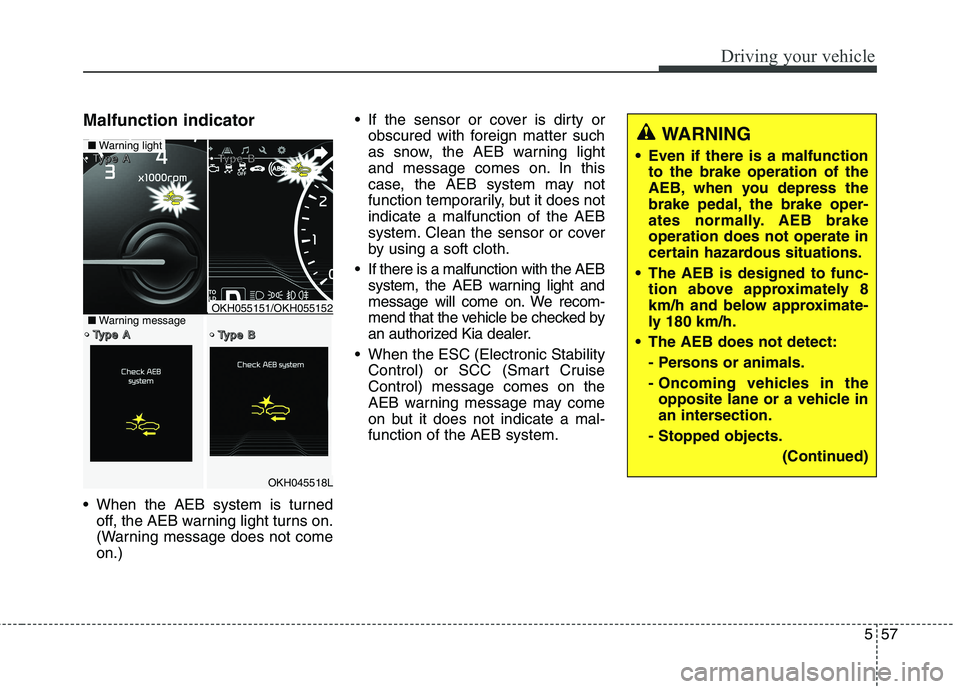
Malfunction indicator
When the AEB system is turnedoff, the AEB warning light turns on.
(Warning message does not comeon.) If the sensor or cover is dirty or
obscured with foreign matter such
as snow, the AEB warning light
and message comes on. In this
case, the AEB system may not
function temporarily, but it does notindicate a malfunction of the AEB
system. Clean the sensor or cover
by using a soft cloth.
If there is a malfunction with the AEB system, the AEB warning light and
message will come on. We recom-
mend that the vehicle be checked by
an authorized Kia dealer.
When the ESC (Electronic Stability Control) or SCC (Smart CruiseControl) message comes on the
AEB warning message may come
on but it does not indicate a mal-function of the AEB system.
OKH045518L
■Warning light TTTTyyyyppppeeee AAAA TTTTyyyyppppeeee BBBB
TTTTyyyyppppeeee AAAA TTTTyyyyppppeeee BBBB■Warning messageOKH055151/OKH055152
WARNING
Even if there is a malfunction to the brake operation of the
AEB, when you depress the
brake pedal, the brake oper-
ates normally. AEB brakeoperation does not operate in
certain hazardous situations.
The AEB is designed to func- tion above approximately 8
km/h and below approximate-
ly 180 km/h.
The AEB does not detect:
- Persons or animals.
- Oncoming vehicles in theopposite lane or a vehicle in
an intersection.
- Stopped objects.
(Continued)
Page 331 of 513
Driving your vehicle
70
5
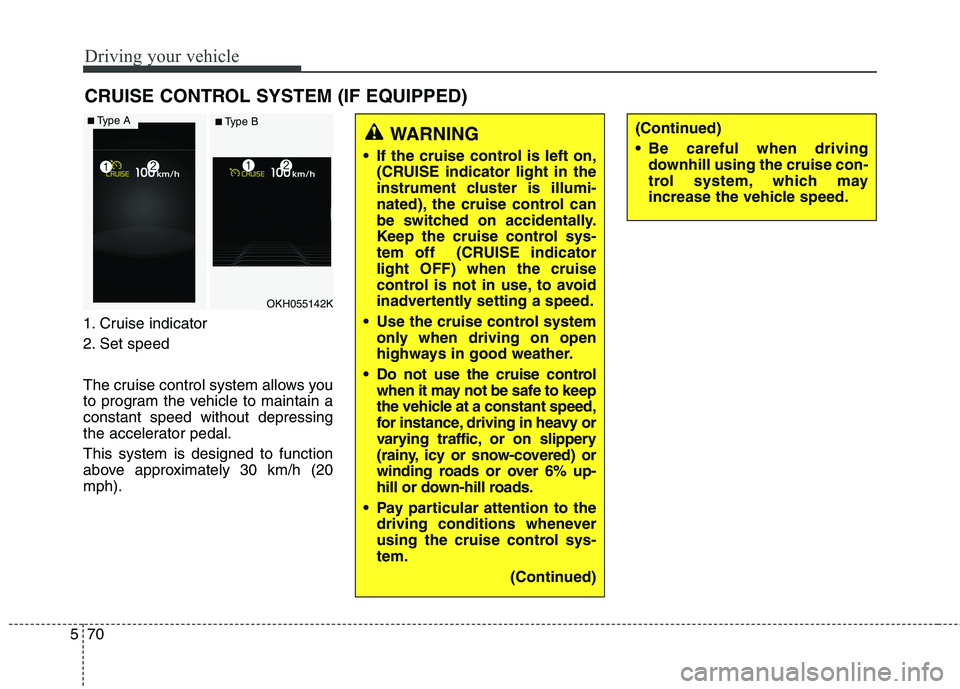
1. Cruise indicator
2. Set speed
The cruise control system allows you
to program the vehicle to maintain aconstant speed without depressing
the accelerator pedal. This system is designed to function
above approximately 30 km/h (20mph). CRUISE CONTROL SYSTEM (IF EQUIPPED)
WARNING
If the cruise control is left on, (CRUISE indicator light in the
instrument cluster is illumi-
nated), the cruise control can
be switched on accidentally.
Keep the cruise control sys-
tem off (CRUISE indicatorlight OFF) when the cruise
control is not in use, to avoid
inadvertently setting a speed.
Use the cruise control system only when driving on open
highways in good weather.
Do not use the cruise control when it may not be safe to keep
the vehicle at a constant speed,
for instance, driving in heavy or
varying traffic, or on slippery
(rainy, icy or snow-covered) or
winding roads or over 6% up-
hill or down-hill roads.
Pay particular attention to the driving conditions whenever
using the cruise control sys-tem.
(Continued)(Continued)
Be careful when drivingdownhill using the cruise con-
trol system, which may
increase the vehicle speed.
OKH055142K
■Type A■ Type B
Page 336 of 513
575
Driving your vehicle
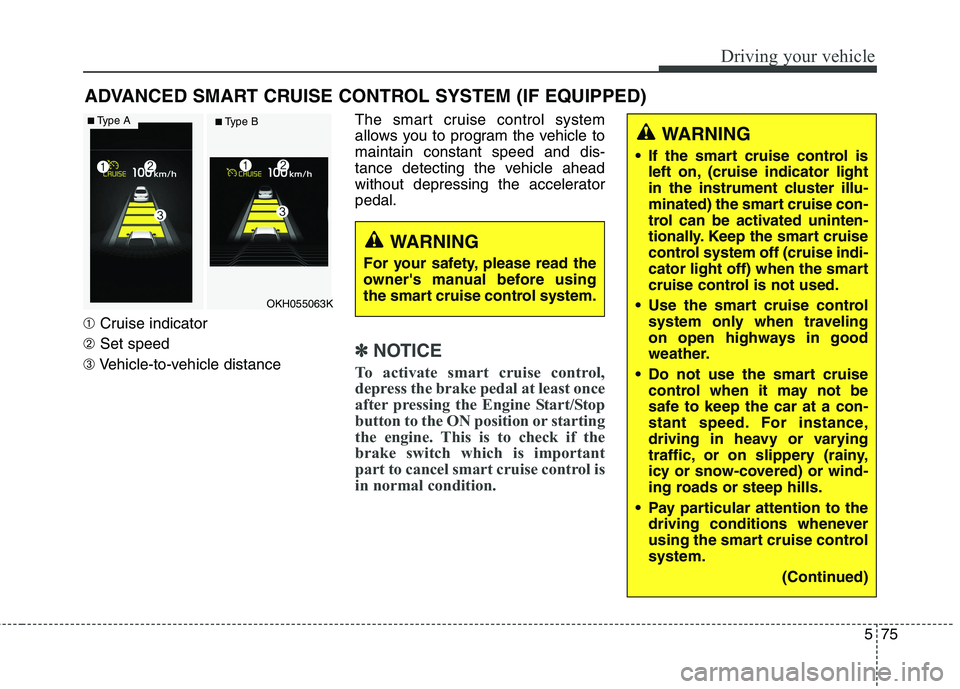
➀Cruise indicator
➁ Set speed
➂ Vehicle-to-vehicle distance The smart cruise control system
allows you to program the vehicle tomaintain constant speed and dis-
tance detecting the vehicle ahead
without depressing the acceleratorpedal.
✽✽
NOTICE
To activate smart cruise control,
depress the brake pedal at least once
after pressing the Engine Start/Stop
button to the ON position or starting
the engine. This is to check if the
brake switch which is important
part to cancel smart cruise control is
in normal condition.
ADVANCED SMART CRUISE CONTROL SYSTEM (IF EQUIPPED)
WARNING
If the smart cruise control is left on, (cruise indicator light
in the instrument cluster illu-
minated) the smart cruise con-
trol can be activated uninten-
tionally. Keep the smart cruise
control system off (cruise indi-
cator light off) when the smart
cruise control is not used.
Use the smart cruise control system only when traveling
on open highways in good
weather.
Do not use the smart cruise control when it may not be
safe to keep the car at a con-
stant speed. For instance,
driving in heavy or varying
traffic, or on slippery (rainy,
icy or snow-covered) or wind-
ing roads or steep hills.
Pay particular attention to the driving conditions whenever
using the smart cruise controlsystem.
(Continued)
WARNING
For your safety, please read the
owner's manual before using
the smart cruise control system.
OKH055063K
■ Type A■ Type B
Page 344 of 513
583
Driving your vehicle
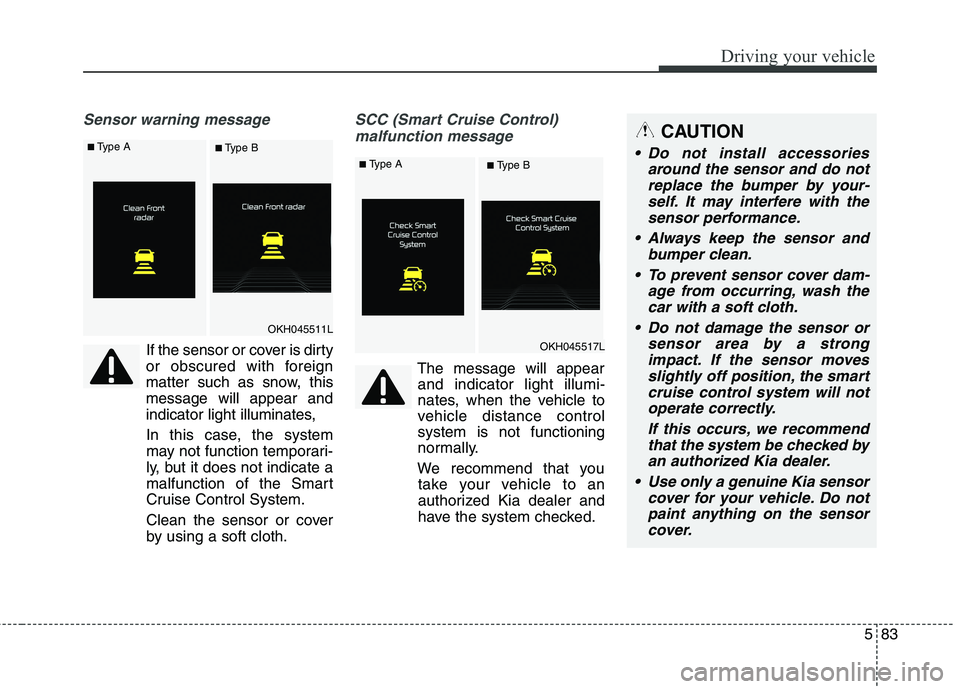
Sensor warning message
If the sensor or cover is dirty
or obscured with foreign
matter such as snow, thismessage will appear and
indicator light illuminates,
In this case, the system
may not function temporari-
ly, but it does not indicate a
malfunction of the Smart
Cruise Control System.
Clean the sensor or cover
by using a soft cloth.
SCC (Smart Cruise Control) malfunction message
The message will appearand indicator light illumi-
nates, when the vehicle to
vehicle distance controlsystem is not functioning
normally.
We recommend that you take your vehicle to an
authorized Kia dealer and
have the system checked.
CAUTION
Do not install accessories
around the sensor and do notreplace the bumper by your- self. It may interfere with thesensor performance.
Always keep the sensor and bumper clean.
To prevent sensor cover dam- age from occurring, wash thecar with a soft cloth.
Do not damage the sensor or sensor area by a strongimpact. If the sensor movesslightly off position, the smart cruise control system will notoperate correctly.
If this occurs, we recommendthat the system be checked byan authorized Kia dealer.
Use only a genuine Kia sensor cover for your vehicle. Do notpaint anything on the sensorcover.
OKH045511L
OKH045517L
■ Type A■ Type B
■Type A■ Type B
Page 345 of 513
Driving your vehicle
84
5
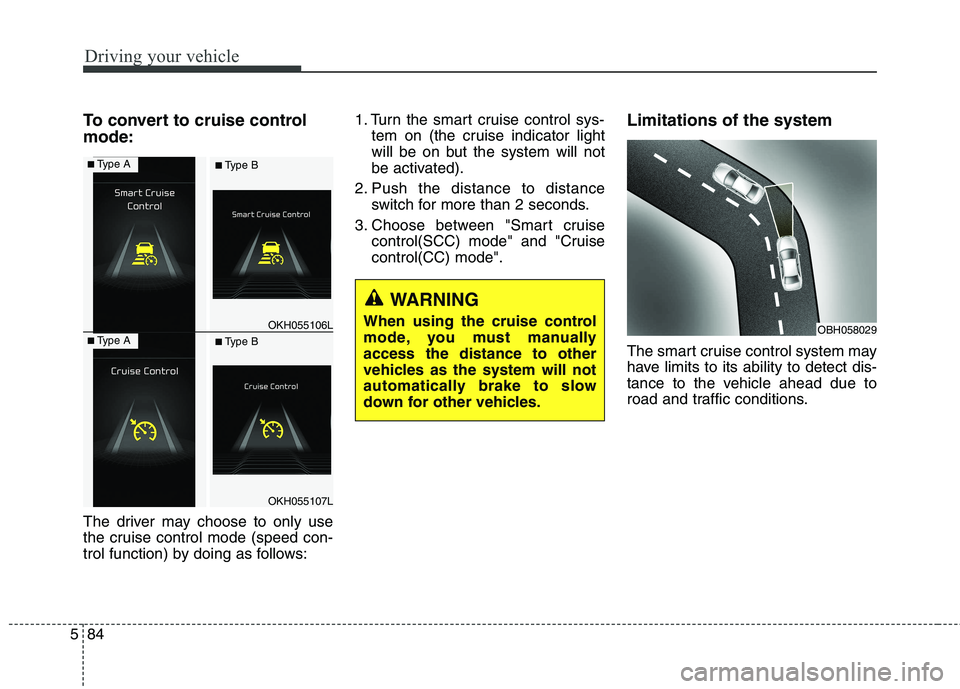
To convert to cruise control mode:
The driver may choose to only use
the cruise control mode (speed con-
trol function) by doing as follows: 1. Turn the smart cruise control sys-
tem on (the cruise indicator light
will be on but the system will not
be activated).
2. Push the distance to distance switch for more than 2 seconds.
3. Choose between "Smart cruise control(SCC) mode" and "Cruisecontrol(CC) mode". Limitations of the system
The smart cruise control system may
have limits to its ability to detect dis-
tance to the vehicle ahead due to
road and traffic conditions.
WARNING
When using the cruise control
mode, you must manuallyaccess the distance to other
vehicles as the system will not
automatically brake to slow
down for other vehicles.
OBH058029OKH055106L
OKH055107L
■ Type A■ Type B
■Type A■ Type B
Page 352 of 513
591
Driving your vehicle
BSD (Blind Spot Detection) /
LCA (Lane Change Assist)
Operating conditions
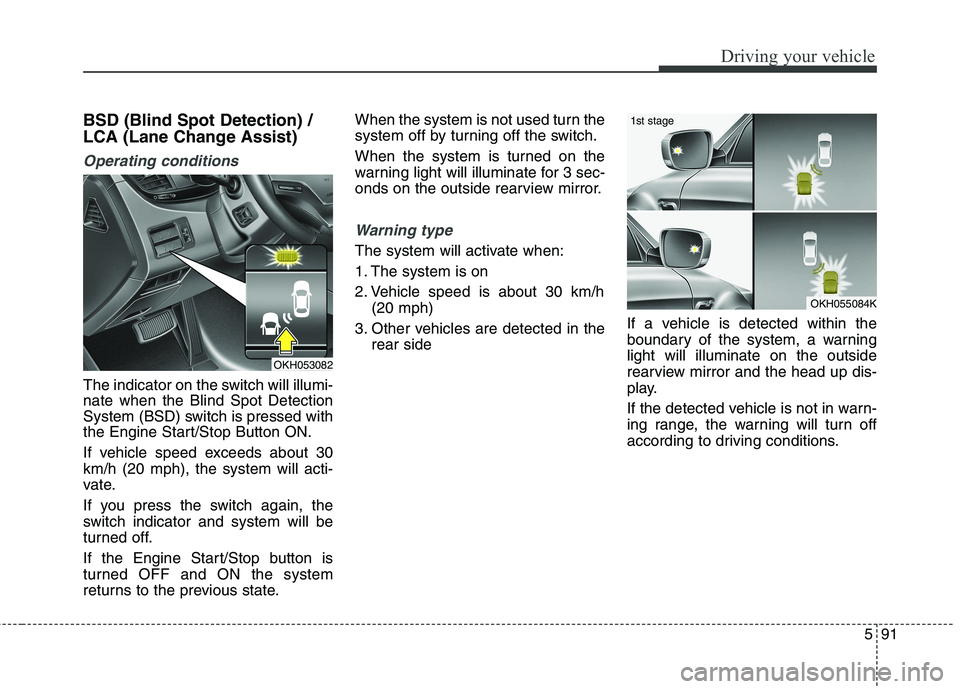
The indicator on the switch will illumi- nate when the Blind Spot Detection
System (BSD) switch is pressed with
the Engine Start/Stop Button ON.
If vehicle speed exceeds about 30 km/h (20 mph), the system will acti-
vate.
If you press the switch again, the
switch indicator and system will be
turned off.
If the Engine Start/Stop button is
turned OFF and ON the system
returns to the previous state.When the system is not used turn the
system off by turning off the switch.
When the system is turned on the
warning light will illuminate for 3 sec-
onds on the outside rearview mirror.
Warning type
The system will activate when:
1. The system is on
2. Vehicle speed is about 30 km/h
(20 mph)
3. Other vehicles are detected in the rear side If a vehicle is detected within the
boundary of the system, a warninglight will illuminate on the outside
rearview mirror and the head up dis-
play.
If the detected vehicle is not in warn-
ing range, the warning will turn off
according to driving conditions.
OKH053082
OKH055084K
1st stage
Page 353 of 513
Driving your vehicle
92
5
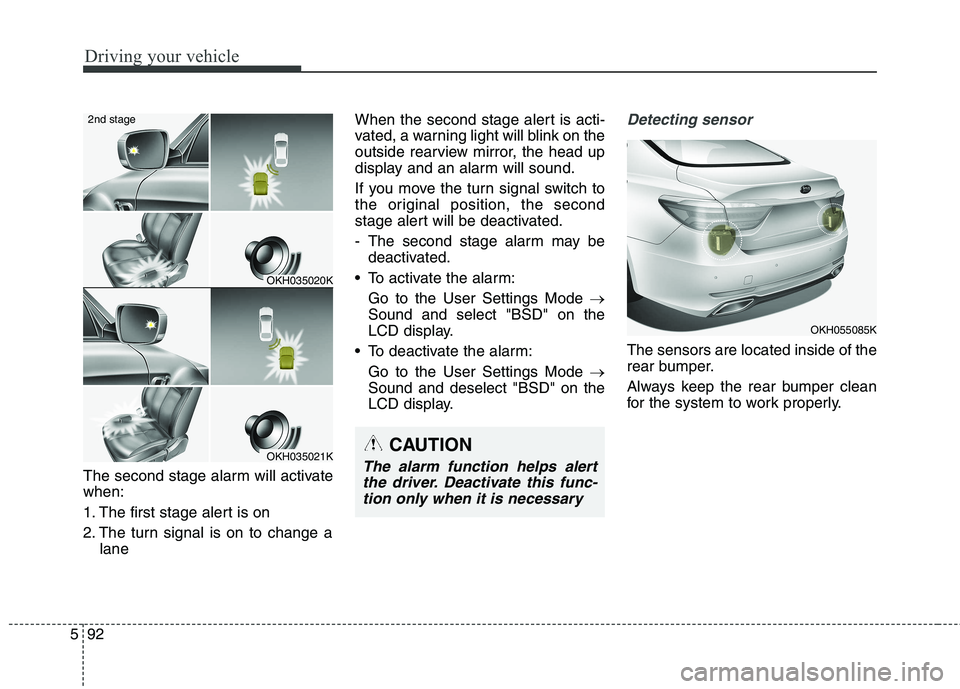
The second stage alarm will activate when:
1. The first stage alert is on
2. The turn signal is on to change a
lane When the second stage alert is acti-
vated, a warning light will blink on the
outside rearview mirror, the head up
display and an alarm will sound.
If you move the turn signal switch to
the original position, the second
stage alert will be deactivated.
- The second stage alarm may be
deactivated.
To activate the alarm: Go to the User Settings Mode
Sound and select "BSD" on the
LCD display.
To deactivate the alarm: Go to the User Settings Mode
Sound and deselect "BSD" on the
LCD display.
Detecting sensor
The sensors are located inside of the
rear bumper.
Always keep the rear bumper clean
for the system to work properly.
OKH035020K
OKH035021K
2nd stage
CAUTION
The alarm function helps alert
the driver. Deactivate this func-tion only when it is necessary
OKH055085K
Page 354 of 513
593
Driving your vehicle
Warning message
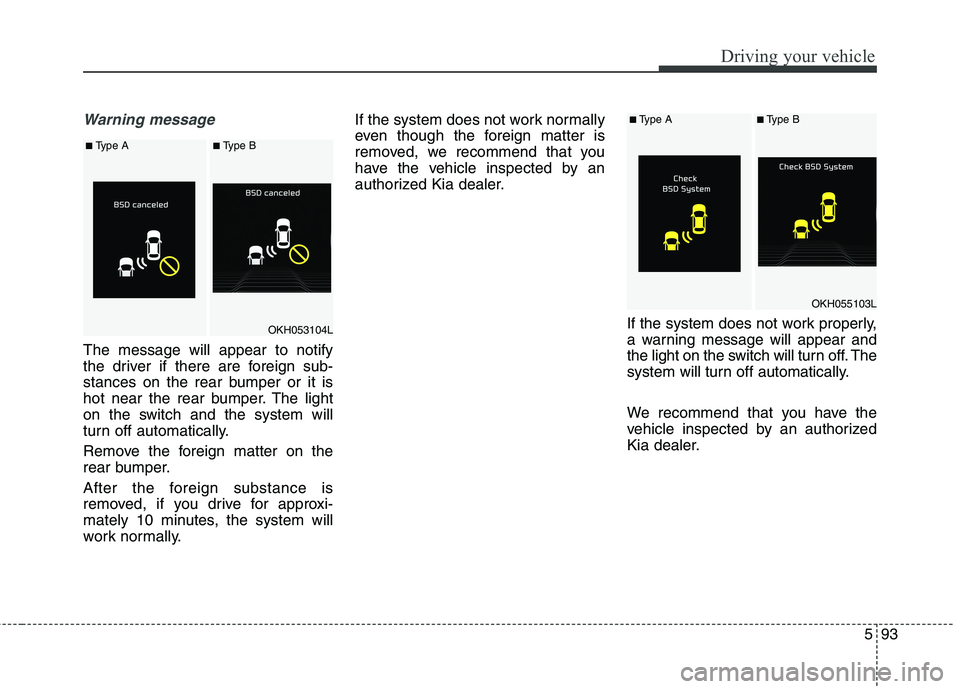
The message will appear to notify
the driver if there are foreign sub-
stances on the rear bumper or it is
hot near the rear bumper. The light
on the switch and the system will
turn off automatically.
Remove the foreign matter on the
rear bumper.
After the foreign substance is
removed, if you drive for approxi-
mately 10 minutes, the system will
work normally.If the system does not work normally
even though the foreign matter is
removed, we recommend that you
have the vehicle inspected by an
authorized Kia dealer.
If the system does not work properly,
a warning message will appear and
the light on the switch will turn off. The
system will turn off automatically.
We recommend that you have the
vehicle inspected by an authorized
Kia dealer.
OKH053104L
OKH055103L
■Type A■Type B
■Type A■Type B
Page 356 of 513
595
Driving your vehicle
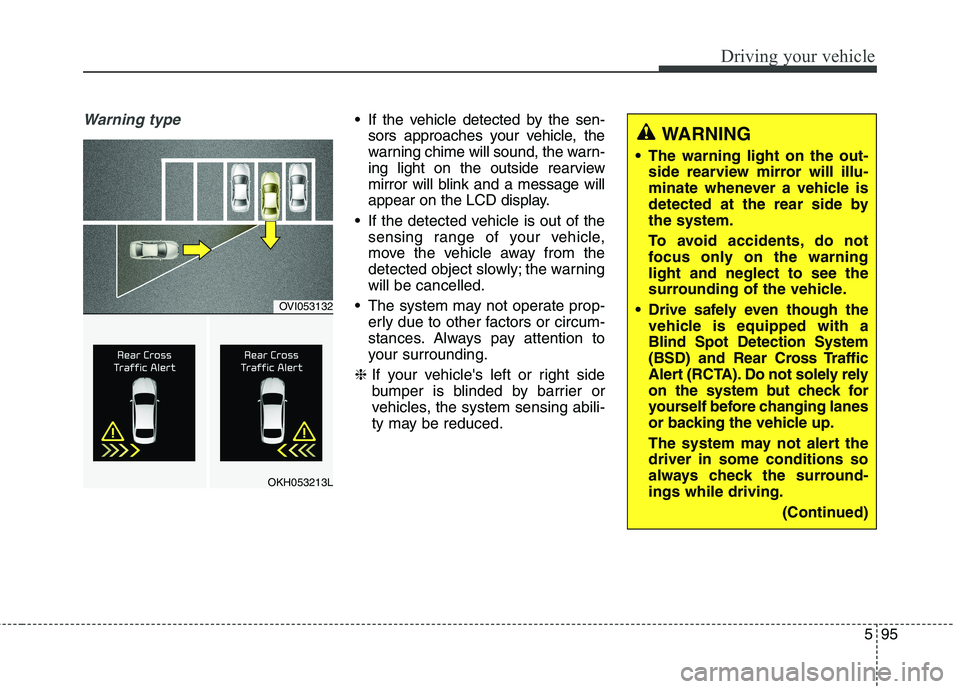
Warning type If the vehicle detected by the sen-sors approaches your vehicle, the
warning chime will sound, the warn-
ing light on the outside rearview
mirror will blink and a message will
appear on the LCD display.
If the detected vehicle is out of the sensing range of your vehicle,
move the vehicle away from the
detected object slowly; the warningwill be cancelled.
The system may not operate prop- erly due to other factors or circum-
stances. Always pay attention to
your surrounding.
❈ If your vehicle's left or right side
bumper is blinded by barrier or
vehicles, the system sensing abili-
ty may be reduced.
WARNING
The warning light on the out- side rearview mirror will illu-
minate whenever a vehicle is
detected at the rear side bythe system.
To avoid accidents, do not
focus only on the warninglight and neglect to see the
surrounding of the vehicle.
Drive safely even though the vehicle is equipped with aBlind Spot Detection System
(BSD) and Rear Cross Traffic
Alert (RCTA). Do not solely rely
on the system but check for
yourself before changing lanes
or backing the vehicle up.
The system may not alert the driver in some conditions so
always check the surround-ings while driving.
(Continued)
OVI053132
OKH053213L
Page 360 of 513
599
Driving your vehicle
Remember, your vehicle does notrequire extended warm-up. After
the engine has started, allow the
engine to run for 10 to 20 seconds
prior to placing the vehicle in gear.
In very cold weather, however, give
your engine a slightly longer warm-
up period.
Do not "lug" or "over-rev" the engine. Lugging is driving too
slowly in too high a gear resulting
engine bucking. If this happens,
shift to a lower gear. Over-revving
is racing the engine beyond its safe
limit. This can be avoided by shift-
ing at the recommended speeds.
Use your air conditioning sparingly. The air conditioning system is
operated by engine power so your
fuel economy is reduced when youuse it.
Open windows at high speeds can reduce fuel economy.
Fuel economy is less in crosswinds and headwinds. To help offset
some of this loss, slow down when
driving in these conditions. Keeping a vehicle in good operating
condition is important both for econ-
omy and safety. Therefore, we rec-
ommend that the system be serviced
by an authorized Kia dealer.
WARNING
- Engine off
during motion
Never turn the engine off to
coast down hills or anytime the
vehicle is in motion. The power
steering and power brakes will
not function properly without
the engine running. Instead,
keep the engine on and down-
shift to an appropriate gear for
engine braking effect. In addi-
tion, turning off the engine
while driving could engage the
steering wheel lock (ifequipped) resulting in loss of
vehicle steering which could
cause serious injury or death.