warning KIA RIO 2020 Owners Manual
[x] Cancel search | Manufacturer: KIA, Model Year: 2020, Model line: RIO, Model: KIA RIO 2020Pages: 516, PDF Size: 10.49 MB
Page 312 of 516
645
Driving your vehicle
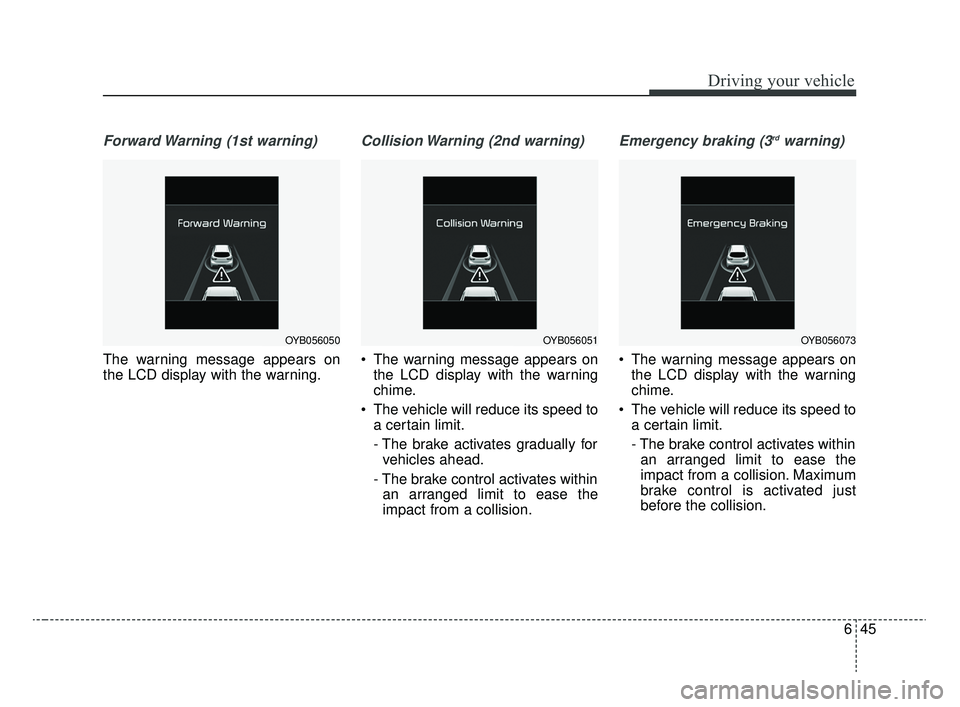
Forward Warning (1st warning)
The warning message appears on
the LCD display with the warning.
Collision Warning (2nd warning)
The warning message appears onthe LCD display with the warning
chime.
The vehicle will reduce its speed to a certain limit.
- The brake activates gradually forvehicles ahead.
- The brake control activates within an arranged limit to ease the
impact from a collision.
Emergency braking (3rdwarning)
The warning message appears on the LCD display with the warning
chime.
The vehicle will reduce its speed to a certain limit.
- The brake control activates withinan arranged limit to ease the
impact from a collision. Maximum
brake control is activated just
before the collision.
OYB056051OYB056073OYB056050
SC CAN (ENG) 6.QXP 6/13/2019 5:08 PM Page 45
Page 313 of 516

Driving your vehicle
46
6
Brake operation
In an emergency situation, the
braking system enters in ready sta-
tus for prompt reaction upon the
driver depressing the brake pedal.
FCA system provides additional braking power for optimum braking
performance when the driver
depresses the brake pedal.
The braking control is automatical- ly deactivated when the driver
sharply depresses the accelerator
pedal, or when the driver abruptly
turns the steering wheel.
The braking control is automatical- ly canceled when risk factors dis-
appear.
FCA system front radar sensor
In order for FCA system to operate
properly, always make sure the sen-
sor or sensor cover is clean and free
of dirt, snow, and debris. Dirt, snow,
or foreign substances on the lens
may adversely affect the sensing
performance of the sensor.
WARNING
FCA system logic operates
within certain parameters, such
as the distance from the vehicle
ahead, the speed of the vehicle
ahead, and the driver's vehicle
speed. Certain conditions such
as inclement weather, road con-
ditions, and systems limitations
may affect the operation of the
FCA system.
WARNING
FCA system braking control
cannot completely stop the
vehicle nor avoid all collisions.
The driver should hold the
responsibility to drive safely
and control the vehicle.
WARNING
Never deliberately drive danger-
ously to activate the system.
CAUTION
The driver should always exer-cise caution when operatingthe vehicle, even though there isno warning message or warningalarm.
OYB056063
SC CAN (ENG) 6.QXP 6/7/2019 9:50 AM Page 46
Page 314 of 516

647
Driving your vehicle
Warning message and warninglight
When the sensor cover is blocked
with dirt, snow, or debris, FCA sys-
tem operation may stop temporarily.
If this occurs, a warning message will
appear on the LCD display. Remove
any dirt, snow, or debris and clean
the radar sensor cover before oper-
ating FCA system. The system will
operate normally when such foreign
substance is removed FCA system
may not properly operate in an area
(e.g. open terrain), where any sub-
stances are not detected after turn-
ing ON the engine.
✽ ✽ NOTICE
• Do not apply foreign objects such
as a bumper sticker or a bumper
guard near the radar sensor.
Doing so may adversely affect the
sensing performance of the radar.
• Always keep the radar sensor and cover clean and free of dirt and
debris.
• Use only a soft cloth to wash the vehicle. Do not spray pressurized
water directly on the sensor or
sensor cover.
• Be careful not to apply unneces- sary force on the frontal sensor
area. When the sensor moves out
of the correct position due to
external force, the system may not
operate correctly even without the
warning light or message. In this
case, have the vehicle inspected by
an authorized Kia dealer. (Continued)(Continued)
• If the front bumper becomes dam-
aged in the area around the radar
sensor, FCA system may not oper-
ate properly. We recommend you
to have the vehicle inspected by
authorized Kia dealer.
• Use only genuine parts to repair or replace a damaged sensor or sen-
sor cover. Do not apply paint to
the sensor cover.
• Playing the vehicle audio system at high volume may make it diffi-
cult to hear FCA system warning
sounds.
OYB057090L
SC CAN (ENG) 6.QXP 6/7/2019 9:50 AM Page 47
Page 315 of 516
Driving your vehicle
48
6
System malfunction
When FCA is not working properly,
FCA warning light ( ) will illumi-
nate and the warning message
(“Check FCA system”) will appear
for a few seconds. After the mes-
sage disappears, the master warn-
ing light ( ) will illuminate. In this
case, have the vehicle inspected by
an authorized Kia dealer.
FCA warning message may appear along with the illumination
of the ESC warning light.WARNING
FCA system is only a supple-mental system for the driver's
convenience. The driver
should hold the responsibility
to control the vehicle opera-
tion. Do not solely depend on
FCA system. Rather, maintain
a safe braking distance, and, if
necessary, depress the brake
pedal to reduce the driving
speed.
In certain instances and under certain driving condi-
tions, FCA system may acti-
vate prematurely. This initial
warning message appears on
the LCD display with a warn-
ing chime. Also, in certain
instances the front radar sen-
sor may not detect the vehicle
ahead. FCA system may not
activate and the warning mes-
sage will not be displayed.
(Continued)
(Continued)
If there is a malfunction withFCA system, Forward
Collision-Avoidance Assist
(FCA) system is not applied
even though the braking sys-
tem is operating normally.
If the vehicle in front stops suddenly, you may have less
control of the brake system.
Therefore, always keep a safe
distance between your vehicle
and the vehicle in front of you.
FCA system may activate dur- ing braking and the vehicle
may stop suddenly shifting
loose objects toward the pas-
sengers. Always keep loose
objects secured.
FCA system may not activate if the driver applies the brake
pedal to avoid a collision.
(Continued)
SC CAN (ENG) 6.QXP 6/7/2019 9:50 AM Page 48
Page 316 of 516

649
Driving your vehicle
Limitation of the system
FCA system is designed to monitor
the vehicle ahead through radar sig-
nals to warn the driver that a collision
is imminent, and if necessary, apply
emergency braking. In certain situa-
tions, the radar sensor may not be
able to detect the vehicle ahead. In
these cases, FCA system may not
operate. The driver must pay careful
attention in the following situations
where FCA operation may be limited:(Continued)
The brake control may beinsufficient, possibly causing
a collision, if a vehicle in front
abruptly stops. Always pay
extreme caution.
Occupants may get injured, if the vehicle abruptly stops by
activated FCA system. Pay
extreme caution.WARNING
FCA system operates only todetect vehicles in front of the
vehicle.
FCA system does not operate when the vehicle is in reverse.
FCA system is not designed to detect other objects on the
road.
FCA system does not detect cross traffic vehicles that are
approaching.
FCA system cannot detect the driver approaching the side
view of a parked vehicle (for
example on a dead end
street.)
In these cases, you must main-
tain a safe braking distance,
and if necessary, depress the
brake pedal to reduce the driv-
ing speed in order to maintain a
safe distance.
SC CAN (ENG) 6.QXP 6/7/2019 9:50 AM Page 49
Page 317 of 516

Driving your vehicle
50
6
Detecting vehicles
The sensor may be limited when:
• The radar sensor is blocked with a
foreign object or debris
Inclement weather such as heavy rain or snow obscures the field of
view of the radar sensor
There is interference by electro- magnetic waves
There is severe irregular reflection from the radar sensor
The radar sensor recognition is limited
The vehicle in front is too small to be detected (for example a motor-
cycle, etc.)
The preceding vehicle is a special purpose vehicle or a special shape
of cargo loaded truck, or a trailer.
The vehicle in front is driving errat- ically
The vehicle is on unpaved or uneven rough surfaces, or roads
with sudden gradient changes
The vehicle is moving under ground level or inside a building The vehicle is driven near areas
containing metal substances such
as a construction zone, railroad,
etc.
The sensor recognition is suddenly changed after passing a speed
bump.
The vehicle is severely vibrating or shaking.
The preceding vehicle is turning at a roundabout.
The radar or sensor cover has been damaged.
The vehicle is passing a tunnel, a tollgate, or a partially paved road.
The radar sensor’s recognition is over its limitation. - Driving on a curve
FCA system performance may be
limited while driving on a curve. FCA
system may not recognize the vehi-
cle in front even if in the same lane.
It may produce the warning message
and the warning alarm prematurely,
or it may not produce the warning
message or the warning alarm at all.
When driving on a curve, exercise
caution, maintain a safe braking dis-
tance, and if necessary, depress the
brake pedal to reduce your driving
speed in order to maintain a safe dis-
tance.
OUM059442
SC CAN (ENG) 6.QXP 8/2/2019 3:03 PM Page 50
Page 318 of 516
651
Driving your vehicle
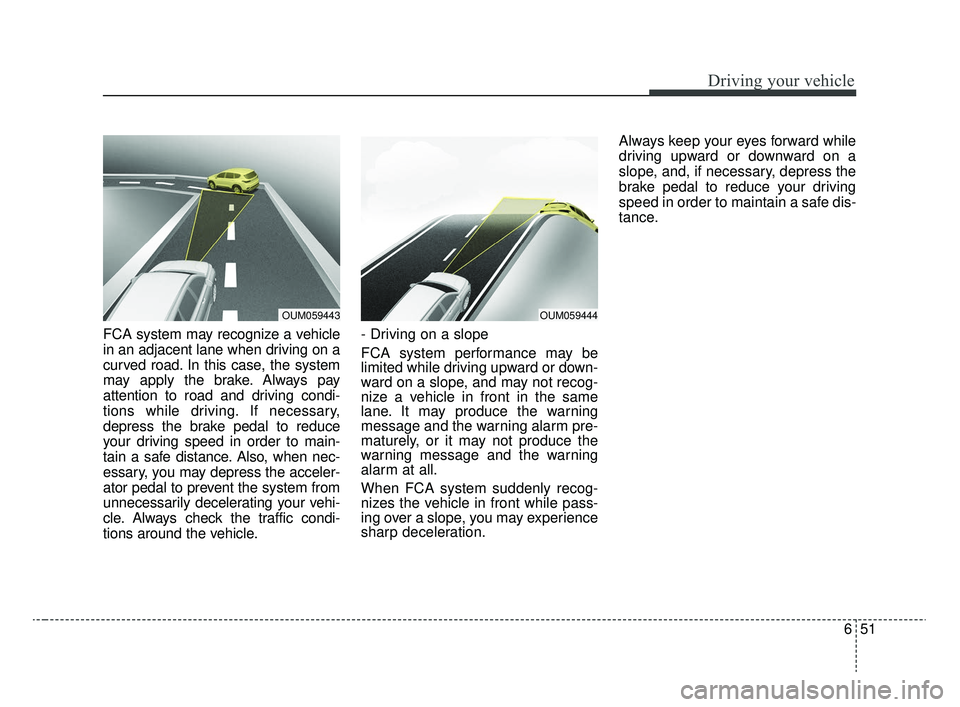
FCA system may recognize a vehicle
in an adjacent lane when driving on a
curved road. In this case, the system
may apply the brake. Always pay
attention to road and driving condi-
tions while driving. If necessary,
depress the brake pedal to reduce
your driving speed in order to main-
tain a safe distance. Also, when nec-
essary, you may depress the acceler-
ator pedal to prevent the system from
unnecessarily decelerating your vehi-
cle. Always check the traffic condi-
tions around the vehicle.- Driving on a slope
FCA system performance may be
limited while driving upward or down-
ward on a slope, and may not recog-
nize a vehicle in front in the same
lane. It may produce the warning
message and the warning alarm pre-
maturely, or it may not produce the
warning message and the warning
alarm at all.
When FCA system suddenly recog-
nizes the vehicle in front while pass-
ing over a slope, you may experience
sharp deceleration.Always keep your eyes forward while
driving upward or downward on a
slope, and, if necessary, depress the
brake pedal to reduce your driving
speed in order to maintain a safe dis-
tance.
OUM059444OUM059443
SC CAN (ENG) 6.QXP 8/2/2019 3:03 PM Page 51
Page 320 of 516

653
Driving your vehicle
✽ ✽NOTICE
In some instances, FCA system may
be canceled when subjected to elec-
tromagnetic interference.
WARNING - Testing FCA
system
The FCA system may not oper-
ate in certain situations.
Therefore, never test the opera-
tion of the FCA system using a
person or object, as doing so
may cause severe injury or
even death.
WARNING - FCA system
and Towing
Cancel FCA system in the User
Settings on the LCD display,
before towing another vehicle.
While towing, the brake applica-
tion may adversely affect your
vehicle safety.
WARNING
Use extreme caution when the vehicle in front of you has
cargo that extends rearward
from the cab, or when the
vehicle in front of you has
higher ground clearance.
FCA system is designed to detect and monitor the vehicle
ahead through sensor recog-
nition. It is not designed to
detect bicycles, motorcycles,
or smaller wheeled objects
such as luggage bags, shop-
ping carts, or strollers.
When replacing or reinstalling of front bumper or radar, have
the vehicle inspected for the
system check by an author-
ized Kia dealer.
SC CAN (ENG) 6.QXP 6/7/2019 9:50 AM Page 53
Page 321 of 516
Driving your vehicle
54
6
The cruise control system allows you
to program the vehicle to maintain a
constant speed without depressing
the accelerator pedal.
This system is designed to function
above approximately 30 km/h (20
mph).
If the cruise control system is left on
(CRUISE indicator light in the instru-
ment cluster illuminated), the cruise
control can be switched on acciden-
tally. Keep the cruise control system
off (CRUISE indicator light OFF)
when the cruise control is not in use,
to avoid inadvertently setting a
speed.
Use the cruise control system only
when traveling on open highways in
good weather.
Do not use the cruise control when
driving in heavy or varying traffic, or
on slipper (rainy, icy, or snow-cov-
ered) or winding roads, or on roads
with an over 6% up-hill or down-hill
grade.✽ ✽
NOTICE
• During normal cruise control
operation, when the SET switch is
activated or reactivated after
applying the brakes, the cruise
control will energize after approx-
imately 3 seconds. This delay is
normal.
• To activate cruise control, depress the brake pedal at least once after
turning the ignition switch to the
ON position or starting the engine.
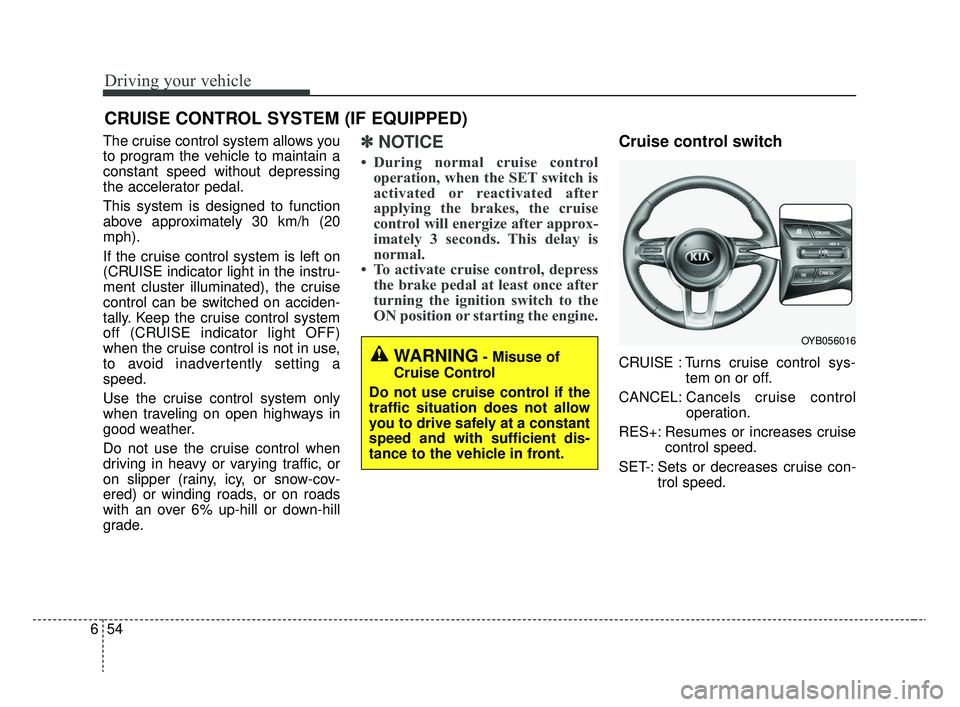
Cruise control switch
CRUISE : Turns cruise control sys-
tem on or off.
CANCEL: Cancels cruise control
operation.
RES+: Resumes or increases cruise control speed.
SET-: Sets or decreases cruise con- trol speed.
CRUISE CONTROL SYSTEM (IF EQUIPPED)
WARNING- Misuse of
Cruise Control
Do not use cruise control if the
traffic situation does not allow
you to drive safely at a constant
speed and with sufficient dis-
tance to the vehicle in front.
OYB056016
SC CAN (ENG) 6.QXP 6/7/2019 9:50 AM Page 54
Page 328 of 516
661
Driving your vehicle
Remember, your vehicle does notrequire extended warm-up. After
the engine has started, allow the
engine to run for 10 to 20 seconds
prior to placing the vehicle in gear.
In very cold weather, however, give
your engine a slightly longer warm-
up period.
Don't “lug” or “over-rev” the engine. Lugging is driving too slowly in a
very high gear resulting in engine
bucking. If this happens, shift to a
lower gear. Over-revving is racing
the engine beyond its safe limit.
This can be avoided by shifting at
the recommended speed. Use your air conditioning sparingly.
The air conditioning system is
operated by engine power so your
fuel economy is reduced when you
use it.
Open windows at high speeds can reduce fuel economy.
Fuel economy is reduced by cross- winds and headwinds. To help off-
set some of this loss, slow down
when driving in these conditions.
Keeping a vehicle in good operating
condition is important both for econ-
omy and safety. Therefore, have an
authorized Kia dealer perform
scheduled inspections and mainte-
nance.
WARNING- Engine off during
motion
Never turn the engine off to
coast down hills or anytime the
vehicle is in motion. The power
steering and power brakes will
not function properly without
the engine running. In addition,
turning off the ignition while
driving could engage the steer-
ing wheel lock resulting in loss
of vehicle steering. Keep the
engine on and downshift to an
appropriate gear for engine
braking effect.
SC CAN (ENG) 6.QXP 6/7/2019 9:51 AM Page 61