eco KIA RIO 2021 Service Manual
[x] Cancel search | Manufacturer: KIA, Model Year: 2021, Model line: RIO, Model: KIA RIO 2021Pages: 534, PDF Size: 13.49 MB
Page 98 of 534

417
Features of your vehicle
Disarmed stage
The system will be disarmed when:
Transmitter
- The door unlock button is pressed.
- The engine is started. (within 3seconds)
- The ignition switch is in the "ON" position for 30 seconds or more.
Smart key
- The door unlock button is pressed.
- The button of the front outside dooris pressed while carrying the smart
key.
- The engine is started. (within 3 seconds)
After the doors are unlocked, the haz-
ard warning lights will blink twice to
indicate that the system is disarmed.
After pressing the unlock button, if any
door (or trunk/liftgate) is not opened
within 30 seconds, the system will be
rearmed.
✽ ✽ NOTICE
• Avoid trying to start the engine
while the alarm is activated. The
vehicle starting motor is disabled
during the theft-alarm stage.
- If the system is not disarmedwith the transmitter, insert the
key into the ignition switch, turn
the ignition switch to the ON
position and wait for 30 seconds.
Then, the system will be dis-
armed.
- If the system is not disarmed with the smart key, press the
ENGINE START/STOP button
with the smart key. The side with
the lock button should contact
the ENGINE START/STOP but-
ton directly.
• If you lose your keys, consult your authorized Kia dealer.
✽ ✽
NOTICE
Malfunctions caused by improper
alterations, adjustments or modifi-
cations to the theft-alarm system are
not covered by your vehicle manu-
facturer warranty.
CAUTION - Adjusting
alarm system
Do not change, alter or adjust
the theft-alarm system becauseit could cause the theft-alarmsystem to malfunction andshould only be serviced by anauthorized Kia dealer.
SC PE USA 4.QXP 10/23/2020 5:40 PM Page 17
Page 99 of 534
Features of your vehicle
18
4
DOOR LOCKS
Operating door locks from
outside the vehicle
Mechanical key
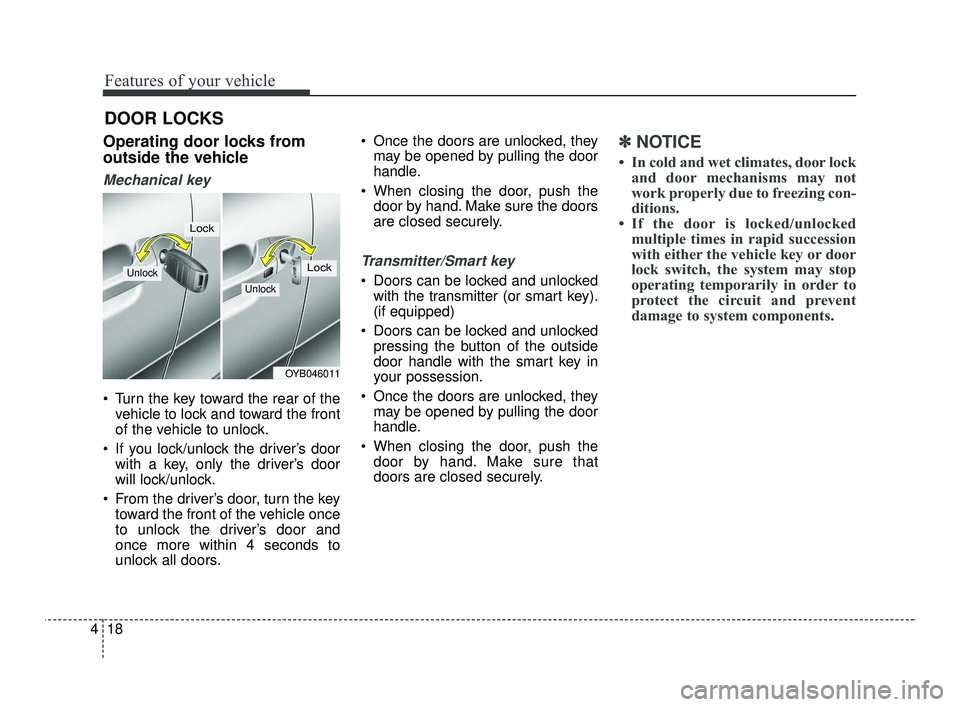
Turn the key toward the rear of the
vehicle to lock and toward the front
of the vehicle to unlock.
If you lock/unlock the driver’s door with a key, only the driver’s door
will lock/unlock.
From the driver’s door, turn the key toward the front of the vehicle once
to unlock the driver’s door and
once more within 4 seconds to
unlock all doors. Once the doors are unlocked, they
may be opened by pulling the door
handle.
When closing the door, push the door by hand. Make sure the doors
are closed securely.
Transmitter/Smart key
Doors can be locked and unlockedwith the transmitter (or smart key).
(if equipped)
Doors can be locked and unlocked pressing the button of the outside
door handle with the smart key in
your possession.
Once the doors are unlocked, they may be opened by pulling the door
handle.
When closing the door, push the door by hand. Make sure that
doors are closed securely.
✽ ✽ NOTICE
• In cold and wet climates, door lock
and door mechanisms may not
work properly due to freezing con-
ditions.
• If the door is locked/unlocked multiple times in rapid succession
with either the vehicle key or door
lock switch, the system may stop
operating temporarily in order to
protect the circuit and prevent
damage to system components.
OYB046011
Unlock
Lock
Unlock
Lock
SC PE USA 4.QXP 10/23/2020 5:40 PM Page 18
Page 102 of 534
421
Features of your vehicle
Impact sensing door unlock
system (if equipped)
All doors will automatically unlock
when an impact causes the air bags
to deploy.
Auto door lock/unlock feature
(if equipped)
All doors will automatically lockwhen the Intelligent Variable
Transmission shift lever is shifted
out of P(Park) (with engine ON, it is
activated).
All doors will automatically unlock when the Intelligent Variable
Transmission shift lever is shifted
into P(Park) (with engine ON, it is
activated).
Speed sensing door lock sys-
tem (if equipped)
All doors will be automatically locked
after the vehicle speed exceeds 9
mph. And all doors will be automati-
cally unlocked when you turn the
engine off or when you remove the
ignition key. An authorized Kia dealer can acti-
vate or deactivate some auto door
lock/ unlock features as follows;
Auto door unlock by using the dri-
ver's door lock button.
Auto door lock/unlock by shifting the transmission shift lever out of P
(Park) or into P (Park).
Auto door unlock when the ignition key is removed from the ignition
switch or the ENGINE STAR/STOP
button is set to the OFF position.
If you want to activate or deactivate
some door lock/unlock feature, con-
sult an authorized Kia dealer.
WARNING - Unattended
children/animals
Never leave children or animals
unattended in your vehicle. An
enclosed vehicle can become
extremely hot, causing death or
severe injury to unattended
children or animals who cannot
escape the vehicle.
SC PE USA 4.QXP 10/23/2020 5:40 PM Page 21
Page 107 of 534
Features of your vehicle
26
4
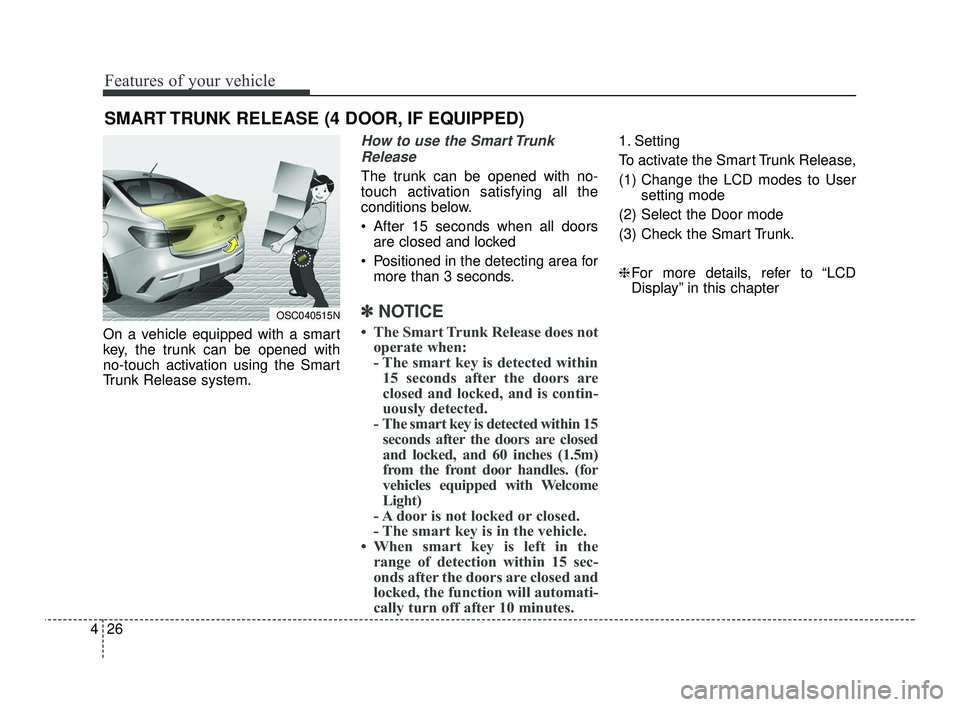
On a vehicle equipped with a smart
key, the trunk can be opened with
no-touch activation using the Smart
Trunk Release system.
How to use the Smart Trunk
Release
The trunk can be opened with no-
touch activation satisfying all the
conditions below.
After 15 seconds when all doors are closed and locked
Positioned in the detecting area for more than 3 seconds.
✽ ✽ NOTICE
• The Smart Trunk Release does not
operate when:
- The smart key is detected within15 seconds after the doors are
closed and locked, and is contin-
uously detected.
- The smart key is detected within 15 seconds after the doors are closed
and locked, and 60 inches (1.5m)
from the front door handles. (for
vehicles equipped with Welcome
Light)
- A door is not locked or closed.
- The smart key is in the vehicle.
• When smart key is left in the range of detection within 15 sec-
onds after the doors are closed and
locked, the function will automati-
cally turn off after 10 minutes.
1. Setting
To activate the Smart Trunk Release,
(1) Change the LCD modes to User
setting mode
(2) Select the Door mode
(3) Check the Smart Trunk.
❈ For more details, refer to “LCD
Display” in this chapter
SMART TRUNK RELEASE (4 DOOR, IF EQUIPPED)
OSC040515N
SC PE USA 4.QXP 10/23/2020 5:40 PM Page 26
Page 108 of 534
427
Features of your vehicle
2. Detect and Alert
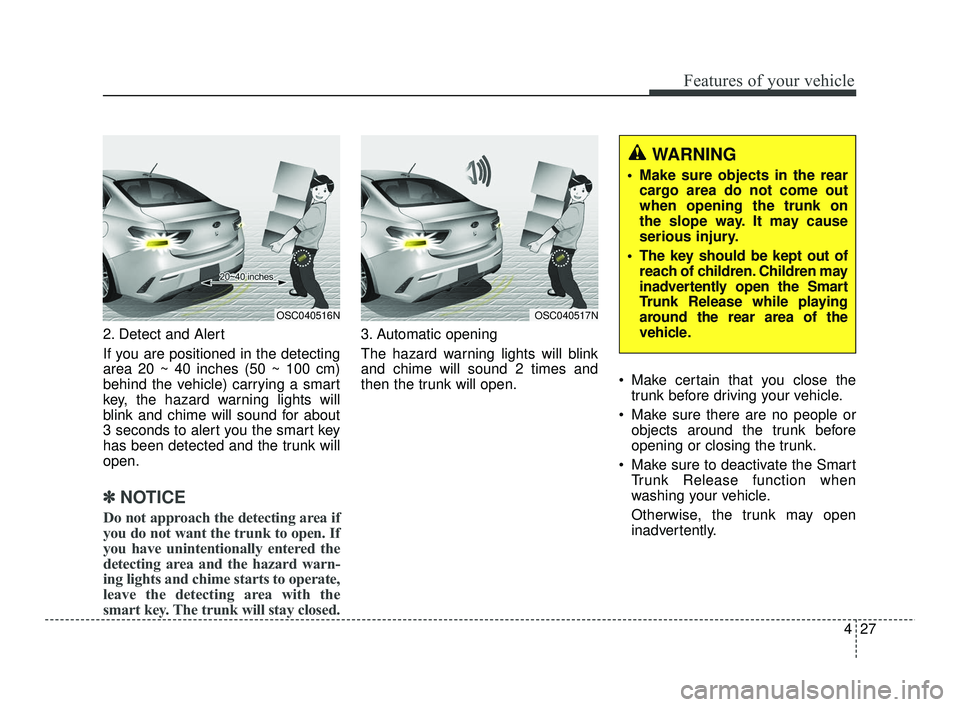
If you are positioned in the detecting
area 20 ~ 40 inches (50 ~ 100 cm)
behind the vehicle) carrying a smart
key, the hazard warning lights will
blink and chime will sound for about
3 seconds to alert you the smart key
has been detected and the trunk will
open.
✽ ✽NOTICE
Do not approach the detecting area if
you do not want the trunk to open. If
you have unintentionally entered the
detecting area and the hazard warn-
ing lights and chime starts to operate,
leave the detecting area with the
smart key. The trunk will stay closed.
3. Automatic opening
The hazard warning lights will blink
and chime will sound 2 times and
then the trunk will open. Make certain that you close the
trunk before driving your vehicle.
Make sure there are no people or objects around the trunk before
opening or closing the trunk.
Make sure to deactivate the Smart Trunk Release function when
washing your vehicle.
Otherwise, the trunk may open
inadvertently.
OSC040516NOSC040517N
WARNING
Make sure objects in the rearcargo area do not come out
when opening the trunk on
the slope way. It may cause
serious injury.
The key should be kept out of reach of children. Children may
inadvertently open the Smart
Trunk Release while playing
around the rear area of the
vehicle.
SC PE USA 4.QXP 10/23/2020 5:40 PM Page 27
Page 109 of 534
Features of your vehicle
28
4
How to deactivate the Smart
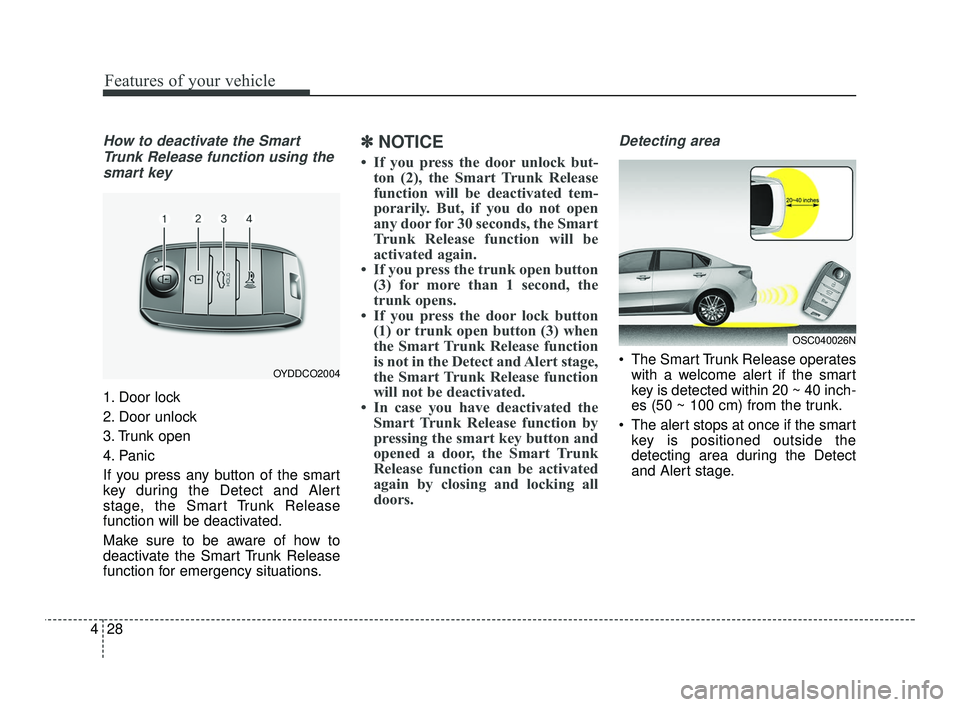
Trunk Release function using thesmart key
1. Door lock
2. Door unlock
3. Trunk open
4. Panic
If you press any button of the smart
key during the Detect and Alert
stage, the Smart Trunk Release
function will be deactivated.
Make sure to be aware of how to
deactivate the Smart Trunk Release
function for emergency situations.
✽ ✽ NOTICE
• If you press the door unlock but-
ton (2), the Smart Trunk Release
function will be deactivated tem-
porarily. But, if you do not open
any door for 30 seconds, the Smart
Trunk Release function will be
activated again.
• If you press the trunk open button (3) for more than 1 second, the
trunk opens.
• If you press the door lock button (1) or trunk open button (3) when
the Smart Trunk Release function
is not in the Detect and Alert stage,
the Smart Trunk Release function
will not be deactivated.
• In case you have deactivated the Smart Trunk Release function by
pressing the smart key button and
opened a door, the Smart Trunk
Release function can be activated
again by closing and locking all
doors.
Detecting area
The Smart Trunk Release operates
with a welcome alert if the smart
key is detected within 20 ~ 40 inch-
es (50 ~ 100 cm) from the trunk.
The alert stops at once if the smart key is positioned outside the
detecting area during the Detect
and Alert stage.OYDDCO2004
OSC040026N
SC PE USA 4.QXP 10/23/2020 5:40 PM Page 28
Page 111 of 534
Features of your vehicle
30
4
Opening the liftgate
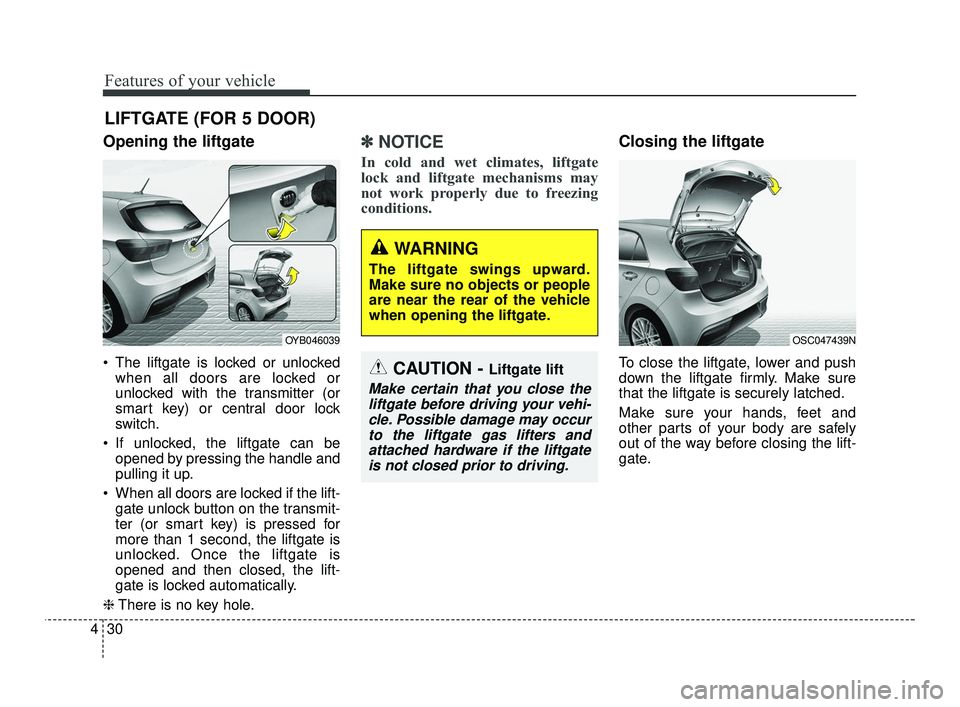
The liftgate is locked or unlocked
when all doors are locked or
unlocked with the transmitter (or
smart key) or central door lock
switch.
If unlocked, the liftgate can be opened by pressing the handle and
pulling it up.
When all doors are locked if the lift- gate unlock button on the transmit-
ter (or smart key) is pressed for
more than 1 second, the liftgate is
unlocked. Once the liftgate is
opened and then closed, the lift-
gate is locked automatically.
❈ There is no key hole.
✽ ✽
NOTICE
In cold and wet climates, liftgate
lock and liftgate mechanisms may
not work properly due to freezing
conditions.
Closing the liftgate
To close the liftgate, lower and push
down the liftgate firmly. Make sure
that the liftgate is securely latched.
Make sure your hands, feet and
other parts of your body are safely
out of the way before closing the lift-
gate.
LIFTGATE (FOR 5 DOOR)
CAUTION - Liftgate lift
Make certain that you close the
liftgate before driving your vehi-cle. Possible damage may occurto the liftgate gas lifters andattached hardware if the liftgateis not closed prior to driving.
OSC047439NOYB046039
WARNING
The liftgate swings upward.
Make sure no objects or people
are near the rear of the vehicle
when opening the liftgate.
SC PE USA 4.QXP 10/23/2020 5:40 PM Page 30
Page 115 of 534

Features of your vehicle
34
4
Power windows (if equipped)
The ignition switch or ENGINE
START/STOP button must be in the
ON position for power windows to
operate. Each door has a power win-
dow switch that controls the door’s
window. The driver has a power win-
dow lock switch which can block the
operation of rear passenger win-
dows.
The power windows can be operated
for approximately 30 seconds after
the ignition key is removed or is set
to the ACC or LOCK/OFF position.
However, if the front doors are
opened, the power windows cannot
be operated even within the 30 sec-
ond period.
If a window cannot be closed
because it is blocked by objects,
remove the objects and close the
window.
✽ ✽
NOTICE
While driving with the rear windows
down, your vehicle may demon-
strate a wind buffeting or pulsation
noise. This noise is a normal occur-
rence and can be reduced or elimi-
nated by taking the following
actions. If the noise occurs with one
or both of the rear windows down,
partially lower both front windows
approximately one inch.
CAUTION
Do not install any accessories
in the area of windows. It mayimpact jam protection.
WARNING- Power
Windows
Do not extend your face or arms
outside of the window opening
while the vehicle is in motion.
Doing so could result in serious
injuries.
SC PE USA 4.QXP 10/23/2020 5:41 PM Page 34
Page 116 of 534
435
Features of your vehicle
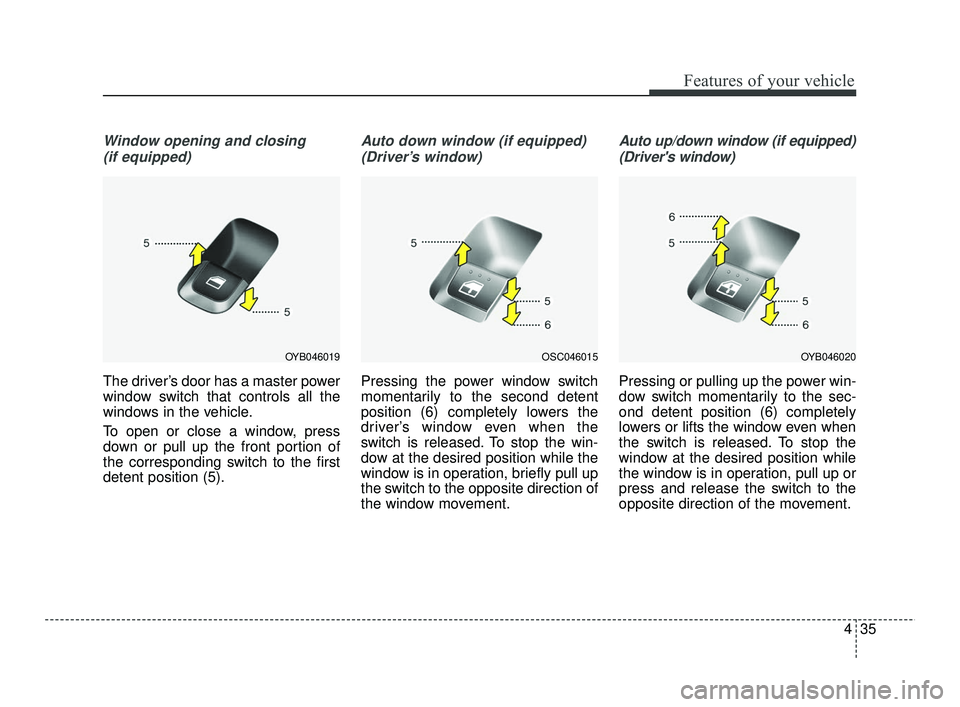
Window opening and closing(if equipped)
The driver’s door has a master power
window switch that controls all the
windows in the vehicle.
To open or close a window, press
down or pull up the front portion of
the corresponding switch to the first
detent position (5).
Auto down window (if equipped) (Driver’s window)
Pressing the power window switch
momentarily to the second detent
position (6) completely lowers the
driver’s window even when the
switch is released. To stop the win-
dow at the desired position while the
window is in operation, briefly pull up
the switch to the opposite direction of
the window movement.
Auto up/down window (if equipped)(Driver's window)
Pressing or pulling up the power win-
dow switch momentarily to the sec-
ond detent position (6) completely
lowers or lifts the window even when
the switch is released. To stop the
window at the desired position while
the window is in operation, pull up or
press and release the switch to the
opposite direction of the movement.
OSC046015OYB046020OYB046019
SC PE USA 4.QXP 10/23/2020 5:41 PM Page 35
Page 117 of 534

Features of your vehicle
36
4
If the power window is not operated
correctly, the automatic power win-
dow system must be reset as follows:
1. Place the ignition switch or
ENGINE START/STOP button to
the ON position.
2. Close the window and continue pulling up on the driver’s power
window switch for at least 1 sec-
ond after the window is complete-
ly closed.
Automatic reversal (if equipped)
If the upward movement of the win-
dow is blocked by an object or part of
the body, the window will detect the
resistance and will stop upward
movement. The window will then
lower approximately 11.8 in. (30 cm)
to allow the object to be cleared.
If the window detects the resistance
while the power window switch is
pulled up continuously, the window
will stop upward movement then
lower approximately 1 in. (2.5 cm). And if the power window switch is
pulled up continuously again within 5
seconds after the window is lowered
by the automatic window reversal
feature, the automatic window rever-
sal will not operate.
The automatic reverse feature for the
driver’s window is only active when
the “auto up” feature is used by fully
pulling up the switch. The automatic
reverse feature will not operate if the
window is raised using the halfway
position on the power window switch.
WARNING
Always check for obstructions
before raising any window to
avoid injuries or vehicle dam-
age. If an object less than 0.16
in. (4 mm) in diameter is caught
between the window glass and
the upper window channel, the
automatic reverse window may
not detect the resistance and
will not stop and reverse direc-
tion.
OUN026013
SC PE USA 4.QXP 10/23/2020 5:41 PM Page 36