eco KIA RIO 2021 Manual Online
[x] Cancel search | Manufacturer: KIA, Model Year: 2021, Model line: RIO, Model: KIA RIO 2021Pages: 534, PDF Size: 13.49 MB
Page 216 of 534
4135
Features of your vehicle
System setting
1. ENGINE START/STOP button isON.
2. Select Floor-Level ( ) air flow direction by pressing Mode
Selection button.
3. With pressing Air Conditioning button, press the Recirculated Air
button more than 4 times within 2
seconds.
4. If the system is set up, the indica- tor on Recirculated Air button will
blinks 6 times.
System cancellation
1. ENGINE START/STOP button isON.
2. Select Floor-Level ( ) air flow direction by pressing Mode
Selection button.
3. With pressing Air Conditioning button, press the Recirculated Air
button more than 4 times within 2
seconds.
4. If the system is cancelled, the indi- cator on Recirculated Air button
will blinks 3 times.
SC PE USA 4.QXP 10/23/2020 5:46 PM Page 135
Page 219 of 534
Features of your vehicle
138
4
Defogging Logic
To reduce the probability of fogging
up inside of the windshield, the air
intake or air conditioning are con-
trolled automatically according to
certain conditions such as or
position. Logic can be disabled and
enabled by doing following :
Manual climate control system
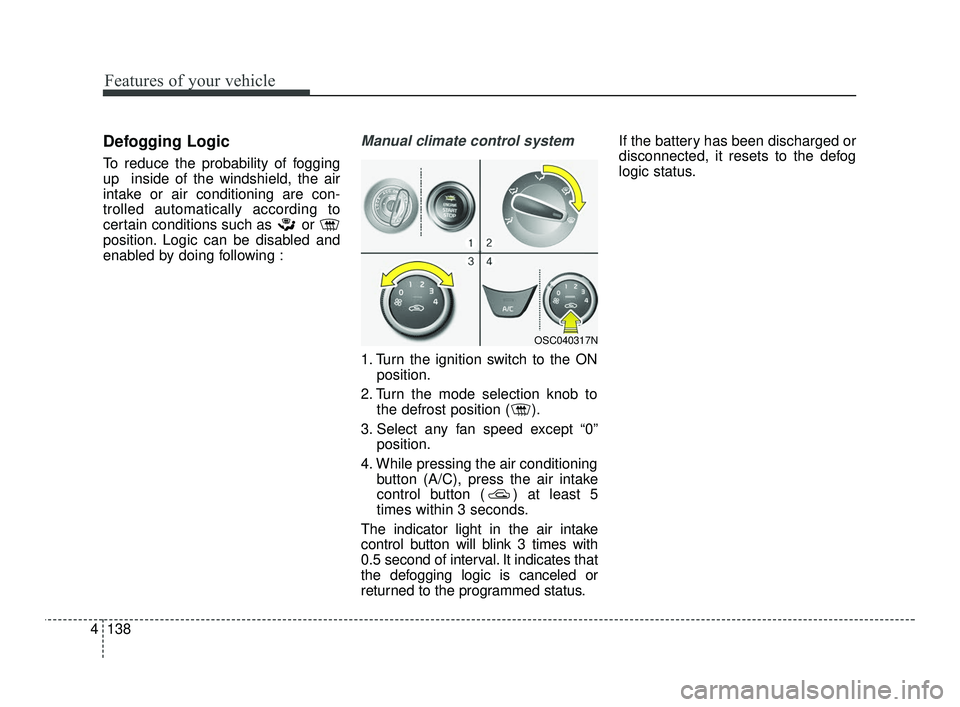
1. Turn the ignition switch to the ON
position.
2. Turn the mode selection knob to the defrost position ( ).
3. Select any fan speed except “0” position.
4. While pressing the air conditioning button (A/C), press the air intake
control button ( ) at least 5
times within 3 seconds.
The indicator light in the air intake
control button will blink 3 times with
0.5 second of interval. It indicates that
the defogging logic is canceled or
returned to the programmed status. If the battery has been discharged or
disconnected, it resets to the defog
logic status.
OSC040317N
SC PE USA 4.QXP 10/23/2020 5:47 PM Page 138
Page 220 of 534
4139
Features of your vehicle
Automatic climate control system
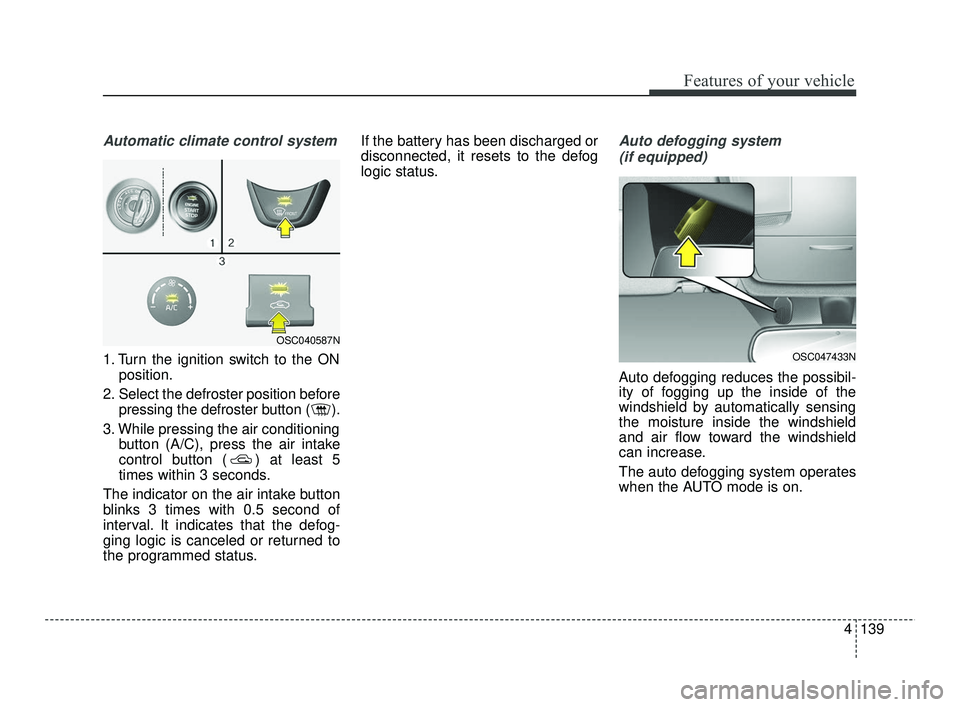
1. Turn the ignition switch to the ONposition.
2. Select the defroster position before pressing the defroster button ( ).
3. While pressing the air conditioning button (A/C), press the air intake
control button ( ) at least 5
times within 3 seconds.
The indicator on the air intake button
blinks 3 times with 0.5 second of
interval. It indicates that the defog-
ging logic is canceled or returned to
the programmed status. If the battery has been discharged or
disconnected, it resets to the defog
logic status.
Auto defogging system
(if equipped)
Auto defogging reduces the possibil-
ity of fogging up the inside of the
windshield by automatically sensing
the moisture inside the windshield
and air flow toward the windshield
can increase.
The auto defogging system operates
when the AUTO mode is on.
OSC047433N
OSC040587N
SC PE USA 4.QXP 10/23/2020 5:47 PM Page 139
Page 221 of 534
Features of your vehicle
140
4
This indicator illuminates
when the auto defogging
system senses moisture
on the inside of the wind-
shield and is activated.
If more moisture is in the vehicle, the
auto defogging system addresses
excess moisture on the inside of the
windshield in stages as follows:
Step 1 : Operating the air condition- ing
Step 2 : Outside air position
Step 3 : Blowing air flow toward the windshield
Step 4 : Increasing air flow toward the windshield
If your vehicle is equipped with the
auto defogging system, it is automat-
ically activated when the conditions
are met.
However, if you would like to deacti-
vate the auto defogging system,
keep the front defroster button
pressed longer than 3 seconds. The “ADS OFF” symbol will be
shown in the climate display to
inform you that the system is deacti-
vated.
To re-activate the auto defogging
system again, follow the procedure
mentioned above and the “ADS
OFF” symbol will disappear.
If the battery has been disconnected
or discharged, it resets to the auto
defogging status.
✽ ✽
NOTICE
• When the air conditioning is
turned on by Auto defogging sys-
tem, if you try to turn off the air
conditioning, the indicator will
blink 3 times and the air condi-
tioning will not be turned off.
• For efficiency, do not select recir- culated air position while Auto
defogging system is operating.
CAUTION
Do not remove the sensor cover
located on the upper end of thedriver side windshield glass.Damage to the system partscould occur and may not be cov-ered by your vehicle warranty.
SC PE USA 4.QXP 10/23/2020 5:47 PM Page 140
Page 223 of 534
Features of your vehicle
142
4
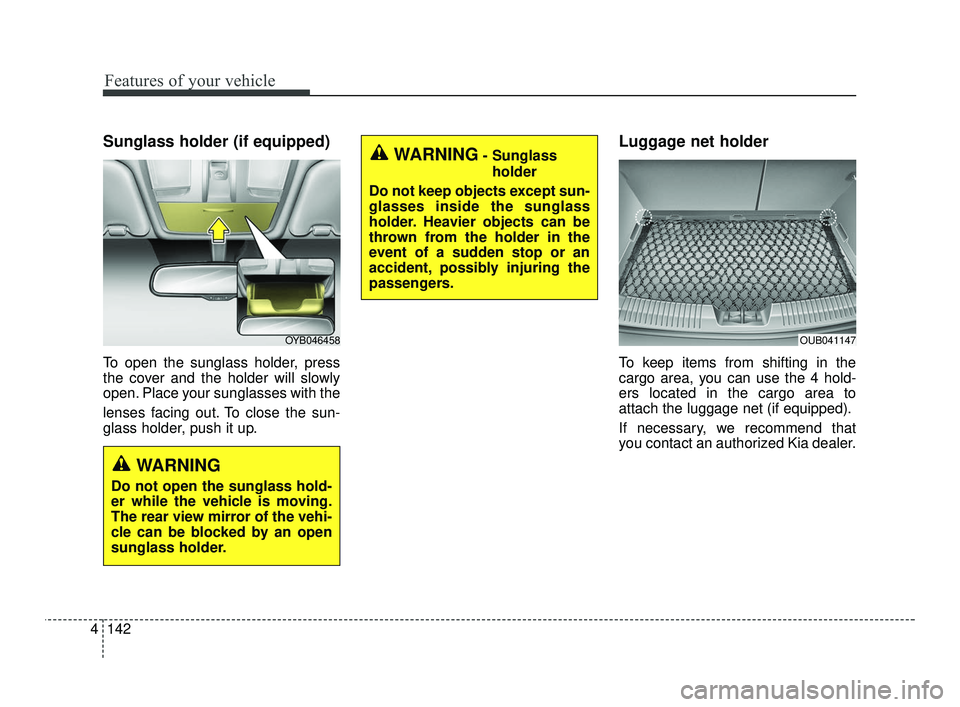
Sunglass holder (if equipped)
To open the sunglass holder, press
the cover and the holder will slowly
open. Place your sunglasses with the
lenses facing out. To close the sun-
glass holder, push it up.
Luggage net holder
To keep items from shifting in the
cargo area, you can use the 4 hold-
ers located in the cargo area to
attach the luggage net (if equipped).
If necessary, we recommend that
you contact an authorized Kia dealer.
OYB046458OUB041147
WARNING
Do not open the sunglass hold-
er while the vehicle is moving.
The rear view mirror of the vehi-
cle can be blocked by an open
sunglass holder.
WARNING- Sunglass
holder
Do not keep objects except sun-
glasses inside the sunglass
holder. Heavier objects can be
thrown from the holder in the
event of a sudden stop or an
accident, possibly injuring the
passengers.
SC PE USA 4.QXP 10/23/2020 5:47 PM Page 142
Page 224 of 534
4143
Features of your vehicle
CAUTION
To prevent damage to the goodsor the vehicle, care should betaken when carrying fragile orbulky objects in the luggagecompartment.
WARNING
To avoid bodily injury, DO NOT
overstretch the luggage net and
ALWAYS keep your face and
body out of the luggage net's
recoil path. DO NOT use when
the strap has visible signs of
wear or damage.
SC PE USA 4.QXP 10/23/2020 5:47 PM Page 143
Page 229 of 534
Features of your vehicle
148
4
The following must be observed
when installing ANY floor mat in the
vehicle.
Ensure that the floor mats are
securely attached to the vehicle's
floor mat anchor(s) before driving
the vehicle.
Do not use ANY floor mat that can- not be firmly attached to the vehi-
cle's floor mat anchors.
Do not stack floor mats on top of one another (e.g. ,all-weather rub-
ber mat on top of a carpeted floor
mat). Only a single floor mat should
be installed in each position.
✽ ✽ NOTICE
Your vehicle was manufactured with
driver's side floor mat anchors that
are designed to securely hold the
floor mat in place. To avoid any
interference with pedal operation,
Kia recommends that only the Kia
floor mat designed for use in your
vehicle be installed.
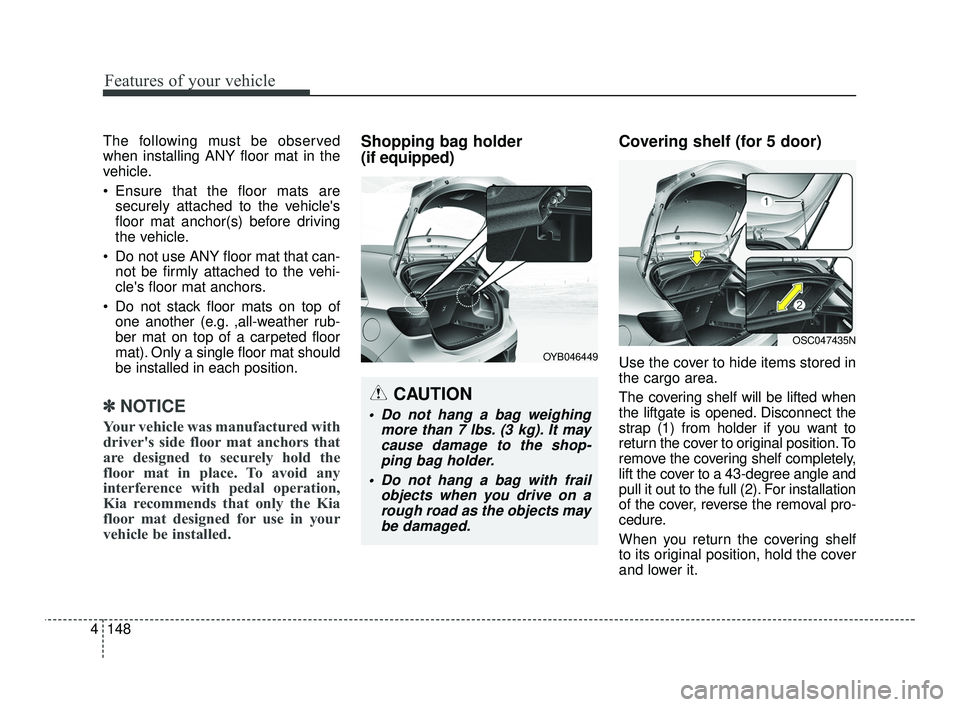
Shopping bag holder
(if equipped) Covering shelf (for 5 door)
Use the cover to hide items stored in
the cargo area.
The covering shelf will be lifted when
the liftgate is opened. Disconnect the
strap (1) from holder if you want to
return the cover to original position. To
remove the covering shelf completely,
lift the cover to a 43-degree angle and
pull it out to the full (2). For installation
of the cover, reverse the removal pro-
cedure.
When you return the covering shelf
to its original position, hold the cover
and lower it.
CAUTION
Do not hang a bag weighing
more than 7 lbs. (3 kg). It maycause damage to the shop-ping bag holder.
Do not hang a bag with frail objects when you drive on arough road as the objects maybe damaged.
OYB046449
OSC047435N
SC PE USA 4.QXP 10/23/2020 5:47 PM Page 148
Page 239 of 534
 . . . . . . . . . . . . 5-78
• Basic function. . . . . . . . . . . . . . . . . . . . . . . . . . . . . . . . \
5-78
• Leading Vehicle Departure Alert function . . .")
Driver Attention Warning (DAW) . . . . . . . . . . . . 5-78
• Basic function. . . . . . . . . . . . . . . . . . . . . . . . . . . . . . . . \
5-78
• Leading Vehicle Departure Alert function . . . . . . . . 5-78
• Detecting sensor . . . . . . . . . . . . . . . . . . . . . . . . . . . . . . 5-78
• Function settings . . . . . . . . . . . . . . . . . . . . . . . . . . . . . 5-79
• Function operation . . . . . . . . . . . . . . . . . . . . . . . . . . . 5-81
• Function malfunction and limitations . . . . . . . . . . . . 5-84
Cruise Control (CC). . . . . . . . . . . . . . . . . . . . . . . . 5-87
• Function operation . . . . . . . . . . . . . . . . . . . . . . . . . . . 5-87
• To increase set speed . . . . . . . . . . . . . . . . . . . . . . . . . . 5-88
• To decrease speed . . . . . . . . . . . . . . . . . . . . . . . . . . . . 5-88
• To temporarily pause the function . . . . . . . . . . . . . . 5-89
• To resume the function . . . . . . . . . . . . . . . . . . . . . . . . 5-89
Lane Following Assist (LFA) . . . . . . . . . . . . . . . . . 5-91
• Detecting sensor . . . . . . . . . . . . . . . . . . . . . . . . . . . . . . 5-91
• Function settings . . . . . . . . . . . . . . . . . . . . . . . . . . . . . 5-92
• Function operation . . . . . . . . . . . . . . . . . . . . . . . . . . . 5-92
• Function malfunction and limitations . . . . . . . . . . . . 5-95
Rear Cross-Traffic Collision Warning (RCCW) . 5-96
• Detecting sensor . . . . . . . . . . . . . . . . . . . . . . . . . . . . . . 5-97
• Functions settings . . . . . . . . . . . . . . . . . . . . . . . . . . . . 5-97
• Function operation . . . . . . . . . . . . . . . . . . . . . . . . . . . 5-98
Function malfunction and limitations . . . . . . . . . . . . . 5-99
Declaration of Conformity . . . . . . . . . . . . . . . . . 5-104
• The radio frequency components(Rear Corner Radar) complies . . . . . . . . . . . . . . . 5-104
Economical operation . . . . . . . . . . . . . . . . . . . . . 5-105
Special driving conditions . . . . . . . . . . . . . . . . . . . 5107
• Hazardous driving conditions . . . . . . . . . . . . . . . . 5-107
• Rocking the vehicle . . . . . . . . . . . . . . . . . . . . . . . . . 5-107
• Smooth cornering . . . . . . . . . . . . . . . . . . . . . . . . . . . 5-108
• Driving at night . . . . . . . . . . . . . . . . . . . . . . . . . . . . 5-108
• Driving in the rain . . . . . . . . . . . . . . . . . . . . . . . . . . . 5-109
• Driving in flooded areas . . . . . . . . . . . . . . . . . . . . . . 5-110
• Driving off-road . . . . . . . . . . . . . . . . . . . . . . . . . . . . . 5-110
• Highway driving . . . . . . . . . . . . . . . . . . . . . . . . . . . . 5-110
Winter driving . . . . . . . . . . . . . . . . . . . . . . . . . . . 5-112
• Snowy or Icy conditions . . . . . . . . . . . . . . . . . . . . . . 5-112
• Use high quality ethylene glycol coolant . . . . . . . . . 5-114
• Check battery and cables . . . . . . . . . . . . . . . . . . . . . 5-114
• Change to "winter weight" oil if necessary . . . . . . 5-115
• Check spark plugs and ignition system . . . . . . . . . . 5-115
• To keep locks from freezing . . . . . . . . . . . . . . . . . . . 5-115
• Use approved window washer anti-freeze in system5-115
• Don't let your parking brake freeze . . . . . . . . . . . . 5-115
• Don't let ice and snow accumulate underneath . . . 5-115
• Carry emergency equipment . . . . . . . . . . . . . . . . . . 5-116
5
SC PE USA 5.QXP 10/23/2020 5:49 PM Page 2
Page 246 of 534
59
Driving your vehicle
Starting the engineStarting the engine with an igni-tion key
1. Make sure the parking brake is applied.
2. Manual Transmission - Depress
the clutch pedal fully and shift the
transmission into Neutral. Keep
the clutch pedal and brake pedal
depressed while turning the igni-
tion switch to the start position.
Intelligent Variable Transmission
- Place the transmission shift lever
in P (Park). Depress the brake
pedal fully.
You can also start the engine when the shift lever is in the N(Neutral) position.
3. Turn the ignition switch to START and hold it there until the engine
starts (a maximum of 10 seconds),
then release the key.
It should be started withoutdepressing the accelerator.
4. Do not wait for the engine to warm up while the vehicle remains sta-
tionary.
Start driving at moderate engine
speeds. (Extreme and/or exces-
sive accelerating and decelerating
should be avoided.)
If the engine stalls while the vehicle
is in motion, do not attempt to move
the shift lever to the P (Park) posi-
tion. If traffic and road conditions per-
mit, you may put the shift lever in the
N (Neutral) position while the vehicle
is still moving and turn the ignition
switch to the START position in an
attempt to restart the engine.
WARNING- Proper footwear
Always wear appropriate shoes
when operating your vehicle.
Unsuitable shoes (high heels, ski
boots, sandals, etc.) may inter-
fere with your ability to use the
brake and accelerator pedals.
CAUTION- Starter
Do not engage the starter for more than 10 seconds. If theengine stalls or fails to start,wait 5 to 10 seconds before re-engaging the starter. Improperuse of the starter may damageit.
SC PE USA 5.QXP 10/23/2020 5:49 PM Page 9
Page 247 of 534
Driving your vehicle
10
5
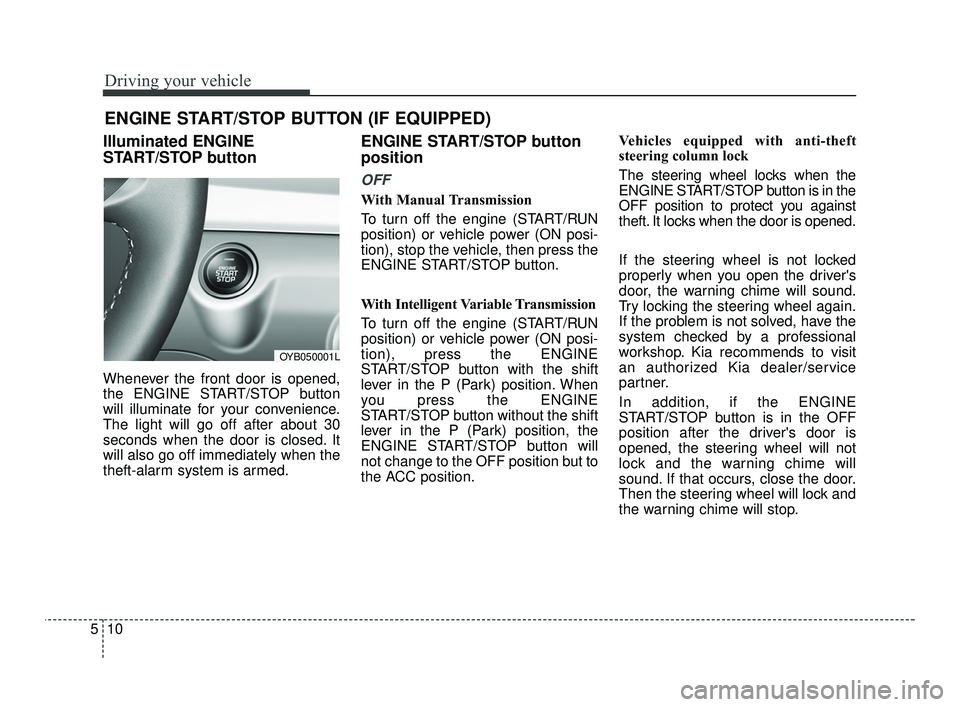
Illuminated ENGINE
START/STOP button
Whenever the front door is opened,
the ENGINE START/STOP button
will illuminate for your convenience.
The light will go off after about 30
seconds when the door is closed. It
will also go off immediately when the
theft-alarm system is armed.
ENGINE START/STOP button
position
OFF
With Manual Transmission
To turn off the engine (START/RUN
position) or vehicle power (ON posi-
tion), stop the vehicle, then press the
ENGINE START/STOP button.
With Intelligent Variable Transmission
To turn off the engine (START/RUN
position) or vehicle power (ON posi-
tion), press the ENGINE
START/STOP button with the shift
lever in the P (Park) position. When
you press the ENGINE
START/STOP button without the shift
lever in the P (Park) position, the
ENGINE START/STOP button will
not change to the OFF position but to
the ACC position. Vehicles equipped with anti-theft
steering column lock
The steering wheel locks when the
ENGINE START/STOP button is in the
OFF position to protect you against
theft. It locks when the door is opened.
If the steering wheel is not locked
properly when you open the driver's
door, the warning chime will sound.
Try locking the steering wheel again.
If the problem is not solved, have the
system checked by a professional
workshop. Kia recommends to visit
an authorized Kia dealer/service
partner.
In addition, if the ENGINE
START/STOP button is in the OFF
position after the driver's door is
opened, the steering wheel will not
lock and the warning chime will
sound. If that occurs, close the door.
Then the steering wheel will lock and
the warning chime will stop.
ENGINE START/STOP BUTTON (IF EQUIPPED)
OYB050001L
SC PE USA 5.QXP 10/23/2020 5:49 PM Page 10