warning KIA SEDONA 2018 Owners Manual
[x] Cancel search | Manufacturer: KIA, Model Year: 2018, Model line: SEDONA, Model: KIA SEDONA 2018Pages: 586, PDF Size: 14.1 MB
Page 282 of 586
Features of your vehicle
180
4
For maximum defrosting, set the
temperature control to the extreme
right/hot position and the fan speed
control to the highest speed.
If warm air to the floor is desired while defrosting or defogging, set
the mode to the floor-defrost posi-
tion.
Before driving, clear all snow and ice from the windshield, rear win-
dow, outside rear view mirrors, and
all side windows.
Clear all snow and ice from the hood and air inlet in the cowl grill to
improve heater and defroster effi-
ciency and to reduce the probabili-
ty of fogging up the inside of the
windshield.Manual climate control system
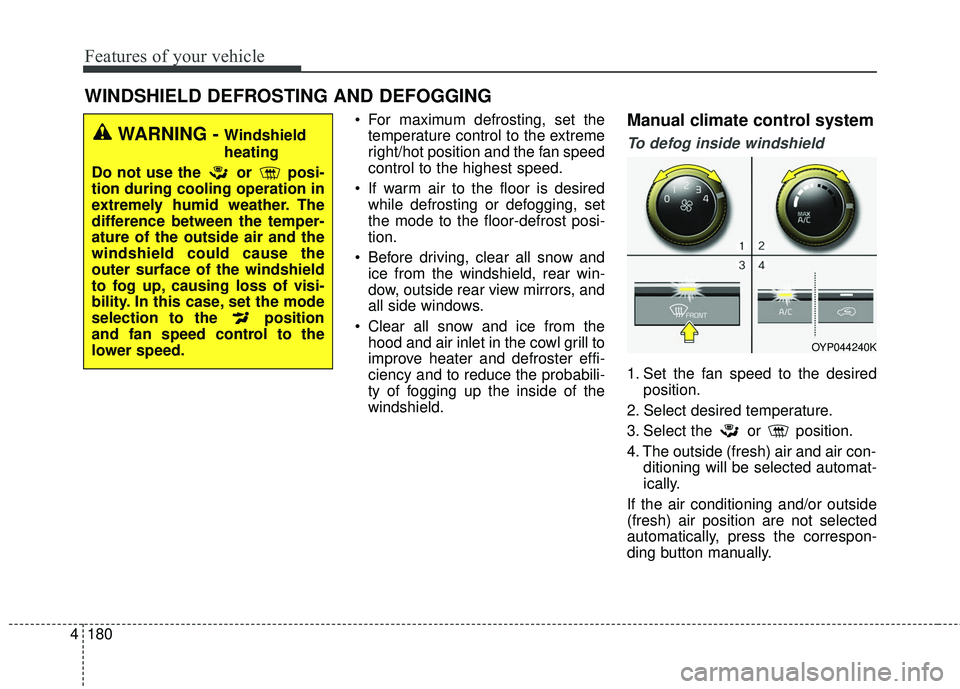
To defog inside windshield
1. Set the fan speed to the desired position.
2. Select desired temperature.
3. Select the or position.
4. The outside (fresh) air and air con- ditioning will be selected automat-
ically.
If the air conditioning and/or outside
(fresh) air position are not selected
automatically, press the correspon-
ding button manually.
WINDSHIELD DEFROSTING AND DEFOGGING
WARNING - Windshield
heating
Do not use the or posi-
tion during cooling operation in
extremely humid weather. The
difference between the temper-
ature of the outside air and the
windshield could cause the
outer surface of the windshield
to fog up, causing loss of visi-
bility. In this case, set the mode
selection to the position
and fan speed control to the
lower speed.
OYP044240K
Page 288 of 586
Features of your vehicle
186
4
STORAGE COMPARTMENTS
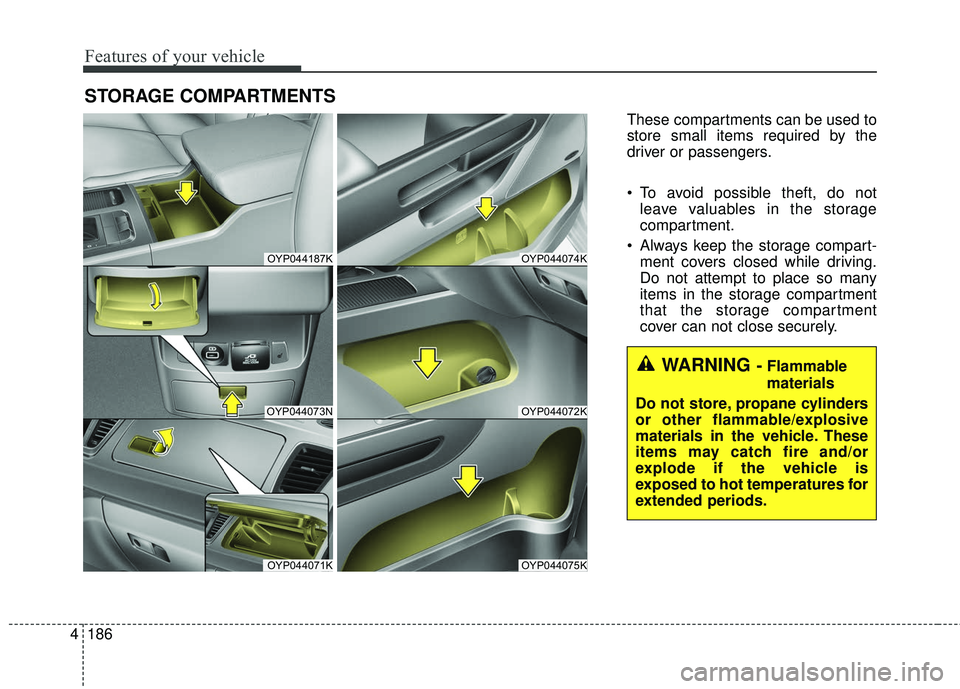
These compartments can be used to
store small items required by the
driver or passengers.
To avoid possible theft, do not
leave valuables in the storage
compartment.
Always keep the storage compart- ment covers closed while driving.
Do not attempt to place so many
items in the storage compartment
that the storage compartment
cover can not close securely.
OYP044187K
OYP044073N
OYP044071K
OYP044074K
OYP044072K
OYP044075K
WARNING - Flammable
materials
Do not store, propane cylinders
or other flammable/explosive
materials in the vehicle. These
items may catch fire and/or
explode if the vehicle is
exposed to hot temperatures for
extended periods.
Page 290 of 586
Features of your vehicle
188
4
Glove box
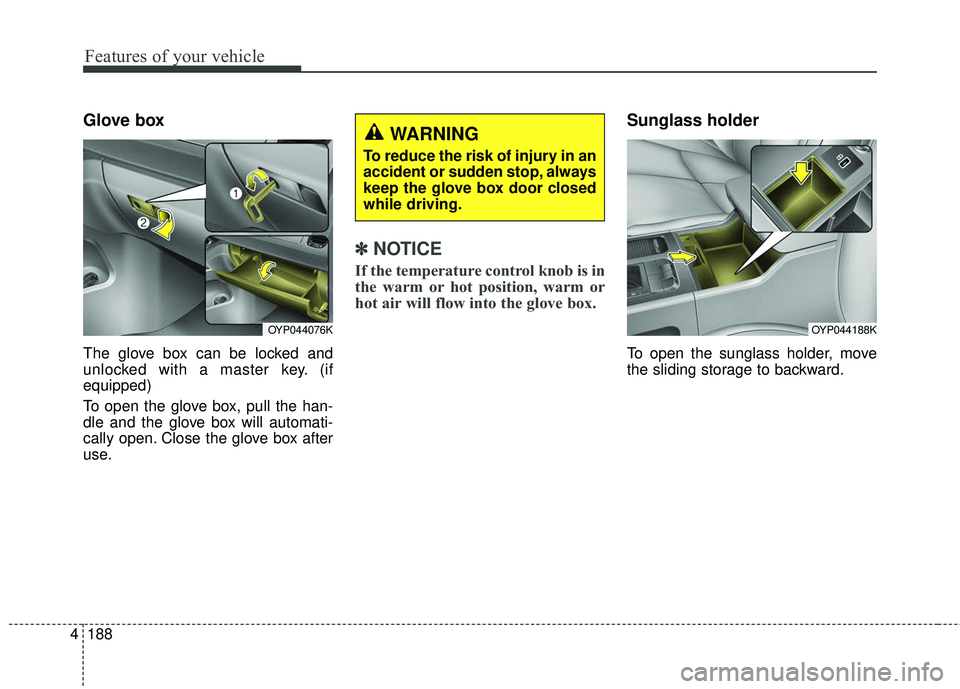
The glove box can be locked and
unlocked with a master key. (if
equipped)
To open the glove box, pull the han-
dle and the glove box will automati-
cally open. Close the glove box after
use.
✽ ✽
NOTICE
If the temperature control knob is in
the warm or hot position, warm or
hot air will flow into the glove box.
Sunglass holder
To open the sunglass holder, move
the sliding storage to backward.
OYP044188KOYP044076K
WARNING
To reduce the risk of injury in an
accident or sudden stop, always
keep the glove box door closed
while driving.
Page 291 of 586
4189
Features of your vehicle
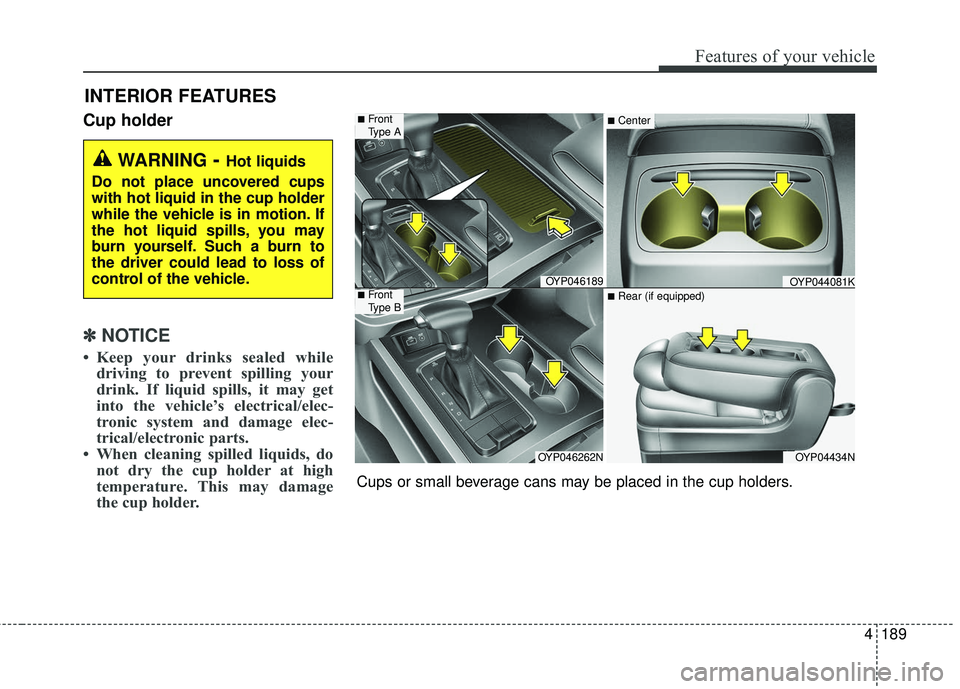
Cup holder
✽ ✽NOTICE
• Keep your drinks sealed while
driving to prevent spilling your
drink. If liquid spills, it may get
into the vehicle’s electrical/elec-
tronic system and damage elec-
trical/electronic parts.
• When cleaning spilled liquids, do not dry the cup holder at high
temperature. This may damage
the cup holder.
INTERIOR FEATURES
WARNING- Hot liquids
Do not place uncovered cups
with hot liquid in the cup holder
while the vehicle is in motion. If
the hot liquid spills, you may
burn yourself. Such a burn to
the driver could lead to loss of
control of the vehicle.
OYP046189
OYP046262NOYP04434N
OYP044081K
■Front
Type A
■Front
Type B
■Center
■Rear (if equipped)
Cups or small beverage cans may be placed in the cup holders.
Page 293 of 586
4191
Features of your vehicle
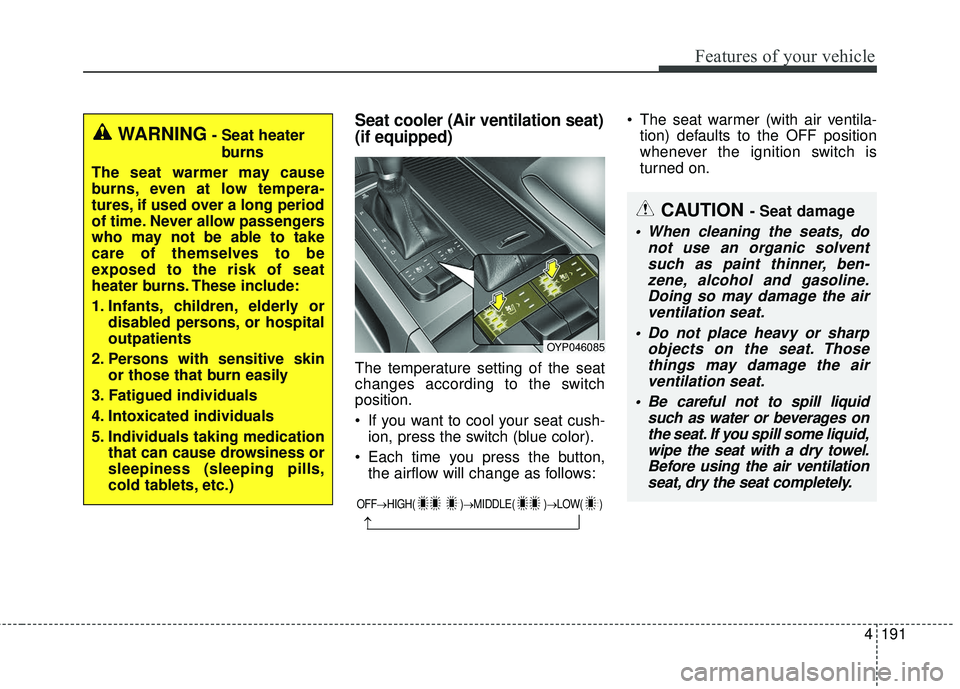
Seat cooler (Air ventilation seat)
(if equipped)
The temperature setting of the seat
changes according to the switch
position.
If you want to cool your seat cush-ion, press the switch (blue color).
Each time you press the button, the airflow will change as follows: The seat warmer (with air ventila-
tion) defaults to the OFF position
whenever the ignition switch is
turned on.
OYP046085
OFF→ HIGH( )→ MIDDLE( )→LOW( )
→
WARNING- Seat heater
burns
The seat warmer may cause
burns, even at low tempera-
tures, if used over a long period
of time. Never allow passengers
who may not be able to take
care of themselves to be
exposed to the risk of seat
heater burns. These include:
1. Infants, children, elderly or disabled persons, or hospital
outpatients
2. Persons with sensitive skin or those that burn easily
3. Fatigued individuals
4. Intoxicated individuals
5. Individuals taking medication that can cause drowsiness or
sleepiness (sleeping pills,
cold tablets, etc.)
CAUTION - Seat damage
When cleaning the seats, donot use an organic solventsuch as paint thinner, ben-zene, alcohol and gasoline.Doing so may damage the airventilation seat.
Do not place heavy or sharp objects on the seat. Thosethings may damage the airventilation seat.
Be careful not to spill liquid such as water or beverages onthe seat. If you spill some liquid,wipe the seat with a dry towel.Before using the air ventilationseat, dry the seat completely.
Page 295 of 586
4193
Features of your vehicle
The power outlet is designed to pro-
vide power for mobile telephones or
other devices designed to operate
with vehicle electrical systems. The
devices should draw less than 10
amps with the engine running.
Use the power outlet only when theengine is running and remove the
accessory plug after use. Using the
accessory plug for prolonged peri-
ods of time with the engine off could
cause the battery to discharge.
Only use 12V electric accessories which are less than 10A in electric
capacity.
Adjust the air-conditioner or heater to the lowest operating level when
using the power outlet.
Close the cover when not in use.
Some electronic devices can cause electronic interference when
plugged into a vehicle’s power out-
let. These devices may cause
excessive audio static and malfunc-
tions in other electronic systems or
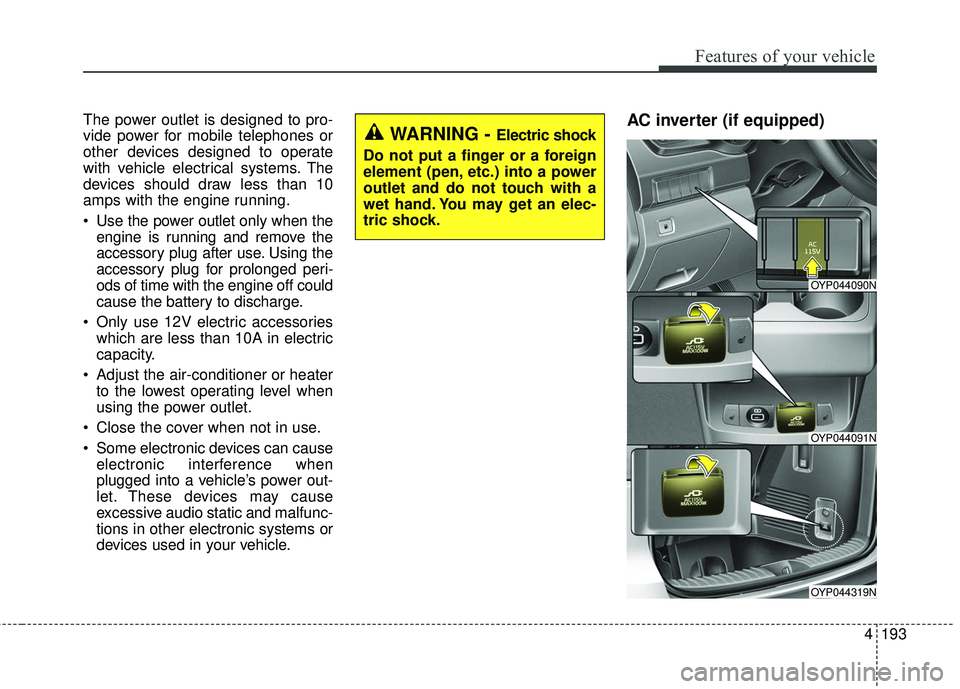
devices used in your vehicle.AC inverter (if equipped) WARNING - Electric shock
Do not put a finger or a foreign
element (pen, etc.) into a power
outlet and do not touch with a
wet hand. You may get an elec-
tric shock.
OYP044090N
OYP044091N
OYP044319N
Page 298 of 586
Features of your vehicle
196
4
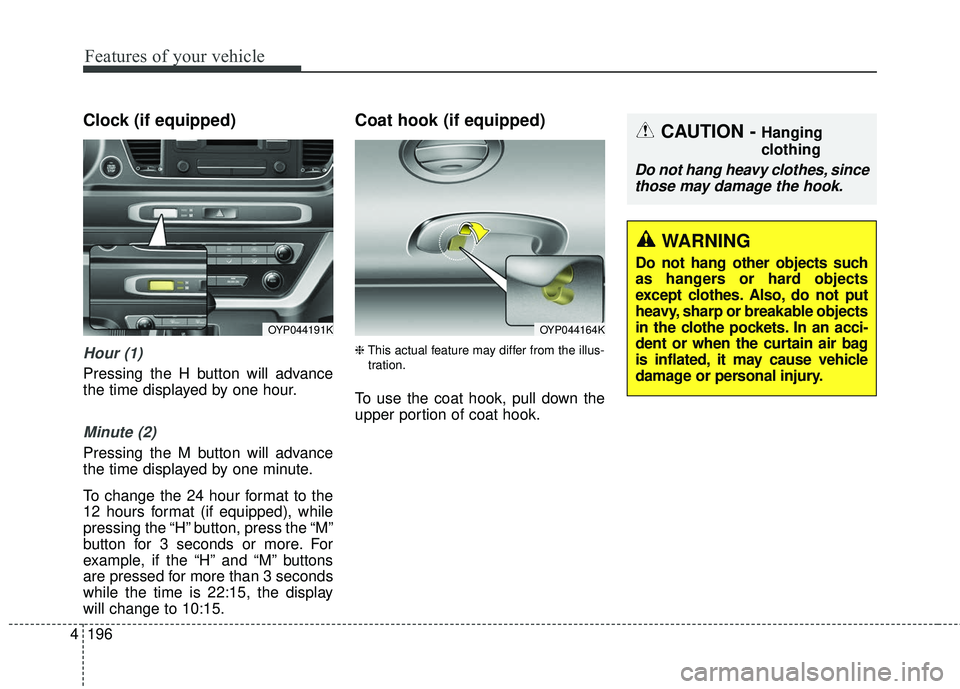
Clock (if equipped)
Hour (1)
Pressing the H button will advance
the time displayed by one hour.
Minute (2)
Pressing the M button will advance
the time displayed by one minute.
To change the 24 hour format to the
12 hours format (if equipped), while
pressing the “H” button, press the “M”
button for 3 seconds or more. For
example, if the “H” and “M” buttons
are pressed for more than 3 seconds
while the time is 22:15, the display
will change to 10:15.
Coat hook (if equipped)
❈ This actual feature may differ from the illus-
tration.
To use the coat hook, pull down the
upper portion of coat hook.
OYP044191KOYP044164K
CAUTION - Hanging
clothing
Do not hang heavy clothes, since those may damage the hook.
WARNING
Do not hang other objects such
as hangers or hard objects
except clothes. Also, do not put
heavy, sharp or breakable objects
in the clothe pockets. In an acci-
dent or when the curtain air bag
is inflated, it may cause vehicle
damage or personal injury.
Page 302 of 586
Features of your vehicle
200
4
Always drive slowly and turn corners
carefully when carrying items on the
roof rack. Severe wind updrafts,
caused by passing vehicles or natu-
ral causes, can cause sudden
upward pressure on items loaded on
the roof rack. This is especially true
when carrying large, flat items such
as wood panels or mattresses. This
could cause the items to fall off the
roof rack and cause damage to your
vehicle or others around you.
To prevent damage or loss of cargo while driving, check frequently
before or while driving to make
sure the items on the roof rack are
securely fastened.
WARNING- Driving with
roof load
Always drive slow and turn cor-
ners carefully when carrying
items on the roof rack. The vehi-
cle center of gravity will be
higher when items are loaded
onto the roof rack.
Page 306 of 586
Features of your vehicle
204
4
Using a cellular phone or a two-
way radio
When a cellular phone is used inside
the vehicle, noise may be produced
from the audio system. This does not
mean that something is wrong with
the audio equipment. In such a case,
try to operate mobile devices as far
from the audio equipment as possi-
ble.
When using a communication sys-
tem such as a cellular phone or a
radio set inside the vehicle, a sepa-
rate external antenna must be fitted.
When a cellular phone or a radio set
is used with an internal antenna
alone, it may interfere with the vehi-
cle's electrical system and adversely
affect safe operation of the vehicle.
WARNING- Antenna
Do not touch the antenna dur-
ing thunder or lightening as
such acts may lead to lightning
induced electric shock.
Page 312 of 586
4 210
Features of your vehicle
WARNING
-
Audio System Safety
Warnings
Do not stare at the screen while driving. Staring at the
screen for prolonged periods
of time could lead to traffic
accidents.
Do not disassemble, assem- ble, or modify the audio sys-
tem. Such acts could result in
accidents, fire, or electric
shock.
Using the phone while driving may lead to a lack of attention
of traffic conditions and
increase the likelihood of
accidents. Use the phone fea-
ture after parking the vehicle.
Exercise caution not to spill water or introduce foreign
objects into the device. Such
acts could lead to smoke, fire,
or product malfunction.
(Continued)
(Continued)
Please refrain from use if thescreen is blank or no sound
can be heard as these signs
may indicate product mal func-
tion. Continued use in such
conditions could lead to acci-
dents (fires, electric shock) or
product malfunctions.
Do not touch the antenna dur- ing thunder or lightening as
such acts may lead to light-
ning induced electric shock.
Do not stop or park in park- ing-restricted areas to operate
the product. Such acts could
lead to traffic accidents.