rear KIA SEDONA 2019 Manual PDF
[x] Cancel search | Manufacturer: KIA, Model Year: 2019, Model line: SEDONA, Model: KIA SEDONA 2019Pages: 593, PDF Size: 15.93 MB
Page 179 of 593
475
Features of your vehicle
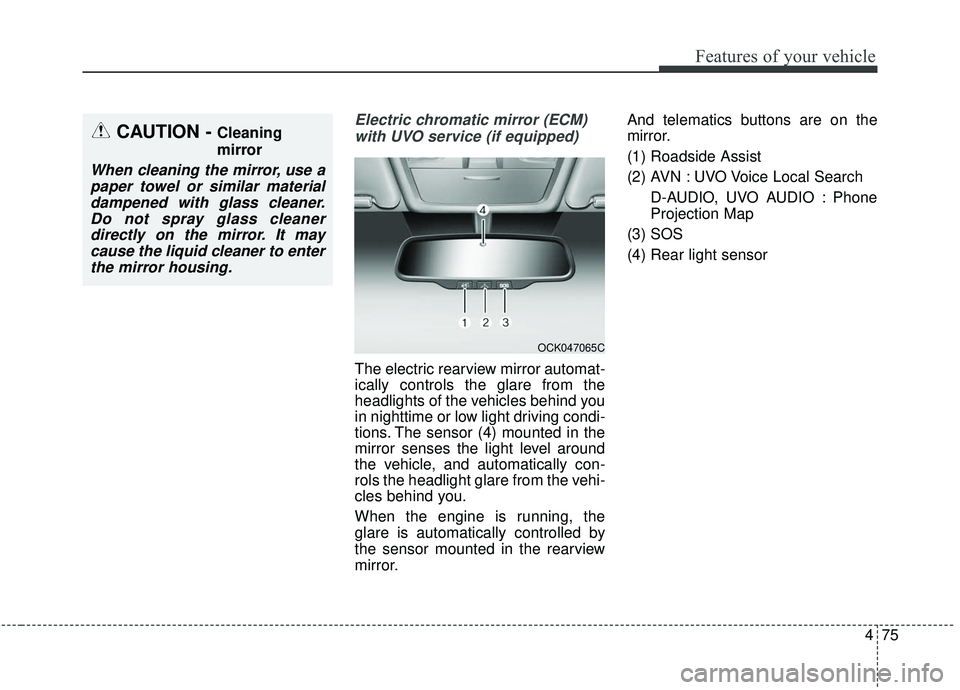
Electric chromatic mirror (ECM)with UVO service (if equipped)
The electric rearview mirror automat-
ically controls the glare from the
headlights of the vehicles behind you
in nighttime or low light driving condi-
tions. The sensor (4) mounted in the
mirror senses the light level around
the vehicle, and automatically con-
rols the headlight glare from the vehi-
cles behind you.
When the engine is running, the
glare is automatically controlled by
the sensor mounted in the rearview
mirror. And telematics buttons are on the
mirror.
(1) Roadside Assist
(2) AVN : UVO Voice Local Search
D-AUDIO, UVO AUDIO : Phone
Projection Map
(3) SOS
(4) Rear light sensor
CAUTION - Cleaning
mirror
When cleaning the mirror, use a paper towel or similar materialdampened with glass cleaner.Do not spray glass cleanerdirectly on the mirror. It maycause the liquid cleaner to enterthe mirror housing.
OCK047065C
Page 180 of 593
Features of your vehicle
76
4
Electric chromic mirror (ECM)
with HomeLink®system and com-
pass (if equipped)
Your vehicle may be equipped with a
Gentex Automatic-Dimming Mirror
with a Z-Nav
®Electronic Compass
Display and an Integrated HomeLink®
Wireless Control System.
During nighttime driving, this feature
will automatically detect and reduce
rearview mirror glare while the com-
pass indicates the direction the vehi-
cle is pointed. The HomeLink
®
Universal Transceiver allows you to
activate your garage door(s), electric
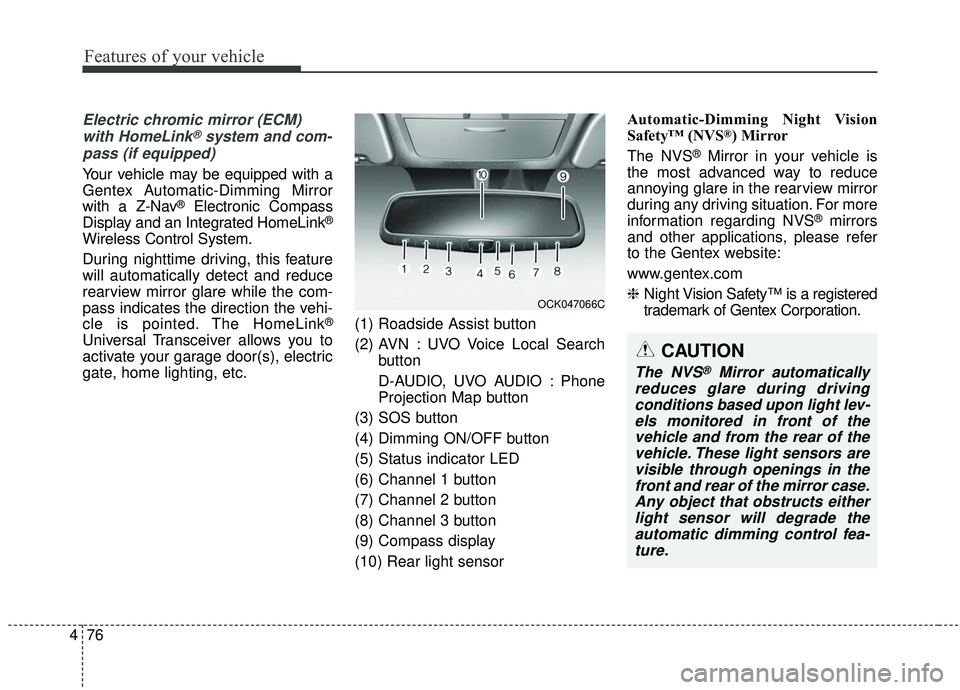
gate, home lighting, etc. (1) Roadside Assist button
(2) AVN : UVO Voice Local Search
button
D-AUDIO, UVO AUDIO : Phone
Projection Map button
(3) SOS button
(4) Dimming ON/OFF button
(5) Status indicator LED
(6) Channel 1 button
(7) Channel 2 button
(8) Channel 3 button
(9) Compass display
(10) Rear light sensor Automatic-Dimming Night Vision
Safety™ (NVS
®) Mirror
The NVS
®Mirror in your vehicle is
the most advanced way to reduce
annoying glare in the rearview mirror
during any driving situation. For more
information regarding NVS
®mirrors
and other applications, please refer
to the Gentex website:
www.gentex.com
❈ Night Vision Safety™ is a registered
trademark of Gentex Corporation.
OCK047066C
CAUTION
The NVS®Mirror automatically
reduces glare during driving conditions based upon light lev-els monitored in front of thevehicle and from the rear of thevehicle. These light sensors arevisible through openings in thefront and rear of the mirror case.Any object that obstructs eitherlight sensor will degrade theautomatic dimming control fea-ture.
Page 188 of 593
Features of your vehicle
84
4
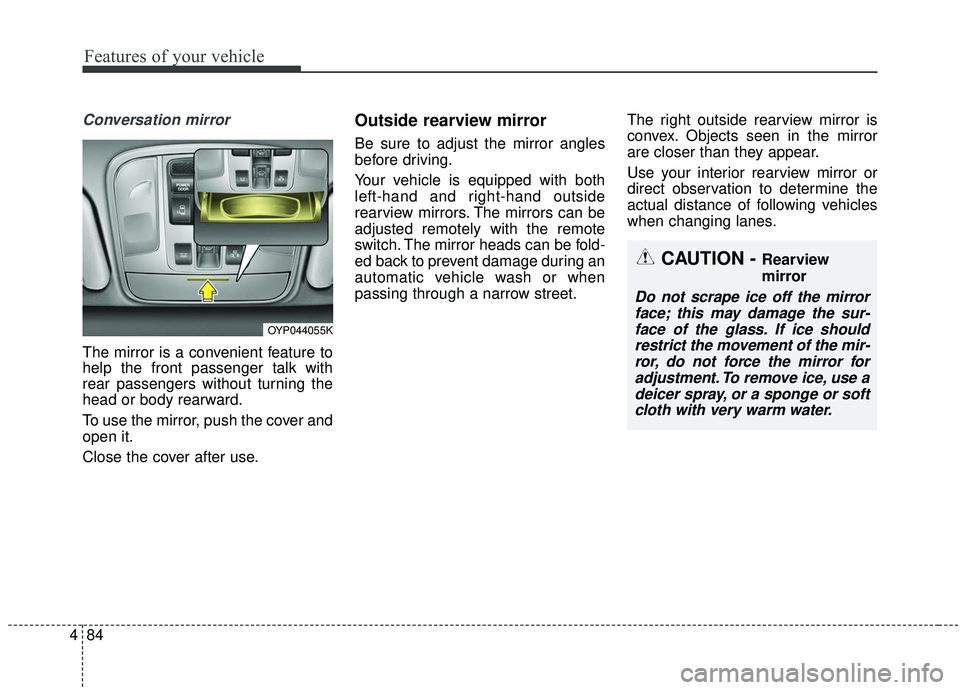
Conversation mirror
The mirror is a convenient feature to
help the front passenger talk with
rear passengers without turning the
head or body rearward.
To use the mirror, push the cover and
open it.
Close the cover after use.
Outside rearview mirror
Be sure to adjust the mirror angles
before driving.
Your vehicle is equipped with both
left-hand and right-hand outside
rearview mirrors. The mirrors can be
adjusted remotely with the remote
switch. The mirror heads can be fold-
ed back to prevent damage during an
automatic vehicle wash or when
passing through a narrow street. The right outside rearview mirror is
convex. Objects seen in the mirror
are closer than they appear.
Use your interior rearview mirror or
direct observation to determine the
actual distance of following vehicles
when changing lanes.
OYP044055K
CAUTION - Rearview
mirror
Do not scrape ice off the mirror
face; this may damage the sur-face of the glass. If ice shouldrestrict the movement of the mir-ror, do not force the mirror foradjustment. To remove ice, use adeicer spray, or a sponge or softcloth with very warm water.
Page 189 of 593
485
Features of your vehicle
If the mirror is jammed with ice, do
not adjust the mirror by force. Use an
approved spray de-icer (not radiator
antifreeze) to release the frozen
mechanism or move the vehicle to a
warm place and allow the ice to melt.Adjusting outside rearview mirror
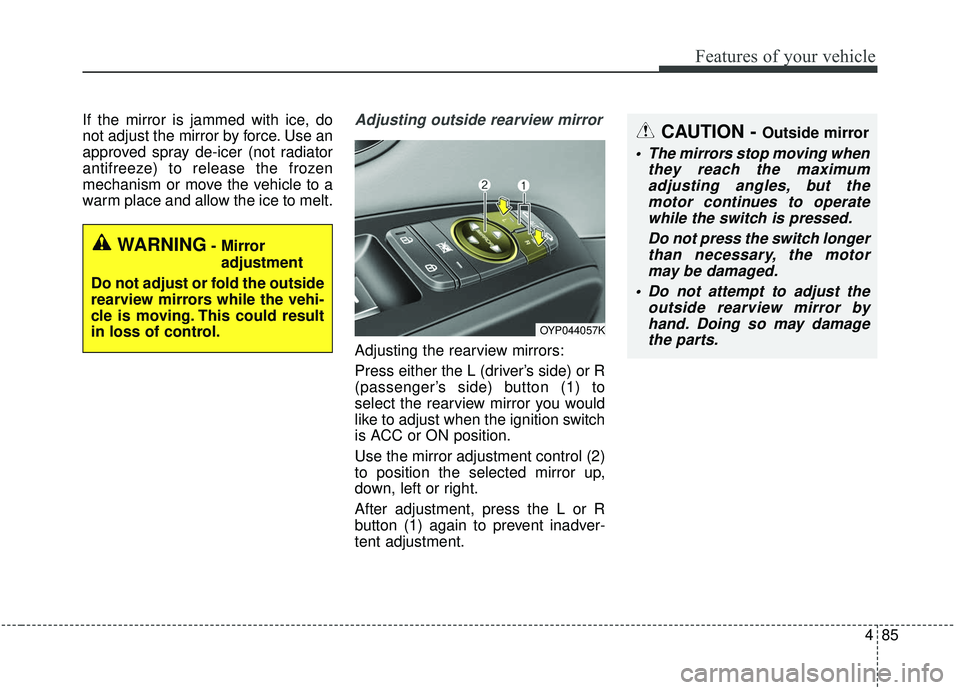
Adjusting the rearview mirrors:
Press either the L (driver’s side) or R
(passenger’s side) button (1) to
select the rearview mirror you would
like to adjust when the ignition switch
is ACC or ON position.
Use the mirror adjustment control (2)
to position the selected mirror up,
down, left or right.
After adjustment, press the L or R
button (1) again to prevent inadver-
tent adjustment.
WARNING- Mirror adjustment
Do not adjust or fold the outside
rearview mirrors while the vehi-
cle is moving. This could result
in loss of control.
CAUTION - Outside mirror
The mirrors stop moving when they reach the maximumadjusting angles, but themotor continues to operatewhile the switch is pressed.
Do not press the switch longerthan necessary, the motormay be damaged.
Do not attempt to adjust the outside rearview mirror byhand. Doing so may damagethe parts.
OYP044057K
Page 190 of 593
Features of your vehicle
86
4
Reverse parking aid function
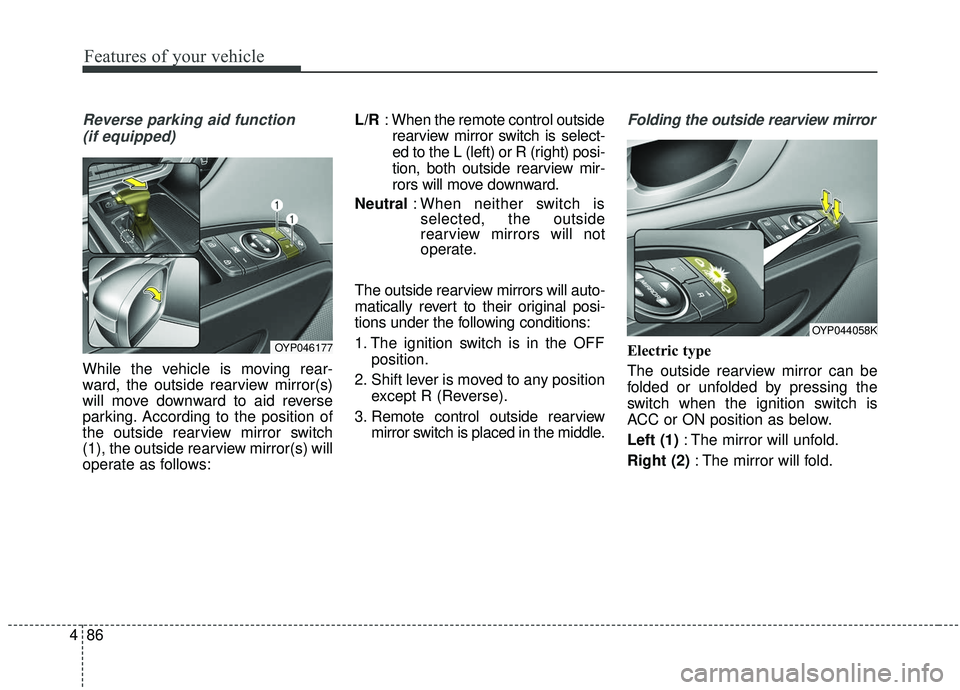
(if equipped)
While the vehicle is moving rear-
ward, the outside rearview mirror(s)
will move downward to aid reverse
parking. According to the position of
the outside rearview mirror switch
(1), the outside rearview mirror(s) will
operate as follows: L/R
: When the remote control outside
rearview mirror switch is select-
ed to the L (left) or R (right) posi-
tion, both outside rearview mir-
rors will move downward.
Neutral : When neither switch is
selected, the outside
rearview mirrors will not
operate.
The outside rearview mirrors will auto-
matically revert to their original posi-
tions under the following conditions:
1. The ignition switch is in the OFF position.
2. Shift lever is moved to any position except R (Reverse).
3. Remote control outside rearview mirror switch is placed in the middle.
Folding the outside rearview mirror
Electric type
The outside rearview mirror can be
folded or unfolded by pressing the
switch when the ignition switch is
ACC or ON position as below.
Left (1) : The mirror will unfold.
Right (2) : The mirror will fold.OYP046177
OYP044058K
Page 191 of 593
487
Features of your vehicle
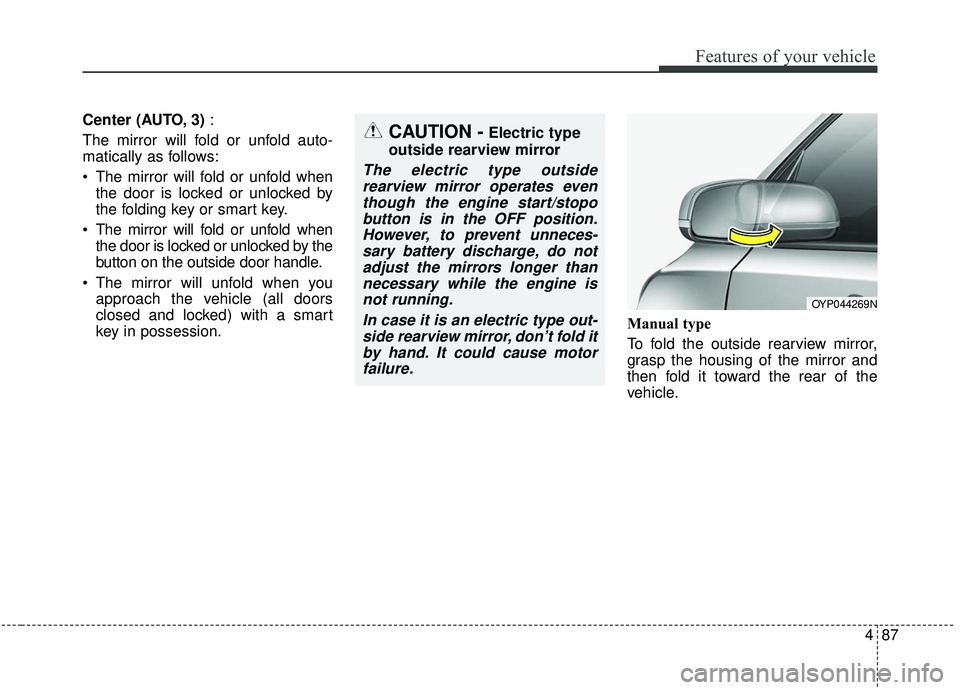
Center (AUTO, 3):
The mirror will fold or unfold auto-
matically as follows:
The mirror will fold or unfold when the door is locked or unlocked by
the folding key or smart key.
The mirror will fold or unfold when the door is locked or unlocked by the
button on the outside door handle.
The mirror will unfold when you approach the vehicle (all doors
closed and locked) with a smart
key in possession. Manual type
To fold the outside rearview mirror,
grasp the housing of the mirror and
then fold it toward the rear of the
vehicle.
OYP044269N
CAUTION -Electric type
outside rearview mirror
The electric type outside rearview mirror operates eventhough the engine start/stopobutton is in the OFF position.However, to prevent unneces-sary battery discharge, do notadjust the mirrors longer thannecessary while the engine isnot running.
In case it is an electric type out-side rearview mirror, don’t fold itby hand. It could cause motorfailure.
Page 192 of 593
Features of your vehicle
88
4
Blind zone mirror (if equipped)
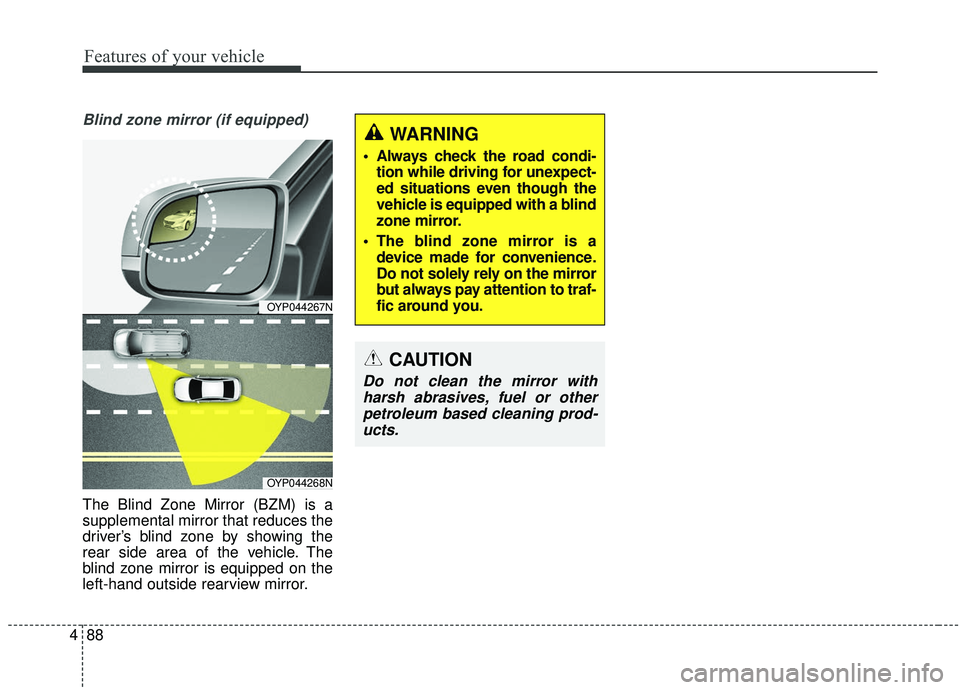
The Blind Zone Mirror (BZM) is a
supplemental mirror that reduces the
driver’s blind zone by showing the
rear side area of the vehicle. The
blind zone mirror is equipped on the
left-hand outside rearview mirror.
CAUTION
Do not clean the mirror with
harsh abrasives, fuel or otherpetroleum based cleaning prod-ucts.
OYP044267N
OYP044268N
WARNING
Always check the road condi- tion while driving for unexpect-
ed situations even though the
vehicle is equipped with a blind
zone mirror.
The blind zone mirror is a device made for convenience.
Do not solely rely on the mirror
but always pay attention to traf-
fic around you.
Page 208 of 593
Features of your vehicle
104
4
Driver Attention Warning (DAW, if
equipped)
❈ For more details, refer to ‘Driver
Attention Warning (DAW)” in chap-
ter 5.
Blind Spot Collision Warning Timing (if equipped)
- Choose the sensitivity(Late/Normal/Fast) of the Blind
Spot Collision Warning Timing
control.
❈ For more details, refer to “Blind spot
Collision Warning” in chapter 5.
Blind Spot Collision Warning Sound (if equipped)
- If this item is checked, the blindspot collision warning sound
function will be activated.
❈ For more details, refer to “Blind spot
Collision Warning” in chapter 5. Rear Cross Traffic Collision
Warning (if equipped)
- If this item is checked, the reacross traffic collision warning will
be activated.
❈ For more details, refer to “Blind-spot
Collision Warning” in chapter 5. Door/Liftgate
Automatically Unlock :
- Disable : The auto door unlockoperation will be canceled.
- Vehicle Off : All doors will be automatically unlocked when the
Engine Star/Stop Button or igni-
tion switch is set to the OFF posi-
tion.
- On Shift to P : All doors will be automatically unlocked if the
automatic transmission shift lever
is shifted to the P (Park) position.
Two Press Unlock (if equipped) - If this item checked, the two pressunlock function will be activated.
(Only the driver’s door will unlock
when unlock button is pressed
once and all doors will unlock
when the same button is pressed
again within 4 seconds.)
Page 210 of 593
Features of your vehicle
106
4
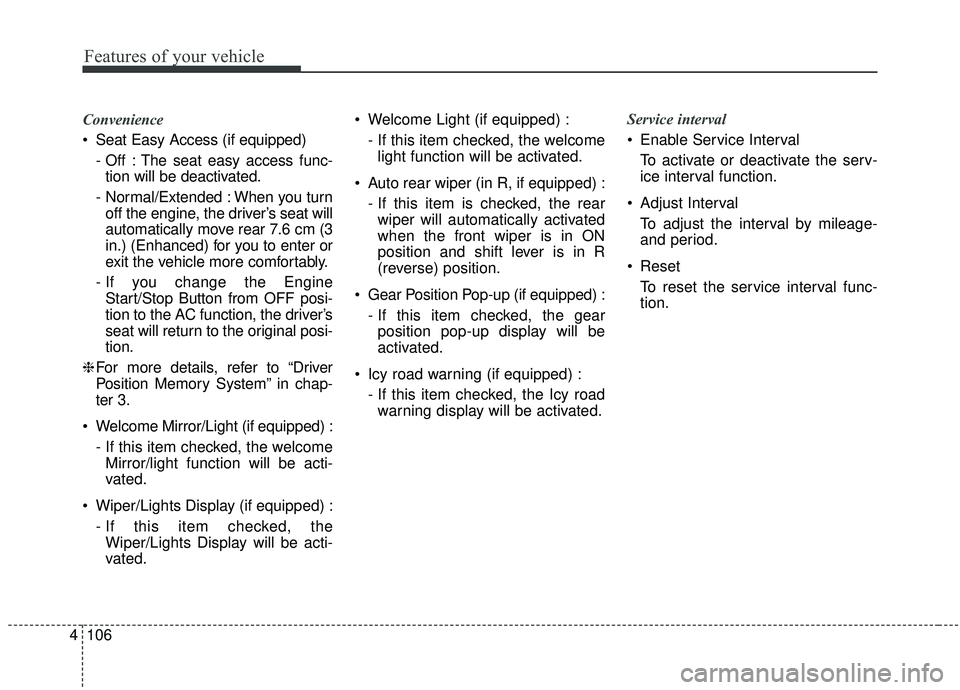
Convenience
Seat Easy Access (if equipped)
- Off : The seat easy access func-tion will be deactivated.
- Normal/Extended : When you turn off the engine, the driver’s seat will
automatically move rear 7.6 cm (3
in.) (Enhanced) for you to enter or
exit the vehicle more comfortably.
- If you change the Engine Start/Stop Button from OFF posi-
tion to the AC function, the driver’s
seat will return to the original posi-
tion.
❈ For more details, refer to “Driver
Position Memory System” in chap-
ter 3.
Welcome Mirror/Light (if equipped) : - If this item checked, the welcomeMirror/light function will be acti-
vated.
Wiper/Lights Display (if equipped) : - If this item checked, theWiper/Lights Display will be acti-
vated. Welcome Light (if equipped) :
- If this item checked, the welcomelight function will be activated.
Auto rear wiper (in R, if equipped) : - If this item is checked, the rearwiper will automatically activated
when the front wiper is in ON
position and shift lever is in R
(reverse) position.
Gear Position Pop-up (if equipped) : - If this item checked, the gearposition pop-up display will be
activated.
Icy road warning (if equipped) : - If this item checked, the Icy roadwarning display will be activated. Service interval
Enable Service Interval
To activate or deactivate the serv-
ice interval function.
Adjust Interval To adjust the interval by mileage-
and period.
Reset To reset the service interval func-
tion.
Page 229 of 593
4125
Features of your vehicle
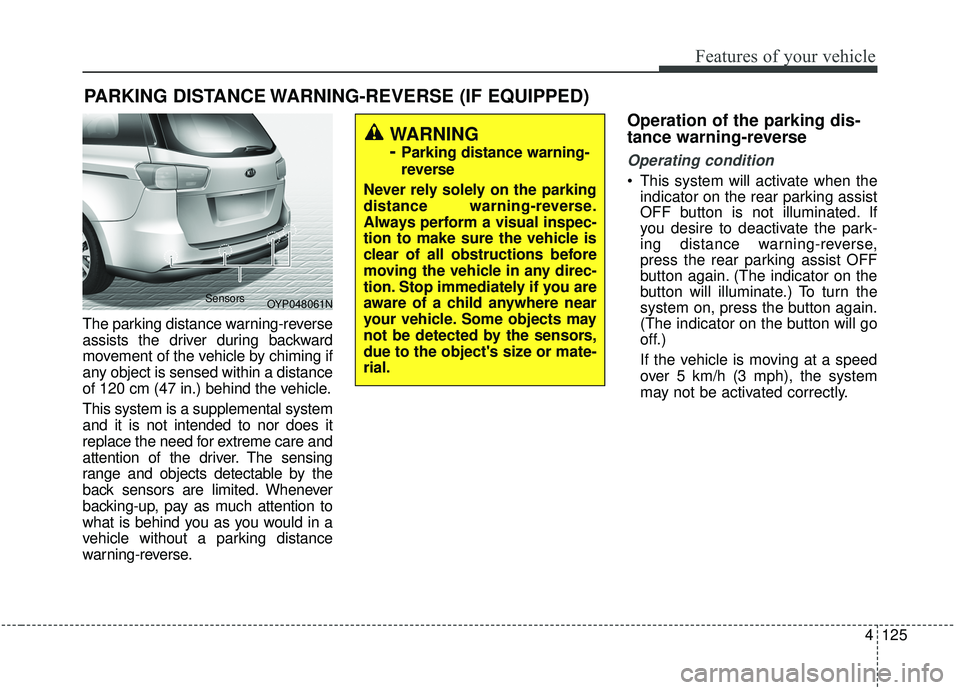
The parking distance warning-reverse
assists the driver during backward
movement of the vehicle by chiming if
any object is sensed within a distance
of 120 cm (47 in.) behind the vehicle.
This system is a supplemental system
and it is not intended to nor does it
replace the need for extreme care and
attention of the driver. The sensing
range and objects detectable by the
back sensors are limited. Whenever
backing-up, pay as much attention to
what is behind you as you would in a
vehicle without a parking distance
warning-reverse.
Operation of the parking dis-
tance warning-reverse
Operating condition
This system will activate when theindicator on the rear parking assist
OFF button is not illuminated. If
you desire to deactivate the park-
ing distance warning-reverse,
press the rear parking assist OFF
button again. (The indicator on the
button will illuminate.) To turn the
system on, press the button again.
(The indicator on the button will go
off.)
If the vehicle is moving at a speed
over 5 km/h (3 mph), the system
may not be activated correctly.
PARKING DISTANCE WARNING-REVERSE (IF EQUIPPED)
WARNING
-
Parking distance warning-
reverse
Never rely solely on the parking
distance warning-reverse.
Always perform a visual inspec-
tion to make sure the vehicle is
clear of all obstructions before
moving the vehicle in any direc-
tion. Stop immediately if you are
aware of a child anywhere near
your vehicle. Some objects may
not be detected by the sensors,
due to the object's size or mate-
rial.
OYP048061N
Sensors