rear KIA SEDONA 2019 Manual Online
[x] Cancel search | Manufacturer: KIA, Model Year: 2019, Model line: SEDONA, Model: KIA SEDONA 2019Pages: 593, PDF Size: 15.93 MB
Page 230 of 593
Features of your vehicle
126
4
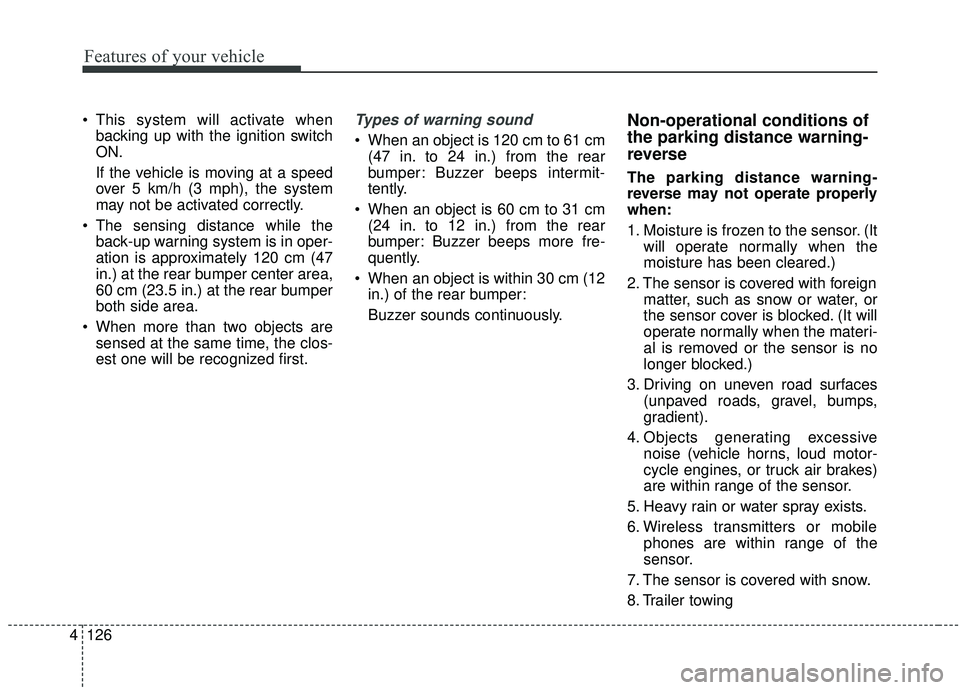
This system will activate when
backing up with the ignition switch
ON.
If the vehicle is moving at a speed
over 5 km/h (3 mph), the system
may not be activated correctly.
The sensing distance while the back-up warning system is in oper-
ation is approximately 120 cm (47
in.) at the rear bumper center area,
60 cm (23.5 in.) at the rear bumper
both side area.
When more than two objects are sensed at the same time, the clos-
est one will be recognized first.Types of warning sound
When an object is 120 cm to 61 cm(47 in. to 24 in.) from the rear
bumper: Buzzer beeps intermit-
tently.
When an object is 60 cm to 31 cm (24 in. to 12 in.) from the rear
bumper: Buzzer beeps more fre-
quently.
When an object is within 30 cm (12 in.) of the rear bumper:
Buzzer sounds continuously.
Non-operational conditions of
the parking distance warning-
reverse
The parking distance warning-
reverse may not operate properly
when:
1. Moisture is frozen to the sensor. (It will operate normally when the
moisture has been cleared.)
2. The sensor is covered with foreign matter, such as snow or water, or
the sensor cover is blocked. (It will
operate normally when the materi-
al is removed or the sensor is no
longer blocked.)
3. Driving on uneven road surfaces (unpaved roads, gravel, bumps,
gradient).
4. Objects generating excessive noise (vehicle horns, loud motor-
cycle engines, or truck air brakes)
are within range of the sensor.
5. Heavy rain or water spray exists.
6. Wireless transmitters or mobile phones are within range of the
sensor.
7. The sensor is covered with snow.
8. Trailer towing
Page 234 of 593
Features of your vehicle
130
4
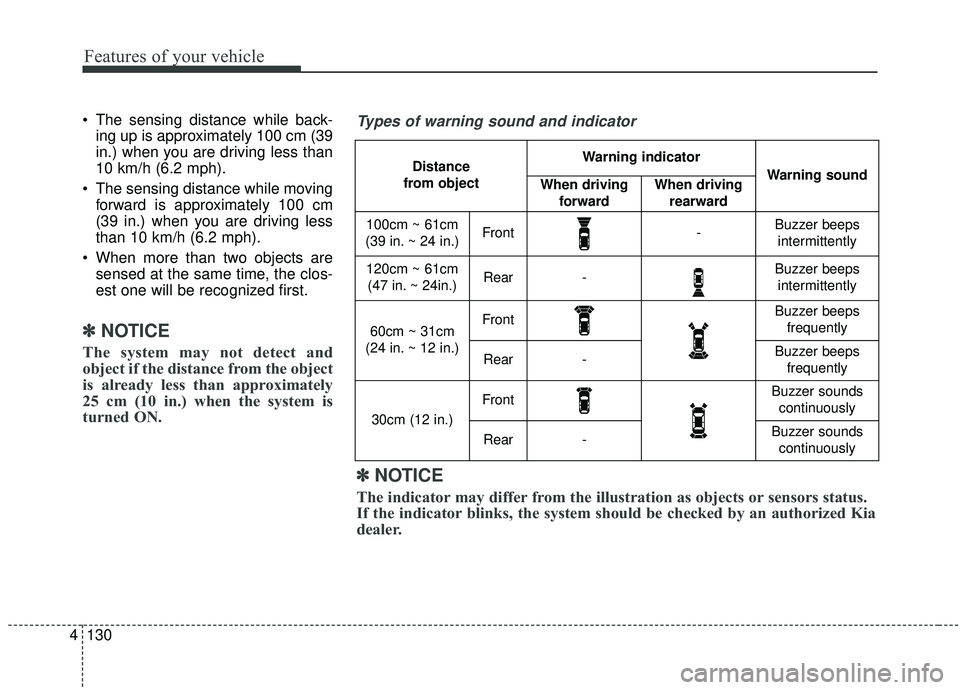
The sensing distance while back-
ing up is approximately 100 cm (39
in.) when you are driving less than
10 km/h (6.2 mph).
The sensing distance while moving forward is approximately 100 cm
(39 in.) when you are driving less
than 10 km/h (6.2 mph).
When more than two objects are sensed at the same time, the clos-
est one will be recognized first.
✽ ✽ NOTICE
The system may not detect and
object if the distance from the object
is already less than approximately
25 cm (10 in.) when the system is
turned ON.
Types of warning sound and indicator
Distance
from object Warning indicator
Warning soundWhen driving forwardWhen driving rearward
100cm ~ 61cm
(39 in. ~ 24 in.)Front-Buzzer beeps intermittently
120cm ~ 61cm(47 in. ~ 24in.)Rear-Buzzer beeps intermittently
60cm ~ 31cm
(24 in. ~ 12 in.)FrontBuzzer beeps frequently
Rear-Buzzer beeps frequently
30cm (12 in.)
FrontBuzzer sounds continuously
Rear-Buzzer sounds continuously
✽ ✽ NOTICE
The indicator may differ from the illustration as objects or sensors status.
If the indicator blinks, the system should be checked by an authorized Kia
dealer.
Page 237 of 593
4133
Features of your vehicle
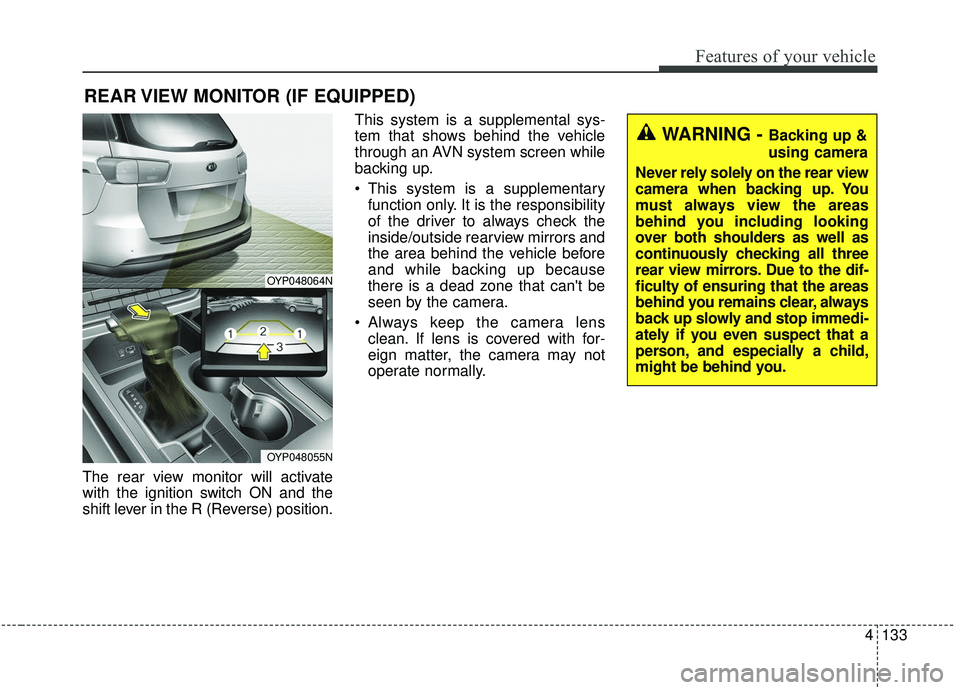
The rear view monitor will activate
with the ignition switch ON and the
shift lever in the R (Reverse) position.This system is a supplemental sys-
tem that shows behind the vehicle
through an AVN system screen while
backing up.
This system is a supplementary
function only. It is the responsibility
of the driver to always check the
inside/outside rearview mirrors and
the area behind the vehicle before
and while backing up because
there is a dead zone that can't be
seen by the camera.
Always keep the camera lens clean. If lens is covered with for-
eign matter, the camera may not
operate normally.
REAR VIEW MONITOR (IF EQUIPPED)
WARNING - Backing up &
using camera
Never rely solely on the rear view
camera when backing up. You
must always view the areas
behind you including looking
over both shoulders as well as
continuously checking all three
rear view mirrors. Due to the dif-
ficulty of ensuring that the areas
behind you remains clear, always
back up slowly and stop immedi-
ately if you even suspect that a
person, and especially a child,
might be behind you.
OYP048064N
OYP048055N
Page 249 of 593
4145
Features of your vehicle
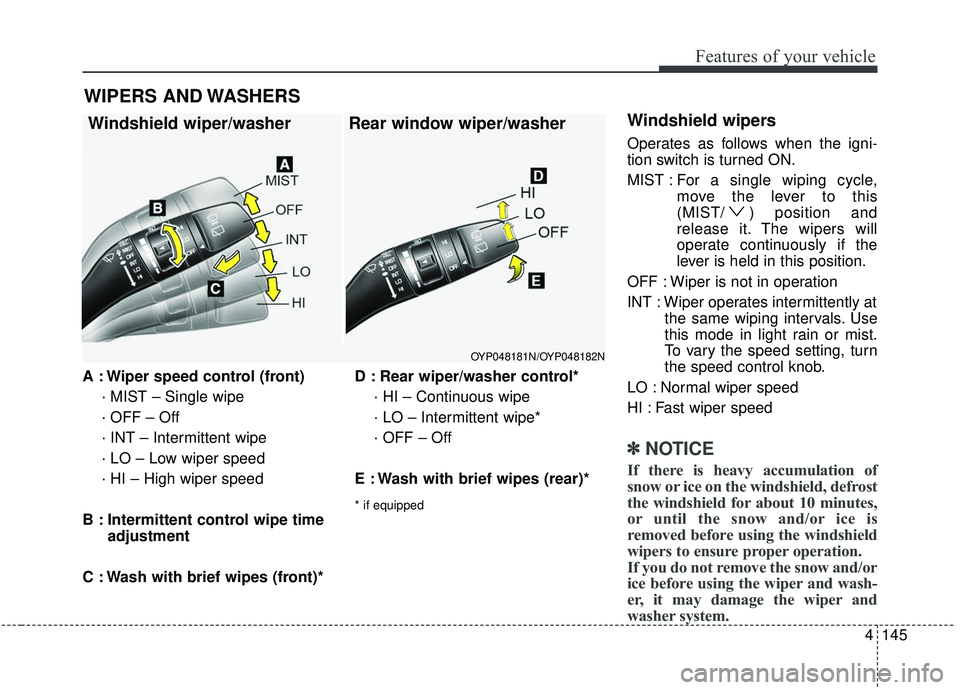
A : Wiper speed control (front)· MIST – Single wipe
· OFF – Off
· INT – Intermittent wipe
· LO – Low wiper speed
· HI – High wiper speed
B : Intermittent control wipe time adjustment
C : Wash with brief wipes (front)* D : Rear wiper/washer control*
· HI – Continuous wipe
· LO – Intermittent wipe*
· OFF – Off
E : Wash with brief wipes (rear)*
* if equipped
Windshield wipers
Operates as follows when the igni-
tion switch is turned ON.
MIST : For a single wiping cycle,
move the lever to this
(MIST/ ) position and
release it. The wipers will
operate continuously if the
lever is held in this position.
OFF : Wiper is not in operation
INT : Wiper operates intermittently at the same wiping intervals. Use
this mode in light rain or mist.
To vary the speed setting, turn
the speed control knob.
LO : Normal wiper speed
HI : Fast wiper speed
✽ ✽ NOTICE
If there is heavy accumulation of
snow or ice on the windshield, defrost
the windshield for about 10 minutes,
or until the snow and/or ice is
removed before using the windshield
wipers to ensure proper operation.
If you do not remove the snow and/or
ice before using the wiper and wash-
er, it may damage the wiper and
washer system.
WIPERS AND WASHERS
Windshield wiper/washer Rear window wiper/washer
OYP048181N/OYP048182N
Page 251 of 593
4147
Features of your vehicle
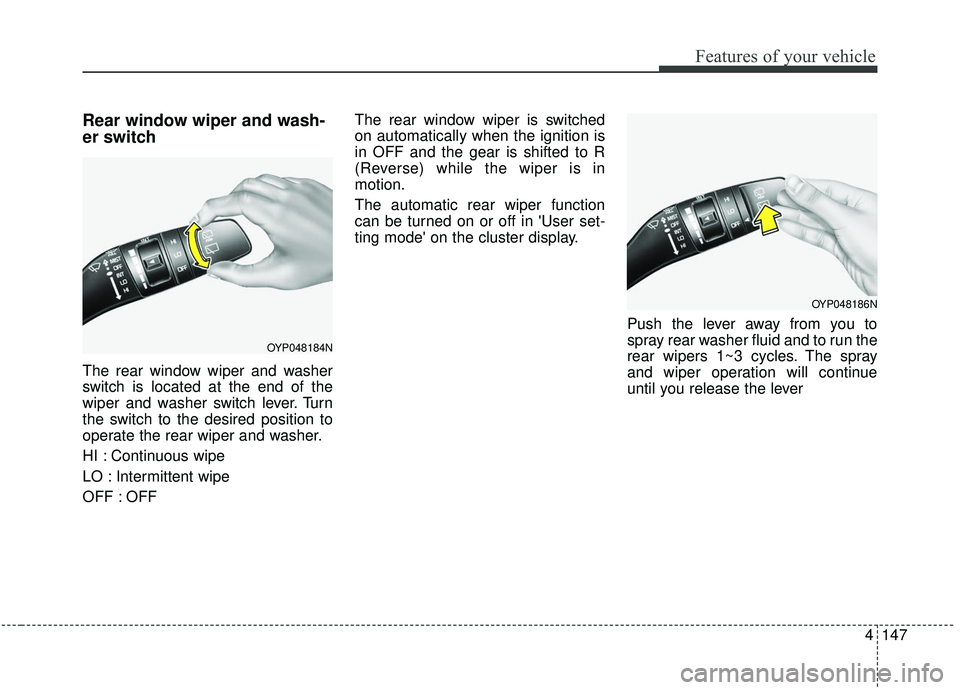
Rear window wiper and wash-
er switch
The rear window wiper and washer
switch is located at the end of the
wiper and washer switch lever. Turn
the switch to the desired position to
operate the rear wiper and washer.
HI : Continuous wipe
LO : Intermittent wipe
OFF : OFFThe rear window wiper is switched
on automatically when the ignition is
in OFF and the gear is shifted to R
(Reverse) while the wiper is in
motion.
The automatic rear wiper function
can be turned on or off in 'User set-
ting mode' on the cluster display.
Push the lever away from you to
spray rear washer fluid and to run the
rear wipers 1~3 cycles. The spray
and wiper operation will continue
until you release the lever
OYP048184N
OYP048186N
Page 255 of 593
4151
Features of your vehicle
If you want to defrost and defog the
front windshield, refer to “Windshield
defrosting and defogging” in this sec-
tion.
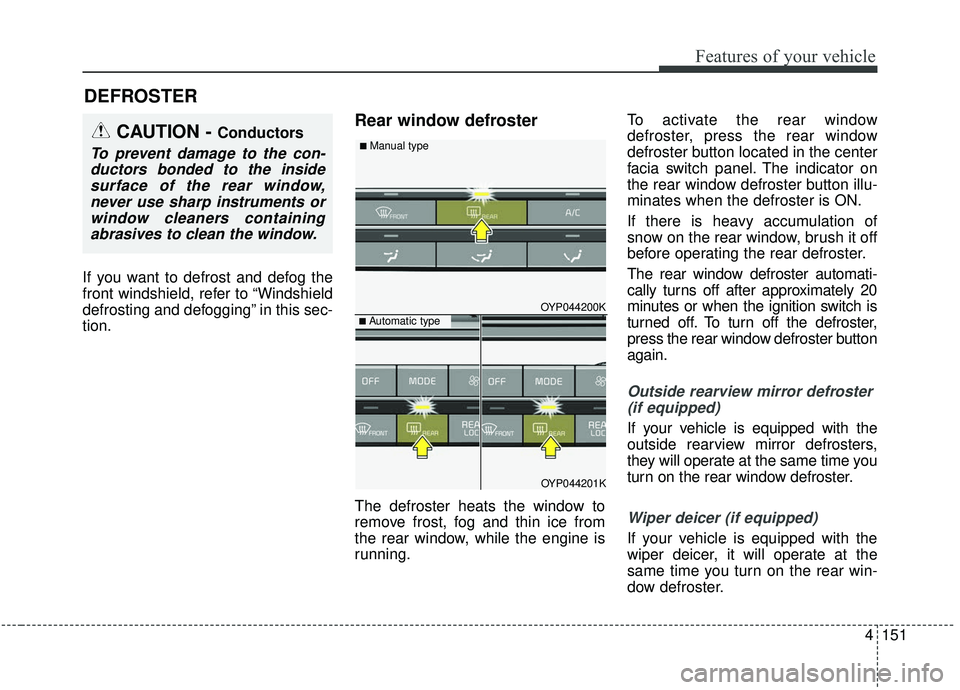
Rear window defroster
The defroster heats the window to
remove frost, fog and thin ice from
the rear window, while the engine is
running.To activate the rear window
defroster, press the rear window
defroster button located in the center
facia switch panel. The indicator on
the rear window defroster button illu-
minates when the defroster is ON.
If there is heavy accumulation of
snow on the rear window, brush it off
before operating the rear defroster.
The rear window defroster automati-
cally turns off after approximately 20
minutes or when the ignition switch is
turned off. To turn off the defroster,
press the rear window defroster button
again.
Outside rearview mirror defroster
(if equipped)
If your vehicle is equipped with the
outside rearview mirror defrosters,
they will operate at the same time you
turn on the rear window defroster.
Wiper deicer (if equipped)
If your vehicle is equipped with the
wiper deicer, it will operate at the
same time you turn on the rear win-
dow defroster.
DEFROSTER
CAUTION - Conductors
To prevent damage to the con-ductors bonded to the insidesurface of the rear window,never use sharp instruments orwindow cleaners containingabrasives to clean the window.
OYP044200K
OYP044201K
■ Automatic type
■ Manual type
Page 256 of 593
Features of your vehicle
152
4
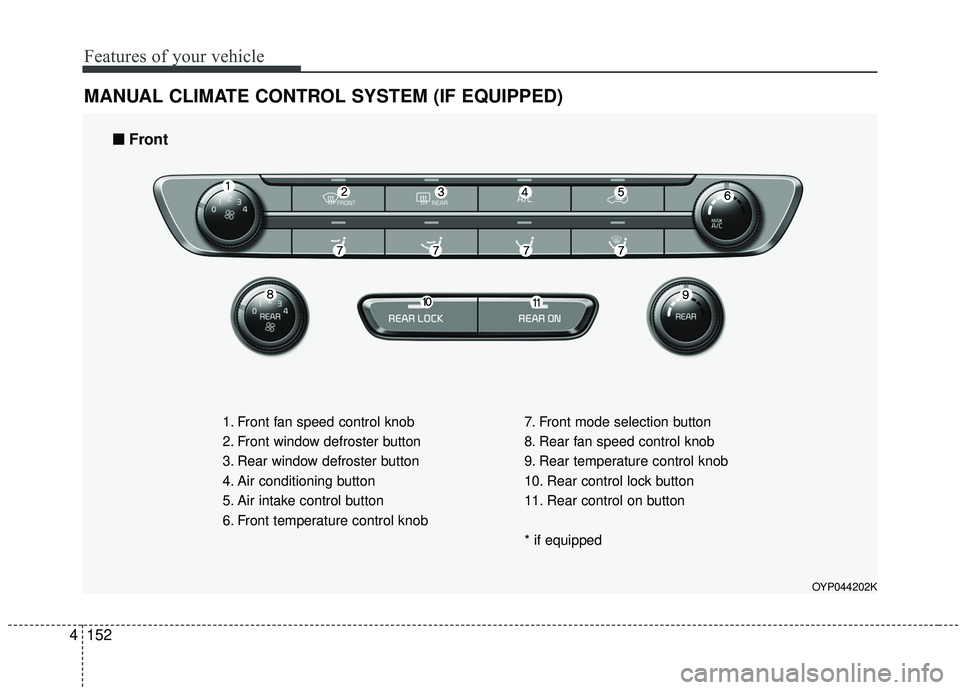
MANUAL CLIMATE CONTROL SYSTEM (IF EQUIPPED)
OYP044202K
1. Front fan speed control knob
2. Front window defroster button
3. Rear window defroster button
4. Air conditioning button
5. Air intake control button
6. Front temperature control knob 7. Front mode selection button
8. Rear fan speed control knob
9. Rear temperature control knob
10. Rear control lock button
11. Rear control on button
* if equipped
■ ■
Front
Page 263 of 593
4159
Features of your vehicle
OYP044212K
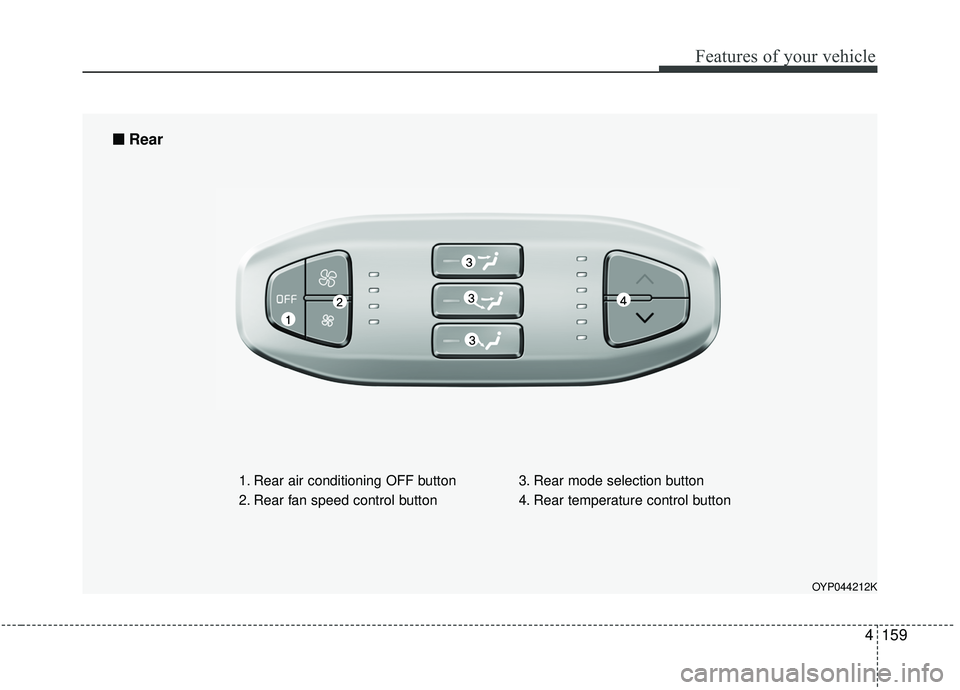
1. Rear air conditioning OFF button
2. Rear fan speed control button3. Rear mode selection button
4. Rear temperature control button
■ ■
Rear
Page 264 of 593
Features of your vehicle
160
4
Rear climate control
(if equipped)
To turn on the rear climate control
system;
From the front seat
1. Set the rear climate control selec-
tion (REAR ON) button in the front
climate control panel to the ON
position.
2. Set the rear fan speed control knob in the front climate control
panel to the desired position.
3. Set the rear temperature control knob in the front climate control
panel to the desired position.
From the rear seat
1. Set the rear climate control selec-tion (REAR ON) button in the front
climate control panel to the ON
position.
2. Set the rear climate control selec- tion (REAR LOCK) button in the
front climate control panel to the
OFF position.
3. Set the rear fan speed control but- ton on the rear climate control
panel to the desired position.
4. Set the rear temperature control button on the rear climate control
panel to the desired position.
5. Select the desired rear mode button on the rear climate control panel.
6. To turn off the rear air conditioning system, press the off button in the
rear climate control panel.
Page 265 of 593
4161
Features of your vehicle
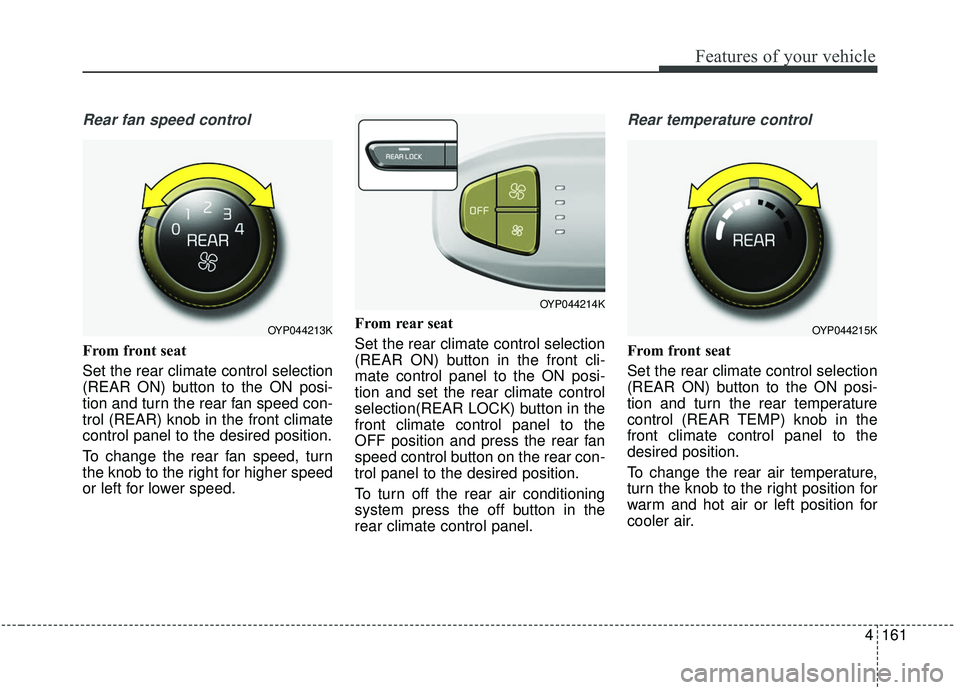
Rear fan speed control
From front seat
Set the rear climate control selection
(REAR ON) button to the ON posi-
tion and turn the rear fan speed con-
trol (REAR) knob in the front climate
control panel to the desired position.
To change the rear fan speed, turn
the knob to the right for higher speed
or left for lower speed.From rear seat
Set the rear climate control selection
(REAR ON) button in the front cli-
mate control panel to the ON posi-
tion and set the rear climate control
selection(REAR LOCK) button in the
front climate control panel to the
OFF position and press the rear fan
speed control button on the rear con-
trol panel to the desired position.
To turn off the rear air conditioning
system press the off button in the
rear climate control panel.
Rear temperature control
From front seat
Set the rear climate control selection
(REAR ON) button to the ON posi-
tion and turn the rear temperature
control (REAR TEMP) knob in the
front climate control panel to the
desired position.
To change the rear air temperature,
turn the knob to the right position for
warm and hot air or left position for
cooler air.
OYP044213K
OYP044214K
OYP044215K