ESP KIA SEDONA 2020 Owner's Guide
[x] Cancel search | Manufacturer: KIA, Model Year: 2020, Model line: SEDONA, Model: KIA SEDONA 2020Pages: 604, PDF Size: 16.24 MB
Page 369 of 604
Driving your vehicle
40
5
✽ ✽
NOTICE
• When operating the vehicle on a
dynamometer, ensure that the
ESC is turned off (ESC OFF light
illuminated). If the ESC is left on,
it may prevent the vehicle speed
from increasing, and result in false
diagnosis.
• Turning the ESC off does not affect ABS or brake system opera-
tion.
Vehicle stability management
(VSM) (if equipped)
This system provides further
enhancements to vehicle stability
and steering responses when a vehi-
cle is driving on a slippery road or a
vehicle detects changes in coeffi-
cient of friction between right wheels
and left wheels when braking.
VSM operation
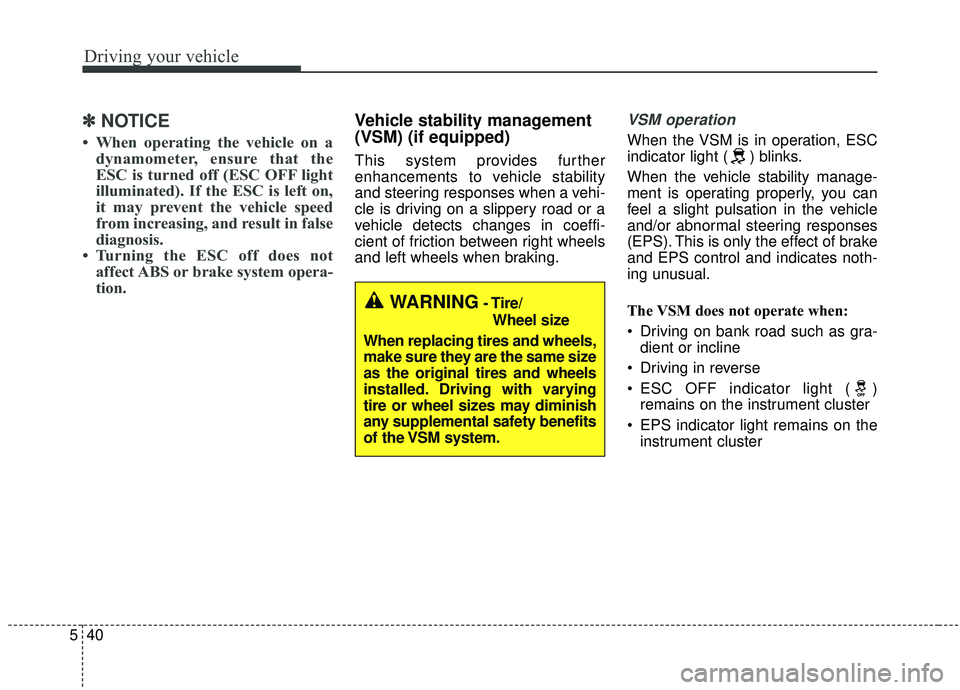
When the VSM is in operation, ESC
indicator light ( ) blinks.
When the vehicle stability manage-
ment is operating properly, you can
feel a slight pulsation in the vehicle
and/or abnormal steering responses
(EPS). This is only the effect of brake
and EPS control and indicates noth-
ing unusual.
The VSM does not operate when:
Driving on bank road such as gra-
dient or incline
Driving in reverse
ESC OFF indicator light ( ) remains on the instrument cluster
EPS indicator light remains on the instrument cluster
WARNING- Tire/
Wheel size
When replacing tires and wheels,
make sure they are the same size
as the original tires and wheels
installed. Driving with varying
tire or wheel sizes may diminish
any supplemental safety benefits
of the VSM system.
Page 370 of 604
541
Driving your vehicle
VSM operation off
If you press the ESC OFF button to
turn off the ESC, the VSM will also
cancel and the ESC OFF indicator
light ( ) illuminates.
To turn on the VSM, press the button
again. The ESC OFF indicator light
goes out.
Malfunction indicator
The VSM can be deactivated even if
you don’t cancel the VSM operation
by pressing the ESC OFF button. It
indicates that a malfunction has
been detected somewhere in the
Electric Power Steering system or
VSM system. If the ESC indicator
light ( ) or EPS warning light
remains on, take your vehicle to an
authorized Kia dealer and have the
system checked.
✽ ✽NOTICE
• The VSM is designed to function
above approximately 22 km/h (13
mph) on curves.
• The VSM is designed to function above approximately 10 km/h (6
mph) when a vehicle is braking on
a split-mu road. The split-mu road
is made of surfaces which have dif-
ferent friction forces.
The Vehicle Stability Management
system is not a substitute for safe
driving practices but a supplemen-
tary function only. It is the respon-
sibility of the driver to always check
the speed and the distance to the
vehicle ahead. Always hold the
steering wheel firmly while driving.
Your vehicle is designed to activate according to the driver’s intention,
even with installed VSM. Always
follow all the normal precautions
for driving at safe speeds for the
conditions – including driving in
clement weather and on a slippery
road.
WARNING
- Vehicle stability manage-
ment
Drive carefully even though your
vehicle has Vehicle stability man-
agement. It can only assist you in
maintaining control under cer-
tain circumstances.
WARNING
For maximum protection, always
wear your seat belt. No system,
no matter how advanced, can
compensate for all driver error
and/or driving conditions.
Always drive responsibly.
Page 377 of 604
Driving your vehicle
48
5
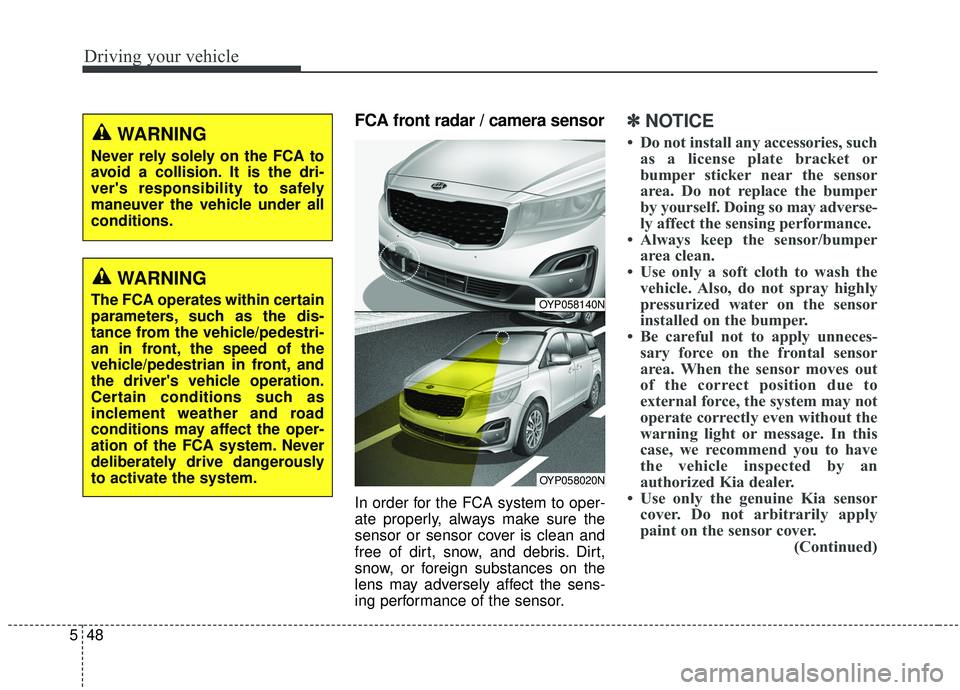
FCA front radar / camera sensor
In order for the FCA system to oper-
ate properly, always make sure the
sensor or sensor cover is clean and
free of dirt, snow, and debris. Dirt,
snow, or foreign substances on the
lens may adversely affect the sens-
ing performance of the sensor.
✽ ✽
NOTICE
• Do not install any accessories, such
as a license plate bracket or
bumper sticker near the sensor
area. Do not replace the bumper
by yourself. Doing so may adverse-
ly affect the sensing performance.
• Always keep the sensor/bumper area clean.
• Use only a soft cloth to wash the vehicle. Also, do not spray highly
pressurized water on the sensor
installed on the bumper.
• Be careful not to apply unneces- sary force on the frontal sensor
area. When the sensor moves out
of the correct position due to
external force, the system may not
operate correctly even without the
warning light or message. In this
case, we recommend you to have
the vehicle inspected by an
authorized Kia dealer.
• Use only the genuine Kia sensor cover. Do not arbitrarily apply
paint on the sensor cover. (Continued)
OYP058140N
OYP058020N
WARNING
Never rely solely on the FCA to
avoid a collision. It is the dri-
ver's responsibility to safely
maneuver the vehicle under all
conditions.
WARNING
The FCA operates within certain
parameters, such as the dis-
tance from the vehicle/pedestri-
an in front, the speed of the
vehicle/pedestrian in front, and
the driver's vehicle operation.
Certain conditions such as
inclement weather and road
conditions may affect the oper-
ation of the FCA system. Never
deliberately drive dangerously
to activate the system.
Page 379 of 604
Driving your vehicle
50
5
WARNING
The FCA is only a supplemen-
tal system for the driver’s con-
venience.
The driver still maintains
responsibility to control the
vehicle. Do not solely depend
on the FCA system. Rather,
maintain a safe braking dis-
tance, and, if necessary,
depress the brake pedal to
reduce the driving speed or
stop the vehicle.
The FCA may unnecessarily produce warning messages
and warning alarms. Due to
the sensing limitation, the
FCA may not produce warning
messages or warning alarm at
all.
When there is a malfunction with the FCA, the braking con-
trol does not operate upon
detecting a collision risk even
with other braking systems
normally operating.
(Continued)
(Continued)
The FCA operates only for thevehicle / pedestrian in front,
while driving forward. It does
not operate for any animals or
vehicles in the opposite direc-
tion.
The FCA cannot recognize cross-traffic or parked vehi-
cles presenting a sideprofile.
If the vehicle in front stops suddenly, you may have less
control of the brake system.
Therefore, always keep safe
distance between your vehicle
and the vehicle in front of you.
The FCA system may not acti- vate if the driver applies the
brake pedal to avoid risk of
collision.
(Continued)(Continued)
The FCA system does notoperate when the vehicle is in
reverse. In these cases, you
must maintain a safe braking
distance, and if necessary,
depress the brake pedal to
reduce the driving speed in
order to maintain a safe dis-
tance.
The FCA system may not acti- vate according to driving con-
dition, traffic on the road,
weather, road condition, etc.
The FCA system may not acti- vate to all types of vehicles.
Page 382 of 604
553
Driving your vehicle
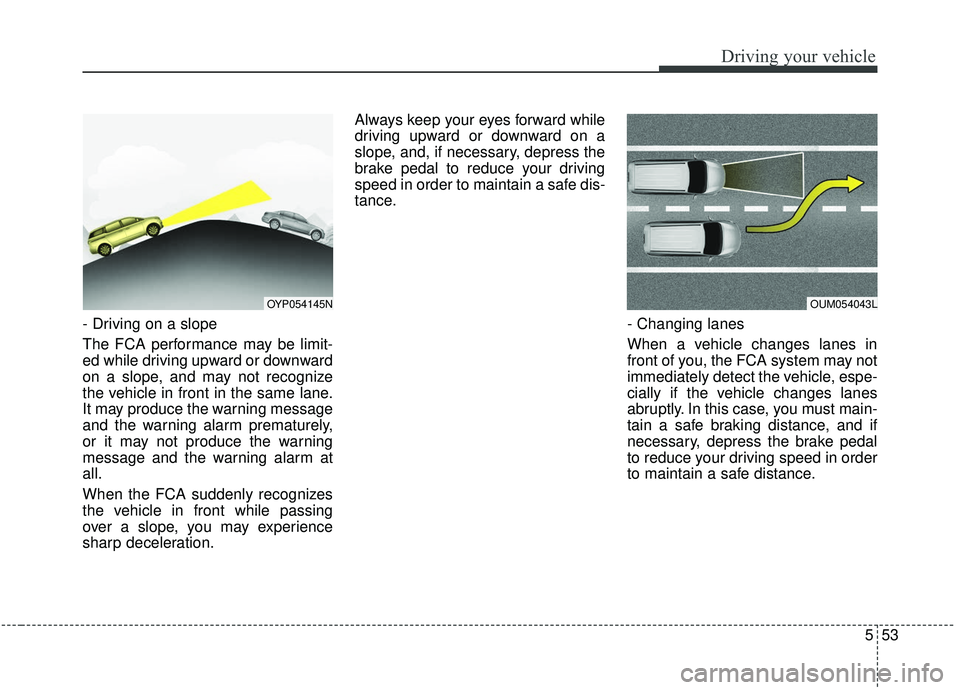
- Driving on a slope
The FCA performance may be limit-
ed while driving upward or downward
on a slope, and may not recognize
the vehicle in front in the same lane.
It may produce the warning message
and the warning alarm prematurely,
or it may not produce the warning
message and the warning alarm at
all.
When the FCA suddenly recognizes
the vehicle in front while passing
over a slope, you may experience
sharp deceleration.Always keep your eyes forward while
driving upward or downward on a
slope, and, if necessary, depress the
brake pedal to reduce your driving
speed in order to maintain a safe dis-
tance.
- Changing lanes
When a vehicle changes lanes in
front of you, the FCA system may not
immediately detect the vehicle, espe-
cially if the vehicle changes lanes
abruptly. In this case, you must main-
tain a safe braking distance, and if
necessary, depress the brake pedal
to reduce your driving speed in order
to maintain a safe distance.
OYP054145NOUM054043L
Page 385 of 604
Driving your vehicle
56
5
✽ ✽
NOTICE
The system may temporarily cancel
if there is interference by electro-
magnetic waves.
When replacing or reinstalling the
windshield, front bumper or
radar/camera after removal, have the
vehicle inspected by an authorized
Kia dealer. This device complies with Industry
Canada licence-exempt RSS stan-
dard(s).
Operation is subject to the following
conditions:
(1) This device may not cause inter-
ference, and
(2) This device must accept any
interference, including interfer-
ence that may cause undesired
operation of the device.
(3) Changes or modifications not
expressly approved by the party
responsible for compliance could
void the user's authority to oper-
ate the device.
WARNING - Testing the
FCA
Never try to test the operation
of the FCA system. Doing so
may cause severe injury or
death.
Page 390 of 604
561
Driving your vehicle
SMART CRUISE CONTROL WITH STOP & GO SYSTEM (IF EQUIPPED)
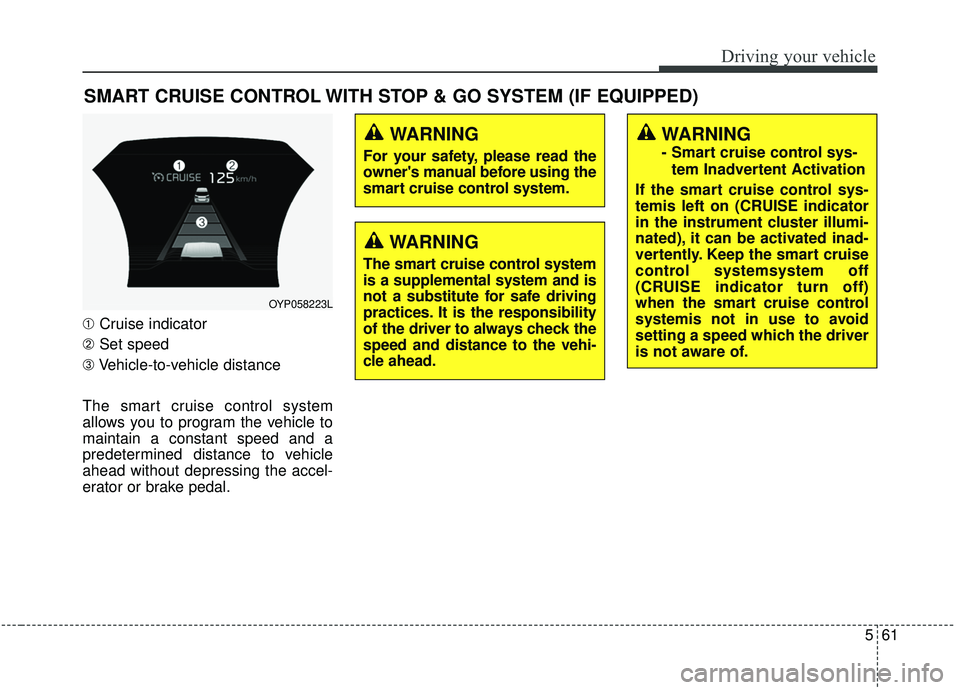
➀Cruise indicator
➁ Set speed
➂ Vehicle-to-vehicle distance
The smart cruise control system
allows you to program the vehicle to
maintain a constant speed and a
predetermined distance to vehicle
ahead without depressing the accel-
erator or brake pedal.
WARNING
- Smart cruise control sys- tem Inadvertent Activation
If the smart cruise control sys-
temis left on (CRUISE indicator
in the instrument cluster illumi-
nated), it can be activated inad-
vertently. Keep the smart cruise
control systemsystem off
(CRUISE indicator turn off)
when the smart cruise control
systemis not in use to avoid
setting a speed which the driver
is not aware of.
OYP058223L
WARNING
For your safety, please read the
owner's manual before using the
smart cruise control system.
WARNING
The smart cruise control system
is a supplemental system and is
not a substitute for safe driving
practices. It is the responsibility
of the driver to always check the
speed and distance to the vehi-
cle ahead.
Page 393 of 604
Driving your vehicle
64
5
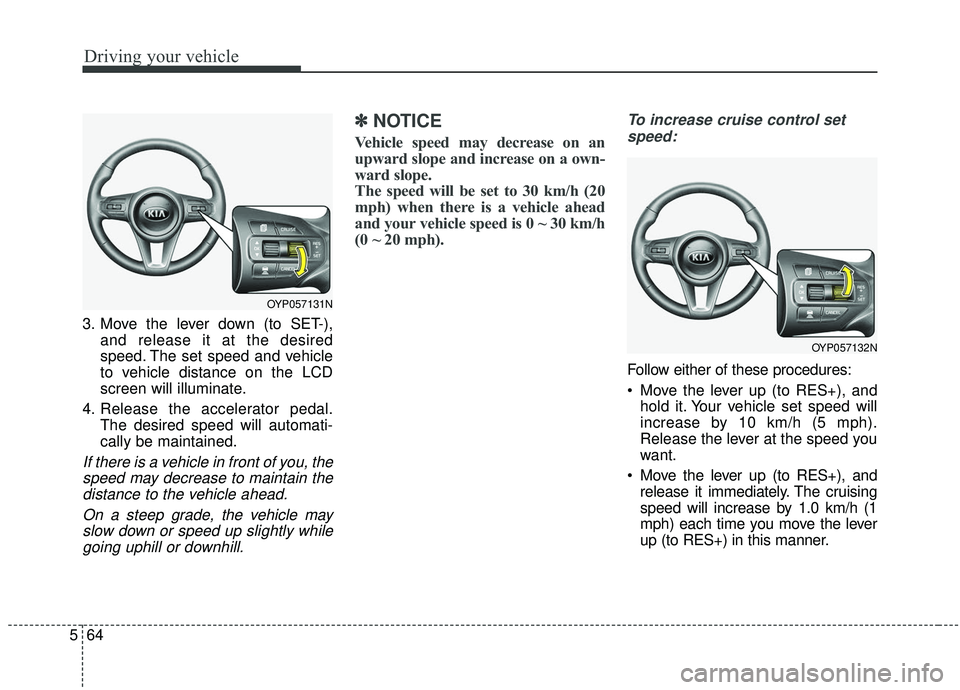
3. Move the lever down (to SET-),
and release it at the desired
speed. The set speed and vehicle
to vehicle distance on the LCD
screen will illuminate.
4. Release the accelerator pedal. The desired speed will automati-
cally be maintained.
If there is a vehicle in front of you, thespeed may decrease to maintain thedistance to the vehicle ahead.
On a steep grade, the vehicle mayslow down or speed up slightly whilegoing uphill or downhill.
✽ ✽ NOTICE
Vehicle speed may decrease on an
upward slope and increase on a own-
ward slope.
The speed will be set to 30 km/h (20
mph) when there is a vehicle ahead
and your vehicle speed is 0 ~ 30 km/h
(0 ~ 20 mph).
To increase cruise control set
speed:
Follow either of these procedures:
Move the lever up (to RES+), and hold it. Your vehicle set speed will
increase by 10 km/h (5 mph).
Release the lever at the speed you
want.
Move the lever up (to RES+), and release it immediately. The cruising
speed will increase by 1.0 km/h (1
mph) each time you move the lever
up (to RES+) in this manner.
OYP057131N
OYP057132N
Page 410 of 604
581
Driving your vehicle
This device complies with Industry
Canada licence-exempt RSS stan-
dard(s).
Operation is subject to the following
conditions:
(1) This device may not cause inter-ference, and
(2) This device must accept any interference, including interfer-
ence that may cause undesired
operation of the device.
(3) Changes or modifications not expressly approved by the party
responsible for compliance could
void the user's authority to oper-
ate the device.
Page 422 of 604

593
Driving your vehicle
A big vehicle is near such as a busor truck.
A motorcycle or bicycle is near.
A flat trailer is near.
If the vehicle has started at the same time as the vehicle next to
you and has accelerated.
When the other vehicle passes at a very fast speed.
While changing lanes.
When going down or up a steep road where the height of the lane is
different.
When the other vehicle approach- es very close.
When a trailer or carrier is installed.
When the temperature of the rear bumper is very high or low.
When the sensors are blocked by other vehicles, walls or parking-lot
pillars.
When the detected vehicle also moves back, as your vehicle drives
back.
If there are small things like a shopping cart or baby carriage. If there is a low height vehicle.
When other vehicles are close to
your vehicle.
When the vehicle in the next lane moves two lanes away from you
OR when the vehicle two lanes
away moves to the next lane from
you.
When driving through a narrow road with many plants.
When driving on wet surface.
The vehicle is driven near areas containing metal substances such
as a construction zone, railroad,
etc.
When the surrounding vehicle or structure is driving in a wide area
(desert, field, suburb etc.) This device complies with Industry
Canada licence-exempt RSS stan-
dard(s).
Operation is subject to the following
conditions:
(1) This device may not cause inter-
ference, and
(2) This device must accept any
interference, including interfer-
ence that may cause undesired
operation of the device.
(3) Changes or modifications not
expressly approved by the party
responsible for compliance could
void the user's authority to oper-
ate the device.