lock KIA Sorento 2012 2.G Manual PDF
[x] Cancel search | Manufacturer: KIA, Model Year: 2012, Model line: Sorento, Model: KIA Sorento 2012 2.GPages: 388, PDF Size: 7.56 MB
Page 189 of 388
499
Features of your vehicle
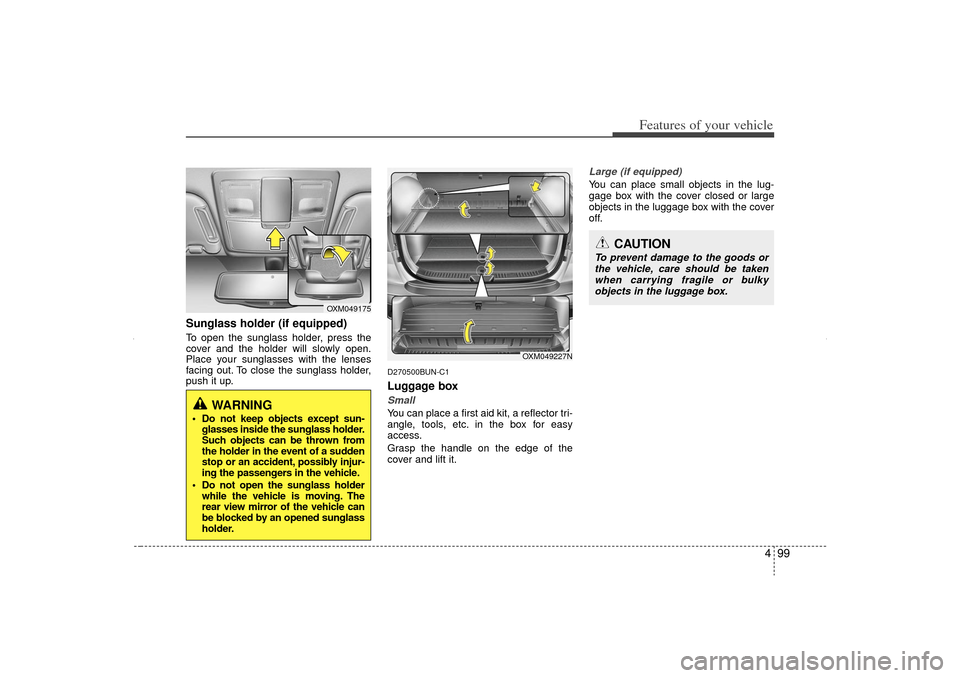
Sunglass holder (if equipped)To open the sunglass holder, press the
cover and the holder will slowly open.
Place your sunglasses with the lenses
facing out. To close the sunglass holder,
push it up.
D270500BUN-C1Luggage boxSmallYou can place a first aid kit, a reflector tri-
angle, tools, etc. in the box for easy
access.
Grasp the handle on the edge of the
cover and lift it.
Large (if equipped)You can place small objects in the lug-
gage box with the cover closed or large
objects in the luggage box with the cover
off.
OXM049175
WARNING
Do not keep objects except sun-glasses inside the sunglass holder.
Such objects can be thrown from
the holder in the event of a sudden
stop or an accident, possibly injur-
ing the passengers in the vehicle.
Do not open the sunglass holder while the vehicle is moving. The
rear view mirror of the vehicle can
be blocked by an opened sunglass
holder.
CAUTION
To prevent damage to the goods or
the vehicle, care should be taken when carrying fragile or bulkyobjects in the luggage box.
OXM049227N
XM CAN (ENG) 4(~105).QXP 4/19/2011 10:42 AM Page 99
Page 192 of 388
Features of your vehicle102
4
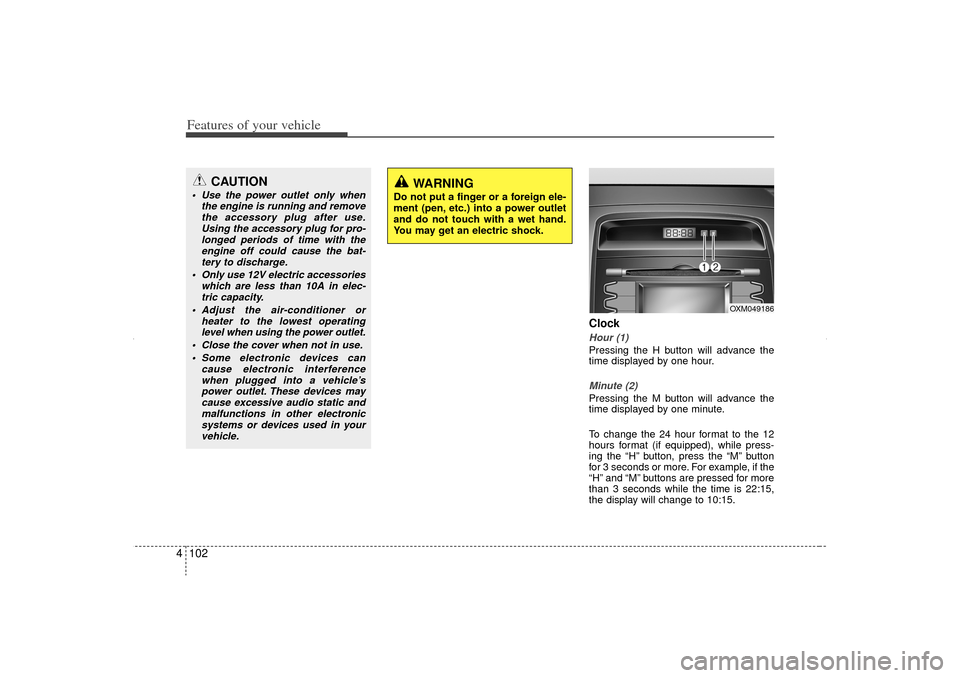
ClockHour (1)Pressing the H button will advance the
time displayed by one hour.Minute (2)Pressing the M button will advance the
time displayed by one minute.
To change the 24 hour format to the 12
hours format (if equipped), while press-
ing the “H” button, press the “M” button
for 3 seconds or more. For example, if the
“H” and “M” buttons are pressed for more
than 3 seconds while the time is 22:15,
the display will change to 10:15.
CAUTION
Use the power outlet only when
the engine is running and removethe accessory plug after use.Using the accessory plug for pro-longed periods of time with the engine off could cause the bat-tery to discharge.
Only use 12V electric accessories which are less than 10A in elec-tric capacity.
Adjust the air-conditioner or heater to the lowest operatinglevel when using the power outlet.
Close the cover when not in use. Some electronic devices can cause electronic interferencewhen plugged into a vehicle’spower outlet. These devices maycause excessive audio static and malfunctions in other electronicsystems or devices used in yourvehicle.
WARNING
Do not put a finger or a foreign ele-
ment (pen, etc.) into a power outlet
and do not touch with a wet hand.
You may get an electric shock.
OXM049186
XM CAN (ENG) 4(~105).QXP 4/19/2011 10:43 AM Page 102
Page 196 of 388
Features of your vehicle106
4✽
✽
NOTICEIf you install an after market HID head
lamp, your vehicle’s audio and electron-
ic device may malfunction.
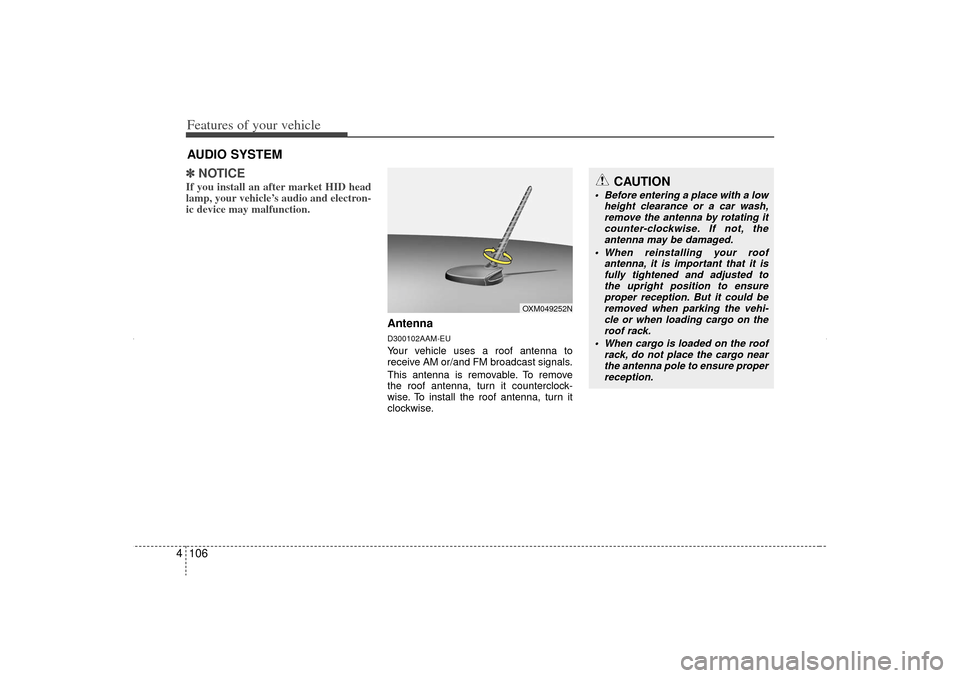
AntennaD300102AAM-EUYour vehicle uses a roof antenna to
receive AM or/and FM broadcast signals.
This antenna is removable. To remove
the roof antenna, turn it counterclock-
wise. To install the roof antenna, turn it
clockwise.
AUDIO SYSTEM
CAUTION
• Before entering a place with a low
height clearance or a car wash,remove the antenna by rotating it counter-clockwise. If not, theantenna may be damaged.
When reinstalling your roof antenna, it is important that it isfully tightened and adjusted tothe upright position to ensure proper reception. But it could beremoved when parking the vehi- cle or when loading cargo on theroof rack.
When cargo is loaded on the roof rack, do not place the cargo nearthe antenna pole to ensure proper reception.
OXM049252N
XM CAN (ENG) 4(106~audio).QXP 4/19/2011 10:48 AM Page 106
Page 199 of 388
4 109
Features of your vehicle
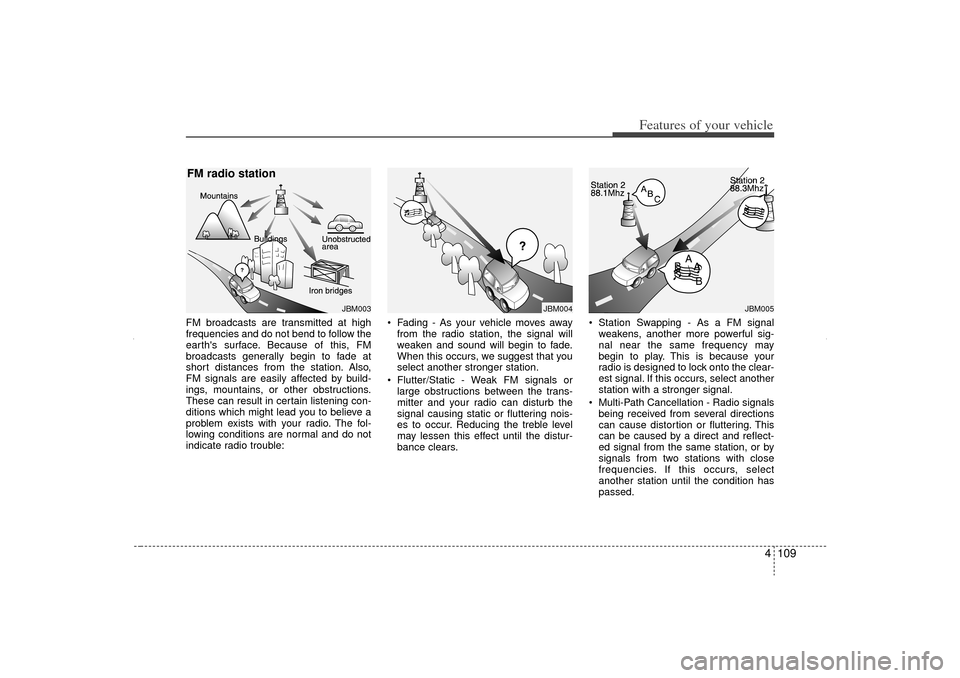
FM broadcasts are transmitted at high
frequencies and do not bend to follow the
earth's surface. Because of this, FM
broadcasts generally begin to fade at
short distances from the station. Also,
FM signals are easily affected by build-
ings, mountains, or other obstructions.
These can result in certain listening con-
ditions which might lead you to believe a
problem exists with your radio. The fol-
lowing conditions are normal and do not
indicate radio trouble: Fading - As your vehicle moves away
from the radio station, the signal will
weaken and sound will begin to fade.
When this occurs, we suggest that you
select another stronger station.
Flutter/Static - Weak FM signals or large obstructions between the trans-
mitter and your radio can disturb the
signal causing static or fluttering nois-
es to occur. Reducing the treble level
may lessen this effect until the distur-
bance clears. Station Swapping - As a FM signal
weakens, another more powerful sig-
nal near the same frequency may
begin to play. This is because your
radio is designed to lock onto the clear-
est signal. If this occurs, select another
station with a stronger signal.
Multi-Path Cancellation - Radio signals being received from several directions
can cause distortion or fluttering. This
can be caused by a direct and reflect-
ed signal from the same station, or by
signals from two stations with close
frequencies. If this occurs, select
another station until the condition has
passed.
JBM004
JBM005
JBM003
FM radio station
XM CAN (ENG) 4(106~audio).QXP 4/19/2011 10:48 AM Page 109
Page 200 of 388
Features of your vehicle110
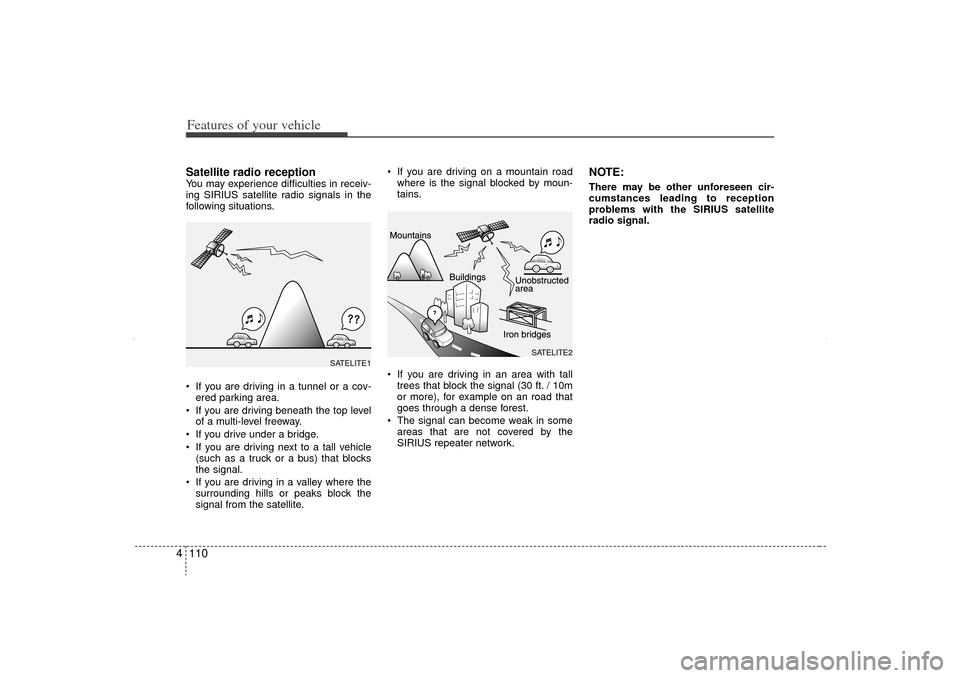
4Satellite radio receptionYou may experience difficulties in receiv-
ing SIRIUS satellite radio signals in the
following situations.
If you are driving in a tunnel or a cov-
ered parking area.
If you are driving beneath the top level of a multi-level freeway.
If you drive under a bridge.
If you are driving next to a tall vehicle (such as a truck or a bus) that blocks
the signal.
If you are driving in a valley where the surrounding hills or peaks block the
signal from the satellite. If you are driving on a mountain road
where is the signal blocked by moun-
tains.
If you are driving in an area with tall trees that block the signal (30 ft. / 10m
or more), for example on an road that
goes through a dense forest.
The signal can become weak in some areas that are not covered by the
SIRIUS repeater network.
NOTE:There may be other unforeseen cir-
cumstances leading to reception
problems with the SIRIUS satellite
radio signal.
SATELITE2
SATELITE1
XM CAN (ENG) 4(106~audio).QXP 4/19/2011 10:48 AM Page 110
Page 203 of 388
4 113
Features of your vehicle
Using RADIO, SETUP, VOLUME
and AUDIO CONTROL
1. FM/AM Selection Button The FM/AM button toggles between FM
and AM. Listed below are the paths as
the system switches from FM to AM and
back to FM.
FM/AM : FM1
➟FM2
➟AM
➟FM1...
FM : FM1
➟FM2
➟FM1...
2. Power ON/OFF Button & Volume Control Knob Turns the audio system on/off when
the ignition switch is on ACC or ON.
If the knob is turned clockwise/counter- clockwise, the volume will increase
/decrease.3. Automatic Station Seek Button When the [SEEK ] is pressed, it will
automatically tune to the next lower
station.
When the [SEEK ] is pressed, it will automatically tune to the next higher
station.
4. SCAN Button When the button is pressed, it auto-matically scans the radio stations
upwards.
The SCAN feature steps through each station, starting from the initial station,
for ten seconds.
Press the [SCAN] button again to stop the scan feature and to listen to the
currently selected channel.5. MUTE ButtonWhen the button is pressed, stops sound
and “Audio Mute” is displayed on LCD.6. Preset Selection Button Press [1]~[6] buttons less than 0.8 sec-onds to play the station saved in each
button.
Press [1]~[6] b utton more than 0.8 sec-
onds or longer to save the current sta-
tion to the respective button with a
beep.
7. TUNE Knob & Audio Control Knob Rotate the knob clockwise or counter-
clock wise to increase or decrease from
current frequency.
(AM 10 kHz, FM 200 kHz)
Pressing the button changes the BASS,
MIDDLE, TREBLE, FADER and BAL-
ANCE TUNE mode. The mode selected
is shown on the display. After selecting
each mode, rotate the Audio control knob
clockwise or counterclockwise.
BASS Control
To increase the BASS, rotate the knob
clockwise, while to decrease the BASS,
rotate the knob counterclockwise.
MIDDLE Control
To increase the MIDDLE, rotate the knob
clockwise, while to decrease the MID-
DLE, rotate the knob counterclockwise.
TREBLE Control
To increase the TREBLE, rotate the knob
clockwise, while to decrease the TRE-
BLE, rotate the knob counterclockwise.
XM CAN (ENG) 4(106~audio).QXP 4/19/2011 10:48 AM Page 113
Page 204 of 388
Features of your vehicle114
4 FADER Control
Turn the control knob clockwise to
emphasize rear speaker sound (front
speaker sound will be attenuated). When
the control knob is turned counterclock-
wise, front speaker sound will be empha-
sized (rear speaker sound will be attenu-
ated).
BALANCE Control
Rotate the knob clockwise to emphasize
right speaker sound (left speaker sound
will be attenuated). When the control
knob is turned counter clockwise, left
speaker sound will be emphasized (right
speaker sound will be attenuated).8. SETUP ButtonPress this button to enter SETUP mode,
If no action is taken for 8 seconds, it will
return to previous mode.
In “SETUP” mode, rotate the TUNE knob
to move the cursor between items, and
push the TUNE knob to select.
SCROLL
Select whether long file names are
scrolled continuously (“ON”) or just once
(“OFF”). SDVC
Select this item to turn the SDVC(Speed
Dependent Volume Control) feature ON
or OFF. If it is turned ON, volume level is
adjusted automatically according to the
vehicle speed.
P.BASS (PowerBass)
This function creates virtual sound
effects and allows adjustments to the
BASS level.
HIGH
➟MID
➟LOW
➟OFF
➟ HIGH...
SAT (if available)
Select default display of SIRIUS mode.
“Category/Channel name” or “Artist/Song
Title” can be selected.
PHONE (if available)
Select this item to enter BLUETOOTH
®
setup mode. Refer to “BLUETOOTH
PHONE OPERATION” section for
detailed information.
XM CAN (ENG) 4(106~audio).QXP 4/19/2011 10:48 AM Page 114
Page 207 of 388
4 117
Features of your vehicle
- MP3 CD : File Name, Title, Artist,Album, Folder, Total Files (Not dis-
played if the information is unavailable
on the CD or file.)10. FOLDER Moving Button Press [FOLDER ] button to move to child folder of the current folder and
display the first song in the folder.
Press TUNE/ ENTER knob to move to
the folder displayed. It will play the first
song in the folder.
Press [FOLDER ] button to move to parent folder of the current folder and
display the first song in the folder.
Press TUNE/ENTER knob to move to
the folder displayed.11. SEARCH Knob & ENTER Button Turn this knob clockwise to browse
songs after current song, or counter-
clockwise to browse songs before cur-
rent song. To play the displayed song,
press the knob.
Pressing this knob without turning enters to AUDIO CONTROL mode.
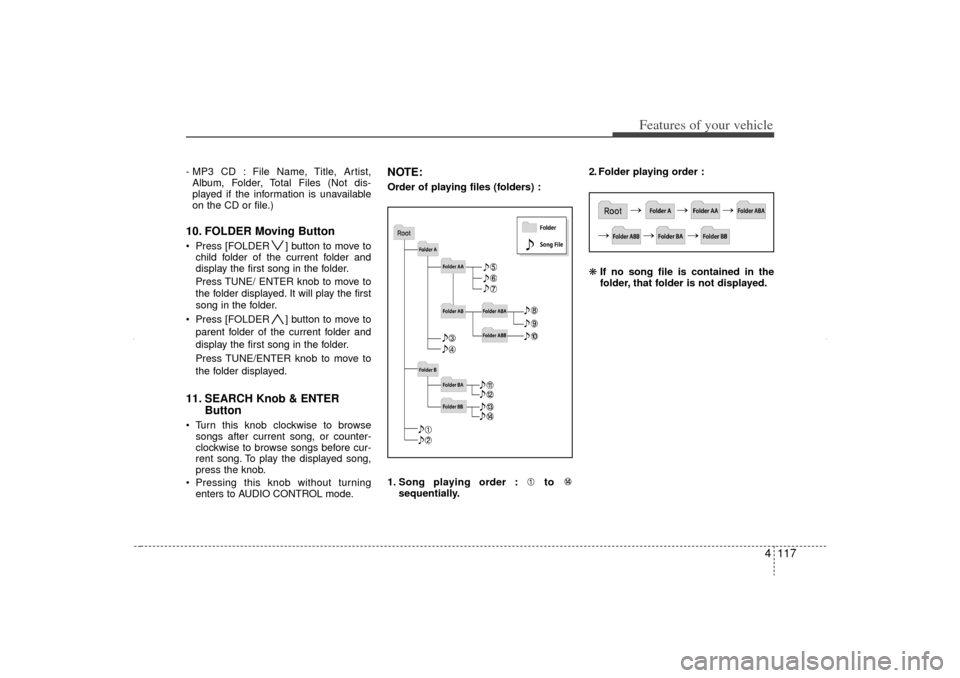
NOTE:Order of playing files (folders) :
1. Song playing order : to sequentially. 2. Folder playing order :
❋
If no song file is contained in the
folder, that folder is not displayed.
XM CAN (ENG) 4(106~audio).QXP 4/19/2011 10:48 AM Page 117
Page 211 of 388
4 121
Features of your vehicle
Using USB device1. AUX/USB Selection ButtonIf the auxiliary device is connected, it
switches to AUX or USB mode to play the
sound from the auxiliary player.
If there is no auxiliary device, then the
message "No Media" will become dis-
played on the LCD for 3 seconds and
returns to previous mode.2. TRACK Selection Button Press the [TRACK ] button for lessthan 0.8 seconds to play from the
beginning of the current song.
Press the button for less than 0.8 sec-
onds and press it again within 1 sec-
ond to move to and play the previous
song.
Press the button for 0.8 seconds or
longer to play the song in reverse
direction in fast speed.
Press the [TRACK ] button for less
than 0.8 seconds to move to the next
song. Press the button for 0.8 seconds
or longer to play the song in forward
direction in fast speed.
3. RANDOM Playback Button Press this button for less than 0.8 sec- onds to play songs randomly in current
folder.
Press this button for 0.8 seconds or longer to play songs randomly in entire
USB device.
To cancel RANDOM play, press this button again.4. REPEAT Button Press this button for less than 0.8 sec-onds to repeat current song.
Press this button for 0.8 seconds or longer to repeat all songs in current
folder.
To cancel REPEAT, press this button again.5. SCAN Selection ButtonPlays each song in the USB device for 10
seconds.
To cancel SCAN Play, press this button
again.
6. INFO ButtonDisplays the information of the file cur-
rently played in the order of FILE NAME➟ TITLE
➟ ARTIST
➟ ALBUM
➟ FOLDER
➟ TOTAL FILE
➟
NORMAL DISPLAY
➟
FILE NAME
➟… (Displays no informa-
tion if the file has no song information.)
7. SEARCH Knob & ENTER Button Turn this knob clockwise to browse
songs after current song, or counter
clockwise to browse songs before cur-
rent song. To play the displayed song,
press the knob.
Pressing this knob without turning enters to AUDIO CONTROL mode.8. FOLDER Moving Button Press [FOLDER ] button to move to
child folder of the current folder and
display the first song in the folder.
Press TUNE/ ENTER knob to move to
the folder displayed. It will play the first
song in the folder.
Press [FOLDER ] button to move to parent folder display the first song in
the folder.
Press TUNE/ENTER knob to move to
the folder displayed.
XM CAN (ENG) 4(106~audio).QXP 4/19/2011 10:48 AM Page 121
Page 214 of 388
Features of your vehicle124
4Using iPod
®
1. iPod Selection ButtonIf iPod is connected, it switches to the
iPod mode from the previous mode to
play the song files stored in the iPod.
If there is no iPod connected, then it dis-
plays the message "No Media" for 3 sec-
onds and returns to the previous mode.2. TRACK Selection Button Press the [TRACK ] b utton for less
than 0.8 seconds to play from the
beginning of the song currently played.
Press the button for less than 0.8 sec-
onds and press it again within 1 sec-
ond to move to and play the previous
track.
Press the button for 0.8 seconds or
longer to play the song in reverse
direction in fast speed.
Press the [TRACK ] button for less than 0.8 seconds to move to the next
track.
Press the button for 0.8 seconds or
longer to play the song in forward direc-
tion in fast speed.
3. REPEAT ButtonRepeats the song currently played.4. RANDOM Playback Button Press this button for less than 0.8 sec-onds to shuffle order of all songs in
current category. (Song Random)
Press this button for 0.8 seconds or longer to shuffle order of albums in cur-
rent category. (Album Random)
To cancel RANDOM Play, press this button again.5. INFO ButtonDisplays the information of the file cur-
rently played in the order of TITLE
➟
ARTIST
➟ALBUM
➟NORMAL DISPLAY
➟TITLE... (Displays no information if the
file has no song information.)6. SEARCH Knob & ENTER ButtonWhen you rotate the knob clockwise, it
will display the songs (category) ahead
of the song currently played (category in
the same level). Also, when you rotate the knob counter-
clockwise, it will display the songs (cate-
gory) before the song currently played
(category in the same level).
To listen to the song displayed in the
song category, press the button to skip to
and play the selected song.
Pressing the button changes the BASS,
MIDDLE, TREBLE, FADER and BAL-
ANCE TUNE mode. The mode selected
is shown on the display. After selecting
each mode, rotate the Audio control knob
clockwise or counterclockwise.
7. CATEGORY Selection ButtonMoves to the upper category from cur-
rently played category of the iPod.
To move to (play) the category (song)
displayed, press TUNE/ENTER knob.
You will be able to search through the
lower category of the selected category.
The order of iPod’s category is SONG,
ALBUMS, ARTISTS, GENRES, and iPod.
XM CAN (ENG) 4(106~audio).QXP 4/19/2011 10:48 AM Page 124