lock KIA Sorento 2014 3.G Manual PDF
[x] Cancel search | Manufacturer: KIA, Model Year: 2014, Model line: Sorento, Model: KIA Sorento 2014 3.GPages: 508, PDF Size: 7.59 MB
Page 237 of 508
Features of your vehicle146
4These compartments can be used to
store small items.
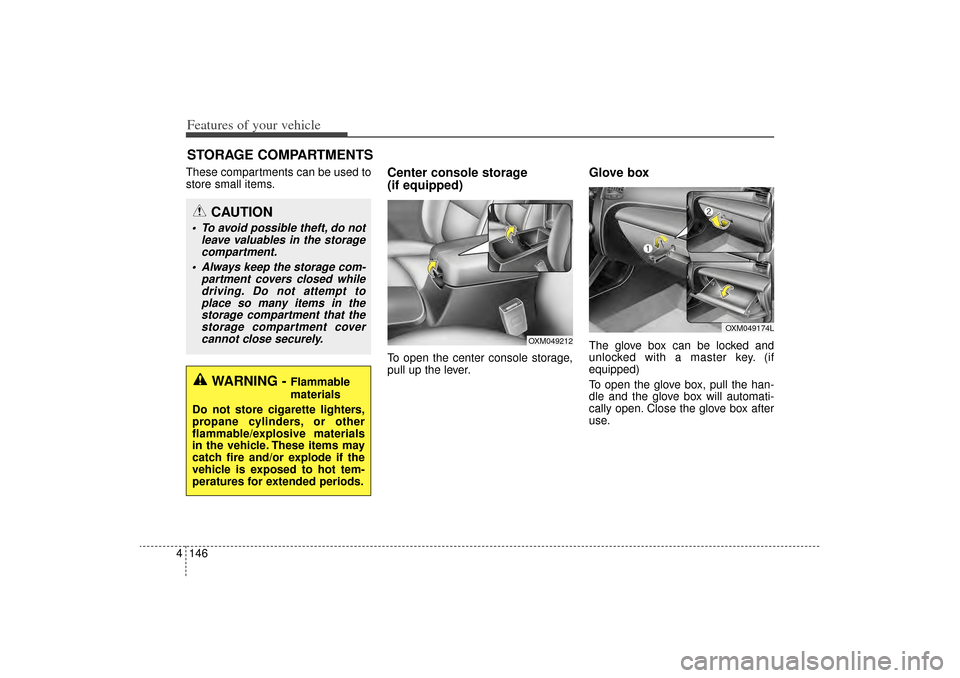
Center console storage
(if equipped)To open the center console storage,
pull up the lever.
Glove boxThe glove box can be locked and
unlocked with a master key. (if
equipped)
To open the glove box, pull the han-
dle and the glove box will automati-
cally open. Close the glove box after
use.
STORAGE COMPARTMENTS
WARNING -
Flammable
materials
Do not store cigarette lighters,
propane cylinders, or other
flammable/explosive materials
in the vehicle. These items may
catch fire and/or explode if the
vehicle is exposed to hot tem-
peratures for extended periods.
CAUTION
To avoid possible theft, do not leave valuables in the storagecompartment.
Always keep the storage com- partment covers closed whiledriving. Do not attempt toplace so many items in thestorage compartment that thestorage compartment covercannot close securely.
OXM049174L
OXM049212
XM(FL) CAN(ENG) 4a(~158).QXP 1/23/2013 3:56 PM Page 146
Page 238 of 508
4 147
Features of your vehicle
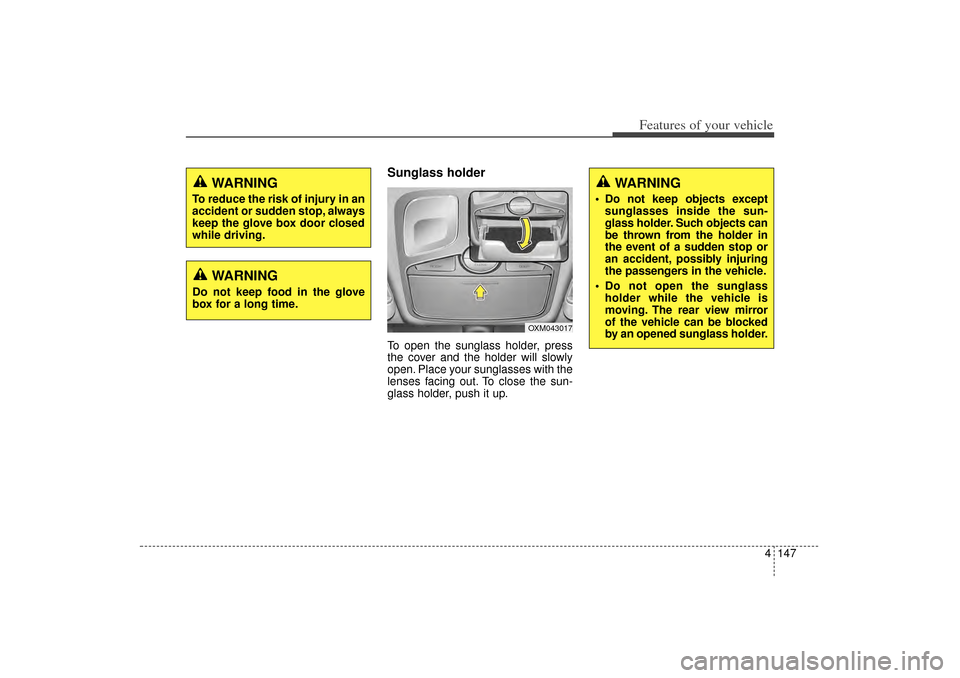
Sunglass holder To open the sunglass holder, press
the cover and the holder will slowly
open. Place your sunglasses with the
lenses facing out. To close the sun-
glass holder, push it up.
WARNING
To reduce the risk of injury in an
accident or sudden stop, always
keep the glove box door closed
while driving.
WARNING
Do not keep food in the glove
box for a long time.
OXM043017
WARNING
Do not keep objects exceptsunglasses inside the sun-
glass holder. Such objects can
be thrown from the holder in
the event of a sudden stop or
an accident, possibly injuring
the passengers in the vehicle.
Do not open the sunglass holder while the vehicle is
moving. The rear view mirror
of the vehicle can be blocked
by an opened sunglass holder.
XM(FL) CAN(ENG) 4a(~158).QXP 1/23/2013 3:56 PM Page 147
Page 245 of 508
Features of your vehicle154
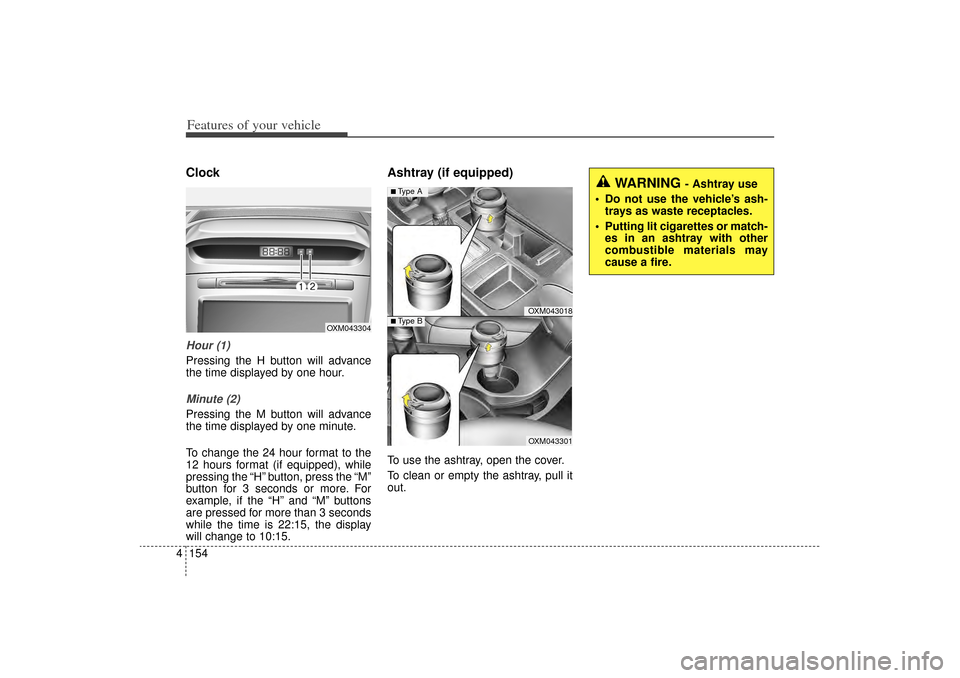
4ClockHour (1)Pressing the H button will advance
the time displayed by one hour.Minute (2)Pressing the M button will advance
the time displayed by one minute.
To change the 24 hour format to the
12 hours format (if equipped), while
pressing the “H” button, press the “M”
button for 3 seconds or more. For
example, if the “H” and “M” buttons
are pressed for more than 3 seconds
while the time is 22:15, the display
will change to 10:15.
Ashtray (if equipped)To use the ashtray, open the cover.
To clean or empty the ashtray, pull it
out.
OXM043304
WARNING
- Ashtray use
Do not use the vehicle’s ash- trays as waste receptacles.
Putting lit cigarettes or match- es in an ashtray with other
combustible materials may
cause a fire.
OXM043018OXM043301
■Type A■ Type B
XM(FL) CAN(ENG) 4a(~158).QXP 1/23/2013 3:56 PM Page 154
Page 250 of 508
4 159
Features of your vehicle
✽
✽NOTICE If you install an after market HID
head lamp, your vehicle’s audio and
electronic device may malfunction.
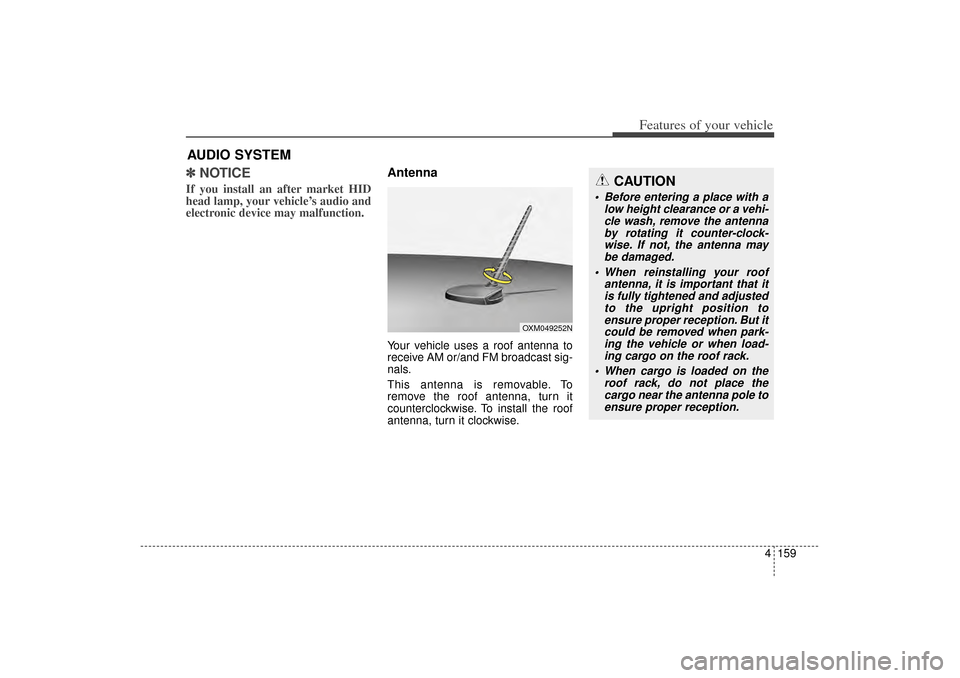
AntennaYour vehicle uses a roof antenna to
receive AM or/and FM broadcast sig-
nals.
This antenna is removable. To
remove the roof antenna, turn it
counterclockwise. To install the roof
antenna, turn it clockwise.
AUDIO SYSTEM
CAUTION
• Before entering a place with a
low height clearance or a vehi-cle wash, remove the antennaby rotating it counter-clock-wise. If not, the antenna maybe damaged.
When reinstalling your roof antenna, it is important that itis fully tightened and adjustedto the upright position toensure proper reception. But itcould be removed when park-ing the vehicle or when load-ing cargo on the roof rack.
When cargo is loaded on the roof rack, do not place thecargo near the antenna pole toensure proper reception.
OXM049252N
XM(FL) CAN(ENG) 4b(AUDIO).qxp 1/23/2013 3:42 PM Page 159
Page 254 of 508
4 163
Features of your vehicle
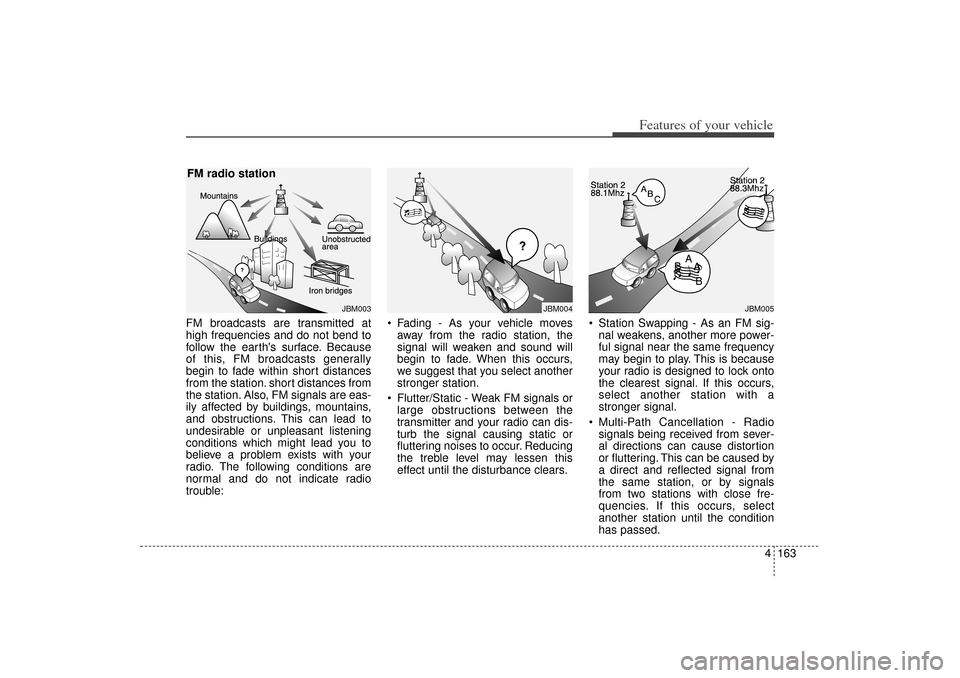
FM broadcasts are transmitted at
high frequencies and do not bend to
follow the earth's surface. Because
of this, FM broadcasts generally
begin to fade within short distances
from the station. short distances from
the station. Also, FM signals are eas-
ily affected by buildings, mountains,
and obstructions. This can lead to
undesirable or unpleasant listening
conditions which might lead you to
believe a problem exists with your
radio. The following conditions are
normal and do not indicate radio
trouble: Fading - As your vehicle moves
away from the radio station, the
signal will weaken and sound will
begin to fade. When this occurs,
we suggest that you select another
stronger station.
Flutter/Static - Weak FM signals or large obstructions between the
transmitter and your radio can dis-
turb the signal causing static or
fluttering noises to occur. Reducing
the treble level may lessen this
effect until the disturbance clears. Station Swapping - As an FM sig-
nal weakens, another more power-
ful signal near the same frequency
may begin to play. This is because
your radio is designed to lock onto
the clearest signal. If this occurs,
select another station with a
stronger signal.
Multi-Path Cancellation - Radio signals being received from sever-
al directions can cause distortion
or fluttering. This can be caused by
a direct and reflected signal from
the same station, or by signals
from two stations with close fre-
quencies. If this occurs, select
another station until the condition
has passed.
JBM003
FM radio station
JBM005
JBM004
XM(FL) CAN(ENG) 4b(AUDIO).qxp 1/23/2013 3:42 PM Page 163
Page 306 of 508

Driving your vehicle Before driving . . . . . . . . . . . . . . . . . . . . . . . . . . . . . . 5-3
Key . . . . . . . . . . . . . . . . . . . . . . . . . . . . . . . . . . . . \
. . . 5-5
Engine start/stop button . . . . . . . . . . . . . . . . . . . . . 5-8
Manual transaxle . . . . . . . . . . . . . . . . . . . . . . . . . . 5-13• Manual transaxle operation . . . . . . . . . . . . . . . . . . . . 5-13Automatic transaxle . . . . . . . . . . . . . . . . . . . . . . . . 5-16• Automatic transaxle operation . . . . . . . . . . . . . . . . . . 5-16All wheel drive (AWD) . . . . . . . . . . . . . . . . . . . . . . 5-23
Brake system . . . . . . . . . . . . . . . . . . . . . . . . . . . . . . 5-30• Power brakes . . . . . . . . . . . . . . . . . . . . . . . . . . . . . . . 5-30
• Parking brake . . . . . . . . . . . . . . . . . . . . . . . . . . . . . . . 5-32
• Anti-lock brake system (ABS) . . . . . . . . . . . . . . . . . . 5-34
• Electronic stability control (ESC) . . . . . . . . . . . . . . . 5-36
• Vehicle stability management (VSM) . . . . . . . . . . . . 5-40
• Hill-start assist control (HAC) . . . . . . . . . . . . . . . . . . 5-41Cruise control system. . . . . . . . . . . . . . . . . . . . . . . 5-44
Blind spot detection system (BSD) . . . . . . . . . . . . 5-49
Active ECO system. . . . . . . . . . . . . . . . . . . . . . . . . 5-54
Economical operation . . . . . . . . . . . . . . . . . . . . . . 5-55Special driving conditions . . . . . . . . . . . . . . . . . . . 5-57
• Hazardous driving conditions . . . . . . . . . . . . . . . . . . 5-57
• Rocking the vehicle . . . . . . . . . . . . . . . . . . . . . . . . . . . 5-58
• Smooth cornering . . . . . . . . . . . . . . . . . . . . . . . . . . . . 5-59
• Driving at night . . . . . . . . . . . . . . . . . . . . . . . . . . . . . . 5-60
• Driving in the rain . . . . . . . . . . . . . . . . . . . . . . . . . . . . 5-60
• Driving in flooded areas . . . . . . . . . . . . . . . . . . . . . . . 5-61
• Driving off-road . . . . . . . . . . . . . . . . . . . . . . . . . . . . . . 5-61
• Highway driving . . . . . . . . . . . . . . . . . . . . . . . . . . . . . 5-61Winter driving . . . . . . . . . . . . . . . . . . . . . . . . . . . . 5-63
Trailer towing . . . . . . . . . . . . . . . . . . . . . . . . . . . . . 5-66
Vehicle load limit . . . . . . . . . . . . . . . . . . . . . . . . . . 5-75
Vehicle weight . . . . . . . . . . . . . . . . . . . . . . . . . . . . . 5-81• Base curb weight . . . . . . . . . . . . . . . . . . . . . . . . . . . . . 5-81
• Vehicle curb weight . . . . . . . . . . . . . . . . . . . . . . . . . . . 5-81
• Cargo weight . . . . . . . . . . . . . . . . . . . . . . . . . . . . . . . . 5-81
• GAW (Gross axle weight) . . . . . . . . . . . . . . . . . . . . . . 5-81
• GAWR (Gross axle weight rating) . . . . . . . . . . . . . . . 5-81
• GVW (Gross vehicle weight) . . . . . . . . . . . . . . . . . . . 5-81
• GVWR (Gross vehicle weight rating) . . . . . . . . . . . . 5-81
5
XM(FL) CAN(ENG) 5.QXP 1/23/2013 3:29 PM Page 1
Page 308 of 508
53
Driving your vehicle
Before entering vehicle• Be sure that all windows, outsidemirror(s), and outside lights are
clean.
Check the condition of the tires.
Check under the vehicle for any sign of leaks.
Be sure there are no obstacles behind you if you intend to back up.
Necessary inspectionsFluid levels, such as engine oil,
engine coolant, brake fluid, and
washer fluid should be checked on a
regular basis, at the exact interval
depending on the fluid. Further
details are provided in chapter 7,
“Maintenance”.
Before starting Close and lock all doors.
Position the seat so that all con-trols are easily reached.
Adjust the inside and outside rearview mirrors.
Be sure that all lights work.
Check all gauges.
Check the operation of warning lights when the ignition switch is
turned to the ON position.
Release the parking brake and make sure the brake warning light
goes out.
For safe operation, be sure you are
familiar with your vehicle and its
equipment.
BEFORE DRIVING
WARNING
Driving while distracted can
result in a loss of vehicle con-
trol, that may lead to an acci-
dent, severe personal injury,
and death. The driver’s primary
responsibility is in the safe and
legal operation of a vehicle, and
use of any handheld devices,
other equipment, or vehicle sys-
tems which take the driver’s
eyes, attention and focus away
from the safe operation of a
vehicle or which are not permis-
sible by law should never be
used during operation of the
vehicle.
XM(FL) CAN(ENG) 5.QXP 1/23/2013 3:29 PM Page 3
Page 310 of 508
55
Driving your vehicle
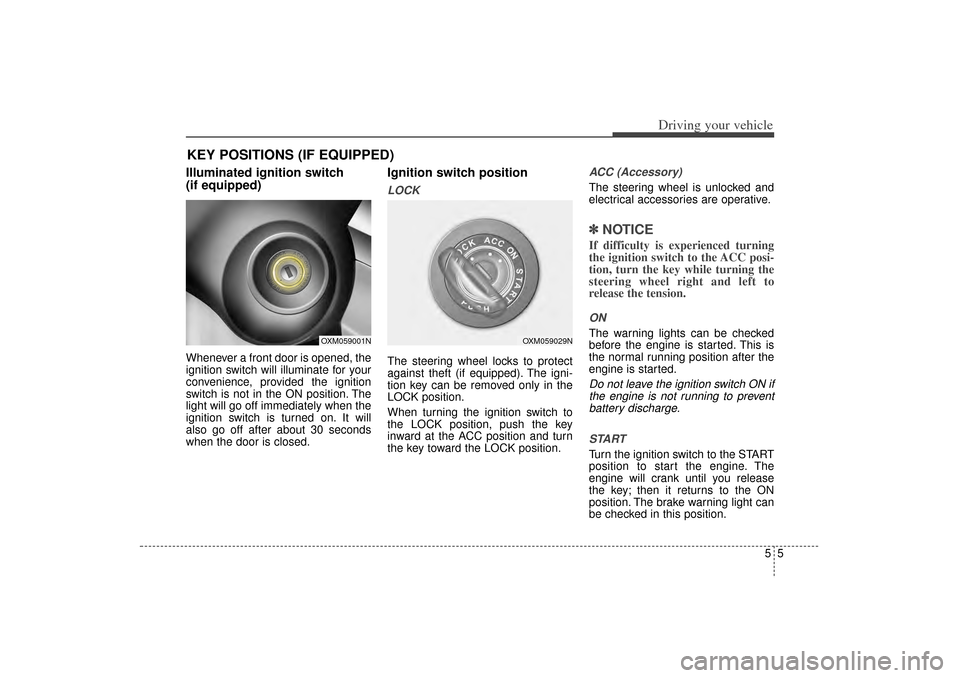
Illuminated ignition switch
(if equipped)Whenever a front door is opened, the
ignition switch will illuminate for your
convenience, provided the ignition
switch is not in the ON position. The
light will go off immediately when the
ignition switch is turned on. It will
also go off after about 30 seconds
when the door is closed.
Ignition switch positionLOCKThe steering wheel locks to protect
against theft (if equipped). The igni-
tion key can be removed only in the
LOCK position.
When turning the ignition switch to
the LOCK position, push the key
inward at the ACC position and turn
the key toward the LOCK position.
ACC (Accessory)The steering wheel is unlocked and
electrical accessories are operative.✽ ✽NOTICEIf difficulty is experienced turning
the ignition switch to the ACC posi-
tion, turn the key while turning the
steering wheel right and left to
release the tension.ONThe warning lights can be checked
before the engine is started. This is
the normal running position after the
engine is started.Do not leave the ignition switch ON if
the engine is not running to preventbattery discharge.
STARTTurn the ignition switch to the START
position to start the engine. The
engine will crank until you release
the key; then it returns to the ON
position. The brake warning light can
be checked in this position.
KEY POSITIONS (IF EQUIPPED)
OXM059001N
OXM059029N
XM(FL) CAN(ENG) 5.QXP 1/23/2013 3:29 PM Page 5
Page 311 of 508
Driving your vehicle65
Starting the engine1.Make sure the parking brake isapplied.
2. Automatic Transaxle - Place the
transaxle shift lever in P (Park).
Depress the brake pedal fully.
You can also start the engine when
the shift lever is in the N (Neutral)
position.
3.Turn the ignition switch to START and hold it there until the engine
starts (a maximum of 10 seconds),
then release the key.
WARNING
Always wear appropriate shoes
when operating your vehicle.
Unsuitable shoes (high heels,
ski boots,etc.) may interfere
with your ability to use the
brake and accelerator pedal.
WARNING
- Ignitionswitch
Never turn the ignition switch
to LOCK or ACC while the
vehicle is moving. This would
result in loss of directional
control and braking function,
which could cause an acci-
dent.
The anti-theft steering column lock is not a substitute for the
parking brake. Before leaving
the driver’s seat, always make
sure the shift lever is engaged
in 1st gear for the manual
transaxle or P (Park) for auto-
matic transaxle, set the park-
ing brake fully and shut the
engine off. Unexpected and
sudden vehicle movement
may occur if these precau-
tions are not taken.
(Continued)
(Continued)
Never reach for the ignitionswitch, or any other controls
through the steering wheel
while the vehicle is in motion.
The presence of your hand or
arm in this area could cause a
loss of vehicle control, an
accident and serious bodily
injury or death.
Do not place any movable objects around the driver’s
seat as they may move while
driving, interfere with the driv-
er and lead to an accident.
XM(FL) CAN(ENG) 5.QXP 1/23/2013 3:29 PM Page 6
Page 317 of 508
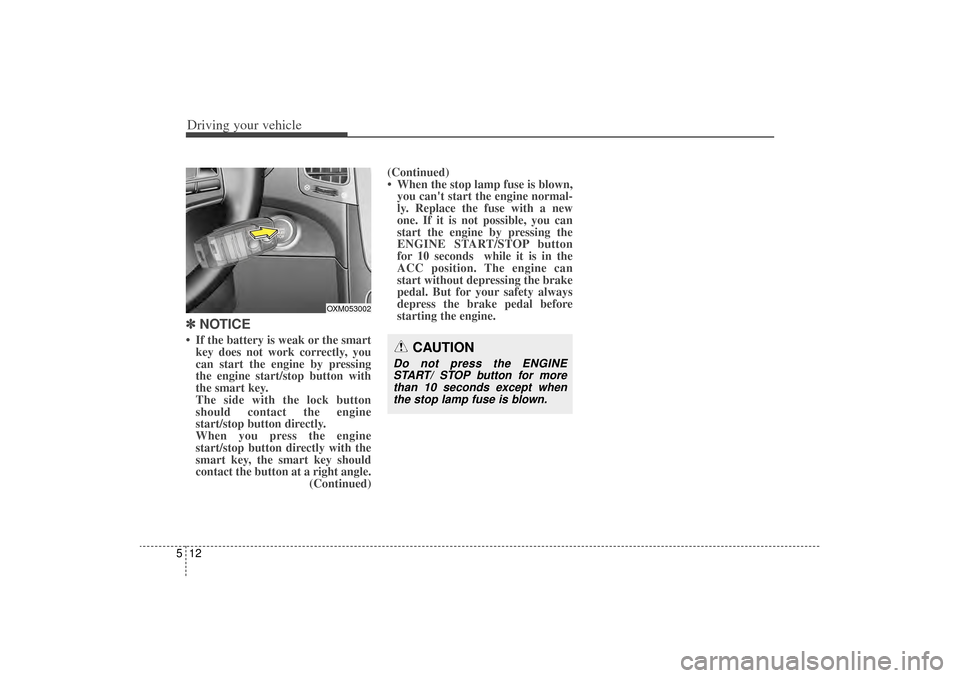
Driving your vehicle12
5✽
✽
NOTICE• If the battery is weak or the smart
key does not work correctly, you
can start the engine by pressing
the engine start/stop button with
the smart key.
The side with the lock button
should contact the engine
start/stop button directly.
When you press the engine
start/stop button directly with the
smart key, the smart key should
contact the button at a right angle. (Continued)(Continued)
• When the stop lamp fuse is blown,
you can't start the engine normal-
ly. Replace the fuse with a new
one. If it is not possible, you can
start the engine by pressing the
ENGINE START/STOP button
for 10 seconds while it is in the
ACC position. The engine can
start without depressing the brake
pedal. But for your safety always
depress the brake pedal before
starting the engine.
CAUTION
Do not press the ENGINE
START/ STOP button for morethan 10 seconds except whenthe stop lamp fuse is blown.
OXM053002
XM(FL) CAN(ENG) 5.QXP 1/23/2013 3:29 PM Page 12