ECO KIA SORENTO 2014 Navigation System Quick Reference Guide
[x] Cancel search | Manufacturer: KIA, Model Year: 2014, Model line: SORENTO, Model: KIA SORENTO 2014Pages: 236, PDF Size: 7.61 MB
Page 28 of 236
2-4
Starting Mode
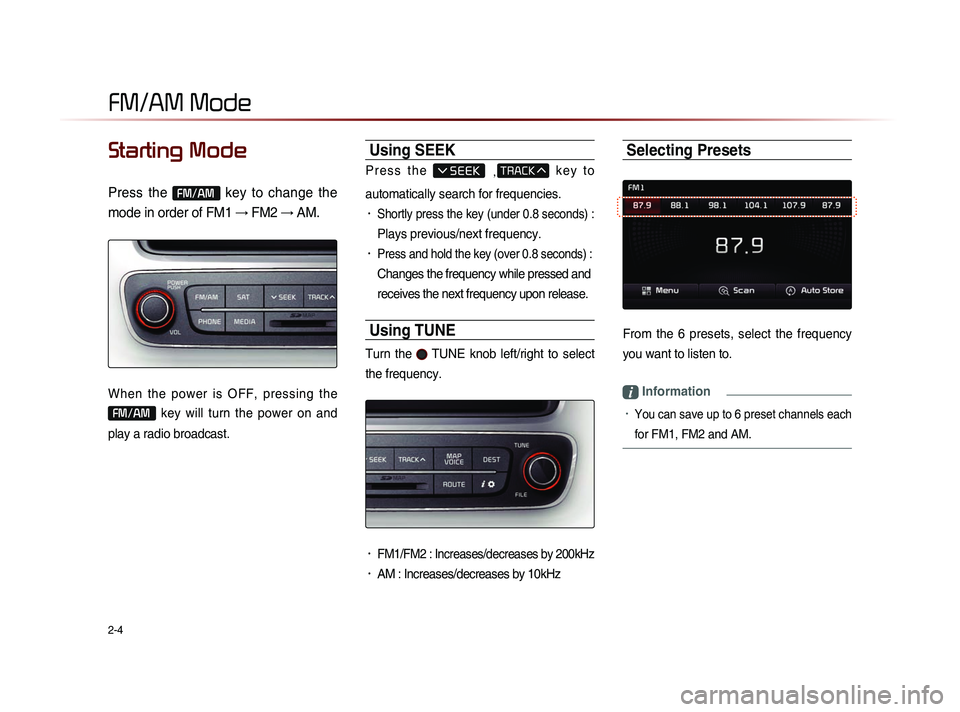
Press the FM/AM key to change the
mode in order of FM1 → FM2 → AM.
When the power is OFF, pressing the
FM/AM key will turn the power on and
play a radio broadcast.
Using SEEK
P r e s s t h e , k e y t o
automatically search for frequencies.
• Shortly press the key (under 0.8 seconds) :
Plays previous/next frequency.
• Press and hold the key (over 0.8 seconds) :
Changes the frequency while pressed and
receives the next frequency upon release.
Using TUNE
Turn the TUNE knob left/right to select
the frequency.
• FM1/FM2 : Increases/decreases by 200kHz
• AM : Increases/decreases by 10kHz
Selecting Presets
From the 6 presets, select the frequency
you want to listen to.
i Information
• You can save up to 6 preset channels each
for FM1, FM2 and AM.
FM/AM Mode
Page 29 of 236
FM/AM Mode
Audio l
2-5
Saving Radio Frequency
Saving Manually
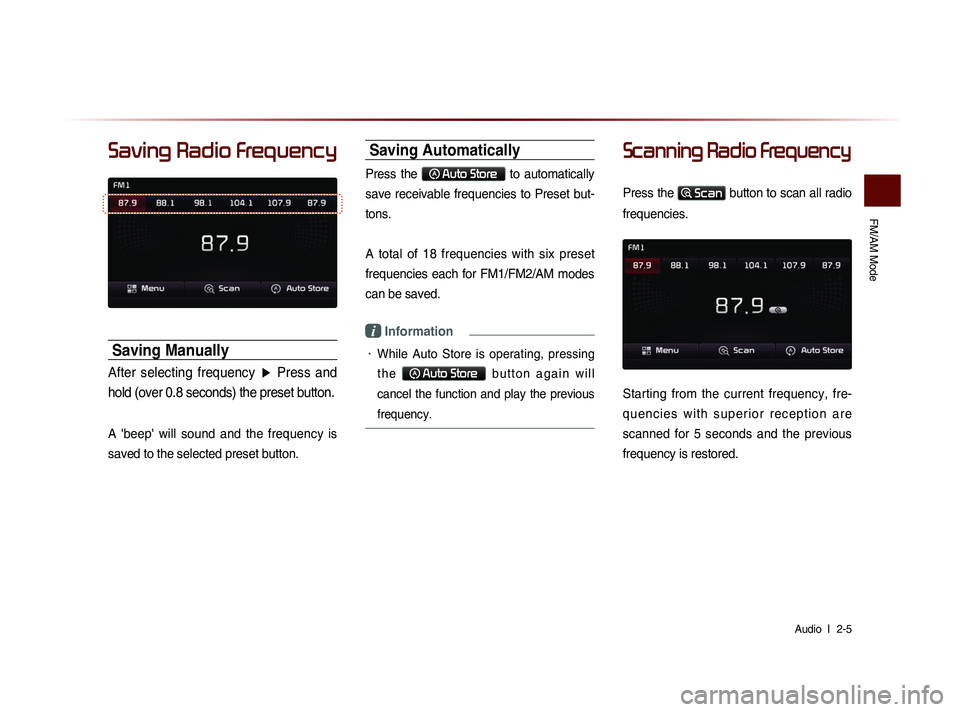
After selecting frequency ▶ Press and
hold (over 0.8 seconds) the preset button.
A 'beep' will sound and the frequency is
saved to the selected preset button.
Saving Automatically
Press the Auto Store to automatically
save receivable frequencies to Preset but-
tons.
A total of 18 frequencies with six preset
frequencies each for FM1/FM2/AM modes
can be saved.
i Information
• While Auto Store is operating, pressing
t h e
Auto Store b u t t o n a g a i n w i l l
cancel the function and play the previous
frequency.
Scanning Radio Frequency
Press the Scan button to scan all radio
frequencies.
Starting from the current frequency, fre-
q u e n c i e s w i t h s u p e r i o r r e c e p t i o n a r e
scanned for 5 seconds and the previous
frequency is restored.
Page 30 of 236
2-6
Using the Menu Buttons
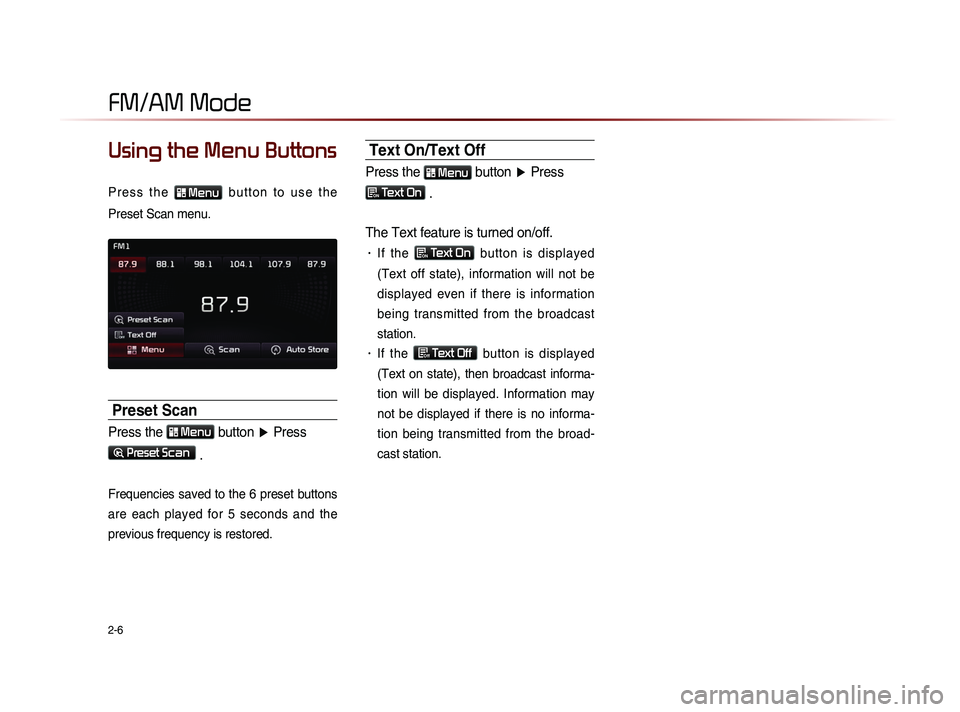
P r e s s t h e Menu b u t t o n t o u s e t h e
Preset Scan menu.
Preset Scan
Press the Menu button ▶ Press
Preset Scan
.
Frequencies saved to the 6 preset buttons
are each played for 5 seconds and the
previous frequency is restored.
Text On/Text Off
Press the Menu button ▶ Press
ON Text On .
The Text feature is turned on/off.
• If the ON Text On
button is displayed
(Text off state), information will not be
displayed even if there is information
being transmitted from the broadcast
station.
• If the Off Text Off
button is displayed
(Text on state), then broadcast informa-
tion will be displayed. Information may
not be displayed if there is no informa-
tion being transmitted from the broad-
cast station.
FM/AM Mode
Page 32 of 236
2-8
HD RadioTM Mode
Starting Mode
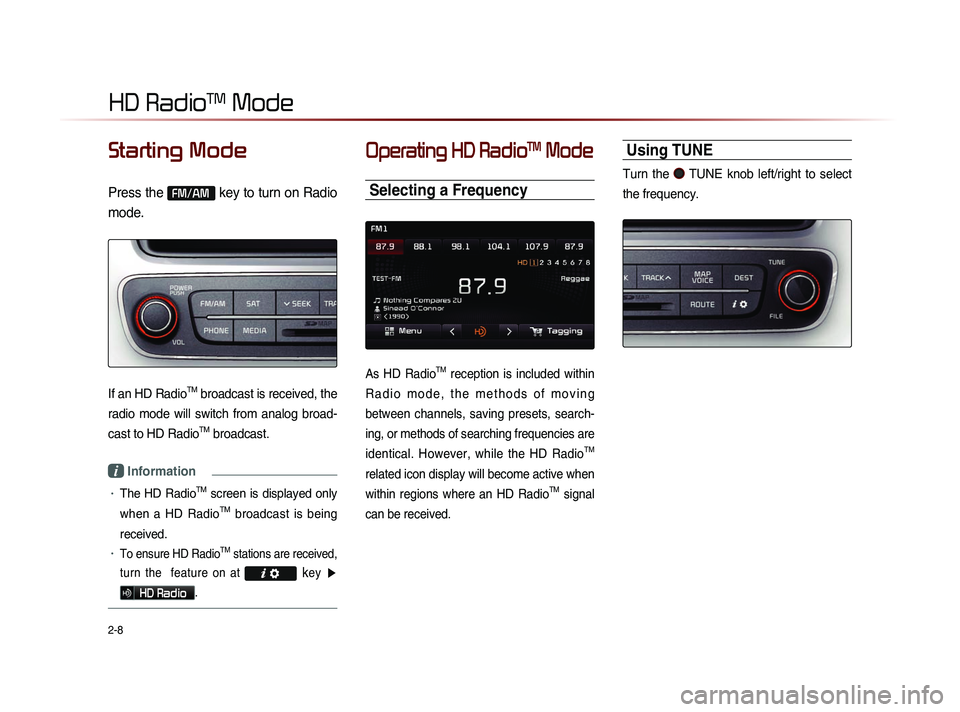
Press the FM/AM key to turn on Radio
mode.
If an HD RadioTM broadcast is received, the
radio mode will switch from analog broad-
cast to HD Radio
TM broadcast.
i Information
• The HD RadioTM screen is displayed only
when a HD Radio
TM broadcast is being
received.
• To ensure HD RadioTM stations are received,
turn the feature on at
key ▶
HD Radio.
Operating HD RadioTM Mode
Selecting a Frequency
As HD RadioTM reception is included within
R a d i o m o d e , t h e m e t h o d s o f m o v i n g
between channels, saving presets, search-
ing, or methods of searching frequencies are
identical. However, while the HD Radio
TM
related icon display will become active when
within regions where an HD Radio
TM signal
can be received.
Using TUNE
Turn the TUNE knob left/right to select
the frequency.
Page 34 of 236
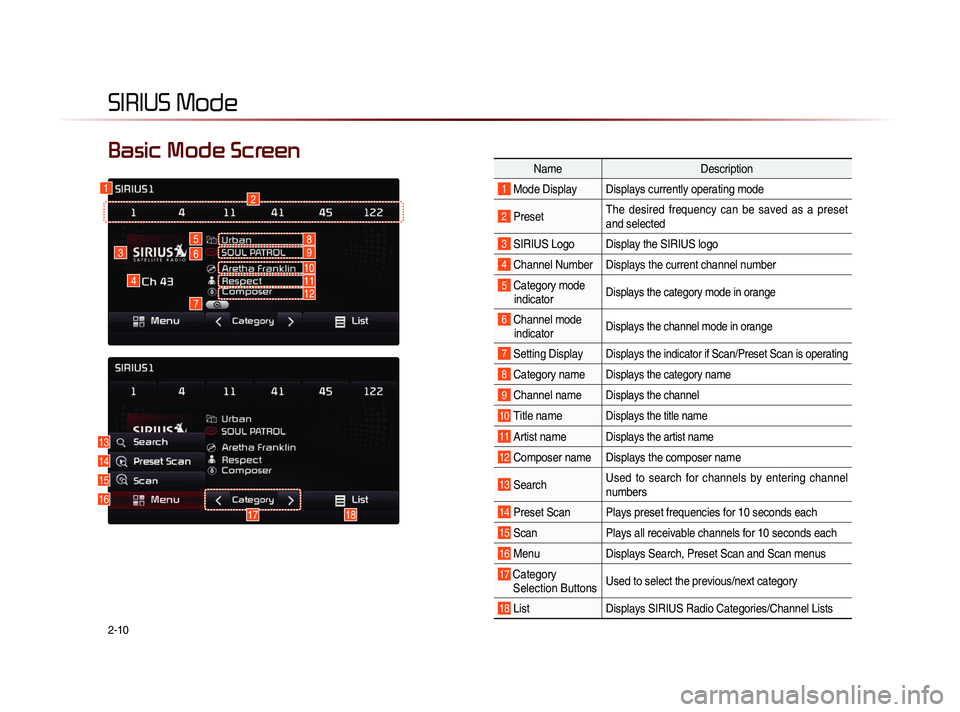
2-10
SIRIUS Mode
NameDescription
1 Mode Display Displays currently operating mode
2 PresetThe desired frequency can be saved as a preset
and selected
3 SIRIUS Logo Display the SIRIUS logo
4 Channel Number Displays the current channel number
5 Category mode
indicator Displays the category mode in orange
6 Channel modeindicator Displays the channel mode in orange
7 Setting DisplayDisplays the indicator if Scan/Preset Scan is operating
8 Category nameDisplays the category name
9 Channel nameDisplays the channel
10 Title nameDisplays the title name
11 Artist nameDisplays the artist name
12 Composer name Displays the composer name
13 Search Used to search for channels by entering channel
numbers
14 Preset Scan Plays preset frequencies for 10 seconds each
15 Scan
Plays all receivable channels for 10 seconds each
16 MenuDisplays Search, Preset Scan and Scan menus
17 Category
Selection Buttons Used to select the previous/next category
18 List
Displays SIRIUS Radio Categories/Channel Lists
Basic Mode Screen
16
4
3
12
5
6
7
13
14
15
1718
8
10
9
1112
Page 35 of 236
SIRIUS Mode
Audio l
2-11
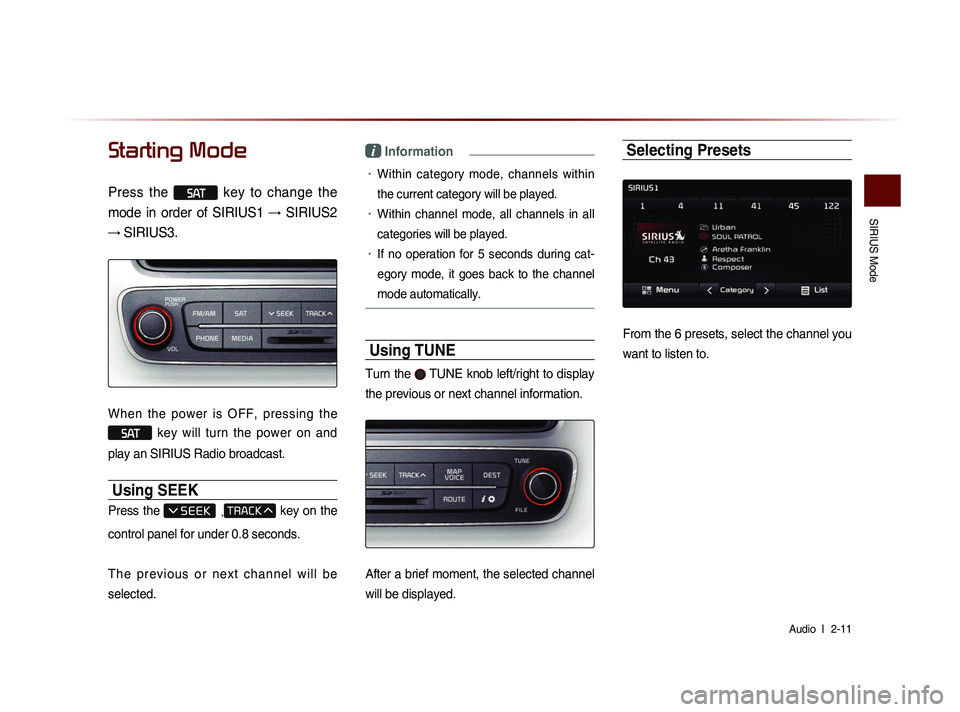
Starting Mode
Press the SAT key to change the
mode in order of SIRIUS1 → SIRIUS2
→ SIRIUS3.
When the power is OFF, pressing the
SAT key will turn the power on and
play an SIRIUS Radio broadcast.
Using SEEK
Press the , key on the
control panel for under 0.8 seconds.
T h e p r e v i o u s o r n e x t c h a n n e l w i l l b e
selected.
i Information
• Within category mode, channels within
the current category will be played.
• Within channel mode, all channels in all
categories will be played.
• If no operation for 5 seconds during cat-
eg
ory mode, it goes back to the channel
mode automatically.
Using TUNE
Turn the TUNE knob left/right to display
the previous or next channel information.
After a brief moment, the selected channel
will be displayed.
Selecting Presets
From the 6 presets, select the channel you
want to listen to.
Page 36 of 236
2-12
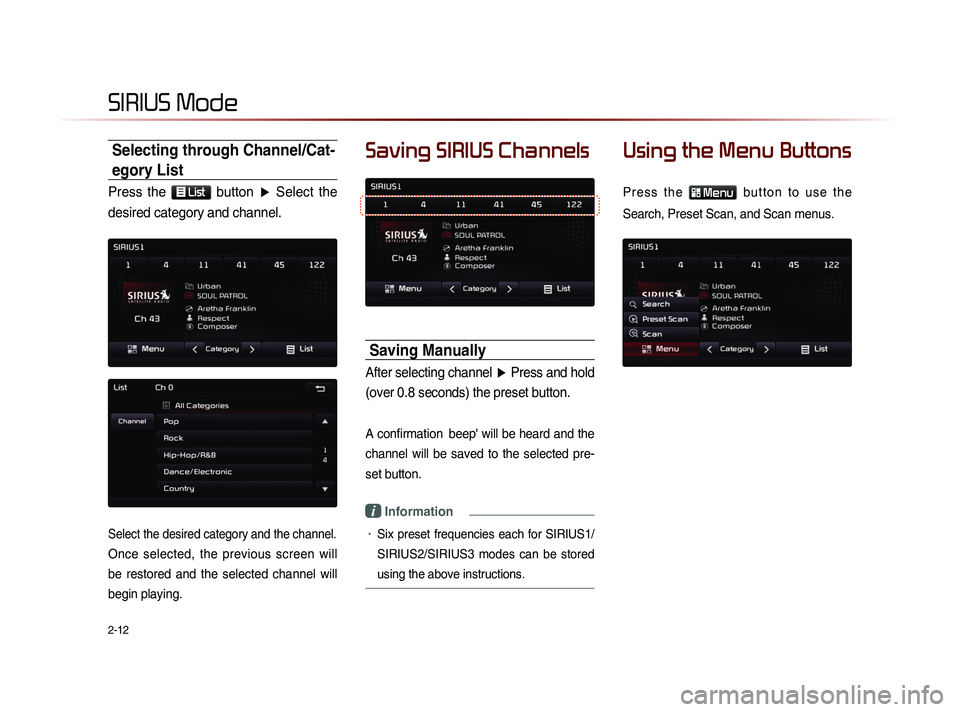
Selecting through Channel/Cat-
egory List
Press the List button ▶ Select the
desired category and channel.
Select the desired category and the channel.
Once selected, the previous screen will
be restored and the selected channel will
begin playing.
Saving SIRIUS Channels
Saving Manually
After selecting channel ▶ Press and hold
(over 0.8 seconds) the preset button.
A confirmation beep' will be heard and the
channel will be saved to the selected pre-
set button.
i Information
• Six preset frequencies each for SIRIUS1/
SIRIUS2/SIRIUS3 modes can be stored
using the above instructions.
Using the Menu Buttons
P r e s s t h e Menu b u t t o n t o u s e t h e
Search, Preset Scan, and Scan menus.
SIRIUS Mode
Page 37 of 236
SIRIUS Mode
Audio l
2-13
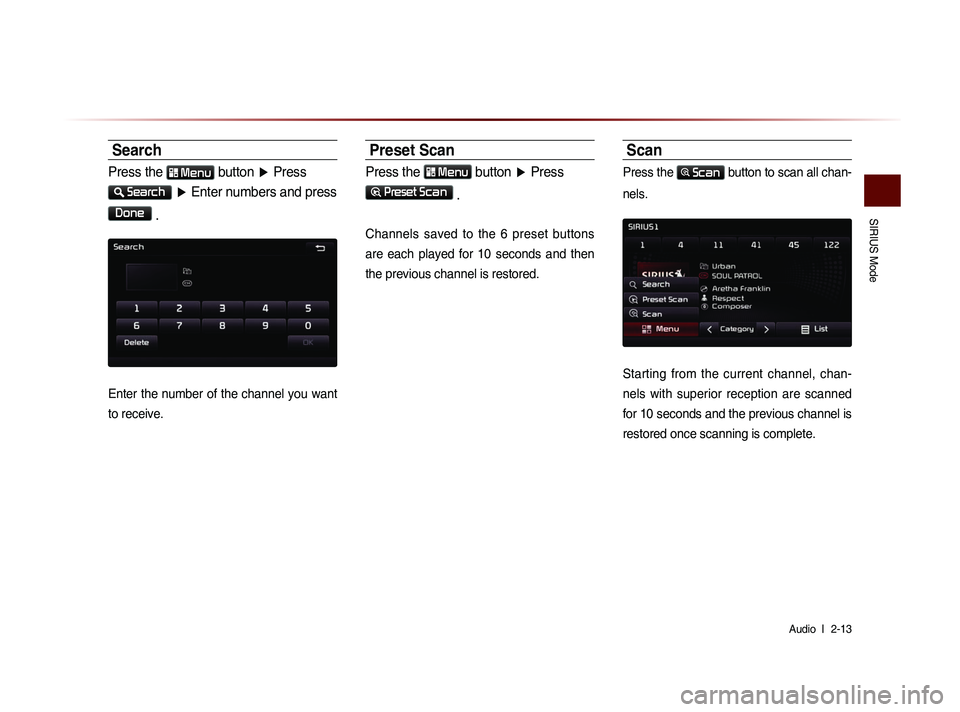
Search
Press the Menu button ▶ Press
Search
▶ Enter numbers and press
Done
.
Enter the number of the channel you want
to receive.
Preset Scan
Press the Menu button ▶ Press
Preset Scan
.
Channels saved to the 6 preset buttons
are each played for 10 seconds and then
the previous channel is restored.
Scan
Press the Scan button to scan all chan-
nels.
Starting from the current channel, chan-
nels with superior reception are scanned
for 10 seconds and the previous channel is
restored once scanning is complete.
Page 38 of 236
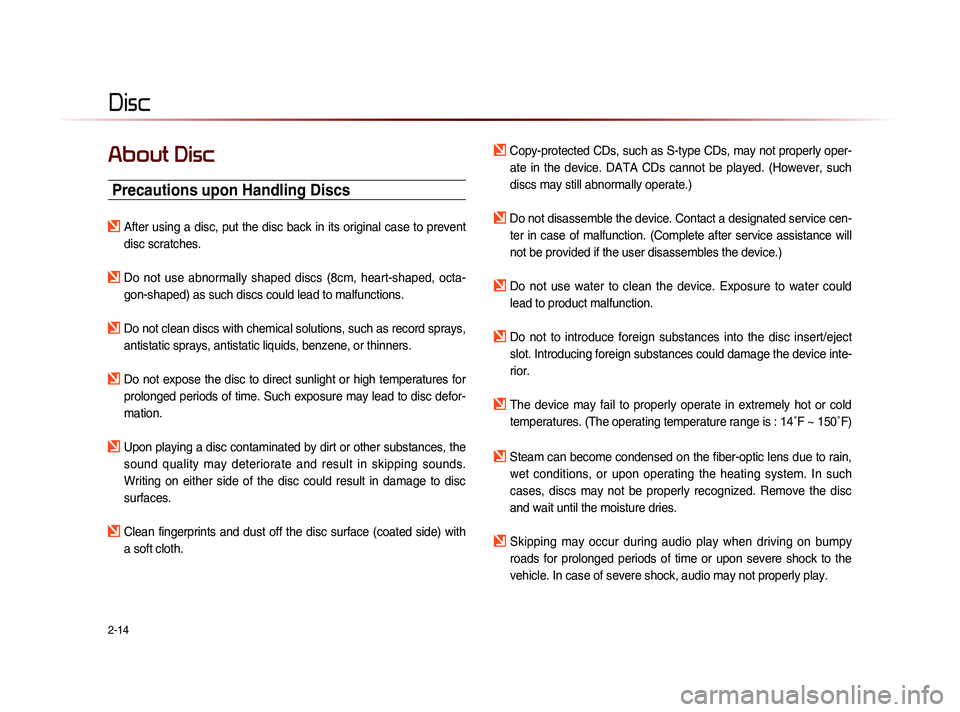
2-14
Disc
About Disc
Precautions upon Handling Discs
After using a disc, put the disc back in its original case to prevent disc scratches.
Do not use abnormally shaped discs (8cm, heart-shaped, octa-gon-shaped) as such discs could lead to malfunctions.
Do not clean discs with chemical solutions, such as record sprays, antistatic sprays, antistatic liquids, benzene, or thinners.
Do not expose the disc to direct sunlight or high temperatures for prolonged periods of time. Such exposure may lead to disc defor-
mation.
Upon playing a disc contaminated by dirt or other substances, the sound quality may deteriorate and result in skipping sounds.
Writing on either side of the disc could result in damage to disc
surfaces.
Clean fingerprints and dust off the disc surface (coated side) with a soft cloth.
Copy-protected CDs, such as S-type CDs, may not properly oper-ate in the device. DATA CDs cannot be played. (However, such
discs may still abnormally operate.)
Do not disassemble the device. Contact a designated service cen-ter in case of malfunction. (Complete after service assistance will
not be provided if the user disassembles the device.)
Do not use water to clean the device. Exposure to water could lead to product malfunction.
Do not to introduce foreign substances into the disc insert/eject slot. Introducing foreign substances could damage the device inte-
rior.
The device may fail to properly operate in extremely hot or cold temperatures. (The operating temperature range is : 14˚F ~ 150˚F)
Steam can become condensed on the fiber-optic lens due to rain, wet conditions, or upon operating the heating system. In such
cases, discs may not be properly recognized. Remove the disc
and wait until the moisture dries.
Skipping may occur during audio play when driving on bumpy
roads for prolonged periods of time or upon severe shock to the
vehicle. In case of severe shock, audio may not properly play.
Page 39 of 236
Disc
Audio l
2-15
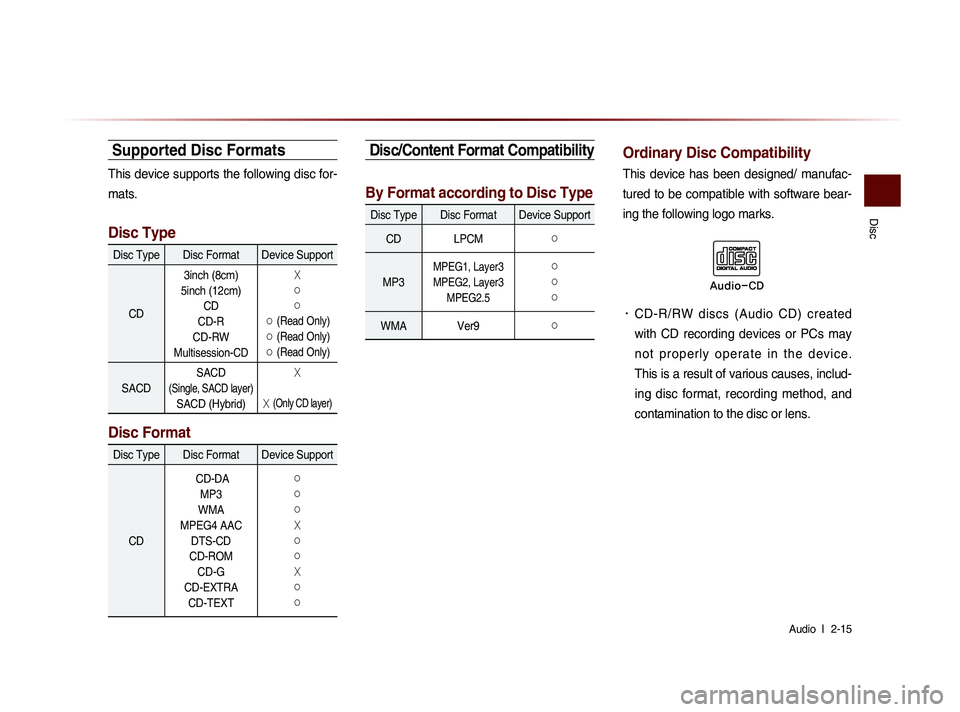
Supported Disc Formats
This device supports the following disc for-
mats.
Disc Type
Disc Type Disc Format Device Support
CD 3inch (8cm)
5inch (12cm) CD
CD-R
CD-RW
Multisession-CD
X
○
○
○ (Read Only)
○ (Read Only)
○ (Read Only)
SACD SACD (Single, SACD layer)
SACD (Hybrid)
X
X (Only CD layer)
Disc Format
Disc Type Disc Format Device Support
CD CD-DA
MP3
WMA
MPEG4 AAC DTS-CD
CD-ROM CD-G
CD-EXTRA CD-TEXT
○
○
○
X
○
○
X
○
○
Disc/Content Format Compatibility
By Format according to Disc Type
Disc Type Disc Format Device Support
CD LPCM
○
MP3
MPEG1, Layer3
MPEG2, Layer3 MPEG2.5 ○
○
○
WMA Ver9○
Ordinary Disc Compatibility
This device has been designed/ manufac-
tured to be compatible with software bear-
ing the following logo marks.
• CD-R/RW discs (Audio CD) created
with CD recording devices or PCs may
n o t p r o p e r l y o p e r a t e i n t h e d e v i c e .
This is a result of various causes, includ-
ing disc format, recording method, and
contamination to the disc or lens.
Audio-CD