ECO KIA SORENTO 2014 Navigation System Quick Reference Guide
[x] Cancel search | Manufacturer: KIA, Model Year: 2014, Model line: SORENTO, Model: KIA SORENTO 2014Pages: 236, PDF Size: 7.61 MB
Page 111 of 236
Using the Navigation
Navigation l
3-29
Avoid Area
Press the ROUTE
key ▶Press
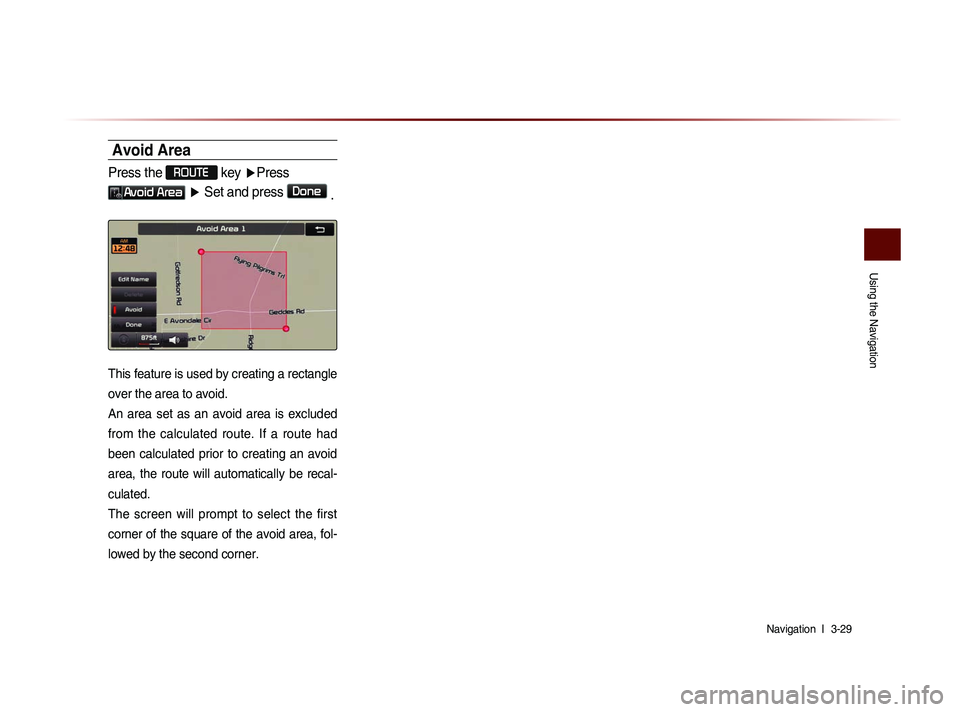
Avoid Area ▶ Set and press Done
.
This feature is used by creating a rectangle
over the area to avoid.
An area set as an avoid area is excluded
from the calculated route. If a route had
been calculated prior to creating an avoid
area, the route will automatically be recal-
culated.
The screen will prompt to select the first
corner of the square of the avoid area, fol-
lowed by the second corner.
Page 117 of 236
Bluetooth® Handsfree l
4-3
Before Use
CAUTIONS upon Connecting
Bluetooth
® Phone
Before connecting the head unit with the mobile phone, check to see that the mobile phone supports Bluetooth® features.
Even if the phone supports Bluetooth® Wireless Technology, the
phone will not be found during device searches if the phone has
been set to hidden state or the Bluetooth
® power is turned off.
Disable the hidden state or turn on the Bluetooth® power prior to
searching/connecting with the head unit.
If Auto Connection is used, the Bluetooth® phone is automatically
connected when the ignition is turned on, making it unnecessary to
have to connect the phone with the head unit every time.
If you do not want automatic connection with your Bluetooth® de-
vice, turn the Bluetooth® feature off of the Bluetooth® device.
To set Auto Connection, go to ▶ Setup ▶
Bluetooth ▶ Connections ▶ Auto Connection.
The car name can be set at ▶ Setup ▶
Bluetooth ▶ Advanced Settings ▶
Device Information
.
The passkey needed to connect the mobile phone can be verified/
changed at
▶ Setup ▶ Bluetooth ▶
Advanced Settings
▶ Change Passkey .
If the Bluetooth® audio does not play, go to ▶ Setup
▶ Bluetooth ▶ Streaming Audio Setting . If the feature
is set to
Off , turn On and try again.
Park the vehicle when connecting the head unit with the mobile phone.
Bluetooth® connection may become intermittently disconnected in
some mobile phones. Follow these steps to try again.
1. Turn the Bluetooth® function within the mobile phone OFF/ON and try
again.
2. Turn the mobile phone power OFF/ON and try again.
3. Completely remove the mobile phone battery, reboot, and then again.
4. Reboot the Audio Navigation System and try again.
5. Delete all paired devices, pair and try again.
The handsfree call volume and quality may differ depending on the mobile phone.
Pairing Bluetooth® devices and use of other Bluetooth® features
are not supported when the vehicle is in motion. For safety, please
first park your vehicle.
When downloading contacts, phenomenon not described within
this user’s manual may be related with the mobile device. When
such occurs, inquire within the mobile phone manufacturer.
Page 119 of 236
Basic Mode Screen
Bluetooth® Handsfree l
4-5
Pairing from the Bluetooth® Device
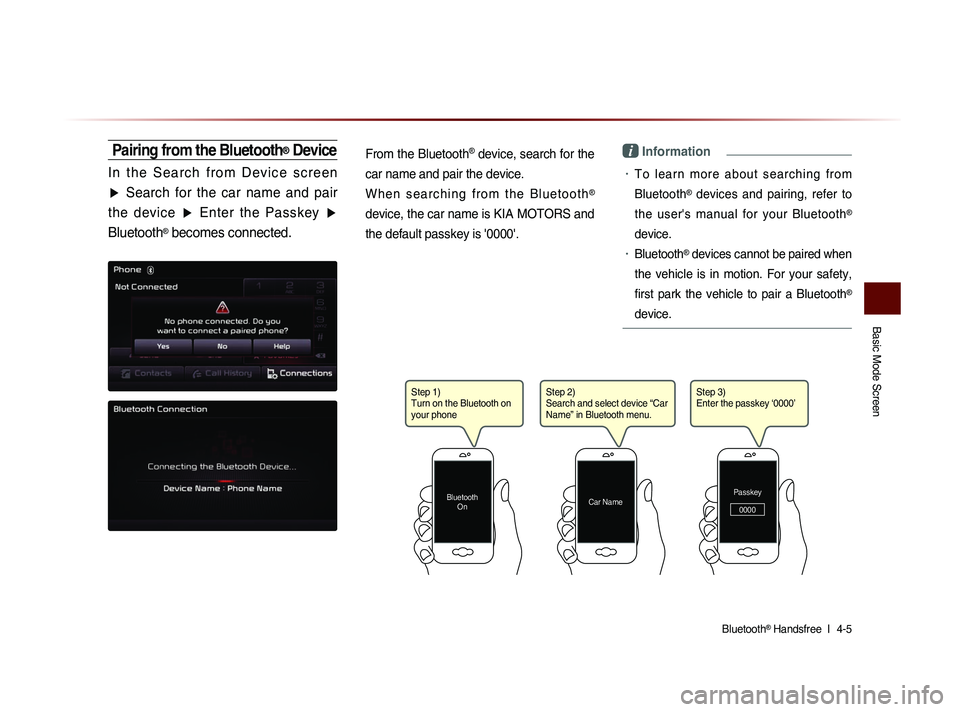
I n t h e S e a r c h f r o m D e v i c e s c r e e n
▶ Search for the car name and pair
the device ▶ Enter the Passkey ▶
Bluetooth
® becomes connected.
From the Bluetooth
® device, search for the
car name and pair the device.
W h e n s e a r c h i n g f r o m t h e B l u e t o o t h
®
device, the car name is KIA MOTORS and
the default passkey is '0000'.
i Information
• To learn more about searching from
Bluetooth
® devices and pairing, refer to
the user's manual for your Bluetooth
®
device.
• Bluetooth® devices cannot be paired when
the vehicle is in motion. For your safety,
first park the vehicle to pair a Bluetooth
®
device.
Step 1)
Turn on the Bluetooth on
your phone
Bluetooth On
Step 2)
Search and select device “Car
Name” in Bluetooth menu.
Car NamePasskey
0000
Step 3)
Enter the passkey ‘0000’
Page 124 of 236
4-10
Using Bluetooth® Wireless Technology
Making/Answering Calls
Calling by Dialing a Number
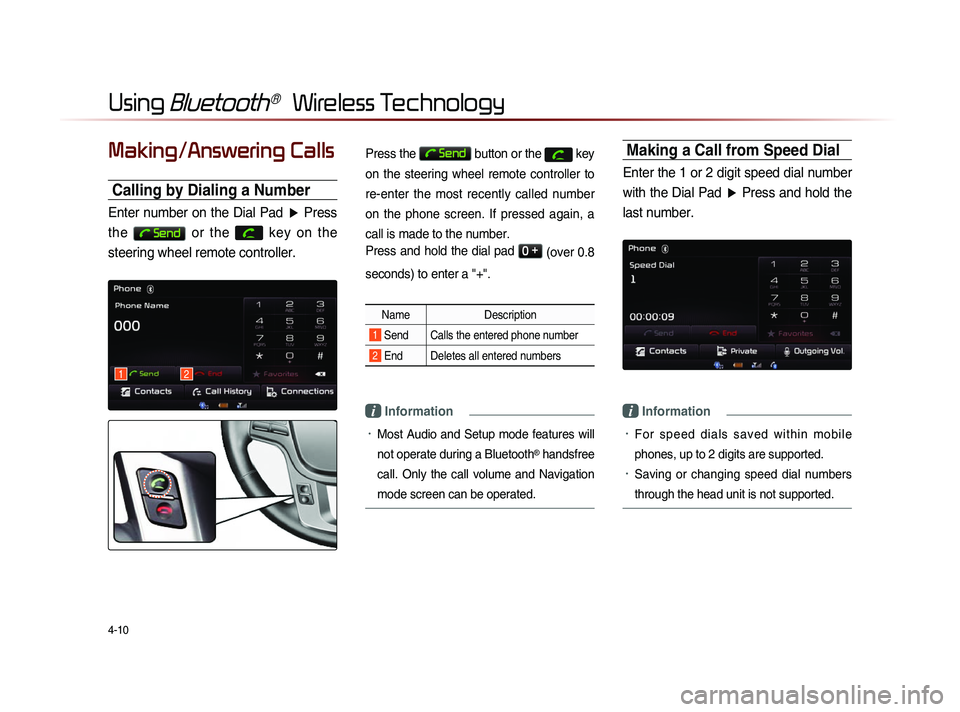
Enter number on the Dial Pad ▶ Press
the
Send or the
key on the
steering wheel remote controller.
Press the Send button or the key
on the steering wheel remote controller to
re-enter the most recently called number
on the phone screen. If pressed again, a
call is made to the number.
Press and hold the dial pad
0 +
(over 0.8
seconds) to enter a "+".
Name Description
1 Send Calls the entered phone number
2 End Deletes all entered numbers
i Information
• Most Audio and Setup mode features will
not operate during a Bluetooth
® handsfree
call. Only the call volume and Navigation
mode screen can be operated.
Making a Call from Speed Dial
Enter the 1 or 2 digit speed dial number with the Dial Pad ▶ Press and hold the
last number.
i Information
• For sp e ed d ia l s sa ved w ithi n mo bi l e
phones, up to 2 digits are supported.
• Saving or changing speed dial numbers
through the head unit is not supported.
12
Page 127 of 236
Using
Bluetooth
® Wireless Technology
Bluetooth® Handsfree l
4-13
Operating Menus
during a Call
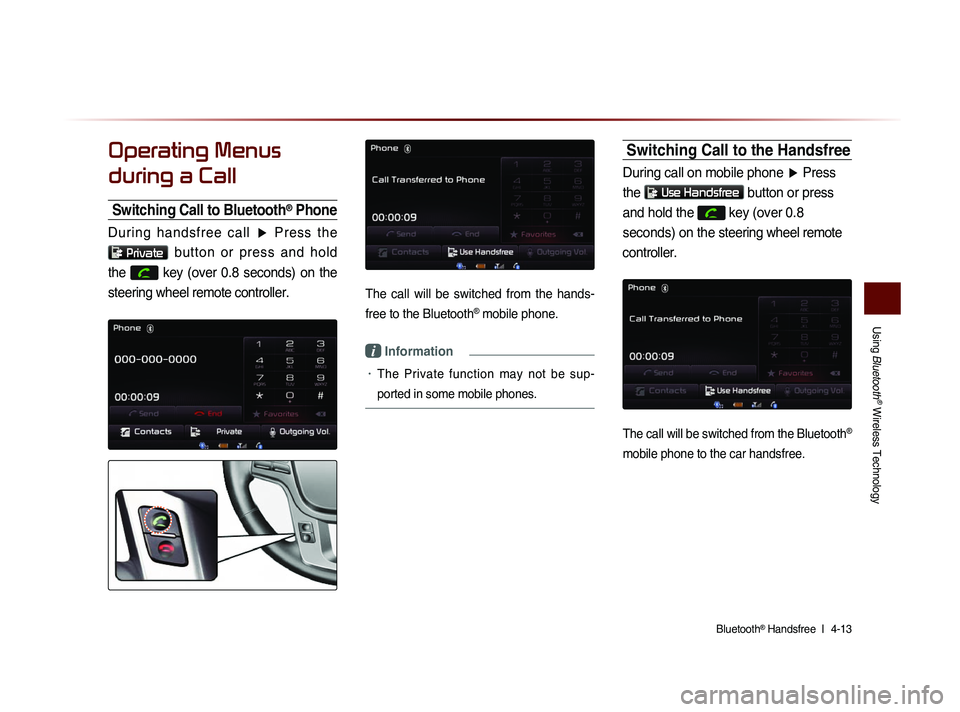
Switching Call to Bluetooth® Phone
During handsfree call ▶ Press the
Private button or press and hold
the
key (over 0.8 seconds) on the
steering wheel remote controller.
The call will be switched from the hands-
free to the Bluetooth
® mobile phone.
i Information
• The Private function may not be sup-
ported in some mobile phones.
Switching Call to the Handsfree
During call on mobile phone ▶ Press
the
Use Handsfree button or press
and hold the
key (over 0.8
seconds) on the steering wheel remote
controller.
The call will be switched from the Bluetooth®
mobile phone to the car handsfree.
Page 128 of 236
4-14
Using Bluetooth® Wireless Technology
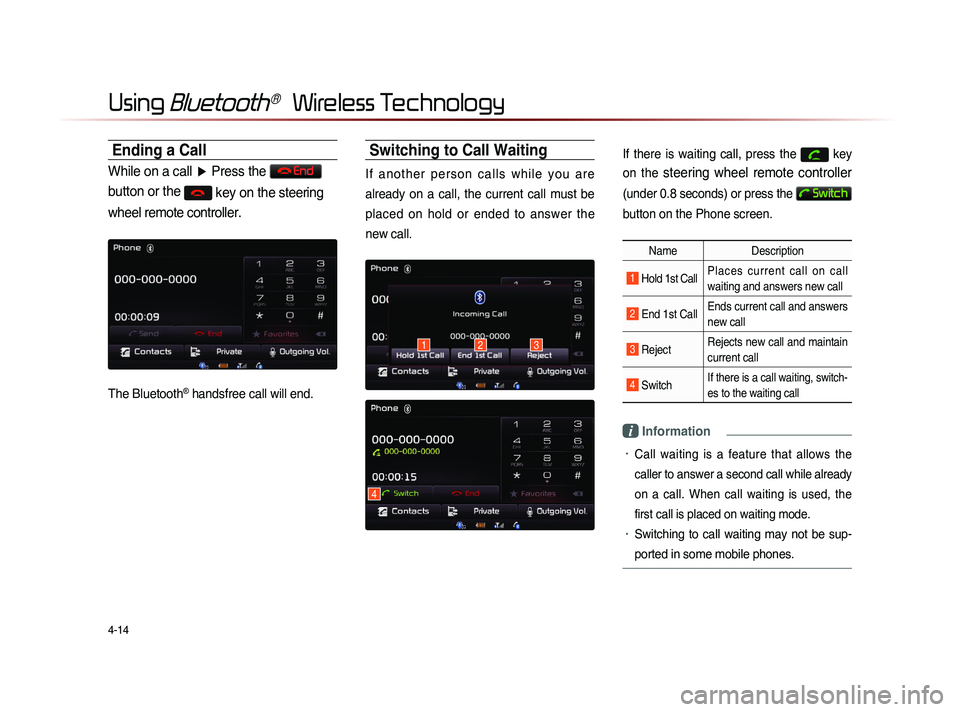
Ending a Call
While on a call ▶ Press the End
button or the
key on the steering
wheel remote controller.
The Bluetooth® handsfree call will end.
Switching to Call Waiting
I f a n o t h e r p e r s o n c a l l s w h i l e y o u a r e
already on a call, the current call must be
placed on hold or ended to answer the
new call.
If there is waiting call, press the key
on the
steering wheel remote controller
(under 0.8 seconds) or press the
Switch
button on the Phone screen.
Name Description
1 Hold 1st Call Places current call on call
waiting and answers new call
2 End 1st CallEnds current call and answers
new call
3 Reject Rejects new call and maintain
current call
4 Switch If there is a call waiting, switch-
es to the waiting call
i Information
• Call waiting is a feature that allows the
caller to answer a second call while already
on a call. When call waiting is used, the
first call is placed on waiting mode.
• Switching to call waiting may not be sup-
ported in some mobile phones.
132
4
Page 140 of 236
4-26
Using Bluetooth® Wireless Technology
Pairing a New Device
For more information on pairing, refer to
the When no phones have been paired'
section.
i Information
• Bluetooth® features supported within the
vehicle are as follow
s. Some features may
not be supported depending on your
Bluetooth
® device.
-A n s w e r i n g a n d p l a c i n g B l u e t o o t h®
Handsfree calls
-Menu operation during call (Switch to Private,
Switch to Call Waiting, Outgoing Volume
-Download Call History
-Download Mobile Contacts
-Download SIM Contacts
-Contacts/ Call History Auto Download
-Bluetooth® device auto connection
-Playing Bluetooth® Streaming Audio
• It is possible to pair up to five Bluetooth®
devices to the car system.
• Only one Bluetooth® device can be con-
nected at a time.
• Other devices cannot be paired while a
Bluetooth
® device is already connected.
• When a Bluetooth® device is in the pro-
ces
s of connecting, the connection pro
-
ces
s cannot be canceled.
• Only Bluetooth® Handsfree and Bluetooth®
Audio related features will operate within
this system.
• Normal operation is possible only for
devices that support handsfree or audio
features, such as a Bluetooth
® mobile
phone or a Bluetooth
® audio device.
• Only one function can be used at a time
between the Bluetooth
® handsfree and
Bluetooth
® audio. (While playing Bluetooth®
audio, streaming will end upon entering the
Bluetooth
® phone screen.)
i Information
• If a connected Bluetooth® device becomes
disconnected for various reasons, such
as being out of range, turning the device
OFF, or a Bluetooth
® communication error,
B l u e t o o t h
® d e v i c e s a r e a u t o m a t i c a l l y
searched and connected.
• If the system becomes unstable due to
communication errors between the vehi-
cle and the Bluetooth
® device, reset the
Bluetooth
® feature and try again. Upon
resetting Bluetooth
® feature, the system
is restored to its factory release state.
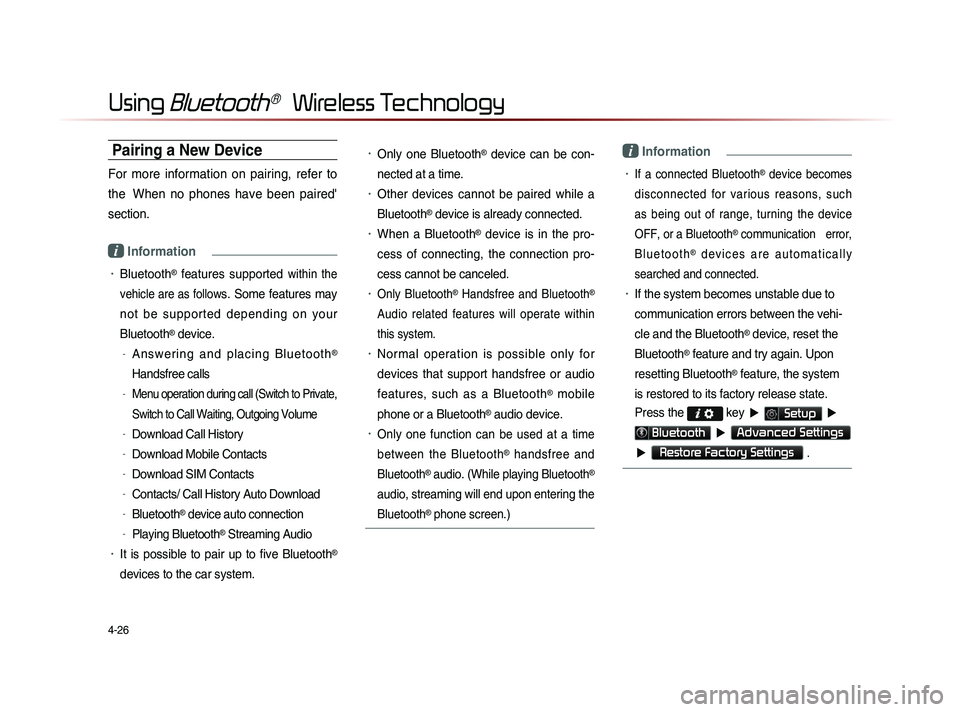
Press the
key ▶ Setup ▶
Bluetooth ▶ Advanced Settings
▶
Restore Factory Settings .
Page 143 of 236
CAR AVN SYSTEM
Voice
Recognition
5
• Using Voice Recognition
• Voice Command Lists
Page 144 of 236
5-2
Using Voice Recognition
Using Voice Recognition
Creating a suitable cabin environment
When using the voice recognition feature, only commands listed within the user's manual are supported.
Be aware that during the operation of the voice recognition sys-tem, pressing some keys other than the
key will terminate
voice recognition mode.
For superior voice recognition performance, position the micro- phone used for voice recognition above the head of the driver’s
seat and maintain a proper position when saying commands.
Within the following situations, voice recognition may not func-tion properly due to external sound.
• When the windows and sunroof are open
• When the wind of the cooling/heating device is strong
• When entering and passing through tunnels
• When driving on rugged and uneven roads
• During severe rain (heavy rains, windstorms)
After downloading the Bluetooth® contacts, it takes some times
to convert the contacts into voice information. During this time,
voice recognition may not properly operate.
Pronounce the voice commands naturally and clearly as if in a normal conversation.
The system may slow down slightly when using the Navigation to calculate a new route or re-calculating an existing route. In
such cases, use voice recognition features after waiting a few
moments.
Page 145 of 236
Using Voice Recognition
Voice Recognition l
5-3
Starting Voice Recognition
Starting Voice Recognition
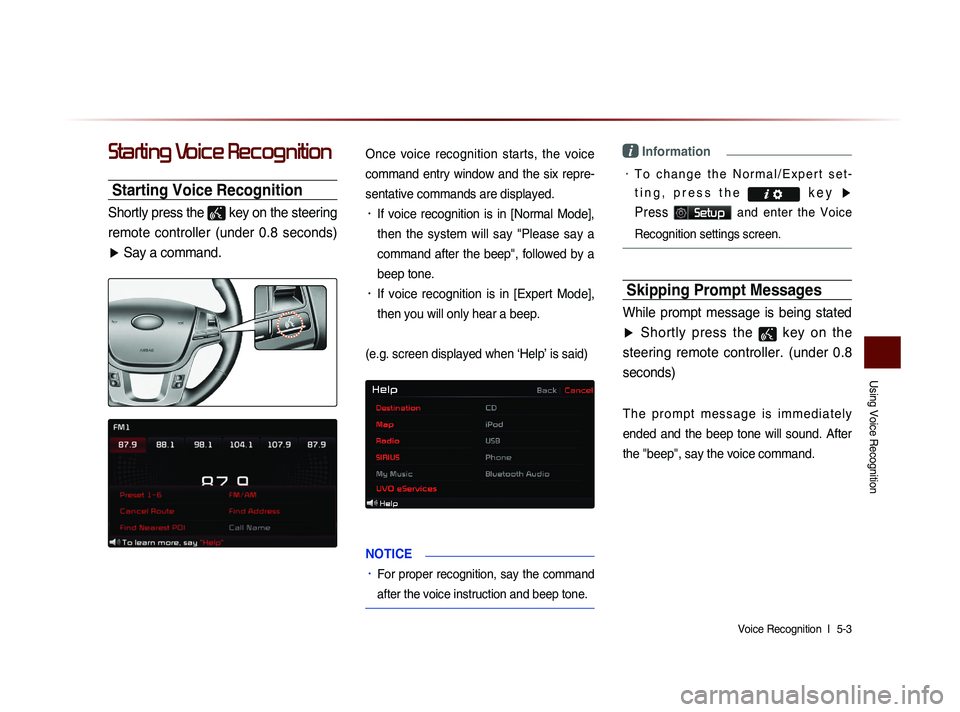
Shortly press the
key on the steering
remote controller (under 0.8 seconds) ▶ Say a command.
Once voice recognition starts, the voice
command entry window and the six repre-
sentative commands are displayed.
• If voice recognition is in [Normal Mode],
then the system will say "Please say a
command after the beep", followed by a
beep tone.
• If voice recognition is in [Expert Mode],
then you will only hear a beep.
(e.g. screen displayed when ‘Help’ is said)
NOTICE
• For proper recognition, say the command
after the voice instruction and beep tone.
i Information
• T o c h a n g e t h e N o r m a l / E x p e r t s e t -
t i n g , p r e s s t h e k e y
▶
Press
Setup and enter the Voice
Recognition settings screen.
Skipping Prompt Messages
While prompt message is being stated
▶ Shortly press the
key on the
steering remote controller. (under 0.8 seconds)
T h e p r o m p t m e s s a g e i s i m m e d i a t e l y
ended and the beep tone will sound. After
the
"beep", say the voice command.