ECO KIA SORENTO PHEV 2022 Navigation System Quick Reference Guide
[x] Cancel search | Manufacturer: KIA, Model Year: 2022, Model line: SORENTO PHEV, Model: KIA SORENTO PHEV 2022Pages: 332, PDF Size: 11.11 MB
Page 103 of 332
4-5
Playing the previous file
You can play the previous file during playback in the USB device.
Perform any of the following methods:
\225On the USB music playback screen, press within 3 seconds during playback.
\225On the control panel, press the [
SEEK] button within 3 seconds during playback (if
equipped).
0000
A
To play the previous music during playback, press
twice or pressing the [ SEEK]
button on the control panel twice after 3 seconds from the start of the playback (if
equipped).
0000
A
You can also run the function by using the Move lever/button on the steering wheel.
0000
A
If any Search knob on the control panel, you can search for the desired music by using
the knob. When you press the knob within 5 seconds, music is played. However, if no
input within 5 seconds, the search stops and the system displays the information of the
current file.
Playing the next file
You can play the next file in the USB device during playback.
Perform any of the following methods:
\225On the USB music playback screen, press .
\225On the control panel, press the [
TRACK ] button (if equipped).
0000
A
You can also run the function by using the Move lever/button on the steering wheel.
0000
A
If any Search knob on the control panel, you can search for the desired music by using
the knob. When you press the knob within 5 seconds, music is played. However, if no
input within 5 seconds, the search stops and the system displays the information of the
current file.
Changing the repeated playback mode for USB music
You can change the repeated playback mode for USB music: Repeat One, Repeat Folder, and
Repeat All.
On the USB music playback screen, press repeatedly.
Each time the icon is pressed, the playback repetition modes are toggled and the activated
mode icon appears on the screen.
Page 105 of 332
4-7
\334\334Caution
\225Be sure to start the vehicle before connecting a USB device. When you start the vehicle
after connecting a USB device, the USB device may get damaged.
\225Be careful of static electricity when connecting or removing a USB device. It may cause a
system failure.
\225Be careful and avoid your body or any object coming into contact with the USB port on
the vehicle. It may cause an accident or system failures.
\225Do not repeatedly connect and remove the USB connector within a short time. It may
cause device errors or system failures.
\225Do not use a USB device for purposes other than playback. When you connect a USB
for charging or heating, the system performance may decrease or it may cause system
failures.
0000
A
When connecting a USB storage, do not use a separate extension cable and directly
connect to the USB port. When you connect a USB storage via a USB hub or extension
cable, the device may not be recognized.
0000
A
Push the USB connector fully into the USB port. When the connector is not fully inserted,
a communication problem may occur.
0000
A
Noise may occur when removing a USB device from the system.
0000
A
You can play only the files that have been encoded in the standard format.
0000
A
The following USB devices may not be recognized or may not work properly.
000DEncrypted MP3 players
000DUSB devices that are not recognized as removable disks
0000
A
USB devices may not be recognized depending on the device status.
0000
A
Some USB devices may not be supported due to compatibility issues.
0000
A
USB device recognition may take longer than usual depending on the device type,
capacity, and file formats on the device.
0000
A
Some devices may not be charged through USB connection. It depends on the USB
specifications.
0000
A
You can hide files only in the USB device formatted in exFAT/NTFS/FAT16/32. The hidden
files can be found in the "Hidden_" folder.
Page 108 of 332

4-10
Resuming playback of the previous Bluetooth audio file
You can play the previous Bluetooth audio file during playback.
Perform any of the following methods:
\225On the Bluetooth audio playback screen, press twice.
\225On the control panel, press the [
SEEK] button twice (if equipped).
0000
A
The actions required may differ depending on the connected device.
0000
A
You can also run the function by using the Move lever/button on the steering wheel.
0000
A
If any Search knob on the control panel, you can search for the desired music by using
the knob. When you press the knob within 5 seconds, music is played. However, if no
input within 5 seconds, the search stops and the system displays the information of the
current file.
Resuming playback of the next Bluetooth audio file
You can play the next Bluetooth audio file during playback.
Perform any of the following methods:
\225On the Bluetooth audio playback screen, press .
\225On the control panel, press the [
TRACK ] button (if equipped).
0000
A
The actions required may differ depending on the connected device.
0000
A
You can also run the function by using the Move lever/button on the steering wheel.
0000
A
If any Search knob on the control panel, you can search for the desired music by using
the knob. When you press the knob within 5 seconds, music is played. However, if no
input within 5 seconds, the search stops and the system displays the information of the
current file.
Page 115 of 332
5-7
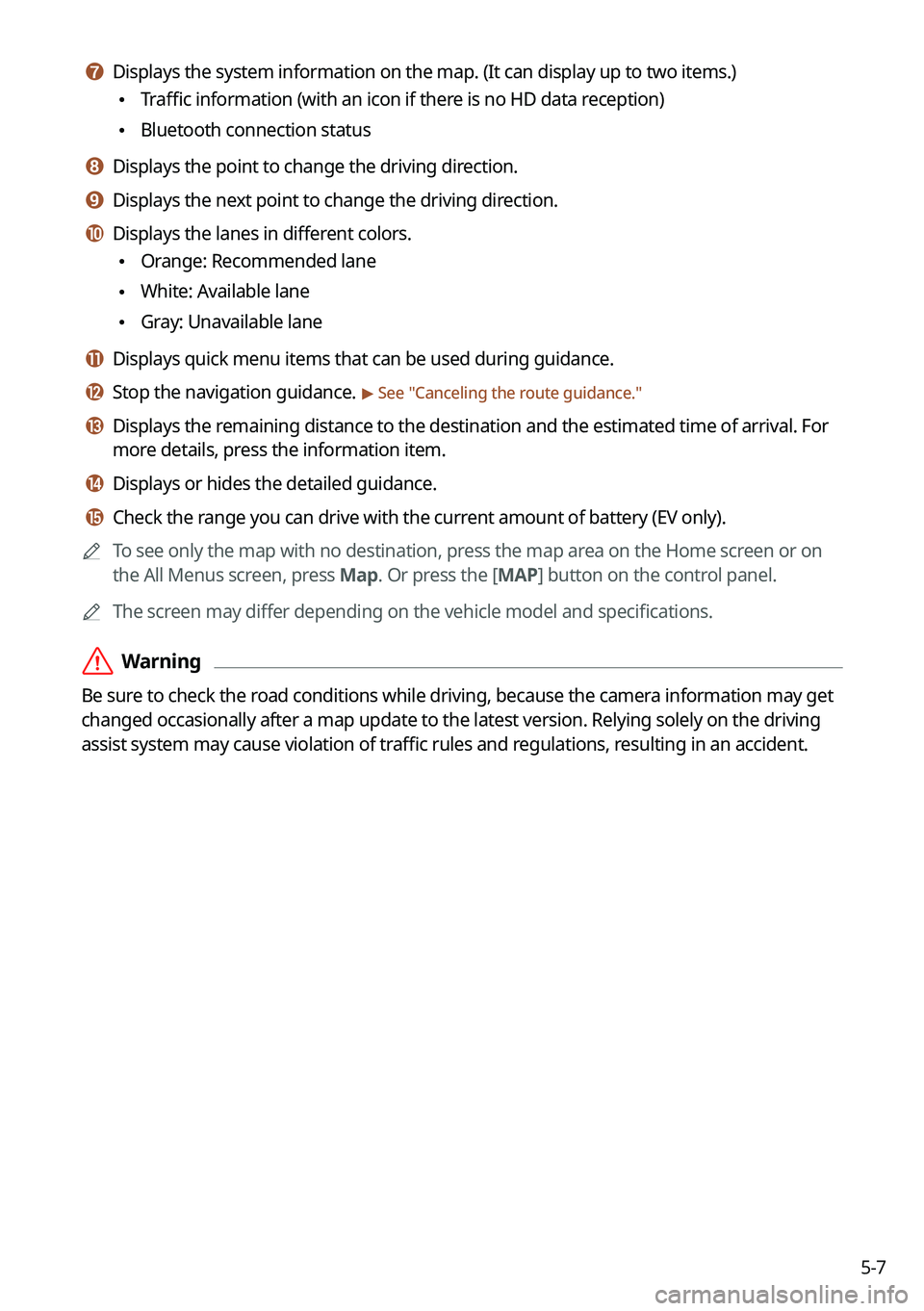
g g Displays the system information on the map. (It can display up to two items.)
\225Traffic information (with an icon if there is no HD data reception)
\225Bluetooth connection status
h h Displays the point to change the driving direction.
i i Displays the next point to change the driving direction.
j j Displays the lanes in different colors.
\225Orange: Recommended lane
\225White: Available lane
\225Gray: Unavailable lane
k k Displays quick menu items that can be used during guidance.
l l Stop the navigation guidance. > See "
Canceling the route guidance."
m m Displays the remaining distance to the destination and the estimated time of arrival. For
more details, press the information item.
n n Displays or hides the detailed guidance.
o o Check the range you can drive with the current amount of battery (EV only).
0000
A
To see only the map with no destination, press the map area on the Home screen or on
the All Menus screen, press Map. Or press the [ MAP] button on the control panel.
0000
A
The screen may differ depending on the vehicle model and specifications.
\335Warning
Be sure to check the road conditions while driving, because the camera information may get
changed occasionally after a map update to the latest version. Relying solely on the driving
assist system may cause violation of traffic rules and regulations, resulting in an accident.
Page 120 of 332
5-12
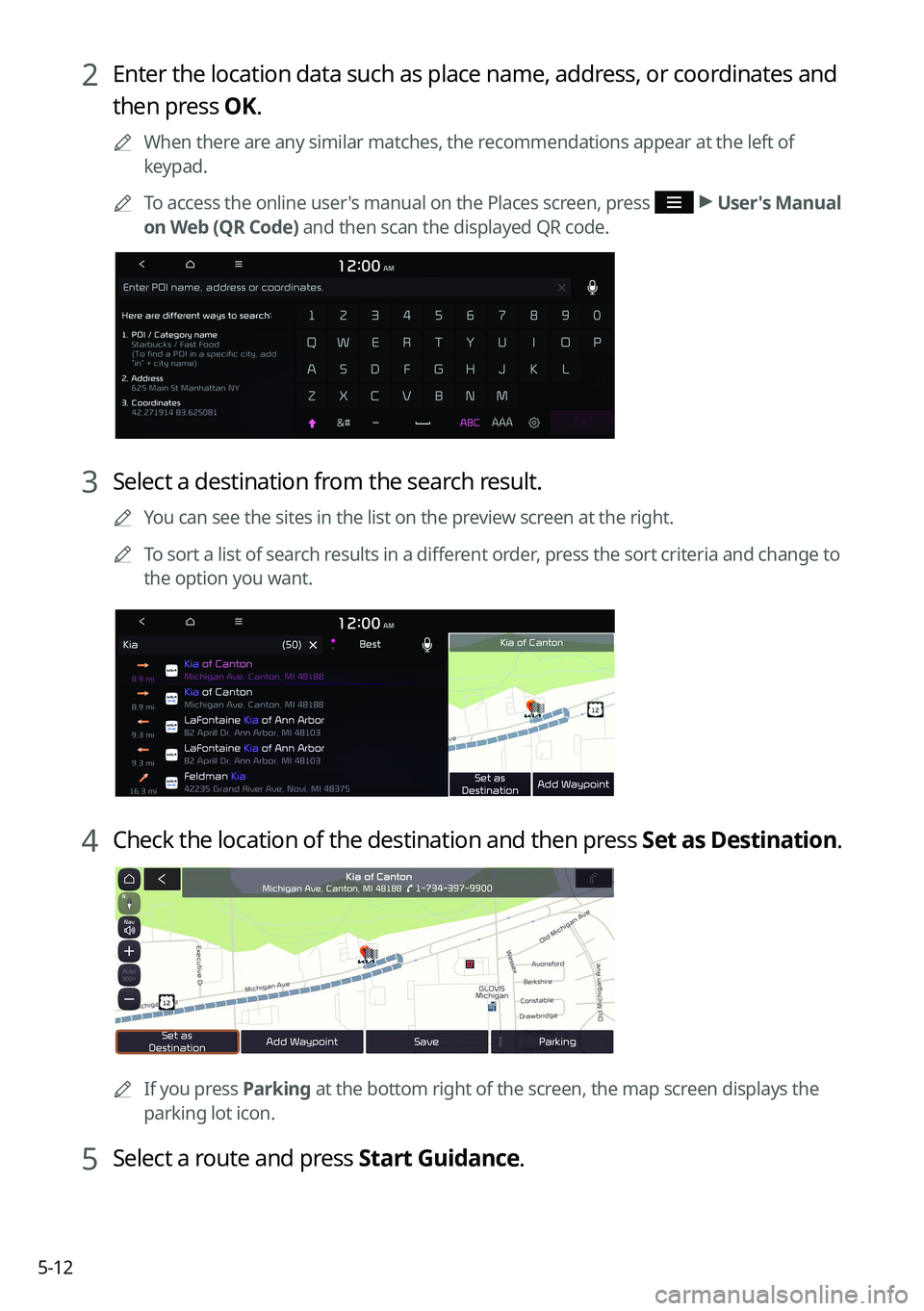
2 Enter the location data such as place name, address, or coordinates and
then press OK.
0000
A
When there are any similar matches, the recommendations appear at the left of
keypad.
0000
A
To access the online user's manual on the Places screen, press
>
User's Manual
on Web (QR Code) and then scan the displayed QR code.
3 Select a destination from the search result.
0000
A
You can see the sites in the list on the preview screen at the right.
0000
A
To sort a list of search results in a different order, press the sort criteria and change to
the option you want.
4 Check the location of the destination and then press Set as Destination.
0000A
If you press Parking at the bottom right of the screen, the map screen displays the
parking lot icon.
5 Select a route and press Start Guidance.
Page 138 of 332
5-30
END USER LICENSE AGREEMENT
PLEASE READ THIS END USER LICENSE AGREEMENT ("EULA") CAREFULLY BEFORE USING THE
NAVIGATION SYSTEM.
This is a license agreement between you and Hyundai Autoever, CORP. including its affiliates
("COMPANY") regarding a copy of the COMPANY navigable map database together with
associated software, media and explanatory printed documentation published by COMPANY
(jointly the "Product"). The Product is provided for your personal, internal use only and not for
resale. It is protected by copyright and is subject to the following terms which are agreed to
by you, on the one hand, and COMPANY and its licensors (and their licensors and suppliers)
(collectively, "Licensors") on the other hand.
By using the Product, you accept and agree to all terms and conditions in this End User
License Agreement ("EULA"). IF YOU DO NOT AGREE TO THE TERMS OF THIS EULA, YOU
MUST PROMPTLY EXIT THE PRODUCT OPERATION PROGRAM AND DO NOT USE OR ACCESS
TO THE PRODUCT. YOU AGREE THAT YOUR RIGHTS UNDER THIS EULA MAY BE TERMINATED
AUTOMATICALLY WITHOUT NOTICE IF YOU FAIL TO COMPLY WITH ANY TERM(S) OF THIS
EULA.
Terms and Conditions
Personal Use Only. You agree to use this Product together with COMPANY's authorized
application for the solely personal, non-commercial purposes for which you were licensed,
and not for service bureau, time-sharing or other similar purposes. Accordingly, but subject to
the restrictions set forth in the following paragraphs, you agree not to otherwise reproduce,
copy, modify, decompile, disassemble, create any derivative works of, or reverse engineer any
portion of this Data, and may not transfer or distribute it in any form, for any purpose, except
to the extent permitted by mandatory laws. You may not assign this EULA or any of the rights
or licenses granted under this EULA, except when installed in the system for which it was
created.
Restrictions. Except where you have been specifically licensed to do so by COMPANY, and
without limiting the preceding paragraph, you may not use the Product (i) with any products,
systems, or applications installed or otherwise connected to or in communication with
vehicles, capable of vehicle navigation, positioning, dispatch, real time route guidance, fleet
management or similar applications; or (ii) with or in communication with any positioning
devices or any mobile or wireless-connected electronic or computer devices, including
without limitation cellular phones, palmtop and handheld computers, pagers, and personal
digital assistants or PDAs.
Page 144 of 332
5-36End-User Terms Required by ZENRIN.
The Product utilizes map data that COMPANY licenses
from ZENRIN and the following copyright notices apply to such map data (the "ZENRIN
Data"):
Europe: Junction View Data provided by ZENRIN CO., LTD. Copyright © 2021, All Rights
Reserved.
Europe: Junction View Data and Exit View Data provided by ZENRIN CO., LTD. Copyright ©
2021, All Rights Reserved.
North America: Junction View Data provided by ZENRIN USA, INC. Copyright © 2021, All Rights
Reserved; Junction View Data fourni par ZENRIN USA, INC. Copyright © 2021. Tous droits
réservés; Las imágenes de las rutas alternas son proveídas por ZENRIN USA, INC. Copyright
© 2021. Todos los derechos reservados.
© 2021 Hyundai Autoever. All rights reserved.
Copyright for Brand Icon
The marks of companies displayed by this product to indicate business locations are the
marks of their respective owners. The use of such marks in this product does not imply any
sponsorship, approval, or endorsement by such companies of this product.
Copyright for Junction View
Junction View Data provided by ZENRIN USA, INC. Copyright© 2021, All rights Reserved.
About Map Updates
You can contact your KIA dealer or call at 1-888-757-0010.
The Data and all copyrights and intellectual property or neighboring rights
therein are owned by HERE and Hyundai Autoever, CORP.
Importance Notice: This is protected by U.S. copyright laws.
You may not extract or reutilize substantial parts of the contents of the
Data, nor reproduce, copy, modify, adapt, translate, disassemble, decompile
or reverse engineer any portion of the Data, except to the extent explicitly
permitted by mandatory laws.
© 1987-2021 HERE. All rights reserved.
Page 150 of 332
6-6
Making a call via Bluetooth
You can connect a Bluetooth device with the hands-free function to use a Bluetooth phone.
The Bluetooth connection allows you to view call details directly from the system screen, and
to make calls safely and easily use your vehicle microphone and speaker.
\335Warning
\225Park the vehicle at a safe place before connecting your mobile phone. It may take the
driver attention off the road and cause a traffic accident which can result in damages,
injuries, and/or death.
\225While driving, do not make a call by dialing a phone number or do not pick up your phone
to talk. Distraction by the use of a mobile phone may cause you not to recognize traffic
flow around and not to cope with unexpected situations. As a result, a traffic accident
may occur. If necessary, use the Bluetooth hands-free function and make the call as short
as possible.
Dialing from the recent call list
Make calls directly from call history of your mobile device.
When you connect your mobile device and system over Bluetooth, the list of recent calls from
the device will be downloaded to the system and you can call them again by selecting them
from the system screen. Your vehicle has a built-in microphone and speaker that make using
mobile phones safe and easy.
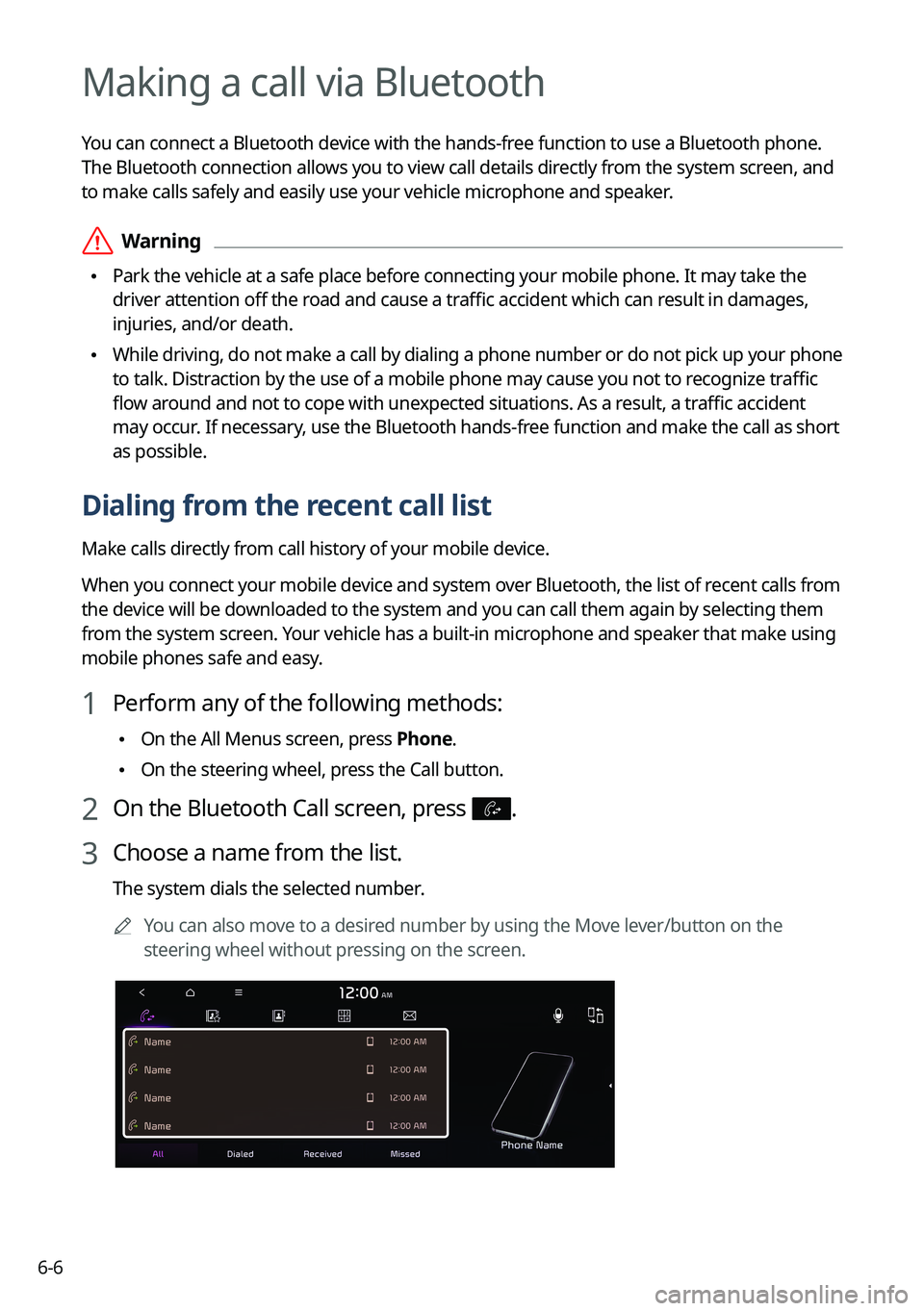
1 Perform any of the following methods:
\225On the All Menus screen, press Phone.
\225On the steering wheel, press the Call button.
2 On the Bluetooth Call screen, press .
3 Choose a name from the list.
The system dials the selected number.
0000
A
You can also move to a desired number by using the Move lever/button on the
steering wheel without pressing on the screen.
Page 151 of 332
6-7
0000
A
The download may not work in some phone models.
0000
A
You can download up to 50 call records for each list.
0000
A
Call durations do not appear on the system screen.
0000
A
You cannot download call records when the download is prohibited by the phone. Some
phone models may require approval for a download. When a successful download is not
made, check the phone screen or its settings.
0000
A
When call records are newly downloaded, the previous records are removed.
0000
A
Learn more about receiving calls while using a Bluetooth connection.
> See "Accepting an
incoming call over Bluetooth."
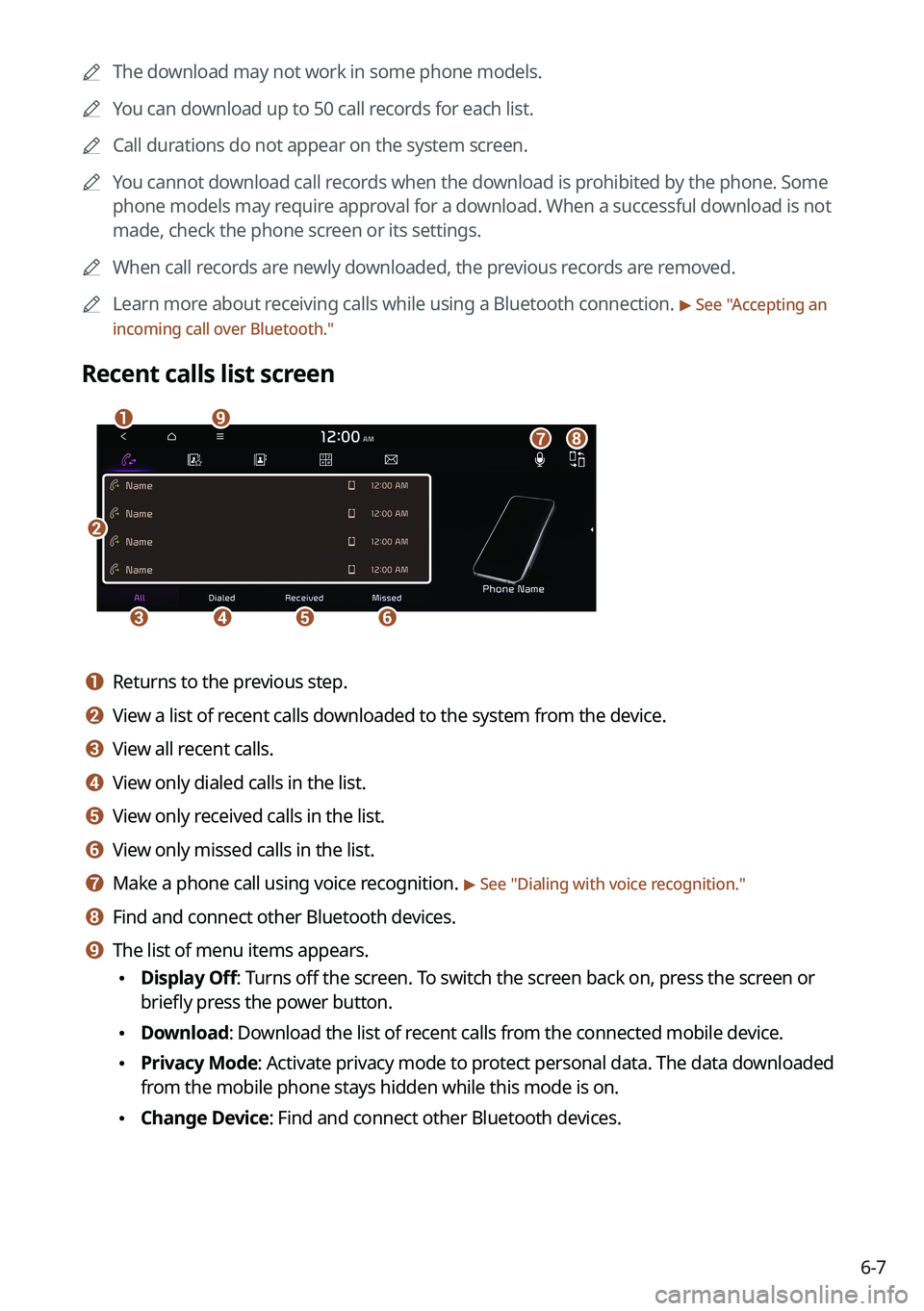
Recent calls list screen
\037
\036\035\034\033
\032\031\030\027
a a Returns to the previous step.
b b View a list of recent calls downloaded to the system from the device.
c c View all recent calls.
d d View only dialed calls in the list.
e e View only received calls in the list.
f f View only missed calls in the list.
g g Make a phone call using voice recognition. > See " Dialing with voice recognition."
h h Find and connect other Bluetooth devices.
i i The list of menu items appears.
\225 Display Off: Turns off the screen. To switch the screen back on, press the screen or
briefly press the power button.
\225Download: Download the list of recent calls from the connected mobile device.
\225Privacy Mode: Activate privacy mode to protect personal data. The data downloaded
from the mobile phone stays hidden while this mode is on.
\225Change Device: Find and connect other Bluetooth devices.
Page 153 of 332
6-9
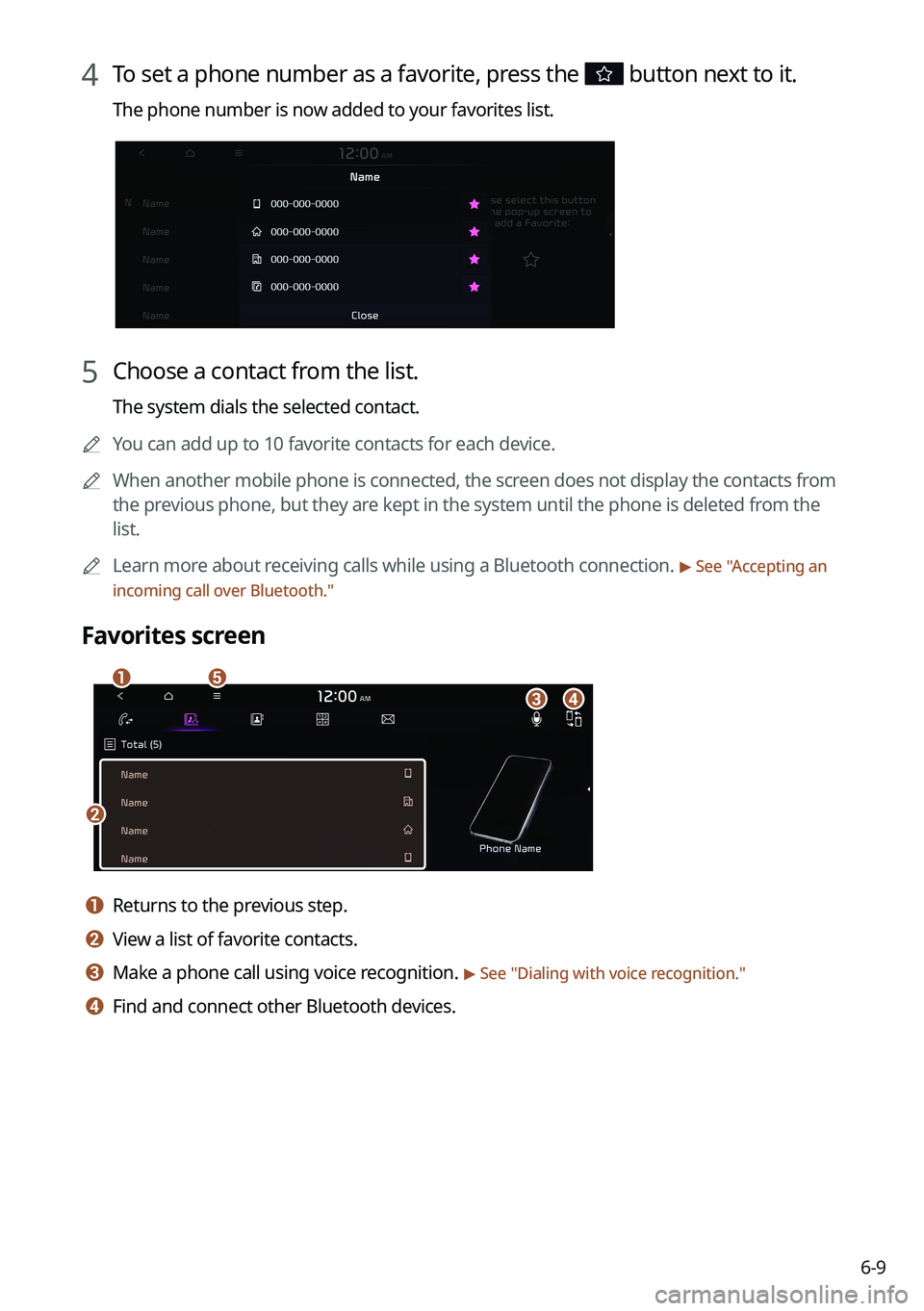
4 To set a phone number as a favorite, press the button next to it.
The phone number is now added to your favorites list.
5 Choose a contact from the list.
The system dials the selected contact.
0000
A
You can add up to 10 favorite contacts for each device.
0000
A
When another mobile phone is connected, the screen does not display the contacts from
the previous phone, but they are kept in the system until the phone is deleted from the
list.
0000
A
Learn more about receiving calls while using a Bluetooth connection.
> See "Accepting an
incoming call over Bluetooth."
Favorites screen
\037
\036
\035\034\033
a a Returns to the previous step.
b b View a list of favorite contacts.
c c Make a phone call using voice recognition. > See " Dialing with voice recognition."
d d Find and connect other Bluetooth devices.