ECO KIA SORENTO PHEV 2022 Navigation System Quick Reference Guide
[x] Cancel search | Manufacturer: KIA, Model Year: 2022, Model line: SORENTO PHEV, Model: KIA SORENTO PHEV 2022Pages: 332, PDF Size: 11.11 MB
Page 155 of 332

6-11
0000
A
You can download only the contacts that can be displayed on the connected Bluetoot\
h
device. The contacts may not appear in some Apps.
0000
A
You can download up to 5,000 contacts for each device.
0000
A
The download may not work in some phone models.
0000
A
Contacts from both the mobile device and its SIM card are downloaded at the same time.
The system may not be able to download SIM card contacts from all phone models.
0000
A
When speed dial numbers are set to contacts on the phone, press and hold a speed
dial number on the dial pad to make a call easily. Some mobile phone models may not
support the speed dial function.
0000
A
You cannot download contacts when the download is prohibited by the phone. Some
phone models may require approval for a download. When a successful download is not
made, check the phone screen or its settings.
0000
A
Depending on the phone model or operation status, downloading may take longer than
usual.
0000
A
When a new contacts list is downloaded, the previous records are removed.
0000
A
The downloaded contacts cannot be edited or deleted from the system.
0000
A
When another mobile phone is connected, the screen does not display the contacts
downloaded from the previous phone, but they are kept in the system until the phone is
deleted from the list.
0000
A
Learn more about receiving calls while using a Bluetooth connection.
> See "Accepting an
incoming call over Bluetooth."
Contacts list screen
\037
\036
\035
\034
\033
\032
\031
a a Returns to the previous step.
b b Enter a contact's name or phone number to search the list. You can also search for a
contact by pressing
and saying the contact's name or phone number.
c c View a list of contacts downloaded to the system from the device.
Page 156 of 332

6-12
d d Use the index to quickly find the contact you are looking for.
e e Make a phone call using voice recognition. > See "Dialing with voice recognition."
f f Find and connect other Bluetooth devices.
g g The list of menu items appears.
\225 Display Off: Turns off the screen. To switch the screen back on, press the screen or
briefly press the power button.
\225Download: Download the list of contacts from the connected mobile device.
\225Search: Search contacts by entering a name or a phone number.
\225Privacy Mode: Activate privacy mode to protect personal data. The data downloaded
from the mobile phone stays hidden while this mode is on.
\225Change Device: Find and connect other Bluetooth devices.
\225Device Connections Settings: Can change the Bluetooth settings.
\225User's Manual on Web (QR Code): Displays the QR code that provides access to the
online user manual for the system.
\225Split Screen: Can turn on or off the split screen mode.
0000
A
The displayed name may differ depending on the vehicle model and specifications.
Dialing using the dial pad
Enter a phone number using the dial pad to make a call.
When you connect your mobile device to the system via Bluetooth, you can enter and dial a
phone number from the system screen, without interacting with the device. Your vehicle has
a built-in microphone and speaker that make using mobile phones safe and easy.
\335Warning
Do not manually dial a call while driving. Distraction by the use of a mobile phone may cause
you not to recognize traffic flow around and not to cope with unexpected situations. As a
result, a traffic accident may occur.
1 Perform any of the following methods:
\225On the All Menus screen, press Phone.
\225On the steering wheel, press the Call button.
2 On the Bluetooth Call screen, press .
Page 157 of 332
6-13
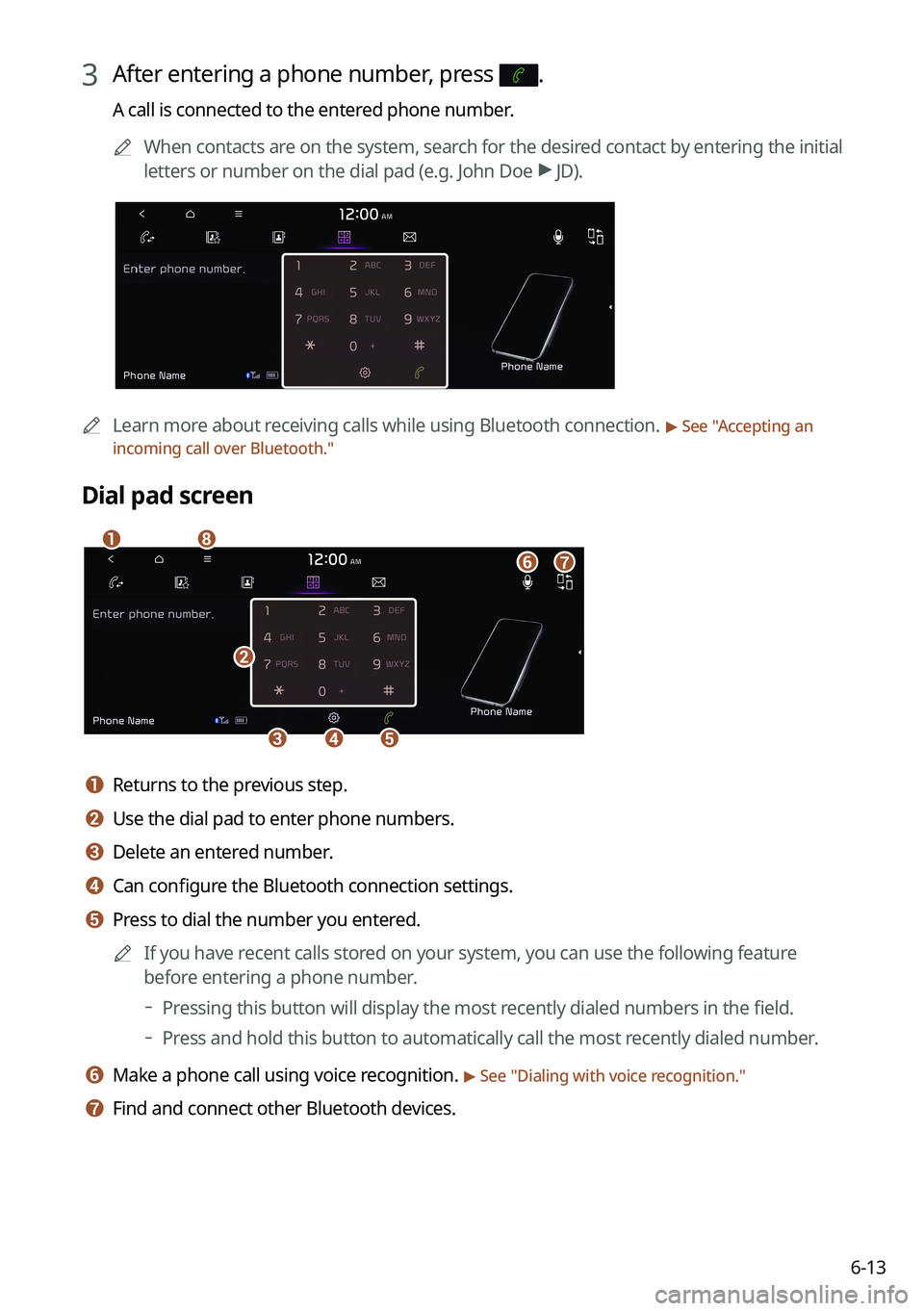
3 After entering a phone number, press .
A call is connected to the entered phone number.0000
A
When contacts are on the system, search for the desired contact by entering the initial
letters or number on the dial pad (e.g. John Doe >
JD).
0000A Learn more about receiving calls while using Bluetooth connection. > See "Accepting an
incoming call over Bluetooth."
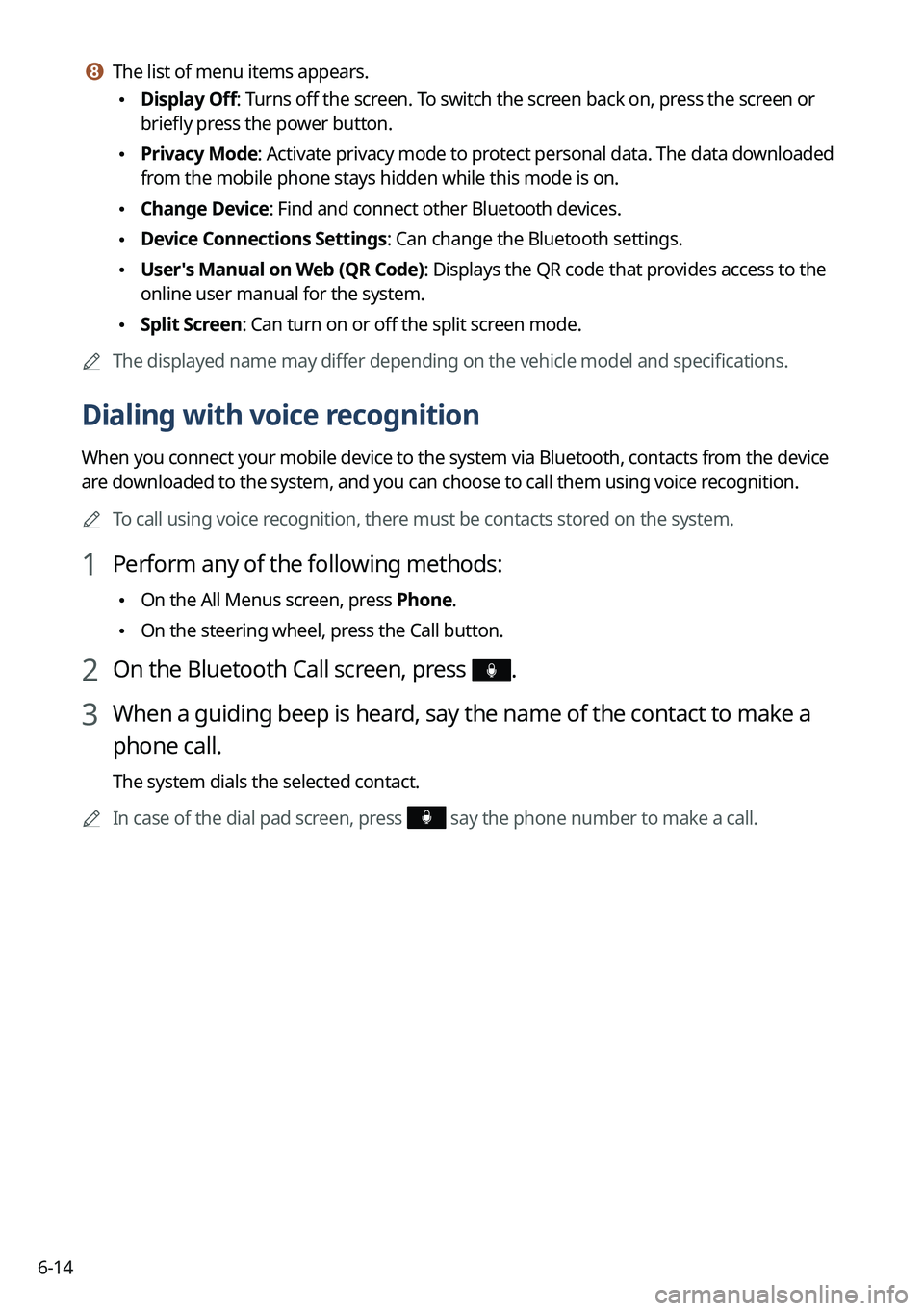
Dial pad screen
\037
\036\035\034
\033
\032
\031
\030
a a Returns to the previous step.
b b Use the dial pad to enter phone numbers.
c c Delete an entered number.
d d Can configure the Bluetooth connection settings.
e e Press to dial the number you entered.
0000
A
If you have recent calls stored on your system, you can use the following feature
before entering a phone number.
000DPressing this button will display the most recently dialed numbers in the field.
000DPress and hold this button to automatically call the most recently dialed number.
f f Make a phone call using voice recognition. > See "
Dialing with voice recognition."
g g Find and connect other Bluetooth devices.
Page 158 of 332
6-14
h h The list of menu items appears.
\225Display Off: Turns off the screen. To switch the screen back on, press the screen or
briefly press the power button.
\225Privacy Mode: Activate privacy mode to protect personal data. The data downloaded
from the mobile phone stays hidden while this mode is on.
\225Change Device: Find and connect other Bluetooth devices.
\225Device Connections Settings: Can change the Bluetooth settings.
\225User's Manual on Web (QR Code): Displays the QR code that provides access to the
online user manual for the system.
\225Split Screen: Can turn on or off the split screen mode.
0000
A
The displayed name may differ depending on the vehicle model and specifications.
Dialing with voice recognition
When you connect your mobile device to the system via Bluetooth, contacts from the device
are downloaded to the system, and you can choose to call them using voice recognition.
0000
A
To call using voice recognition, there must be contacts stored on the system.
1 Perform any of the following methods:
\225On the All Menus screen, press Phone.
\225On the steering wheel, press the Call button.
2 On the Bluetooth Call screen, press .
3 When a guiding beep is heard, say the name of the contact to make a
phone call.
The system dials the selected contact.
0000
A
In case of the dial pad screen, press
say the phone number to make a call.
Page 159 of 332
6-15
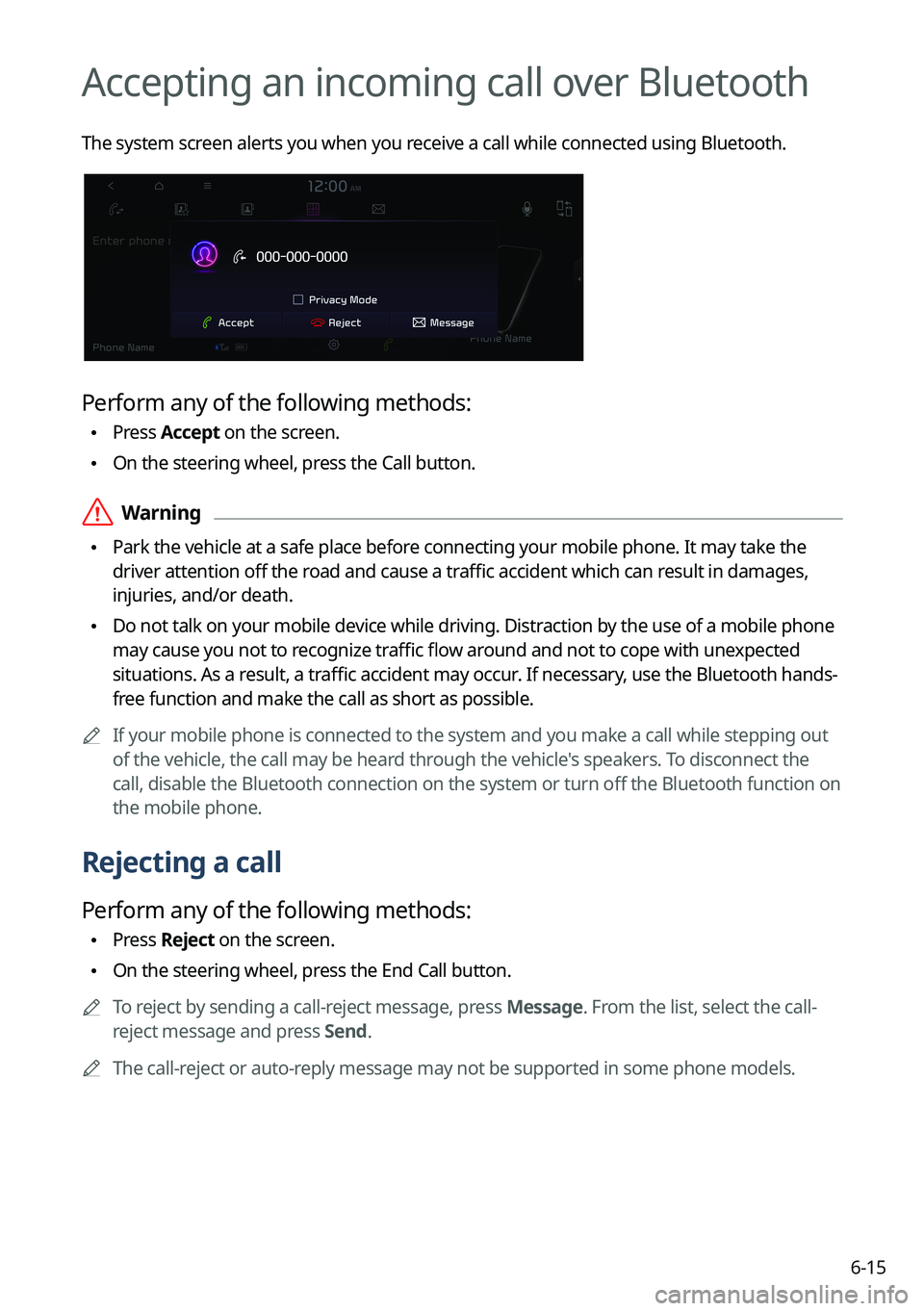
Accepting an incoming call over Bluetooth
The system screen alerts you when you receive a call while connected using Bluetooth.
Perform any of the following methods:
\225Press
Accept on the screen.
\225On the steering wheel, press the Call button.
\335Warning
\225Park the vehicle at a safe place before connecting your mobile phone. It may take the
driver attention off the road and cause a traffic accident which can result in damages,
injuries, and/or death.
\225Do not talk on your mobile device while driving. Distraction by the use of a mobile phone
may cause you not to recognize traffic flow around and not to cope with unexpected
situations. As a result, a traffic accident may occur. If necessary, use the Bluetooth hands-
free function and make the call as short as possible.
0000
A
If your mobile phone is connected to the system and you make a call whil\
e stepping out
of the vehicle, the call may be heard through the vehicle's speakers. To disconnect the
call, disable the Bluetooth connection on the system or turn off the Bluetooth function on
the mobile phone.
Rejecting a call
Perform any of the following methods:
\225Press
Reject on the screen.
\225On the steering wheel, press the End Call button.
0000
A
To reject by sending a call-reject message, press Message. From the list, select the call-
reject message and press Send.
0000
A
The call-reject or auto-reply message may not be supported in some phone models.
Page 160 of 332
6-16
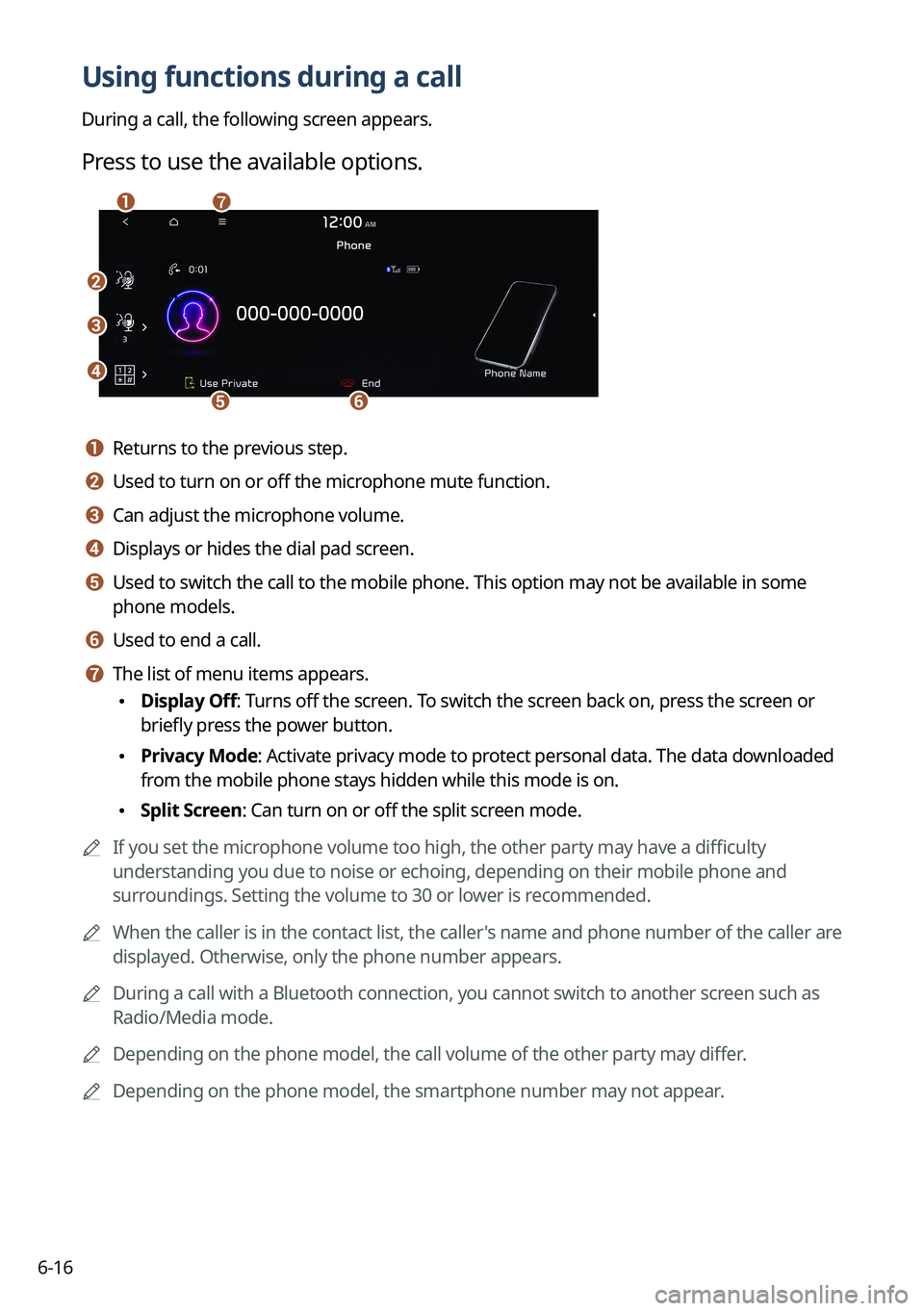
Using functions during a call
During a call, the following screen appears.
Press to use the available options.
\037
\036
\035
\034\033
\032\031
a a Returns to the previous step.
b b Used to turn on or off the microphone mute function.
c c Can adjust the microphone volume.
d d Displays or hides the dial pad screen.
e e Used to switch the call to the mobile phone. This option may not be avai\
lable in some
phone models.
f f Used to end a call.
g g The list of menu items appears.
\225Display Off: Turns off the screen. To switch the screen back on, press the screen or
briefly press the power button.
\225Privacy Mode: Activate privacy mode to protect personal data. The data downloaded
from the mobile phone stays hidden while this mode is on.
\225Split Screen: Can turn on or off the split screen mode.
0000
A
If you set the microphone volume too high, the other party may have a difficulty
understanding you due to noise or echoing, depending on their mobile pho\
ne and
surroundings. Setting the volume to 30 or lower is recommended.
0000
A
When the caller is in the contact list, the caller's name and phone number of the caller are
displayed. Otherwise, only the phone number appears.
0000
A
During a call with a Bluetooth connection, you cannot switch to another \
screen such as
Radio/Media mode.
0000
A
Depending on the phone model, the call volume of the other party may differ.
0000
A
Depending on the phone model, the smartphone number may not appear.
Page 162 of 332
6-18
c c Can see the message details.
d d Reads out the message through the speakers in the vehicle.
e e Used to close the notification window.
0000
A
The message notification window does not appear when the privacy mode is enabled or
the message notification is turned off.
0000
A
The screen display may differ depending on the mobile phone model.
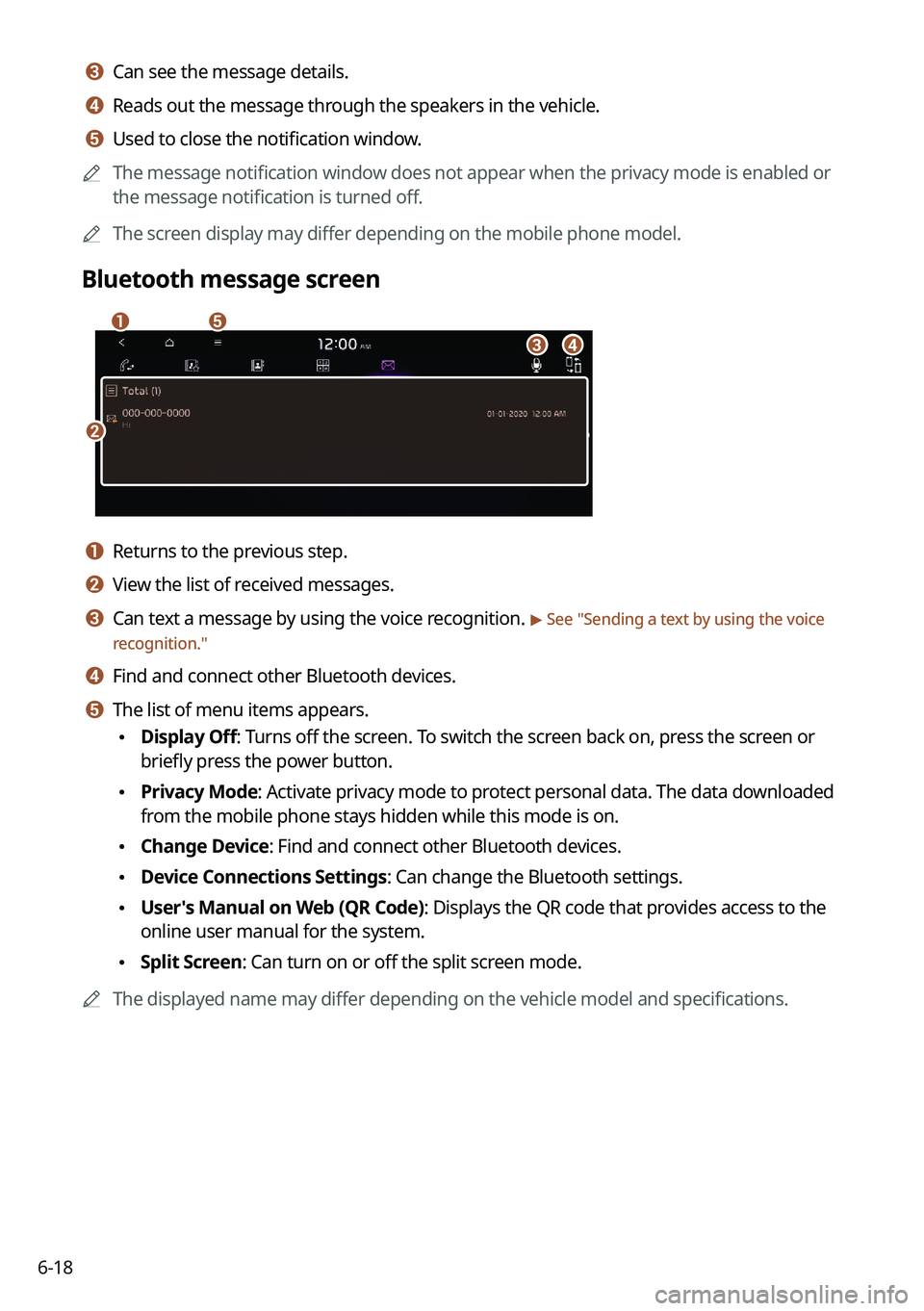
Bluetooth message screen
\037
\036
\035
\034
\033
a a Returns to the previous step.
b b View the list of received messages.
c c Can text a message by using the voice recognition. > See "Sending a text by using the voice
recognition."
d d Find and connect other Bluetooth devices.
e e The list of menu items appears.
\225 Display Off: Turns off the screen. To switch the screen back on, press the screen or
briefly press the power button.
\225Privacy Mode: Activate privacy mode to protect personal data. The data downloaded
from the mobile phone stays hidden while this mode is on.
\225Change Device: Find and connect other Bluetooth devices.
\225Device Connections Settings: Can change the Bluetooth settings.
\225User's Manual on Web (QR Code): Displays the QR code that provides access to the
online user manual for the system.
\225Split Screen: Can turn on or off the split screen mode.
0000
A
The displayed name may differ depending on the vehicle model and specifications.
Page 163 of 332
6-19
Checking new messages from the list
1 Perform any of the following methods:
\225On the All Menus screen, press Phone.
\225On the steering wheel, press the Call button.
2 On the Bluetooth Call screen, press .
3 Select a message from the list.
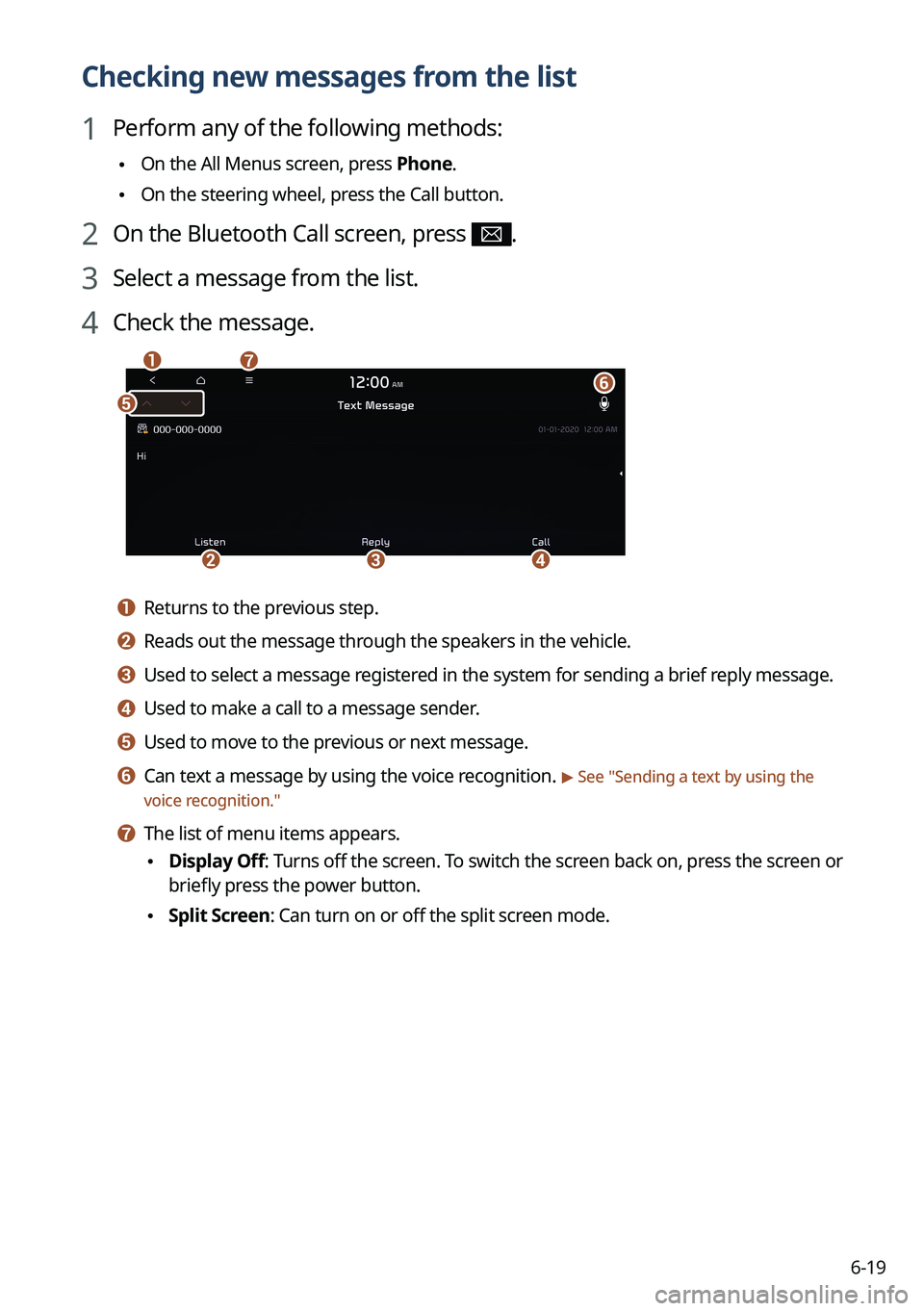
4 Check the message.
\037
\036
\035
\034
\033\032
\031
a a Returns to the previous step.
b b Reads out the message through the speakers in the vehicle.
c c Used to select a message registered in the system for sending a brief reply message.
d d Used to make a call to a message sender.
e e Used to move to the previous or next message.
f f Can text a message by using the voice recognition. > See "
Sending a text by using the
voice recognition."
g g The list of menu items appears.
\225 Display Off
: Turns off the screen. To switch the screen back on, press the screen or
briefly press the power button.
\225 Split Screen: Can turn on or off the split screen mode.
Page 164 of 332

6-200000
A
The auto-reply messaging may not be available depending on the smartphone model.
0000
A
To edit or delete a message, park the vehicle at a safe place and access \
the messaging
function on your smartphone. You cannot edit or delete a message from the system.
0000
A
When an iPhone is connected to the system, there are some restrictions when receiving
messages as follows:
000DOnly the sender name appears when the sender information is saved.
000DWhen the sender information is not saved, only the phone number appears.\
000DYou cannot use the auto-reply message function.
000DWhen the incoming message notification or lock-screen view option is off, messages
cannot be received.
0000
A
The message reader function may not be supported depending on the system language.
Sending a text by using the voice recognition
When you connect your mobile device to the system via Bluetooth, contacts from the device
are downloaded to the system so you can text a message to a contact by using the voice
recognition.
0000
A
To call using voice recognition, there must be contacts stored on the system.
0000
A
It is available only when the UVO service is active.
1 Perform any of the following methods:
\225On the All Menus screen, press Phone.
\225On the steering wheel, press the Call button.
2 On the Bluetooth message screen, press .
3 When a guiding beep is heard, say the message.
The system sends the text to the selected contact.
Page 165 of 332
Voice functions
Voice recognition
Using the Siri Eyes Free Voice Memo
07