ECO KIA SORENTO PHEV 2022 Navigation System Quick Reference Guide
[x] Cancel search | Manufacturer: KIA, Model Year: 2022, Model line: SORENTO PHEV, Model: KIA SORENTO PHEV 2022Pages: 332, PDF Size: 11.11 MB
Page 46 of 332
2-8
Using the Apple CarPlay
1 On the All Menus screen, press Apple CarPlay.
2 Perform the desired function.
\225To run any of functions (phone, messaging, navigation, etc.) on your iPhone, press the
corresponding function icon.
0000
A
When you are using your smartphone′s navigation via phone projection, sounds
from both the system′s radio/media function and the navigation will be output
through your vehicle′s speakers. When you use the Volume knob while both
sounds are being output, the navigation volume is adjusted first.
\225To run the Siri voice recognition, press and hold the Voice Recognition button on the
steering wheel.
0000
A
By pressing the [ MODE] button on the steering wheel, you can run the media App on
your smartphone as well as the Radio/Media mode of the system.
0000
A
To specify which functions to run when the [ MODE] button on the steering wheel is
pressed, press and hold the [ MODE] button to display the settings screen.
0000
A
When you receive a call, press the Call button on the steering wheel to answer it.
0000
A
When phone projection is active, you cannot change the phone projection settings. To
change the settings, remove the USB cable from your system.
0000
A
Apps or functions used through Apple CarPlay are subject to change according to the
policy of Apple Corporation. For supportable functions, visit the Apple Corporation
website at http://www.apple.com/ios/carplay .
0000
A
To use the functions on your smartphone with the minimized system settings, update the
smartphone OS to the latest version.
0000
A
The recognition time may differ depending on the device type, firmware, and OS version.
0000
A
Charges may apply for any mobile data used while Apple CarPlay is running.
0000
A
Some functions may not work properly depending on the network signal strength.
0000
A
Avoid interacting with the smartphone while using Apple CarPlay.
0000
A
You cannot use the following functions when Apple CarPlay is in use.
000DBluetooth phone
000DUSB mode
000DAndroid Auto
000DBrowsing using the Search knob on the control panel (if equipped)
Page 63 of 332
2-25
Viewing the driving information (if equipped)
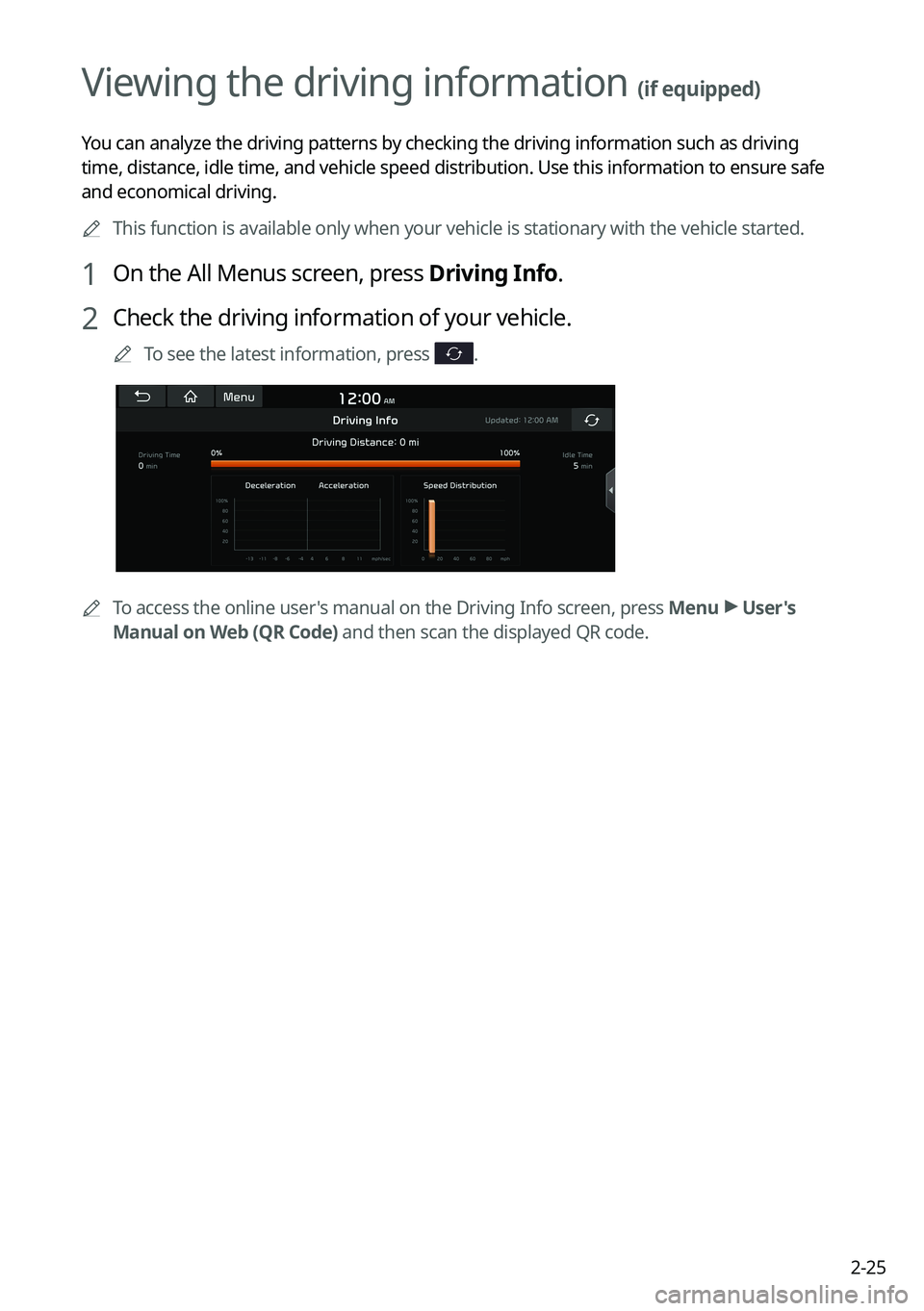
You can analyze the driving patterns by checking the driving information such as driving
time, distance, idle time, and vehicle speed distribution. Use this info\
rmation to ensure safe
and economical driving.0000
A
This function is available only when your vehicle is stationary with the vehicle started.
1 On the All Menus screen, press Driving Info.
2 Check the driving information of your vehicle.
0000
A
To see the latest information, press .
0000
A
To access the online user's manual on the Driving Info screen, press Menu >
User's
Manual on Web (QR Code) and then scan the displayed QR code.
Page 66 of 332
2-28
Using the Plug-in Hybrid menu (PHEV only)
You can see the driving and energy information, schedule charging, or search for charging
stations.
On the All Menus screen, press PHEV.
Plug-in Hybrid screen (PHEV only)
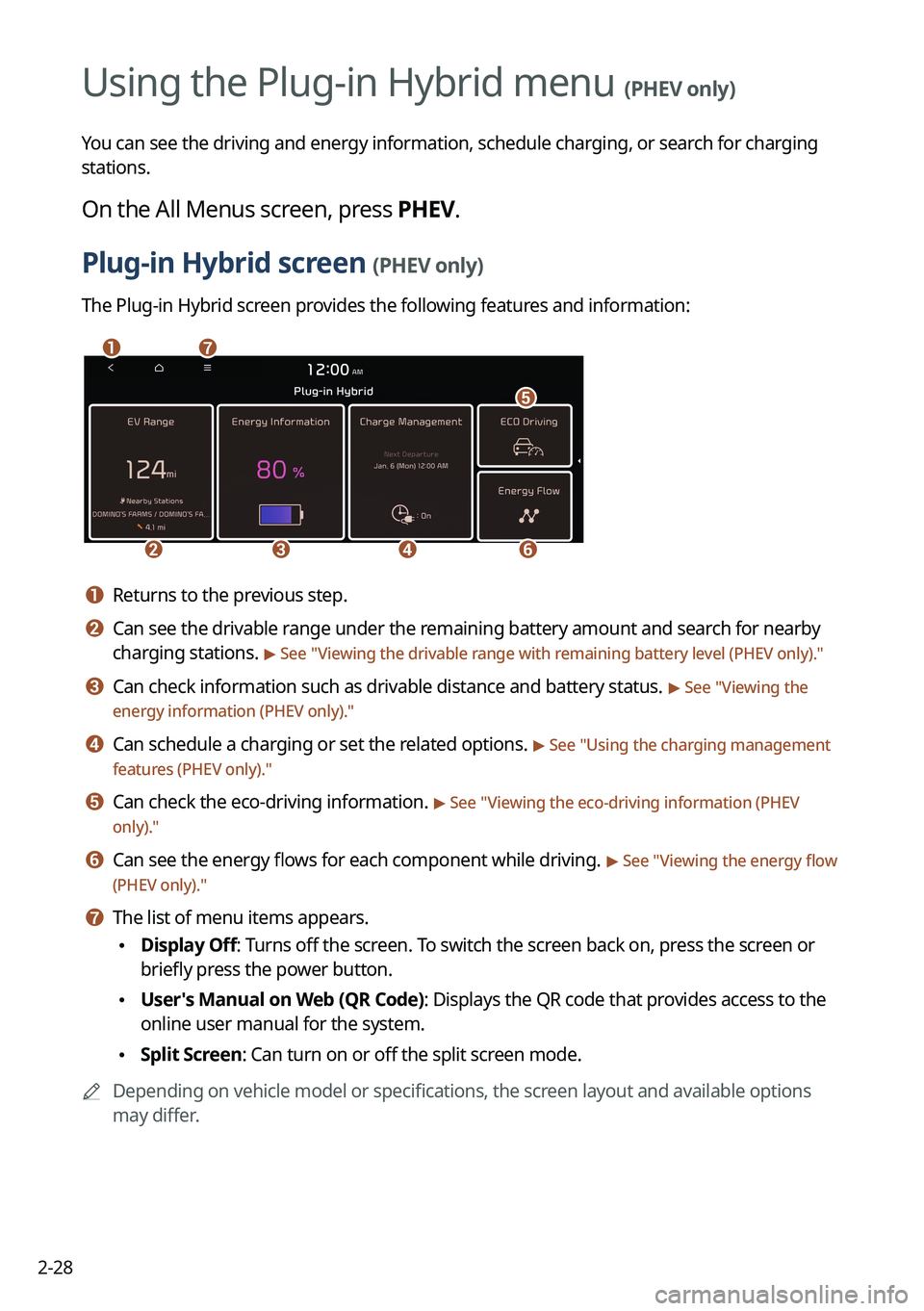
The Plug-in Hybrid screen provides the following features and information:
\037\036
\035\034\033
\032
\031
a a Returns to the previous step.
b b Can see the drivable range under the remaining battery amount and search for nearby
charging stations.
> See "Viewing the drivable range with remaining battery level (PHEV only) ."
c c Can check information such as drivable distance and battery status. > See "Viewing the
energy information (PHEV only)."
d d Can schedule a charging or set the related options. > See " Using the charging management
features (PHEV only)."
e e Can check the eco-driving information. > See " Viewing the eco-driving information (PHEV
only)."
f f Can see the energy flows for each component while driving. > See " Viewing the energy flow
(PHEV only)."
g g The list of menu items appears.
\225 Display Off: Turns off the screen. To switch the screen back on, press the screen or
briefly press the power button.
\225User's Manual on Web (QR Code): Displays the QR code that provides access to the
online user manual for the system.
\225Split Screen: Can turn on or off the split screen mode.
0000
A
Depending on vehicle model or specifications, the screen layout and available options
may differ.
Plug-in Hybrid
Page 70 of 332
2-32
Energy information screen
\037
\036
\035\034
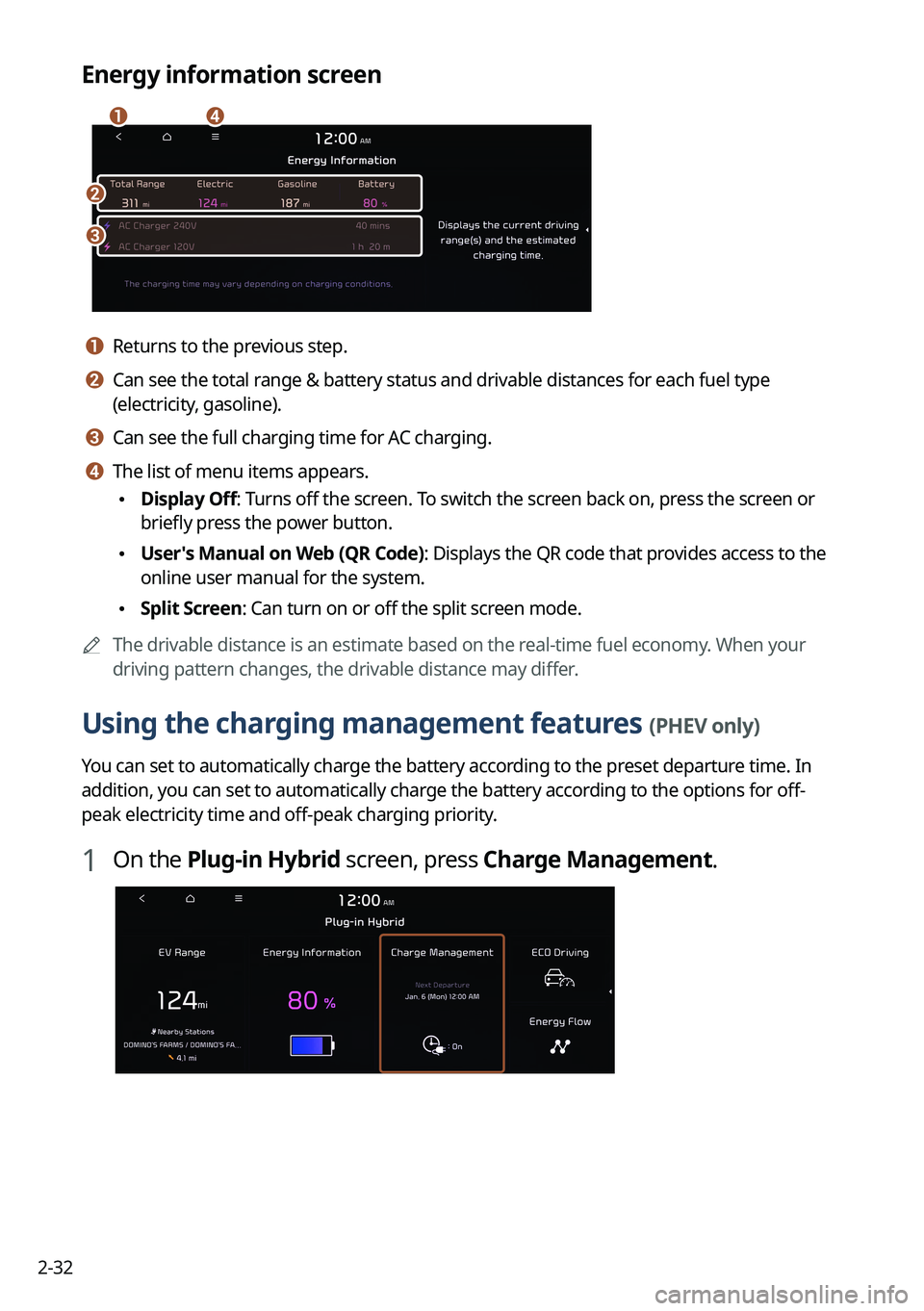
a a Returns to the previous step.
b b Can see the total range & battery status and drivable distances for each fuel type
(electricity, gasoline).
c c Can see the full charging time for AC charging.
d d The list of menu items appears.
\225Display Off: Turns off the screen. To switch the screen back on, press the screen or
briefly press the power button.
\225User's Manual on Web (QR Code): Displays the QR code that provides access to the
online user manual for the system.
\225Split Screen: Can turn on or off the split screen mode.
0000
A
The drivable distance is an estimate based on the real-time fuel economy. When your
driving pattern changes, the drivable distance may differ.
Using the charging management features (PHEV only)
You can set to automatically charge the battery according to the preset departure time. In
addition, you can set to automatically charge the battery according to the options for off-
peak electricity time and off-peak charging priority.
1 On the Plug-in Hybrid screen, press Charge Management.
Page 74 of 332
2-36
Viewing the eco-driving information (PHEV only)
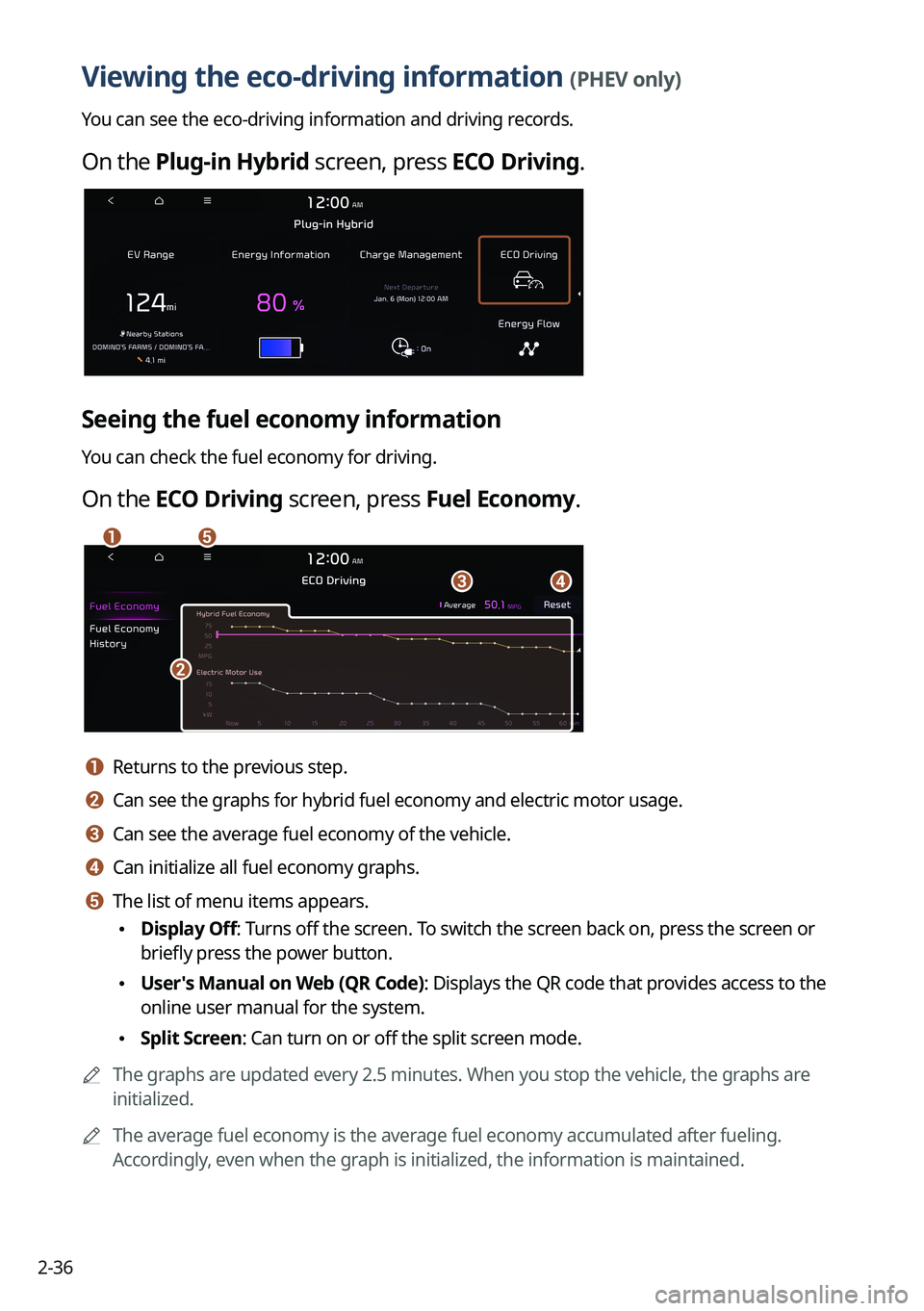
You can see the eco-driving information and driving records.
On the Plug-in Hybrid screen, press ECO Driving.
Seeing the fuel economy information
You can check the fuel economy for driving.
On the ECO Driving screen, press Fuel Economy.
\037
\036
\035
\034
\033
a a Returns to the previous step.
b b Can see the graphs for hybrid fuel economy and electric motor usage.
c c Can see the average fuel economy of the vehicle.
d d Can initialize all fuel economy graphs.
e e The list of menu items appears.
\225Display Off: Turns off the screen. To switch the screen back on, press the screen or
briefly press the power button.
\225User's Manual on Web (QR Code): Displays the QR code that provides access to the
online user manual for the system.
\225Split Screen: Can turn on or off the split screen mode.
0000
A
The graphs are updated every 2.5 minutes. When you stop the vehicle, the graphs are
initialized.
0000
A
The average fuel economy is the average fuel economy accumulated after fueling.
Accordingly, even when the graph is initialized, the information is maintained.
Page 75 of 332
2-37
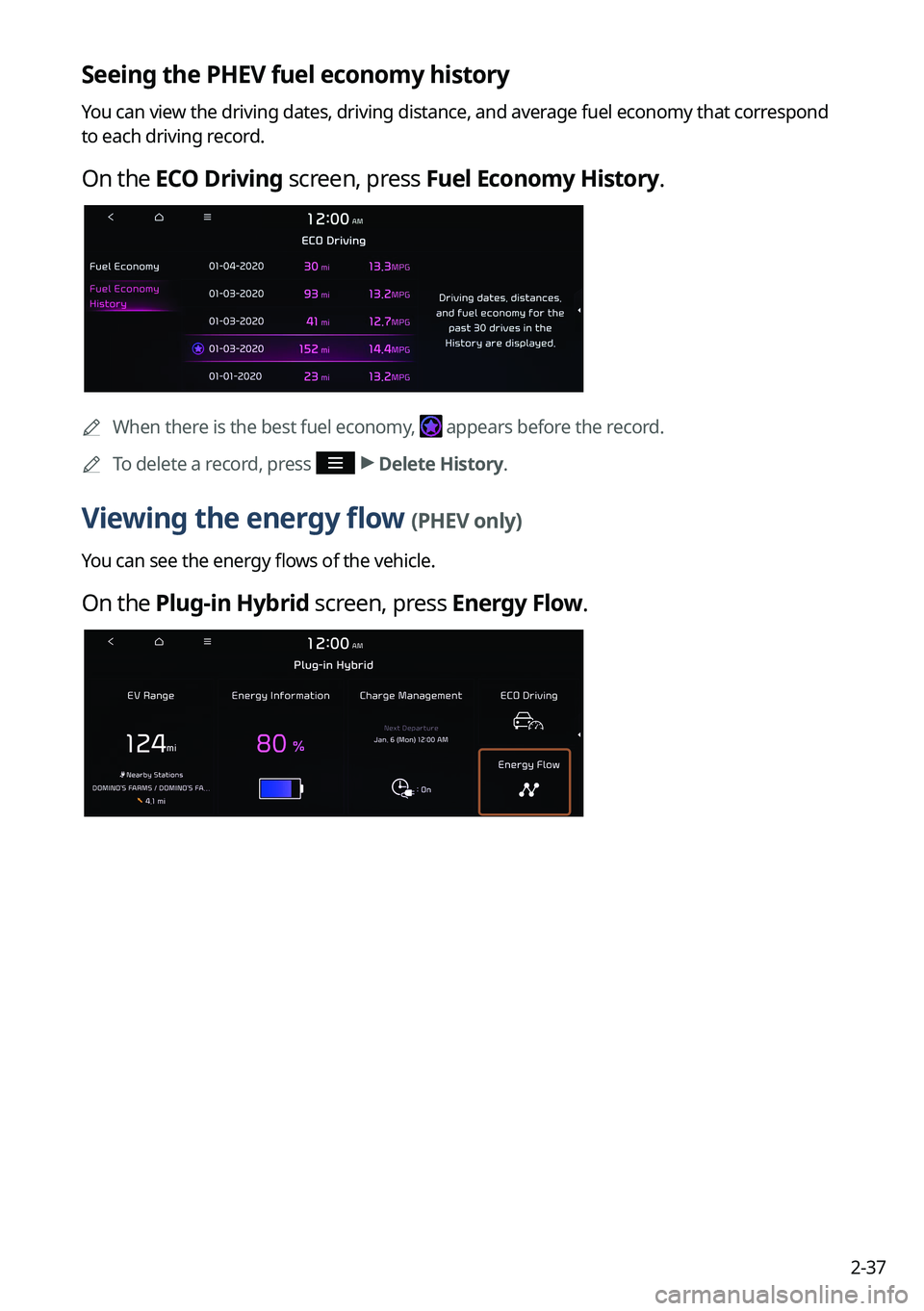
Seeing the PHEV fuel economy history
You can view the driving dates, driving distance, and average fuel economy that correspond
to each driving record.
On the ECO Driving screen, press Fuel Economy History.
0000
A
When there is the best fuel economy, appears before the record.
0000
A
To delete a record, press >
Delete History.
Viewing the energy flow (PHEV only)
You can see the energy flows of the vehicle.
On the Plug-in Hybrid screen, press Energy Flow.
Page 85 of 332
3-7
Changing the radio channel (Type1)
Perform any of the following methods:
\225On the Radio screen, press the desired channel from the presets list.
0000
A
You can also change the channel by using the Move lever/button on the steering
wheel.
\225On the control panel, press the [
SEEK] or [TRACK ] button. You can move to the
previous or next channel with good reception.
\225 When you know an accurate frequency, turn the Search knob on the control panel to
change the frequency.
You can listen to the changed radio broadcast.
Changing the channel by using voice commands
You can change the radio channel by using voice commands.
1 On the Radio screen, press .
2 When a guiding beep is heard, say the desired radio station channel.
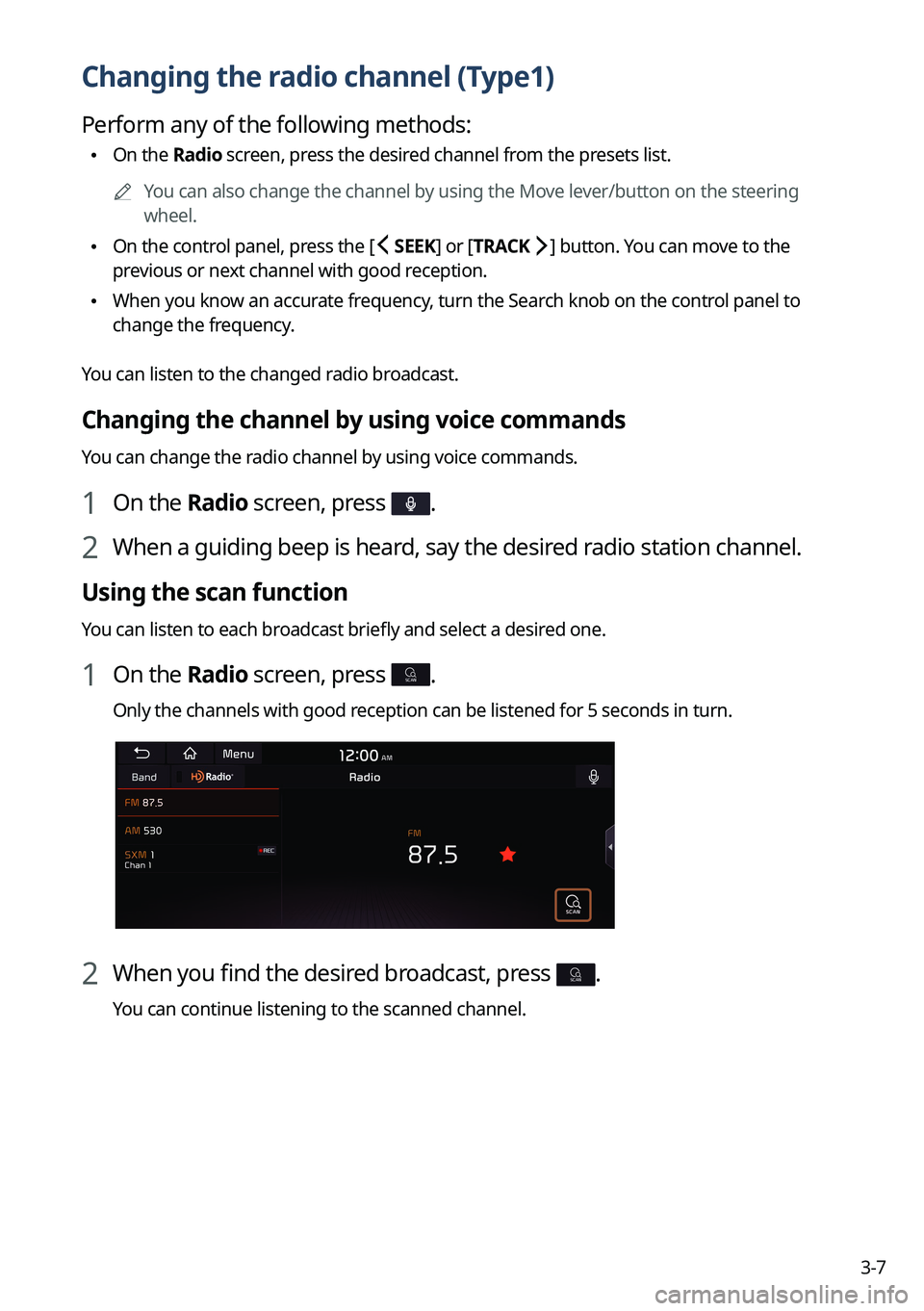
Using the scan function
You can listen to each broadcast briefly and select a desired one.
1 On the Radio screen, press SCAN.
Only the channels with good reception can be listened for 5 seconds in turn.
2 When you find the desired broadcast, press SCAN.
You can continue listening to the scanned channel.
Page 86 of 332
3-8
Changing the radio channel (Type2)
Perform any of the following methods:
\225On the Radio screen, press the desired channel from the presets list.
0000
A
You can also change the channel by using the Move lever/button on the steering
wheel.
\225On the control panel, press the [
SEEK] or [TRACK ] button. You can move to the
previous or next channel with good reception (if equipped).
You can listen to the changed radio broadcast. 0000
A
If any Search knob on the control panel, you can also change the frequency by using the
knob.
Changing the channel by using voice commands
You can change the radio channel by using voice commands.
1 On the Radio screen, press .
2 When a guiding beep is heard, say the desired radio station channel.
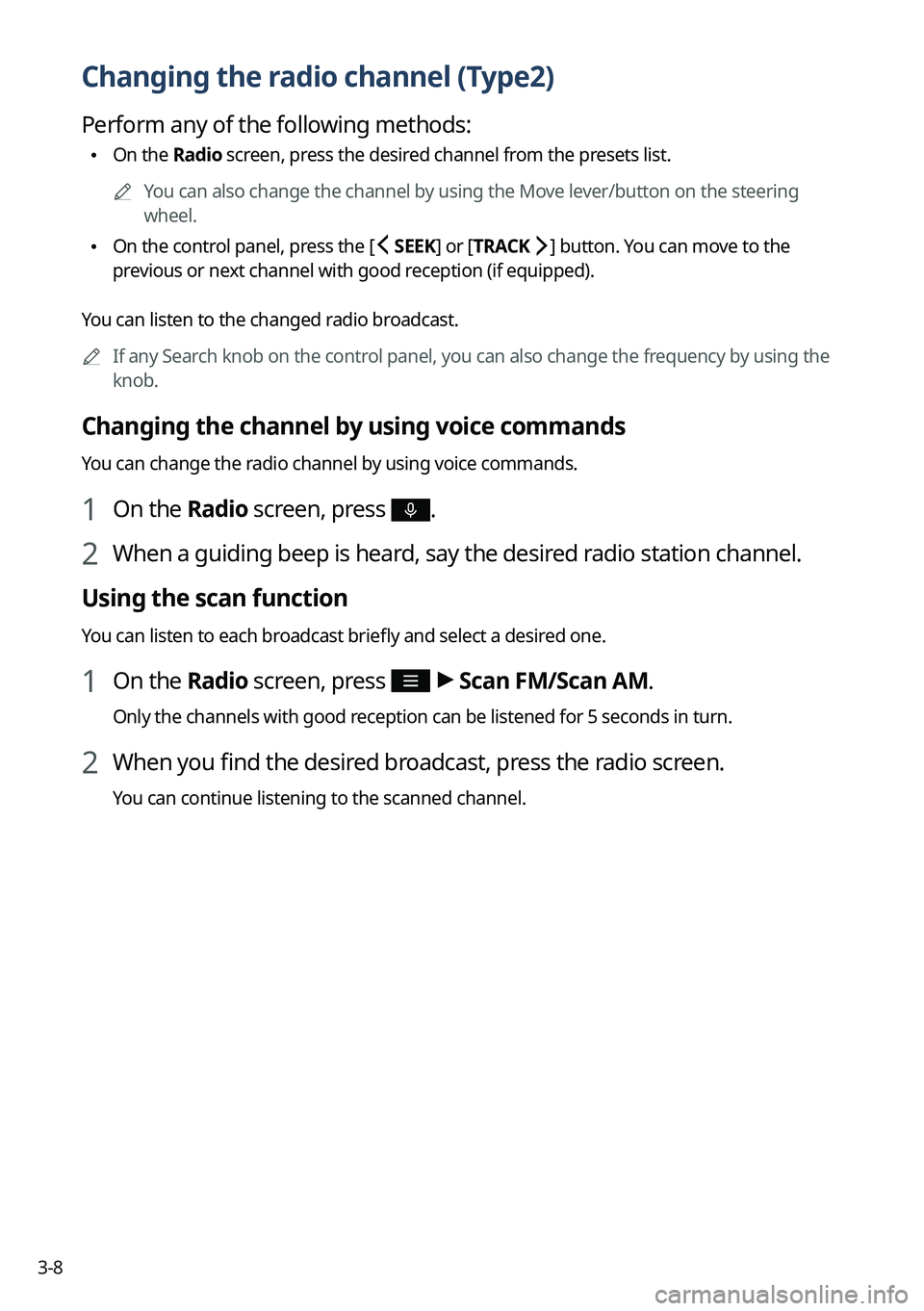
Using the scan function
You can listen to each broadcast briefly and select a desired one.
1 On the Radio screen, press >
Scan FM/Scan AM.
Only the channels with good reception can be listened for 5 seconds in turn.
2 When you find the desired broadcast, press the radio screen.
You can continue listening to the scanned channel.
Page 93 of 332
3-15
c c Moves to the previous segment. Press and hold to rewind the broadcast.
d d Pauses or restarts the broadcast.
e e Moves to the next segment. Press and hold to fast-forward the broadcast.
f f Can change the radio mode.
g g You can go to the previous or next channel.
h h Can enter channel number to select the channel directly.
i i You can delete or save the current frequency to the presets list.
j j Presets list
k k Can see the list of available SiriusXM channels (if equipped).
l l You can change radio channels by using voice commands. > See "Changing the channel by
using voice commands."
m m Displays the options list.
\225 Display Off: Turns off the screen. To switch the screen back on, press the screen or
briefly press the power button.
\225Channel List: Can see the list of available SiriusXM channels.
\225Scan SXM Channels: Scan and play each SiriusXM channel for 5 seconds.
\225Delete Presets: Can delete a registered channel from the presets list.
\225What is on My Presets?: Displays the broadcast schedule.
\225Featured Favorites: Can listen to groups of channels provided by SiriusXM.
\225Sound Settings: Displays the system sound settings screen.
\225User's Manual on Web (QR Code): Displays the QR code that provides access to the
online user manual for the system.
\225Split Screen: Can turn on or off the split screen mode.
0000
A
The screen may differ depending on the vehicle model and specifications.
0000
A
The
icon appears next to the first 10 SiriusXM channels saved. Once preset
channels have been saved, the broadcasts from them are buffered automatically for your
convenience each time you start the vehicle.
Page 102 of 332
4-4
Pause/Resume
You can pause or resume playback of a USB music file.
On the USB music playback screen, press or .
Rewind
By using the rewind function, you can listen to music in the USB device from the desired point
during playback.
Perform any of the following methods:
\225On the USB music playback screen, press and hold .
\225On the control panel, press and hold the [
SEEK] button (if equipped).
0000
A
You can also run the function by using the Move lever/button on the steering wheel.
Fast forward
By using the fast forward function, you can listen to music in the USB device from the desired
point during playback.
Perform any of the following methods:
\225On the USB music playback screen, press and hold .
\225On the control panel, press and hold the [
TRACK ] button (if equipped).
0000
A
You can also run the function by using the Move lever/button on the steering wheel.
Resuming playback of the current music
You can play the current music in the USB device from the beginning.
Perform any of the following methods:
\225On the USB music playback screen, press after 3 seconds during playback.
\225On the control panel, press the [
SEEK] button after 3 seconds during playback (if
equipped).
0000
A
You can also run the function by using the Move lever/button on the steering wheel.