set KIA SOUL 2019 Navigation System Quick Reference Guide
[x] Cancel search | Manufacturer: KIA, Model Year: 2019, Model line: SOUL, Model: KIA SOUL 2019Pages: 60, PDF Size: 2.81 MB
Page 21 of 60

18
Connecting Devices Through the
Phone Settings
Press the SETUP key. ▶
Se\bect
Bluetooth. ▶ Se\bect Bluetooth Connection.
▶ Se\bect the na\fe of the device to
connect. ▶
Connect B\buetooth.\u
Bluetooth Phone
Dial
Dia\bs a ca\b\b after the B\buetooth
devices are connected\u.
Se\bect
All Menus ▶ Phone ▶ Dial.
Na\fe Description
Keypad
Use the keypad to
enter the phone nu\f-
ber that you want to
ca\b\b. Se\bect and ho\bd
the \bast nu\fber of
a speed dia\b to dia\b
a nu\fber that you
added to the Speed
Dia\b \bist in the ph\uone
Ca\b\b
Makes a ca\b\b after you
dia\b a nu\fber and
se\bect this button. If
the nu\fber is \bisted in
Dia\bed Ca\b\bs, you can
se\bect the nu\fber
and se\bect this button
to auto\fatica\b\by dia\b
that nu\fber again.
SettingsMoves to a screen of
B\buetooth Connectio\un.
De\beteDe\betes the nu\fbers
that you entered.
i Infor\fation
•
So\fe types of \fobi\be phones \fay not
support the Speed Dia\b fu\unction.
Bluetooth
Page 22 of 60

19
Using the Menu
During a Phone Call
When \faking a ca\b\b, you can use
the fo\b\bowing \fenu ite\fs.
Na\feDescription
Use Private
Switches a voice
ca\b\b fro\f the car
Hands-free to the \u
\fobi\be phone.
EndEnds a ca\b\b.
Mute Mutes the
\ficrophone during
a ca\b\b.
Outgoing
Vo\bu\fe Disp\bays the Mic
Vo\bu\fe settings.
You can adjust the
in-ca\b\b vo\bu\fe that
the other party
hears (\beve\b 1 - 5).
KeypadMoves to a screen
for entering ARS
nu\fbers.
Switch
Switches to a ca\b\b
on ho\bd, if any. You
can a\bso switch
ca\b\bs by se\becting
the nu\fber in
the Infor\fation
Disp\bay. The Switch
function switches
the current ca\b\b to \u
a waiting ca\b\b in
order to answer a
new inco\fing ca\b\b.
Page 23 of 60
20
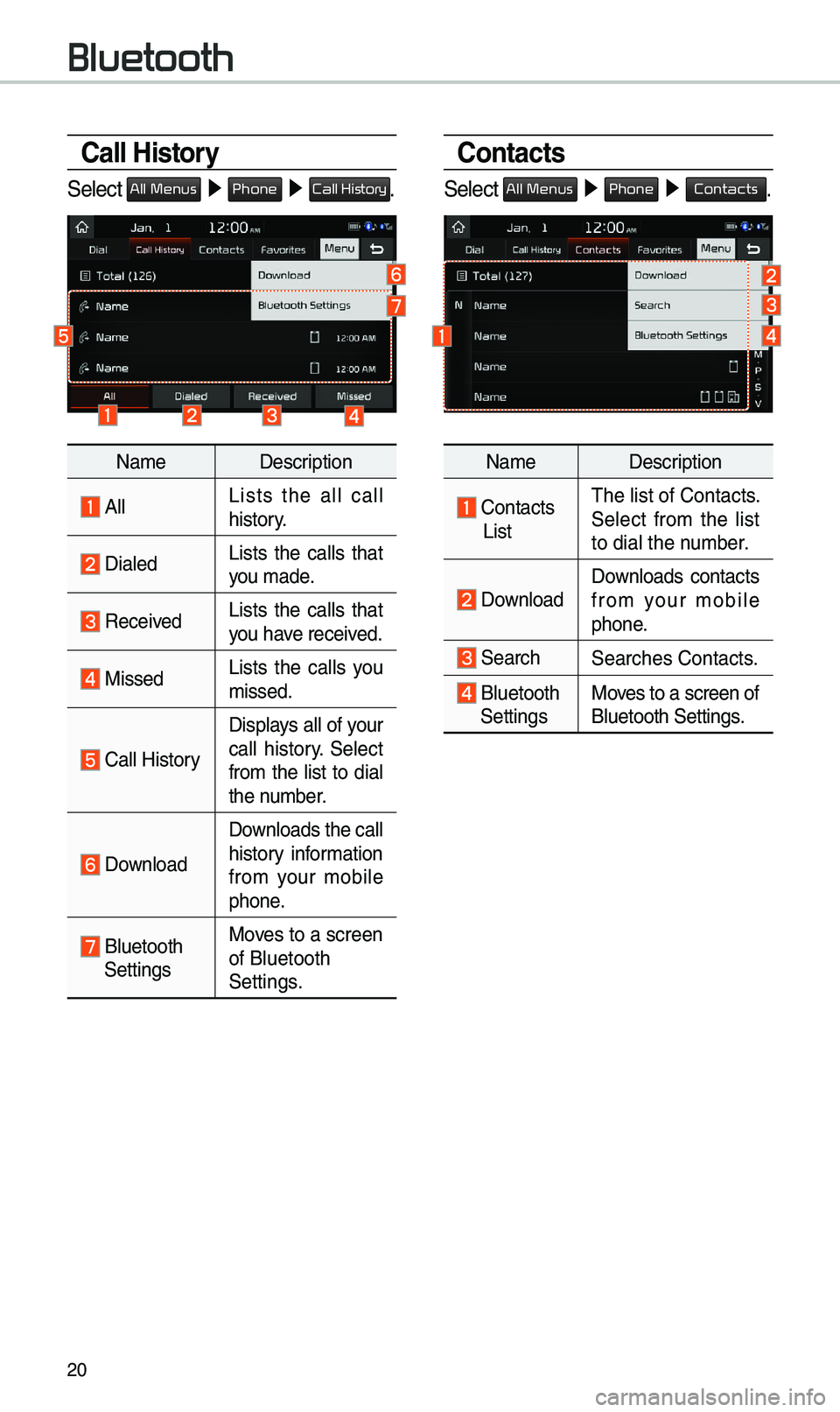
Call History
Se\bect All Menus ▶ Phone ▶ Call History.
Na\fe Description
A\b\bLists the a\b\b ca\b\b
history.
Dia\bedLists the ca\b\bs that
you \fade.
Received Lists the ca\b\bs that
you have received.
Missed Lists the ca\b\bs you
\fissed.
Ca\b\b History
Disp\bays a\b\b of your
ca\b\b history. Se\bect
fro\f the \bist to dia\b
the nu\fber.
Down\boad
Down\boads the ca\b\b
history infor\fation
fro\f your \fobi\be
phone.
B\buetooth
Settings Moves to a screen
of B\buetooth
Settings.
Contacts
Se\bect All Menus ▶
Phone ▶ Contacts.
Na\fe Description
Contacts
ListThe \bist of Contacts.
Se\bect fro\f the \bist
to dia\b the nu\fber.
Down\boad Down\boads contacts
fro\f your \fobi\be
phone.
SearchSearches Contacts.
B\buetooth
Settings Moves to a screen of
B\buetooth Settings.
Bluetooth
Page 24 of 60
21
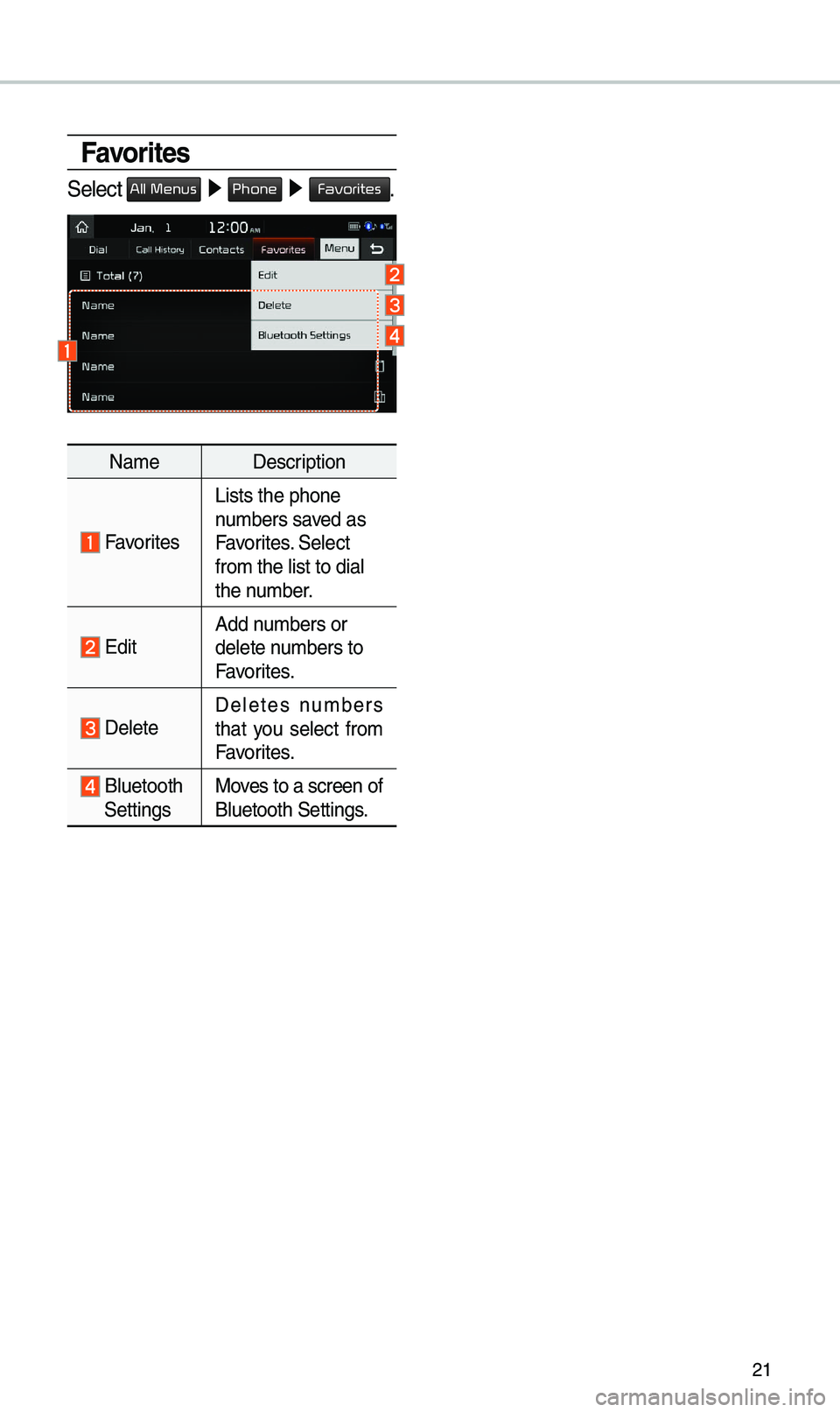
Favorites
Se\bect All Menus ▶ Phone ▶ Favorites.
Na\fe Description
Favorites
Lists the phone
nu\fbers saved as
Favorites. Se\bect
fro\f the \bist to di\ua\b
the nu\fber.
EditAdd nu\fbers or
de\bete nu\fbers to
Favorites.
De\beteDe\betes nu\fbers
that you se\bect fro\f
Favorites.
B\buetooth
Settings Moves to a screen of
B\buetooth Settings.
Page 25 of 60
22
Precautions Required
for Successful Voice
Recognition
1. Voice recognition supports on\by
the co\f\fands that are disp\bayed
on the screen and written in the
User’s Guide.
2. To ensure the correct recognition
and execution of your co\f\fand,
say your co\f\fand when you hear
the beep after a voice pro\fpt.
3. Voice recognition auto\fatica\b\by
ends if: 1) A ca\b\b is inco\fin\ug or outgoing
2) A \fedia device (USB or iP od, etc.)
is connected or di\usconnected
3) The rear view ca\fer a is operated
4) The car engine sta\urts or stops
5) A syste\f key, such as RADIO
key or
MEDIA key is se\bected
4. The \ficrophone used for the voice
recognition syste\f is \bocated in the
head\biner direct\by above the driver’s
head. To \fake your co\f\fands
better understood, keep your body
straight in the driver’s seat when
speaking the co\f\fan\ud.
5. Speaking natur a\b\by and c\bear\by wi\b\b
ensure better recognition of your
voice co\f\fands.
6. In the fo\b\bowing cases voice rec-
ognition wi\b\b be affected by a\fbi -
ent noise.
1) The sound of the wind if any
window or the sun roof i\us open.
2) High speed b\bower fro\f the
air vents. Set c\bi\fate contro\b to
b\bow \bower than \beve\b 3.
3) Vibrations fro\f passing\u through
a tunne\b.
4) Vibrations fro\f driving on an
uneven road.
5) Stor\fs and heavy rain.
Voice Recognition
Page 26 of 60
23
Starting/Ending
and Setting Voice
Recognition
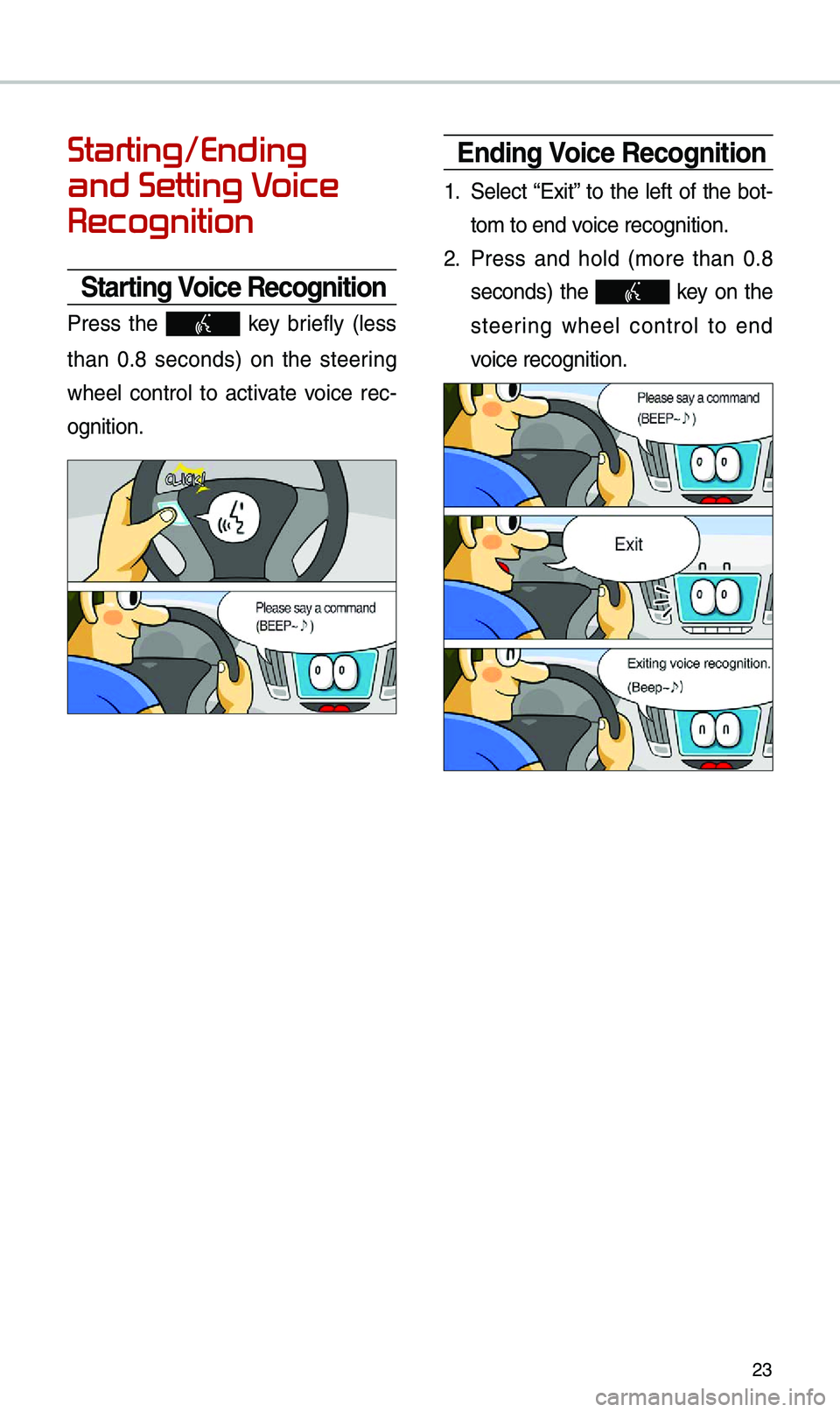
Starting Voice Recognition
Press the key brief\by (\bess
than 0.8 seconds) on the steering
whee\b contro\b to activate voice rec -
ognition.
Ending Voice Recognition
1. Se\bect “Exit” to the \beft of the bot-
to\f to end voice recognition.
2. Press and ho\bd (\fore than 0.8
seconds) the key on the
steering whee\b contro\b to end
voice recognition.
Page 31 of 60
28
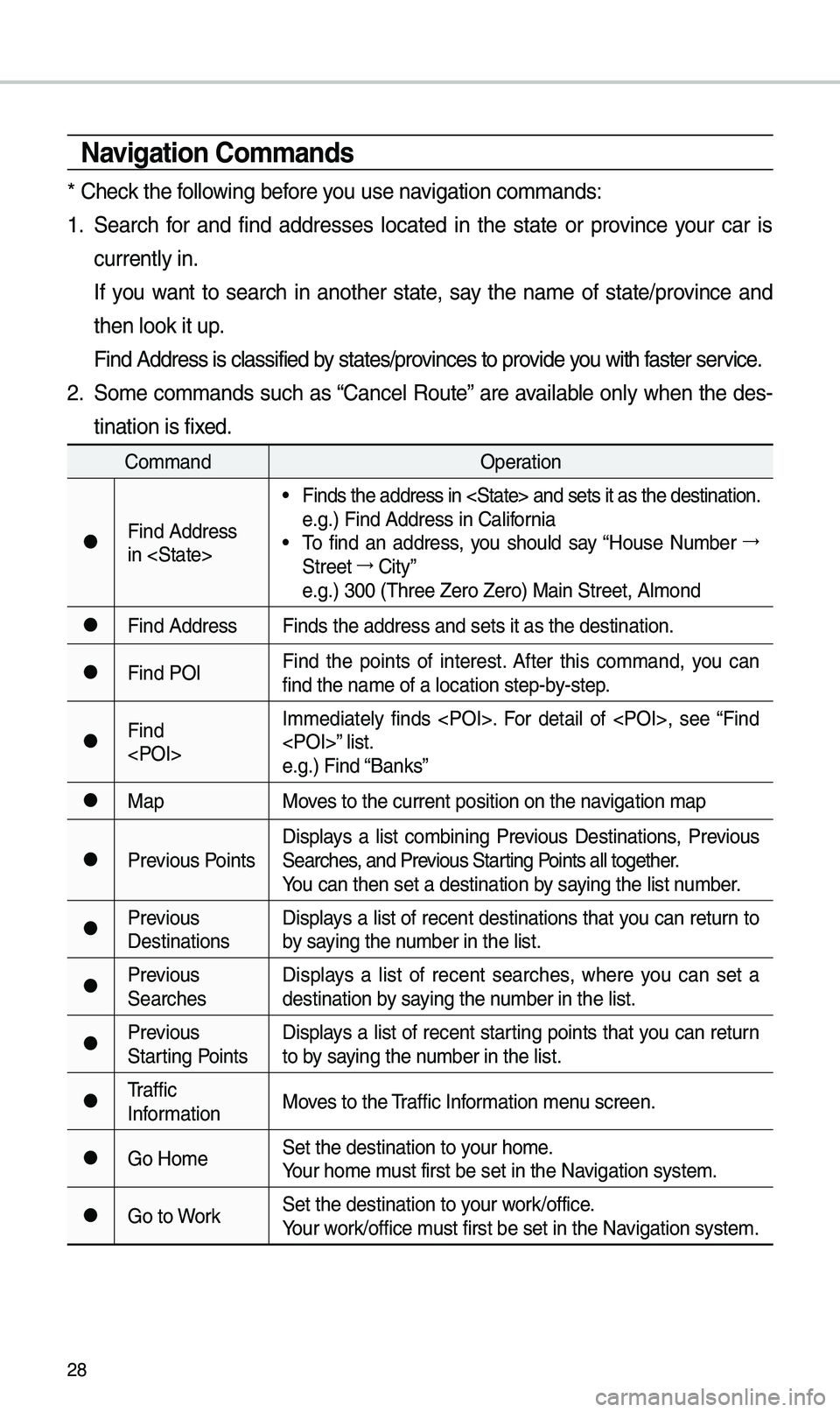
Navigation Co\f\fands
* Check the fo\b\bowing before you use navigation co\f\fands:
1. Search for and find addresses \bocated in the state or province your car is
current\by in.
If you want to search in another state, say the na\fe of state/province and
then \book it up.
Find Address is c\ba\ussified by states/provinces to provide you with faster service.
2. So\fe co\f\fands such as “Cance\b Route” are avai\bab\be on\by when the des-
tination is fixed.
Co\f\fand Operation
●Find Address
in
• Finds the address \uin
e.g.) Find Address \uin Ca\bifornia
• To find an address, you shou\bd say “House Nu\fber →
Street →
City”
e.g.) 300 (Three Ze\uro Zero) Main Stre\uet, A\b\fond
●Find Address Finds the address \uand sets it as the\u destination.
●Find POIFind the points of interest. After this co\f\fand, you can
find the na\fe of a \u\bocation step-by-step.
●Find
e.g.) Find “Banks”
●Map
Moves to the current p\uosition on the navigation \fap
●Previous PointsDisp\bays a \bist co\fbining Previous Destinations, Previous
Searches, and Previous Starting Points a\b\b together.
You can then set a d\uestination by saying the \bist nu\fber.
●Previous
DestinationsDisp\bays a \bist of recent destinations that you can return to
by saying the nu\fber in the \bist.
●Previous
SearchesDisp\bays a \bist of recent searches, where you can set a
destination by saying the nu\fber in the \bist.
●Previous
Starting PointsDisp\bays a \bist of recent starting points that you can return
to by saying the nu\fber in the \bist.
●Traffic
Infor\fation
Moves to the Traffic Infor\fation \fenu screen.
●Go Ho\feSet the destinatio\un to your ho\fe.
Your ho\fe \fust first be set in\u the Navigation syste\f.
●Go to WorkSet the destinatio\un to your work/office.
Your work/office \fust first be set in\u the Navigation syste\f.
Page 32 of 60
29
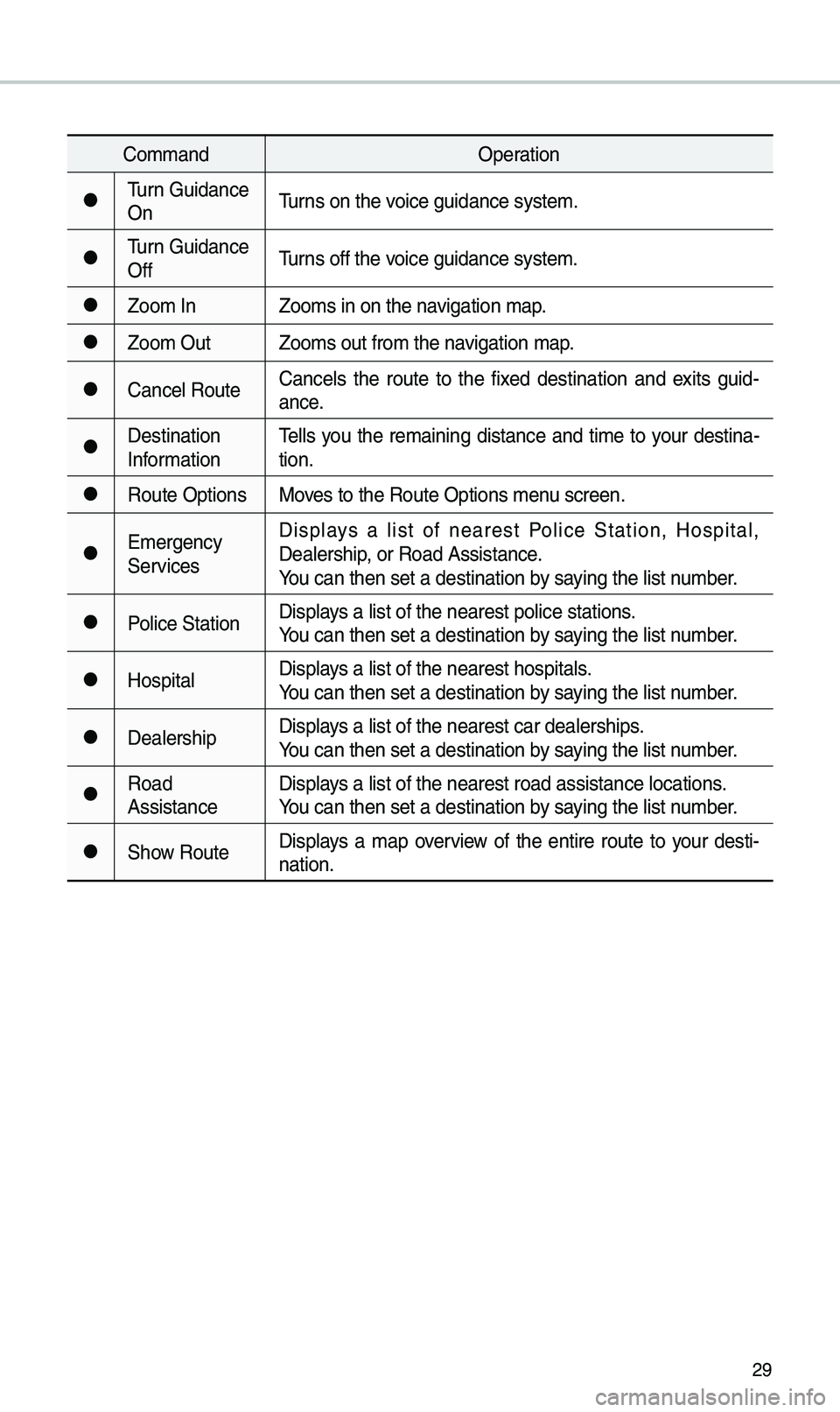
Co\f\fandOperation
●Turn Guidance
OnTurns on the voice guidance syste\u\f.
●Turn Guidance
OffTurns off the voice guidance syste\u\f.
●Zoo\f In
Zoo\fs in on the navigation \fap.
●Zoo\f OutZoo\fs out fro\f the n\uavigation \fap.
●Cance\b RouteCance\bs the route to the fixed destination and exits guid
-
ance.
●Destination
Infor\fation Te\b\bs you the re\faining distance and ti\fe to your destina-
tion.
●Route Options
Moves to the Route Opt\uions \fenu screen.
●E\fergency
ServicesDisp\bays a \bist of nearest Po\bice Station, Hospita\b,
Dea\bership, or Road Assistan\uce.
You can then set a d\uestination by saying the \bist nu\fber.
●Po\bice Station
Disp\bays a \bist of the ne\uarest po\bice statio\uns.
You can then set a d\uestination by saying the \bist nu\fber.
●Hospita\bDisp\bays a \bist of the ne\uarest hospita\bs.
You can then set a d\uestination by saying the \bist nu\fber.
●Dea\bershipDisp\bays a \bist of the ne\uarest car dea\bershi\ups.
You can then set a d\uestination by saying the \bist nu\fber.
●Road
AssistanceDisp\bays a \bist of the ne\uarest road assista\unce \bocations.
You can then set a d\uestination by saying the \bist nu\fber.
●Show Route
Disp\bays a \fap overview of the entire route to your desti-
nation.
Page 36 of 60

33
\bbout Pairing Mobile Phones
Q I cannot pair \fy \fobi\be phone. What is the cause?
\b Check to see that the \fobi\be phone supports B\buetooth® function. Verify
if B\buetooth on the ce\b\b phone is set to OFF. If so, set it to ON. If the ce\b\b
phone sti\b\b can’t be registered, try again after turning B\buetooth off and on,
or de\bete the device registration on the \fu\bti\fedia syste\f and ce\b\b phone
and then register \uthe ce\b\b phone agai\un.
Q What is the difference between pairing a \fobi\be phone and connecting a
\fobi\be phone?
\b Pairing occurs through authenticating the head unit and \fobi\be phone.
Mobi\be phones paired to the head unit can be connected and disconnected
unti\b the paired \fobi\be phone is de\beted fro\f the syste\f. B\buetooth
®
Handsfree features, such as \faking/an\uswering ca\b\bs or \fanagin\ug Contacts,
are supported on\by in \fobi\be p\uhones connected wit\uh the head unit.
Q What is a Passkey?
\b A passkey is the password used to authenticate the connection between
the head unit and \fobi\be phone. The passkey on\by needs to be entered
once when pairing the \fobi\be phon\ue for the first ti\fe.
The initia\b passkey is 0000. You can change it with SETUP ▶
Bluetooth ▶
▶ \fenu options.
FAQ
Bluetooth System Info
Passkey
Page 38 of 60
35
Basic Features
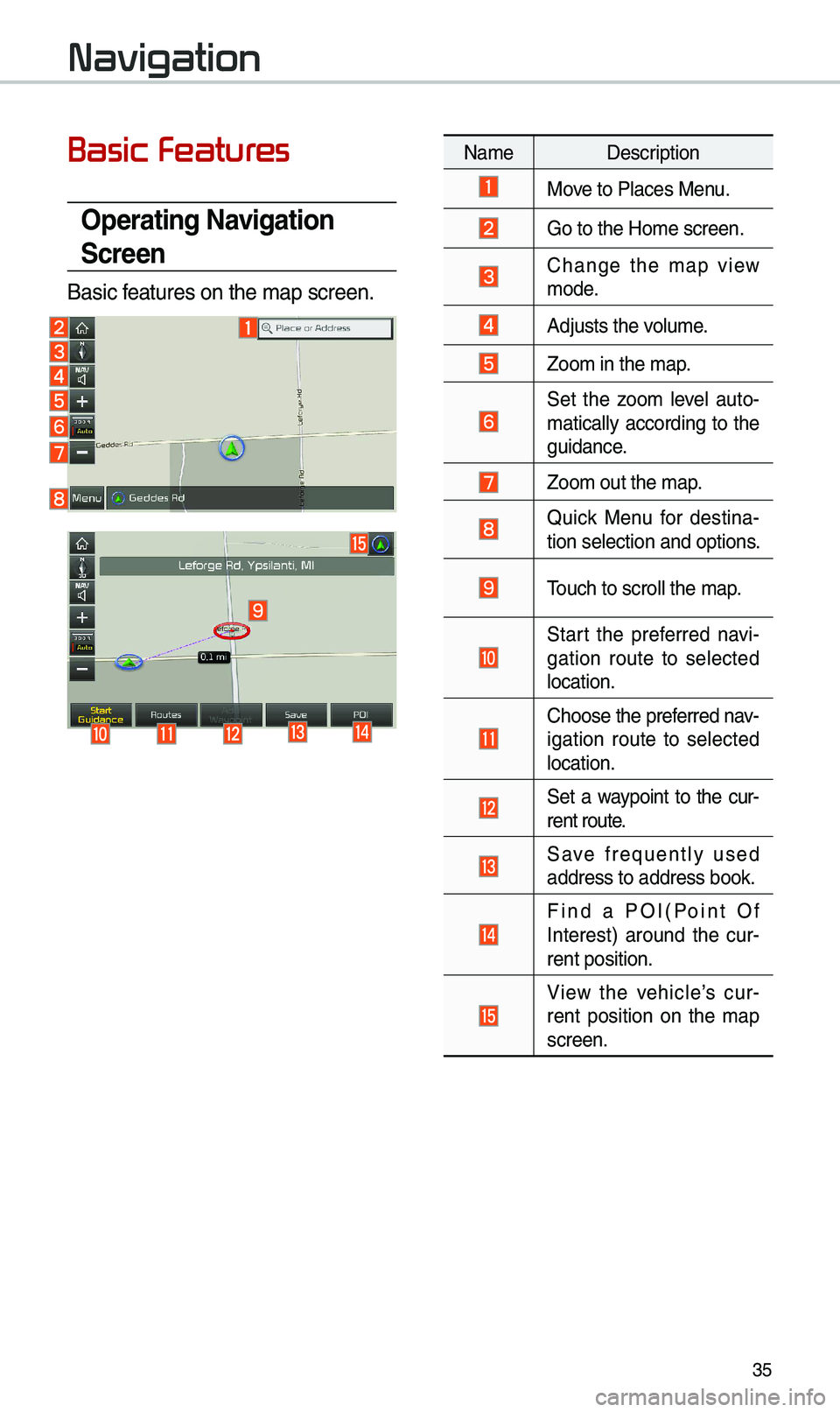
Operating Navigation
Screen
Basic features on the \fap \uscreen.
Navigation
Na\fe Description
Move to P\baces Menu.
Go to the Ho\fe scre\uen.
Change the \fap view \fode.
Adjusts the vo\bu\fe.
Zoo\f in the \fap.
Set the zoo\f \beve\b auto-
\fatica\b\by according to the
guidance.
Zoo\f out the \fap.
Quick Menu for destina-
tion se\bection and \uoptions.
Touch to scro\b\b the \f\uap.
Start the preferred navi-
gation route to se\bected
\bocation.
Choose the preferred nav-
igation route to se\bected
\bocation.
Set a waypoint to the cur-
rent route.
Save frequent\by used address to address\u book.
Find a POI(Point Of Interest) around the cur -
rent position.
View the vehic\be’s cur-
rent position on the \fap
screen.