sensor KIA SOUL 2019 User Guide
[x] Cancel search | Manufacturer: KIA, Model Year: 2019, Model line: SOUL, Model: KIA SOUL 2019Pages: 564, PDF Size: 14.2 MB
Page 85 of 564
367
Safety features of your vehicle
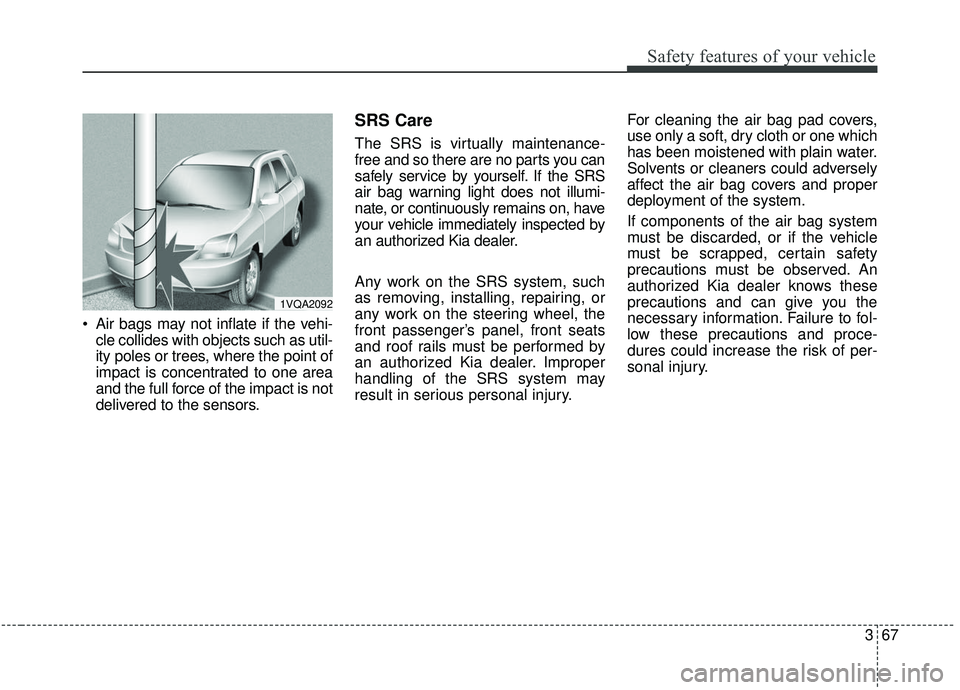
Air bags may not inflate if the vehi-cle collides with objects such as util-
ity poles or trees, where the point of
impact is concentrated to one area
and the full force of the impact is not
delivered to the sensors.
SRS Care
The SRS is virtually maintenance-
free and so there are no parts you can
safely service by yourself. If the SRS
air bag warning light does not illumi-
nate, or continuously remains on, have
your vehicle immediately inspected by
an authorized Kia dealer.
Any work on the SRS system, such
as removing, installing, repairing, or
any work on the steering wheel, the
front passenger’s panel, front seats
and roof rails must be performed by
an authorized Kia dealer. Improper
handling of the SRS system may
result in serious personal injury. For cleaning the air bag pad covers,
use only a soft, dry cloth or one which
has been moistened with plain water.
Solvents or cleaners could adversely
affect the air bag covers and proper
deployment of the system.
If components of the air bag system
must be discarded, or if the vehicle
must be scrapped, certain safety
precautions must be observed. An
authorized Kia dealer knows these
precautions and can give you the
necessary information. Failure to fol-
low these precautions and proce-
dures could increase the risk of per-
sonal injury.
1VQA2092
Page 86 of 564
Safety features of your vehicle
68
3
Adding equipment to or modi-
fying your air bag-equipped
vehicle
If you modify your vehicle by changing
your vehicle's frame, bumper system,
front end or side sheet metal or ride
height, this may affect the operation of
your vehicle's air bag system.
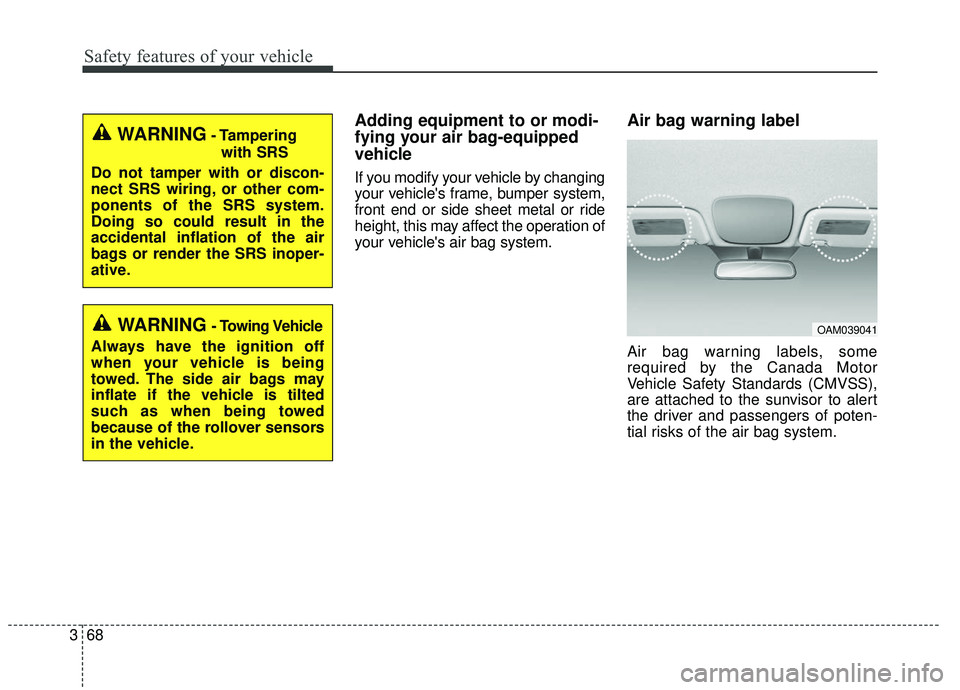
Air bag warning label
Air bag warning labels, some
required by the Canada Motor
Vehicle Safety Standards (CMVSS),
are attached to the sunvisor to alert
the driver and passengers of poten-
tial risks of the air bag system.
WARNING- Tampering
with SRS
Do not tamper with or discon-
nect SRS wiring, or other com-
ponents of the SRS system.
Doing so could result in the
accidental inflation of the air
bags or render the SRS inoper-
ative.
WARNING- Towing Vehicle
Always have the ignition off
when your vehicle is being
towed. The side air bags may
inflate if the vehicle is tilted
such as when being towed
because of the rollover sensors
in the vehicle.OAM039041
Page 133 of 564
447
Features of your vehicle
Electric chromic mirror (ECM) (if equipped)
The electric rearview mirror automat-
ically controls the glare from the
headlights of the vehicles behind you
in nighttime or low light driving condi-
tions. The sensor mounted in the mir-
ror senses the light level around the
vehicle, and automatically controls
the headlight glare from the vehicles
behind you.
When the engine is running, the
glare is automatically controlled by
the sensor mounted in the rearview
mirror.
Whenever the shift lever is shifted
into reverse (R), the mirror will auto-
matically go to the brightest setting in
order to improve the drivers view
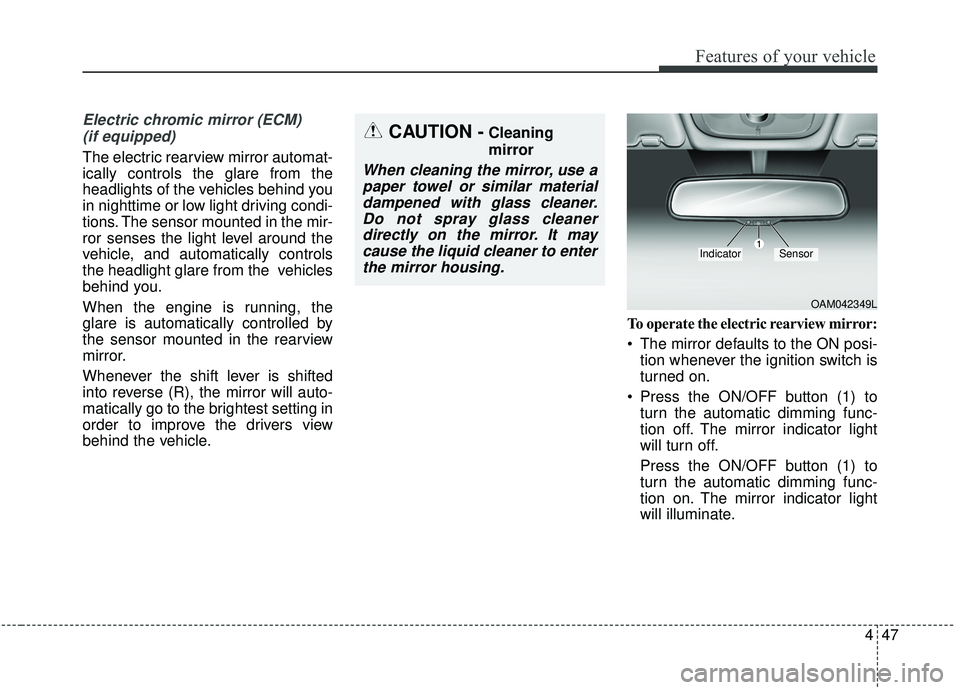
behind the vehicle. To operate the electric rearview mirror:
The mirror defaults to the ON posi-
tion whenever the ignition switch is
turned on.
Press the ON/OFF button (1) to turn the automatic dimming func-
tion off. The mirror indicator light
will turn off.
Press the ON/OFF button (1) to
turn the automatic dimming func-
tion on. The mirror indicator light
will illuminate.
CAUTION -Cleaning
mirror
When cleaning the mirror, use apaper towel or similar materialdampened with glass cleaner.Do not spray glass cleanerdirectly on the mirror. It maycause the liquid cleaner to enterthe mirror housing.
OAM042349L
IndicatorSensor
Page 179 of 564
493
Features of your vehicle
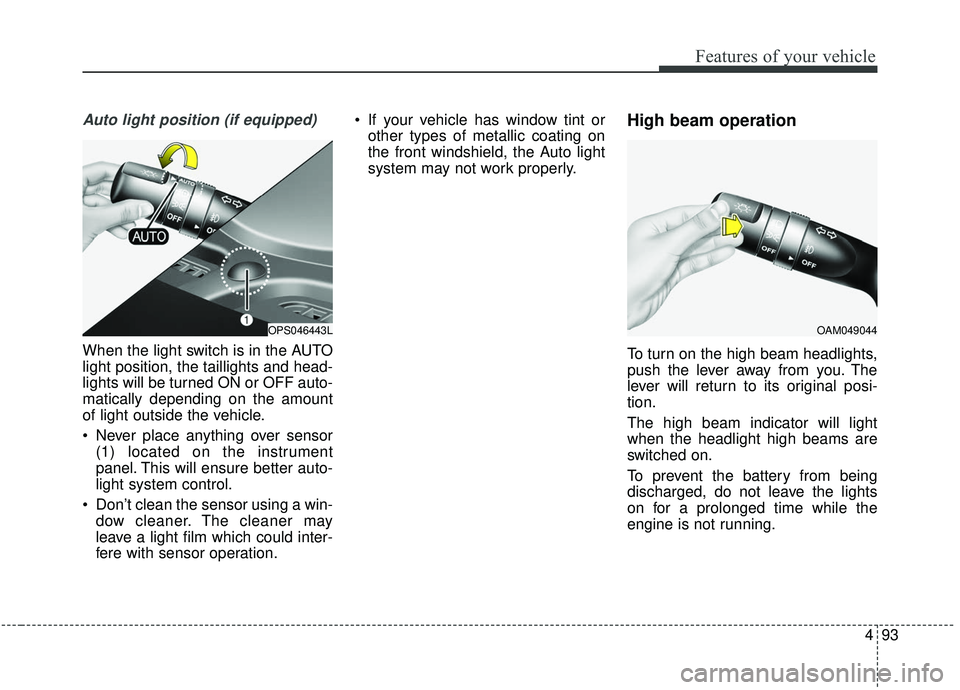
Auto light position (if equipped)
When the light switch is in the AUTO
light position, the taillights and head-
lights will be turned ON or OFF auto-
matically depending on the amount
of light outside the vehicle.
Never place anything over sensor(1) located on the instrument
panel. This will ensure better auto-
light system control.
Don’t clean the sensor using a win- dow cleaner. The cleaner may
leave a light film which could inter-
fere with sensor operation. If your vehicle has window tint or
other types of metallic coating on
the front windshield, the Auto light
system may not work properly.
High beam operation
To turn on the high beam headlights,
push the lever away from you. The
lever will return to its original posi-
tion.
The high beam indicator will light
when the headlight high beams are
switched on.
To prevent the battery from being
discharged, do not leave the lights
on for a prolonged time while the
engine is not running.
OPS046443LOAM049044
Page 205 of 564
4119
Features of your vehicle
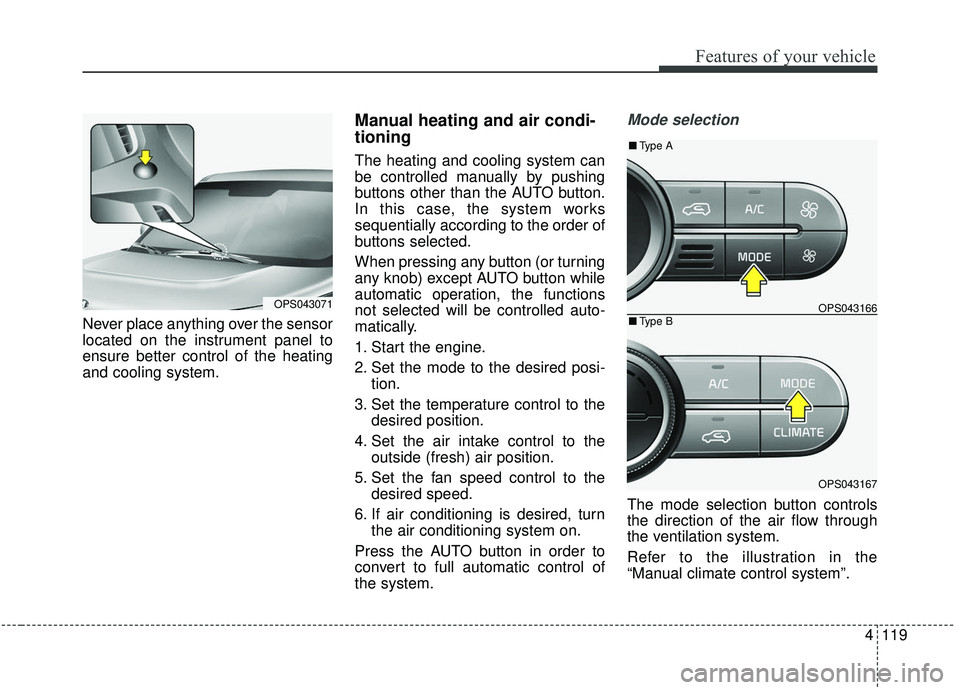
Never place anything over the sensor
located on the instrument panel to
ensure better control of the heating
and cooling system.
Manual heating and air condi-
tioning
The heating and cooling system can
be controlled manually by pushing
buttons other than the AUTO button.
In this case, the system works
sequentially according to the order of
buttons selected.
When pressing any button (or turning
any knob) except AUTO button while
automatic operation, the functions
not selected will be controlled auto-
matically.
1. Start the engine.
2. Set the mode to the desired posi-tion.
3. Set the temperature control to the desired position.
4. Set the air intake control to the outside (fresh) air position.
5. Set the fan speed control to the desired speed.
6. If air conditioning is desired, turn the air conditioning system on.
Press the AUTO button in order to
convert to full automatic control of
the system.
Mode selection
The mode selection button controls
the direction of the air flow through
the ventilation system.
Refer to the illustration in the
“Manual climate control system”.
OPS043071OPS043166
OPS043167
■ Type B
■Type A
Page 340 of 564
Driving your vehicle
50
6
The AEB system is designed to
potentially reduce accident risk. It
recognizes the distance from the
vehicle ahead or a pedestrian
through the sensors (i.e. radar and
camera), and, if necessary, warns
the driver of a collision risk with ta
warning message or warning alarms.System setting and activation
System setting
The driver can activate the AEB by
placing the engine start/stop button
to the ON position and by selecting
'User Settings', 'Driving Assist', and
'Autonomous Emergency Braking
System'. The AEB deactivates, when
the driver cancels the system setting.
AUTONOMOUS EMERGENCY BRAKING (AEB) (IF EQUIPPED)
WARNING
-
Autonomous Emergency
Braking (AEB) Limitations
The AEB system is a supple-
mental system and is not a sub-
stitute for safe driving prac-
tices. It is still the responsibility
of the driver to ensure it is safe
to use the AEB based on the
speed of traffic and the distance
to the nearest vehicle ahead of
the driver.
WARNING
Take the following precautions
when using the Autonomous
Emergency Braking (AEB):
This system is only a supple- mental system and it is not
intended to, nor does it
replace the need for extreme
care and attention of the driv-
er. The sensing range and
objects detectable by the sen-
sors are limited. Pay attention
to the road conditions at all
times.
NEVER drive too fast in accor- dance with the road condi-
tions or while cornering.
Always drive cautiously to prevent unexpected and sud-
den situations from occur-
ring. AEB does not stop the
vehicle completely and does
not avoid collisions.
Page 345 of 564
655
Driving your vehicle
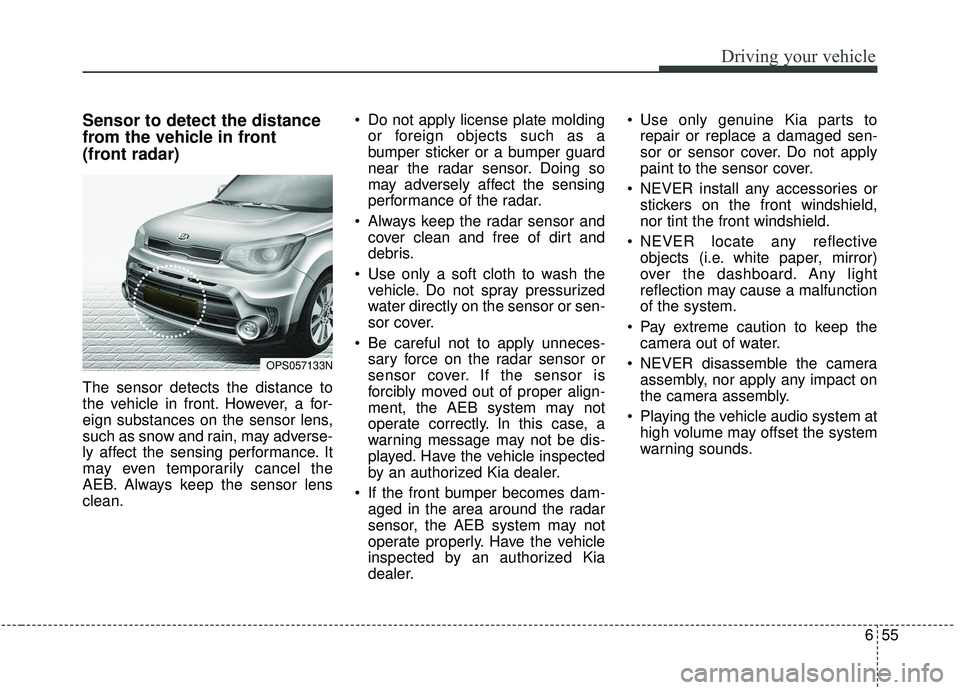
Sensor to detect the distance
from the vehicle in front
(front radar)
The sensor detects the distance to
the vehicle in front. However, a for-
eign substances on the sensor lens,
such as snow and rain, may adverse-
ly affect the sensing performance. It
may even temporarily cancel the
AEB. Always keep the sensor lens
clean. Do not apply license plate molding
or foreign objects such as a
bumper sticker or a bumper guard
near the radar sensor. Doing so
may adversely affect the sensing
performance of the radar.
Always keep the radar sensor and cover clean and free of dirt and
debris.
Use only a soft cloth to wash the vehicle. Do not spray pressurized
water directly on the sensor or sen-
sor cover.
Be careful not to apply unneces- sary force on the radar sensor or
sensor cover. If the sensor is
forcibly moved out of proper align-
ment, the AEB system may not
operate correctly. In this case, a
warning message may not be dis-
played. Have the vehicle inspected
by an authorized Kia dealer.
If the front bumper becomes dam- aged in the area around the radar
sensor, the AEB system may not
operate properly. Have the vehicle
inspected by an authorized Kia
dealer. Use only genuine Kia parts to
repair or replace a damaged sen-
sor or sensor cover. Do not apply
paint to the sensor cover.
NEVER install any accessories or stickers on the front windshield,
nor tint the front windshield.
NEVER locate any reflective objects (i.e. white paper, mirror)
over the dashboard. Any light
reflection may cause a malfunction
of the system.
Pay extreme caution to keep the camera out of water.
NEVER disassemble the camera assembly, nor apply any impact on
the camera assembly.
Playing the vehicle audio system at high volume may offset the system
warning sounds.
OPS057133N
Page 346 of 564
Driving your vehicle
56
6
Warning message and warning
light
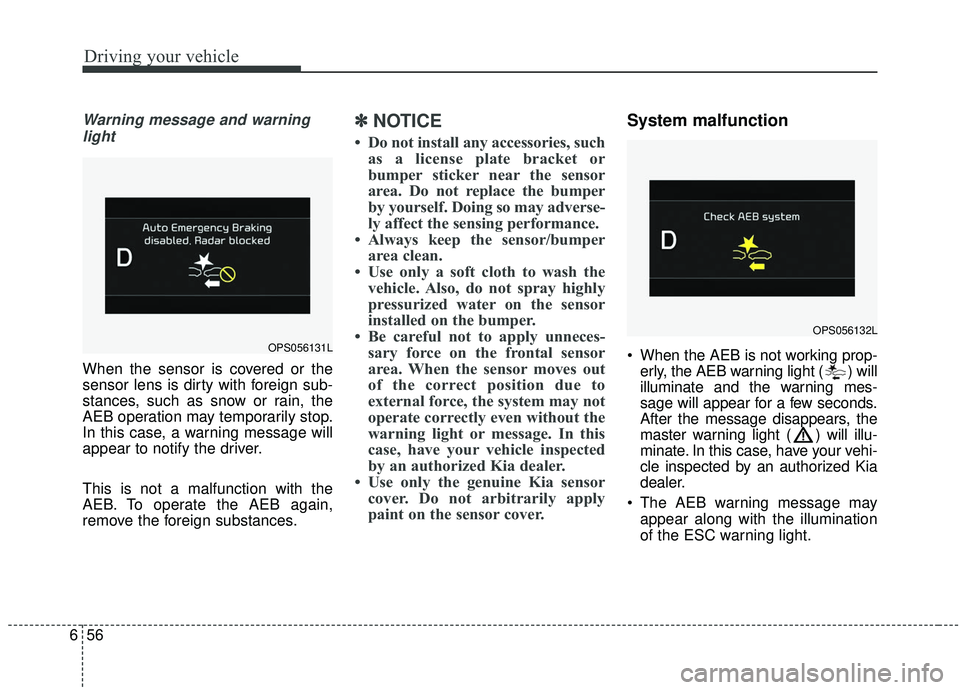
When the sensor is covered or the
sensor lens is dirty with foreign sub-
stances, such as snow or rain, the
AEB operation may temporarily stop.
In this case, a warning message will
appear to notify the driver.
This is not a malfunction with the
AEB. To operate the AEB again,
remove the foreign substances.
✽ ✽ NOTICE
• Do not install any accessories, such
as a license plate bracket or
bumper sticker near the sensor
area. Do not replace the bumper
by yourself. Doing so may adverse-
ly affect the sensing performance.
• Always keep the sensor/bumper area clean.
• Use only a soft cloth to wash the vehicle. Also, do not spray highly
pressurized water on the sensor
installed on the bumper.
• Be careful not to apply unneces- sary force on the frontal sensor
area. When the sensor moves out
of the correct position due to
external force, the system may not
operate correctly even without the
warning light or message. In this
case, have your vehicle inspected
by an authorized Kia dealer.
• Use only the genuine Kia sensor cover. Do not arbitrarily apply
paint on the sensor cover.
System malfunction
When the AEB is not working prop-
erly, the AEB warning light ( ) will
illuminate and the warning mes-
sage will appear for a few seconds.
After the message disappears, the
master warning light ( ) will illu-
minate. In this case, have your vehi-
cle inspected by an authorized Kia
dealer.
The AEB warning message may appear along with the illumination
of the ESC warning light.OPS056131L
OPS056132L
Page 347 of 564
657
Driving your vehicle
✽ ✽NOTICE
• In certain instances and under cer-
tain driving conditions, the AEB
system may activate prematurely.
This initial warning message
appears on the LCD display with a
warning chime.
Also, in certain instances the front
radar sensor or camera recogni-
tion system may not detect the
vehicle or pedestrian ahead. The
AEB system may not activate and
the warning message will not be
displayed.
✽ ✽ NOTICE
• If there is a malfunction with the
AEB system, the automatic emer-
gency braking is not applied even
though it is operating normally.
• The AEB system may not activate if the driver applies the brake
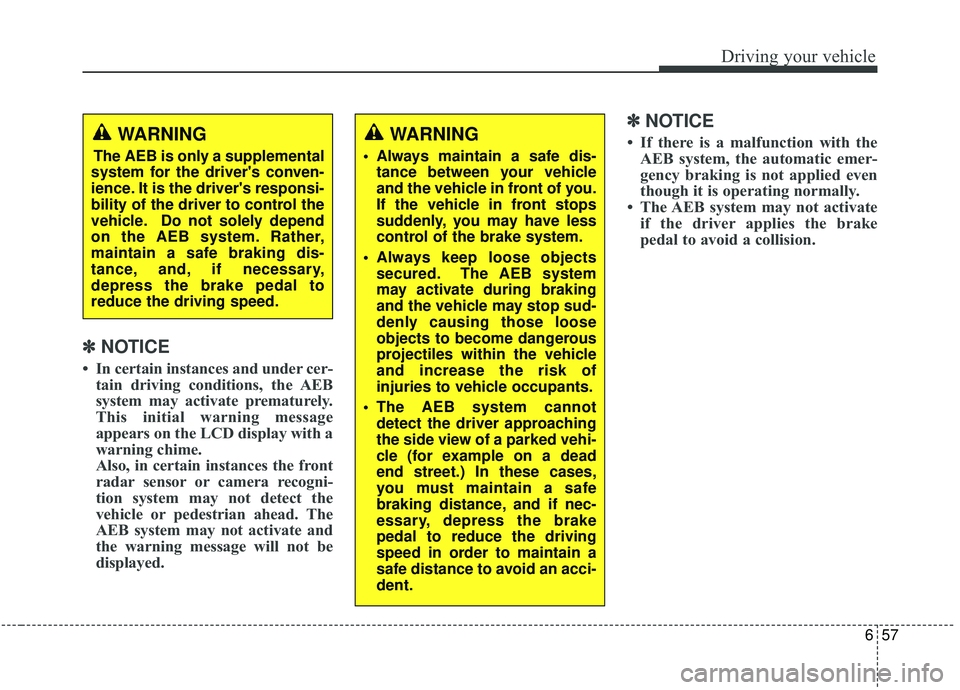
pedal to avoid a collision.WARNING
The AEB is only a supplemental
system for the driver's conven-
ience. It is the driver's responsi-
bility of the driver to control the
vehicle. Do not solely depend
on the AEB system. Rather,
maintain a safe braking dis-
tance, and, if necessary,
depress the brake pedal to
reduce the driving speed.
WARNING
Always maintain a safe dis- tance between your vehicle
and the vehicle in front of you.
If the vehicle in front stops
suddenly, you may have less
control of the brake system.
Always keep loose objects secured. The AEB system
may activate during braking
and the vehicle may stop sud-
denly causing those loose
objects to become dangerous
projectiles within the vehicle
and increase the risk of
injuries to vehicle occupants.
The AEB system cannot detect the driver approaching
the side view of a parked vehi-
cle (for example on a dead
end street.) In these cases,
you must maintain a safe
braking distance, and if nec-
essary, depress the brake
pedal to reduce the driving
speed in order to maintain a
safe distance to avoid an acci-
dent.
Page 348 of 564
Driving your vehicle
58
6
The brake control may be insuffi-
cient, possibly causing a collision,
if a vehicle in front abruptly stops.
Always pay close attention and
exercise extreme caution.
Occupants may get injured, if the vehicle abruptly stops by the acti-
vated AEB system. Always pay
close attention and exercise
extreme caution.
The AEB system operates only to detect vehicles or pedestrians in
front of the vehicle.
The AEB system does not operate when the vehicle is in reverse.
The AEB system is not designed to detect other objects on the road
such as animals.
The AEB system does not detect vehicles in the opposite lane.
The AEB system does not detect cross traffic vehicles that are
approaching.Limitations of the System
The Automatic Emergency Braking
(AEB) system is designed to monitor
the vehicle ahead or a pedestrian on
the roadway through radar signals
and camera recognition to warn the
driver that a collision is imminent,
and if necessary, apply emergency
braking.
In certain situations, the radar sen-
sor or the camera may not be able to
detect the vehicle or pedestrian
ahead. In these cases, the AEB sys-
tem may not operate. The driver must
pay careful attention in the following
situations where the AEB operation
may be limited.
Recognizing vehicles
The sensor may be limited when:
The radar sensor or camera isblocked with a foreign object or
debris
Inclement weather such as heavy rain or snow obscures the field of
view of the radar sensor or camera
There is interference by electro- magnetic waves
There is severe irregular reflection from the radar sensor
The radar/camera sensor recogni- tion is limited
The vehicle in front is too small to be detected (for example a motor-
cycle or a bicycle, etc.)
The camera cannot fit the full out- line of a vehicle in front
The vehicle in front is an oversize vehicle or trailer that is too big to
be detected by the camera recog-
nition system (for example a tractor
trailer, etc.)