sensor KIA SOUL 2019 Owner's Manual
[x] Cancel search | Manufacturer: KIA, Model Year: 2019, Model line: SOUL, Model: KIA SOUL 2019Pages: 564, PDF Size: 14.2 MB
Page 349 of 564
659
Driving your vehicle
The driver's field of view is not wellilluminated (either too dark or too
much reflection or too much back-
light that obscures the field of view)
The vehicle in front does not have their rear lights properly turned ON
The outside brightness changes suddenly, for example when enter-
ing or exiting a tunnel
Light coming from a street light or an oncoming vehicle is reflected on
a wet road surface such as a pud-
dle in the road
The field of view in front is obstructed by sun glare
The windshield glass is fogged up; a clear view of the road is obstruct-
ed
The vehicle in front is driving errat- ically
The vehicle drives through a con- struction area, on an unpaved
road, or above metal materials,
such as a railway
The vehicle drives inside a build- ing, such as a basement parking
lot The adverse road conditions cause
excessive vehicle vibrations while
driving
The vehicle in front is moving verti- cally to the driving direction
The vehicle in front is stopped ver- tically
The vehicle in front is driving towards your vehicle or reversing
Sensor recognition changes rapid- ly when driving over a bump
When the vehicle vibrates heavily
When the vehicle in front drives in circles, such as on a roundabout
Window tint on the front wind- shield, film, water repellent coat-
ing, damaged glass, camera lens
contaminated with foreign objects
(e.g. a sticker, insect, etc.)
When the radar or camera/camera lens is damaged
When the headlights are off or weak at night or in a tunnel
Light such as street light, sunlight or oncoming vehicle light reflects
from water on the road Driving with the sun in front of you
(including headlights of a vehicle
coming from the opposite direc-
tion)
Signs, shadow on the road, tunnel entrance, toll gate, partially paved
roads
The windshield is fogged by humid air in the vehicle or frosted over
In foggy weather
The radar/camera sensor recogni- tion is limited
Page 350 of 564
Driving your vehicle
60
6
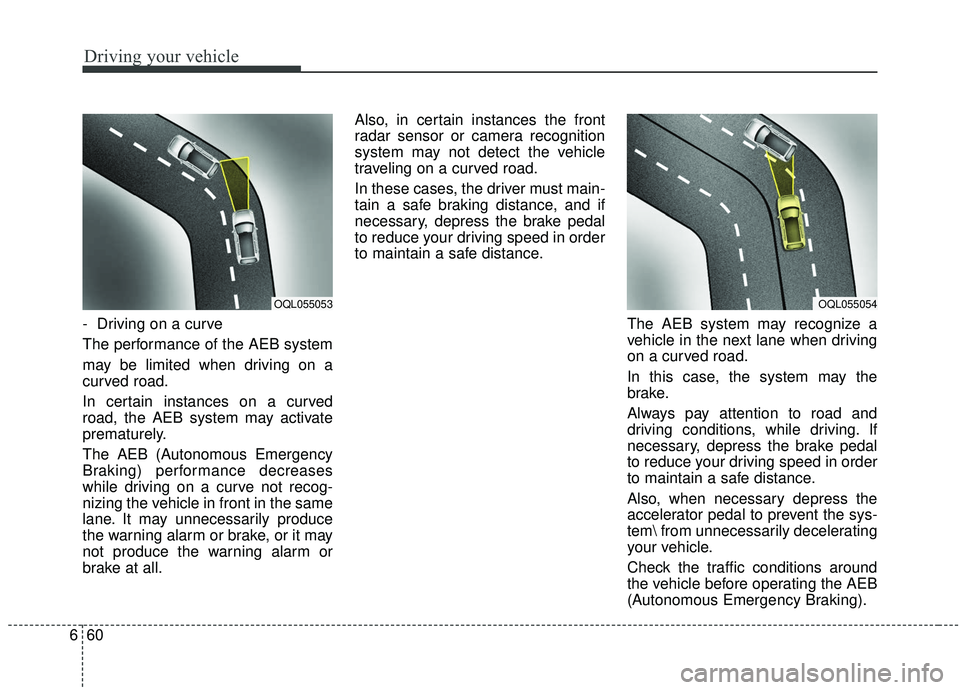
- Driving on a curve
The performance of the AEB system
may be limited when driving on a
curved road.
In certain instances on a curved
road, the AEB system may activate
prematurely.
The AEB (Autonomous Emergency
Braking) performance decreases
while driving on a curve not recog-
nizing the vehicle in front in the same
lane. It may unnecessarily produce
the warning alarm or brake, or it may
not produce the warning alarm or
brake at all. Also, in certain instances the front
radar sensor or camera recognition
system may not detect the vehicle
traveling on a curved road.
In these cases, the driver must main-
tain a safe braking distance, and if
necessary, depress the brake pedal
to reduce your driving speed in order
to maintain a safe distance.
The AEB system may recognize a
vehicle in the next lane when driving
on a curved road.
In this case, the system may the
brake.
Always pay attention to road and
driving conditions, while driving. If
necessary, depress the brake pedal
to reduce your driving speed in order
to maintain a safe distance.
Also, when necessary depress the
accelerator pedal to prevent the sys-
tem from unnecessarily decelerating
your vehicle.
Check the traffic conditions around
the vehicle before operating the AEB
(Autonomous Emergency Braking).
OQL055054OQL055053
Page 352 of 564
Driving your vehicle
62
6
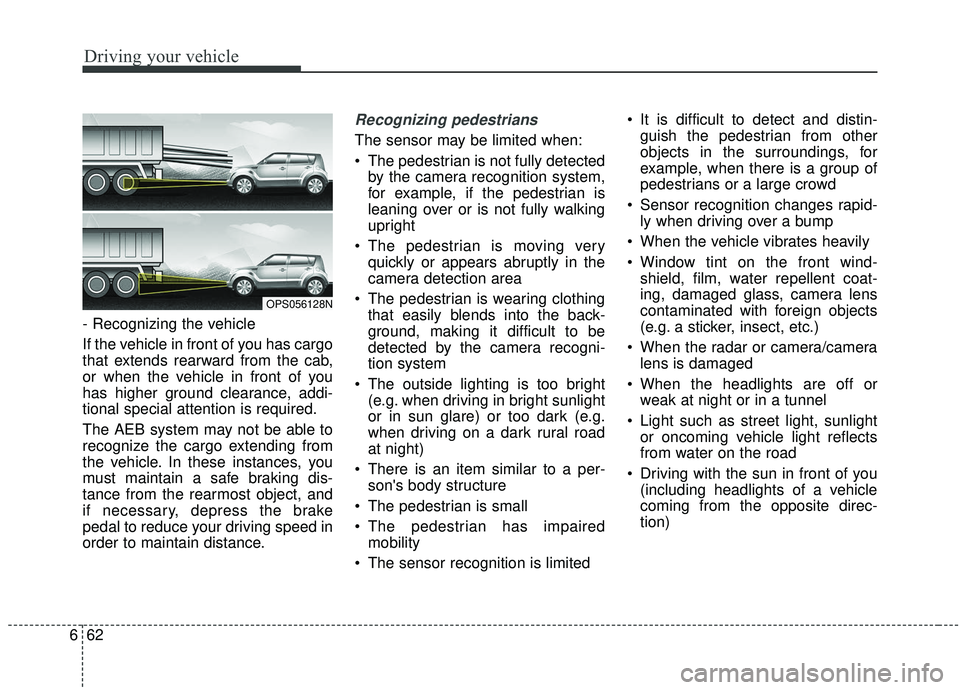
- Recognizing the vehicle
If the vehicle in front of you has cargo
that extends rearward from the cab,
or when the vehicle in front of you
has higher ground clearance, addi-
tional special attention is required.
The AEB system may not be able to
recognize the cargo extending from
the vehicle. In these instances, you
must maintain a safe braking dis-
tance from the rearmost object, and
if necessary, depress the brake
pedal to reduce your driving speed in
order to maintain distance.
Recognizing pedestrians
The sensor may be limited when:
The pedestrian is not fully detected
by the camera recognition system,
for example, if the pedestrian is
leaning over or is not fully walking
upright
The pedestrian is moving very quickly or appears abruptly in the
camera detection area
The pedestrian is wearing clothing that easily blends into the back-
ground, making it difficult to be
detected by the camera recogni-
tion system
The outside lighting is too bright (e.g. when driving in bright sunlight
or in sun glare) or too dark (e.g.
when driving on a dark rural road
at night)
There is an item similar to a per- son's body structure
The pedestrian is small
The pedestrian has impaired mobility
The sensor recognition is limited It is difficult to detect and distin-
guish the pedestrian from other
objects in the surroundings, for
example, when there is a group of
pedestrians or a large crowd
Sensor recognition changes rapid- ly when driving over a bump
When the vehicle vibrates heavily
Window tint on the front wind- shield, film, water repellent coat-
ing, damaged glass, camera lens
contaminated with foreign objects
(e.g. a sticker, insect, etc.)
When the radar or camera/camera lens is damaged
When the headlights are off or weak at night or in a tunnel
Light such as street light, sunlight or oncoming vehicle light reflects
from water on the road
Driving with the sun in front of you (including headlights of a vehicle
coming from the opposite direc-
tion)
OPS056128N
Page 353 of 564
663
Driving your vehicle
Signs, shadow on the road, tunnelentrance, toll gate, partially paved
roads
The windshield is fogged by humid air in the vehicle or frosted over
In foggy weather
The radar/camera sensor recogni- tion is limited
Do not use the Autonomous Emergency Braking system when
towing a vehicle.
Application of the AEB system
while towing may adversely affect
the safety of your vehicle or the
towing vehicle.
Use extreme caution when the vehicle in front of you has cargo
that extends rearward from the
cab, or when the vehicle in front of
you has higher ground clearance.
The AEB system is designed to detect and monitor the vehicle
ahead or detect a pedestrian in the
roadway through radar signals and
camera recognition. It is not
designed to detect bicycles, motor-
cycles, or smaller wheeled objects
such as luggage bags, shopping
carts, or strollers. Never try to test the operation of
the AEB system. Doing so may
cause severe injury or death.
Please have the system inspected by a professional workshop when
replacing or reinstalling the front
windshield, front bumper or
radar/camera. Kia recommends to
visit an authorized Kia dealer/serv-
ice partner.
✽ ✽ NOTICE
In some instances, the AEB system
may be cancelled when subjected to
electromagnetic interference.
Page 363 of 564
673
Driving your vehicle
SCC will be temporarily canceledwhen:
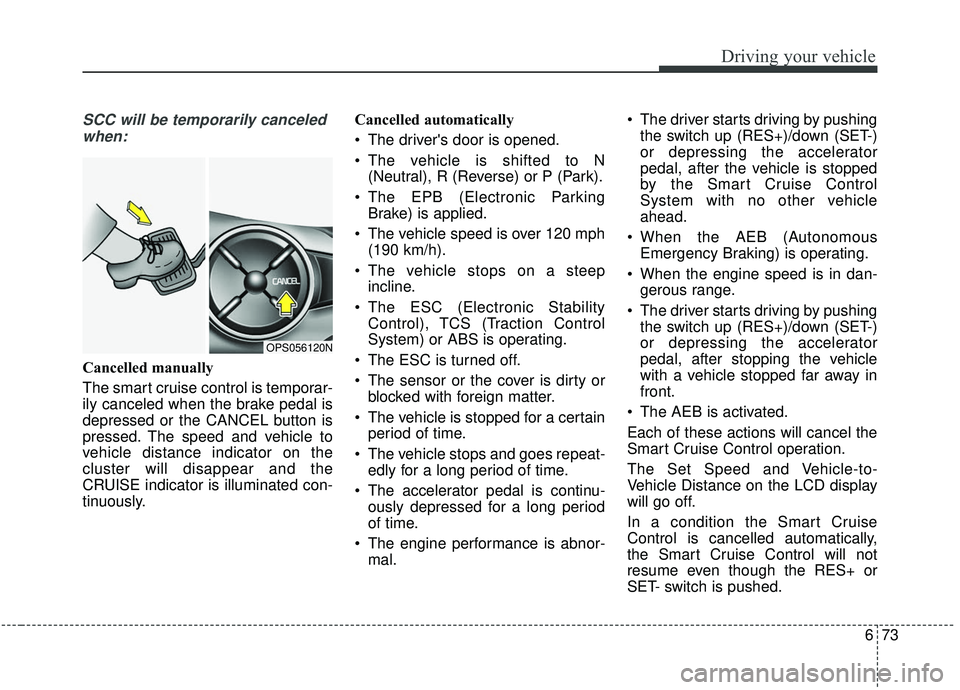
Cancelled manually
The smart cruise control is temporar-
ily canceled when the brake pedal is
depressed or the CANCEL button is
pressed. The speed and vehicle to
vehicle distance indicator on the
cluster will disappear and the
CRUISE indicator is illuminated con-
tinuously. Cancelled automatically
The driver's door is opened.
The vehicle is shifted to N
(Neutral), R (Reverse) or P (Park).
The EPB (Electronic Parking Brake) is applied.
The vehicle speed is over 120 mph (190 km/h).
The vehicle stops on a steep incline.
The ESC (Electronic Stability Control), TCS (Traction Control
System) or ABS is operating.
The ESC is turned off.
The sensor or the cover is dirty or blocked with foreign matter.
The vehicle is stopped for a certain period of time.
The vehicle stops and goes repeat- edly for a long period of time.
The accelerator pedal is continu- ously depressed for a long period
of time.
The engine performance is abnor- mal. The driver starts driving by pushing
the switch up (RES+)/down (SET-)
or depressing the accelerator
pedal, after the vehicle is stopped
by the Smart Cruise Control
System with no other vehicle
ahead.
When the AEB (Autonomous Emergency Braking) is operating.
When the engine speed is in dan- gerous range.
The driver starts driving by pushing the switch up (RES+)/down (SET-)
or depressing the accelerator
pedal, after stopping the vehicle
with a vehicle stopped far away in
front.
The AEB is activated.
Each of these actions will cancel the
Smart Cruise Control operation.
The Set Speed and Vehicle-to-
Vehicle Distance on the LCD display
will go off.
In a condition the Smart Cruise
Control is cancelled automatically,
the Smart Cruise Control will not
resume even though the RES+ or
SET- switch is pushed.
OPS056120N
Page 367 of 564
677
Driving your vehicle
The vehicle will maintain the setspeed, when the lane ahead is clear.
The vehicle will slow down or speed up within selected speed to
maintain the selected distance,
when there is a vehicle ahead of
you in the lane. (A vehicle will
appear in front of your vehicle in
the LCD display only when there is
an actual vehicle in front of you)
If the vehicle ahead speeds up, your vehicle will travel at a steady
cruising speed after accelerating to
the selected speed.
The warning chime sounds and LCD display blinks if it is hard to
maintain the selected distance to
the vehicle ahead.
If the warning chime sounds, actively adjust the vehicle speed by
depressing the brake pedal
according to the road condition
ahead and driving condition.
Even if the warning chime is not acti- vated, always pay attention to the
driving conditions to prevent danger-
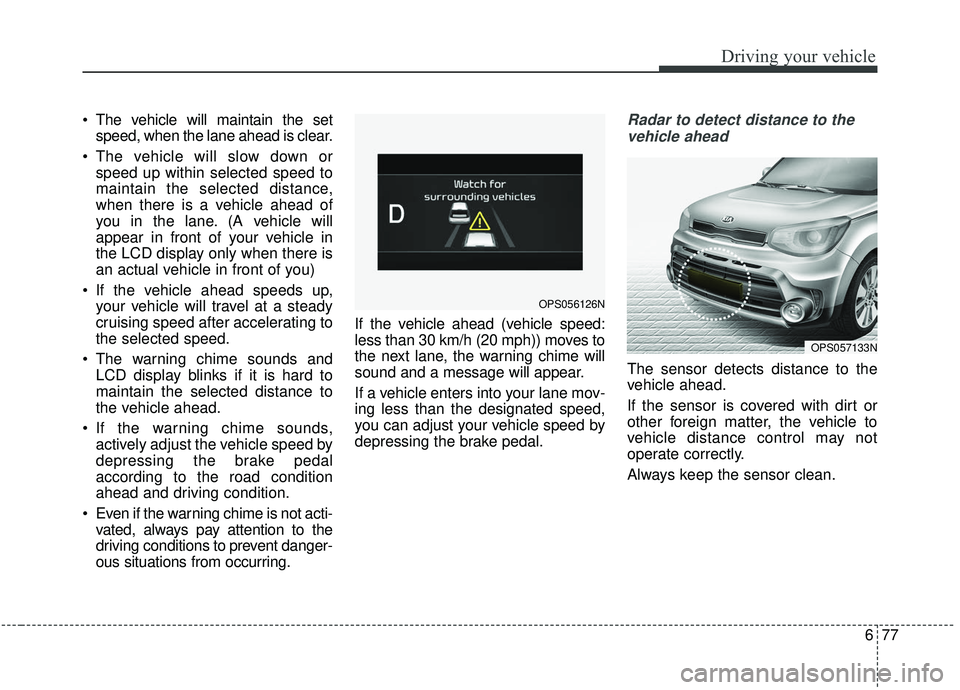
ous situations from occurring. If the vehicle ahead (vehicle speed:
less than 30 km/h (20 mph)) moves to
the next lane, the warning chime will
sound and a message will appear.
If a vehicle enters into your lane mov-
ing less than the designated speed,
you can adjust your vehicle speed by
depressing the brake pedal.Radar to detect distance to the
vehicle ahead
The sensor detects distance to the
vehicle ahead.
If the sensor is covered with dirt or
other foreign matter, the vehicle to
vehicle distance control may not
operate correctly.
Always keep the sensor clean.
OPS057133N
OPS056126N
Page 368 of 564
Driving your vehicle
78
6
Radar check message
If the radar or cover is dirty or
obscured with foreign matter such as
snow, this message (“Smart Cruise
Control disabled temporarily”) will
appear and it will disappear after for
a while. In this case, the system may
not function temporarily, but it does
not indicate a malfunction of the
Smart Cruise Control System. Clean
the radar or cover by using a soft
cloth and it will operate normally.
SCC (Smart Cruise Control)
malfunction message
The message (“Check Smart Cruise
Control System”) will appear when
the vehicle to vehicle distance control
system is not functioning normally.
Take your vehicle to an authorized
Kia dealer and have the system
checked. Always keep the sensor and
bumper clean.
Use only a genuine Kia sensor cover for your vehicle.
Do not install accessories around the sensor and do not replace the
bumper by yourself. It may interfere
with the sensor performance.
Impact damage to the sensor or sensor area may cause the sensor
to move slightly off position and
result in the SCC not operating
correctly without any warning or
indicator from the cluster. If this
occurs, have your vehicle checked
by an authorized Kia dealer as
soon as possible. Do not apply license plate frame or
foreign objects such as a bumper
sticker or a bumper guard near the
radar sensor. Doing so may
adversely affect the sensing per-
formance of the radar.
Always keep the radar sensor and lens cover clean and free of dirt
and debris.
Use only a soft cloth to wash the vehicle. Do not spray pressurized
water directly on the sensor or sen-
sor cover.
Be careful not to apply unneces- sary force on the radar sensor or
sensor cover. If the sensor is
forcibly moved out of proper align-
ment, the Smart Cruise Control
System may not operate correctly.
In this case, a warning message
may not be displayed. Have the
vehicle inspected by an authorized
Kia dealer.
If the front bumper becomes dam- aged in the area around the radar
sensor, the Smart Cruise Control
System may not operate properly.
Have the vehicle inspected by an
authorized Kia dealer.
CAUTION - Sensor
Damage
To prevent sensor cover dam-age from occurring, wash thecar with a soft cloth.
Page 369 of 564
679
Driving your vehicle
Use only genuine Kia parts torepair or replace a damaged sen-
sor or sensor cover. Do not apply
paint to the sensor cover.To adjust the sensitivity of
Smart Cruise Control
The sensitivity of vehicle speed when
following the front vehicle to maintain
the set distance can be adjusted. Go
to the User Settings Mode (Driving
Assist) and select SCC (Smart
Cruise Control). You may select one
of the three stages you prefer.
Slow:
Vehicle speed following the front
vehicle to maintain the set distance
is slower than normal speed.
Normal: Vehicle speed following the front
vehicle to maintain the set distance
is normal
Fast: Vehicle speed following the front
vehicle to maintain the set distance
is faster than normal speed.
✽ ✽ NOTICE
The system remembers the last
selected mode.
To convert to cruise control
mode:
The driver may choose to only use
the cruise control mode (speed con-
trol function) by doing as follows:
1.Turn the SCC on (the cruise indi-
cator light will be on but the system
will not be activated).
2.Push the distance to distance switch for more than 2 seconds.
3.Choose between “Smart cruise control (SCC) mode” and “Cruise
control (CC) mode”.
WARNING
When using the cruise control
mode, ensure it is safe to use
the feature by assessing the
distance to other vehicles since
the system will not automatical-
ly slow down to avoid an acci-
dent.
Page 371 of 564
681
Driving your vehicle
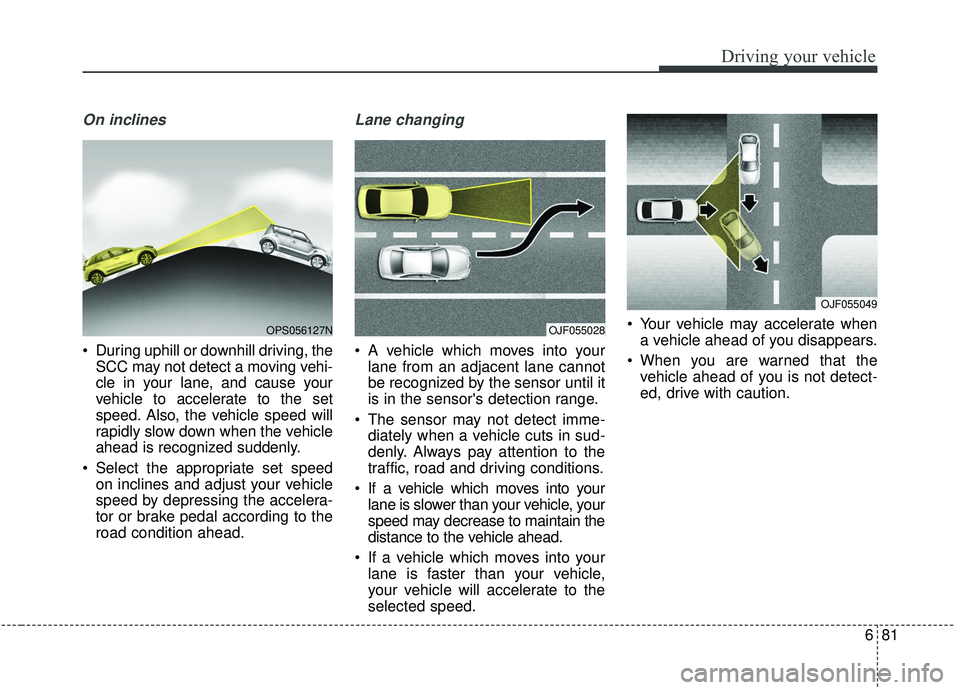
On inclines
During uphill or downhill driving, theSCC may not detect a moving vehi-
cle in your lane, and cause your
vehicle to accelerate to the set
speed. Also, the vehicle speed will
rapidly slow down when the vehicle
ahead is recognized suddenly.
Select the appropriate set speed on inclines and adjust your vehicle
speed by depressing the accelera-
tor or brake pedal according to the
road condition ahead.
Lane changing
A vehicle which moves into yourlane from an adjacent lane cannot
be recognized by the sensor until it
is in the sensor's detection range.
The sensor may not detect imme- diately when a vehicle cuts in sud-
denly. Always pay attention to the
traffic, road and driving conditions.
If a vehicle which moves into your lane is slower than your vehicle, your
speed may decrease to maintain the
distance to the vehicle ahead.
If a vehicle which moves into your lane is faster than your vehicle,
your vehicle will accelerate to the
selected speed. Your vehicle may accelerate when
a vehicle ahead of you disappears.
When you are warned that the vehicle ahead of you is not detect-
ed, drive with caution.
OPS056127NOJF055028
OJF055049
Page 372 of 564
Driving your vehicle
82
6
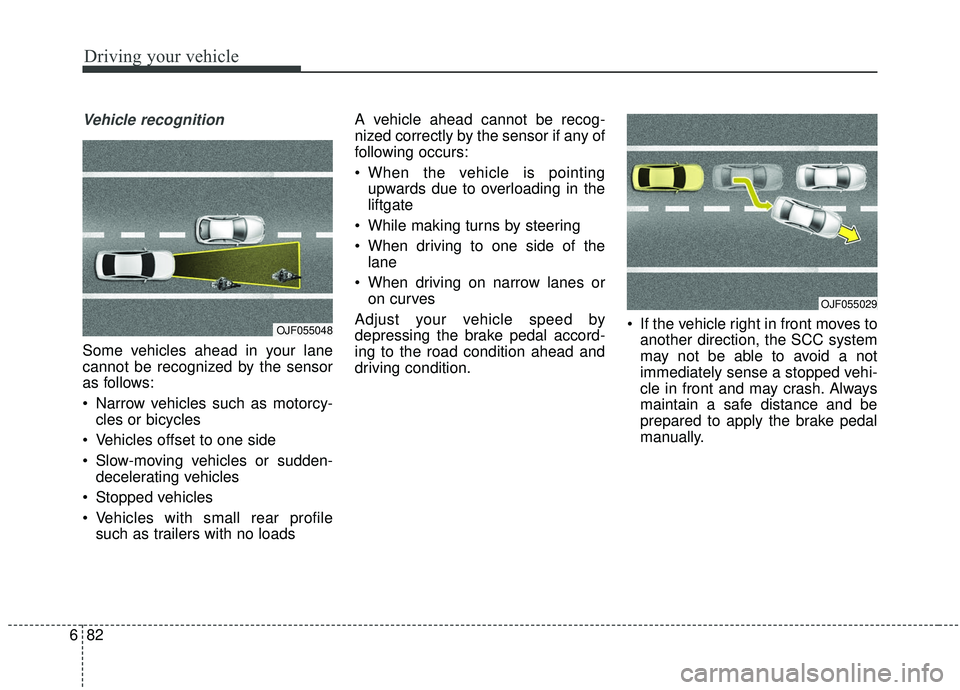
Vehicle recognition
Some vehicles ahead in your lane
cannot be recognized by the sensor
as follows:
Narrow vehicles such as motorcy-
cles or bicycles
Vehicles offset to one side
Slow-moving vehicles or sudden- decelerating vehicles
Stopped vehicles
Vehicles with small rear profile such as trailers with no loads A vehicle ahead cannot be recog-
nized correctly by the sensor if any of
following occurs:
When the vehicle is pointing
upwards due to overloading in the
liftgate
While making turns by steering
When driving to one side of the lane
When driving on narrow lanes or on curves
Adjust your vehicle speed by
depressing the brake pedal accord-
ing to the road condition ahead and
driving condition. If the vehicle right in front moves to
another direction, the SCC system
may not be able to avoid a not
immediately sense a stopped vehi-
cle in front and may crash. Always
maintain a safe distance and be
prepared to apply the brake pedal
manually.
OJF055048
OJF055029