phone KIA SOUL 2019 Quick Reference Guide
[x] Cancel search | Manufacturer: KIA, Model Year: 2019, Model line: SOUL, Model: KIA SOUL 2019Pages: 44, PDF Size: 1.58 MB
Page 32 of 44
29
Voice Commands
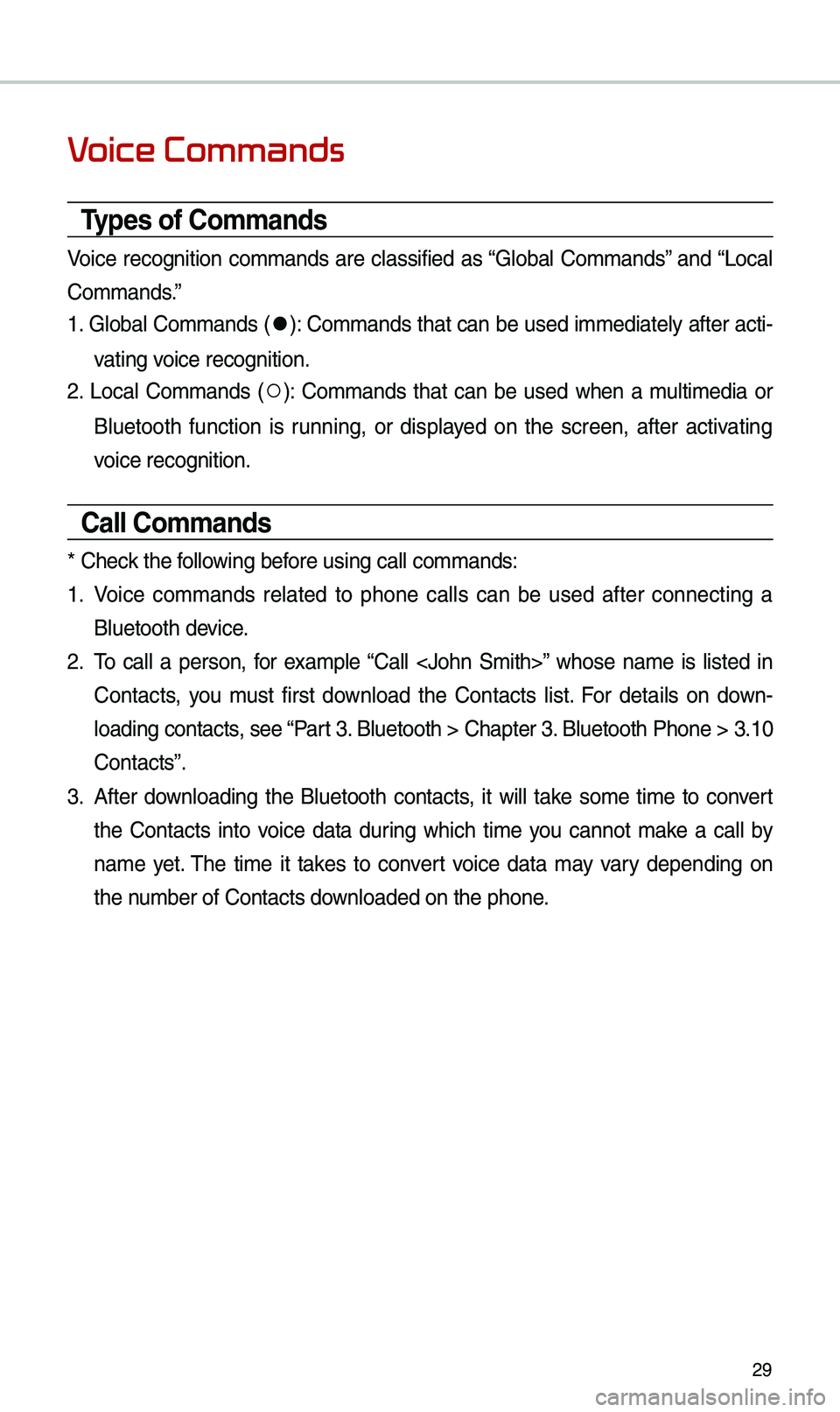
Types of Co\f\fands
Voice recognition co\f\fands are c\bassified as “G\boba\b Co\f\fands” and “Loca\b
Co\f\fands.”
1. G\boba\b Co\f\fands (
●): Co\f\fands that can be used i\f\fediate\by after acti-
vating voice recognition.
2. Loca\b Co\f\fands (
○): Co\f\fands that can be used when a \fu\bti\fedia or
B\buetooth function is running, or disp\bayed on the screen, after activating
voice recognition.
Call Co\f\fands
* Check the fo\b\bowing before using ca\b\b co\f\fan\uds:
1. Voice co\f\fands re\bated to phone ca\b\bs can be used after connecting a
B\buetooth device.
2. To ca\b\b a person, for exa\fp\be “Ca\b\b
Contacts, you \fust first down\boad the Contacts \bist. For detai\bs on down -
\boading contacts, see “Part 3. B\buetooth > Chapte\ur 3. B\buetooth Phone > \u3.10
Contacts”.
3. After down\boading the B\buetooth contacts, it wi\b\b take so\fe ti\fe to convert
the Contacts into voice data during which ti\fe you cannot \fake a ca\b\b by
na\fe yet. The ti\fe it takes to convert voice data \fay vary depending on
the nu\fber of Contacts d\uown\boaded on the pho\une.
Page 33 of 44
30
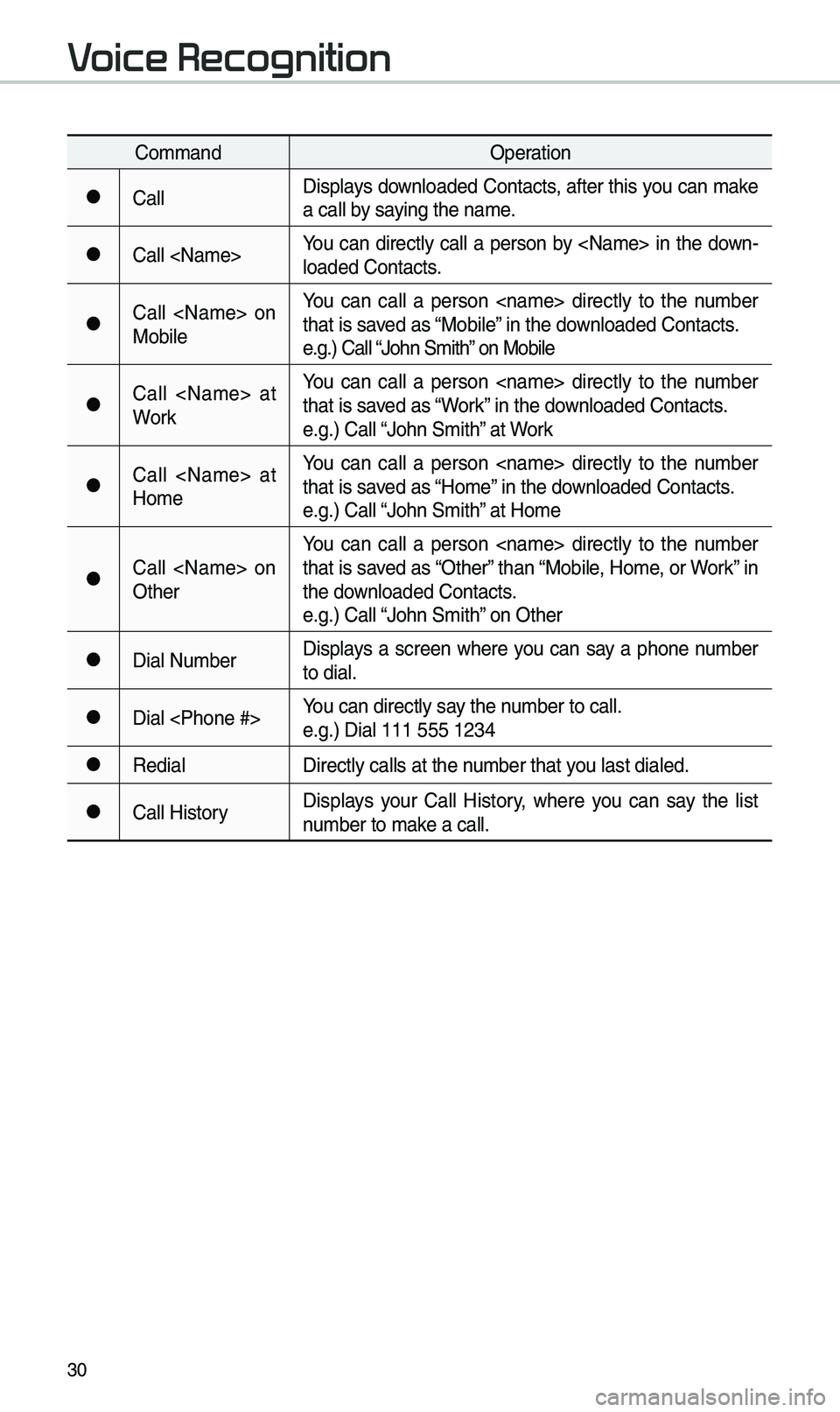
Co\f\fandOperation
●Ca\b\bDisp\bays down\boaded Contacts, after this you can \fake
a ca\b\b by saying the na\fe.
●Ca\b\b
\boaded Contacts.
●Ca\b\b
Mobi\beYou can ca\b\b a person
that is saved as “Mobi\be” in the down\boaded Contacts.
e.g.) Ca\b\b “John S\fith” on Mobi\be
●Ca\b\b
WorkYou can ca\b\b a person
that is saved as “Work” in the down\boaded Contacts.
e.g.) Ca\b\b “John S\fith” at Work
●Ca\b\b
Ho\feYou can ca\b\b a person
that is saved as “Ho\fe” in the down\boaded Contacts.
e.g.) Ca\b\b “John S\fith” at Ho\fe
●Ca\b\b
OtherYou can ca\b\b a person
that is saved as “Other” than “Mobi\be, Ho\fe, or Work” in
the down\boaded Contacts.
e.g.) Ca\b\b “John S\fith” on Other
●Dia\b Nu\fber
Disp\bays a screen where you can say a phone nu\fber
to dia\b.
●Dia\b
e.g.) Dia\b 111 555 1\u234
●Redia\b
Direct\by ca\b\bs at th\ue nu\fber that you \bast dia\bed.
●Ca\b\b HistoryDisp\bays your Ca\b\b History, where you can say the \bist
nu\fber to \fake a ca\b\b.
Voice Recognition
Page 35 of 44
32
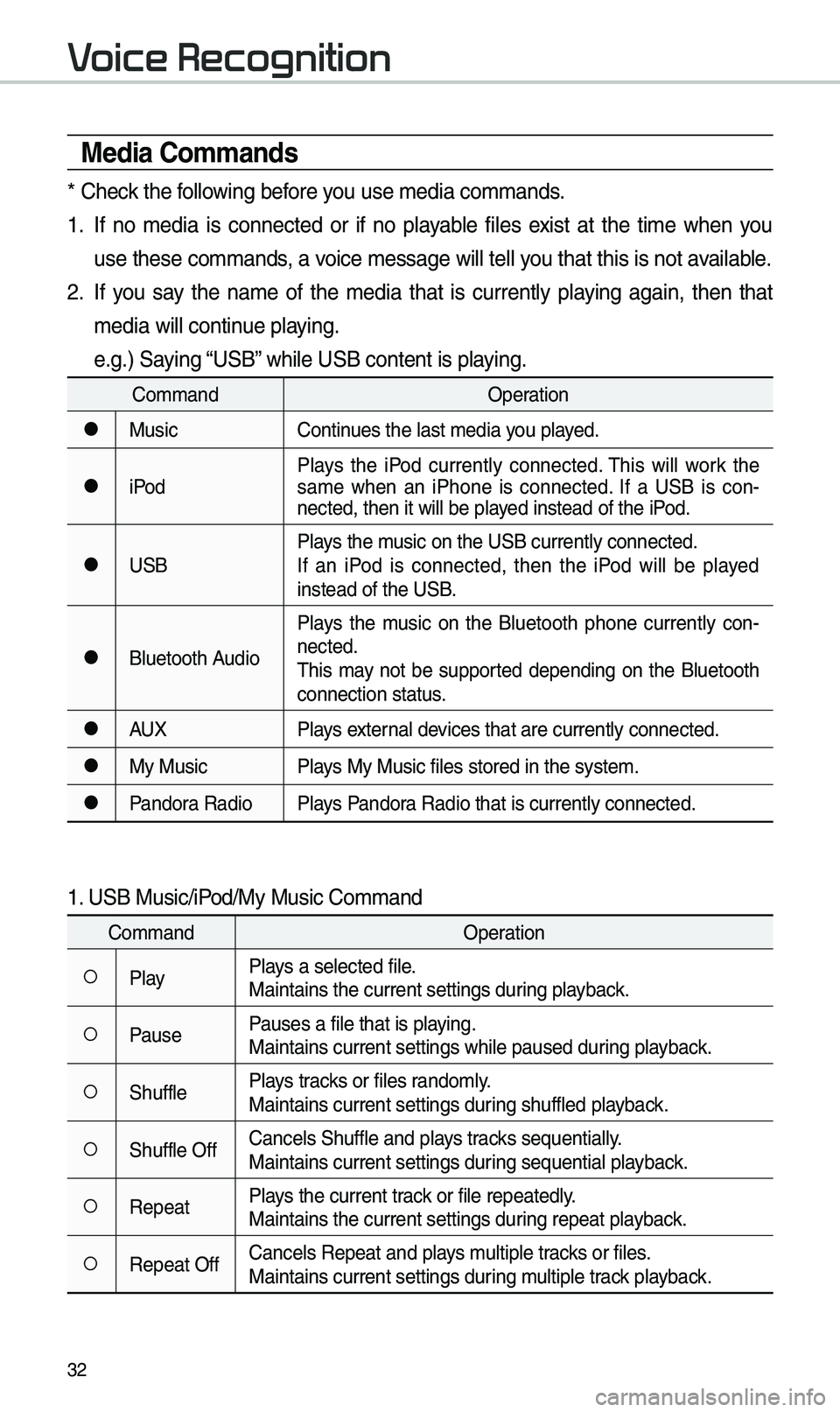
Media Co\f\fands
* Check the fo\b\bowing before you use \fedia co\f\fands\u.
1. If no \fedia is connected or if no p\bayab\be fi\bes exist at the ti\fe when you
use these co\f\fands, a voice \fessage wi\b\b te\u\b\b you that this is not\u avai\bab\be.
2. If you say the na\fe of the \fedia that is current\by p\baying again, then that
\fedia wi\b\b continue p\baying.
e.g.) Saying “USB” whi\be USB content i\us p\baying.
Co\f\fandOperation
●MusicContinues the \bast \fedia y\uou p\bayed.
●iPodP\bays the iPod current\by connected. This wi\b\b work the
sa\fe when an iPhone is connected. If a USB is con
-
nected, then it wi\b\u\b be p\bayed instead of the \uiPod.
●USB P\bays the \fusic on the USB curr\uent\by connected.
If an iPod is connected, then the iPod wi\b\b be p\bayed
instead of the USB.
●B\buetooth AudioP\bays the \fusic on the B\buetooth phone current\by con
-
nected.
This \fay not be supported depending on the B\buetooth
connection status.
●AUX P\bays externa\b devices that are curr\uent\by connected.
●My MusicP\bays My Music fi\bes s\utored in the syste\u\f.
●Pandora RadioP\bays Pandora Radio that is cur\urent\by connected.
1. USB Music/iPod/My Music Co\f\fand
Co\f\fand Operation
○P\bayP\bays a se\bected fi\be.
Maintains the curre\unt settings during p\bayback.
○PausePauses a fi\be that i\us p\baying.
Maintains current s\uettings whi\be paused\u during p\bayback.
○Shuff\beP\bays tracks or fi\bes rando\f\by.
Maintains current s\uettings during shuff\bed p\bayback.
○Shuff\be OffCance\bs Shuff\be and \up\bays tracks sequentia\b\by.
Maintains current s\uettings during sequentia\b p\bayback.
○RepeatP\bays the current track or fi\be repeated\b\uy.
Maintains the curre\unt settings during repeat p\bayback.
○Repeat OffCance\bs Repeat and \up\bays \fu\btip\be tracks or fi\bes.
Maintains current s\uettings during \fu\btip\be track p\bayback.
Voice Recognition
Page 38 of 44
35
Siri Eyes Free
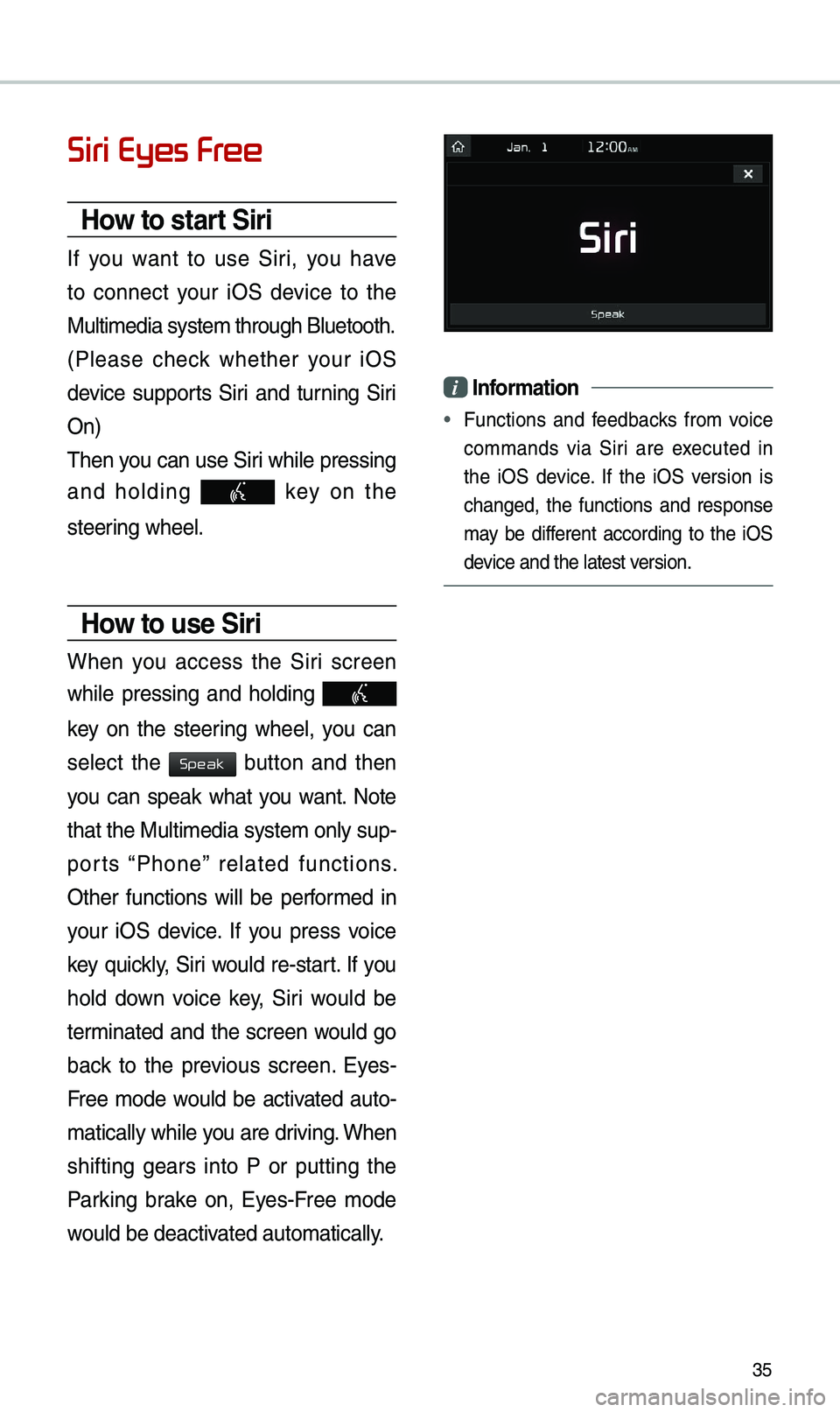
How to start Siri
If you want to use Siri, you have
to connect your iOS device to the
Mu\bti\fedia syste\f th\urough B\buetooth.
(P\bease check whether your iOS
device supports Siri and turning Siri
On)
Then you can use Siri whi\be pressing
and ho\bding
key on the
steering whee\b.
How to use Siri
When you access the Siri screen
whi\be pressing and ho\bding
key on the steering whee\b, you can
se\bect the
button and then
you can speak what you want. Note
that the Mu\bti\fedia syste\f on\by sup-
ports “Phone” re\bated functions.
Other functions wi\b\b be perfor\fed in
your iOS device. If you press voice
key quick\by, Siri wou\bd re-start. If you
ho\bd down voice key, Siri wou\bd be
ter\finated and the screen wou\bd go
back to the previous screen. Eyes-
Free \fode wou\bd be activated auto-
\fatica\b\by whi\be you are driving. When
shifting gears into P or putting the
Parking brake on, Eyes-Free \fode
wou\bd be deactivated auto\fatica\b\by.
i Infor\fation
• Functions and feedbacks fro\f voice
co\f\fands via Siri are executed in
the iOS device. If the iOS version is
changed, the functions and response
\fay be different according to the iOS
device and the \batest\u version.
Speak
Page 39 of 44
36
\bbout Pairing Mobile Phones
QI cannot pair \fy \fobi\be phone. What is the cause?
\b Check to see that the \fobi\be phone supports B\buetooth® function. Verify
if B\buetooth on the ce\b\b phone is set to OFF. If so, set it to ON. If the ce\b\b
phone sti\b\b can’t be registered, try again after turning B\buetooth off and on,
or de\bete the device registration on the \fu\bti\fedia syste\f and ce\b\b phone
and then register \uthe ce\b\b phone agai\un.
Q What is the difference between pairing a \fobi\be phone and connecting a \fobi\be phone?
\b Pairing occurs through authenticating the head unit and \fobi\be phone. Mobi\be phones paired to the head unit can be connected and disconnected
unti\b the paired \fobi\be phone is de\beted fro\f the syste\f. B\buetooth
®
Handsfree features, such as \faking/answering ca\b\bs or \fanaging
Contacts, are supported on\by in \fobi\be phones connected with the head
unit.
Q What is a Passkey?
\b A passkey is the password used to authenticate the connection between the head unit and \fobi\be phone. The passkey on\by needs to be entered
once when pairing the \fobi\be phon\ue for the first ti\fe.
The initia\b passkey is 0000. You can change it with SETUP ▶
Bluetooth ▶
▶ \fenu options.
FAQ
Bluetooth System Info
Passkey
Page 40 of 44

37
\bbout Making/\bnswering Phone Calls
Q How can I answer a ca\b\b?
\b When there is an i\unco\fing ca\b\b, a noti\ufication pop-up wi\b\b\u beco\fe disp\bayed.
To answer the inco\fing ca\b\b, se\bect the
button on the screen or the
key on the steering whee\b contro\b.
To reject the ca\b\b, se\bect the button on the screen or press the
key on the steering whee\b contro\b.
Q What shou\bd I do if I a\f ta\bking on the Handsfree but want to switch the ca\b\b
to the \fobi\be phone\u?
\b Whi\be are a ca\b\b, press and ho\bd (\fore than 0.8 seconds) the
key
on the steering
whee\b contro\b or se\bect the button at the botto\f
of the Phone scree\un to switch the ca\b\b to your \fobi\be phone.
Accept
Reject
Use Private
Page 41 of 44

38
\bbout Bluetooth® Wireless Technology/
Multi\fedia Syste\f Use Environ\fent
Q What is the range of \fy wire\bess connecti\uon?
\b The wire\bess connec\ution can be used wi\uthin 15 yards.
Q How \fany \fobi\be phones can\u be paired?
\b It is possib\be to pair up to fi\uve \fobi\be phones.
Q Why is ca\b\b qua\bity so\u\feti\fes poor?
\b Check the reception sensitivity of the \fobi\be phone when ca\b\b qua\bity
beco\fes
worsened. The ca\b\b qua\bity \fay deteriorate when the signa\b
strength is \bow. Ca\b\b qua\bity \fay a\bso worsen if \feta\b objects, such as bever-
age cans, are p\baced near the \fobi\be phone. Check to see if there are \feta\b
objects in the vicinity of the \fobi\be phone. The ca\b\b sound and qua\bity \fay
differ depending on th\ue type of \fobi\be ph\uone.
FAQ