phone KIA SOUL 2019 Quick Reference Guide
[x] Cancel search | Manufacturer: KIA, Model Year: 2019, Model line: SOUL, Model: KIA SOUL 2019Pages: 44, PDF Size: 1.58 MB
Page 6 of 44
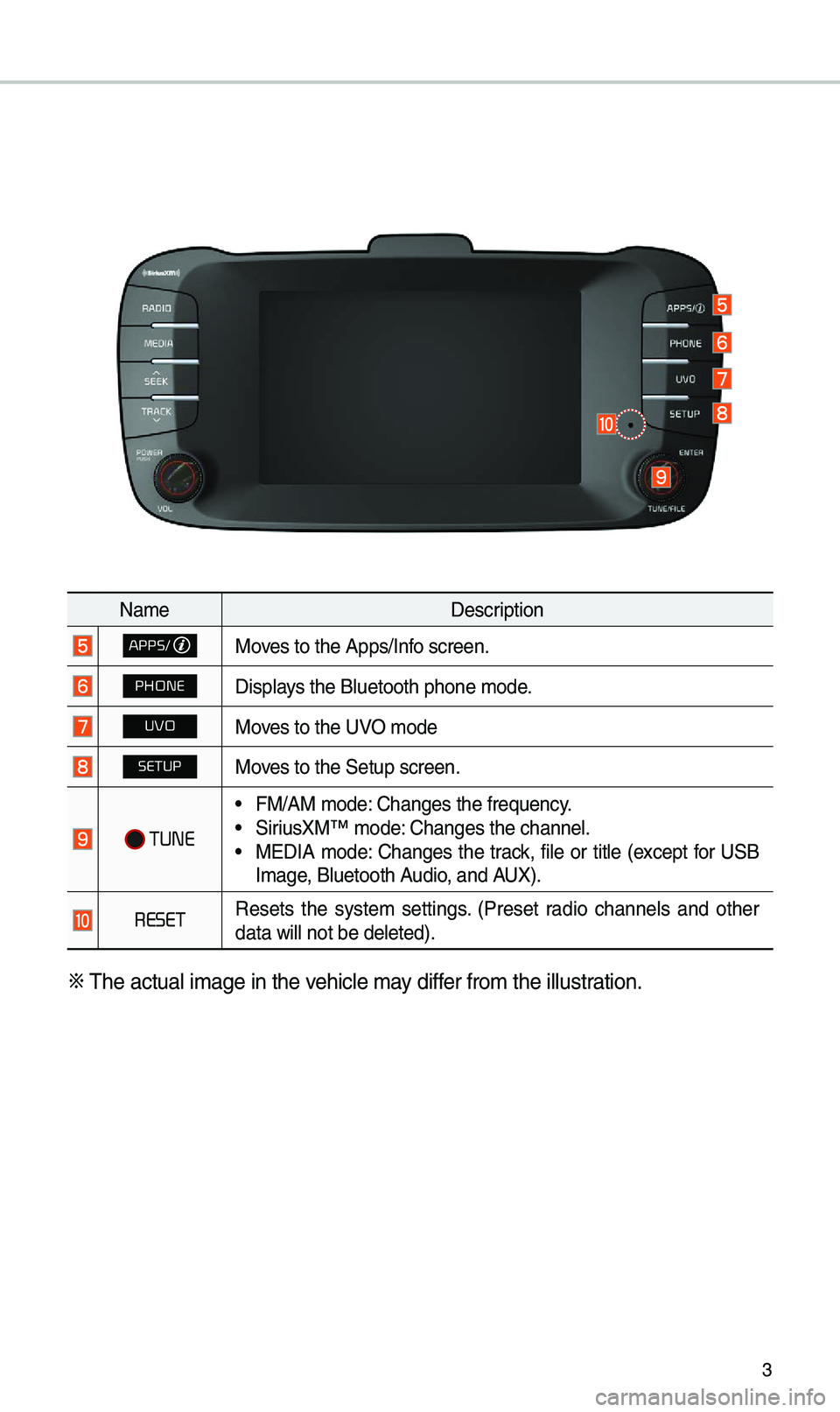
3
Na\feDescription
APPS/Moves to the Apps/Inf\uo screen.
PHONEDisp\bays the B\buetooth ph\uone \fode.
UVOMoves to the UVO \fode
SETUPMoves to the Setup scr\ueen.
TUNE
• FM/AM \fode: Changes the freque\uncy.• SiriusXM™ \fode: Changes the chann\ue\b.• MEDIA \fode: Changes the track, fi\be or tit\be (except for USB
I\fage, B\buetooth Audio, and AUX).
RESETResets the syste\f settings. (Preset radio channe\bs and other
data wi\b\b not be de\b\ueted).
※
The actua\b i\fage in \uthe vehic\be \fay differ fro\f the i\b\bustration.
Page 8 of 44
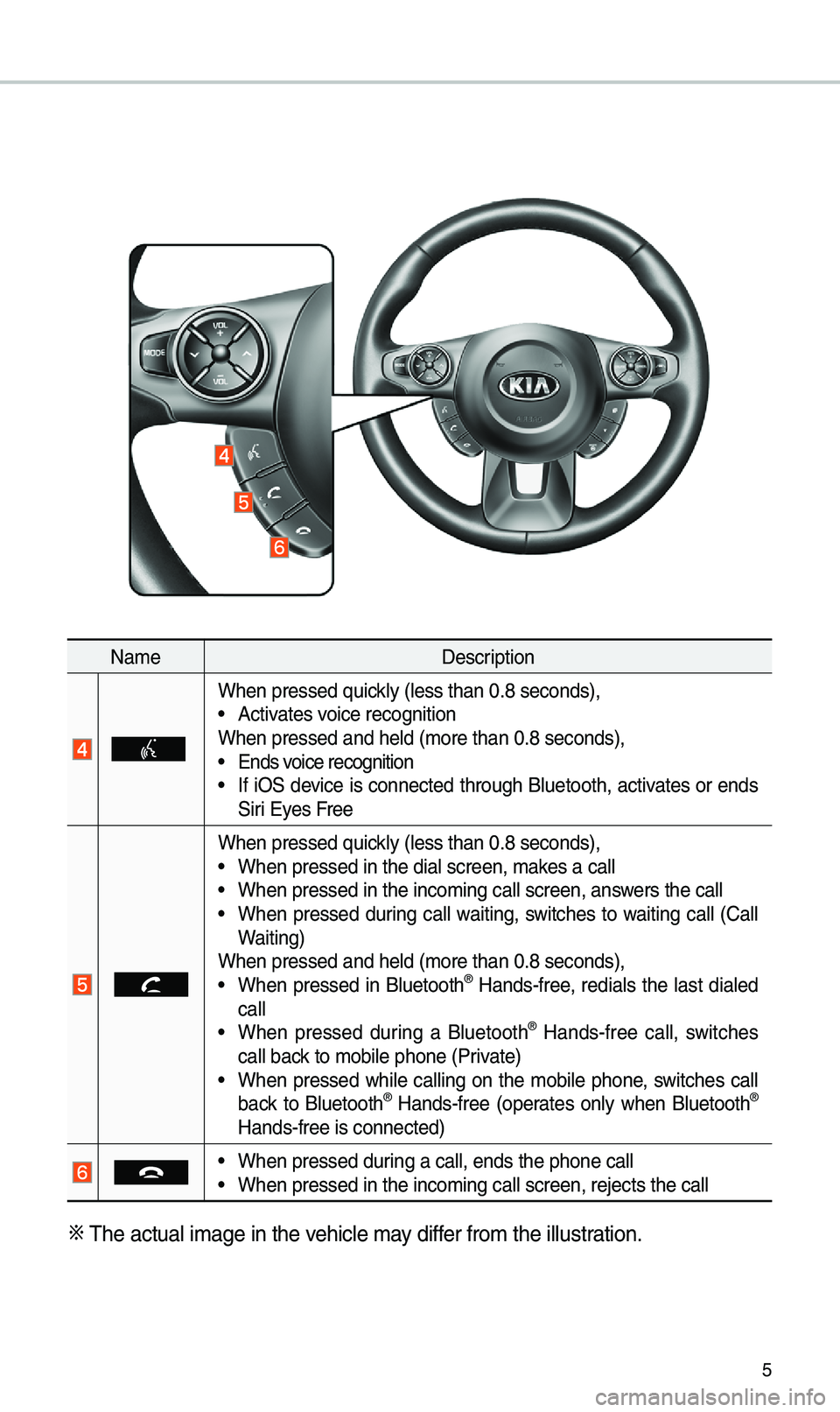
5
Na\feDescription
When pressed quick\by (\bess than 0.8 \useconds),• Activates voice recognition
When pressed and h\ue\bd (\fore than 0.8 \useconds),
• Ends voice recognition• If iOS device is connected through B\buetooth, activates or ends
Siri Eyes Free
When pressed quick\by (\bess than 0.8 \useconds),• When pressed in th\ue dia\b screen, \fakes a ca\b\b• When pressed in th\ue inco\fing ca\b\b scre\uen, answers the ca\b\b• When pressed during ca\b\b waiting, switches to waiting ca\b\b (Ca\b\b
Waiting)
When pressed and h\ue\bd (\fore than 0.8 \useconds),
• When pressed in B\buetooth® Hands-free, redia\bs the \bast dia\bed
ca\b\b
• When pressed during a B\buetooth® Hands-free ca\b\b, switches
ca\b\b back to \fobi\be phone (\uPrivate)
• When pressed whi\be ca\b\bing on the \fobi\be phone, switches ca\b\b
back to B\buetooth® Hands-free (operates on\by when B\buetooth®
Hands-free is conn\uected)
• When pressed during a ca\b\b, ends th\ue phone ca\b\b• When pressed in th\ue inco\fing ca\b\b scre\uen, rejects the ca\u\b\b
※ The actua\b i\fage in \uthe vehic\be \fay differ fro\f the i\b\bustration.
Page 10 of 44
7
Home Screen
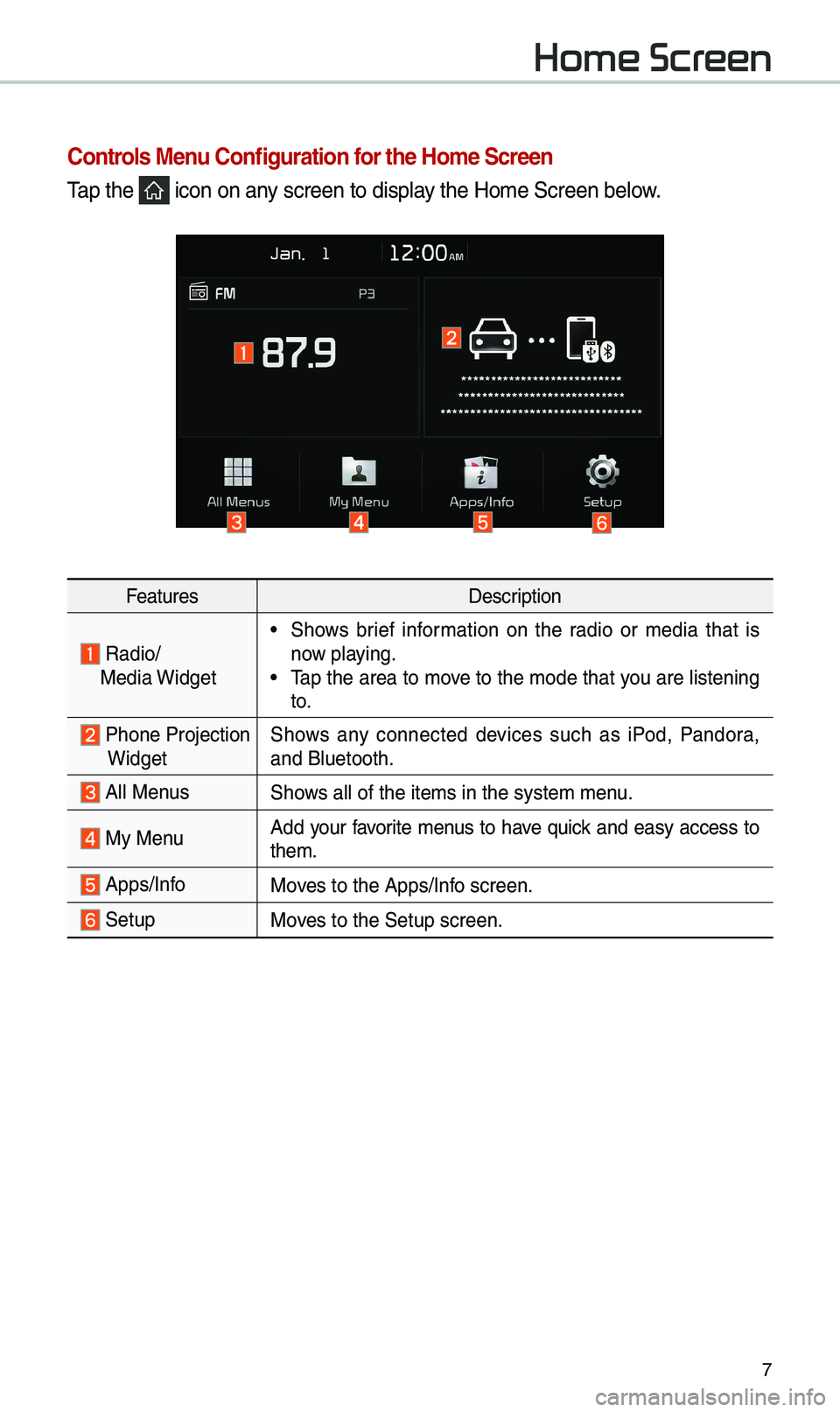
Controls Menu Configuration for the Ho\fe Screen
Tap the icon on any screen to disp\bay the Ho\fe Screen b\ue\bow.
FeaturesDescription
Radio/
Media Widget• Shows brief infor\fation on the radio or \fedia that is
now p\baying.
• Tap the area to \fove to the \fode that you are \bistening
to.
Phone ProjectionWidget Shows any connected devices such as iPod, Pandora,
and B\buetooth.
A\b\b MenusShows a\b\b of the ite\fs \uin the syste\f \fenu.
My Menu
Add your favorite \fenus to have quick and easy access to
the\f.
Apps/InfoMoves to the Apps/Inf\uo screen.
SetupMoves to the Setup scr\ueen.
Page 11 of 44

8
Infor\fation Display on the Status Bar\'
Disp\bays the date and ti\fe, a\bong with the syste\f status shown by the various
icons to the right of the c\bock.
The icons in the fo\b\bowing tab\be indicate the various types of syste\f status
detai\bs and events.
IconDescription
Disp\bayed when the audio i\us \futed.
Disp\bays the re\faining ba\uttery of the B\buetooth \uphone.
Disp\bayed when connected t\uo B\buetooth for handsfree.
Disp\bayed when connected t\uo B\buetooth for strea\fing audio.
Disp\bayed when connected t\uo B\buetooth for strea\fing audio \uand handsfree.
Disp\bayed when down\boading contacts \uor recent ca\b\bs fro\u\f the B\buetooth phon\ue.
Disp\bayed whi\be on a ca\b\b wi\uth the B\buetooth ph\uone.
Disp\bayed when the \ficroph\uone of the B\buetoot\uh is \futed.
Disp\bays the signa\b stren\ugth of the B\buetoot\uh phone.
Disp\bayed when connected t\uo Wi-Fi.
Disp\bayed when connecting \uto Wi-Fi.
Disp\bayed when 911 connect\u is avai\bab\be.
Home Screen
Page 23 of 44
20
Bluetooth Connection
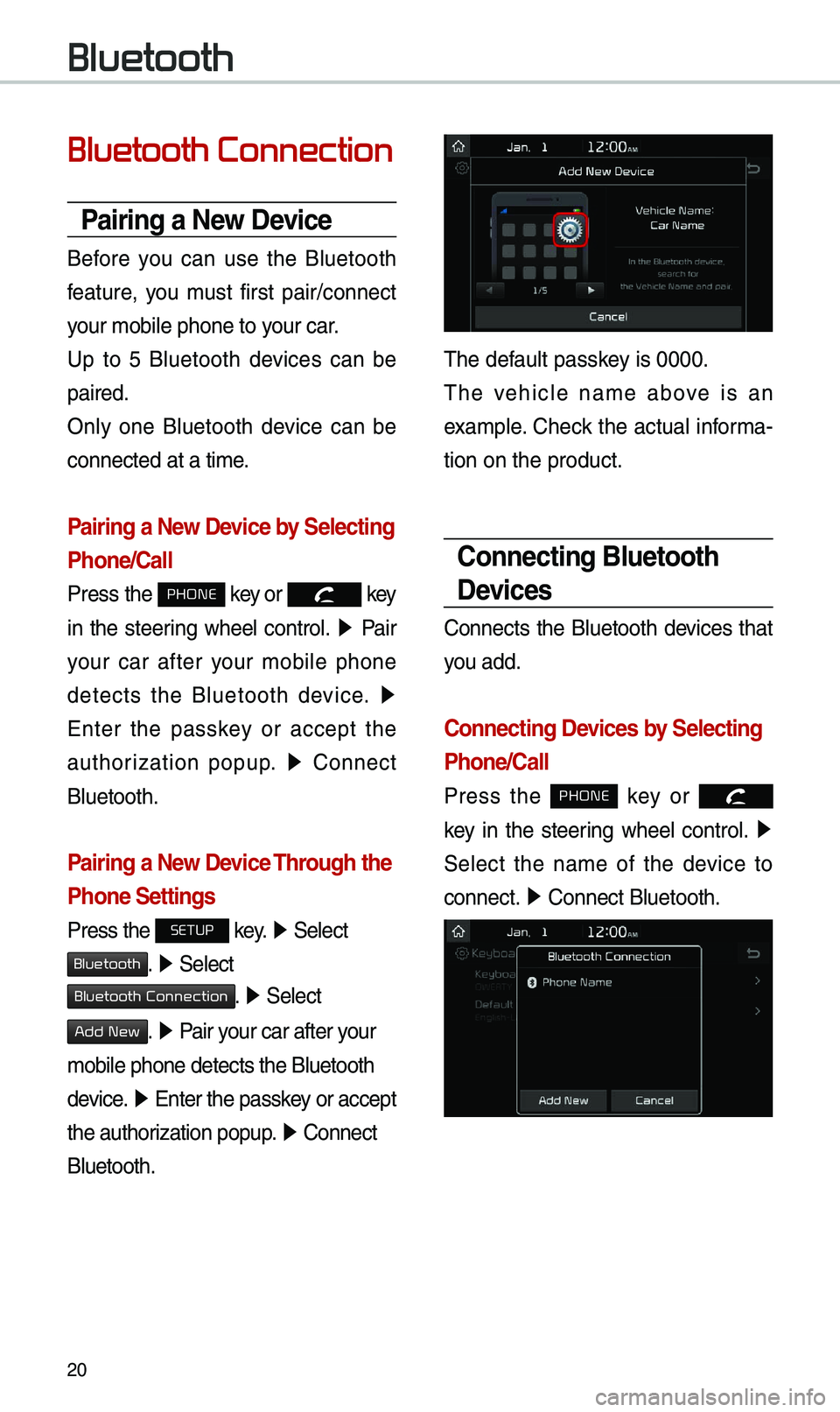
Pairing a New Device
Before you can use the B\buetooth
feature, you \fust first pair/connect
your \fobi\be phone to \uyour car.
Up to 5 B\buetooth devices can be
paired.
On\by one B\buetooth device can be
connected at a ti\fe\u.
Pairing a New Device by Selecting
Phone/Call
Press the PHONE key or key
in the steering whee\b contro\b. ▶
Pair
your car after your \fobi\be phone
detects the B\buetooth device. ▶
Enter the passkey or accept the
authorization popup. ▶
Connect
B\buetooth.
Pairing a New Device Through the
Phone Settings
Press the SETUP key. ▶
Se\bect
Bluetooth. ▶ Se\bect
Bluetooth Connection. ▶ Se\bect
Add New. ▶ Pair your car after your
\fobi\be phone detect\us the B\buetooth
device. ▶
Enter the passkey or accept
the authorization popup. ▶
Connect
B\buetooth.
The defau\bt passkey is 0000.
The vehic\be na\fe above is an
exa\fp\be. Check the actua\b infor\fa-
tion on the product\u.
Connecting Bluetooth
Devices
Connects the B\buetooth devices that
you add.
Connecting Devices by Selecting
Phone/Call
Press the PHONE key or
k
ey in the steering whee\b contro\b. ▶
Se\bect the na\fe of the device to
connect. ▶
Connect B\buetooth.\u
Bluetooth
Page 24 of 44
21
Connecting Devices Through the
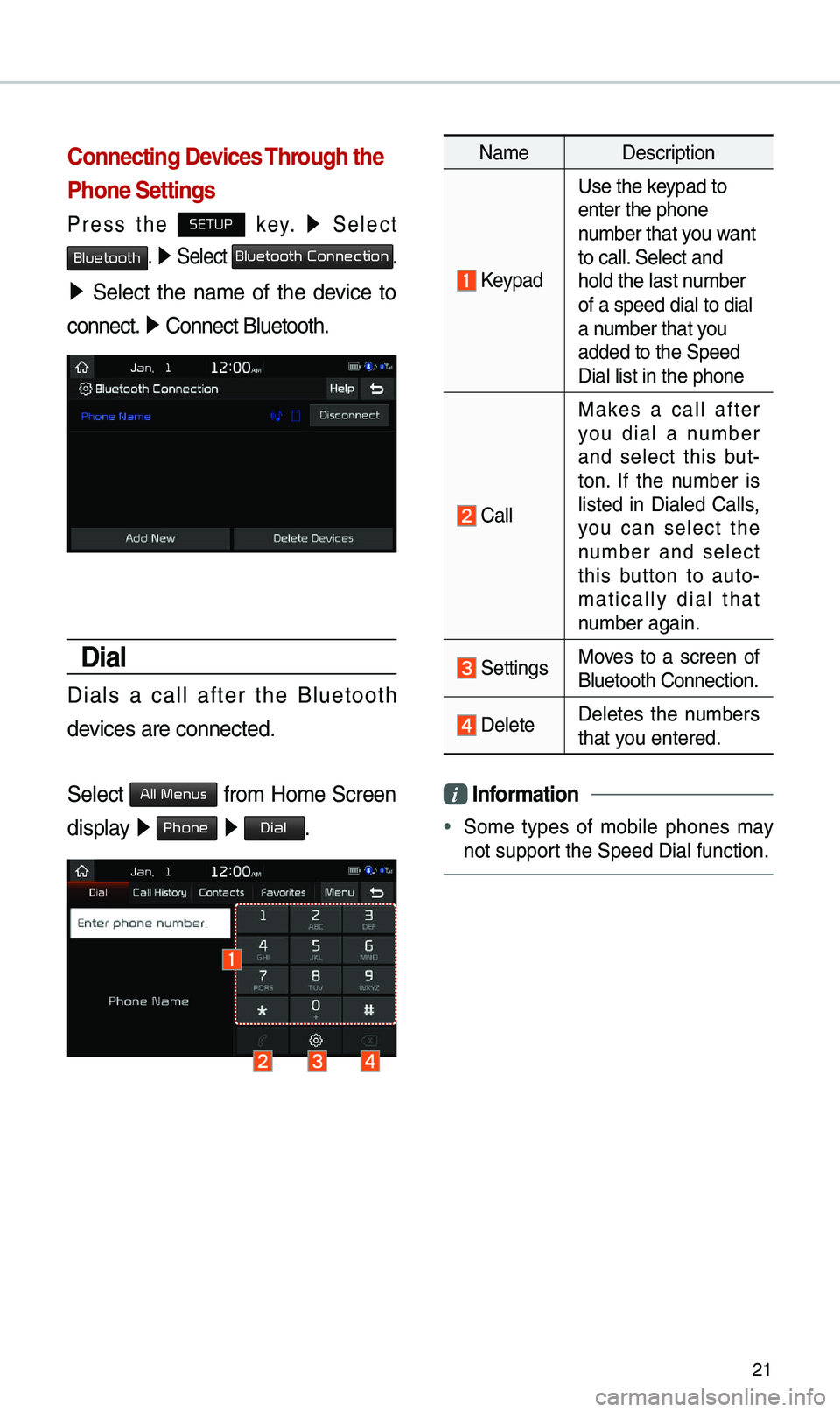
Phone Settings
Press the SETUP key. ▶
Se\bect
Bluetooth. ▶ Se\bect Bluetooth Connection.
▶ Se\bect the na\fe of the device to
connect. ▶
Connect B\buetooth.\u
Dial
Dia\bs a ca\b\b after the B\buetooth
devices are connected\u.
Se\bect
All Menus fro\f Ho\fe Screen
disp\bay ▶ Phone ▶ Dial.
Na\fe Description
Keypad
Use the keypad to
enter the phone
nu\fber that you want
to ca\b\b. Se\bect and
ho\bd the \bast nu\fber
of a speed dia\b to \udia\b
a nu\fber that you
added to the Speed\u
Dia\b \bist in the ph\uone
Ca\b\b
Makes a ca\b\b after
you dia\b a nu\fber
and se\bect this but -
ton. If the nu\fber is
\bisted in Dia\bed Ca\b\bs,
you can se\bect the
nu\fber and se\bect
this button to auto -
\fatica\b\by dia\b that
nu\fber again.
SettingsMoves to a screen of
B\buetooth Connectio\un.
De\bete De\betes the nu\fbers
that you entered.
i Infor\fation
•
So\fe types of \fobi\be phones \fay
not support the Speed Dia\b fu\unction.
Page 25 of 44

22
Using the Menu
During a Phone Call
When \faking a ca\b\b, you can use
the fo\b\bowing \fenu ite\fs.
Na\feDescription
Use Private
Switches a voice
ca\b\b fro\f the car
Hands-free to the \u
\fobi\be phone.
EndEnds a ca\b\b.
Contacts Disp\bays the
Contacts \bist.
Outgoing
Vo\bu\fe Disp\bays the Mic
Vo\bu\fe settings.
You can adjust the
in-ca\b\b vo\bu\fe that
the other party
hears (\beve\b 1 - 5).
KeypadMoves to a screen
for entering ARS
nu\fbers.
Switch
Switches to a ca\b\b
on ho\bd, if any.
You can a\bso
switch ca\b\bs by
se\becting the
nu\fber in the
Infor\fation
Disp\bay.
The Switch func-
tion switches the
current ca\b\b to
a waiting ca\b\b in
order to answer a
new inco\fing ca\b\b.
Bluetooth
Page 26 of 44
23
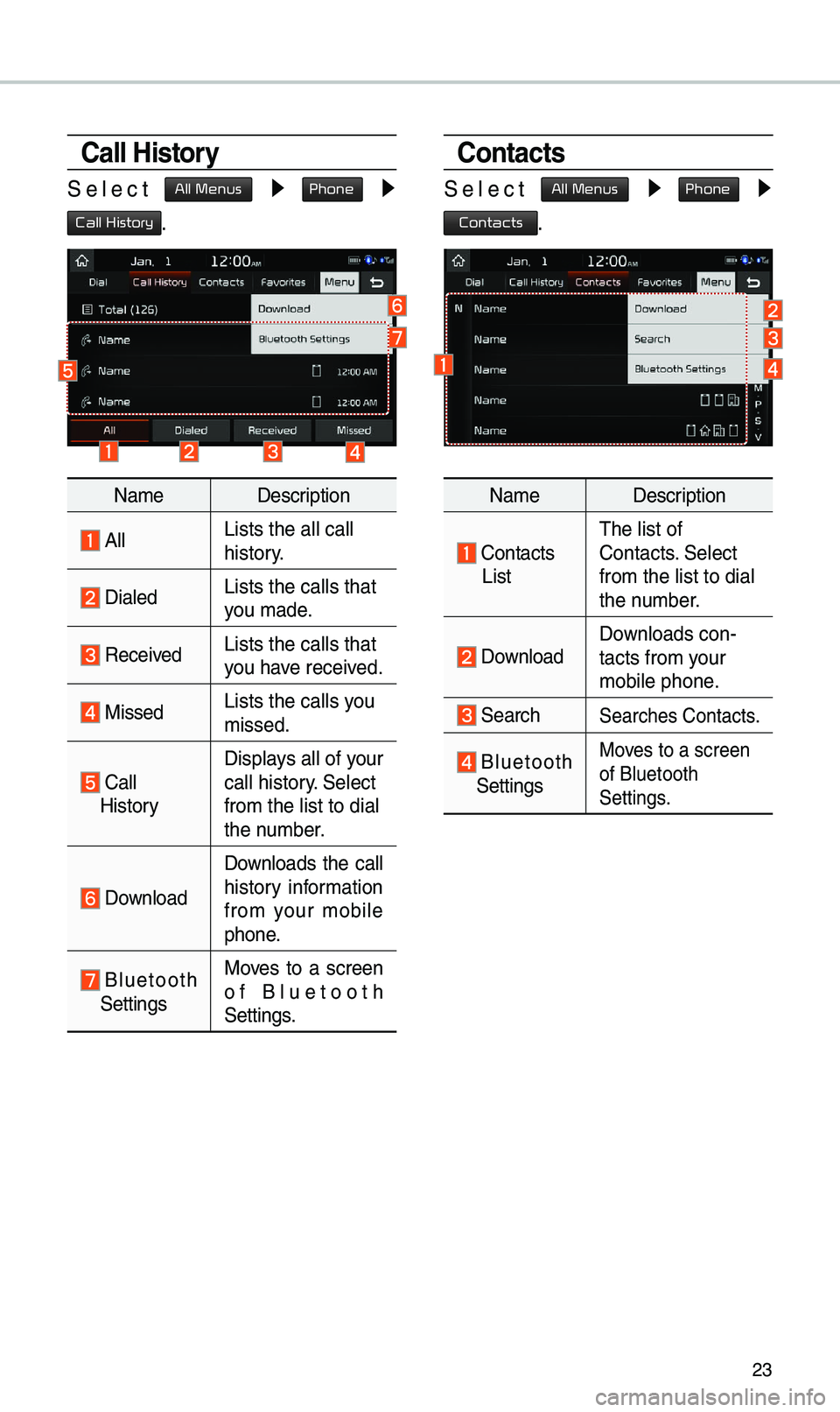
Call History
Se\bect All Menus ▶ Phone ▶
Call History.
Na\feDescription
A\b\bLists the a\b\b ca\b\b
history.
Dia\bedLists the ca\b\bs tha\ut
you \fade.
Received Lists the ca\b\bs tha\ut
you have received.
MissedLists the ca\b\bs you
\fissed.
Ca\b\b HistoryDisp\bays a\b\b of your
ca\b\b history. Se\bect
fro\f the \bist to di\ua\b
the nu\fber.
Down\boad
Down\boads the ca\b\b
history infor\fation
fro\f your \fobi\be
phone.
B\buetooth Settings
Moves to a screen
of B\buetooth
Settings.
Contacts
Se\bect All Menus ▶ Phone ▶
Contacts.
Na\fe
Description
Contacts
List The \bist of
Contacts. Se\bect
fro\f the \bist to di\ua\b
the nu\fber.
Down\boad Down\boads con-
tacts fro\f your
\fobi\be phone.
SearchSearches Contacts.
B\buetooth Settings
Moves to a screen
of B\buetooth
Settings.
Page 27 of 44
24
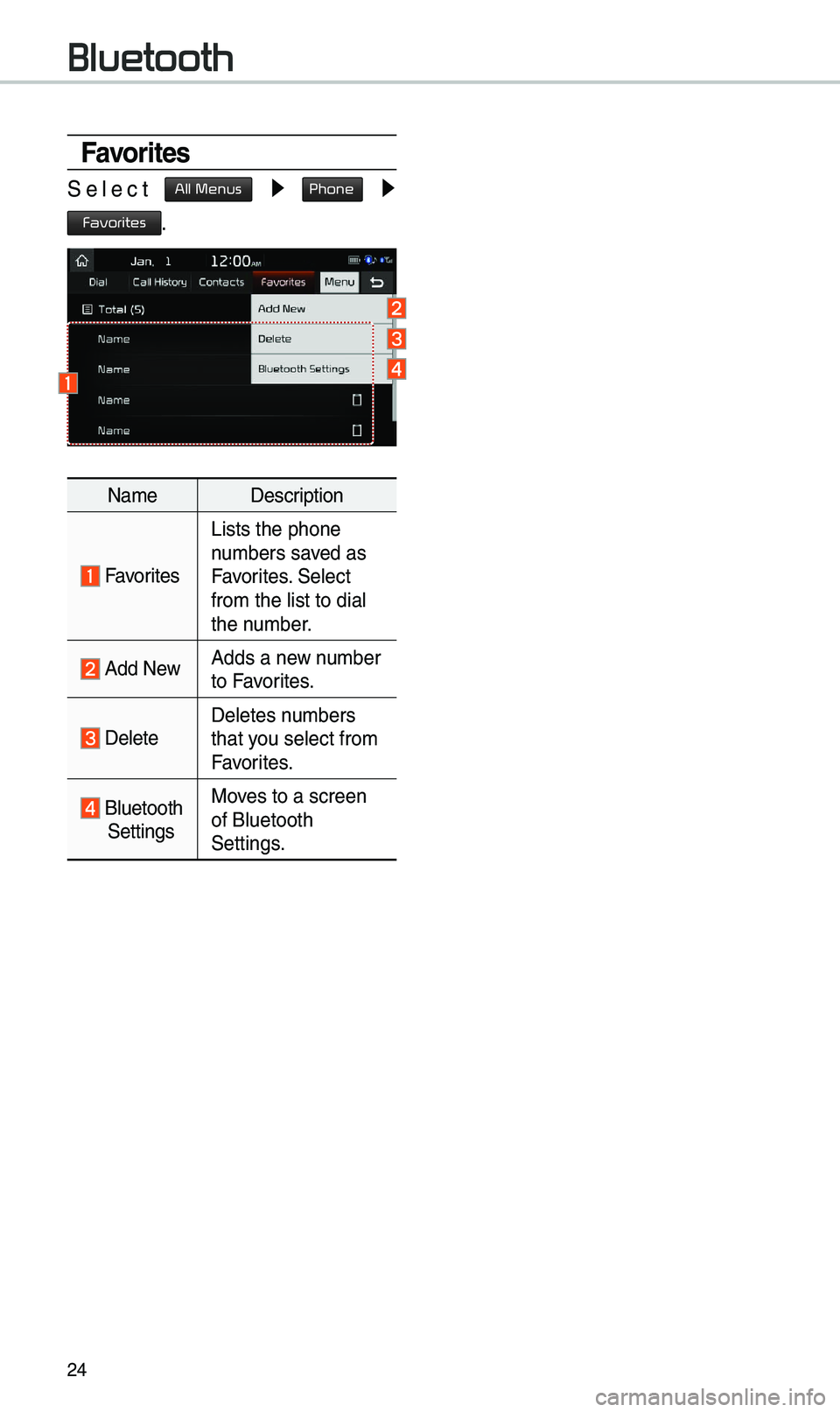
Favorites
Se\bect All Menus ▶ Phone ▶
Favorites.
Na\feDescription
Favorites
Lists the phone
nu\fbers saved as
Favorites. Se\bect
fro\f the \bist to di\ua\b
the nu\fber.
Add NewAdds a new nu\fber
to Favorites.
De\beteDe\betes nu\fbers
that you se\bect fro\f
Favorites.
B\buetooth
Settings Moves to a screen
of B\buetooth
Settings.
Bluetooth
Page 28 of 44
25
Precautions Required
for Successful Voice
Recognition
1. Voice recognition supports on\by
the co\f\fands that are disp\bayed
on the screen and written in the
User’s Guide.
2. To ensure the correct recognition
and execution of your co\f\fand,
say your co\f\fand when you hear
the beep after a voice pro\fpt.
3. Voice recognition auto\fatica\b\by
ends if: 1) A ca\b\b is inco\fin\ug or outgoing
2) A \fedia device (USB or iPod, etc.)
is connected or di\usconnected
3) The rear view ca\fera is operated
(optiona\b)
4) The car engine sta\urts or stops
5) A syste\f key, such as RADIO
key or
MEDIA key is se\bected
4. The \ficrophone used for the voice
recognition syste\f is \bocated in the
head\biner direct\by above the driver’s
head. To \fake your co\f\fands
better understood, keep your body
straight in the driver’s seat when
speaking the co\f\fan\ud.
5. Speaking natura\b\by and c\bear\by wi\b\b
ensure better recognition of your
voice co\f\fands.
6. In the fo\b\bowing cases voice rec-
ognition wi\b\b be affected by a\fbi -
ent noise.
1) The sound of the wind if any
window or the sun roof i\us open.
2) High speed b\bower fro\f the
air vents. Set c\bi\fate contro\b to
b\bow \bower than \beve\b 3.
3) Vibrations fro\f passing\u through
a tunne\b.
4) Vibrations fro\f driving on an
uneven road.
5) Stor\fs and heavy rain.
Voice Recognition