PARKING KIA SPORTAGE 2019 Owners Manual
[x] Cancel search | Manufacturer: KIA, Model Year: 2019, Model line: SPORTAGE, Model: KIA SPORTAGE 2019Pages: 607, PDF Size: 16.97 MB
Page 13 of 607
Your vehicle at a glance
22
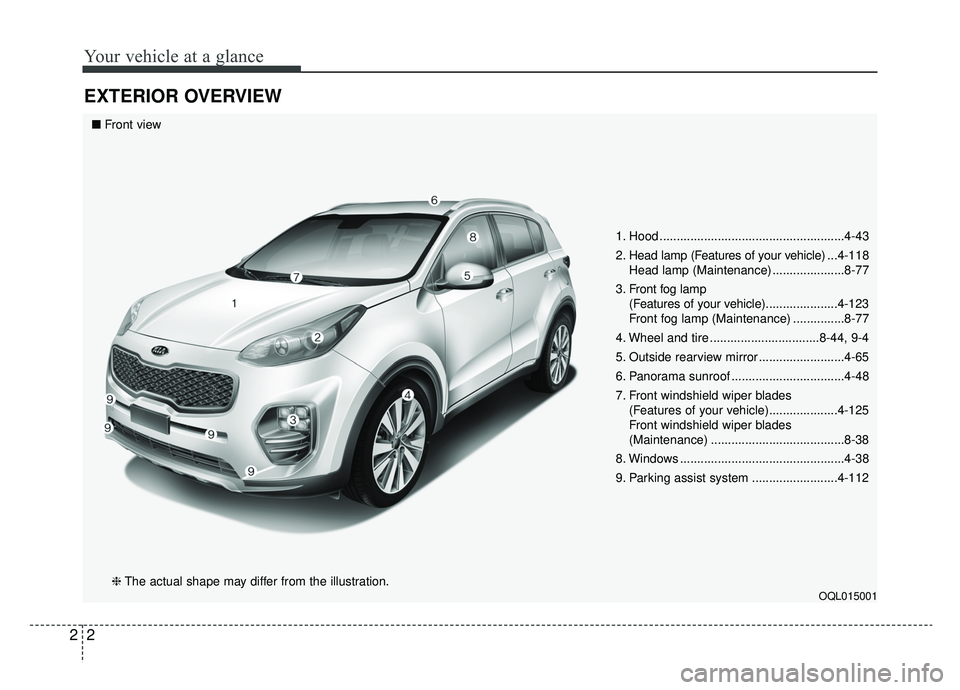
EXTERIOR OVERVIEW
1. Hood ......................................................4-43
2. Head lamp (Features of your vehicle) ...4-118
Head lamp (Maintenance) .....................8-77
3. Front fog lamp (Features of your vehicle) .....................4-123
Front fog lamp (Maintenance) ...............8-77
4. Wheel and tire ................................8-44, 9-4
5. Outside rearview mirror .........................4-65
6. Panorama sunroof .................................4-48
7. Front windshield wiper blades (Features of your vehicle)....................4-125
Front windshield wiper blades
(Maintenance) .......................................8-38
8. Windows ................................................4-38
9. Parking assist system .........................4-112
OQL015001
■ Front view
❈ The actual shape may differ from the illustration.
Page 14 of 607
23
Your vehicle at a glance
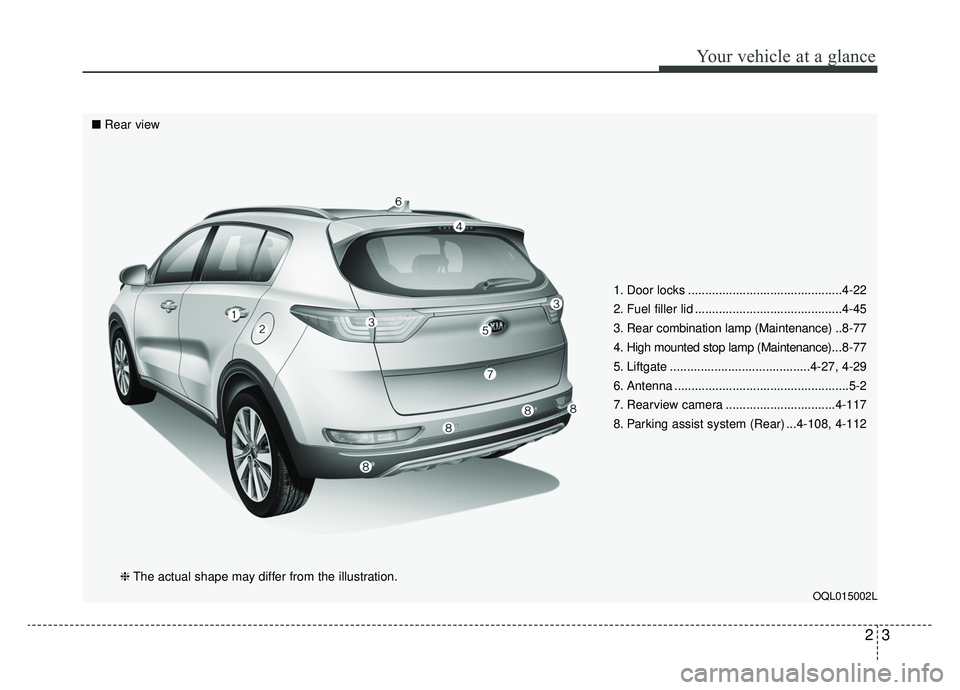
1. Door locks .............................................4-22
2. Fuel filler lid ...........................................4-45
3. Rear combination lamp (Maintenance) ..8-77
4. High mounted stop lamp (Maintenance)... 8-77
5. Liftgate .........................................4-27, 4-29
6. Antenna ...................................................5-2
7. Rearview camera ................................4-117
8. Parking assist system (Rear) ...4-108, 4-112
OQL015002L
■ Rear view
❈The actual shape may differ from the illustration.
Page 15 of 607
Your vehicle at a glance
42
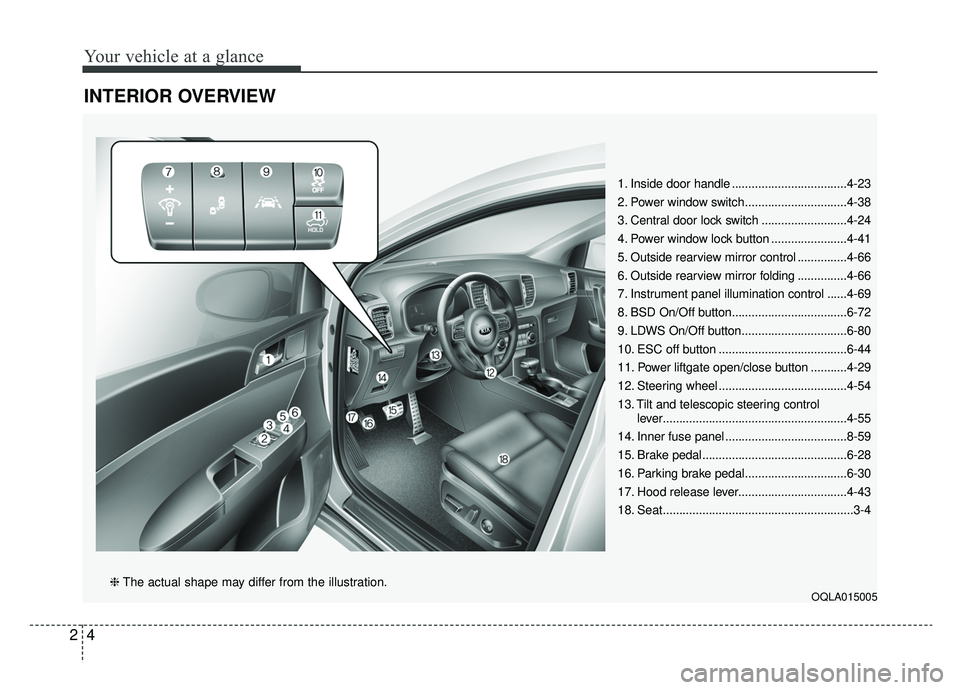
INTERIOR OVERVIEW
1. Inside door handle ...................................4-23
2. Power window switch...............................4-38
3. Central door lock switch ..........................4-24
4. Power window lock button .......................4-41
5. Outside rearview mirror control ...............4-66
6. Outside rearview mirror folding ...............4-66
7. Instrument panel illumination control ......4-69
8. BSD On/Off button...................................6-72
9. LDWS On/Off button................................6-80
10. ESC off button .......................................6-44
11. Power liftgate open/close button ...........4-29
12. Steering wheel .......................................4-54
13. Tilt and telescopic steering controllever........................................................4-55
14. Inner fuse panel .....................................8-59
15. Brake pedal............................................6-28
16. Parking brake pedal...............................6-30
17. Hood release lever.................................4-43
18. Seat..........................................................3-4
OQLA015005❈ The actual shape may differ from the illustration.
Page 16 of 607
25
Your vehicle at a glance
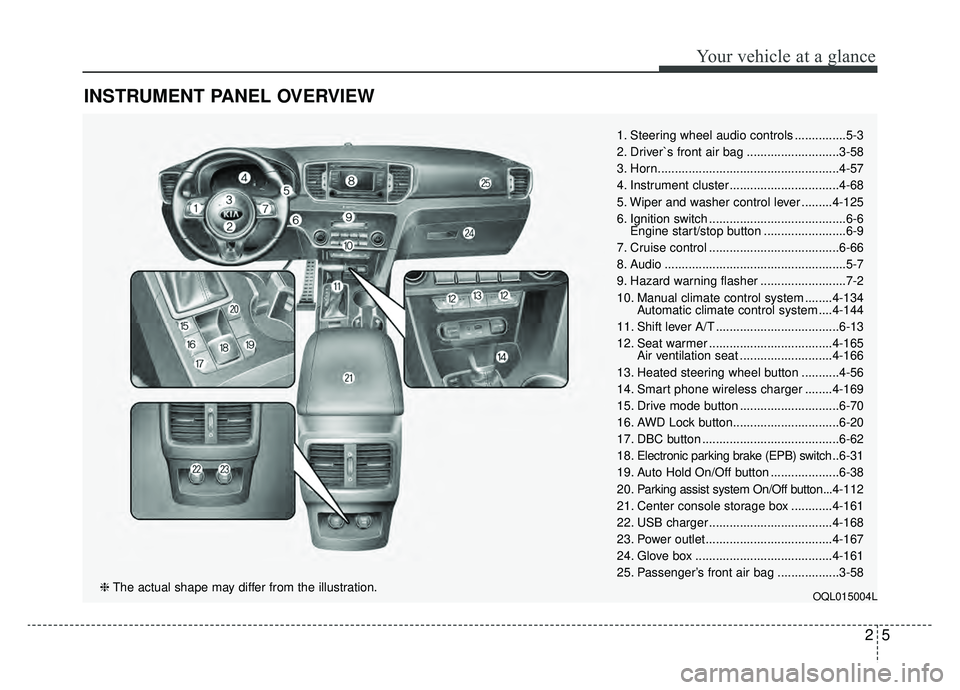
INSTRUMENT PANEL OVERVIEW
1. Steering wheel audio controls ...............5-3
2. Driver`s front air bag ...........................3-58
3. Horn.....................................................4-57
4. Instrument cluster ................................4-68
5. Wiper and washer control lever .........4-125
6. Ignition switch ........................................6-6Engine start/stop button ........................6-9
7. Cruise control ......................................6-66
8. Audio .....................................................5-7
9. Hazard warning flasher .........................7-2
10. Manual climate control system ........4-134 Automatic climate control system ....4-144
11. Shift lever A/T ....................................6-13
12. Seat warmer ....................................4-165 Air ventilation seat ...........................4-166
13. Heated steering wheel button ...........4-56
14. Smart phone wireless charger ........4-169
15. Drive mode button .............................6-70
16. AWD Lock button...............................6-20
17. DBC button ........................................6-62
18. Electronic parking brake (EPB) switch .. 6-31
19. Auto Hold On/Off button ....................6-38
20. Parking assist system On/Off button...4-112
21. Center console storage box ............4-161
22. USB charger ....................................4-168
23. Power outlet.....................................4-167
24. Glove box ........................................4-161
25. Passenger’s front air bag ..................3-58
OQL015004L❈ The actual shape may differ from the illustration.
Page 35 of 607
Safety features of your vehicle
18
3
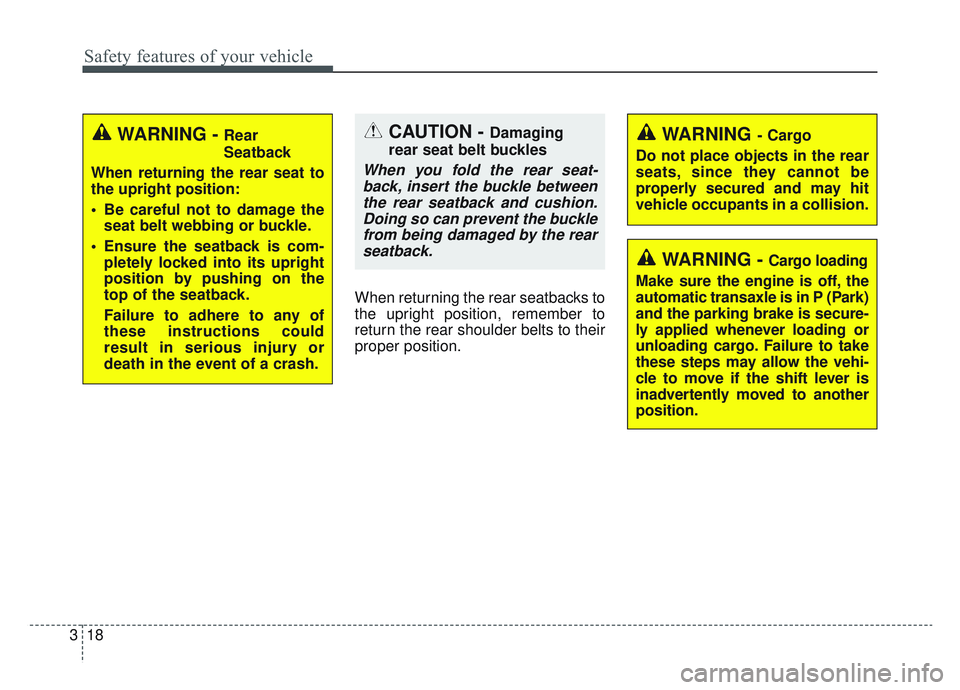
When returning the rear seatbacks to
the upright position, remember to
return the rear shoulder belts to their
proper position.
CAUTION - Damaging
rear seat belt buckles
When you fold the rear seat- back, insert the buckle betweenthe rear seatback and cushion.Doing so can prevent the bucklefrom being damaged by the rearseatback.
WARNING - Cargo loading
Make sure the engine is off, the
automatic transaxle is in P (Park)
and the parking brake is secure-
ly applied whenever loading or
unloading cargo. Failure to take
these steps may allow the vehi-
cle to move if the shift lever is
inadvertently moved to another
position.
WARNING- Cargo
Do not place objects in the rear
seats, since they cannot be
properly secured and may hit
vehicle occupants in a collision.WARNING - Rear
Seatback
When returning the rear seat to
the upright position:
Be careful not to damage the seat belt webbing or buckle.
Ensure the seatback is com- pletely locked into its upright
position by pushing on the
top of the seatback.
Failure to adhere to any of
these instructions could
result in serious injury or
death in the event of a crash.
Page 89 of 607

Mirrors . . . . . . . . . . . . . . . . . . . . . . . . . . . . . . . . . . 4-58\
• Inside rearview mirror . . . . . . . . . . . . . . . . . . . . . . . . 4-58
• Outside rearview mirror . . . . . . . . . . . . . . . . . . . . . . 4-65
Instrument cluster . . . . . . . . . . . . . . . . . . . . . . . . . 4-68
• Instrument Cluster Control . . . . . . . . . . . . . . . . . . . . 4-69
• LCD Display Control . . . . . . . . . . . . . . . . . . . . . . . . . 4-69
• Gauges . . . . . . . . . . . . . . . . . . . . . . . . . . . . . . . . . . . . \
. 4-70
• Transaxle Shift Indicator . . . . . . . . . . . . . . . . . . . . . . 4-73
LCD Display . . . . . . . . . . . . . . . . . . . . . . . . . . . . . . 4-74
• LCD Modes . . . . . . . . . . . . . . . . . . . . . . . . . . . . . . . . . 4-74
• Service Mode . . . . . . . . . . . . . . . . . . . . . . . . . . . . . . . . 4-75
• User Settings Mode . . . . . . . . . . . . . . . . . . . . . . . . . . . 4-77
Trip modes (Trip computer) . . . . . . . . . . . . . . . . . 4-83
• Trip Modes . . . . . . . . . . . . . . . . . . . . . . . . . . . . . . . . . . 4-83\
• Fuel Economy . . . . . . . . . . . . . . . . . . . . . . . . . . . . . . . 4-83
• Trip A/B . . . . . . . . . . . . . . . . . . . . . . . . . . . . . . . . . . . . \
4-85
• Digital speedometer . . . . . . . . . . . . . . . . . . . . . . . . . . . 4-86
• One time driving information mode . . . . . . . . . . . . . 4-86
• Turn By Turn Mode . . . . . . . . . . . . . . . . . . . . . . . . . . 4-87
• LDWS Mode . . . . . . . . . . . . . . . . . . . . . . . . . . . . . . . . 4-87
• A/V Mode . . . . . . . . . . . . . . . . . . . . . . . . . . . . . . . . . . . 4-\
87
• Warning Messages . . . . . . . . . . . . . . . . . . . . . . . . . . . . 4-88
Warning and indicator lights . . . . . . . . . . . . . . . . 4-96
• Warning lights . . . . . . . . . . . . . . . . . . . . . . . . . . . . . . . 4-96
• Indicator Lights . . . . . . . . . . . . . . . . . . . . . . . . . . . . . 4-103
Rear parking assist system . . . . . . . . . . . . . . . . . 4-108
• Operation of the rear parking assist system . . . . . . 4-108
• Non-operational conditions of rear parking assist system . . . . . . . . . . . . . . . . . . . 4-109
• Rear parking assist system precautions . . . . . . . . . 4-110
• Self-diagnosis . . . . . . . . . . . . . . . . . . . . . . . . . . . . . . . 4-111
Parking assist system . . . . . . . . . . . . . . . . . . . . . . 4-112
• Operation of the parking assist system . . . . . . . . . . 4-112
• Non-operational conditions of parking assist system. . 4-114
• Self-diagnosis . . . . . . . . . . . . . . . . . . . . . . . . . . . . . . . 4-116
Rearview camera . . . . . . . . . . . . . . . . . . . . . . . . . 4-117
Lighting . . . . . . . . . . . . . . . . . . . . . . . . . . . . . . . . . 4-118
• Battery saver function . . . . . . . . . . . . . . . . . . . . . . . . 4-118
• Daytime running light . . . . . . . . . . . . . . . . . . . . . . . . 4-118
• Lighting control . . . . . . . . . . . . . . . . . . . . . . . . . . . . . 4-118
• High beam operation. . . . . . . . . . . . . . . . . . . . . . . . . 4-120
• High Beam Assist . . . . . . . . . . . . . . . . . . . . . . . . . . . . 4-121
• Turn signals and lane change signals . . . . . . . . . . . 4-123
• Front fog light . . . . . . . . . . . . . . . . . . . . . . . . . . . . . . 4-123
• Check headlight . . . . . . . . . . . . . . . . . . . . . . . . . . . . 4-124
• AFLS (Adaptive Front Lighting System) . . . . . . . . 4-124
Wipers and washers . . . . . . . . . . . . . . . . . . . . . . . 4-125
• Windshield wipers . . . . . . . . . . . . . . . . . . . . . . . . . . 4-125
• Front windshield washers . . . . . . . . . . . . . . . . . . . . . 4-126
• Rear window wiper and washer switch. . . . . . . . . . 4-127
4
Page 110 of 607
423
Features of your vehicle
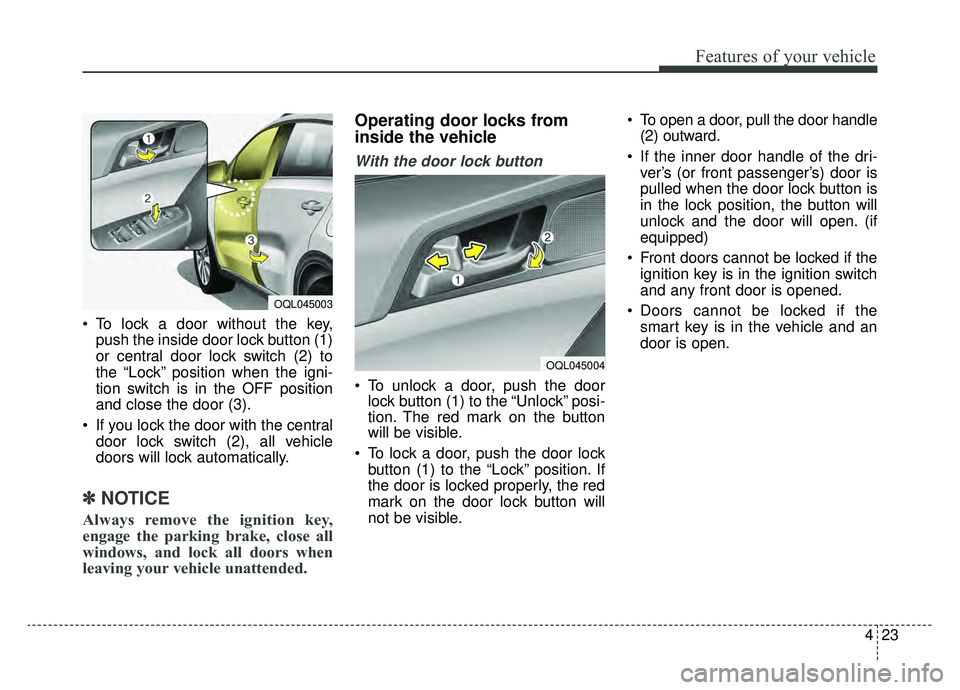
To lock a door without the key,push the inside door lock button (1)
or central door lock switch (2) to
the “Lock” position when the igni-
tion switch is in the OFF position
and close the door (3).
If you lock the door with the central door lock switch (2), all vehicle
doors will lock automatically.
✽ ✽ NOTICE
Always remove the ignition key,
engage the parking brake, close all
windows, and lock all doors when
leaving your vehicle unattended.
Operating door locks from
inside the vehicle
With the door lock button
To unlock a door, push the door
lock button (1) to the “Unlock” posi-
tion. The red mark on the button
will be visible.
To lock a door, push the door lock button (1) to the “Lock” position. If
the door is locked properly, the red
mark on the door lock button will
not be visible. To open a door, pull the door handle
(2) outward.
If the inner door handle of the dri- ver’s (or front passenger’s) door is
pulled when the door lock button is
in the lock position, the button will
unlock and the door will open. (if
equipped)
Front doors cannot be locked if the ignition key is in the ignition switch
and any front door is opened.
Doors cannot be locked if the smart key is in the vehicle and an
door is open.
OQL045004
OQL045003
Page 130 of 607
443
Features of your vehicle
Opening the hood
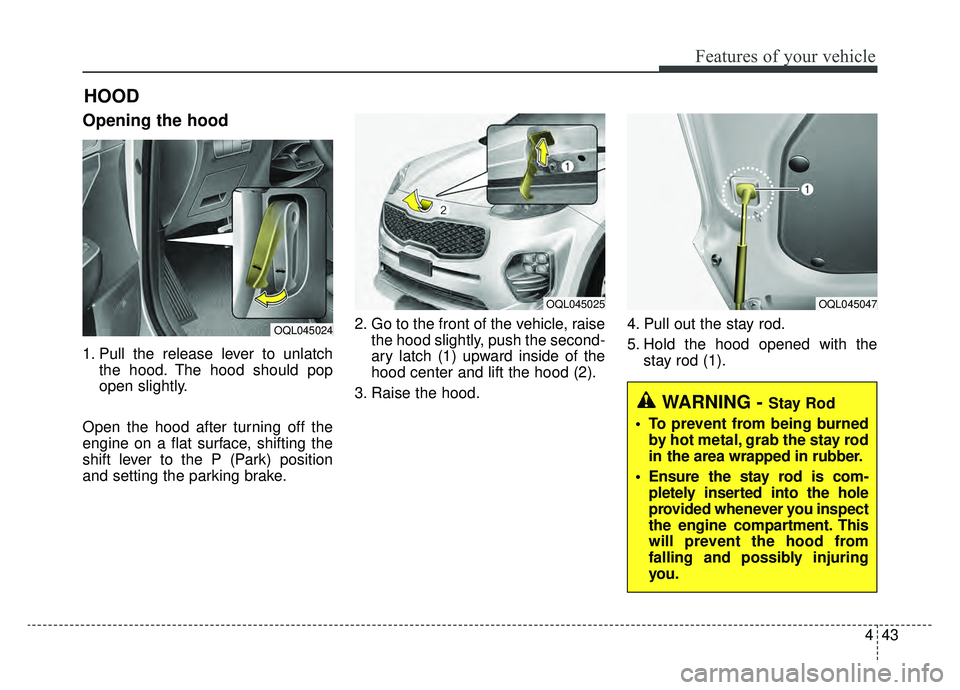
1. Pull the release lever to unlatchthe hood. The hood should pop
open slightly.
Open the hood after turning off the
engine on a flat surface, shifting the
shift lever to the P (Park) position
and setting the parking brake. 2. Go to the front of the vehicle, raise
the hood slightly, push the second-
ary latch (1) upward inside of the
hood center and lift the hood (2).
3. Raise the hood. 4. Pull out the stay rod.
5. Hold the hood opened with the
stay rod (1).
HOOD
OQL045024
OQL045025OQL045047
WARNING - Stay Rod
To prevent from being burned by hot metal, grab the stay rod
in the area wrapped in rubber.
Ensure the stay rod is com- pletely inserted into the hole
provided whenever you inspect
the engine compartment. This
will prevent the hood from
falling and possibly injuring
you.
Page 162 of 607
475
Features of your vehicle
Edit settings after engaging park-ing brake/Edit settings after shift-ing to P
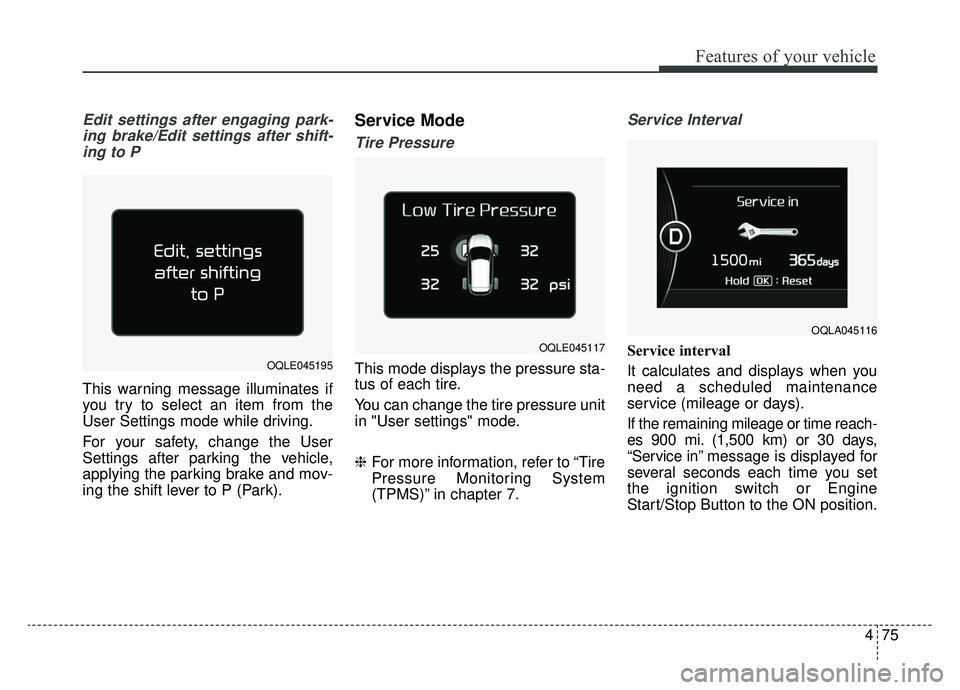
This warning message illuminates if
you try to select an item from the
User Settings mode while driving.
For your safety, change the User
Settings after parking the vehicle,
applying the parking brake and mov-
ing the shift lever to P (Park).
Service Mode
Tire Pressure
This mode displays the pressure sta-
tus of each tire.
You can change the tire pressure unit
in "User settings" mode.
❈ For more information, refer to “Tire
Pressure Monitoring System
(TPMS)” in chapter 7.
Service Interval
Service interval
It calculates and displays when you
need a scheduled maintenance
service (mileage or days).
If the remaining mileage or time reach-
es 900 mi. (1,500 km) or 30 days,
“Service in” message is displayed for
several seconds each time you set
the ignition switch or Engine
Start/Stop Button to the ON position.
OQLA045116
OQLE045195
OQLE045117
Page 167 of 607
Features of your vehicle
80
4
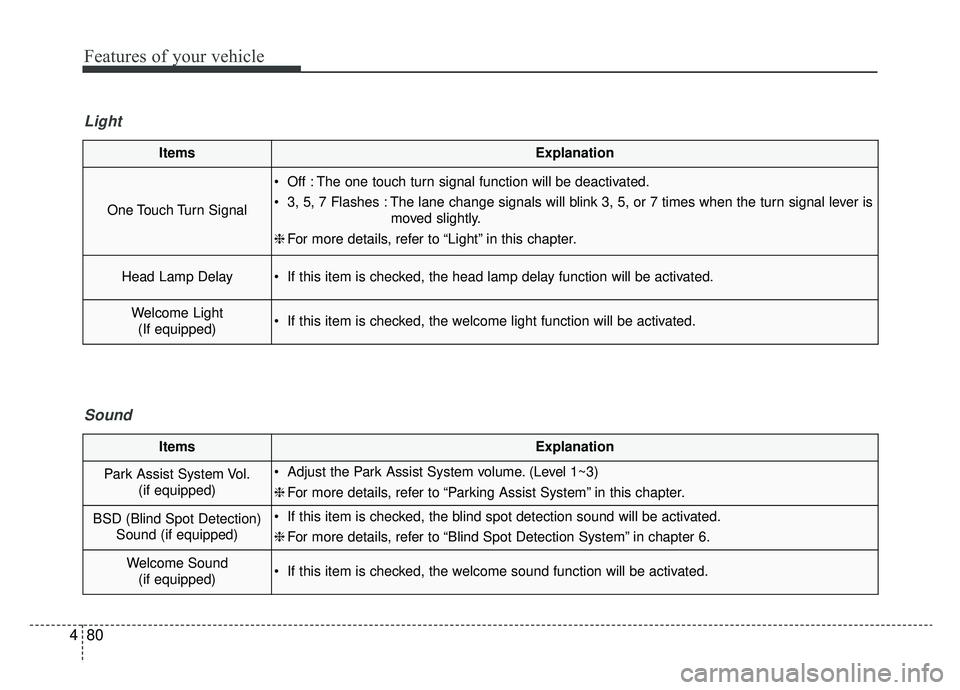
ItemsExplanation
One Touch Turn Signal
Off : The one touch turn signal function will be deactivated.
3, 5, 7 Flashes : The lane change signals will blink 3, 5, or 7 times when the turn signal lever is
moved slightly.
❈ For more details, refer to “Light” in this chapter.
Head Lamp Delay If this item is checked, the head lamp delay function will be activated.
Welcome Light
(If equipped) If this item is checked, the welcome light function will be activated.
Light
ItemsExplanation
Park Assist System Vol. (if equipped) Adjust the Park Assist System volume. (Level 1~3)
❈For more details, refer to “Parking Assist System” in this chapter.
BSD (Blind Spot Detection)
Sound (if equipped) If this item is checked, the blind spot detection sound will be activated.
❈For more details, refer to “Blind Spot Detection System” in chapter 6.
Welcome Sound
(if equipped) If this item is checked, the welcome sound function will be activated.
Sound