warning KIA SPORTAGE 2022 Owners Manual
[x] Cancel search | Manufacturer: KIA, Model Year: 2022, Model line: SPORTAGE, Model: KIA SPORTAGE 2022Pages: 630, PDF Size: 9.69 MB
Page 387 of 630

Driving your vehicle
102
5
Detecting Sensor
The rear corner radars are the sen-
sors inside the rear bumper for
detecting the side/rear areas. Always
keep the rear bumper clean for prop-
er operation of the system.
✽ ✽
NOTICE
• The system may not work proper-
ly when the bumper has been
damaged, or if the rear bumper
has been replaced or repaired.
• The sensing range differs some- what according to the width of the
road. When the road is narrow,
the system may detect other vehi-
cles in the next lane.
• The system may turn off due to strong electromagnetic waves.
• Always keep the sensor clean.
• NEVER arbitrarily disassemble the sensor component nor apply
any impact on the sensor compo-
nent.
• Be careful not to apply unneces- sary force on the radar sensor or
sensor cover. If the sensor is
forcibly moved out of proper
alignment, the system may not
operate correctly. In this case, a
warning message may not be dis-
played. (Continued)CAUTION
The driver should always use
extreme caution while operat-ing the vehicle, whether or notthe warning light on the out-side rearview mirror illumi-nates or there is a warningalarm.
Playing the vehicle audio sys- tem at high volume may offsetBlind-Spot Collision Warningwarning sounds.
The warning of the Blind-Spot Collision Warning may notsound while other system'swarning sounds.
OQL058209L
■Rear corner radars
Page 388 of 630

5103
Driving your vehicle
(Continued)Have the vehicle inspected by an
authorized Kia dealer.
• Do not apply foreign objects such as a bumper sticker or a bumper
guard near the radar sensor or
apply paint to the sensor area.
Doing so may adversely affect the
performance of the sensor.Warning message
Blind-Spot Collision Warning dis-
abled. Radar blocked
This warning message may appear
when :
- One or both of the sensors on the
rear bumper is blocked by dirt or
snow or a foreign object.
- Driving in rural areas where the
sensor does not detect another
vehicle for an extended period of
time.
- When there is inclement weather
such as heavy snow or rain.
- When a trailer or carrier is installed. If any of these conditions occur, the
light on the Blind-Spot Safety button
and the system will turn off automat-
ically.
Turn off BCW (if equipped) when a
trailer or carrier is installed.
- Press the Blind-Spot Safety button
(the indicator on the button extin-
guish) or “User Settings Driver
Assistance Blind-Spot Safety
Off ”.
- Deactivate RCCW system by des- electing
“User Settings Driver
Assistance Blind-Spot Safety
Rear Cross-Traffic Safety”.
If you use BCW, remove a trailer or
carrier.
When BCW canceled warning mes-
sage is displayed in the cluster,
check to make sure that the rear
bumper is free from any dirt or snow
in the areas where the sensor is
located. Remove any dirt, snow, or
foreign material that could interfere
with the radar sensors.
OJF058433L
Page 389 of 630

Driving your vehicle
104
5
After any dirt or debris is removed,
BCW should operate normally after
about 10 minutes of driving the vehi-
cle.
If the system still does not operate
normally, have your vehicle inspect-
ed by an authorized Kia dealer.
Check Blind-Spot Collision Warning
If there is a problem with BCW , a
warning message will appear and
the light on the switch will turn off.
The system will turn off automatical-
ly. We recommend that you have
your vehicle inspected by an author-
ized Kia dealer.Limitations of the system
The driver must be cautious in the
below situations, because the sys-
tem may not detect other vehicles or
objects in certain circumstances.
When a trailer or carrier isinstalled.
The vehicle drives in inclement weather such as heavy rain or
snow.
The sensor is polluted with rain, snow, mud, etc.
The rear bumper where the sensor is located is covered with a foreign
object such as a bumper sticker, a
bumper guard, a bike rack, etc.
The rear bumper is damaged, or the sensor is out of the original
default position.
The vehicle height gets lower or higher due to heavy loading in a
liftgate, abnormal tire pressure,
etc.
When the temperature of the rear bumper is high.
When the sensors are blocked by other vehicles, walls or parking-lot
pillars.
OJF058435L
Page 394 of 630

5109
Driving your vehicle
Driver Attention Warning (DAW) dis-
plays the level of the driver’s fatigue
and inattention, considering the driv-
ing pattern, etc.System setting and activation
System setting
To turn ON the Driver AttentionWarning system, turn on the
engine, and then select 'User
Settings Driver Assistance
Driver Attention Warning High
sensitivity/Normal sensitivity/Off'
on the LCD display.
The driver can select the Driver Attention Warning system mode.
- Off : Driver Attention Warning isdeactivated.
- Normal sensitivity : Driver Attention Warning alerts the driv-
er of his/her or inattentive driving
practices.
- High sensitivity : Driver Attention Warning alerts the driver of
his/her or inattentive driving prac-
tices faster than Normal mode.
The set-up of Driver Attention Warning will be maintained, when
the engine is re-started.
Display of the driver's attention
level
DRIVER ATTENTION WARNING (DAW)
OJF058423L
■Type A
■Type B
OJF058424L
Page 395 of 630

Driving your vehicle
110
5
The driver can monitor their driving
conditions on the LCD display.
- Select 'User Settings Mode' andthen 'Driver Assistance' on the
LCD display. (For more informa-
tion, refer to “LCD Display” in
chapter 4.)
The driver's attention level is dis- played on the scale of 1 to 5. The
lower the number is, the more inat-
tentive the driver is.
The number decreases when the driver does not take a break for a
certain period of time.
The number increases when the driver attentively drives for a cer-
tain period of time.
When the driver turns on the sys- tem while driving, it displays ‘Last
Break time’.Take a break
The “Consider taking a break”message appears on the LCD dis-
play and a warning sounds to sug-
gest that the driver take a break,
when the driver's attention level is
below 1. Driver Attention Warning will not
suggest a break when the total
driving time is shorter than 10 min-
utes.
OJF058425L
■Type A
■Type B
OJF058426L
CAUTION
While other warning systemssuch as the seat belt warningsound are in operation andoverride the DAW alarming sys-tem, DAW sounds may notoccur.
Page 396 of 630

5111
Driving your vehicle
Resetting the system
The last break time is set to 00:00and the driver's attention level is
set to 5 (very attentive) when the
driver resets Driver Attention
Warning.
Driver Attention Warning resets in the following situations.
- The engine is turned OFF.
- The driver unfastens the seat beltand then opens the driver’s door
in stop.
- The driver takes a break from driving that lasts more than 10
minutes.
Driver Attention Warning operates again, when the driver restarts
driving.
System standby
Driver Attention Warning enters the
ready status and displays the
'Standby' screen in the following situ-
ations.
- The camera sensor is unable todetect the lanes.
- Driving speed remains under 40 mph (64 km/h) or over 110 mph
(177 km/h).
System malfunction
When the "Check Driver Attention
Warning (DAW) system” warning mes-
sage appears, the system is not work-
ing properly. In this case, have the
vehicle inspected by an authorized Kia
dealer.
OJF058427LOJF058429L
Page 397 of 630

Driving your vehicle
112
5
✽ ✽
NOTICE
It may suggest a break according to
the driver’s driving pattern or
habits even if the driver doesn’t feel
fatigued.
✽ ✽NOTICE
The Driver Attention Warning
(DAW) is quite related with the front
camera in the vehicle for the better
performance. For more information
of front camera, refer to ”Lane
Keeping Assist (LKA)”
It may not properly operate with
limited alerting in the following situ-
ations:
- Not properly recognize lane
- Rough & Intentionally evasive
driving
- Intentionally frequent lane cut-in
- Severe winding road and uneven road surface condition
- Windy road
- The vehicle is controlled by other driving assist systems; e.g. Lane
Keeping Assist (LKA), etc.WARNING
Driver Attention Warning is
not a substitute for safe driv-
ing practices. It is the respon-
sibility of the driver to always
drive cautiously to prevent
unexpected and sudden situa-
tions from occurring. Pay
attention to the road condi-
tions at all times.
The driver, who feels fatigued, should take a break, even
though there is no break sug-
gestion by the Driver
Attention Warning system.
CAUTION
Driver Attention Warning maynot provide alerts in the follow-ing situations:
The lane detection perform- ance is limited. (For moreinformation, refer to “LaneKeeping Assist (LKA)” in thischapter.)
The vehicle is erratically driv- en or is abruptly turned forobstacle avoidance (e.g. con-struction area, other vehicles,fallen objects, bumpy road).
Forward drivability of the vehi- cle is severely undermined(possibly due to wide varia-tion in tire pressures, uneventire wear-out, toe-in/toe-outalignment).
(Continued)
Page 398 of 630

5113
Driving your vehicle
✽ ✽NOTICE
Driver Attention Warning does not
detect actual driver fatigue or
drowsiness. The system monitors
driving and provides a warning if it
detects inattentive driving practices.
(Continued)
The vehicle drives on a curvy road.
The vehicle drives on a bumpy road.
The vehicle drives through a windy area.
The vehicle is controlled by the following driver assistancesystems:
- Lane Keeping Assist - Forward collision-avoidanceassist
- Smart Cruise Control
Page 399 of 630

Driving your vehicle
114
5
1. CRUISE indicator( CRUISE)
2. Set speed
Cruise Control system allows you to
program the vehicle to maintain a
constant speed without depressing
the accelerator pedal.
This system is designed to function
above approximately 20 mph (30
km/h). If Cruise Control is left on, (CRUISE
indicator light in the instrument cluster
illuminated) Cruise Control can be
switched on accidentally. Keep Cruise
Control system off (CRUISE indicator
light OFF) when Cruise Control is not
in use, to avoid inadvertently setting a
speed.
Use Cruise Control system only
when traveling on open highways in
good weather.
Do not use Cruise Control when driv-
ing in heavy or varying traffic, or on
slippery (rainy, icy or snow-covered)
or winding roads or over 6% up-hill or
down-hill roads.
✽ ✽
NOTICE
• During normal Cruise Control
operation, when the SET switch is
activated or reactivated after
applying the brakes, Cruise
Control will energize after approx-
imately 3 seconds. This delay is
normal.
• To activate Cruise Control, depress the brake pedal at least
once after turning the ignition
switch to the ON position or start-
ing the engine.
CRUISE CONTROL (CC)
WARNING - Misuse of
Cruise Control
Do not use Cruise Control if the
traffic situation does not allow
you to drive safely at a constant
speed and with sufficient dis-
tance to the vehicle in front.
OQL050025N
Page 403 of 630
Driving your vehicle
118
5
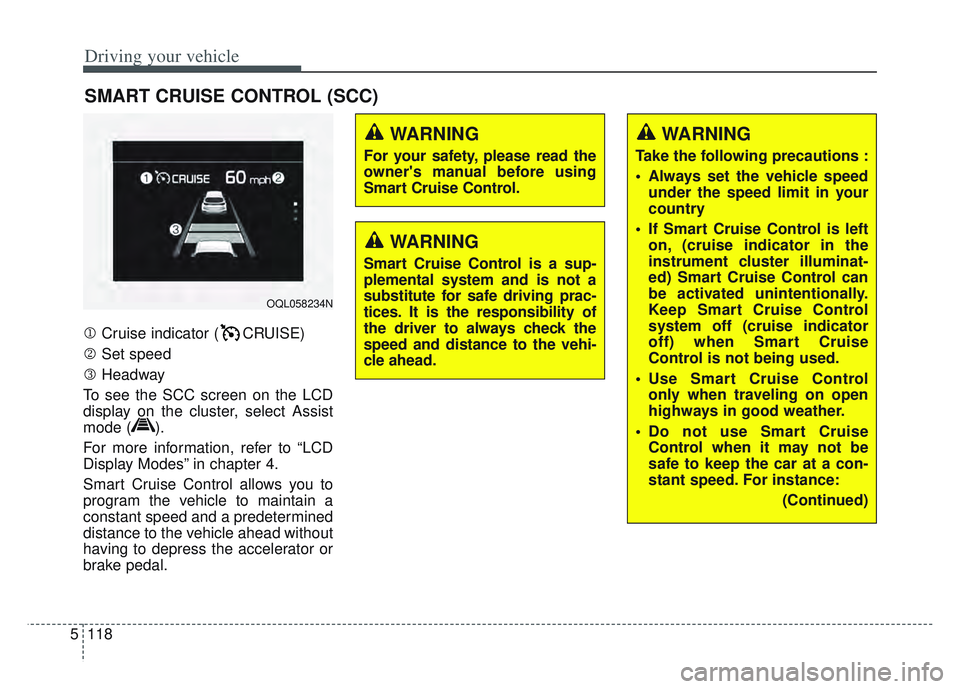
Cruise indicator ( CRUISE)
Set speed
Headway
To see the SCC screen on the LCD
display on the cluster, select Assist
mode ( ).
For more information, refer to “LCD
Display Modes” in chapter 4.
Smart Cruise Control allows you to
program the vehicle to maintain a
constant speed and a predetermined
distance to the vehicle ahead without
having to depress the accelerator or
brake pedal.
SMART CRUISE CONTROL (SCC)
WARNING
For your safety, please read the
owner's manual before using
Smart Cruise Control.
WARNING
Smart Cruise Control is a sup-
plemental system and is not a
substitute for safe driving prac-
tices. It is the responsibility of
the driver to always check the
speed and distance to the vehi-
cle ahead.
OQL058234N
WARNING
Take the following precautions :
Always set the vehicle speed under the speed limit in your
country
If Smart Cruise Control is left on, (cruise indicator in the
instrument cluster illuminat-
ed) Smart Cruise Control can
be activated unintentionally.
Keep Smart Cruise Control
system off (cruise indicator
off) when Smart Cruise
Control is not being used.
Use Smart Cruise Control only when traveling on open
highways in good weather.
Do not use Smart Cruise Control when it may not be
safe to keep the car at a con-
stant speed. For instance:
(Continued)