warning KIA SPORTAGE 2022 Owners Manual
[x] Cancel search | Manufacturer: KIA, Model Year: 2022, Model line: SPORTAGE, Model: KIA SPORTAGE 2022Pages: 630, PDF Size: 9.69 MB
Page 409 of 630
Driving your vehicle
124
5
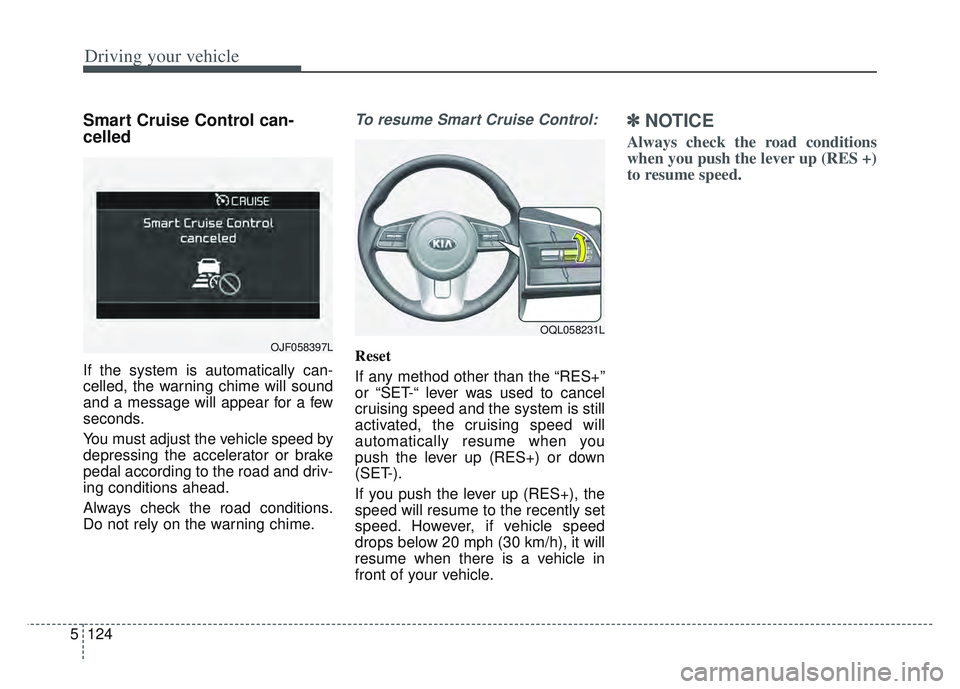
Smart Cruise Control can-
celled
If the system is automatically can-
celled, the warning chime will sound
and a message will appear for a few
seconds.
You must adjust the vehicle speed by
depressing the accelerator or brake
pedal according to the road and driv-
ing conditions ahead.
Always check the road conditions.
Do not rely on the warning chime.
To resume Smart Cruise Control:
Reset
If any method other than the “RES+”
or “SET-“ lever was used to cancel
cruising speed and the system is still
activated, the cruising speed will
automatically resume when you
push the lever up (RES+) or down
(SET-).
If you push the lever up (RES+), the
speed will resume to the recently set
speed. However, if vehicle speed
drops below 20 mph (30 km/h), it will
resume when there is a vehicle in
front of your vehicle.
✽ ✽
NOTICE
Always check the road conditions
when you push the lever up (RES +)
to resume speed.
OQL058231L
OJF058397L
Page 411 of 630

Driving your vehicle
126
5
When the lane ahead is clear :
The vehicle speed will maintain the
set speed.
WARNING
- Following Distance
To avoid collisions, always be aware of the selected speed
and vehicle to vehicle dis-
tance settings when activat-
ing your Smart Cruise Control
system.
Always maintain sufficient braking distance and deceler-
ate your vehicle by applying
the brakes if necessary.
OQL058283N
Page 413 of 630

Driving your vehicle
128
5
If there is a high risk of collision due
to sudden braking of the front vehicle
or lack of safety distance with the
vehicle ahead during SCC driving, so
that if the driver's brake or steering
wheel operation is required, the
Distance Step with the vehicle ahead
will blink on the cluster and a colli-
sion warning will sound.
In this case, immediately reduce the
speed.
CAUTION
If the vehicle ahead (vehicle
speed: less than 20 mph (30km/h) moves to the next lane,the warning chime will soundand a message will appear.Adjust your vehicle speed forvehicles or objects that cansuddenly appear in front of youby depressing the brake pedalaccording to the road conditionahead and driving condition.
OJF058401L
WARNING
When using Smart Cruise
Control :
The warning message appears and warning chime sounds, if
the vehicle is unable to main-
tain the selected distance
from the vehicle ahead.
If the warning message appears and warning chime
sounds, depress the brake
pedal to actively adjust the
vehicle speed, and the dis-
tance to the vehicle ahead.
Even if the warning message does not appear and warning
chime is does not sound,
always pay attention to the
driving conditions to prevent
dangerous situations from
occurring.
Playing the vehicle audio sys- tem at high volume may cause
the vehicle occupants not to
hear the system warning
sounds.
OQL058200L
Page 415 of 630

Driving your vehicle
130
5
Warning message
Smart Cruise Control disabled. Radar
blocked
When the sensor cover is covered
with dirt, snow, or debris, Smart
Cruise Control operation may stop
temporarily.
If this occurs, a warning message will
appear on the LCD display.
Remove any dirt, snow, or debris and
clean the radar sensor cover before
operating Smart Cruise Control. Smart Cruise Control may not prop-
erly activate if the radar is totally con-
taminated, or if any substance is not
detected after turning ON the engine
(e.g. in an open terrain).
OJF058404L
CAUTION
Do not apply license plate
frame or foreign objects suchas a bumper sticker or abumper guard near the radarsensor. Doing so mayadversely affect the sensingperformance of the radar.
Always keep the sensor and bumper clean.
Use only a soft cloth to wash the vehicle. Do not spray pres-surized water directly on thesensor or sensor cover.
(Continued)
(Continued) Be careful not to apply unnec- essary force on the radar sen-sor or sensor cover. If the sen-sor is forcibly moved out ofproper alignment, SmartCruise Control may not oper-ate correctly. In this case, awarning message may not bedisplayed.
Have the vehicle inspected byan authorized Kia dealer.
Use only a genuine Kia sensor cover for your vehicle. Do notpaint anything on the sensorcover.
If the front bumper becomes damaged in the area aroundthe radar sensor, Smart CruiseControl may not operate prop-erly.
Page 417 of 630

Driving your vehicle
132
5
To convert to Cruise Control
mode:
The driver may choose to only use
Cruise Control mode (speed control
function) by doing as follows: 1. Turn Smart Cruise Control on (the
cruise indicator light will be on but
the system will not be activated).
2. Push the distance to distance switch for more than 2 seconds.
3. Choose between "Smart Cruise Control" and "Cruise Control".
When the system is canceled using
the CRUISE button or the CRUISE
button is used after the engine is
turned on, the Smart Cruise Control
mode will turn on.
Limitations of the system
Smart Cruise Control may have lim-
its to its ability to detect distance to
the vehicle ahead due to road and
traffic conditions.
OJF058400L
OJF058399L
WARNING
When using Cruise Control
mode, you must manually
assess the distance to other
vehicles as the system will not
automatically brake to slow
down for other vehicles.
Page 421 of 630

Driving your vehicle
136
5
Always look out for pedestrians
when your vehicle is maintaining a
distance with the vehicle ahead. Always be cautious when
approaching vehicles that are taller
with higher clearance, or vehicles
carrying loads that stick out of the
back of the vehicle.
OQL058204LOYG056049
WARNING
When using Smart Cruise
Control take the following pre-
cautions:
If an emergency stop is nec-essary, you must apply the
brakes. Smart Cruise Control
may not be able to completely
stop the vehicle or avoid a
collision in every situation.
Keep a safe distance accord- ing to road conditions and
vehicle speed. If the vehicle to
vehicle distance is too close
during a high-speed driving, a
serious collision may result.
Always maintain sufficient braking distance and deceler-
ate your vehicle by applying
the brakes if necessary.
(Continued)
Page 422 of 630
5137
Driving your vehicle
✽ ✽NOTICE
Smart Cruise Control may not oper-
ate temporarily due to:
- Electrical interference
- Modified suspension
- Differences in tire abrasion or tire
pressure
- Installation of different type of tires(Continued)
Always be aware of the select-
ed speed and distance to the
vehicle ahead.
Smart Cruise Control may not recognize complex driving sit-
uations, always pay attention
to driving conditions and con-
trol your vehicle speed.
After an engine start, please stop for several seconds. If
system initialization is not
completed, SCC does not nor-
mally operate.
After starting the engine, if objects are not detected or
the sensor cover is covered
with foreign substances, the
SCC may not work.(Continued)
Smart Cruise Control cannotrecognize a stopped vehicle,
pedestrians or an oncoming
vehicle.
Always look ahead cautiously
to prevent unexpected and
sudden situations from occur-
ring.
When other vehicles are changing lanes in front of you
frequently, Smart Cruise
Control may not operate
appropriately.
Always drive cautiously to
prevent unexpected and sud-
den situations from occurring.
Smart Cruise Control is not a substitute for safe driving
practices but a convenience
function only. It is the respon-
sibility of the driver to always
check to the vehicle ahead.
(Continued)
WARNING
For safe operation, carefully
read and follow the instructions
in this manual before use.
Page 424 of 630
5139
Driving your vehicle
System description
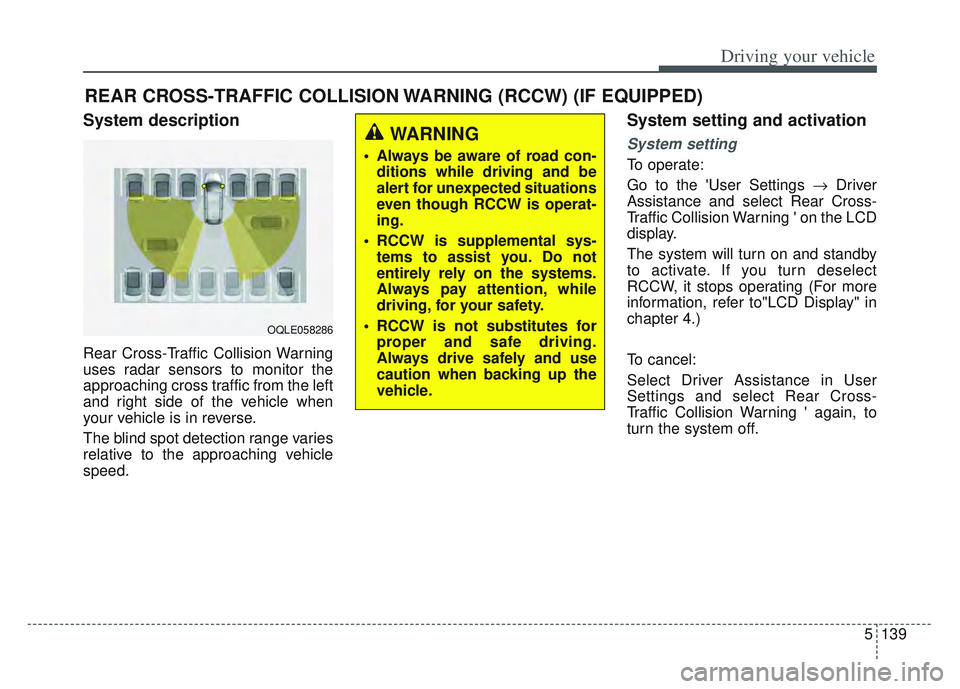
Rear Cross-Traffic Collision Warning
uses radar sensors to monitor the
approaching cross traffic from the left
and right side of the vehicle when
your vehicle is in reverse.
The blind spot detection range varies
relative to the approaching vehicle
speed.
System setting and activation
System setting
To operate:
Go to the 'User Settings Driver
Assistance and select Rear Cross-
Traffic Collision Warning ' on the LCD
display.
The system will turn on and standby
to activate. If you turn deselect
RCCW, it stops operating (For more
information, refer to"LCD Display" in
chapter 4.)
To cancel:
Select Driver Assistance in User
Settings and select Rear Cross-
Traffic Collision Warning ' again, to
turn the system off.
REAR CROSS-TRAFFIC COLLISION WARNING (RCCW) (IF EQUIPPED)
OQLE058286
WARNING
Always be aware of road con- ditions while driving and be
alert for unexpected situations
even though RCCW is operat-
ing.
RCCW is supplemental sys- tems to assist you. Do not
entirely rely on the systems.
Always pay attention, while
driving, for your safety.
RCCW is not substitutes for proper and safe driving.
Always drive safely and use
caution when backing up the
vehicle.
Page 425 of 630
Driving your vehicle
140
5
✽ ✽
NOTICE
• If the vehicle is turned off then on
again, RCCW returns to the previ-
ous state.
• When the system is turned on, the warning light will illuminate for 3
seconds on the outside rearview
mirror.
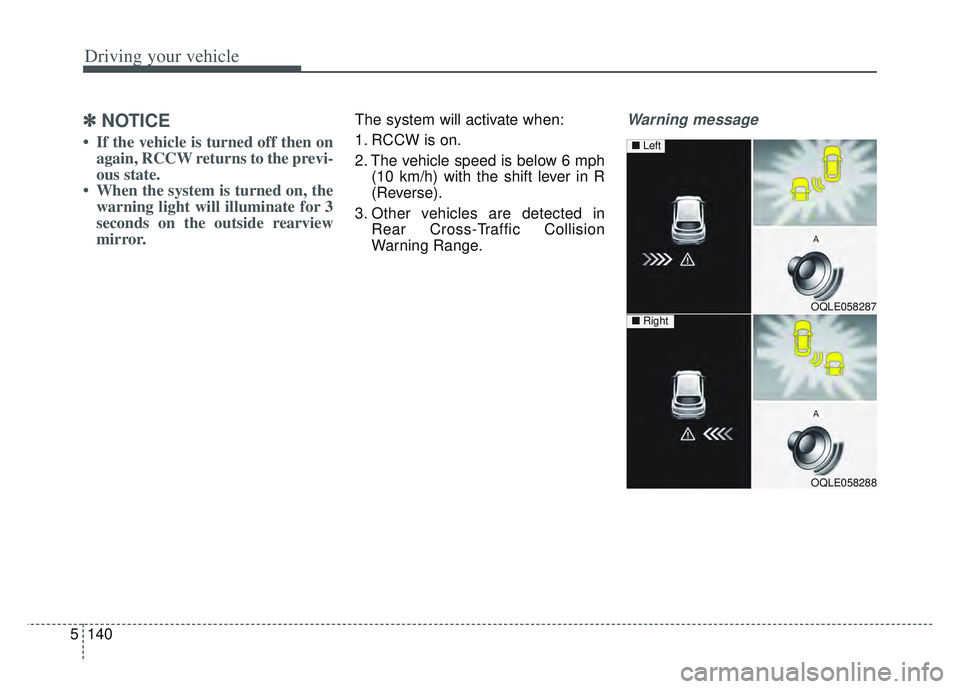
The system will activate when:
1. RCCW is on.
2. The vehicle speed is below 6 mph
(10 km/h) with the shift lever in R
(Reverse).
3. Other vehicles are detected in Rear Cross-Traffic Collision
Warning Range.Warning message
OQLE058287
OQLE058288
■ Left
■ Right
Page 426 of 630
5141
Driving your vehicle
If the vehicle detected by the sensors
approaches from the rear left/right
side of your vehicle, the warning
chime will sound, the warning light
on the outside rearview mirror will
blink and a message will appear on
the LCD display. If the rear view mon-
itor system is in activation, a mes-
sage will also appear on the
‘Infortainment System’.
The warning will stop when:
- The vehicle moving at the rearleft/right side of your vehicle is not
in the detection range.
- The vehicle is right behind your vehicle.
- The vehicle is not driving towards your vehicle.
- The vehicle’s approaching speed is decreased.✽ ✽ NOTICE
• When the operation condition of
RCCW is met, the warning will
occur every time a vehicle
approaches the side or rear of
your stopped (0 mph (0 km/h)
vehicle speed) vehicle.
• The system's warning or brake may not operate properly if the
left or right of your vehicle's rear
bumper is blocked by a vehicle or
obstacle.
• The driver should always use extreme caution while operating
the vehicle, whether or not the
warning light on the outer side
view mirror illuminates or there is
a warning alarm.
• Playing the vehicle audio system at high volume may prevent occu-
pants from hearing the system's
warning sounds.
• If any other warning sound such as seat belt warning chime is
already generated, the RCCW
warning may not sound.WARNING
Drive safely even though the
vehicle is equipped with Rear
Cross-Traffic Collision
Warning. Do not solely rely on
the system but check your
surrounding when backing
the vehicle up.
The driver is responsible for accurate brake control.
Always pay extreme caution while driving. Rear Cross-
Traffic Collision Warning may
not operate properly or
unnecessarily operate
depending on traffic and driv-
ing conditions.