lock KIA STINGER 2019 Manual PDF
[x] Cancel search | Manufacturer: KIA, Model Year: 2019, Model line: STINGER, Model: KIA STINGER 2019Pages: 555, PDF Size: 13.49 MB
Page 269 of 555
Driving your vehicle
16
5
Shift lock system
For your safety, the automatic trans-
mission has a shift lock system
which prevents shifting the transmis-
sion from P (Park) into R (Reverse)
unless the brake pedal is depressed.
To shift the transmission from P
(Park) into R (Reverse):
1.Depress and hold the brake pedal.
2.Start the engine or turn the ignition
switch to the ON position.
3.Move the shift lever.
If the brake pedal is repeatedly
depressed and released with the
shift lever in the P (Park) position, a
chattering noise & vibration near the
shift lever may be heard. It is a nor-
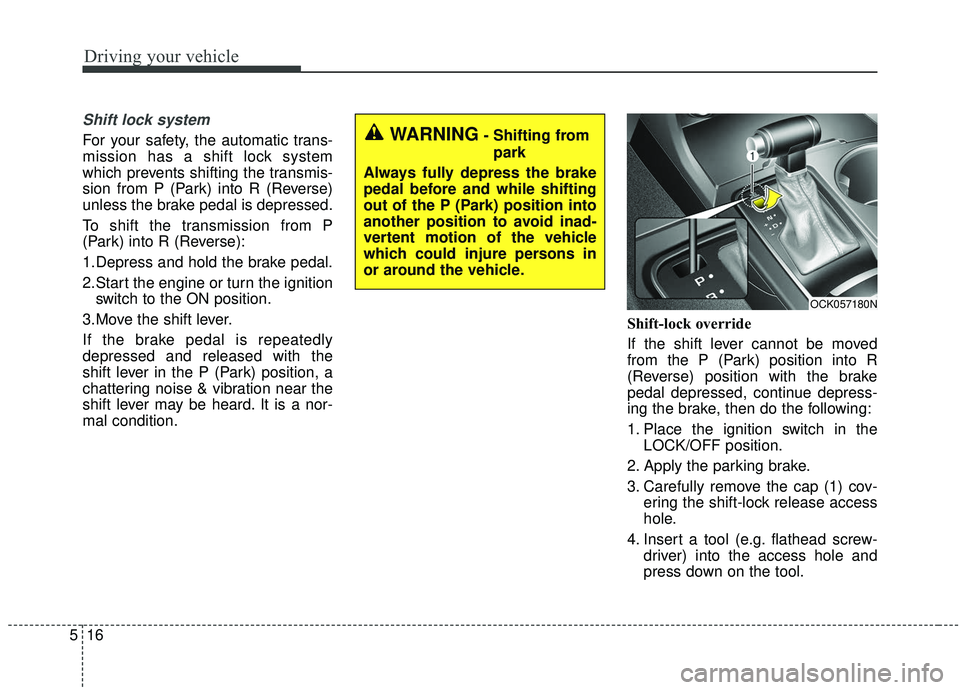
mal condition. Shift-lock override
If the shift lever cannot be moved
from the P (Park) position into R
(Reverse) position with the brake
pedal depressed, continue depress-
ing the brake, then do the following:
1. Place the ignition switch in the
LOCK/OFF position.
2. Apply the parking brake.
3. Carefully remove the cap (1) cov- ering the shift-lock release access
hole.
4. Insert a tool (e.g. flathead screw- driver) into the access hole and
press down on the tool.WARNING- Shifting from
park
Always fully depress the brake
pedal before and while shifting
out of the P (Park) position into
another position to avoid inad-
vertent motion of the vehicle
which could injure persons in
or around the vehicle.
OCK057180N
Page 270 of 555
517
Driving your vehicle
5. Move the shift lever.
6. Remove the tool from the shiftlockoverride access hole then install
the cap.
7. We recommend that the system be inspected by an authorized Kia
dealer.
Ignition key interlock system
The ignition key cannot be removed
unless the shift lever is in the P
(Park) position. Even if the ignition
switch is in the LOCK position, the
key cannot be removed.
If your vehicle is equipped with
engine start/stop button, the button
will not change to the OFF position
unless the shift lever is in the P
(Park) position.
Good driving practices
Never move the gear shift leverfrom P (Park) to any other position
with the accelerator pedal
depressed.
Never move the gear shift lever into P (Park) when the vehicle is in
motion.
Slow down before shifting to a lower gear. Otherwise, the lower
gear may not be engaged.
Always use the parking brake. Do not depend on placing the trans-
mission in P (Park) to keep the
vehicle from moving.
Optimum vehicle performance and economy is obtained by smoothly
depressing and releasing the
accelerator pedal.
✽ ✽ NOTICE- Kickdown
Mechanism
Use the kickdown mechanism for
maximum acceleration. Depress the
accelerator pedal beyond the pres-
sure point. The automatic transmis-
sion will shift to a lower gear
depending on the engine speed.
Moving up a steep grade from astanding start
To move up a steep grade from a
standing start, depress the brake
pedal, release the parking brake,
and shift the shift lever to D (Drive).
Depress the accelerator gradually
while releasing the brake pedal.
Page 271 of 555
Driving your vehicle
18
5
Launch Control
Launch Control Operation
When using Launch Control, a
driver should always make sure
that the engine’s cooling water is
warmed up and reaches a recom-
mended temperature.
To operate ESC Off state 2, Press and hold ESC button for more than
3 seconds in Sports mode. (Status
Display on Cluster Screen)
For launching, stop the vehicle and keep the steering wheel straight.
Footbrakes, EPB and Auto Hold must be released for smooth
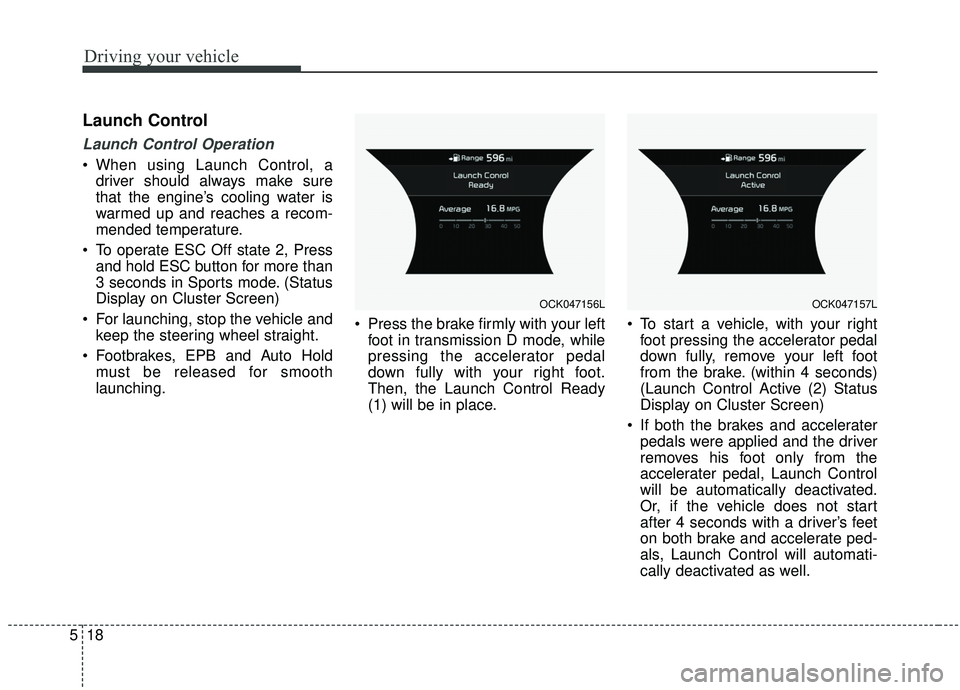
launching. Press the brake firmly with your left
foot in transmission D mode, while
pressing the accelerator pedal
down fully with your right foot.
Then, the Launch Control Ready
(1) will be in place. To start a vehicle, with your right
foot pressing the accelerator pedal
down fully, remove your left foot
from the brake. (within 4 seconds)
(Launch Control Active (2) Status
Display on Cluster Screen)
If both the brakes and accelerater pedals were applied and the driver
removes his foot only from the
accelerater pedal, Launch Control
will be automatically deactivated.
Or, if the vehicle does not start
after 4 seconds with a driver’s feet
on both brake and accelerate ped-
als, Launch Control will automati-
cally deactivated as well.
OCK047156LOCK047157L
Page 273 of 555
Driving your vehicle
20
5
Automatic transmission opera-
tion
The automatic transmission has 8
forward speeds and one reverse
speed.
The individual speeds are selected
automatically in the D (Drive) posi-
tion.
AUTOMATIC TRANSMISSION (SHIFT-BY-WIRE) (IF EQUIPPED)
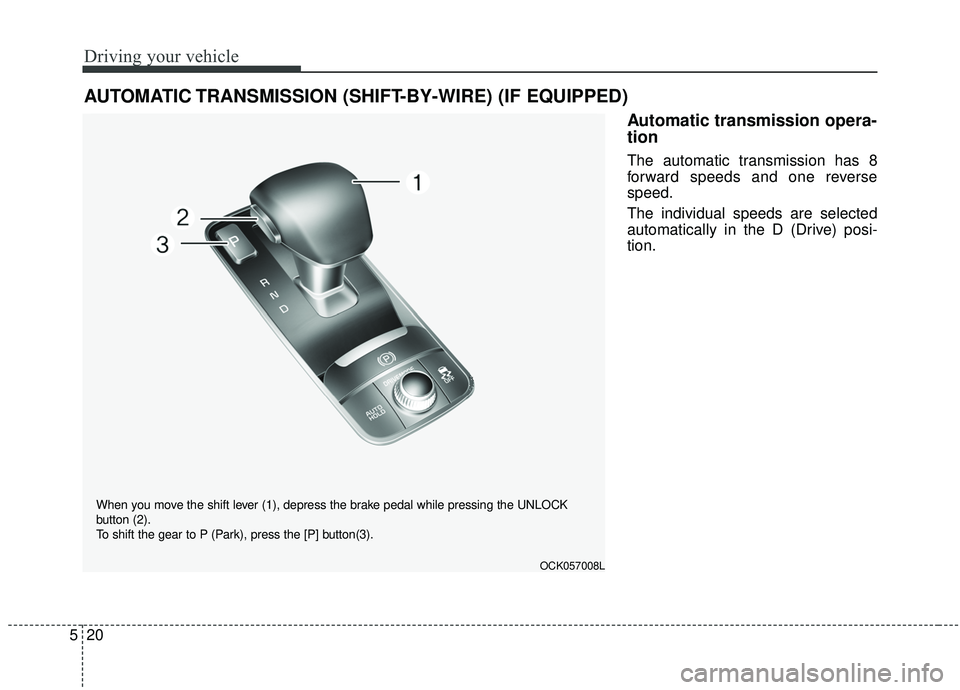
OCK057008L
When you move the shift lever (1), depress the brake pedal while pressing the UNLOCK
button (2).
To shift the gear to P (Park), press the [P] button(3).
Page 275 of 555
Driving your vehicle
22
5
To reduce rollaway risk, do not use
the P (Park) Position in place of the
parking brake.
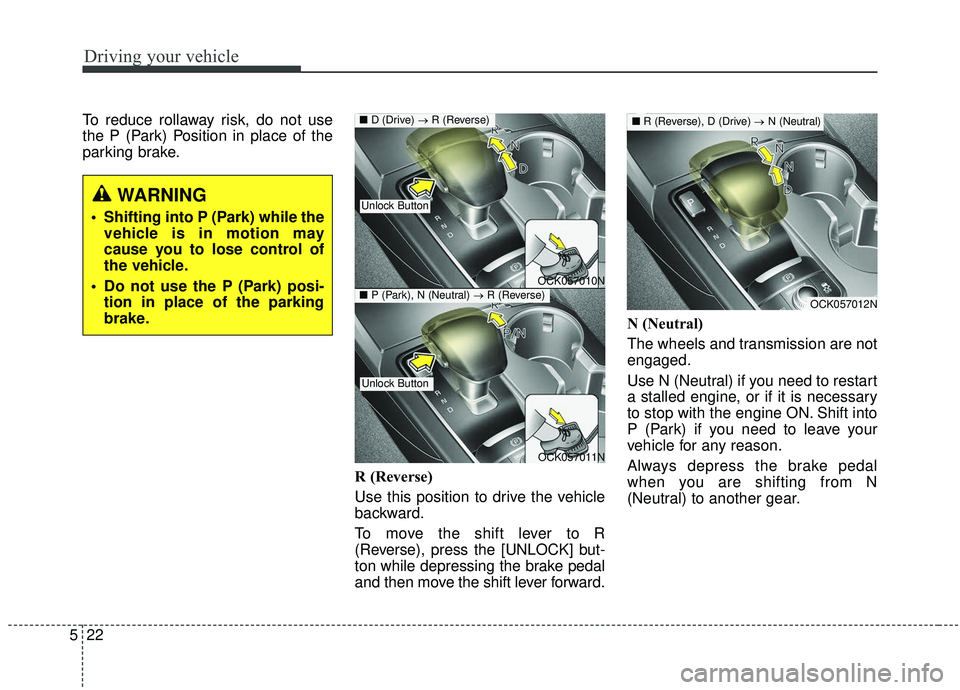
R (Reverse)
Use this position to drive the vehicle
backward.
To move the shift lever to R
(Reverse), press the [UNLOCK] but-
ton while depressing the brake pedal
and then move the shift lever forward.N (Neutral)
The wheels and transmission are not
engaged.
Use N (Neutral) if you need to restart
a stalled engine, or if it is necessary
to stop with the engine ON. Shift into
P (Park) if you need to leave your
vehicle for any reason.
Always depress the brake pedal
when you are shifting from N
(Neutral) to another gear.
WARNING
Shifting into P (Park) while the
vehicle is in motion may
cause you to lose control of
the vehicle.
Do not use the P (Park) posi- tion in place of the parking
brake.
OCK057010N
OCK057011N
■ D (Drive) → R (Reverse)
Unlock Button
Unlock Button
■P (Park), N (Neutral) →R (Reverse)OCK057012N
■R (Reverse), D (Drive) →N (Neutral)
Page 276 of 555
![KIA STINGER 2019 Manual PDF 523
Driving your vehicle
To turn off the engine, re-press the
engine start/stop button to the ON
position, press the [P] button, and
press the engine start/stop button to
the OFF position.
When eithe](/img/2/40390/w960_40390-275.png "KIA STINGER 2019 Manual PDF 523
Driving your vehicle
To turn off the engine, re-press the
engine start/stop button to the ON
position, press the [P] button, and
press the engine start/stop button to
the OFF position.
When eithe")
523
Driving your vehicle
To turn off the engine, re-press the
engine start/stop button to the ON
position, press the [P] button, and
press the engine start/stop button to
the OFF position.
When either the driver's door or the
front passenger's door is opened
with the engine start/stop button in
the ACC position and the shift lever
in N (Neutral) position, the engine is
automatically turned OFF and the
transmission automatically changes
to the P (Park) position.D (Drive)
This is the normal driving position. The
transmission will automatically shift
through a 8-gear sequence, providing
the best fuel economy and power.
WARNING
To avoid inadvertent vehiclemovement, do not shift into
gear unless your foot is firmly
on the brake pedal.
D not permit your vehicle to idle in the N (Neutral) position
for an extended period of
time as this will preclude the
wheels and the transmission
from engaging. While parking
the vehicle with the engine
running, depress the brake
pedal, shift the vehicle to the
P (Park) position and apply
the parking brake.
Do not drive with the shift lever in N (Neutral). The
engine brake will not work
and may lead to an accident.
OCK057013N
OCK057014N
■ R (Reverse) → D (Drive)
■P (Park), N (Neutral) →D (Drive)
Unlock Button
Unlock Button
Page 277 of 555
Driving your vehicle
24
5
For extra power when passing anoth-
er vehicle or driving uphill, depress
the accelerator pedal further until
you feel the transmission downshift
to a lower gear.
To shift into D (Drive), depress the
brake pedal and press the
[UNLOCK] button on the shift lever.
Move the shift lever backward.
To shift into D (Drive) from N
(Neutral), you must depress the
brake pedal.
✽ ✽
NOTICE
Always come to complete stop
before shifting into D (Drive).
- Parking in N (Neutral) gear
Follow the steps below when parking
and you want the vehicle to move
when pushed.
1.After parking your vehicle, step on
the brake pedal and press the [P]
button with the ignition button in
[ON] or while the engine is running.
2.If the parking brake is applied unlock the parking brake.
- For EPB (Electronic ParkingBrake) equipped vehicles, push
the brake pedal with the ignition
button in [ON] or while the engine
is running to disengage the park-
ing brake. If [AUTO HOLD] func-
tion is used while driving (If
[AUTO HOLD] indicator is on in
the cluster), press [AUTO HOLD]
switch and [AUTO HOLD] func-
tion will be turned off.
3.While pressing the brake pedal, turn the ignition button [OFF].
- For smart key equipped vehicles,the ignition switch can be [OFF]
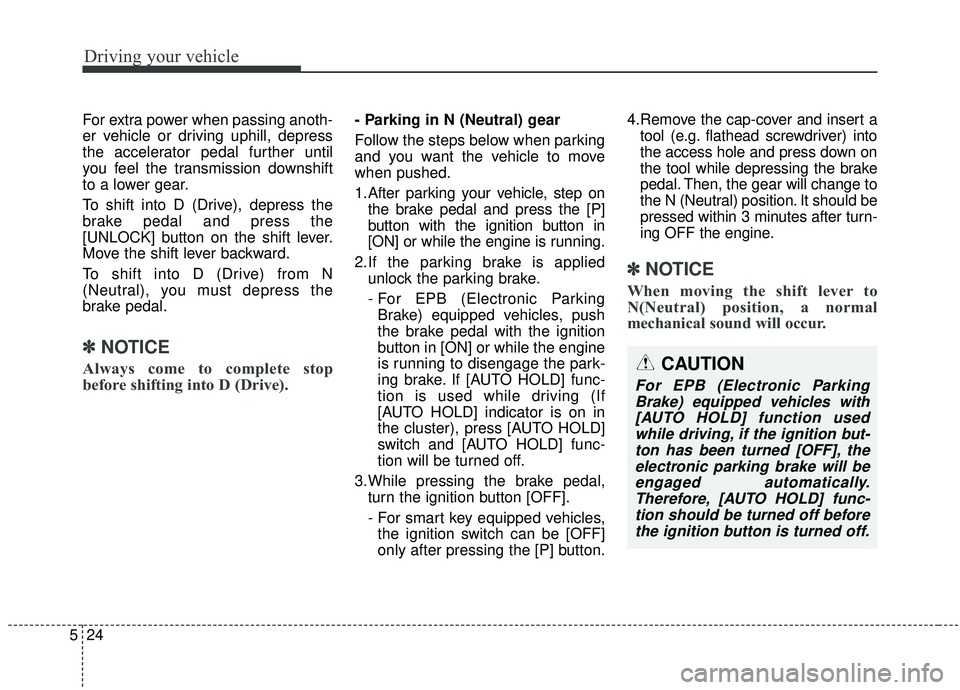
only after pressing the [P] button. 4.Remove the cap-cover and insert a
tool (e.g. flathead screwdriver) into
the access hole and press down on
the tool while depressing the brake
pedal. Then, the gear will change to
the N (Neutral) position. It should be
pressed within 3 minutes after turn-
ing OFF the engine.
✽ ✽ NOTICE
When moving the shift lever to
N(Neutral) position, a normal
mechanical sound will occur.
CAUTION
For EPB (Electronic Parking
Brake) equipped vehicles with[AUTO HOLD] function usedwhile driving, if the ignition but-ton has been turned [OFF], theelectronic parking brake will beengaged automatically.Therefore, [AUTO HOLD] func-tion should be turned off beforethe ignition button is turned off.
Page 279 of 555
Driving your vehicle
26
5
Shift-lock system
For your safety, the automatic trans-
mission has a shift-lock system
which prevents shifting the transmis-
sion from P (Park) into R (Reverse)
or D (Drive) unless the [UNLOCK]
button is pressed while depressing
the brake pedal.
To shift the transmission from P
(Park) into R (Reverse) or D (Drive):
1. Depress and hold the brake pedal.
2. Start the engine or place the
engine start/stop button in the ON
position.
3. Move the shift lever to R (Reverse) or D (Drive) while pressing the
[UNLOCK] button.
When the battery is discharged:
You can move the shift lever, when
the battery is discharged. However, it
will not change the gear from P
(Parking) to N (Neutral) or others.
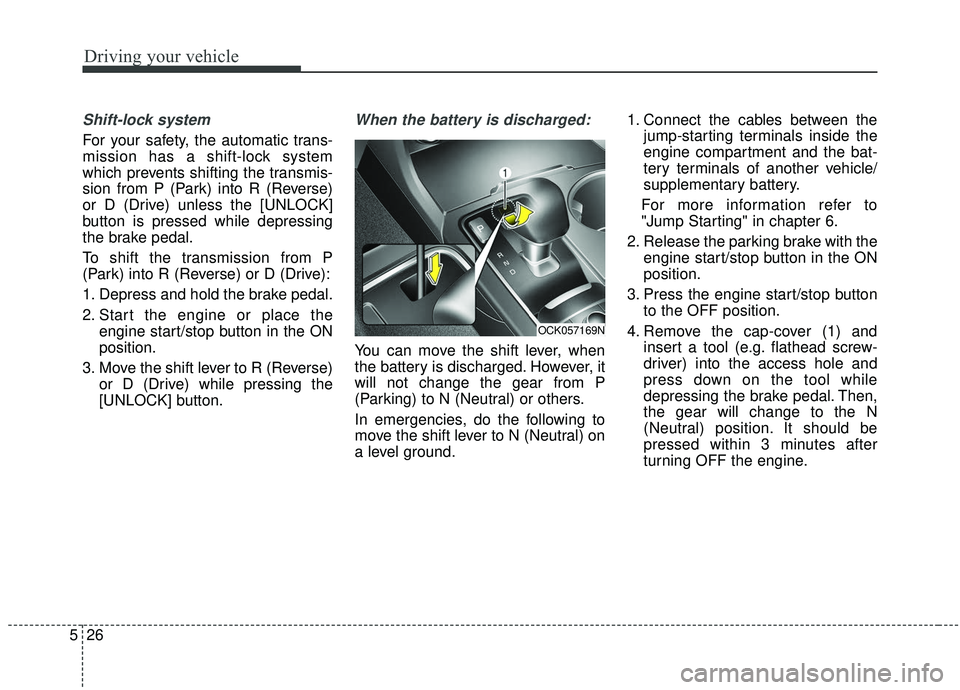
In emergencies, do the following to
move the shift lever to N (Neutral) on
a level ground. 1. Connect the cables between the
jump-starting terminals inside the
engine compartment and the bat-
tery terminals of another vehicle/
supplementary battery.
For more information refer to
"Jump Starting" in chapter 6.
2. Release the parking brake with the engine start/stop button in the ON
position.
3. Press the engine start/stop button to the OFF position.
4. Remove the cap-cover (1) and insert a tool (e.g. flathead screw-
driver) into the access hole and
press down on the tool while
depressing the brake pedal. Then,
the gear will change to the N
(Neutral) position. It should be
pressed within 3 minutes after
turning OFF the engine.
OCK057169N
Page 281 of 555
Driving your vehicle
28
5
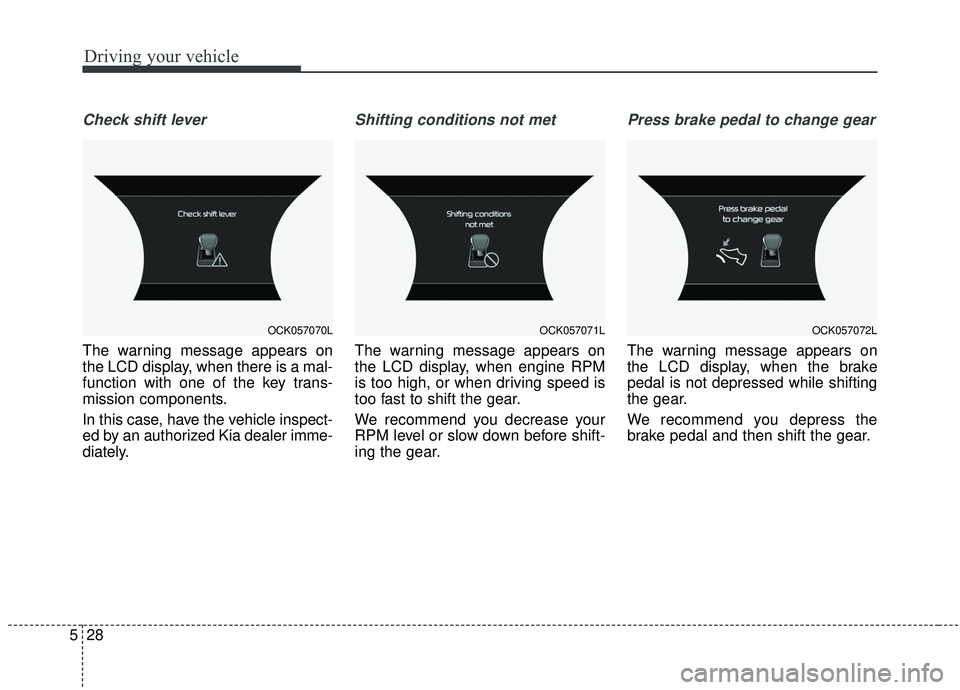
Check shift lever
The warning message appears on
the LCD display, when there is a mal-
function with one of the key trans-
mission components.
In this case, have the vehicle inspect-
ed by an authorized Kia dealer imme-
diately.
Shifting conditions not met
The warning message appears on
the LCD display, when engine RPM
is too high, or when driving speed is
too fast to shift the gear.
We recommend you decrease your
RPM level or slow down before shift-
ing the gear.
Press brake pedal to change gear
The warning message appears on
the LCD display, when the brake
pedal is not depressed while shifting
the gear.
We recommend you depress the
brake pedal and then shift the gear.
OCK057070LOCK057071LOCK057072L
Page 282 of 555
529
Driving your vehicle
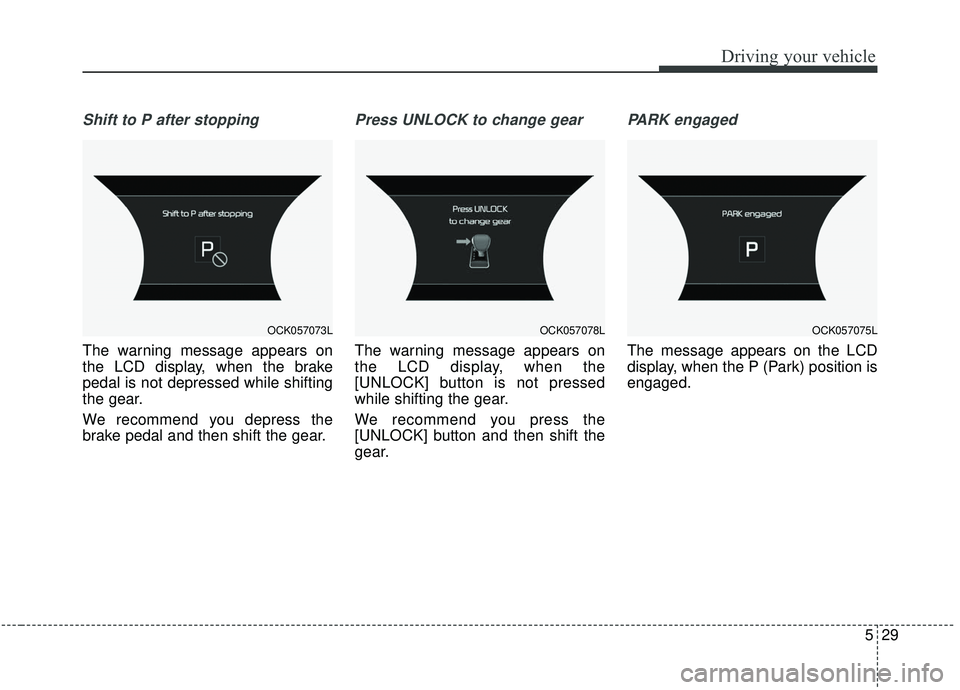
Shift to P after stopping
The warning message appears on
the LCD display, when the brake
pedal is not depressed while shifting
the gear.
We recommend you depress the
brake pedal and then shift the gear.
Press UNLOCK to change gear
The warning message appears on
the LCD display, when the
[UNLOCK] button is not pressed
while shifting the gear.
We recommend you press the
[UNLOCK] button and then shift the
gear.
PARK engaged
The message appears on the LCD
display, when the P (Park) position is
engaged.
OCK057073LOCK057078LOCK057075L