stop KIA TELLURIDE 2020 Features and Functions Guide
[x] Cancel search | Manufacturer: KIA, Model Year: 2020, Model line: TELLURIDE, Model: KIA TELLURIDE 2020Pages: 66, PDF Size: 8.05 MB
Page 41 of 66
CENTER PANEL
39
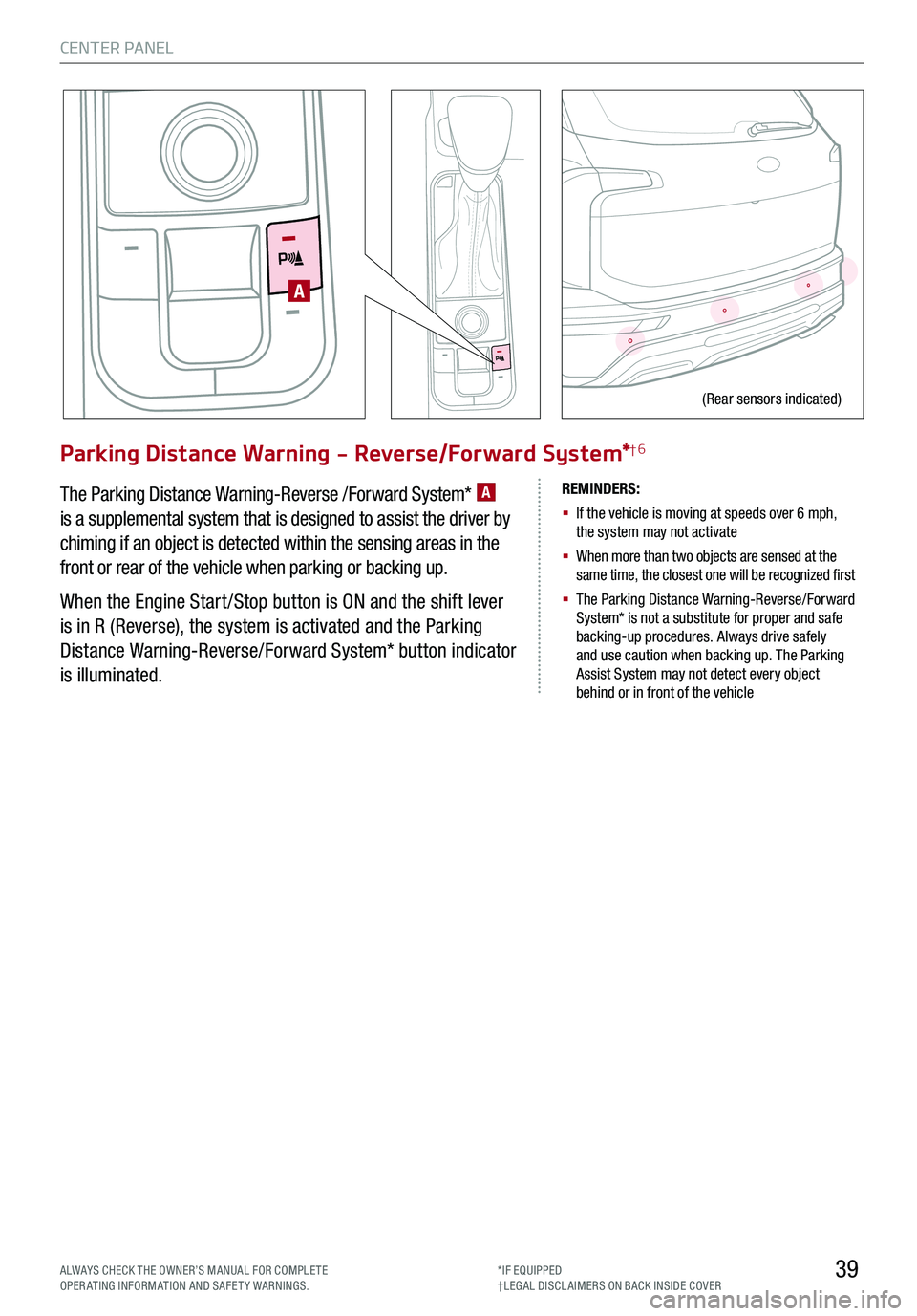
Parking Distance Warning - Reverse/Forward System*†6
The Parking Distance Warning-Reverse /Forward System* A
is a supplemental system that is designed to assist the driver by
chiming if an object is detected within the sensing areas in the
front or rear of the vehicle when parking or backing up.
When the Engine Start /Stop button is ON and the shift lever
is in R (Reverse), the system is activated and the Parking
Distance Warning-Reverse/Forward System* button indicator
is illuminated.
REMINDERS:
§
If the vehicle is moving at speeds over 6 mph, the system may not activate
§
When more than two objects are sensed at the same time, the closest one will be recognized first
§
The Parking Distance Warning-Reverse/Forward System* is not a substitute for proper and safe backing-up procedures. Always drive safely and use caution when backing up. The Parking Assist System may not detect every object behind or in front of the vehicle
A
(Rear sensors indicated)
ALWAYS CHECK THE OWNER’S MANUAL FOR COMPLE TE OPERATING INFORMATION AND SAFETY WARNINGS.*IF EQUIPPED†LEG AL DISCL AIMERS ON BACK INSIDE COVER
Page 42 of 66
*IF EQUIPPED
CENTER PANEL
40
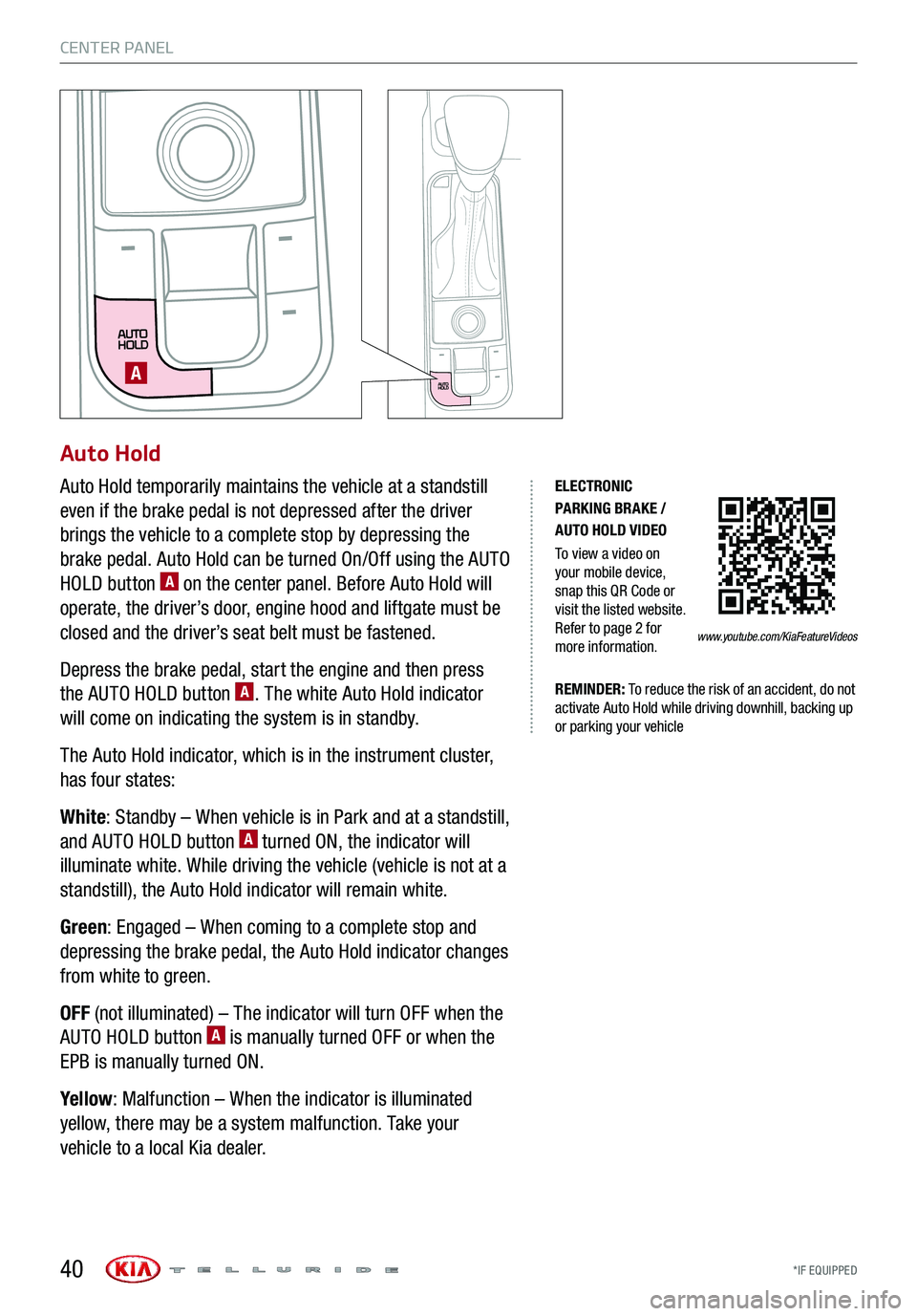
Auto Hold
Auto Hold temporarily maintains the vehicle at a standstill
even if the brake pedal is not depressed after the driver
brings the vehicle to a complete stop by depressing the
brake pedal. Auto Hold can be turned On/Off using the AUTO
HOLD button A on the center panel. Before Auto Hold will
operate, the driver’s door, engine hood and liftgate must be
closed and the driver’s seat belt must be fastened.
Depress the brake pedal, start the engine and then press
the AUTO HOLD button A. The white Auto Hold indicator
will come on indicating the system is in standby.
The Auto Hold indicator, which is in the instrument cluster,
has four states:
White: Standby – When vehicle is in Park and at a standstill,
and AUTO HOLD button A turned ON, the indicator will
illuminate white. While driving the vehicle (vehicle is not at a
standstill), the Auto Hold indicator will remain white.
Green: Engaged – When coming to a complete stop and
depressing the brake pedal, the Auto Hold indicator changes
from white to green.
OFF (not illuminated) – The indicator will turn OFF when the
AUTO HOLD button A is manually turned OFF or when the
EPB is manually turned ON.
Yellow: Malfunction – When the indicator is illuminated
yellow, there may be a system malfunction. Take your
vehicle to a local Kia dealer.
A
ELECTRONIC PARKING BRAKE / AUTO HOLD VIDEO
To view a video on your mobile device, snap this QR Code or visit the listed website. Refer to page 2 for more information.
REMINDER: To reduce the risk of an accident, do not activate Auto Hold while driving downhill, backing up or parking your vehicle
www.youtube.com/KiaFeatureVideos
Page 47 of 66
45
S E AT I N G
ALWAYS CHECK THE OWNER’S MANUAL FOR COMPLE TE OPERATING INFORMATION AND SAFETY WARNINGS.*IF EQUIPPED†LEG AL DISCL AIMERS ON BACK INSIDE COVER
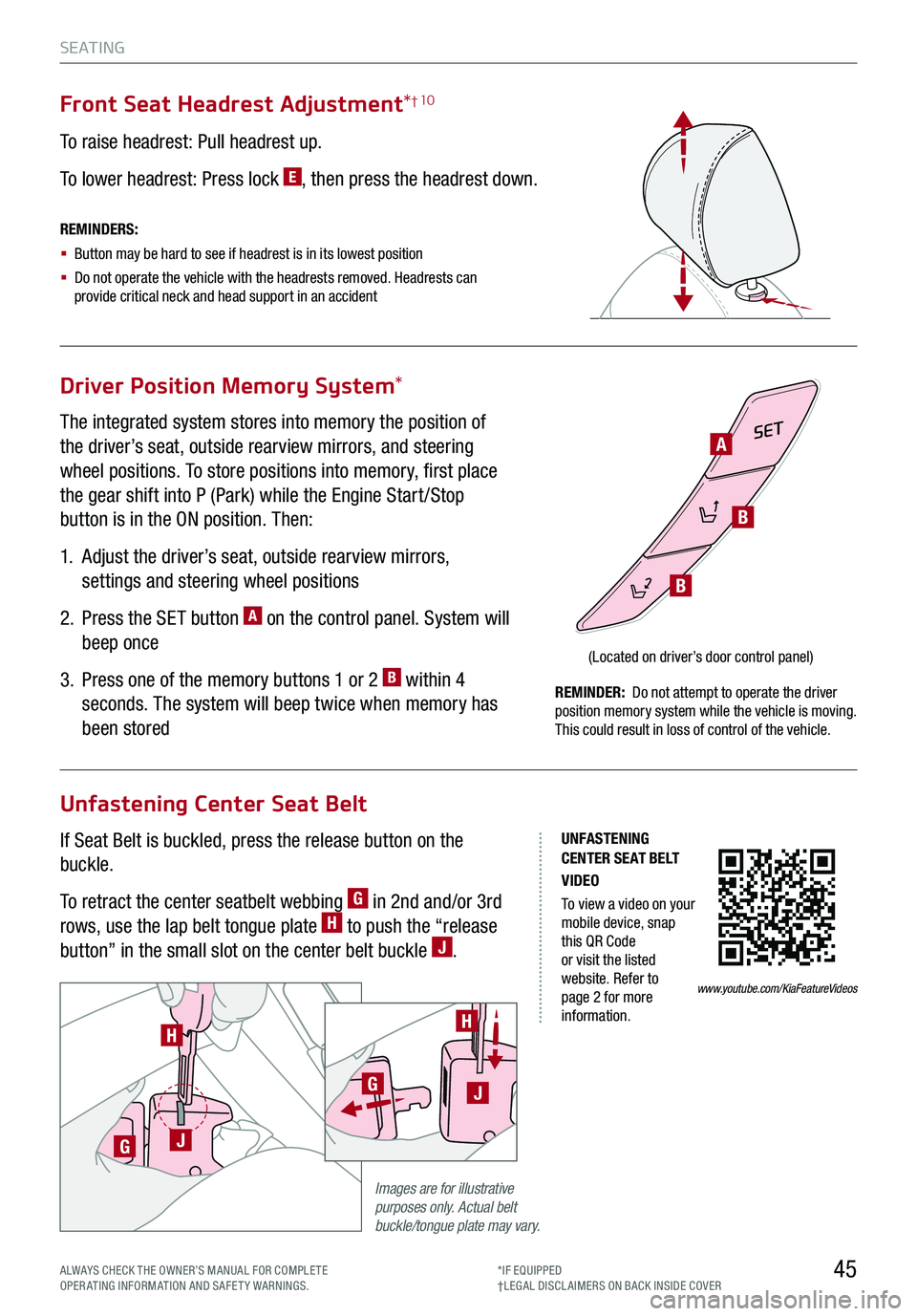
Driver Position Memory System*
Unfastening Center Seat Belt
The integrated system stores into memory the position of
the driver’s seat, outside rearview mirrors, and steering
wheel positions. To store positions into memory, first place
the gear shift into P (Park) while the Engine Start /Stop
button is in the ON position. Then:
1.
Adjust the driver’s seat, outside rearview mirrors,
settings and steering wheel positions
2.
Press the SET button A on the control panel. System will
beep once
3.
Press one of the memory buttons 1 or 2 B within 4
seconds. The system will beep twice when memory has
been stored
If Seat Belt is buckled, press the release button on the
buckle.
To retract the center seatbelt webbing G in 2nd and/or 3rd
rows, use the lap belt tongue plate H to push the “release
button” in the small slot on the center belt buckle J.
Front Seat Headrest Adjustment*† 10
To raise headrest: Pull headrest up.
To lower headrest: Press lock E, then press the headrest down.
SET
(Located on driver’s door control panel)
REMINDERS:
§ Button may be hard to see if headrest is in its lowest position
§
Do not operate the vehicle with the headrests removed. Headrests can provide critical neck and head support in an accident
REMINDER: Do not attempt to operate the driver position memory system while the vehicle is moving. This could result in loss of control of the vehicle.
Images are for illustrative purposes only. Actual belt buckle/tongue plate may vary.
H
GJ
H
GJ
A
B
B
UNFASTENING CENTER SEAT BELT VIDEO
To view a video on your mobile device, snap this QR Code or visit the listed website. Refer to page 2 for more information.
www.youtube.com/KiaFeatureVideos
Page 50 of 66
HOLD
HOLD
OTHER KEY FEATURES
*IF EQUIPPED 48
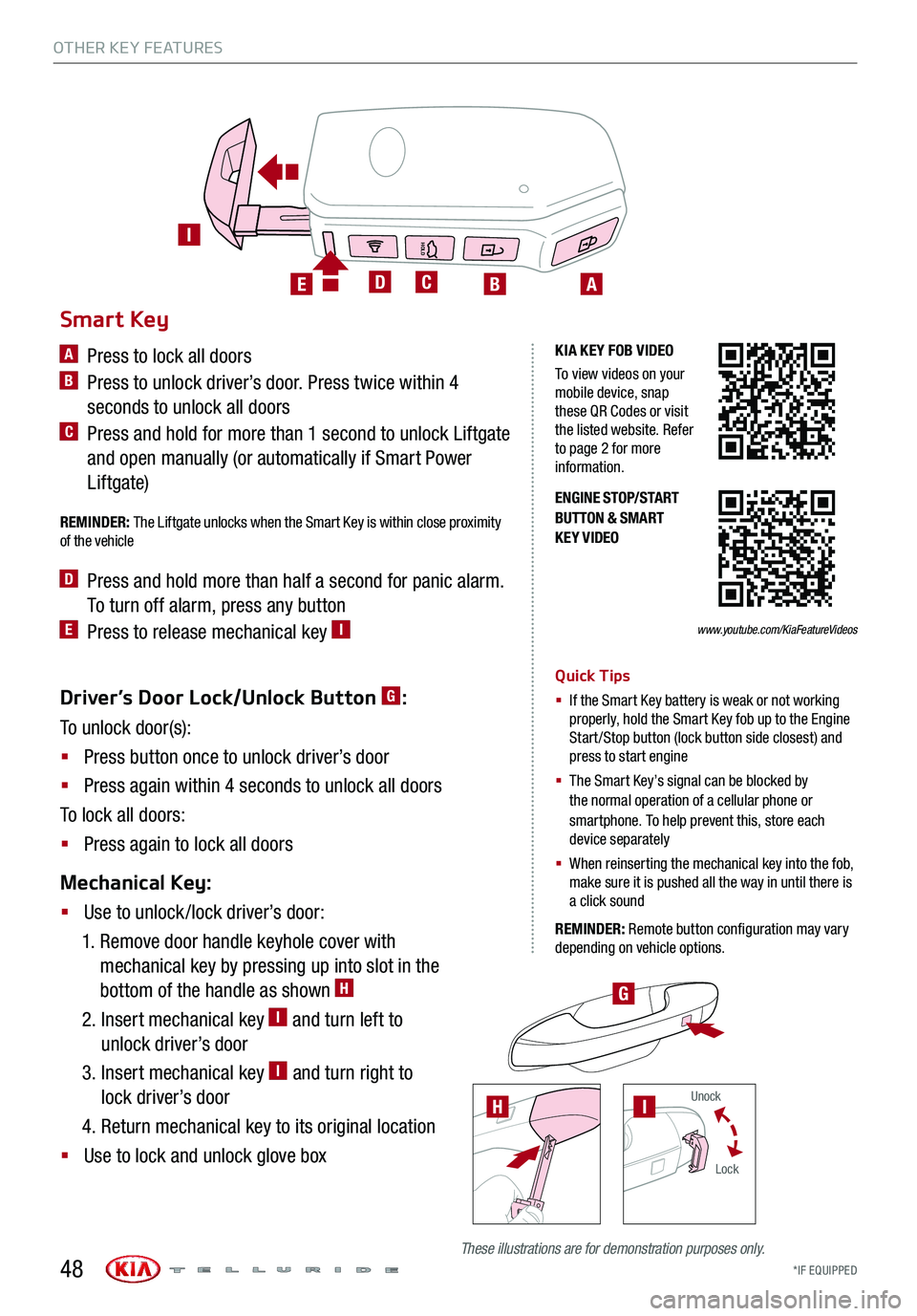
Driver’s Door Lock/Unlock Button G:
To unlock door(s):
§ Press button once to unlock driver’s door
§ Press again within 4 seconds to unlock all doors
To lock all doors:
§ Press again to lock all doors
Mechanical Key:
§ Use to unlock /lock driver’s door:
1. Remove door handle keyhole cover with
mechanical key by pressing up into slot in the
bottom of the handle as shown H
2. Insert mechanical key I and turn left to
unlock driver’s door
3. Insert mechanical key I and turn right to
lock driver’s door
4. Return mechanical key to its original location
§ Use to lock and unlock glove box
ENGINE STOP/START BUTTON & SMART KEY VIDEO
H
G
Smart Key
A Press to lock all doors
B Press to unlock driver’s door. Press twice within 4
seconds to unlock all doors
C Press and hold for more than 1 second to unlock Liftgate
and open manually (or automatically if Smart Power
Liftgate)
REMINDER: The Liftgate unlocks when the Smart Key is within close proximity of the vehicle
D Press and hold more than half a second for panic alarm.
To turn off alarm, press any button
E Press to release mechanical key I
Quick Tips
§ If the Smart Key battery is weak or not working properly, hold the Smart Key fob up to the Engine Start /Stop button (lock button side closest) and press to start engine
§
The Smart Key’s signal can be blocked by the normal operation of a cellular phone or smartphone. To help prevent this, store each device separately
§ When reinserting the mechanical key into the fob, make sure it is pushed all the way in until there is a click sound
REMINDER: Remote button configuration may vary depending on vehicle options.
ABCDE
I
KIA KEY FOB VIDEO
To view videos on your mobile device, snap these QR Codes or visit the listed website. Refer to page 2 for more information.
www.youtube.com/KiaFeatureVideos
These illustrations are for demonstration purposes only.
Unock
Lock
I
Page 53 of 66

51
OTHER KEY FEATURES
UVO
FRONTREAR
ONOFFDOOR
Map/Room Lamps
Automatic Turn Off Function
The interior lights automatically turn off approximately 20
seconds after the Engine Start /Stop button is turned OFF.
Map/Room Lamp Operation
Map Lamps – These lights produce spot beams for
convenient use as map lamps or as personal lamps for the
driver or the front passenger. Press the buttons A to turn the
map lamps ON/OFF.
Room button – Press the button B to turn the front and rear
lamps ON/OFF.
Door button – When the Door button C is pressed the
front and rear lamps will turn ON as follows:
§ When a door is opened or doors are unlocked with the
Smart Key, the lamps will turn ON for approximately
30 seconds
§ If the Engine Start /Stop button is in the ACC/OFF
position and a door is open, the lamps will stay ON for
approximately 20 minutes
§ If the Engine Start /Stop button is in the ACC/ON position
and a door is open, the lamps will stay ON
The lamps will turn OFF immediately if the Engine Start /Stop
button is turned ON or all doors are locked.
REMINDER: When room lamp lens is pressed ON it will remain ON, even when the map lamp switch is in the OFF position.
Quick Tips
§
When doors are unlocked by the Smart Key, the lamp turns ON for approximately 30 seconds
§ If your vehicle is equipped with the theft alarm system, the interior lights automatically turn off approximately 3 seconds after the system is in armed stage
§ Using interior lights for an extended period of time may cause battery discharge
AA
CB
*IF EQUIPPED ALWAYS CHECK THE OWNER’S MANUAL FOR COMPLE TE OPER ATING INFORMATION AND SAFE T Y WARNINGS.
Page 54 of 66
UVO
FRONTREAR
ONOFFDOOR
*IF EQUIPPED
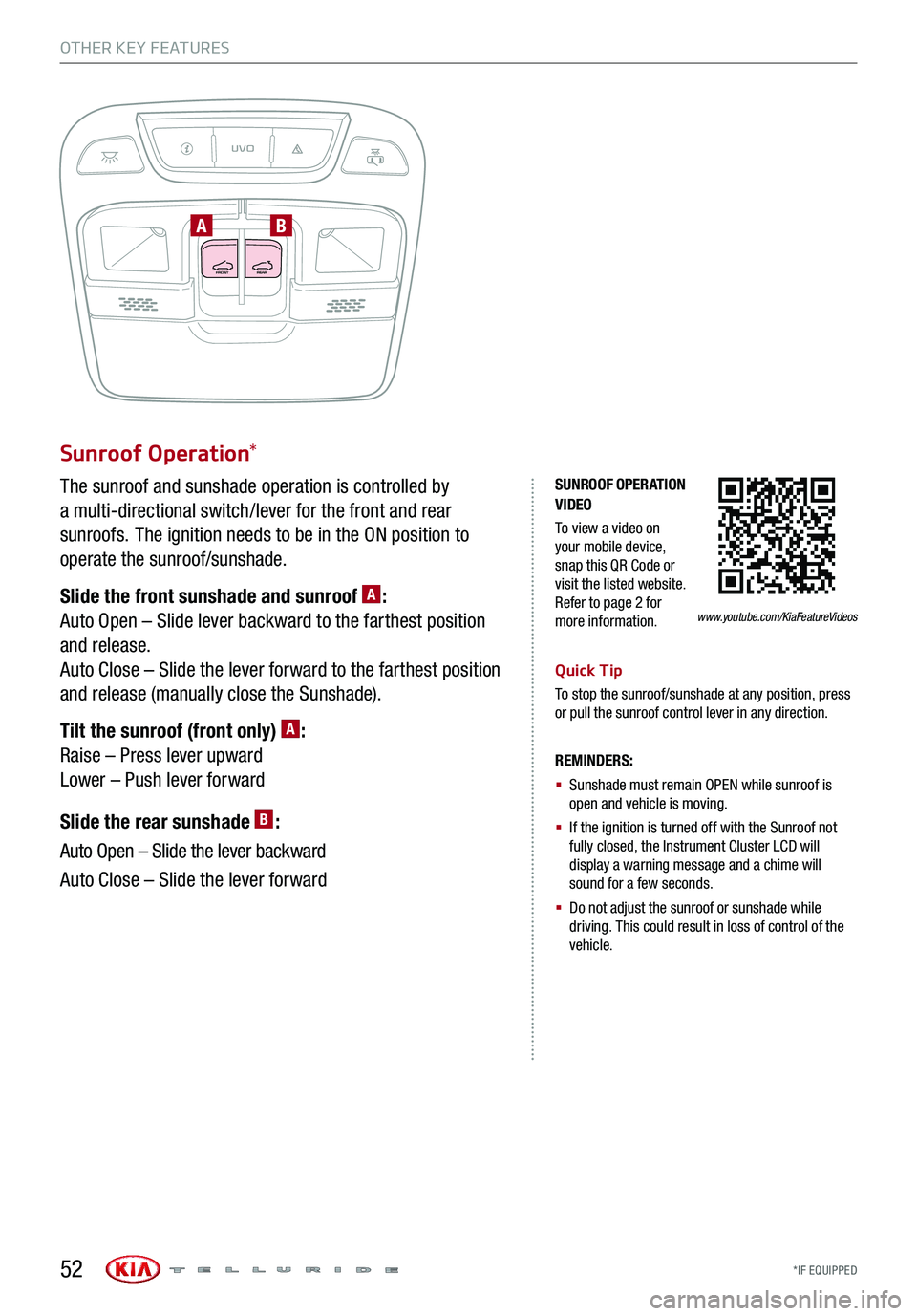
Sunroof Operation*
The sunroof and sunshade operation is controlled by
a multi-directional switch/lever for the front and rear
sunroofs. The ignition needs to be in the ON position to
operate the sunroof/sunshade.
Slide the front sunshade and sunroof A:
Auto Open – Slide lever backward to the farthest position
and release.
Auto Close – Slide the lever forward to the farthest position
and release (manually close the Sunshade).
Tilt the sunroof (front only) A:
Raise – Press lever upward
Lower – Push lever forward
Slide the rear sunshade B:
Auto Open – Slide the lever backward
Auto Close – Slide the lever forward
REMINDERS:
§
Sunshade must remain OPEN while sunroof is open and vehicle is moving.
§
If the ignition is turned off with the Sunroof not fully closed, the Instrument Cluster LCD will display a warning message and a chime will sound for a few seconds.
§
Do not adjust the sunroof or sunshade while driving. This could result in loss of control of the vehicle.
Quick Tip
To stop the sunroof/sunshade at any position, press or pull the sunroof control lever in any direction.
OTHER KEY FEATURES
AB
SUNROOF OPERATION VIDEO
To view a video on your mobile device, snap this QR Code or visit the listed website. Refer to page 2 for more information.www.youtube.com/KiaFeatureVideos
52
Page 55 of 66
53
OTHER KEY FEATURES
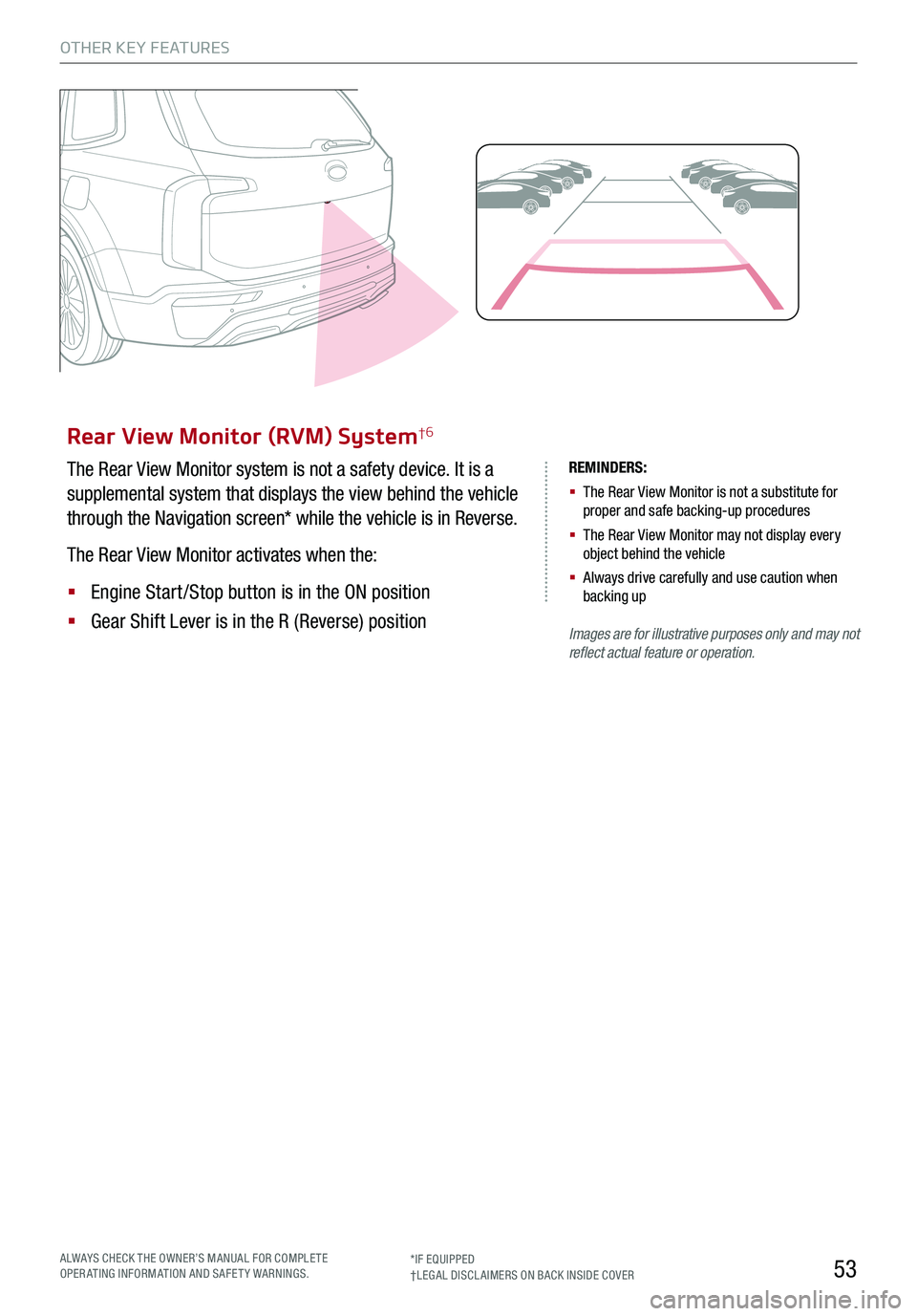
Rear View Monitor (RVM) System†6
The Rear View Monitor system is not a safety device. It is a
supplemental system that displays the view behind the vehicle
through the Navigation screen* while the vehicle is in Reverse.
The Rear View Monitor activates when the:
§ Engine Start /Stop button is in the ON position
§ Gear Shift Lever is in the R (Reverse) position
REMINDERS:
§ The Rear View Monitor is not a substitute for proper and safe backing-up procedures
§ The Rear View Monitor may not display every object behind the vehicle
§ Always drive carefully and use caution when backing up
Images are for illustrative purposes only and may not reflect actual feature or operation.
ALWAYS CHECK THE OWNER’S MANUAL FOR COMPLE TE OPERATING INFORMATION AND SAFETY WARNINGS.*IF EQUIPPED†LEG AL DISCL AIMERS ON BACK INSIDE COVER
Page 59 of 66
57
SAFETY
*IF EQUIPPED†LEG AL DISCL AIMERS ON BACK INSIDE COVERALWAYS CHECK THE OWNER’S MANUAL FOR COMPLE TE OPERATING INFORMATION AND SAFETY WARNINGS.
A
C
B
A
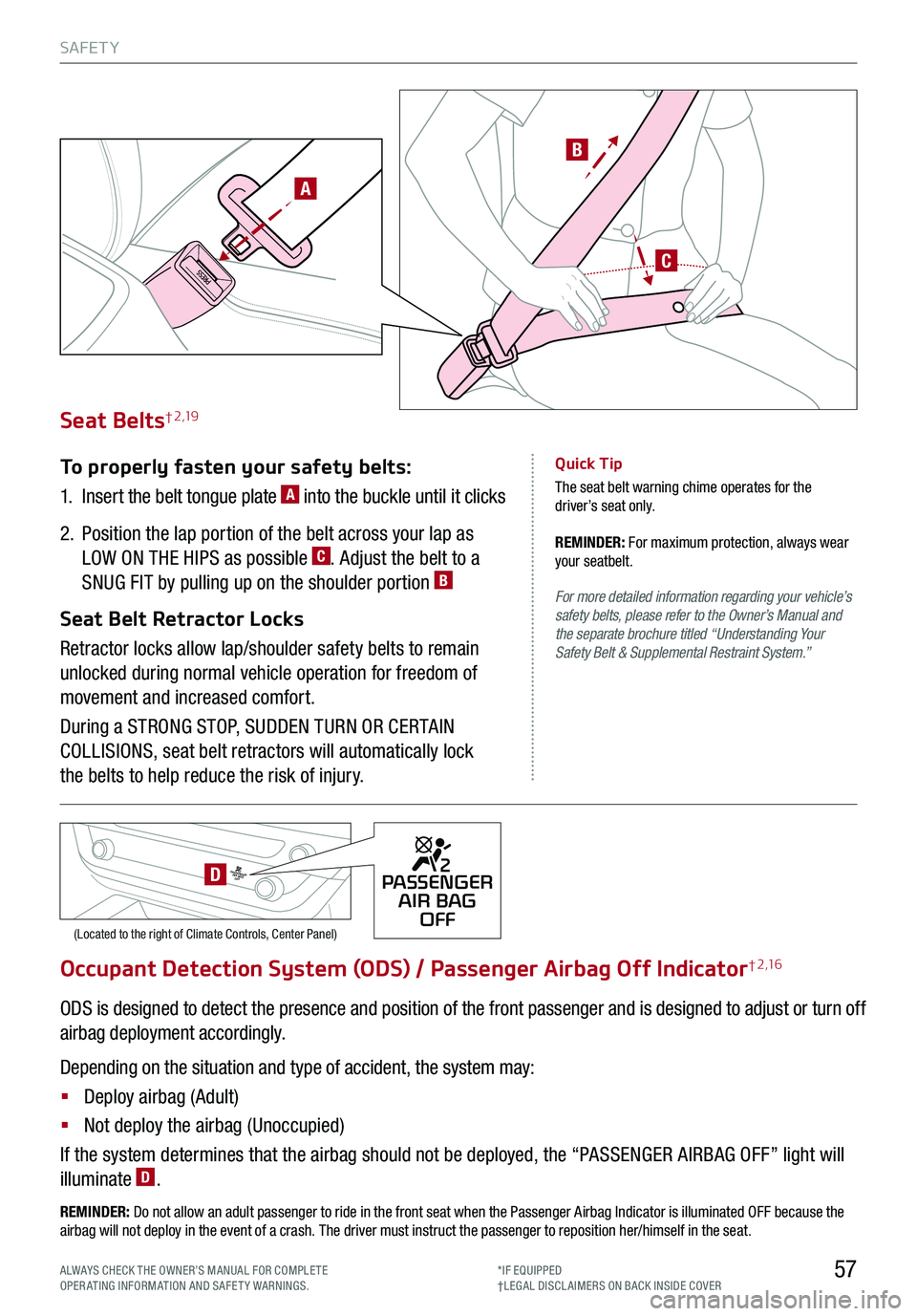
Occupant Detection System (ODS) / Passenger Airbag Off Indicator† 2 ,1 6
ODS is designed to detect the presence and position of the front passenger and is designed to adjust or turn off
airbag deployment accordingly.
Depending on the situation and type of accident, the system may:
§ Deploy airbag (Adult)
§ Not deploy the airbag (Unoccupied)
If the system determines that the airbag should not be deployed, the “PASSENGER AIRBAG OFF” light will
illuminate D.
REMINDER: Do not allow an adult passenger to ride in the front seat when the Passenger Airbag Indicator is illuminated OFF because the airbag will not deploy in the event of a crash. The driver must instruct the passenger to reposition her/himself in the seat.
Seat Belts† 2 ,19
To properly fasten your safety belts:
1.
Insert the belt tongue plate A into the buckle until it clicks
2.
Position the lap portion of the belt across your lap as
LOW ON THE HIPS as possible C. Adjust the belt to a
SNUG FIT by pulling up on the shoulder portion B
Seat Belt Retractor Locks
Retractor locks allow lap/shoulder safety belts to remain
unlocked during normal vehicle operation for freedom of
movement and increased comfort.
During a STRONG STOP, SUDDEN TURN OR CERTAIN
COLLISIONS, seat belt retractors will automatically lock
the belts to help reduce the risk of injury.
For more detailed information regarding your vehicle’s safety belts, please refer to the Owner’s Manual and the separate brochure titled “Understanding Your Safety Belt & Supplemental Restraint System.”
Quick Tip
The seat belt warning chime operates for the driver’s seat only.
REMINDER: For maximum protection, always wear your seatbelt.
2PASSENGER
AIR BAG OFF
(Located to the right of Climate Controls, Center Panel)
2PASSENGERAIR BAG OFFD
Page 63 of 66
Driving while distracted is dangerous and should be avoided. Drivers should remain attentive to driving and always exercise caution when using the steering-wheel-mounted controls while driving.
Driving while distracted can result in a loss of vehicle control that may lead to an accident, severe personal injury and death. The driver’s primary responsibility is in the safe and legal operation of a vehicle, and any handheld devices, other equipment or vehicle systems which take the driver’s eyes, attention and focus away from the safe operation of a vehicle or that are not permissible by law should never be used during operation of the vehicle.
Safety Features: No system, no matter how advanced, can compensate for all driver error and/or driving conditions. Always drive safely.
1. UVO link: Purchase/lease of a new 2019 Kia Telluride vehicle with UVO link includes a complimentary 1-year subscription starting from new vehicle retail sale/lease date as recorded by the dealer. After your complimentary 1-year UVO link subscription expires, continued access to UVO link will require a paid subscription at the then current subscription rate or your use of UVO link will immediately terminate. Use of UVO is subject to agreement to the UVO Privacy Policy (available at https://www.myuvo.com/legal/privacy-policy.shtml) and Terms of Service (available at https://www.myuvo.com/legal/terms-of-service.shtml). UVO link transferrable to subsequent owner during the original UVO link service term. Only use UVO link when safe to do so. The Kia Access with UVO link App is available from the App Store® or Google Play™ Store. Kia Motors America, Inc. reserves the right to change or discontinue UVO link at any time without prior notification or incurring any future obligation. Message and data rates may apply. Cellular and GPS coverage is required to use most features. UVO link features may vary by model, model year, and trim level. Features, specifications, and fees are subject to change. For more on details and limitations, visit https://www.myuvo.com/ or your authorized Kia dealer. Google and logos are trademarks of Google, Inc. App Store is a service mark of Apple, Inc.
2. Airbags: For maximum protection, always wear your seat belt.
3. Android Auto™: Android Auto is a trademark of Google LLC. Vehicle user interface is a product of Google and its terms and privacy statements apply. Requires the Android Auto app on Google Play and an Android compatible smartphone running Android™ 5.0 Lollipop or higher. Data plan rates apply.
4. Apple CarPlay®: Apple CarPlay® a registered trademark of Apple Inc.
5. Bluetooth® Wireless Technology: The Bluetooth® word mark and logos are registered trademarks owned by Bluetooth SIG Inc., and any such marks by Kia is pursuant to license. A Bluetooth® enabled cell phone is required to use Bluetooth® wireless technology.
6. Driver Assist Features – Forward Collision-Avoidance Assist-Pedestrian (FCA-Ped) / Forward Collision Warning (FCW), Blind-Spot Collision Avoidance-Rear (BCA-R) / Blind-Spot Collision Warning (BCW), Blind-Spot View Monitor (BVM) System, Rear Cross-Traffic Collision Warning (RCCW) / Rear Cross-Traffic Collision Avoidance Assist (RCCA), Lane Keeping Assist (LKA) / Lane Departure Warning (LDW), Lane Follow Assist (LFA) System*, Rear View Monitor System, Reverse Parking Aid Function, Parking Distance Warning-Reverse/Forward, Smart Cruise Control (SCC) with Stop & Go, Safe Exit Assist (SEA) System , Rear Occupant Alert (ROA), Highway Driving Assist (HDA) System: These features are not substitutes for safe driving, and may not detect all objects surrounding vehicle. Always drive safely and use caution.
7.
Driver Attention Warning (DAW): Driver Attention Warning is not a substitute for safe driving and may not detect all instances of inattentive driving practices. Failure to pay attention to travel conditions and vehicle operation could result in loss of vehicle control. Always drive safely and use caution.
8. Electronic Stability Control (ESC) / Traction Control System (TCS) / Hill-start Assist Control (HAC): No system, no matter how advanced, can compensate for all driver error and/or driving conditions. Always drive safely.
9. Engine Start/Stop Button with Smart Key: Always come to a complete stop before turning the engine on or off. However, if you have an emergency while the vehicle is in motion and must turn the engine off, you can turn the engine off to the ACC position by pressing the Start/Stop button for more than 3 seconds or 3 times in succession. If the vehicle is still moving, you can restart the engine by pressing the Start/Stop button with the shift lever in Neutral (N). With the engine off, hydraulic power assist for steering and braking will be disabled and the vehicle will be more difficult to control.
10. Front Seat Headrest Adjustment: Never attempt to adjust headrests when vehicle is in motion.
11. Google Play™ Store is a trademark of Google, Inc. ©2019 Google Inc. All rights reserved. Google and the Google Logo are registered trademarks of Google Inc.
12. Head-Up Display (HUD): Failure to pay attention to travel conditions and vehicle operation could result in loss of vehicle control. Always drive safely and use caution.
13. HomeLink®: Homelink® is a registered trademark of Gentex Corporation.
14. iPhone®: iPhone is a registered trademark of Apple Inc. Distracted driving can result in a loss of vehicle control. Never use a handheld device or vehicle system that takes your focus away from safe vehicle operation.
15. Navigation: Distracted driving can result in a loss of vehicle control. When operating a vehicle, never use a vehicle system that takes your focus away from safe vehicle operation. Navigation is for information purposes only, and Kia does not make any warranties about the accuracy of the information.
16. Occupant Detection System (ODS): Kia vehicles use a number of different ODS types that vary by model.
17. Roadside Assist: 24-hour Enhanced Roadside Assistance is a service plan provided by Kia Motors America, Inc. Certain limitations apply. Coverage details are available in the Kia Warranty and Consumer Information Manual. For access to Enhanced Roadside Assistance, a connected mobile phone via Bluetooth® within the cellular service coverage area is required.
18. Seat adjustments: Reclining the passenger seats can reduce the effectiveness of the safety restraint system and may lead to additional injury in an accident.
19. Seat belts: For maximum protection, always wear your seatbelt.
20. Seat warmers: Use extreme caution when using the seat warmers to avoid burns. Refer to the Owner’s Manual for more information.
21. SiriusXM®: SiriusXM Satellite Radio, SiriusXM Traffic and SiriusXM Travel Link each require a subscription sold separately, or as a package, by SiriusXM Radio Inc. If you decide to continue your service at the end of your trial subscription, the plan you choose will automatically renew and bill at then-current rates until you call 1-866-635-2349 to cancel. See SiriusXM Customer Agreement for complete terms at www.siriusxm.com. Other fees and taxes will apply. All fees and programming are subject to change. Not all vehicles or devices are capable of receiving all services offered by SiriusXM. Data displays and individual product availability vary by vehicle hardware. Current information and features may not be available in all locations, or on all receivers. Weather Forecast, Current Conditions may not be available in all locations. Images above are for representative purposes only and are not real products. For actual features and images of real products, consult the vehicle manufacturer. SiriusXM is not responsible for any errors or inaccuracies in the data services or their use in the vehicle. Travel Link Stocks displays current price and daily delta of around 7,000 actively reported securities trade\
d on the NYSE®, NASDAQ® and AMEX®. The service is delayed approximately 20 minutes. SiriusXM satellite service is available only to those at least 18 years of age in the 48 contiguous USA, DC, and Puerto Rico (with coverage limitations). SiriusXM Internet Radio service is available throughout our satellite service area and in AK and HI. ©2019 SiriusXM Radio Inc. Sirius, XM and all related marks and logos are trademarks of SiriusXM Radio Inc.
22. Smart Power LIftgate*: Driving with the liftgate open may be unlawful and can draw dangerous exhaust fumes into your vehicle.
23. Steering-wheel-mounted controls: Driving while distracted is dangerous and should be avoided. Remain attentive to driving and be cautious when using steering-wheel-mounted controls while driving.
24. Sunvisors: Sunvisor may not shield all direct light. Do not operate the vehicle if sunvisor is impairing your visibility.
25. Tilt/Telescoping Steering Wheel: Never attempt to adjust steering wheel position when vehicle is in motion.
26. Tire Pressure Monitoring System (TPMS): Even with Tire Pressure Monitoring System, check tire pressure on a regular basis.
LEGAL DISCLAIMERS
Page 64 of 66
Sales Consultant:
Sales Manager:
Customer:
Date:
Date:
Date:
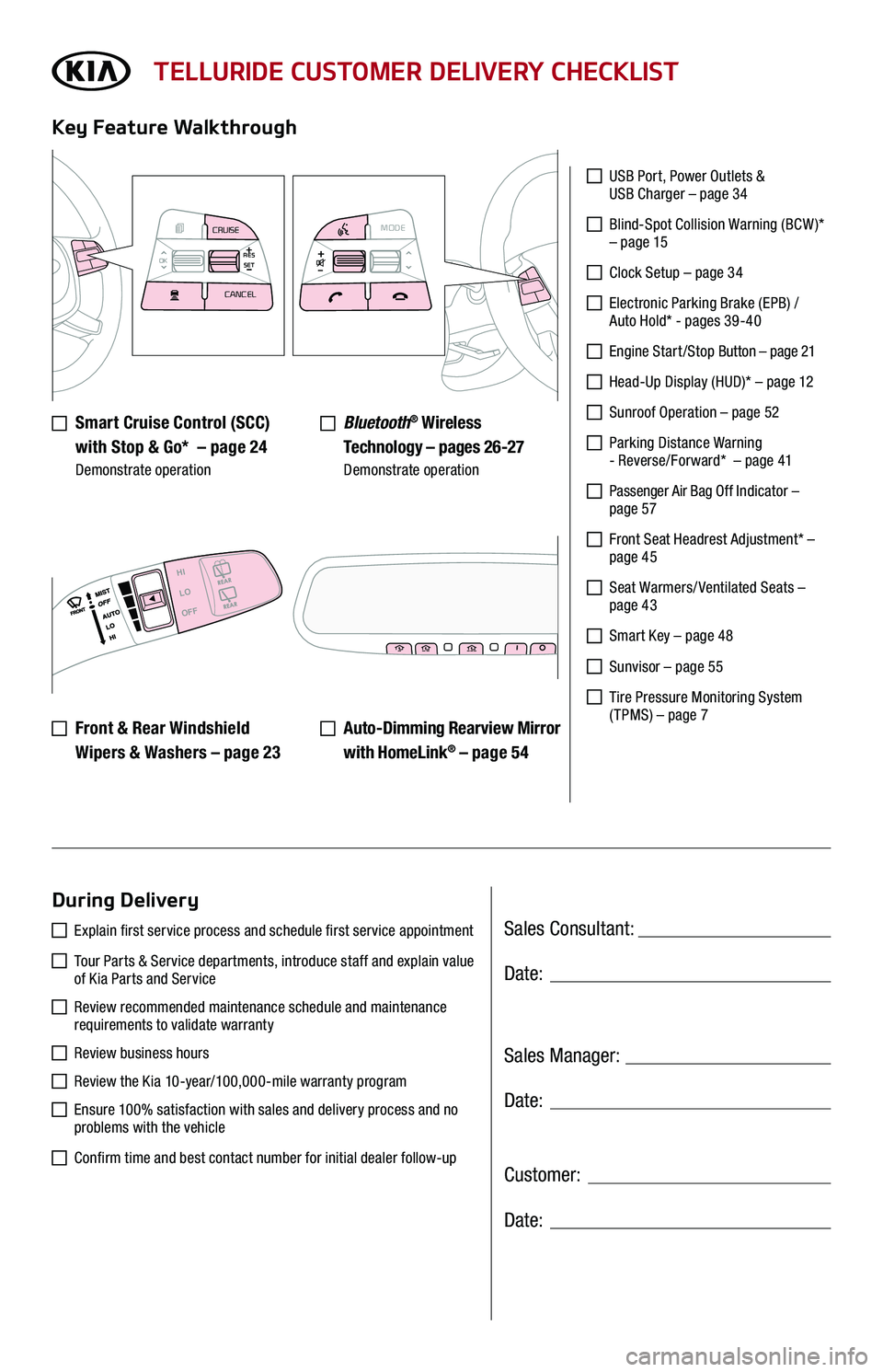
TELLURIDE CUSTOMER DELIVERY CHECKLIST
Smart Cruise Control (SCC)
with Stop & Go* – page 24 Demonstrate operation
Key Feature Walkthrough
During Delivery
USB Port, Power Outlets & USB Charger – page 34
Blind-Spot Collision Warning (BCW )* – page 15
Clock Setup – page 34
Electronic Parking Brake (EPB) / Auto Hold* - pages 39-40
Engine S tar t / S top Button – page 21
Head-Up Display (HUD)* – page 12
Sunroof Operation – page 52
Parking Distance Warning - Reverse/Forward* – page 41
Passenger Air Bag Off Indicator – page 57
Front Seat Headrest Adjustment* – page 45
Seat Warmers/ Ventilated Seats – page 43
Smart Key – page 48
Sunvisor – page 55
Tire Pressure Monitoring System ( TPMS) – page 7
Explain first service process and schedule first service appointment
Tour Parts & Service departments, introduce staff and explain value of Kia Parts and Service
Review recommended maintenance schedule and maintenance requirements to validate warranty
Review business hours
Review the Kia 10-year/100,000-mile warranty program
Ensure 100% satisfaction with sales and delivery process and no problems with the vehicle
Confirm time and best contact number for initial dealer follow-up
Bluetooth® Wireless
Technology – pages 26-27 Demonstrate operation
Auto-Dimming Rearview Mirror
with HomeLink® – page 5 4
Front & Rear Windshield
Wipers & Washers – page 23
MODE
CRUISE
CANCEL
RES
OK SET
CRUISE
CANCEL
RES
OK SET
MODECRUISE
CANCEL
RES
OK SET
MODECRUISE
CANCEL
RES
OK SET
MODECRUISE
CANCEL
RES
OK SET
MODECRUISE
CANCEL
RES
OK SET
CRUISE
CANCEL
RES
OK SET
MODE CRUISE
CANCEL
RES
OK SET
MODECRUISE
CANCEL
RES
OK SET
MODECRUISE
CANCEL
RES
OK SET
HI
LO
OFF