low KIA TELLURIDE 2021 Navigation System Quick Reference Guide
[x] Cancel search | Manufacturer: KIA, Model Year: 2021, Model line: TELLURIDE, Model: KIA TELLURIDE 2021Pages: 300, PDF Size: 10.06 MB
Page 257 of 300
9-77
Date/Time
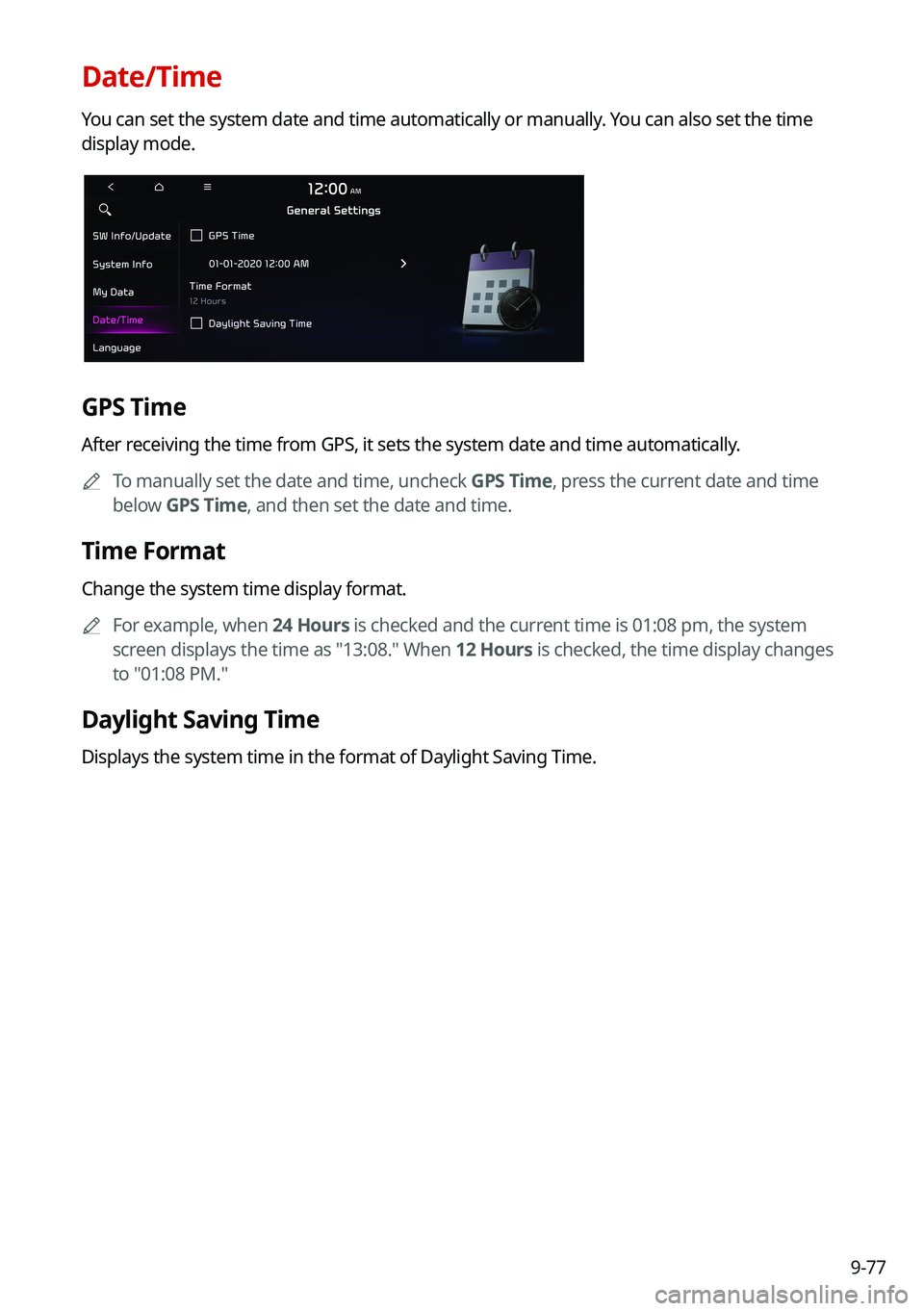
You can set the system date and time automatically or manually. You can also set the time
display mode.
GPS Time
After receiving the time from GPS, it sets the system date and time automatically.0000
A
To manually set the date and time, uncheck GPS Time, press the current date and time
below GPS Time, and then set the date and time.
Time Format
Change the system time display format.
0000
A
For example, when 24 Hours is checked and the current time is 01:08 pm, the system
screen displays the time as "13:08." When 12 Hours is checked, the time display changes
to "01:08 PM."
Daylight Saving Time
Displays the system time in the format of Daylight Saving Time.
Page 271 of 300
9-91
Updating the software and map
1 Connect a USB device to the computer and run Navigation Updater for
downloading the update files.
2 Follow the instructions on the screen to download the update files.
3 Remove the USB device from the computer and then connect it to the
USB port in your vehicle.
4 Start the vehicle to turn on the system.
0000
A
You can perform update without starting the vehicle by simply locating the start
switch to "ON".
\334\334Caution
\225Perform update with the start switch "ON" when the battery is sufficiently charged
by driving the vehicle. When the battery is discharged while updating, the system
may get damaged with the update stopped.
-Note that the battery may be discharged easily in winter.
-The battery may also be discharged easily when the vehicle is not used for a long
time. Caution is required.
\225
When you start the vehicle while updating with the start switch "ON", po\
wer supply
to the system may be cut off.
5 On the All Menus screen, press Setup >
General >
SW Info/Update.
0000
A
After the system is turned on, press Yes when a pop-up window appears whether
to proceed with update. In this case, the screen changes to allow you to select the
update method.
[ Updating immediately
You can finish the update quickly.
1 On the SW Info/Update screen, press Update.
2 Press
Update Now.
3 Press OK.
The update is performed immediately after the system reboots.
Page 273 of 300
9-93
0000
A
Make sure that a USB device with update files is connected to the system before turning
off the vehicle.
0000
A
When you set the update time to "0", the update notification window appears and then
the update starts.
000DTo close the notification window and proceed with the update, press
Yes.
000DTo cancel the update, press No.
0000
A
Once the update has started, you cannot cancel it. After the update, the\
system
automatically turns off.
0000
A
When you start the vehicle, the update complete notification appears to show the update
result. After update is completed, the SW Info/Update screen displays the updated
version.
0000
A
When you turn on the system while updating, you can see its progress.
0000
A
Scheduled update is canceled when:
000DLow battery is detected when turning off the vehicle.
000DThe storage device with the update files is disconnected.
000DThe vehicle is started before the update scheduled time.
000DThe system has been turned off for more than 3 minutes with the vehicle turned off.
Page 276 of 300
10-2
Solutions
Before reporting a malfunctioning system, refer to the following table and see if you can
identify and fix the problem. If the problem persists or you are unable to locate your specific
need, contact your place of purchase or dealer.
Sound and display
SymptomPossible causeSolution
A blank screen
appears and sound
is not audible. The system is turned
off.
\225
Check that the start switch is in "ACC" or
"ON."
\225Press the Power button on the control
panel to turn on the system.
Sound volume is too
low. Turn the Volume knob on the control panel
to adjust the volume.
Sound is muted. Press the Mute button on the steering wheel
to unmute.
Sound is audible
from only one side
of the speakers. Sound is
imbalanced.
On the All Menus screen, press Setup
>
Sound >
Position and adjust the sound
outputs for the left and right speakers.
The sound is cut off
or noise is heard. Vibration occurs in
the system.When the system vibrates, the sound may
be cut off or noise may occur. This is not a
system failure. The system is restored as
soon as the vibration stops.
Page 280 of 300
10-6
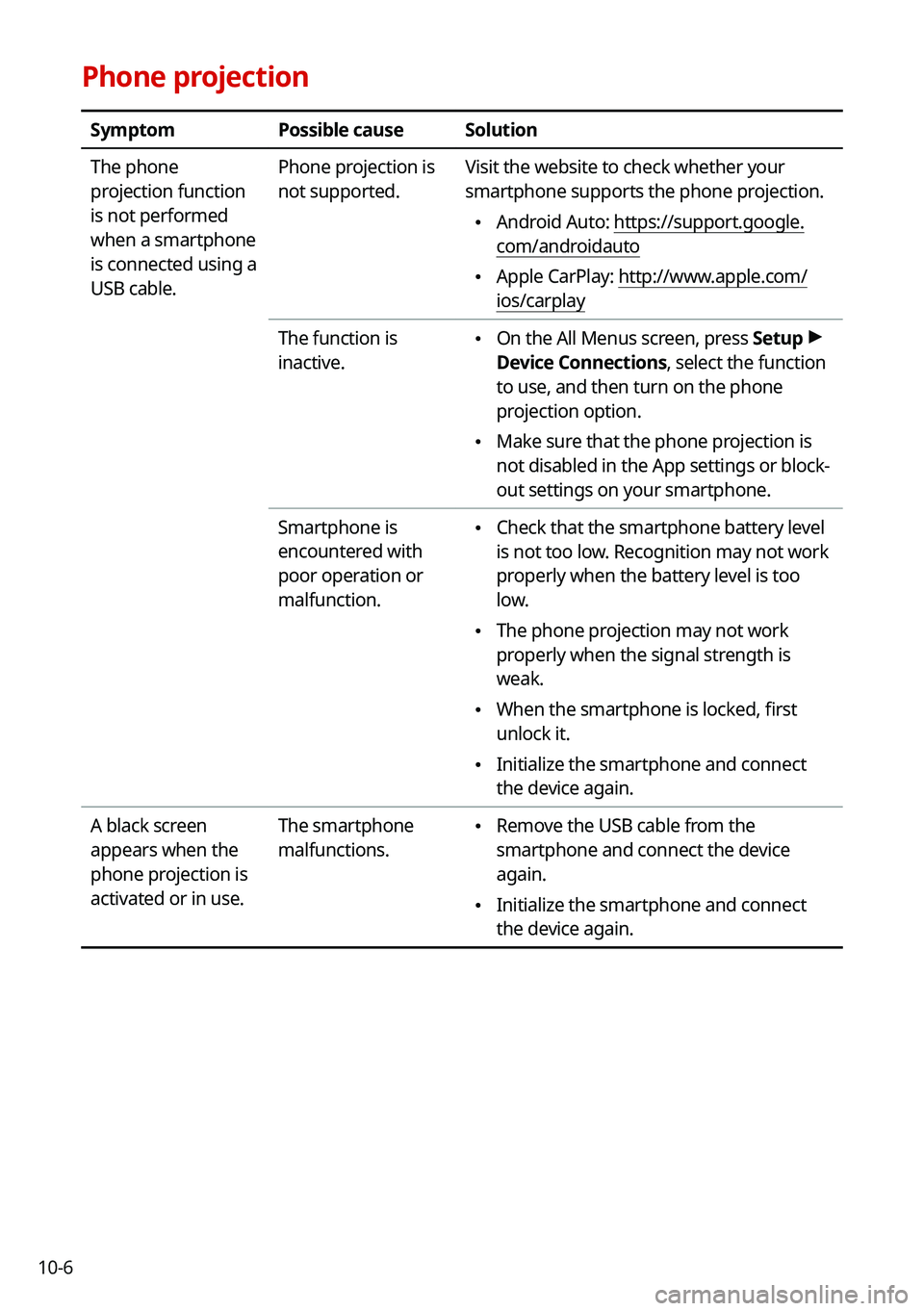
Phone projection
SymptomPossible causeSolution
The phone
projection function
is not performed
when a smartphone
is connected using a
USB cable. Phone projection is
not supported.
Visit the website to check whether your
smartphone supports the phone projection.
\225
Android Auto: https://support.google.
com/androidauto
\225Apple CarPlay: http://www.apple.com/
ios/carplay
The function is
inactive.
\225 On the All Menus screen, press Setup >
Device Connections, select the function
to use, and then turn on the phone
projection option.
\225 Make sure that the phone projection is
not disabled in the App settings or block-
out settings on your smartphone.
Smartphone is
encountered with
poor operation or
malfunction.
\225 Check that the smartphone battery level
is not too low. Recognition may not work
properly when the battery level is too
low.
\225The phone projection may not work
properly when the signal strength is
weak.
\225When the smartphone is locked, first
unlock it.
\225Initialize the smartphone and connect
the device again.
A black screen
appears when the
phone projection is
activated or in use. The smartphone
malfunctions.
\225
Remove the USB cable from the
smartphone and connect the device
again.
\225Initialize the smartphone and connect
the device again.
Page 281 of 300
10-7
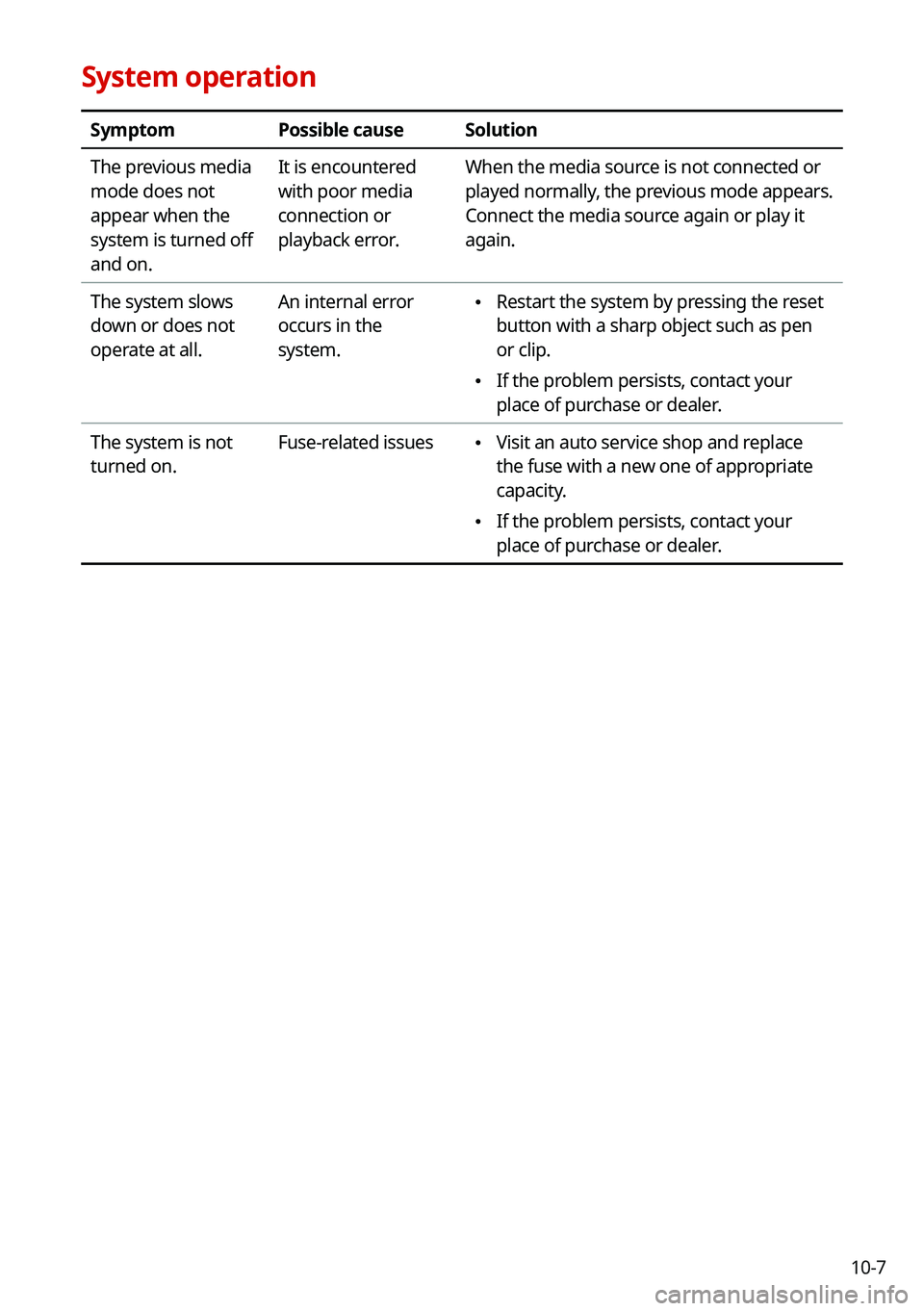
System operation
SymptomPossible causeSolution
The previous media
mode does not
appear when the
system is turned off
and on. It is encountered
with poor media
connection or
playback error.
When the media source is not connected or
played normally, the previous mode appears.
Connect the media source again or play it
again.
The system slows
down or does not
operate at all. An internal error
occurs in the
system.
\225
Restart the system by pressing the reset
button with a sharp object such as pen
or clip.
\225If the problem persists, contact your
place of purchase or dealer.
The system is not
turned on. Fuse-related issues
\225
Visit an auto service shop and replace
the fuse with a new one of appropriate
capacity.
\225If the problem persists, contact your
place of purchase or dealer.
Page 282 of 300
10-8
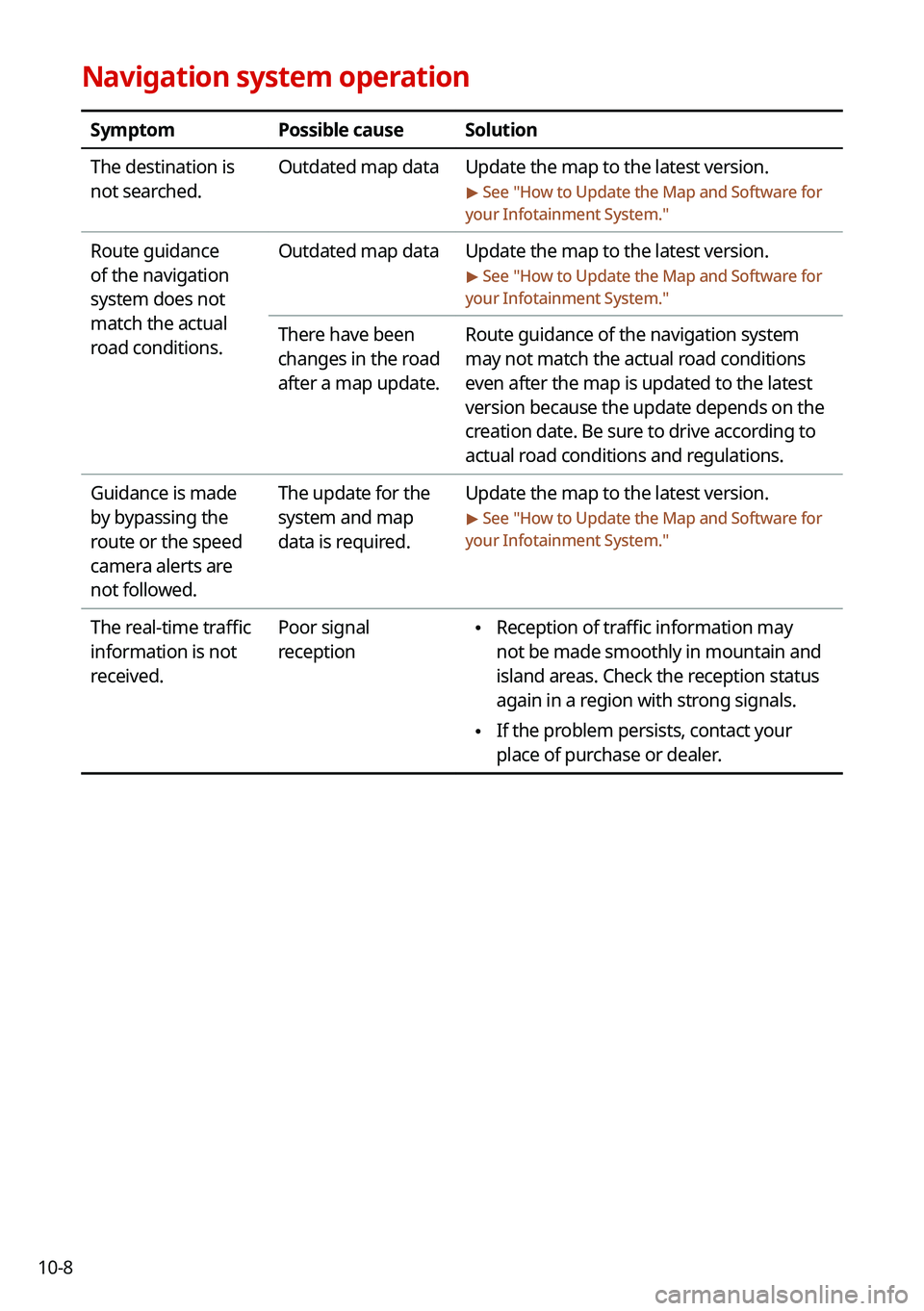
Navigation system operation
SymptomPossible causeSolution
The destination is
not searched. Outdated map data
Update the map to the latest version.
> See "How to Update the Map and Software for
your Infotainment System."
Route guidance
of the navigation
system does not
match the actual
road conditions. Outdated map data
Update the map to the latest version.
> See "How to Update the Map and Software for
your Infotainment System."
There have been
changes in the road
after a map update. Route guidance of the navigation system
may not match the actual road conditions
even after the map is updated to the latest
version because the update depends on the
creation date. Be sure to drive according to
actual road conditions and regulations.
Guidance is made
by bypassing the
route or the speed
camera alerts are
not followed. The update for the
system and map
data is required.
Update the map to the latest version.
> See "
How to Update the Map and Software for
your Infotainment System."
The real-time traffic
information is not
received. Poor signal
reception \225
Reception of traffic information may
not be made smoothly in mountain and
island areas. Check the reception status
again in a region with strong signals.
\225If the problem persists, contact your
place of purchase or dealer.
Page 283 of 300
10-9
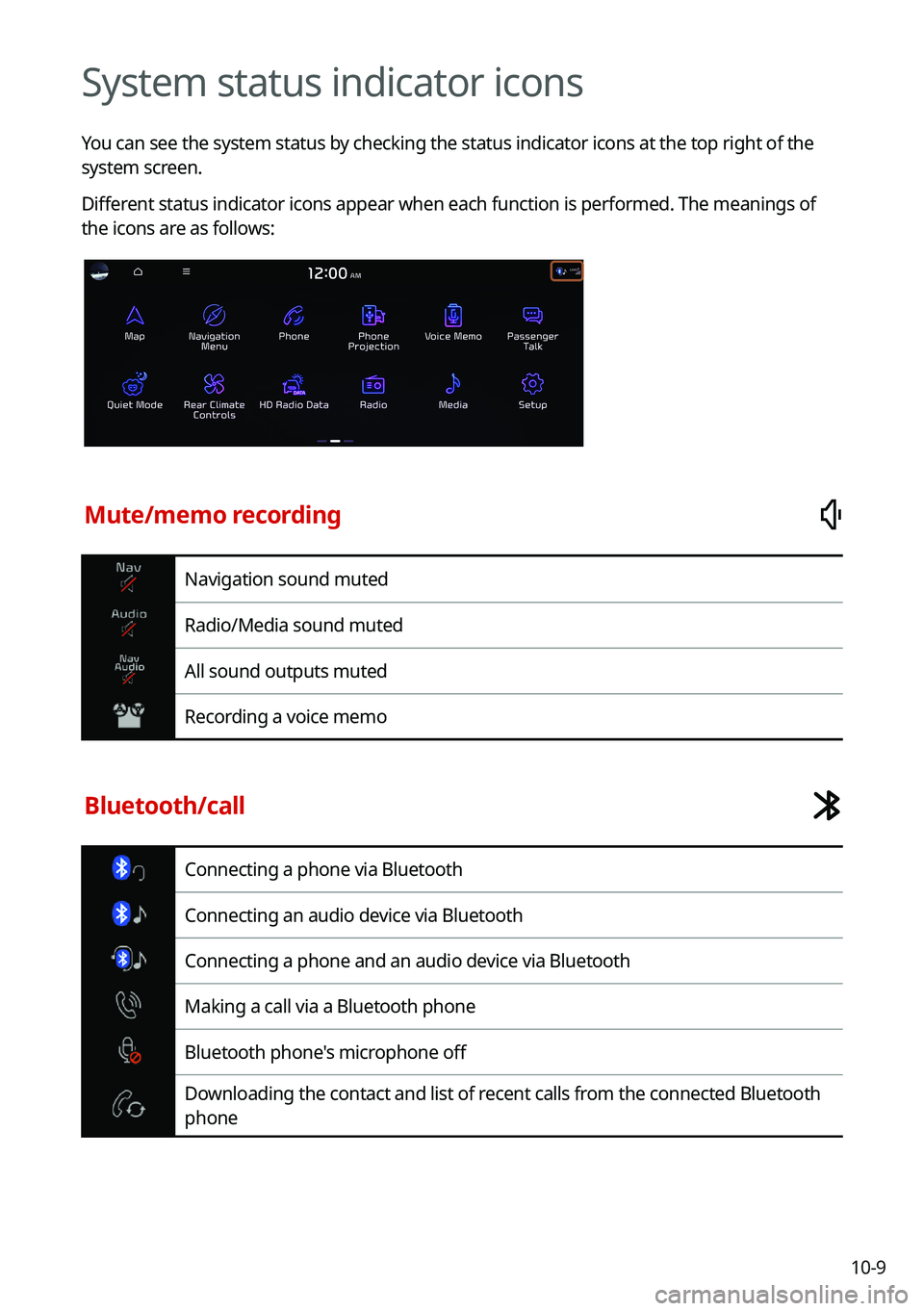
System status indicator icons
You can see the system status by checking the status indicator icons at the top right of the
system screen.
Different status indicator icons appear when each function is performed. The meanings of
the icons are as follows:
Mute/memo recording
Navigation sound muted
Radio/Media sound muted
All sound outputs muted
Recording a voice memo
Bluetooth/call
Connecting a phone via Bluetooth
Connecting an audio device via Bluetooth
Connecting a phone and an audio device via Bluetooth
Making a call via a Bluetooth phone
Bluetooth phone's microphone off
Downloading the contact and list of recent calls from the connected Bluetooth
phone
Page 288 of 300
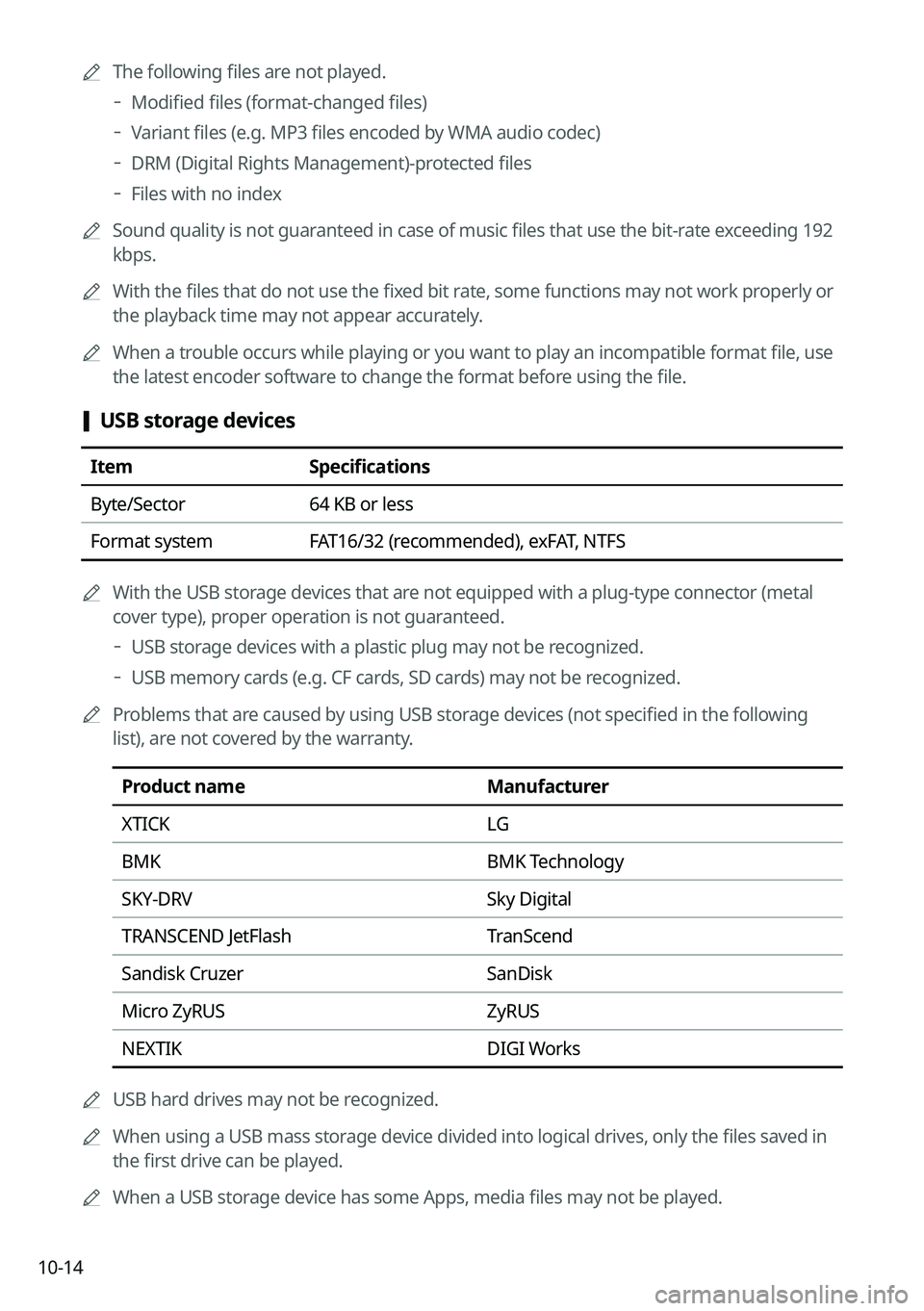
10-140000
A
The following files are not played.
000DModified files (format-changed files)
000DVariant files (e.g. MP3 files encoded by WMA audio codec)
000DDRM (Digital Rights Management)-protected files
000DFiles with no index
0000
A
Sound quality is not guaranteed in case of music files that use the bit-rate exceeding 192
kbps.
0000
A
With the files that do not use the fixed bit rate, some functions may not work properly or
the playback time may not appear accurately.
0000
A
When a trouble occurs while playing or you want to play an incompatible format file, use
the latest encoder software to change the format before using the file.
[USB storage devices
Item
Specifications
Byte/Sector 64 KB or less
Format system FAT16/32 (recommended), exFAT, NTFS
0000
A
With the USB storage devices that are not equipped with a plug-type connector (metal
cover type), proper operation is not guaranteed.
000DUSB storage devices with a plastic plug may not be recognized.
000DUSB memory cards (e.g. CF cards, SD cards) may not be recognized.
0000
A
Problems that are caused by using USB storage devices (not specified in the following
list), are not covered by the warranty.
Product name Manufacturer
XTICK LG
BMK BMK Technology
SKY-DRV Sky Digital
TRANSCEND JetFlash TranScend
Sandisk Cruzer SanDisk
Micro ZyRUS ZyRUS
NEXTIK DIGI Works
0000
A
USB hard drives may not be recognized.
0000
A
When using a USB mass storage device divided into logical drives, only the files saved in
the first drive can be played.
0000
A
When a USB storage device has some Apps, media files may not be played.
Page 289 of 300
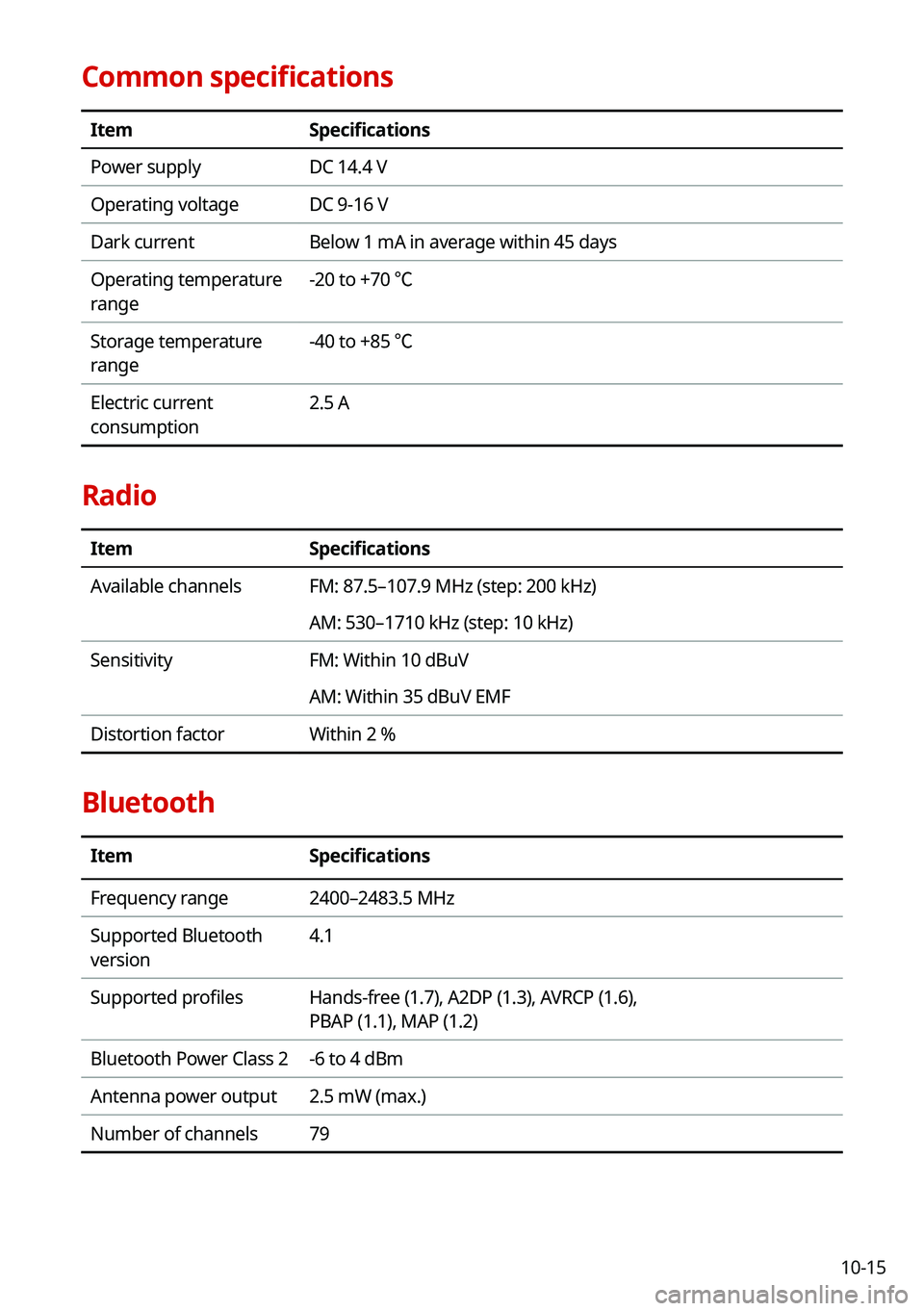
10-15
Common specifications
ItemSpecifications
Power supply DC 14.4 V
Operating voltage DC 9-16 V
Dark current Below 1 mA in average within 45 days
Operating temperature
range -20 to +70 ℃
Storage temperature
range -40 to +85 ℃
Electric current
consumption 2.5 A
Radio
Item
Specifications
Available channels FM: 87.5–107.9 MHz (step: 200 kHz)
AM: 530–1710 kHz (step: 10 kHz)
Sensitivity FM: Within 10 dBuV
AM: Within 35 dBuV EMF
Distortion factor Within 2 %
Bluetooth
ItemSpecifications
Frequency range 2400–2483.5 MHz
Supported Bluetooth
version 4.1
Supported profiles Hands-free (1.7), A2DP (1.3), AVRCP (1.6),
PBAP (1.1), MAP (1.2)
Bluetooth Power Class 2 -6 to 4 dBm
Antenna power output 2.5 mW (max.)
Number of channels 79