USB KIA VENGA 2015 Owners Manual
[x] Cancel search | Manufacturer: KIA, Model Year: 2015, Model line: VENGA, Model: KIA VENGA 2015Pages: 480, PDF Size: 23.15 MB
Page 27 of 480
27
Press the SET button less than 1 second to select the mode and set the data usingthe UP(▲) and DOWN( ▼) button whilst
the selected setting mode blinks.
To cancel the SET UP mode, do one of
the following :
- Press the SET button less than 1 sec- ond in set-up temperature unit change mode
- Press the SET button more than 1 sec- ond in any set-up mode
- After 15 seconds without any key press
- Ignition is ON or OFF in set-up mode
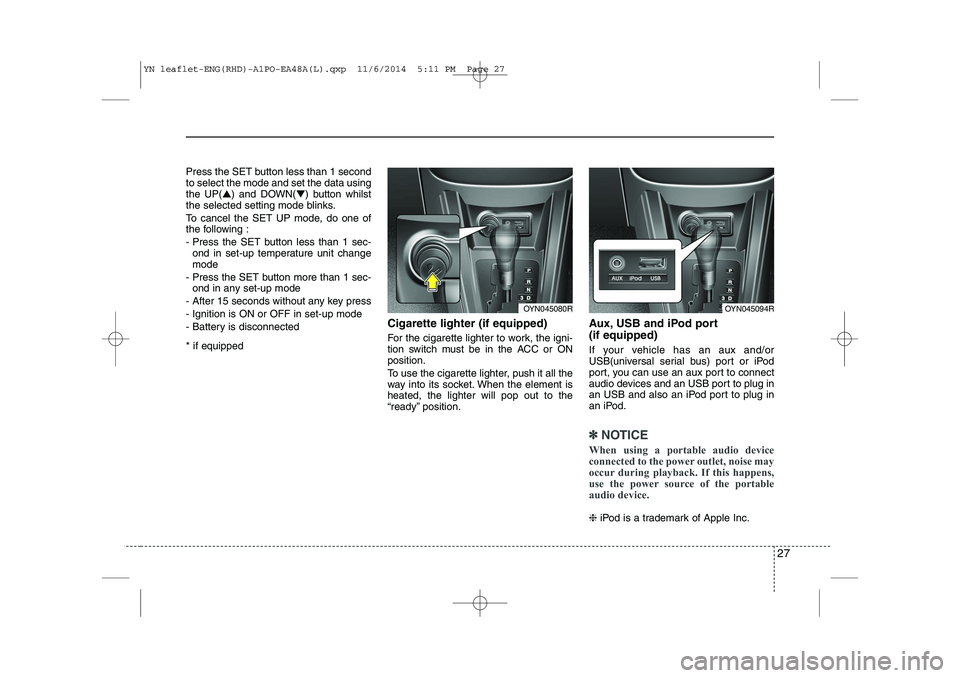
- Battery is disconnected * if equipped Cigarette lighter (if equipped)
For the cigarette lighter to work, the igni-
tion switch must be in the ACC or ONposition.
To use the cigarette lighter, push it all the
way into its socket. When the element isheated, the lighter will pop out to the
“ready” position.Aux, USB and iPod port (if equipped)
If your vehicle has an aux and/or
USB(universal serial bus) port or iPod
port, you can use an aux port to connect
audio devices and an USB port to plug in
an USB and also an iPod port to plug in
an iPod.
✽✽
NOTICE
When using a portable audio device
connected to the power outlet, noise may
occur during playback. If this happens,
use the power source of the portable
audio device.
❈ iPod is a trademark of Apple Inc.
OYN045080ROYN045094R
YN leaflet-ENG(RHD)-A1PO-EA48A(L).qxp 11/6/2014 5:11 PM Page 27
Page 55 of 480
55
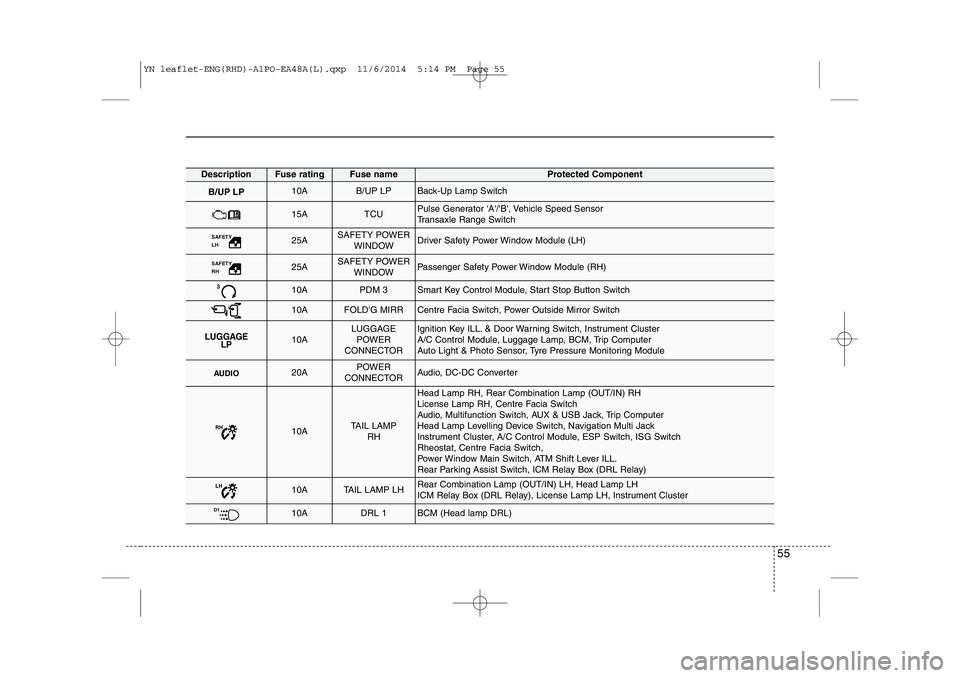
DescriptionFuse ratingFuse nameProtected Component
B/UP LP10AB/UP LPBack-Up Lamp Switch
15ATCUPulse Generator 'A'/'B', Vehicle Speed Sensor
Transaxle Range Switch
SAFETY LH 25ASAFETY POWERWINDOWDriver Safety Power Window Module (LH)
SAFETY RH 25ASAFETY POWERWINDOWPassenger Safety Power Window Module (RH)
310APDM 3Smart Key Control Module, Start Stop Button Switch
10AFOLD'G MIRRCentre Facia Switch, Power Outside Mirror Switch
LUGGAGE LP10ALUGGAGE
POWER
CONNECTORIgnition Key ILL. & Door Warning Switch, Instrument Cluster
A/C Control Module, Luggage Lamp, BCM, Trip Computer
Auto Light & Photo Sensor, Tyre Pressure Monitoring Module
AUDIO20APOWER
CONNECTORAudio, DC-DC Converter
RH10ATAIL LAMP RH
Head Lamp RH, Rear Combination Lamp (OUT/IN) RH
License Lamp RH, Centre Facia Switch
Audio, Multifunction Switch, AUX & USB Jack, Trip Computer
Head Lamp Levelling Device Switch, Navigation Multi Jack
Instrument Cluster, A/C Control Module, ESP Switch, ISG Switch
Rheostat, Centre Facia Switch,
Power Window Main Switch, ATM Shift Lever ILL.
Rear Parking Assist Switch, ICM Relay Box (DRL Relay)
LH10ATAIL LAMP LHRear Combination Lamp (OUT/IN) LH, Head Lamp LH
ICM Relay Box (DRL Relay), License Lamp LH, Instrument Cluster
D110ADRL 1BCM (Head lamp DRL)
YN leaflet-ENG(RHD)-A1PO-EA48A(L).qxp 11/6/2014 5:14 PM Page 55
Page 241 of 480
Features of your vehicle
98
4
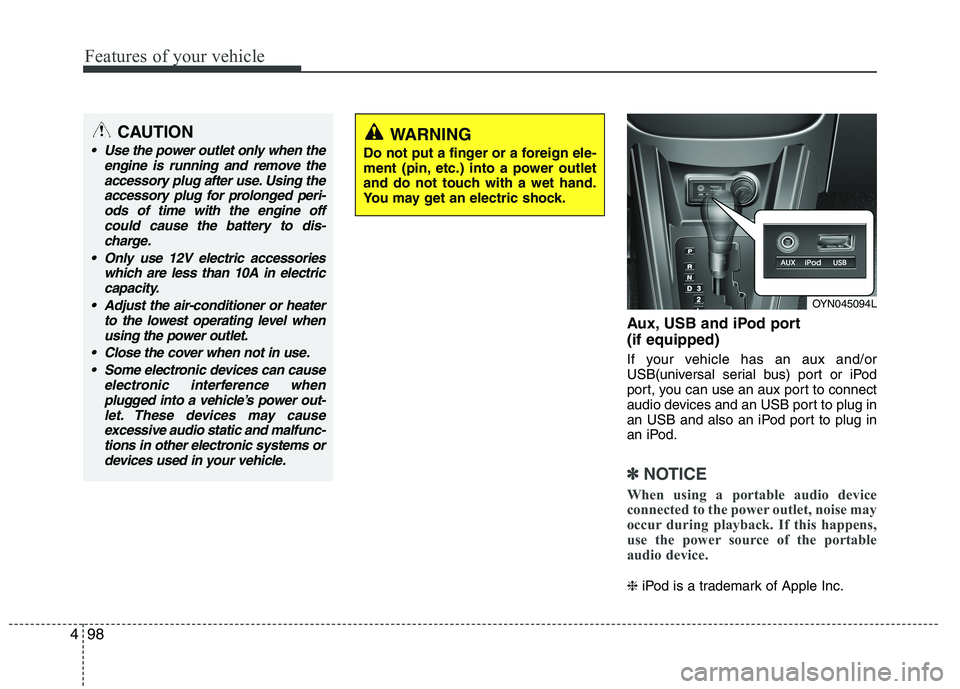
Aux, USB and iPod port (if equipped)
If your vehicle has an aux and/or
USB(universal serial bus) port or iPod
port, you can use an aux port to connect
audio devices and an USB port to plug in
an USB and also an iPod port to plug in
an iPod.
✽✽
NOTICE
When using a portable audio device
connected to the power outlet, noise may
occur during playback. If this happens,
use the power source of the portable
audio device.
❈ iPod is a trademark of Apple Inc.
OYN045094L
CAUTION
Use the power outlet only when the
engine is running and remove the
accessory plug after use. Using theaccessory plug for prolonged peri-ods of time with the engine off could cause the battery to dis-
charge.
Only use 12V electric accessories which are less than 10A in electriccapacity.
Adjust the air-conditioner or heater to the lowest operating level whenusing the power outlet.
Close the cover when not in use. Some electronic devices can cause electronic interference when
plugged into a vehicle’s power out-let. These devices may causeexcessive audio static and malfunc- tions in other electronic systems or
devices used in your vehicle.WARNING
Do not put a finger or a foreign ele-
ment (pin, etc.) into a power outlet
and do not touch with a wet hand.
You may get an electric shock.
Page 249 of 480
4 105
Features of your vehicle
Safety instructions Notes on USB stick (thumb drive)Notes on Bluetooth®Wireless
Technology devices
Notes on Bluetooth
®Wireless
Technology*
Bluetooth®Wireless Technology is a
short-range wireless radio connectivi-
ty technology used mainly for mobile
phones, hand-held PC’s and other
devices.
Bluetooth®Wireless Technology SIG
Inc. owns the Bluetooth®Wireless
Technology w ord, marking and logo;
and any use of such marks is under
license. Other trademarks and trade
names are those of their respective
owners.
Bluetooth®Wireless Technology oper-
ates in 2.4 GHz frequency range and
transmits voice and data at speeds of
up to 1 mbps within a range of up to10 m.
WARNING
Make all inputs via the remote con-
trol only when the vehicle is sta-
tionary, or have the passenger
make them. Otherwise, you may
endanger the occupants and other
road users.
WARNING
In rare cases it is possible that an
Bluetooth®Wireless Technology
device is not recognized by the unit
or may cause a malfunction. Please
only use
Bluetooth®Wireless
Technology devices that comply withthe
Bluetooth®Wireless Technology
specifications.
WARNING
We strongly recommend only using USB sticks (thumb drives)
of well-known manufacturers.
On no account must other USB devices such as hard discs or
other digital equipment or multiplug USB hub be connected to
the USB hub. Connecting other
devices can cause malfunction or
even destroy the audio equip-ment.
Avoid using the USB memory when it might hinder your safetydriving.
It is possible that noise is heard during playback when using the
AUX-IN together with the poweroutlet due to system-related not a
malfunction. If this happens, use
the power source of the AUX
device.
In rare cases it is possible that an USB stick (thumb drive) is not
recognized by the unit or may
cause a malfunction. Please only
use USB sticks that comply withthe USB thumb drive specifica-tions.
WARNING
Avoid inserting any foreign objects
into the slot of this player. Failure to
observe this may cause malfunc-
tion due to the precise mechanismof this unit.
WARNING
Keep the volume level low enough
to be aware of road and traffic con-ditions.
WARNING
Do not open covers and do not
repair yourself. Refer servicing to
qualified personnel.
YN RHD 4(101~AUDIO).QXP 11/20/2014 7:29 PM Page 105
Page 252 of 480
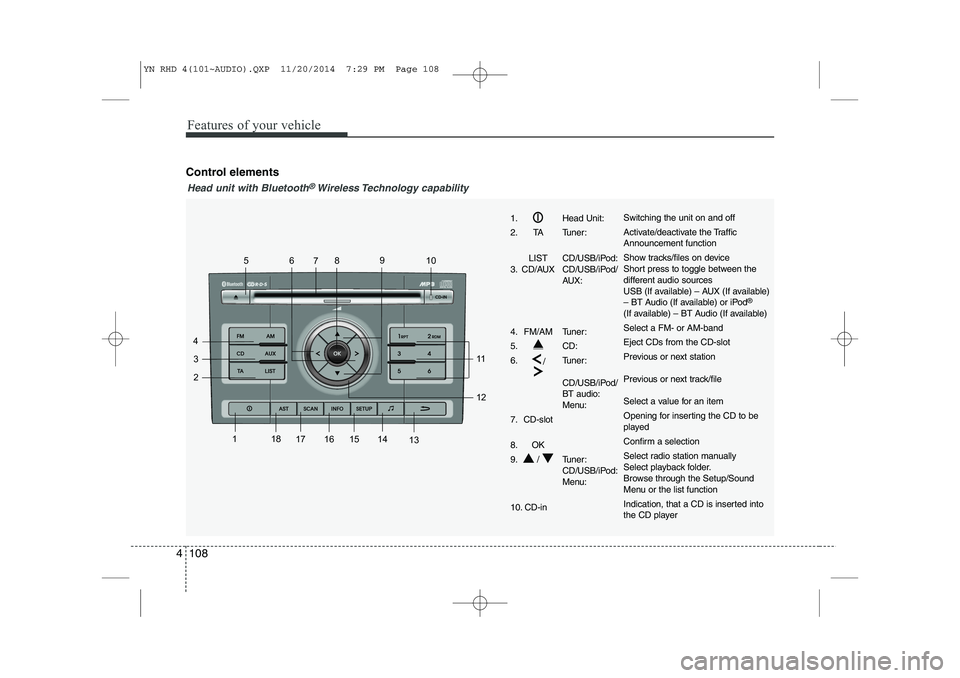
Features of your vehicle
108
4
Control elements
1
2
3
4 56
78 9
10
11 12
13
14
15
161718
1. Head Unit:
2. TA Tuner:
LIST CD/USB/iPod:
3. CD/AUX CD/USB/iPod/ AUX:
4. FM/AM Tuner:
5. CD:6. /Tuner:
CD/USB/iPod/ BT audio:
Menu:
7. CD-slot
8. OK
9. / Tuner: CD/USB/iPod:
Menu:
10. CD-inSwitching the unit on and off
Activate/deactivate the Traffic Announcement function
Show tracks/files on device
Short press to toggle between the
different audio sources
USB (If available) – AUX (If available)
– BT Audio (If available) or iPod ®
(If available) – BT Audio (If available) Select a FM- or AM-bandEject CDs from the CD-slot
Previous or next station
Previous or next track/file
Select a value for an item
Opening for inserting the CD to be
played
Confirm a selection
Select radio station manually
Select playback folder.
Browse through the Setup/Sound
Menu or the list function
Indication, that a CD is inserted into
the CD player
Head unit with Bluetooth®Wireless Technology capability
YN RHD 4(101~AUDIO).QXP 11/20/2014 7:29 PM Page 108
Page 253 of 480
4 109
Features of your vehicle
1
2
3
4 56
78 9
10
11 12
13
14
15
1617
18
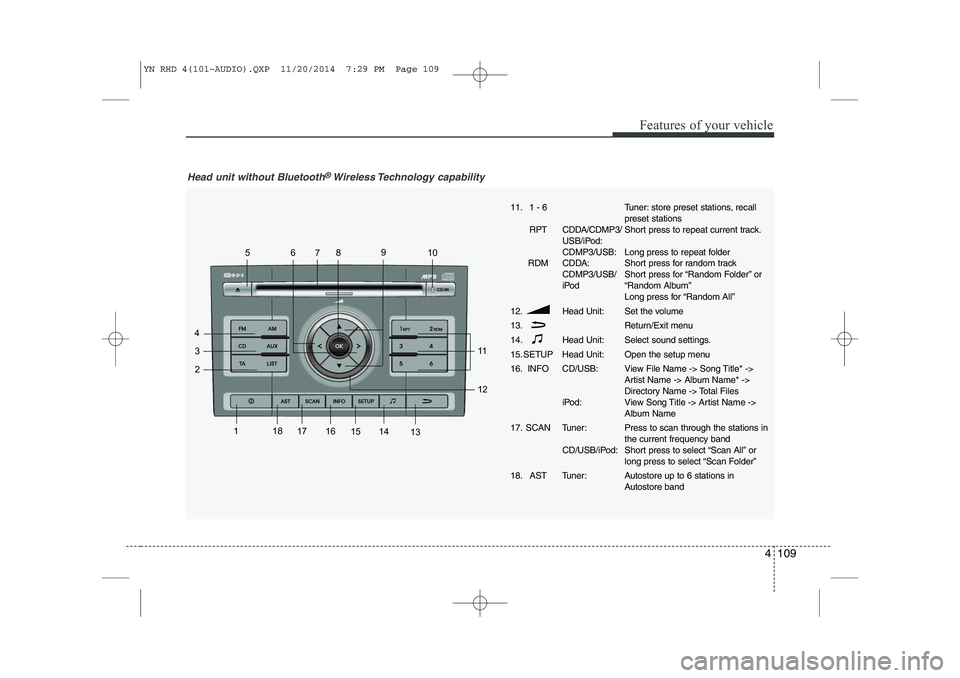
Head unit without Bluetooth®Wireless Technology capability
11. 1 - 6
RPT CDDA/CDMP3/ USB/iPod: CDMP3/USB:
RDM CDDA: CDMP3/USB/
iPod
12. Head Unit: 13.
14. Head Unit:
15. SETUP Head Unit:
16. INFO CD/USB:
iPod:
17. SCAN Tuner: CD/USB/iPod:
18. AST Tuner:Tuner: store preset stations, recall preset stations
Short press to repeat current track.
Long press to repeat folder
Short press for random track
Short press for “Random Folder” or
“Random Album”
Long press for “Random All”
Set the volume
Return/Exit menu
Select sound settings.
Open the setup menu
View File Name -> Song Title* ->
Artist Name -> Album Name* ->
Directory Name -> Total Files
View Song Title -> Artist Name ->
Album Name Press to scan through the stations in the current frequency band
Short press to select “Scan All” or
long press to select “Scan Folder”
Autostore up to 6 stations in
Autostore band
YN RHD 4(101~AUDIO).QXP 11/20/2014 7:29 PM Page 109
Page 257 of 480
4 113
Features of your vehicle
Frequency Scan
The tuner will tune to each available sta-
tion from the current waveband for 5 sec-
onds before scanning for the next higherfrequency station.
Short press the SCANbutton to acti-
vate/ deactivate the scan function.
Storing preset stations
In the FM 1 and 2 waveband there are 12
station presets and in the AM waveband
there are 6 station presets.
(Also see “Selecting FM or AM wave- band”).
Select the waveband, FM or AM.
Tune to the desired station.
Press and hold one of the preset (1 -
6) button till you hear a beep.
The station selected is stored under
the preset button.
Recalling preset stations
With this function you can recall a preset station.
Short press the desired preset button
(1 through 6) to recall the previouslyset station. Radio Data System (RDS)
Many FM stations broadcast RDS infor-
mation. The RDS provides you with infor-
mation of the following:
Traffic announcement (TA)
This function enables you to hear traffic
announcements (TA). You will also hear
traffic announcements when in CD/USB/
iPOD/ AUX mode.
Short press the TA button to
enable/disable function.
Press the SCAN button to scan for
Traffic Programme (TP) stations.
OR
Press the or to search for TP
stations.
Set the required volume for the traffic
announcements in the SETUP menu.
The TA symbol will be displayed when
TA is enabled.
✎ In FM mode: If no TP stations are
found, the unit will remain at the cur-
rent station displaying “NO TA/TP” for
5 seconds.
✎ In CD/USB/IPOD/AUX: If no TP sta-
tion is found, the unit will remain at the
current station. TP seek will be carried
out at the background periodically
every 30 seconds until a TP station is
found or TA will be disabled. TP lost ✎
If the TP signal of tuned station is lost
after 30 seconds, an automatic TP
seek for the next TP station will be
performed. If no TP station is found,the unit will remain at the current sta-
tion and display “TP LOST” for 5 sec-
onds.
TP seek will be performed periodical-
ly every 30 seconds until a TP station
is found.
Traffic announcements from other sta-
tions – EON With the EON function (Enhanced Other
Networks) you will hear traffic announce-
ments even if the set station does not
provide this service but is operating on a
network with other stations. ✎ If you have activated Traffic info, sta-
tions with EON will be treated like traf-
fic stations, i.e. the search will also
stop at these stations.
✎ When a traffic announcement is
made, the unit switches to a traffic
information station linked to EON.After the announcement, the unit
returns to the previous programme.
YN RHD 4(101~AUDIO).QXP 11/20/2014 7:29 PM Page 113
Page 263 of 480
4 119
Features of your vehicle
List Function
With this function you can navigate
through all tracks in the iPOD file sys-tem.
✎ The main menu of the LIST functionconsists of:
✎ PLAYLIST, ARTIST, ALBUM,GENRE, SONG and COMPOSER.
Short press the OKbutton to enter the
selected category or the sub-category.
Short press the button to go to the
previous category.
Short press or button to navi-gate through the list of the selected
category.
The songs in the selected play-list will
be displayed.
Artist : a list of albums of the selected
artist will displayed, the user can then
select an album from this list to view
the songs in the album selected.
Album : the songs in the selected
album will be displayed.
Genre : the list of artists for the select-
ed Genre will be displayed. After the
selection of an artist, a list of albums
for this artist is displayed. The user
can now select an album in this list to
view the songs in the selected album.
Song : all songs in the album will be
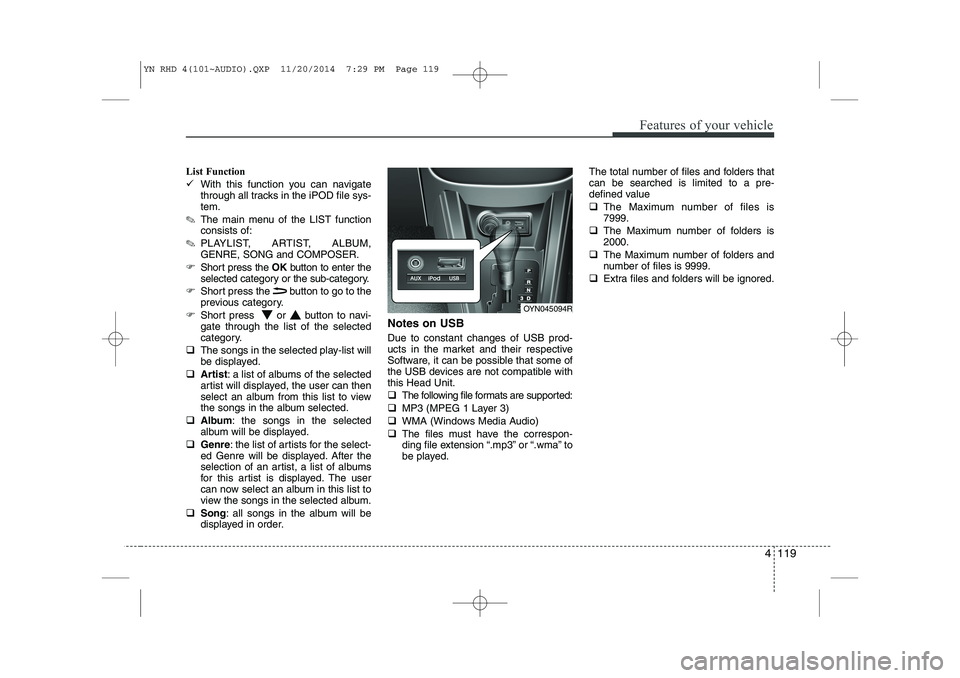
displayed in order. Notes on USB Due to constant changes of USB prod-
ucts in the market and their respective
Software, it can be possible that some of
the USB devices are not compatible withthis Head Unit.
The following file formats are supported:
MP3 (MPEG 1 Layer 3)
WMA (Windows Media Audio)
The files must have the correspon-
ding file extension “.mp3” or “.wma” to
be played. The total number of files and folders thatcan be searched is limited to a pre-
defined value
The Maximum number of files is 7999.
The Maximum number of folders is2000.
The Maximum number of folders and
number of files is 9999.
Extra files and folders will be ignored.
OYN045094R
YN RHD 4(101~AUDIO).QXP 11/20/2014 7:29 PM Page 119
Page 264 of 480
Features of your vehicle
120
4
Notes on USB Sticks (Thumb drives)
Only use USB sticks (thumb drives) of
wellknown manufacturers. The use of
other drives may result in malfunction ofthe set.
Do not connect other USB devices such as hard discs or other digital equipment
to the USB hub. Connecting other
devices can cause malfunction or even
destroy the audio equipment. Inserting and removing an USB stick
(thumb drive)
Insert the USB stick into the USB hub The USB hub is located in the con-
sole (also see Car Manual).
✎ Please keep lid closed when not in
use.
Playback of files ✎ Playback starts automatically, in case
there are MP3 or WMA files on the
USB stick,
OR
When the device is inserted but a dif-
ferent source was selected before,press the AUXbutton to start play-
back.
Previous/Next Folder
Press the or buttons to select
previous or next folder.
Previous/Next File
Press the or buttons to select
previous or next song file✽✽
NOTICE
In rare cases it is possible that an USB stick (thumb drive) is not recognized
by the unit or may cause a malfunc-
tion.
This is not a system fault. Some USB
sticks do not comply with the USB
thumb drive specifications.
CAUTION
The USB hub is designed for a
charge and supply current of upto 500 mA.
When using external equipment with a current consumptionexceeding the specified 500 mA,
the unit switches off the USB huband gives a warning.
CAUTION
We strongly recommend only using USB sticks (thumb drives)
of well-known manufacturers.
On no account must other USB devices such as hard discs orother digital equipment be con- nected to the USB hub.
Connecting other devices can cause malfunction or evendestroy the audio equipment.
YN RHD 4(101~AUDIO).QXP 11/20/2014 7:29 PM Page 120
Page 265 of 480
4 121
Features of your vehicle
Manual Seek – Fast Forward/Fast back-
ward
Press and hold the or button to
go fast forward or fast backward.
During manual seek audio is audible
at reduced volume.
Repeat File/Folder
Short press the RPTbutton to select
Repeat File.
The current file will be repeated.
Long press the RPTbutton to select
Repeat Folder.
All files within the current folder will be repeated.
To cancel the “Repeat File/Folder”
mode, short press the RPTbutton
again. Random Folder/All Files
Short press the RDMbutton to acti-
vate the “Random Folder” option.
All files in the folder will be played at
random.
OR
Long press the RDMbutton to acti-
vate the “Random All” option.
All files on the USB device will be
played at random.
To deactivate the “Random Folder/All
Files” feature, press the RDMbutton
again.
Scan File/Folder
Long press the SCANbutton to acti-
vate the “Scan Folder” option.
✎ The first track of each folder will be
scanned, except the root directory.
OR
Short press the SCANbutton to acti-
vate the “Scan All” option.
All files on the USB device will be scanned.
To deactivate the “Scan Folder/All
Files” feature, short press the SCAN
button again to abort “Scan All” Viewing MP3 Information
With this function text information of the
MP3 files can displayed on the LCD-
Display.
Short press the press INFObutton.
The following information will be shown
in the following sequence.
Filename (“NO INFO” will appear if
the file name contains characters that
do not pertain to the ASCII characterset)
ID3 tag info – Song Title (“NO INFO”
will appear if there is no Song Title
available)
ID3 tag info – Artist name (“NO INFO”
will appear if there is no Artist Name
available)
ID3 tag info – Album name (“NO
INFO” will appear if will appear if there
is no Album Name available).
Directory name
Total no. of files on the USB device
The information will be visible on the
LCD-display for 5 seconds.
YN RHD 4(101~AUDIO).QXP 11/20/2014 7:29 PM Page 121