sunroof Lancia Thema 2014 Owner handbook (in English)
[x] Cancel search | Manufacturer: LANCIA, Model Year: 2014, Model line: Thema, Model: Lancia Thema 2014Pages: 332, PDF Size: 3.46 MB
Page 19 of 332
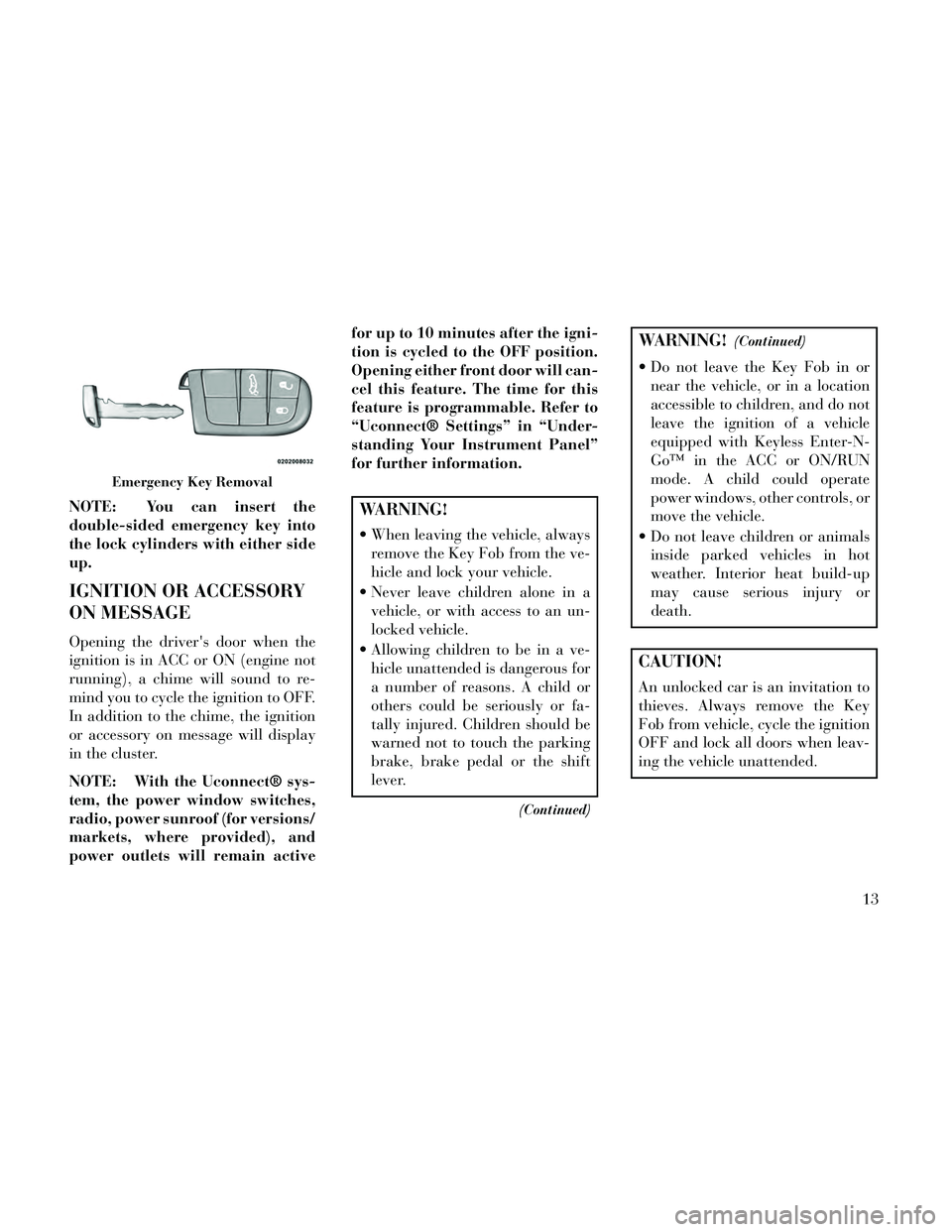
NOTE: You can insert the
double-sided emergency key into
the lock cylinders with either side
up.
IGNITION OR ACCESSORY
ON MESSAGE
Opening the driver's door when the
ignition is in ACC or ON (engine not
running), a chime will sound to re-
mind you to cycle the ignition to OFF.
In addition to the chime, the ignition
or accessory on message will display
in the cluster.
NOTE: With the Uconnect® sys-
tem, the power window switches,
radio, power sunroof (for versions/
markets, where provided), and
power outlets will remain activefor up to 10 minutes after the igni-
tion is cycled to the OFF position.
Opening either front door will can-
cel this feature. The time for this
feature is programmable. Refer to
“Uconnect® Settings” in “Under-
standing Your Instrument Panel”
for further information.
WARNING!
When leaving the vehicle, always
remove the Key Fob from the ve-
hicle and lock your vehicle.
Never leave children alone in a vehicle, or with access to an un-
locked vehicle.
Allowing children to be in a ve- hicle unattended is dangerous for
a number of reasons. A child or
others could be seriously or fa-
tally injured. Children should be
warned not to touch the parking
brake, brake pedal or the shift
lever.
(Continued)
WARNING!(Continued)
Do not leave the Key Fob in ornear the vehicle, or in a location
accessible to children, and do not
leave the ignition of a vehicle
equipped with Keyless Enter-N-
Go™ in the ACC or ON/RUN
mode. A child could operate
power windows, other controls, or
move the vehicle.
Do not leave children or animals inside parked vehicles in hot
weather. Interior heat build-up
may cause serious injury or
death.
CAUTION!
An unlocked car is an invitation to
thieves. Always remove the Key
Fob from vehicle, cycle the ignition
OFF and lock all doors when leav-
ing the vehicle unattended.
Emergency Key Removal
13
Page 33 of 332
3. Push the window switch down
firmly to the second detent to open the
window completely and continue to
hold the switch down for an addi-
tional two seconds after the window is
fully open.
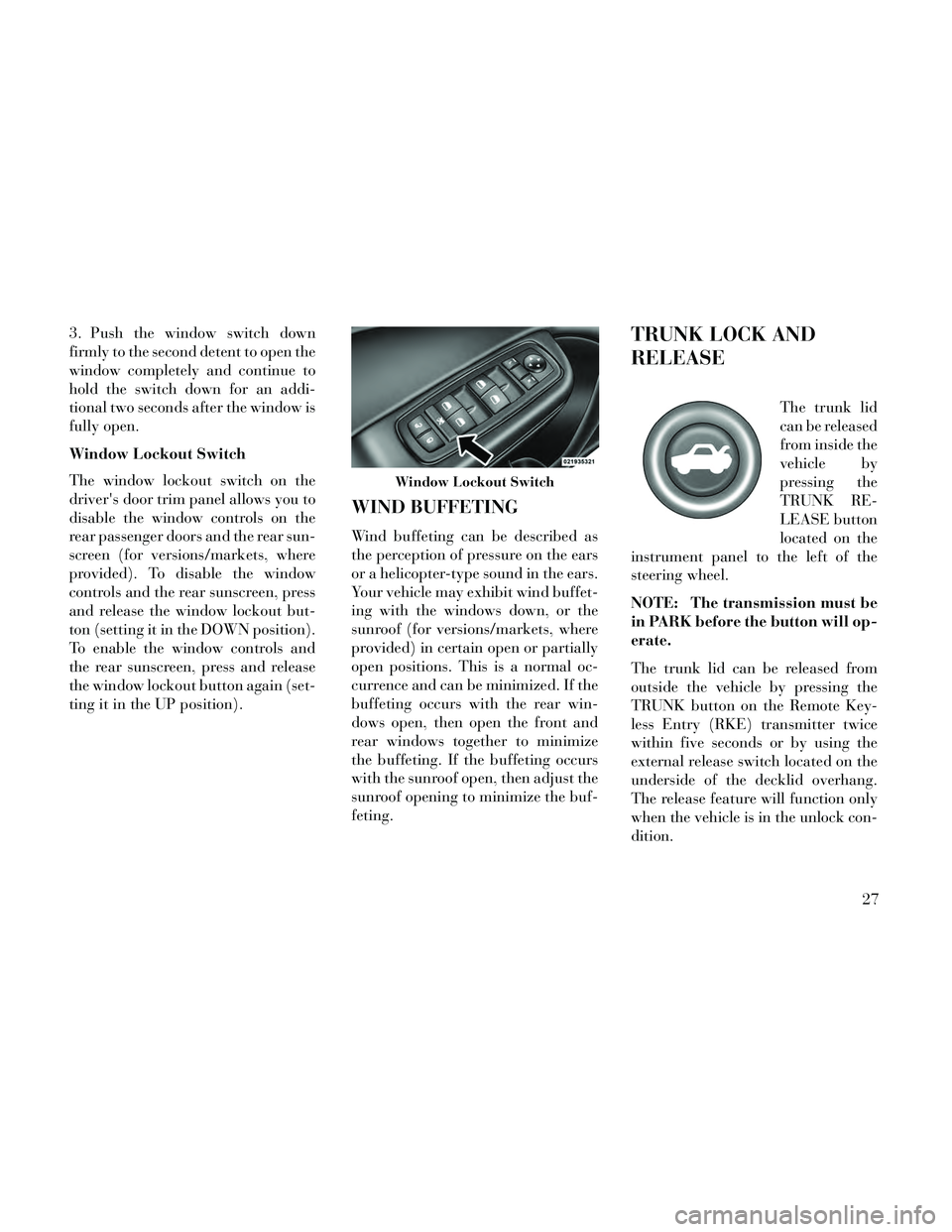
Window Lockout Switch
The window lockout switch on the
driver's door trim panel allows you to
disable the window controls on the
rear passenger doors and the rear sun-
screen (for versions/markets, where
provided). To disable the window
controls and the rear sunscreen, press
and release the window lockout but-
ton (setting it in the DOWN position).
To enable the window controls and
the rear sunscreen, press and release
the window lockout button again (set-
ting it in the UP position).
WIND BUFFETING
Wind buffeting can be described as
the perception of pressure on the ears
or a helicopter-type sound in the ears.
Your vehicle may exhibit wind buffet-
ing with the windows down, or the
sunroof (for versions/markets, where
provided) in certain open or partially
open positions. This is a normal oc-
currence and can be minimized. If the
buffeting occurs with the rear win-
dows open, then open the front and
rear windows together to minimize
the buffeting. If the buffeting occurs
with the sunroof open, then adjust the
sunroof opening to minimize the buf-
feting.
TRUNK LOCK AND
RELEASE
The trunk lid
can be released
from inside the
vehicle by
pressing the
TRUNK RE-
LEASE button
located on the
instrument panel to the left of the
steering wheel.
NOTE: The transmission must be
in PARK before the button will op-
erate.
The trunk lid can be released from
outside the vehicle by pressing the
TRUNK button on the Remote Key-
less Entry (RKE) transmitter twice
within five seconds or by using the
external release switch located on the
underside of the decklid overhang.
The release feature will function only
when the vehicle is in the unlock con-
dition.
Window Lockout Switch
27
Page 47 of 332

against the door, side windows, or
area where the SAB or SABIC air bags
inflate, even if they are in an infant or
child restraint. Always sit upright as
possible with your back against the
seat back, use the seat belts properly,
and use the appropriate sized child
restraint, infant restraint or booster
seat recommended for the size and
weight of the child.
The system includes side impact sen-
sors that are calibrated to deploy the
side air bags during impacts that re-
quire air bag occupant protection.
WARNING!
Your vehicle is equipped withSABIC air bags, do not have any
accessory items installed which
will alter the roof, including add-
ing a sunroof to your vehicle. Do
not add roof racks that require
permanent attachments (bolts or
screws) for installation on the ve-
hicle roof. Do not drill into the
roof of the vehicle for any reason.
(Continued)
WARNING!(Continued)
Your vehicle is equipped with leftand right Supplemental Side Air
Bag Inflatable Curtain (SABIC),
do not stack luggage or other
cargo up high enough to block the
location of the SABIC. The area
where the SABIC is located
should remain free from any ob-
structions.
Do not use accessory seat covers or place objects between you and
the side air bags; the performance
could be adversely affected
and/or objects could be pushed
into you, causing serious injury.
Supplemental Driver Side Knee
Air Bag
The Supplemental Driver Side Knee
Air Bag provides enhanced protection
and works together with the Driver
Advanced Front Air Bag during a
frontal impact.
Knee Impact Bolsters
The Knee Impact Bolsters help pro-
tect the knees of the driver and front passenger, and position the front oc-
cupants for the best interaction with
the Advanced Front Air Bags.
Along with seat belts and pretension-
ers, Advanced Front Air Bags and the
Supplemental Driver Knee Air Bag
work with the knee impact bolsters to
provide improved protection for the
driver and front passenger.
AIR BAG DEPLOYMENT
SENSORS AND CONTROLS
Occupant Restraint Controller
(ORC)
The ORC is part of a regulated safety
system required for this vehicle.
The ORC determines if deployment of
the front and/or side air bags in a
frontal or side collision is required.
Based on the impact sensor's signals,
a central electronic ORC deploys the
Advanced Front Air Bags, SABIC air
bags, SAB, Supplemental Driver Side
Knee Air Bag, and front seat belt pre-
tensioners, as required, depending on
several factors, including the severity
and type of impact.
41
Page 74 of 332

PARKSENSE® SYSTEM USAGEPRECAUTIONS .........................140
PARKVIEW® REAR BACK UP CAMERA (for versions/markets, where provided) ...........142
TURNING PARKVIEW® ON OR OFF — WITH TOUCH SCREEN .......................143
OVERHEAD CONSOLE ....................143
SUNGLASS BIN DOOR ..................144
COMMANDVIEW® SUNROOF WITH POWER SHADE — (for versions/markets,
where provided) .........................144
OPENING SUNROOF — EXPRESS ..........144
OPENING SUNROOF — MANUAL MODE .....145
CLOSING SUNROOF — EXPRESS ..........145
CLOSING SUNROOF — MANUAL MODE .....145
VENTING SUNROOF — EXPRESS ..........145
OPENING POWER SHADE — EXPRESS .....145
OPENING POWER SHADE — MANUAL MODE................................145
CLOSING POWER SHADE — EXPRESS ......146
CLOSING POWER SHADE — MANUAL MODE................................146
VENTING SUNROOF — EXPRESS ..........146
PINCH PROTECT FEATURE ...............146
WINDBUFFETING .....................146
SUNROOF MAINTENANCE ................146
IGNITION OFF OPERATION ...............146
ELECTRICAL POWER OUTLETS ............147
68
Page 149 of 332

WARNING!
Drivers must be careful when back-
ing up even when using the
ParkView® Rear Back Up Camera.
Always check carefully behind your
vehicle, and be sure to check for
pedestrians, animals, other ve-
hicles, obstructions, or blind spots
before backing up. You are respon-
sible for the safety of your sur-
roundings and must continue to
pay attention while backing up.
Failure to do so can result in serious
injury or death.
CAUTION!
To avoid vehicle damage,ParkView® should only be used
as a parking aid. The ParkView®
camera is unable to view every
obstacle or object in your drive
path.
(Continued)
CAUTION!(Continued)
To avoid vehicle damage, the ve-hicle must be driven slowly when
using ParkView® to be able to
stop in time when an obstacle is
seen. It is recommended that the
driver look frequently over his/
her shoulder when using
ParkView®.
NOTE: If snow, ice, mud, or any
foreign substance builds up on the
camera lens, clean the lens, rinse
with water, and dry with a soft
cloth. Do not cover the lens.
TURNING PARKVIEW® ON
OR OFF — WITH TOUCH
SCREEN
Perform the following steps on the
touch screen to turn the Parkview®
Backup Camera ON or OFF:
1. Press the “More” soft-key.
2. Press the “Settings” soft-key.
3. Press the “Safety & Driving Assis-
tance” soft-key. 4. Press the check box soft key next
to “Parkview® Backup Camera” to
enable/disable.
OVERHEAD CONSOLE
The overhead console contains
courtesy/reading lights and storage
for sunglasses. Power sunroof
switches may also be included, (for
versions/markets, where provided).
Refer to your “Lights” section for
more information.
Overhead Console
143
Page 150 of 332

SUNGLASS BIN DOOR
At the front of the console a compart-
ment is provided for the storage of a
pair of sunglasses. The storage com-
partment access is a “push/push” de-
sign. Push the chrome pad on the door
to open. Push the chrome pad on the
door to close.
COMMANDVIEW®
SUNROOF WITH POWER
SHADE — (for
versions/markets, where
provided)
The CommandView® sunroof switch
is located to the left between the sun
visors on the overhead console.The power shade switch is located to
the right between the sun visors on the
overhead console.
WARNING!
Never leave children unattended
in a vehicle, and do not let chil-
dren play with the sun roof. Do
not leave the key fob in or near
the vehicle, or in a location acces-
sible to children, and do not leave
the ignition of a vehicle equipped
with Keyless Enter-N-Go in the
ACC or ON/RUN mode. Occu-
pants, particularly unattended
children, can become entrapped
by the power sunroof while oper-
ating the power sunroof switch.
Such entrapment may result in
serious injury or death.
(Continued)
WARNING!(Continued)
In a collision, there is a greater
risk of being thrown from a ve-
hicle with an open sunroof. You
could also be seriously injured or
killed. Always fasten your seat
belt properly and make sure all
passengers are properly secured
too.
Do not allow small children to operate the sunroof. Never allow
your fingers, other body parts, or
any object to project through the
sunroof opening. Injury may re-
sult.
OPENING SUNROOF —
EXPRESS
Press the switch rearward and release
it within one-half second and the sun-
roof will open automatically from any
position. The sunroof will open fully
and stop automatically. This is called
“Express Open”. During Express
Open operation, any movement of the
sunroof switch will stop the sunroof.
Sunglass Bin Door
CommandView® Sunroof And Power
Shade Switches
144
Page 151 of 332

NOTE: If the sunshade is in the
closed position it will automati-
cally open halfway prior to the
glass cycling open.
OPENING SUNROOF —
MANUAL MODE
To open the sunroof, press and hold
the switch rearward to full open. Any
release of the switch will stop the
movement and the sunroof will re-
main in a partially opened condition
until the switch is pushed and held
rearward again.
NOTE: If the sunshade is in the
closed position it will automati-
cally open halfway prior to the
glass cycling open.
CLOSING SUNROOF —
EXPRESS
Press the switch forward and release it
within one-half second and the sun-
roof will close automatically from any
position. The sunroof will close fully
and stop automatically. This is called
“Express Close”. During ExpressClose operation, any movement of the
switch will stop the sunroof.
CLOSING SUNROOF —
MANUAL MODE
To close the sunroof, press and hold
the switch in the forward position.
Any release of the switch will stop the
movement and the sunroof will re-
main in a partially closed condition
until the switch is pushed and held
forward again.
VENTING SUNROOF —
EXPRESS
Press and release the "Vent" button
within one-half second and the sun-
roof will open to the vent position.
This is called “Express Vent”, and it
will occur regardless of sunroof posi-
tion. During Express Vent operation,
any movement of the switch will stop
the sunroof.
NOTE: If the sunshade is in the
closed position when the vent
switch is pressed, the sunshade
will automatically cycle to the
halfway open position prior to the
sunroof opening to the Vent posi-
tion.
OPENING POWER SHADE
— EXPRESS
Press the shade switch rearward and
release it within one-half second and
the shade will open automatically
from any position. The shade will
open fully and stop automatically.
This is called “Express Open”. During
Express Open operation, any move-
ment of the shade switch will stop the
shade.
OPENING POWER SHADE
— MANUAL MODE
To open the shade, press and hold the
switch rearward to full open. Any re-
lease of the switch will stop the move-
ment and the shade will remain in a
partially opened condition until the
switch is pushed and held rearward
again.
145
Page 152 of 332

CLOSING POWER SHADE
— EXPRESS
Press the switch forward and release it
within one-half second and the shade
will close automatically from any po-
sition. The shade will close fully and
stop automatically. This is called “Ex-
press Close”. During Express Close
operation, any movement of the
switch will stop the shade.
CLOSING POWER SHADE
— MANUAL MODE
To close the shade, press and hold the
switch in the forward position. Any
release of the switch will stop the
movement and the shade will remain
in a partially closed condition until
the switch is pushed and held forward
again.
VENTING SUNROOF —
EXPRESS
Press and release the "Vent" button
within one-half second and the sun-
roof will open to the vent position.
This is called “Express Vent”, and itwill occur regardless of sunroof posi-
tion. During Express Vent operation,
any movement of the switch will stop
the sunroof.
NOTE: If the sunshade is in the
closed position when the vent
switch is pressed, the sunshade
will automatically cycle to the
halfway open position prior to the
sunroof opening to the Vent posi-
tion.
PINCH PROTECT FEATURE
This feature will detect an obstruction
in the opening of the sunroof during
Express Close operation. If an ob-
struction in the path of the sunroof is
detected, the sunroof will automati-
cally retract. Remove the obstruction
if this occurs. Next, press the switch
forward and release to Express Close.
NOTE: If three consecutive sun-
roof close attempts result in Pinch
Protect reversals, the fourth close
attempt will be a Manual Close
movement with Pinch Protect dis-
abled.
WIND BUFFETING
Wind buffeting can be described as
the perception of pressure on the ears
or a helicopter-type sound in the ears.
Your vehicle may exhibit wind buffet-
ing with the windows down, or the
sunroof (for versions/markets, where
provided) in certain open or partially
open positions. This is a normal oc-
currence and can be minimized. If the
buffeting occurs with the rear win-
dows open, open the front and rear
windows together to minimize the
buffeting. If the buffeting occurs with
the sunroof open, adjust the sunroof
opening to minimize the buffeting or
open any window.
SUNROOF MAINTENANCE
Use only a non-abrasive cleaner and a
soft cloth to clean the glass panel.
IGNITION OFF OPERATION
For vehicles not equipped with the
Electronic Vehicle Information Center
(EVIC), the power sunroof switch will
remain active for 45 seconds after the
146
Page 153 of 332

ignition switch is turned to the LOCK
position. Opening either front door
will cancel this feature.
NOTE:
For vehicles equipped with theEVIC, the power sunroof switch
will remain active for up to ap-
proximately ten minutes after
the ignition switch is turned to
the LOCK position. Opening ei-
ther front door will cancel this
feature.
The Ignition Off time is pro- grammable using the
Uconnect® System. Refer to
“Uconnect® Settings” in “Un-
derstanding Your Instrument
Panel” for further information.
ELECTRICAL POWER
OUTLETS
There are three 12 Volt (13 Amp)
electrical power outlets on this ve-
hicle. The power outlets are protected
by a fuse. Insert cigar lighter or accessory plug
into the power outlets for use to en-
sure proper operation.
CAUTION!
Do not exceed the maximum
power of 160 Watts (13 Amps) at
12 Volts. If the 160 Watts (13
Amps) power rating is exceeded,
the fuse protecting the system will
need to be replaced.
Power outlets are designed for ac- cessory plugs only. Do not insert
any other object in the power out-
lets as this will damage the outlet
and blow the fuse. Improper use
of the power outlet can cause
damage not covered by your New
Vehicle Limited Warranty.
The front 12 Volt power outlet has
power available only when the igni-
tion is placed in the ACC or RUN
position.
WARNING!
Do not place ashes inside the cubby
bin located on the center console on
vehicle's not equipped with the ash
receiver tray. A fire leading to
bodily injury could result.
The center console outlet is powered
directly from the battery (power
available at all times). Items plugged
into this outlet may discharge the bat-
tery and/or prevent the engine from
starting.
Front Power Outlet
147
Page 187 of 332
is programmed touching the
handle more than once will only
result in the driver’s door opening.
If driver door first is selected, once
the driver door is opened, the inte-
rior door lock/unlock switch can
be used to unlock all doors (or use
RKE transmitter).
Passive Entry
This feature allows you to lock and
unlock the vehicle’s door(s) without
having to press the Remote Keyless
Entry (RKE) transmitter lock or un-
lock buttons. To make your selection,
touch the Passive Entry soft-key, until
a check-mark appears next to setting,
showing that setting has been selected.
Touch the back arrow soft-key to re-
turn to the previous menu. Refer to
“Keyless Enter-N-Go” in “Things To
Know Before Starting Your Vehicle”.
Personal Settings Linked To FOB
(for versions/markets, where pro-
vided)
This feature provides automatic
driver seat positioning to enhance
driver mobility when entering and ex-
iting the vehicle. To make your selec-
tion, touch the Personal SettingsLinked To FOB soft-key, until a
check-mark appears next to setting,
showing that setting has been se-
lected. Touch the back arrow soft-key
to return to the previous menu.
NOTE: The seat will return to the
memorized seat location (if Recall
Memory with Remote Key Unlock
is set to ON) when the Remote Key-
less Entry (RKE) transmitter is
used to unlock the door. Refer to
“Driver Memory Seat” in “Under-
standing The Features Of Your Ve-
hicle” for further information.
Engine Off Options
After pressing the Engine Off Options
soft-key the following settings will be
available.
Easy Exit Seat (for versions/
markets, where provided)
This feature provides automatic
driver seat positioning to enhance
driver mobility when entering and ex-
iting the vehicle. To make your selec-
tion, touch the Easy Exit Seats soft-
key, until a check-mark appears next
to setting, showing that setting has
been selected. Touch the back arrow
soft-key to return to the previous
menu.
Engine Off Power Delay (for
versions/markets, where provided)
When this feature is selected, the
power window switches, radio,
Uconnect® phone system (for
versions/markets, where provided),
DVD video system (for versions/
markets, where provided), power
sunroof (for versions/markets, where
provided), and power outlets will re-
main active for up to 10 minutes after
the ignition is cycled to OFF. Opening
either front door will cancel this fea-
ture. To change the Engine Off Power
Delay status touch the 0 seconds, 45
seconds, 5 minutes or 10 minutes
soft-key. Then touch the arrow back
soft-key.
Headlight Off Delay
When this feature is selected, the
driver can choose to have the head-
lights remain on for 0, 30, 60, or 90
seconds when exiting the vehicle. To
change the Headlight Off Delay status
touch the + or - soft-key to select your
181