wiring LAND ROVER DISCOVERY 1999 Repair Manual
[x] Cancel search | Manufacturer: LAND ROVER, Model Year: 1999, Model line: DISCOVERY, Model: LAND ROVER DISCOVERY 1999Pages: 1529, PDF Size: 34.8 MB
Page 1121 of 1529

PANEL REPAIRS
77-2-54 REPAIRS
Repair
1.Remove existing panel(s), prepare panel joint
faces and install new panel(s) in accordance
with Panel Replacement Procedure. Punch or
drill holes in new panel for plug welding as
shown.
2. During welding operations, apply 'Heat
shrink paste' to roof and body side panel to
avoid heat damage to paintwork.Refit
1.Fit and secure wiring.
2.Fit side and rear drip rail finishers.
3.Fit alpine light glass.
+ SCREENS, REPAIRS, Glass - alpine
light.
4.Fit windscreen.
+ SCREENS, REPAIRS, Windscreen.
5.Fit 'D' post outer trim finishers.
6.Fit rear door aperture seals.
7.Fit tread plates to rear door apertures.
8.Fit front door aperture seals.
9.Fit 'A' post lower trim panels.
10.Fit tread plates to front door apertures.
11.Fit roof bars.
+ EXTERIOR FITTINGS, REPAIRS,
Roof bars.
12.Fit rear headrests.
13.Fit rear seats.
+ SEATS, REPAIRS, Seat - rear.
14.Fit front seats.
+ SEATS, REPAIRS, Seat - front.
15. Models with fixed roof: Fit head lining.
+ INTERIOR TRIM COMPONENTS,
REPAIRS, Headlining.
16. Models with sunroof: Fit sunroof drain tubes.
17. Models with sunroof: Fit rear sunroof.
+ SUNROOF, REPAIRS, Sunroof -
rear.
18. Models with sunroof: Fit front sunroof.
+ SUNROOF, REPAIRS, Sunroof -
front.
19.Connect leads/multiplug to alternator.
20.Connect battery leads, negative lead last.
M77 1715A
Page 1161 of 1529
HEATING AND VENTILATION
80-4DESCRIPTION AND OPERATION
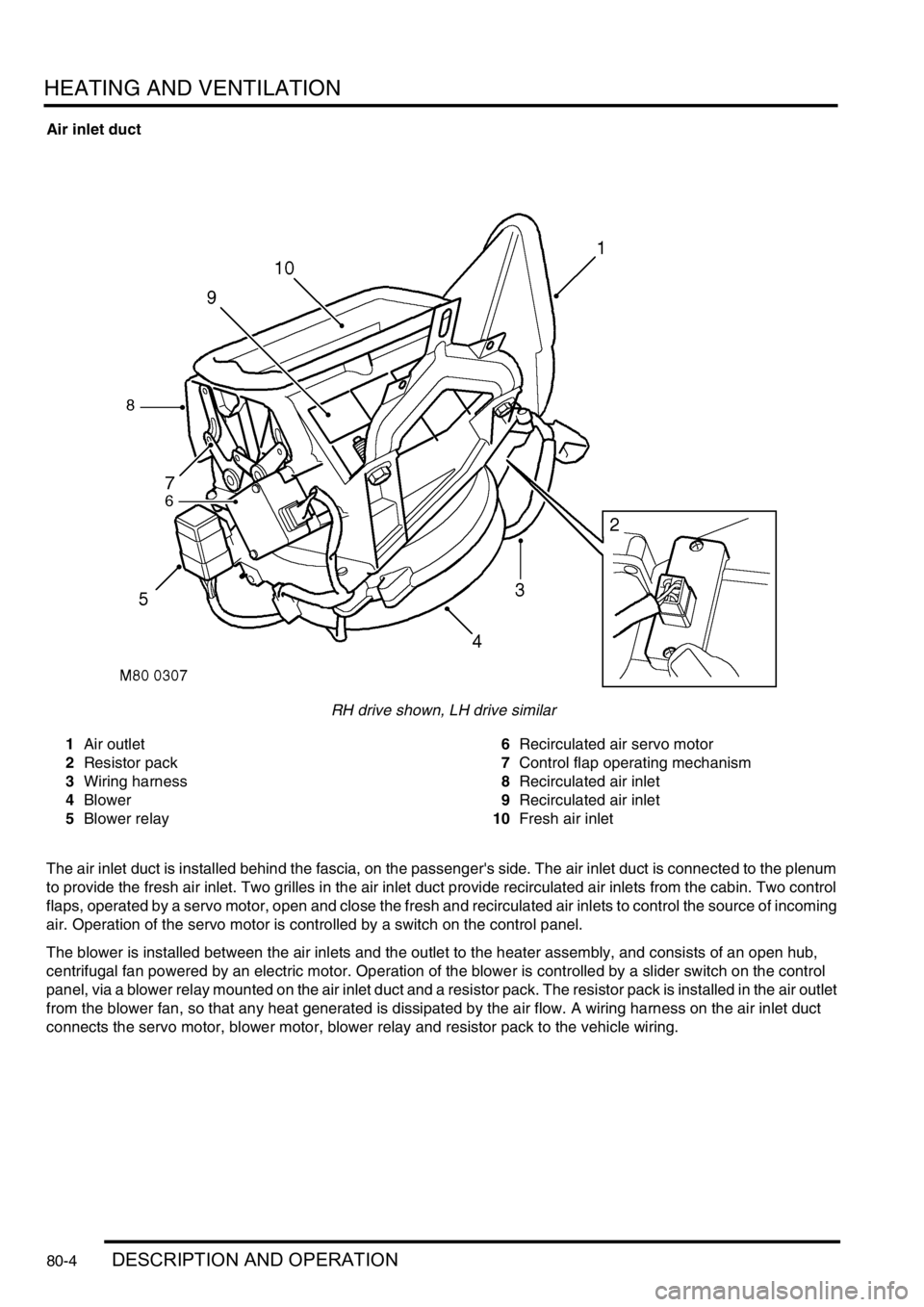
Air inlet duct
RH drive shown, LH drive similar
1Air outlet
2Resistor pack
3Wiring harness
4Blower
5Blower relay6Recirculated air servo motor
7Control flap operating mechanism
8Recirculated air inlet
9Recirculated air inlet
10Fresh air inlet
The air inlet duct is installed behind the fascia, on the passenger's side. The air inlet duct is connected to the plenum
to provide the fresh air inlet. Two grilles in the air inlet duct provide recirculated air inlets from the cabin. Two control
flaps, operated by a servo motor, open and close the fresh and recirculated air inlets to control the source of incoming
air. Operation of the servo motor is controlled by a switch on the control panel.
The blower is installed between the air inlets and the outlet to the heater assembly, and consists of an open hub,
centrifugal fan powered by an electric motor. Operation of the blower is controlled by a slider switch on the control
panel, via a blower relay mounted on the air inlet duct and a resistor pack. The resistor pack is installed in the air outlet
from the blower fan, so that any heat generated is dissipated by the air flow. A wiring harness on the air inlet duct
connects the servo motor, blower motor, blower relay and resistor pack to the vehicle wiring.
Page 1167 of 1529
HEATING AND VENTILATION
80-10DESCRIPTION AND OPERATION
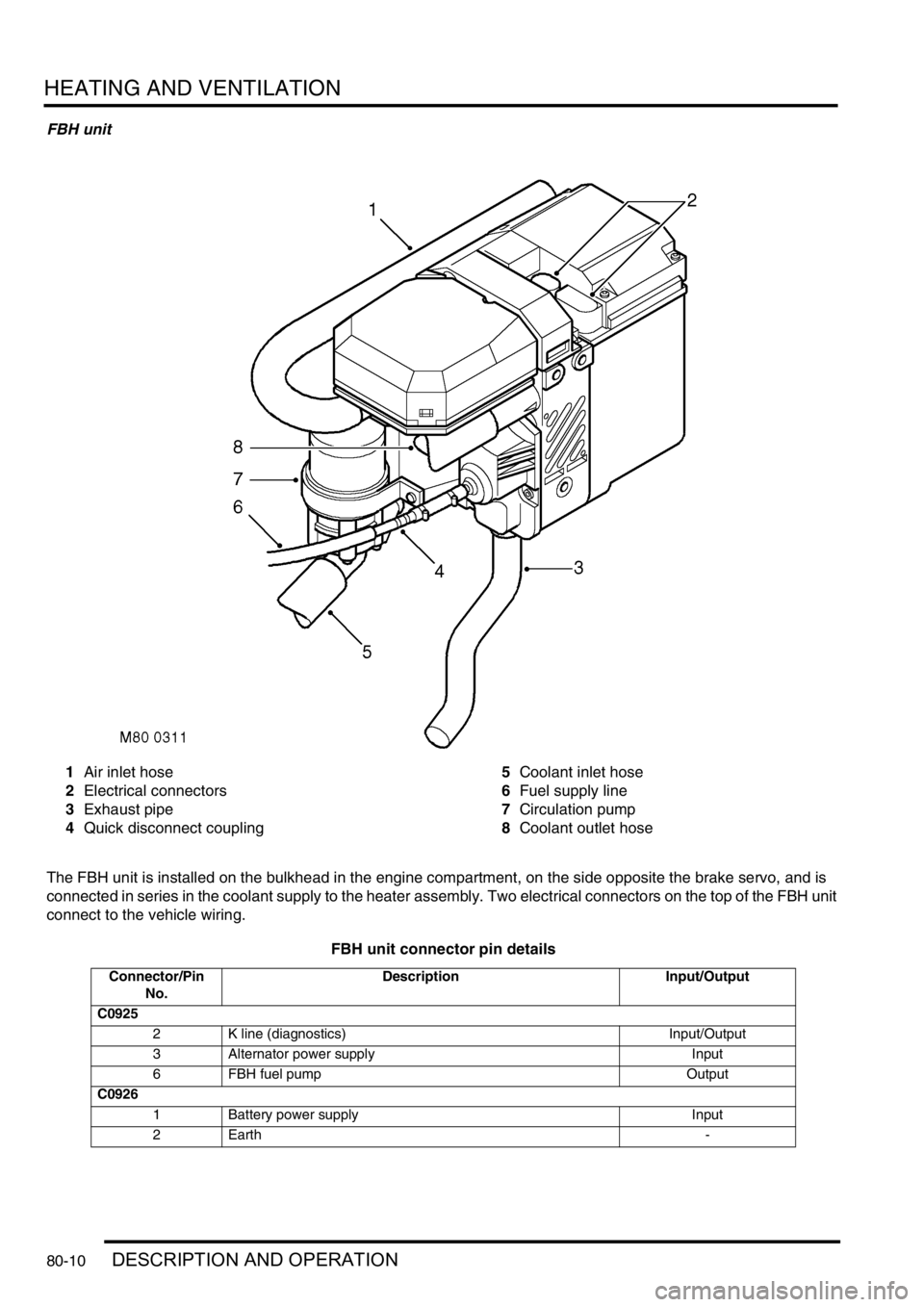
FBH unit
1Air inlet hose
2Electrical connectors
3Exhaust pipe
4Quick disconnect coupling5Coolant inlet hose
6Fuel supply line
7Circulation pump
8Coolant outlet hose
The FBH unit is installed on the bulkhead in the engine compartment, on the side opposite the brake servo, and is
connected in series in the coolant supply to the heater assembly. Two electrical connectors on the top of the FBH unit
connect to the vehicle wiring.
FBH unit connector pin details
Connector/Pin
No.Description Input/Output
C0925
2 K line (diagnostics) Input/Output
3 Alternator power supply Input
6 FBH fuel pump Output
C0926
1 Battery power supply Input
2Earth -
Page 1306 of 1529

BODY CONTROL UNIT
DESCRIPTION AND OPERATION 86-3-19
Operation
For IDM inputs which are also inputs for BCU functions, the delay before the BCU recognises the change in input
status is less than 250 ms. The BCU uses a debounce algorithm to ignore changes in input having a duration less
than 100 ms with the exception of automatic gearbox W, X, Y, Z inputs, which have a debounce period of 33 ms.
Transit mode
To prevent excessive battery drain during transit to overseas markets, the vehicle is placed in a transit mode.
To exit the transit mode, simultaneously hold down the heated rear window switch and the rear fog lamp switch, turn
the ignition switch from 0 to II and, after a minimum of 2 seconds, release the switches.
Transit mode can be entered using TestBook. When TestBook communicates with the BCU for diagnostics related to
BCU operation, it first checks that the vehicle is not in transit mode.
Anti-theft system
The BCU uses the driver's door key lock and unlock switches to activate and deactivate the security system. The
driver's door lock is also used for entering the EKA.
+ ALARM SYSTEM AND HORN, DESCRIPTION AND OPERATION, Description.
Immobilisation
For immobilisation, the BCU disables the starter motor relay. When the engine is cranking, the ECM looks for a coded
signal from the BCU. If the signal is not received within one second of cranking, the fuel supply to the engine is
stopped and the injectors are disabled. This also prevents unburnt fuel from entering the catalyst.
If the BCU is disconnected, the engine starter motor will remain isolated by the starter motor relay and the ECM will
remain immobilised. The main wiring for the system is contained within the main harness which is relatively
inaccessible, so preventing intruders from disabling the system by cutting the wires for the immobilisation system.
Once the immobiliser has been activated, destruction of the trigger device or the wiring to it will not disarm the system.
The RF transmitter communicates to the BCU via the RF receiver using a 70 bit code. Pressing the unlock button on
the transmitter will re-mobilise the vehicle. The RF transponder is integrated into the metal key assembly, inserting
the key into the ignition switch will induce a signal in the exciter coil to re-mobilise the vehicle.
Anti-theft alarm
The alarm system provides a warning of unauthorised access to the vehicle and includes perimetric and volumetric
monitoring under the control of the BCU.
The perimetric protection system detects opening of all doors, tail door and bonnet and will also detect the operation
of the ignition key switch. The following conditions must be satisfied before the BCU will operate all of the functions
of perimetric protection:
lAll doors and hinged panels are in the closed position.
lIgnition key out of the ignition switch.
lInertia switch is not tripped.
If all conditions are not satisfied the BCU will enter a mislock condition.
The volumetric sensor uses two ultrasonic sensors mounted in the headlining to detect movement within the vehicle.
The alarm will trigger when the sensor signals the BCU for 200 ms or greater. Within a single setting period the alarm
system will allow a maximum of 10 triggers as a result of any combination of sensor inputs. It is possible to lock the
vehicle without enabling the volumetric alarm by using the key. The same conditions needed to satisfy enabling of the
perimetric protection system is also needed to enable volumetric protection.
When the alarm system is set the BCU checks the status of all the inputs from the door and bonnet switches to ensure
the integrity of the vehicle before setting the alarm system into operational mode. In some markets, when the alarm
is set the BCU sends a signal to the IDM which will cause the direction indicators to flash three times for a duration of
3 seconds.
If the sensors are triggered the BCU will activate an alarm sounder to provide an audible warning of a theft attempt.
The activation period of the alarm sounder is 25 to 30 seconds. The duty cycle of the alarm sounder is 50:50 ± 10%.
Page 1343 of 1529

ALARM SYSTEM AND HORN
86-4-20 DESCRIPTION AND OPERATION
Super locking
Super locking prevents the use of the interior door handles to unlock and open the vehicle doors. This prevents the
doors from being opened if the window be smashed in an attempt to gain access to the vehicle.
There are four configurations for super locking:
lNo super locking.
lSuper locking on single handset press only (no key activated super locking).
lSuper locking on single handset press or single key turn.
lSuper locking on double handset press or double key turn.
To super lock, press the lock button on the handset once or twice within one second depending on system
configuration. In some configurations, it is also possible to super lock the vehicle using the key in the driver's door.
This also may require one or two turns of the key in the lock direction. If two turns of the key are required to activate
super locking, the two turns must occur within one second of each other.
In order to super lock the vehicle, the following conditions must be met:
lAll door are closed.
lThe ignition is off.
lThe fuel cut-off switch is not tripped.
Partial arming
Partial arming allows protection of as much of the vehicle as possible if the alarm is armed with one or more doors or
the bonnet open.
Partial arming allows the vehicle alarm to be armed even if the following conditions exist. When the bonnet or door is
closed, the BCU activates the perimetric alarm and the volumetric alarm after 15 seconds have elapsed:
lThe bonnet is not closed: If the bonnet is open when the alarm is armed, the BCU activates super locking and
volumetric sensing. In this condition, the alarm enters a partially armed state. All other functions of the alarm are
active and the BCU monitors the bonnet for a change of state. If the bonnet closes, the system is completely
armed.
lThe passenger door, a rear door or the tail door is not closed: If a door is open when the alarm is armed, the BCU
does not activate super locking or volumetric sensing. In this condition the alarm enters a partially armed state.
All other alarm functions are armed and the BCU monitors the open door. If the door closes volumetric sensing
and super locking become active.
lFailure of a door latch switch: If a short circuit in the door latch switch occurs, the BCU presumes the door is not
closed. In this situation the BCU does not activate super locking or volumetric sensing. All other alarm functions
are armed.
lDamaged wiring harness: If a short circuit in the wiring harness for the door latch switch occurs, the BCU
presumes the door is not closed and does not activate super locking or volumetric sensing; all other alarm
functions are armed. If an open circuit in the wiring harness for the door latch switch occurs, the BCU presumes
the door is closed and arms the alarm as normal.
Mislock
Mislock alerts the driver that a failed attempt has been made to lock the vehicle because of the doors or the bonnet
not being fully closed.
There are six audible configurations for mislock:
lNo audible warning.
lAlarm sounder.
lVehicle horn.
lAlarm sounder and vehicle horn.
lBBUS.
lAlarm sounder, vehicle horn and BBUS.
When a failed attempt has been made to lock the vehicle, the audible warning device is switched on for 50 ms and
off for 200 ms. The BCU allows the audible warning device to operate 3 times.
Page 1376 of 1529

IN CAR ENTERTAINMENT
DESCRIPTION AND OPERATION 86-6-9
Inputs and outputs
The radio cassette player receives a mute signal from the telephone system if a call is received, when the call finishes
the mute is removed and the system resumes play. Inputs are also received from the steering wheel control system
(mid line and high line sytems). When the system is turned on, the high line systems radio cassette player:
lsends a 'power on enable' to the power amplifier
lsends an 'enable' signal to the radio headphone amplifiers.
On the high line system the radio cassette player also sends and receives signals from the CD-autochanger and rear
headphone amplifiers (if fitted). On high line systems the radio cassette player sends audio signals to the power
amplifier.
Remote radio steering wheel controls (midline and high line systems)
The remote radio control switch is located on the LH side of the steering wheel and is secured with two screws. The
wiring from the remote radio control switch plugs in to a connector that is part of the steering wheel rotary coupler.
Operation of the remote radio control switches allow the driver to control the ICE without releasing the steering wheel.
Volume, mode and selection functions can be carried out using the steering wheel mounted control switches. Control
inputs from the remote radio control switches are sent to the radio cassette player.
C0098
1 Telephone mute Input
2 Steering wheel remote radio controls Input
3 Steering wheel remote radio controls Output
4 Permanent battery feed Input
5 System enable Output
6 Illumination Input
7 Auxilary feed Input
8 Earth Input
C0921 (high line systems)
1 Radio headphone left channel Output +
2 Radio headphone right channel Output +
3 Telephone audio Input +
4 Radio headphone left channel Output -
5 Radio headphone right channel Output -
6 Telephone audio Input -
C0922 (high line systems)
7 Radio headphone active Input
8 I-BUS communications Input/Output
9 Audio amplifier spatial imaging enable Output
10 Radio headphone LH remote control Input
11 Radio headphone RH remote control Input
12 Headphone remote controls feed Output
C1354 (high line systems)
13 CD-autochanger audio left channel Input +
14 CD-autochanger audio right channel Input +
15 CD-autochanger audio earth Output
16 CD-autochanger audio left channel Input -
17 CD-autochanger audio right channel Input -
18 Not Used
19 CD-autochanger I-BUS communications link Input/Output
20 CD-autochanger permanent feed Output
Page 1383 of 1529

IN CAR ENTERTAINMENT
86-6-16 DESCRIPTION AND OPERATION
Description
General
The DVD entertainment system can be fitted by Land Rover Special Vehicles as an original equipment system on the
Adventurer model or can be supplied as an accessory for fitment by the dealer. The system can be fitted to all
Discovery Series II models.
NOTE: The DVD system cannot be fitted to vehicles fitted with a Visteon single slot CD head unit.
The fitment of the system to vehicles manufactured before 2002 model year requires a different wiring harness and
connector plugs to vehicles from 2002 model year. Full details of components required for specific vehicles is
contained in the DVD System Accessory fitting instructions (Part No. STC 61947/61946).
The system comprises a main wiring harness, a lower wiring harness, CD switch box with integral noise filter, CD
switch harness, remote control handset and an overhead console containing the Liquid Crystal Display (LCD) monitor
and Digital Versatile Disc (DVD) player.
The system can play DVD films and display them on the LCD screen. The DVD audio can be played over the vehicle
audio speaker system or on headphones connected directly to the overhead console. The system can also function
as a second CD player. Rear seat occupants can listen to a CD in the overhead console via headphones, whilst the
remaining vehicle occupants can listen to CD's played from the CD autochanger in the normal way.
Page 1384 of 1529

IN CAR ENTERTAINMENT
DESCRIPTION AND OPERATION 86-6-17
Overhead Console Unit
1Headphone jack
2Headphone jack
3Audio select button
4Play/Pause button
5Stop/Eject button
6Infra-red LED
7Status LED8CD/DVD slot
9Audio In – Right
10Audio In – Left
11Video In
12Headphone jack
13LCD monitor
The overhead console unit is attached to a bracket which in turn is attached to a roof cross-member, to the rear of the
front sunroof. The cross-member is drilled and fitted with three captive nuts. The bracket is secured to the cross-
member with three Torx screws and provides the attachment support for the overhead console unit. The unit is
secured to the bracket with two screws located underneath the screen and two further screws which are located
beneath the button and plug trim panels.
The overhead console unit is connected to the main DVD wiring harness by a short link lead which has a connector
at each end. The main wiring harness is routed across the roof, above the headlining, to the top of the right hand 'B'
post and is then routed along the roof panel and descends down the 'A' post, behind the trim panel, to the CD switch
box next to the passenger compartment fusebox.
Page 1460 of 1529

NAVIGATION SYSTEM
DESCRIPTION AND OPERATION 87-7
Calibration
Calibration is required after initial installation or replacement of the navigation computer. It may also be necessary
after repairs to system wiring and if route navigation becomes inaccurate or fails to operate. If the navigation computer
contains an existing calibration, this must be deleted, using the garage menu, prior to running the new calibration
routine. The sensor inputs should also be checked before running the calibration routine.
Sensor Check
1Call up the SENSORS screen on the LCD:
lIf the navigation CD-ROM has not been installed before, press and hold multifunction button 1 then press
multifunction button 10.
lIf the navigation CD-ROM has been installed before, use the garage menu as detailed above.
2Drive the vehicle forwards a short distance at a speed greater than 2.5 mph (4 km/h) and ensure the road speed
counter on the SENSORS screen starts to increment.
3Select reverse gear and ensure the direction arrows on the SENSORS screen point rearwards.
4Ensure the GPS data on the SENSORS screen is displayed and updated.
NOTE: The GPS data will randomly display a GPS MODULE FAILURE message. This is not a fault condition, and
no action need be taken, provided the GPS data switches between the GPS MODULE FAILURE message and
actual GPS data.
5Exit the SENSORS screen:
lIf the navigation CD-ROM has not been installed before, press and hold multifunction button 1 then press
multifunction button 10.
lIf the navigation CD-ROM has been installed before, press the Nav button.