earth LAND ROVER DISCOVERY 2002 Workshop Manual
[x] Cancel search | Manufacturer: LAND ROVER, Model Year: 2002, Model line: DISCOVERY, Model: LAND ROVER DISCOVERY 2002Pages: 1672, PDF Size: 46.1 MB
Page 1589 of 1672
HARNESSES
86-7-18 REPAIRS
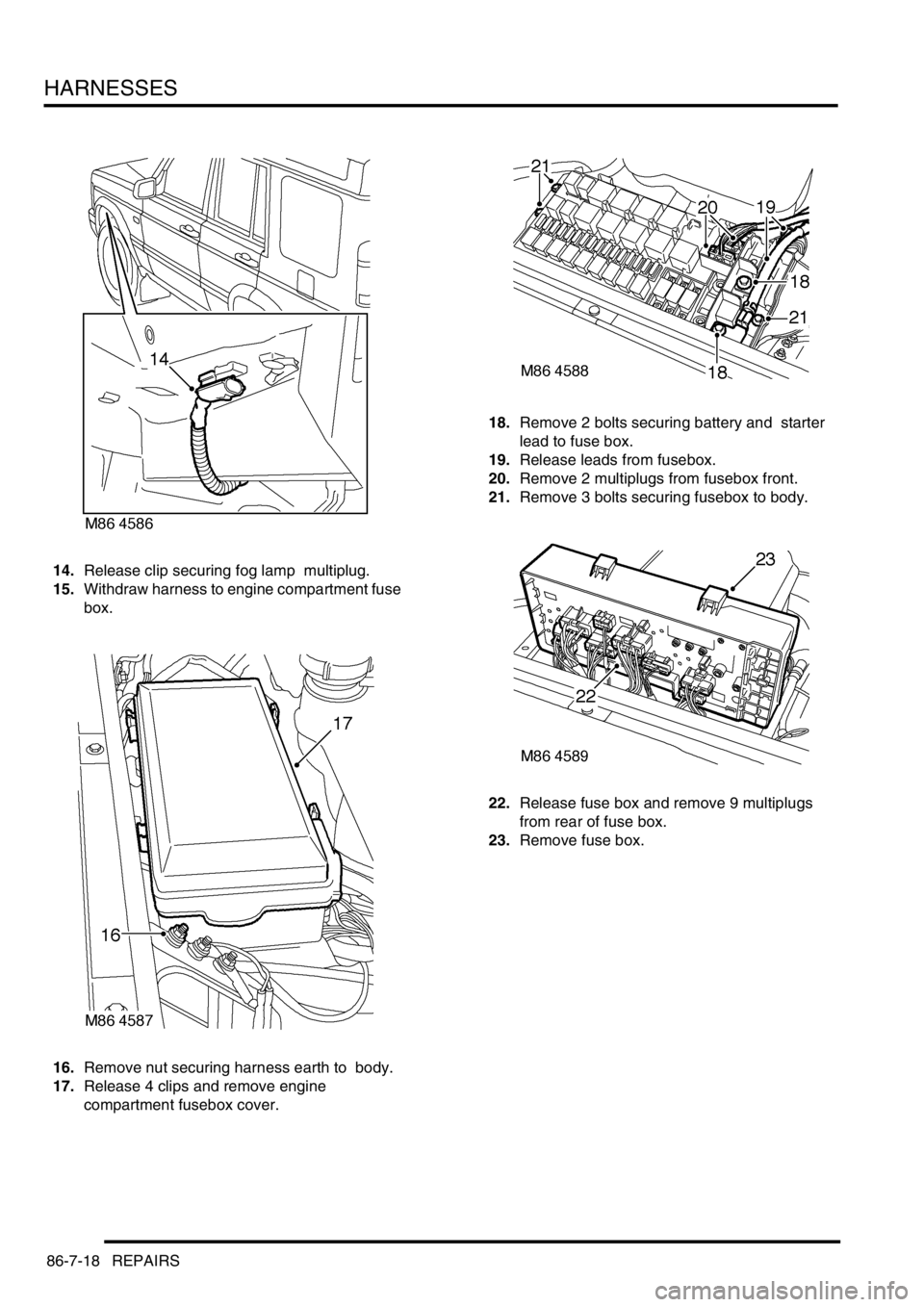
14.Release clip securing fog lamp multiplug.
15.Withdraw harness to engine compartment fuse
box.
16.Remove nut securing harness earth to body.
17.Release 4 clips and remove engine
compartment fusebox cover. 18.Remove 2 bolts securing battery and starter
lead to fuse box.
19.Release leads from fusebox.
20.Remove 2 multiplugs from fusebox front.
21.Remove 3 bolts securing fusebox to body.
22.Release fuse box and remove 9 multiplugs
from rear of fuse box.
23.Remove fuse box.
Page 1591 of 1672

HARNESSES
86-7-20 REPAIRS
34.Release multiplug from ACE accelerometer.
35.Remove 3 cable tie clips from body and
withdraw harness to bulkhead.
36.Disconnect multiplug from LH horn.
37.Remove LH indicator lamp.
+ LIGHTING, REPAIRS, Lamp - front
repeater. 38.Disconnect multiplugs from headlamp and
sidelamp.
39.Disconnect headlamp level multiplug from
headlamp levelling motor.
40.Release earth header behind headlamp.
41.Disconnect multiplug from front of washer
reservoir.
42.Release clip securing fog lamp multiplug.
Page 1592 of 1672
HARNESSES
REPAIRS 86-7-21
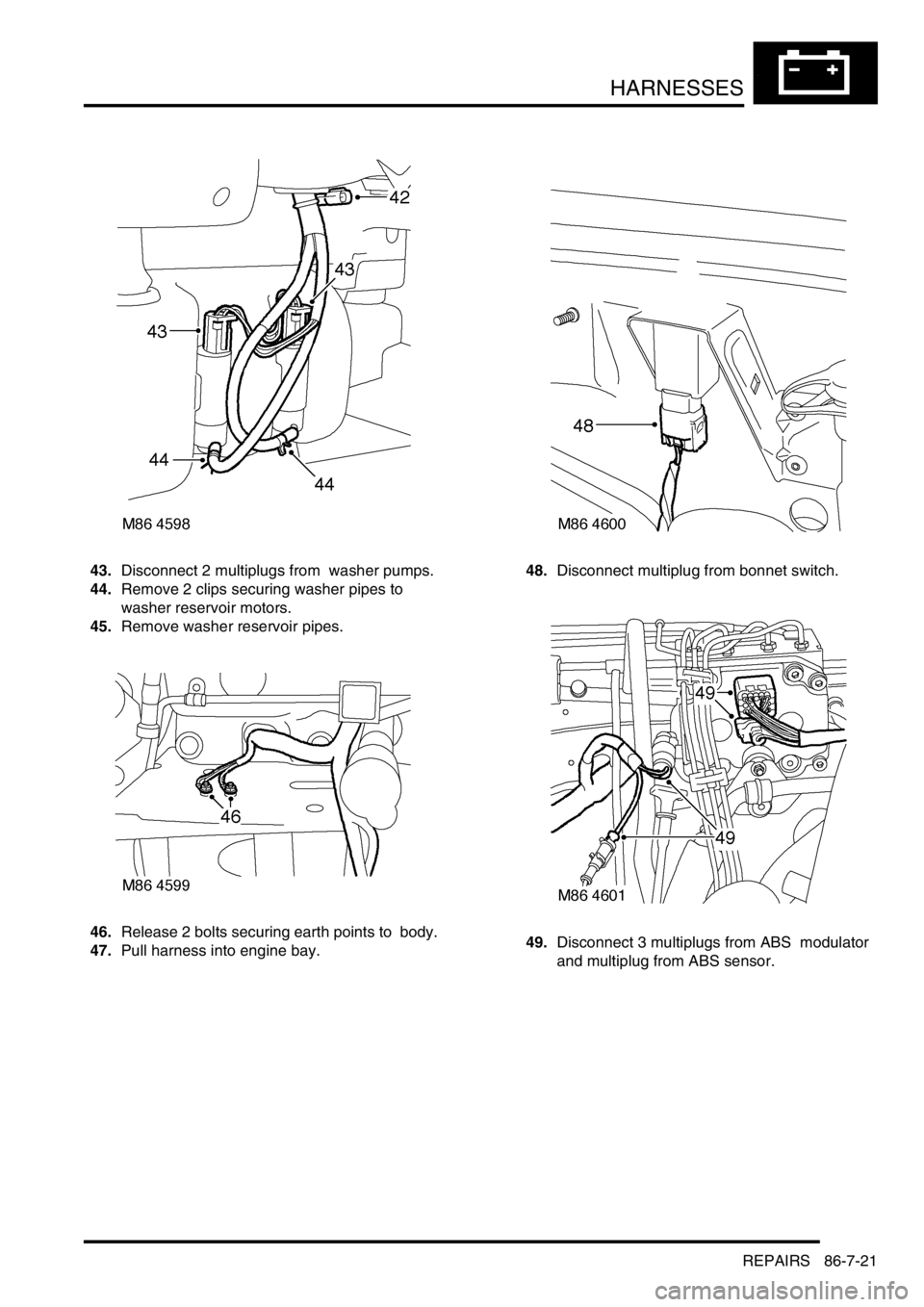
43.Disconnect 2 multiplugs from washer pumps.
44.Remove 2 clips securing washer pipes to
washer reservoir motors.
45.Remove washer reservoir pipes.
46.Release 2 bolts securing earth points to body.
47.Pull harness into engine bay. 48.Disconnect multiplug from bonnet switch.
49.Disconnect 3 multiplugs from ABS modulator
and multiplug from ABS sensor.
Page 1594 of 1672
HARNESSES
REPAIRS 86-7-23
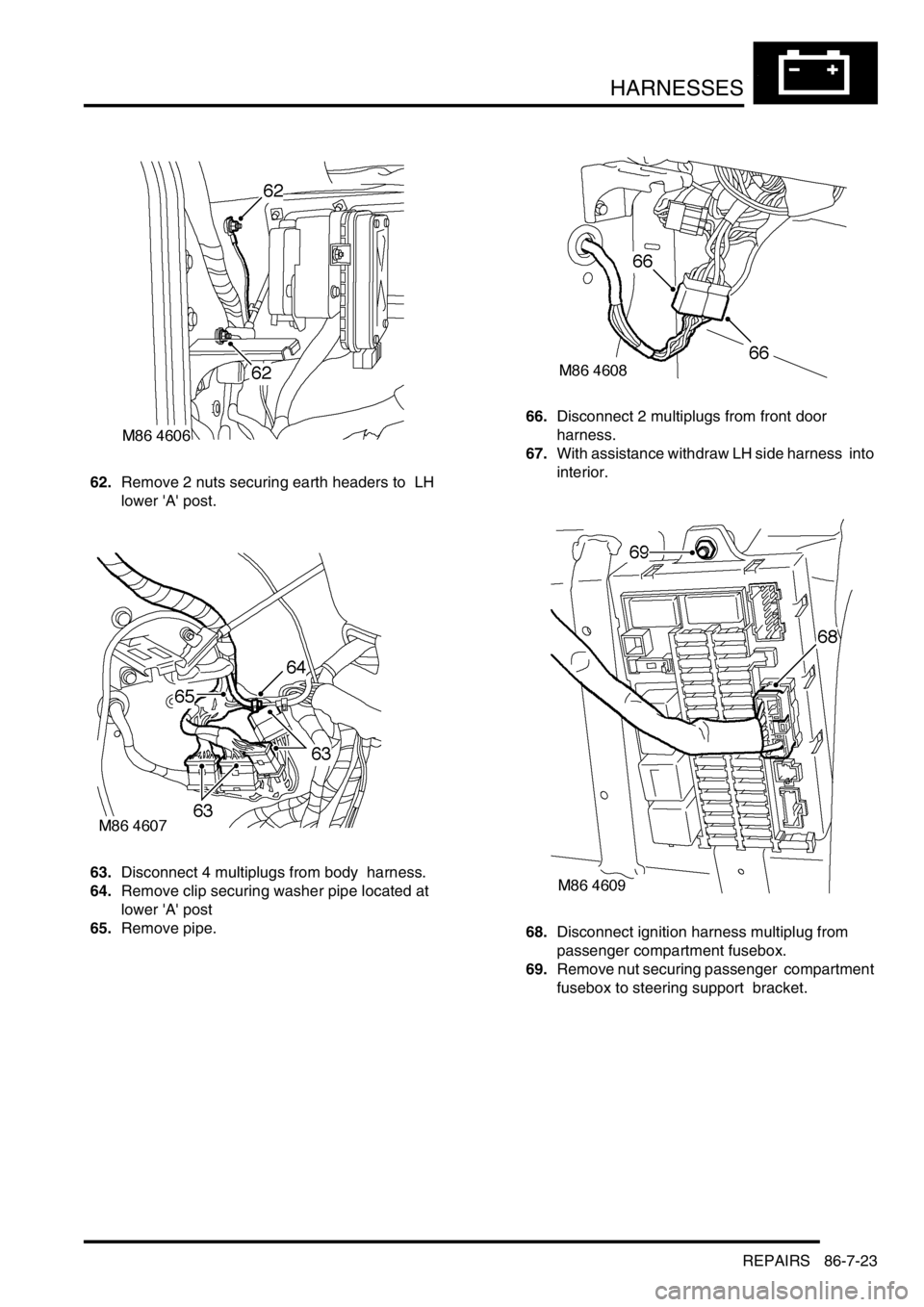
62.Remove 2 nuts securing earth headers to LH
lower 'A' post.
63.Disconnect 4 multiplugs from body harness.
64.Remove clip securing washer pipe located at
lower 'A' post
65.Remove pipe.66.Disconnect 2 multiplugs from front door
harness.
67.With assistance withdraw LH side harness into
interior.
68.Disconnect ignition harness multiplug from
passenger compartment fusebox.
69.Remove nut securing passenger compartment
fusebox to steering support bracket.
Page 1596 of 1672
HARNESSES
REPAIRS 86-7-25
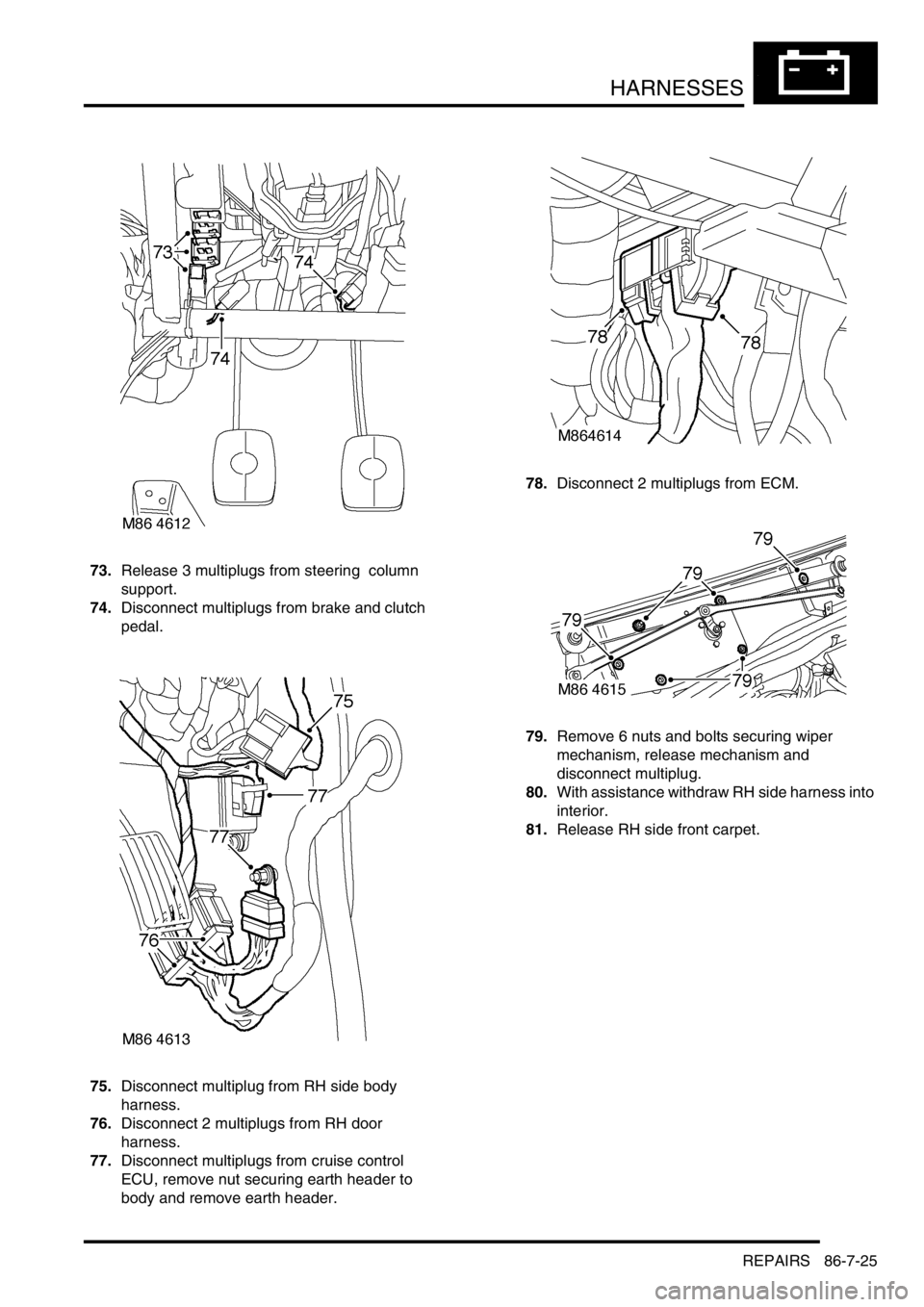
73.Release 3 multiplugs from steering column
support.
74.Disconnect multiplugs from brake and clutch
pedal.
75.Disconnect multiplug from RH side body
harness.
76.Disconnect 2 multiplugs from RH door
harness.
77.Disconnect multiplugs from cruise control
ECU, remove nut securing earth header to
body and remove earth header. 78.Disconnect 2 multiplugs from ECM.
79.Remove 6 nuts and bolts securing wiper
mechanism, release mechanism and
disconnect multiplug.
80.With assistance withdraw RH side harness into
interior.
81.Release RH side front carpet.
Page 1597 of 1672
HARNESSES
86-7-26 REPAIRS
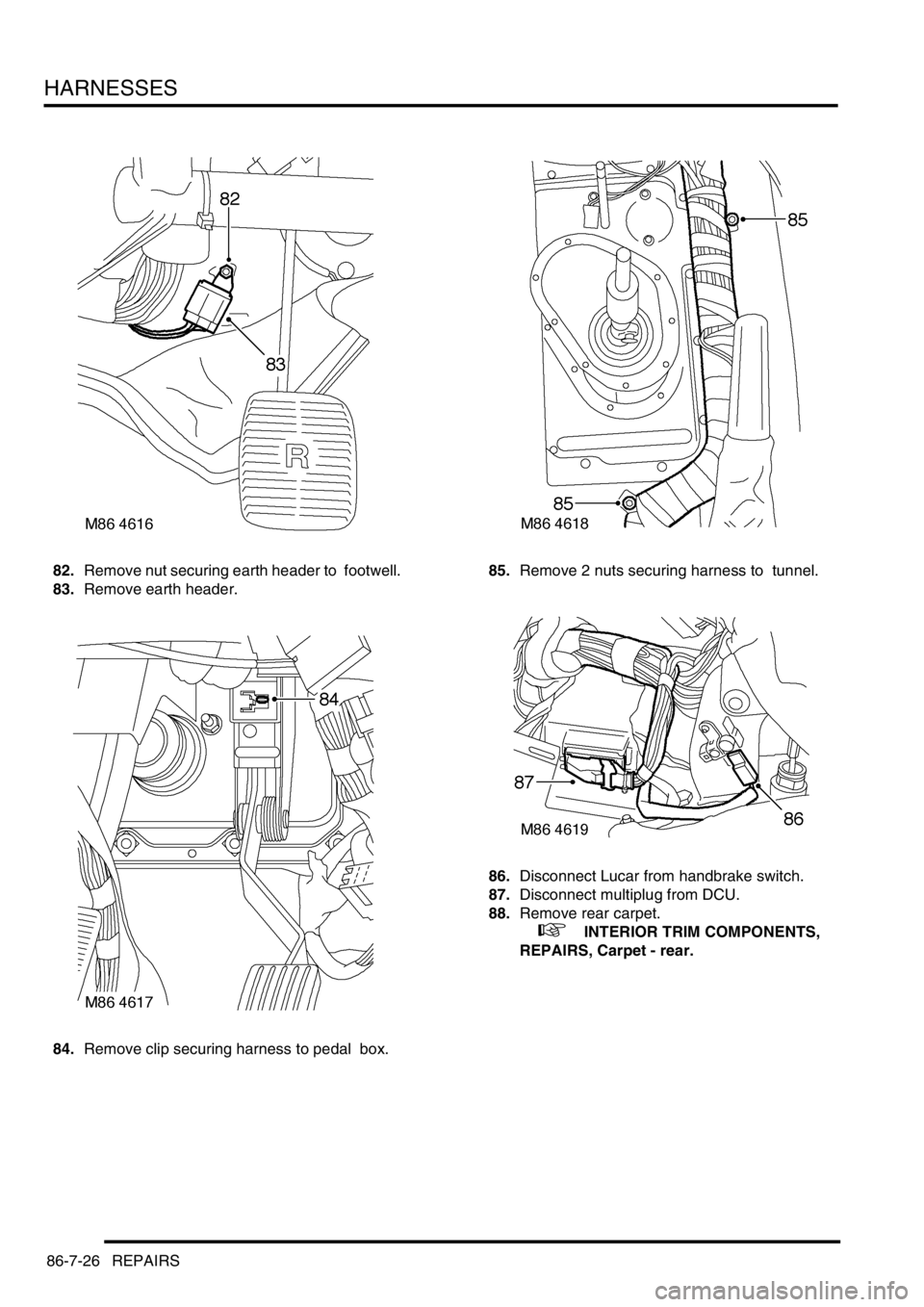
82.Remove nut securing earth header to footwell.
83.Remove earth header.
84.Remove clip securing harness to pedal box. 85.Remove 2 nuts securing harness to tunnel.
86.Disconnect Lucar from handbrake switch.
87.Disconnect multiplug from DCU.
88.Remove rear carpet.
+ INTERIOR TRIM COMPONENTS,
REPAIRS, Carpet - rear.
Page 1598 of 1672
HARNESSES
REPAIRS 86-7-27
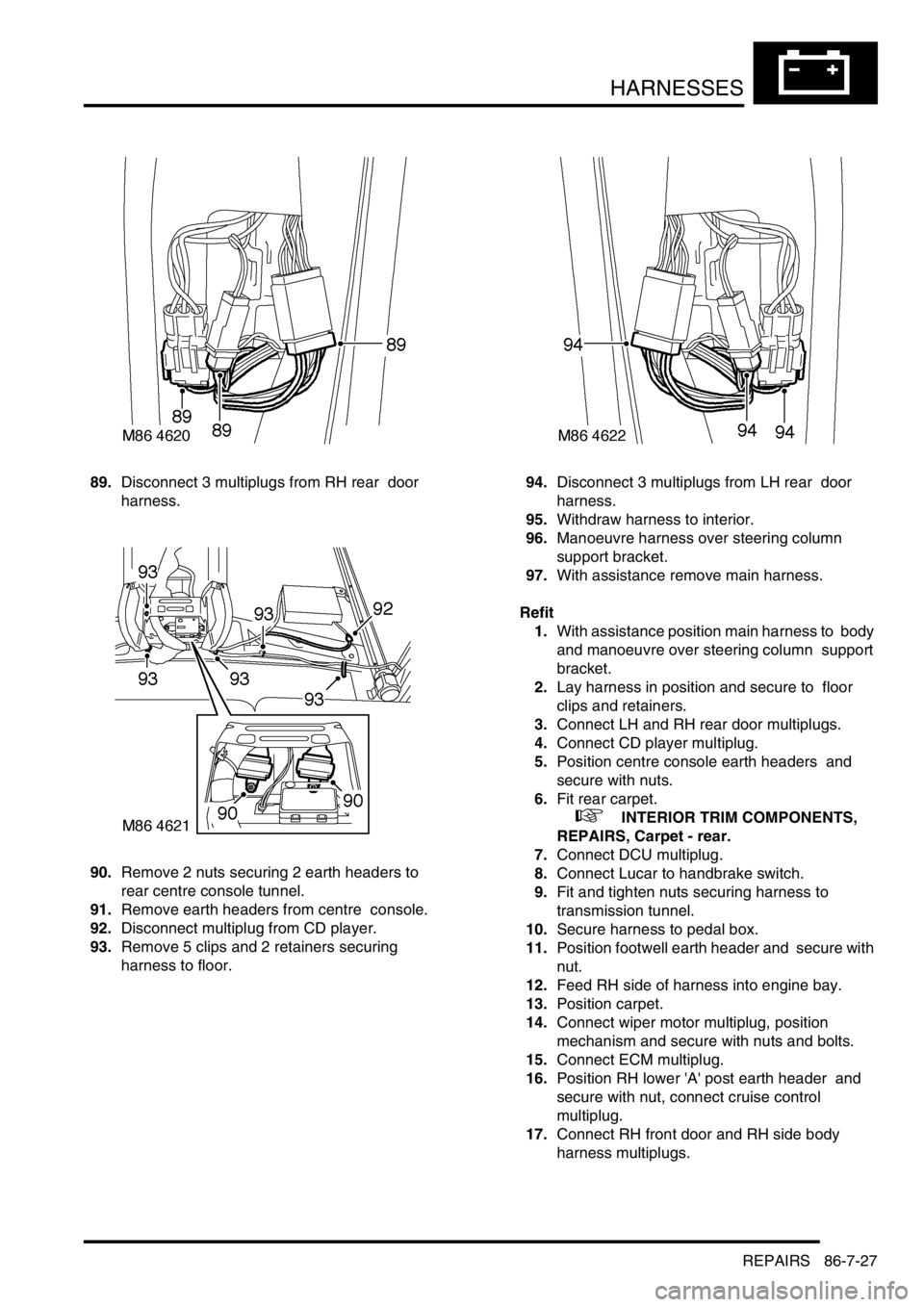
89.Disconnect 3 multiplugs from RH rear door
harness.
90.Remove 2 nuts securing 2 earth headers to
rear centre console tunnel.
91.Remove earth headers from centre console.
92.Disconnect multiplug from CD player.
93.Remove 5 clips and 2 retainers securing
harness to floor. 94.Disconnect 3 multiplugs from LH rear door
harness.
95.Withdraw harness to interior.
96.Manoeuvre harness over steering column
support bracket.
97.With assistance remove main harness.
Refit
1.With assistance position main harness to body
and manoeuvre over steering column support
bracket.
2.Lay harness in position and secure to floor
clips and retainers.
3.Connect LH and RH rear door multiplugs.
4.Connect CD player multiplug.
5.Position centre console earth headers and
secure with nuts.
6.Fit rear carpet.
+ INTERIOR TRIM COMPONENTS,
REPAIRS, Carpet - rear.
7.Connect DCU multiplug.
8.Connect Lucar to handbrake switch.
9.Fit and tighten nuts securing harness to
transmission tunnel.
10.Secure harness to pedal box.
11.Position footwell earth header and secure with
nut.
12.Feed RH side of harness into engine bay.
13.Position carpet.
14.Connect wiper motor multiplug, position
mechanism and secure with nuts and bolts.
15.Connect ECM multiplug.
16.Position RH lower 'A' post earth header and
secure with nut, connect cruise control
multiplug.
17.Connect RH front door and RH side body
harness multiplugs.
Page 1599 of 1672

HARNESSES
86-7-28 REPAIRS
18.Secure multiplugs to steering column support
bracket and connect brake and clutch pedal
multiplugs.
19.Connect multiplugs to column switch and
passive coil.
20.Position passenger compartment fusebox,
connect multiplugs, fit fusebox to fascia and
secure with nut.
21.Connect ignition switch multiplug to fuse box.
22.With assistance feed LH side of harness into
engine bay.
23.Connect multiplugs to front door harness and
body harness.
24.Position earth headers to LH lower 'A' post and
secure with nuts.
25.Connect multiplugs to ECU pack.
26.Position harness in engine bay.
27.Connect and secure heated front screen
multiplugs.
28.Fit plenum molding.
+ HEATING AND VENTILATION,
REPAIRS, Plenum Air Intake.
29.Connect multiplugs to ABS sensor and fuel
cut-off switch.
30.Using draw string feed harness through inner
wing, remove draw string, connect repeater
lamp multiplug and fit lamp.
31.Connect multiplugs to ABS modulator.
32.Feed harness through to front panel.
33.Position body earth leads and secure with
bolts.
34.Connect washer reservoir multiplugs and
pipes, secure pipes with clips.
35.Secure fog lamp multiplug.
36.Secure earth header behind headlamp.
37.Connect multiplugs to headlamp level motor,
headlamp and side lamp.
38.Fit indicator lamp
+ LIGHTING, REPAIRS, Lamp - front
repeater.
39.Connect multiplug to LH horn.
40.Feed harness to ACE accelerometer, connect
multiplug and secure with cable ties.
41.Connect cruise control, ABS sensor and brake
fluid level switch multiplugs.
42.Connect engine harness multiplug and feed
harness along RH wing to fuse box.
43.Using draw string pull harness through inner
wing, remove draw string, connect repeater
lamp multiplug and fit lamp. 44.Connect chassis harness multiplugs.
45.Position engine bay fuse box and connect
multiplugs, fit fuse box and secure with screws.
46.Connect multiplugs to front of fuse box.
47.Position battery and starter cables and secure
with screws.
48.Fit fuse box cover.
49.Position earth lead and secure with nut.
50.Feed harness through to front panel.
51.Secure fog lamp multiplug.
52.Connect headlamp level motor, headlamp and
side lamp multiplugs.
53.Fit indicator lamp.
+ LIGHTING, REPAIRS, Lamp - front
repeater.
54.Secure harness to RH front panel.
55.Connect cooling fan and horn multiplug.
56.Secure harness to lower support rail.
57.Connect receiver drier and air temperature
sensor multiplugs.
58.Fit front bumper.
+ EXTERIOR FITTINGS, REPAIRS,
Bumper assembly - front.
59.Fit battery tray.
60.Fit air filter assembly.
+ ENGINE MANAGEMENT SYSTEM -
V8, REPAIRS, Air cleaner assembly.
61.Position both lower 'A' post trims and secure
with studs.
62.Fit heater assembly.
+ HEATING AND VENTILATION,
REPAIRS, Heater assembly - models with
air conditioning.
+ HEATING AND VENTILATION,
REPAIRS, Heater assembly - models
without air conditioning.
Page 1617 of 1672

NAVIGATION SYSTEM
87-2 DESCRIPTION AND OPERATION
Description
General
The navigation system provides audio and visual route guidance to help the driver reach a selected destination. The
system is an optional fit consisting of a Traffic Pro navigation computer and antenna, manufactured by Harman/
Becker Automotive Systems, which are fitted in place of the In Car Entertainment (ICE) head unit and antenna.
Compact Disc (CD) and radio functions are incorporated into the navigation computer.
The navigation system allows the driver to choose between the shortest and fastest routes between the vehicle's
current position and a selected destination, and to select a stopover point in the journey and a route that avoids
motorways, ferries and toll roads. Directions to Points Of Interest (POI) e.g. airports, hospitals, petrol stations etc,
either local, national or in another country, can also be selected. A traffic jam function enables the driver to request
diversion instructions, around an obstructed part of the selected route, during the journey. A Traffic Management
Control (TMC) function, currently only available in some European countries, monitors traffic broadcasts and
automatically selects an alternative route during the journey if the original route is effected by a traffic jam, accident
or road works etc.
The position of the vehicle is determined by the navigation computer using a combination of vehicle sensor inputs and
radio signals from the 24 Global Positioning System (GPS) satellites orbiting the earth. The position of the vehicle is
then plotted on a digitised map, loaded into the navigation computer from a CD-ROM, to determine the journey route
and provide the route guidance.
The GPS satellite signals are used for initial determination of the vehicle's position and periodic position updates. The
vehicle sensor inputs are used to monitor the vehicle's direction of travel and distance travelled between position
updates from the GPS satellite signals. The vehicle sensor inputs consist of:
lA vehicle speed signal from the ABS ECU, to monitor the distance travelled and for automatic volume control.
lA reverse gear signal from the selector and inhibitor switch of the automatic gearbox, or reverse gear switch of
the manual gearbox, to enable the navigation computer to differentiate between forward and rearward movement
of the vehicle.
lA gyro in the navigation computer, to monitor changes of direction, i.e. steering inputs.
The signal from each GPS satellite contains information about satellite position, almanac data and time (almanac data
is the current status of the satellite). Signals from between five and 11 of the GPS satellites can be received at a given
point on the earth's surface at any one time. The number and quality of separate GPS satellite signals received also
varies with vehicle location. In hilly or tree lined areas, built up areas with tall buildings, multi-storey car parks,
garages, tunnels, bridges and during heavy rain/thunderstorms, signal reception of some or all of the GPS satellites
will be poor or non existent.
A minimum of three separate GPS satellite signals are required for the navigation computer to calculate a three
dimensional (3D) positional fix. When only two signals are being received, the navigation computer will calculate a
less accurate two dimensional (2D) positional fix. The more widely dispersed that the GPS satellites are, the more
accurate the positional fix. The navigation computer can store information from a maximum of 12 GPS satellites at
any one time. When more than three signals are stored, the navigation computer selects the three most widely
dispersed signals for the position calculation.
GPS Antenna and diplexer unit
The GPS antenna is installed at the rear of the roof on the centreline. A diplexer unit on the underside of the GPS
antenna amplifies the radio signals received from the GPS satellites and transmits them through separate dedicated
co-axial cable to the navigation computer for processing.
Page 1634 of 1672

INSTRUMENTS
DESCRIPTION AND OPERATION 88-7
LCD odometer/trip meter
The LCD has 3 different display elements:
lOdometer.
lTrip meter.
lSelected gear (on vehicles with automatic gearboxes).
The odometer displays units in either miles or kilometres. It has a range from 0 to 999,999 units, only full units are
displayed irrespective of the type of units selected, the display will stop at 999,999 units. TestBook can be used to
reset the odometer. This is allowed only once and must be carried out before 150 miles (240 km) from new, after this
distance the feature is disabled. The odometer may lose up to one km (0.6 miles) when the battery is reconnected,
this is due to the software incorporated into the instrument pack to prevent anyone tampering with the odometer
reading.
The trip meter displays units in either miles or kilometres and has a range of 0.0 to 999.9 units. The display rolls over
from 999.9 to 0.0 units. Units down to one tenth of a mile or one tenth of a kilometre are displayed. The trip meter
displays 0.0 when the battery is reconnected or charged from a discharged state.
A push button located next to the LCD is utilised to reset the trip meter to zero and to change the units from miles to
kilometres. Pressing the button for less than 2 seconds allows the display to reset to zero. Pressing the button for
more than 2 seconds changes the units from miles to kilometres and vice versa. The units will only change for UK,
NAS and Canadian market vehicles.
The selected gear displays when the automatic gearbox is in park, reverse, neutral, drive 3,2,1, by using the letters
or numbers PRND321 in the display.
The data input for the LCD odometer/trip meter is from the SLABS ECU for the distance input and from the BCU for
the gear position. The instrument pack provides the earth path to illuminate the gear position warning lamp.
If a replacement instrument pack is required TestBook must be used to retrieve the odometer reading, so that when
the new instrument pack is fitted the odometer reading can be programmed in.