key LAND ROVER FRELANDER 2 2006 Owners Manual
[x] Cancel search | Manufacturer: LAND ROVER, Model Year: 2006, Model line: FRELANDER 2, Model: LAND ROVER FRELANDER 2 2006Pages: 3229, PDF Size: 78.5 MB
Page 2975 of 3229
255
Telephone
R
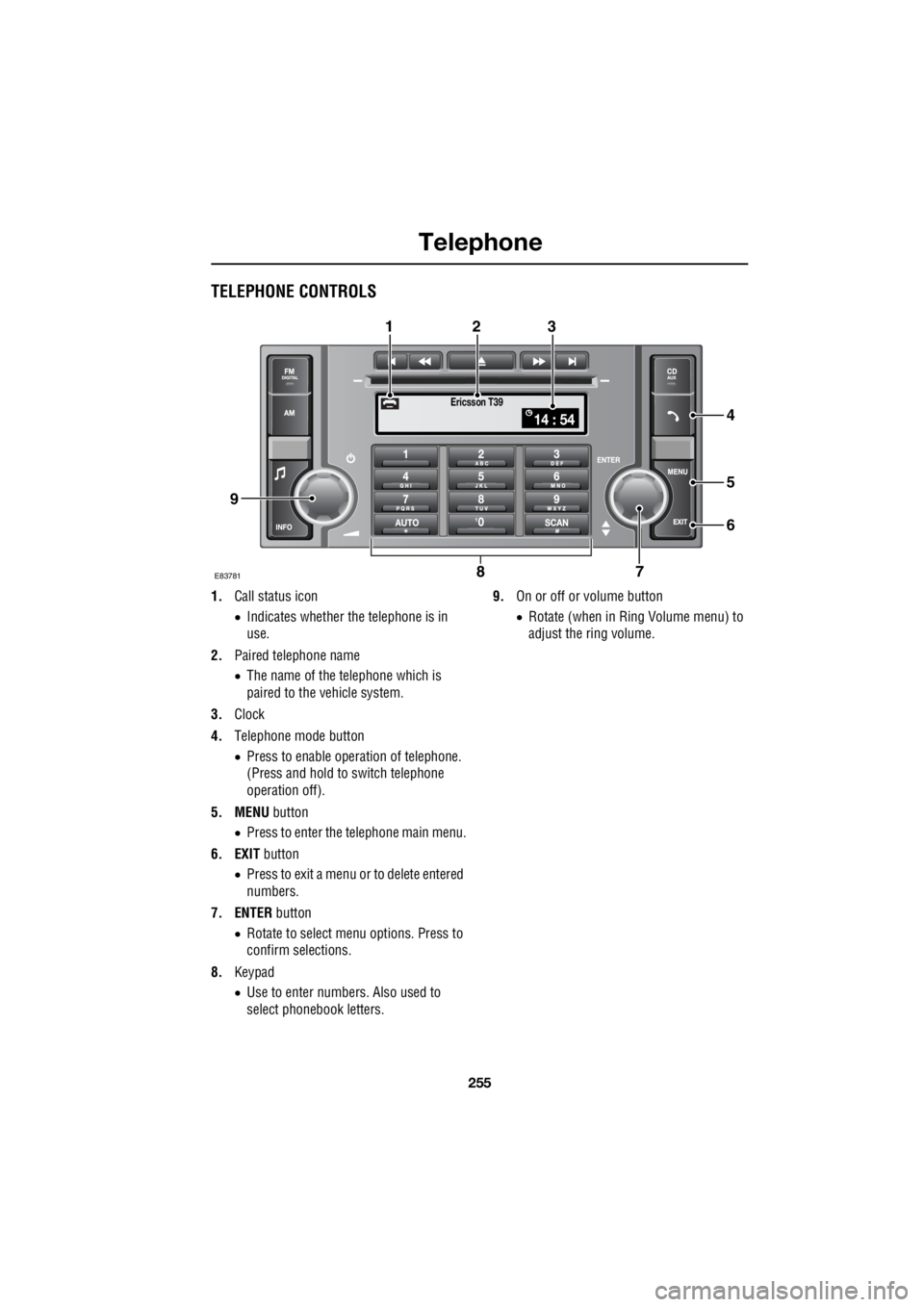
TELEPHONE CONTROLS
1. Call status icon
• Indicates whether the telephone is in
use.
2. Paired telephone name
• The name of the telephone which is
paired to the vehicle system.
3. Clock
4. Telephone mode button
• Press to enable opera tion of telephone.
(Press and hold to switch telephone
operation off).
5. MENU button
• Press to enter the telephone main menu.
6. EXIT button
• Press to exit a menu or to delete entered
numbers.
7. ENTER button
• Rotate to select me nu options. Press to
confirm selections.
8. Keypad
• Use to enter numbers. Also used to
select phonebook letters. 9.
On or off or volume button
• Rotate (when in Ring Volume menu) to
adjust the ring volume.
Ericsson T39
14 : 54
E837817
5
6
4
8
123
9
Page 2979 of 3229
259
Telephone
R
Note: When viewing received calls, do not
rotate the volume button as this will result in
your highlighted selection returning to the first
entry in the list, irrespective of your previously
highlighted position.
Dialled calls
The audio unit display will list the numbers of
the last 10 calls which ha ve been dialled. These
are displayed in chronological order, with the
last number dialled fi rst and highlighted.
Note: Some mobile telephones reverse the
dialled call list, which re sults in the last dialled
call number being at the bottom of the list,
rather than the top.
The dialled calls list can also be accessed by
pressing the ENTER button, when telephone
mode is selected.
Rotate the ENTER button to select the number.
Then to dial the number, press ENTER again, or
operate the answer call switch on the steering
wheel.
If there are no entries, an empty list is shown,
press EXIT to return to the phone view.
Note: When viewing dialled calls, do not press
the volume button as this will take you back to
the radio or CD.
Phone settings
Select Call options from the Phone Settings
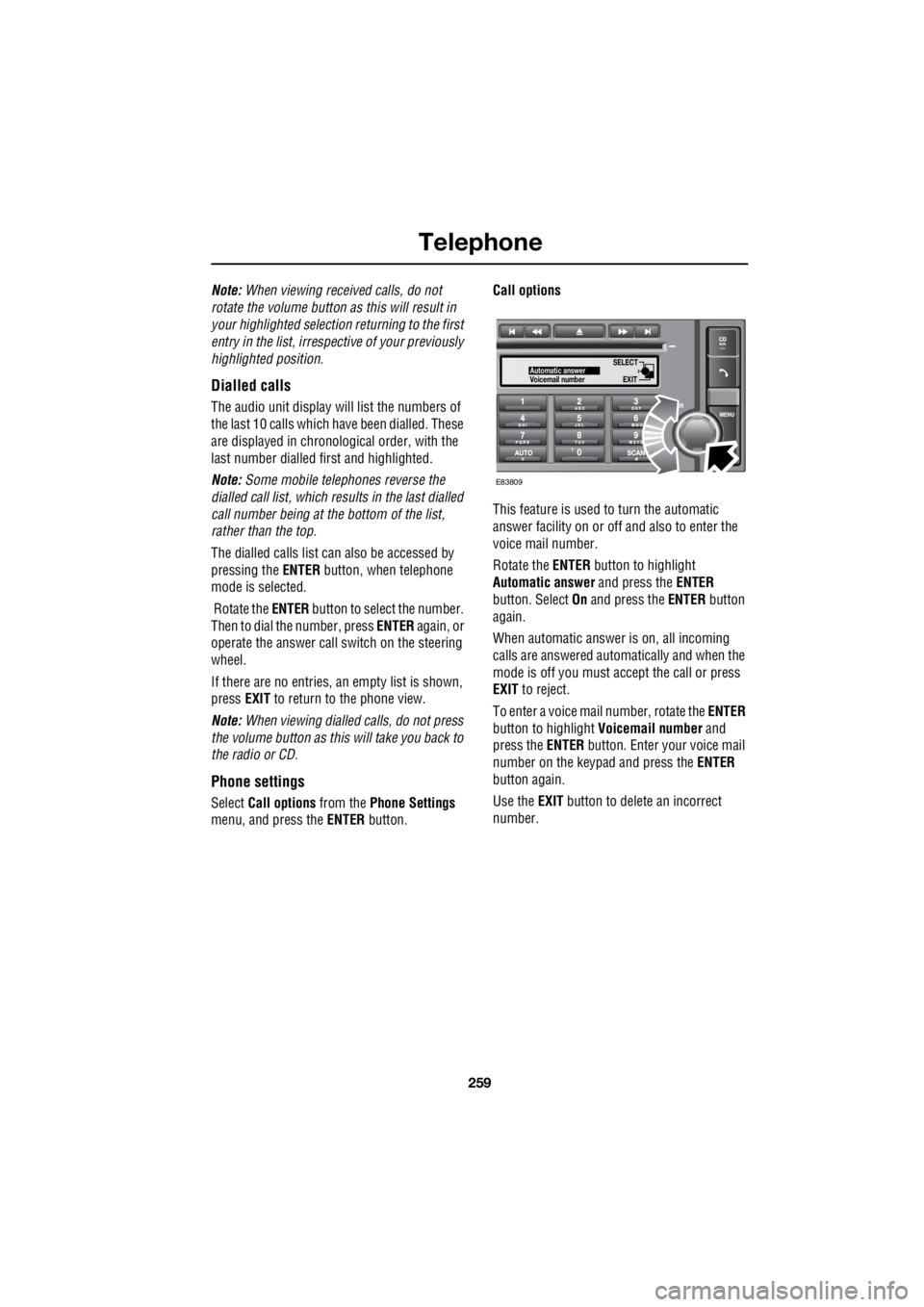
menu, and press the ENTER button. Call options
This feature is used to turn the automatic
answer facility on or off and also to enter the
voice mail number.
Rotate the ENTER button to highlight
Automatic answer and press the ENTER
button. Select On and press the ENTER button
again.
When automatic answer is on, all incoming
calls are answered automatically and when the
mode is off you must ac cept the call or press
EXIT to reject.
To enter a voice mail number, rotate the ENTER
button to highlight Voicemail number and
press the ENTER button. Enter your voice mail
number on the keypad and press the ENTER
button again.
Use the EXIT button to delete an incorrect
number.
SELECT
EXITAutomatic answer
Voicemail number
E83809
Page 2982 of 3229
Telephone
262
L
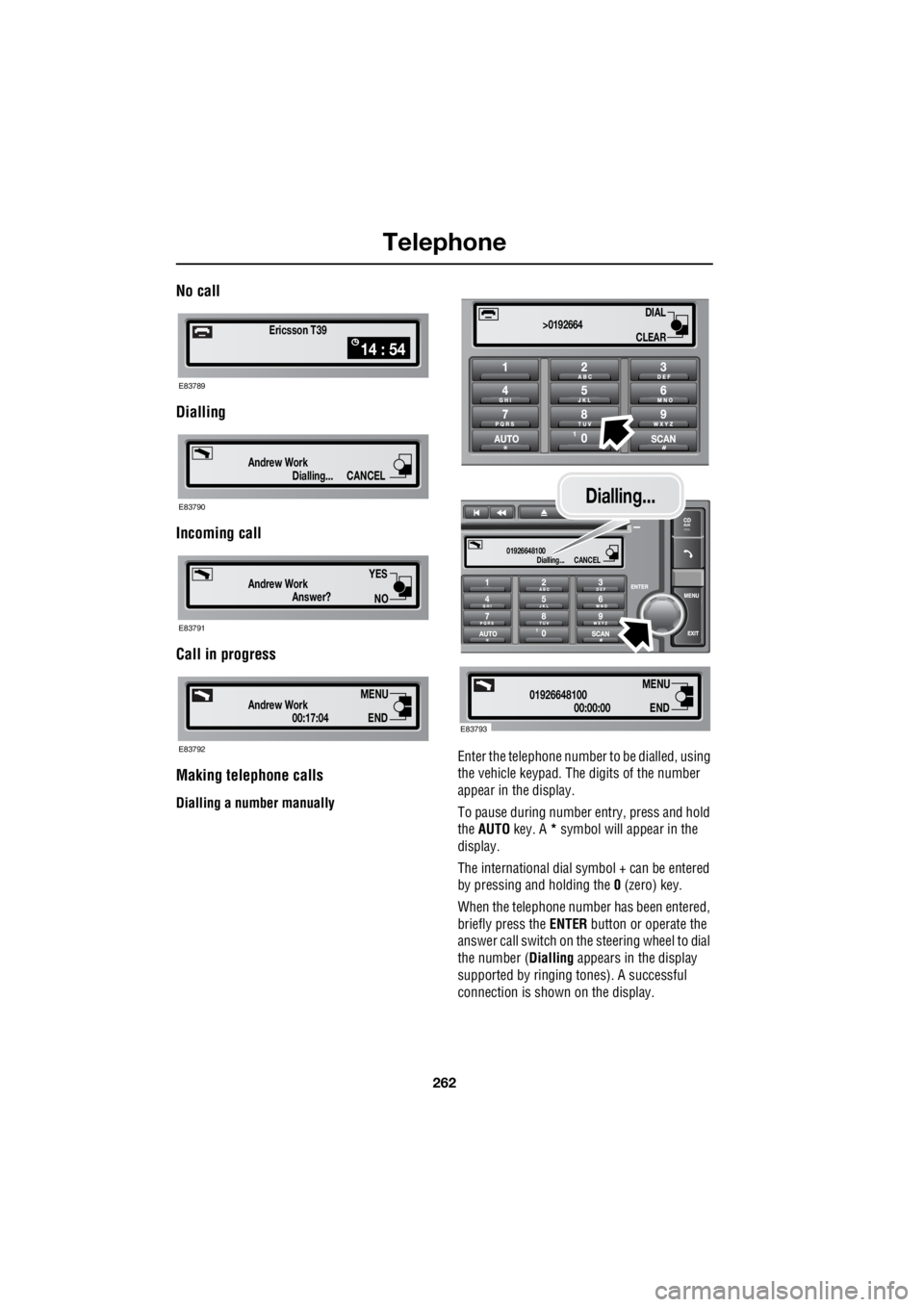
No call
Dialling
Incoming call
Call in progress
Making telephone calls
Dialling a number manually Enter the telephone number
to be dialled, using
the vehicle keypad. The digits of the number
appear in the display.
To pause during number entry, press and hold
the AUTO key. A * symbol will appear in the
display.
The international dial symbol + can be entered
by pressing and holding the 0 (zero) key.
When the telephone numbe r has been entered,
briefly press the ENTER button or operate the
answer call switch on the steering wheel to dial
the number ( Dialling appears in the display
supported by ringing tones). A successful
connection is shown on the display.
Ericsson T39
14 : 54
E83789
Dialling...
Andrew WorkCANCEL
E83790
Answer?
Andrew Work
YES
NO
E83791
00:17:04
Andrew WorkEND
MENU
E83792
DIAL
CLEAR
>0192664
Dialling...
01926648100CANCEL
00:00:00
01926648100END
MENU
E83793
Dialling...
Page 2983 of 3229
263
Telephone
R
Note: To cancel a call at any time, press the
EXIT button or operate the end call button on
the steering wheel.
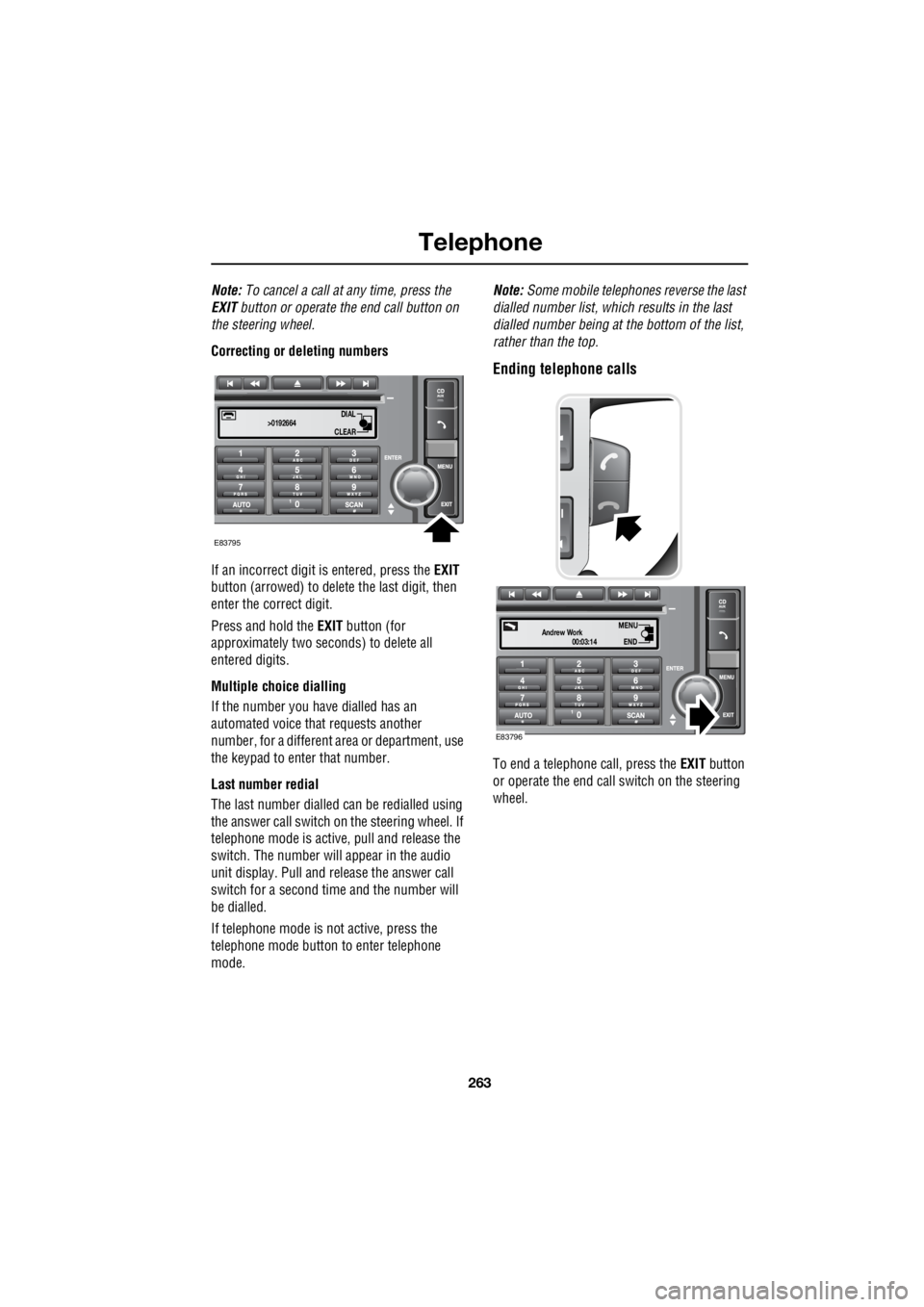
Correcting or deleting numbers
If an incorrect digit is entered, press the EXIT
button (arrowed) to delete the last digit, then
enter the correct digit.
Press and hold the EXIT button (for
approximately two sec onds) to delete all
entered digits.
Multiple choice dialling
If the number you have dialled has an
automated voice that requests another
number, for a different area or department, use
the keypad to enter that number.
Last number redial
The last number dialled can be redialled using
the answer call switch on the steering wheel. If
telephone mode is active , pull and release the
switch. The number will appear in the audio
unit display. Pull and release the answer call
switch for a second time and the number will
be dialled.
If telephone mode is not active, press the
telephone mode button to enter telephone
mode. Note:
Some mobile telephone s reverse the last
dialled number list, whic h results in the last
dialled number being at the bottom of the list,
rather than the top.
Ending telephone calls
To end a telephone call, press the EXIT button
or operate the end call switch on the steering
wheel.
DIAL
CLEAR
>0192664
E83795
00:03:14
Andrew WorkEND
MENU
E83796
Page 2986 of 3229
Telephone
266
L
Voice mail
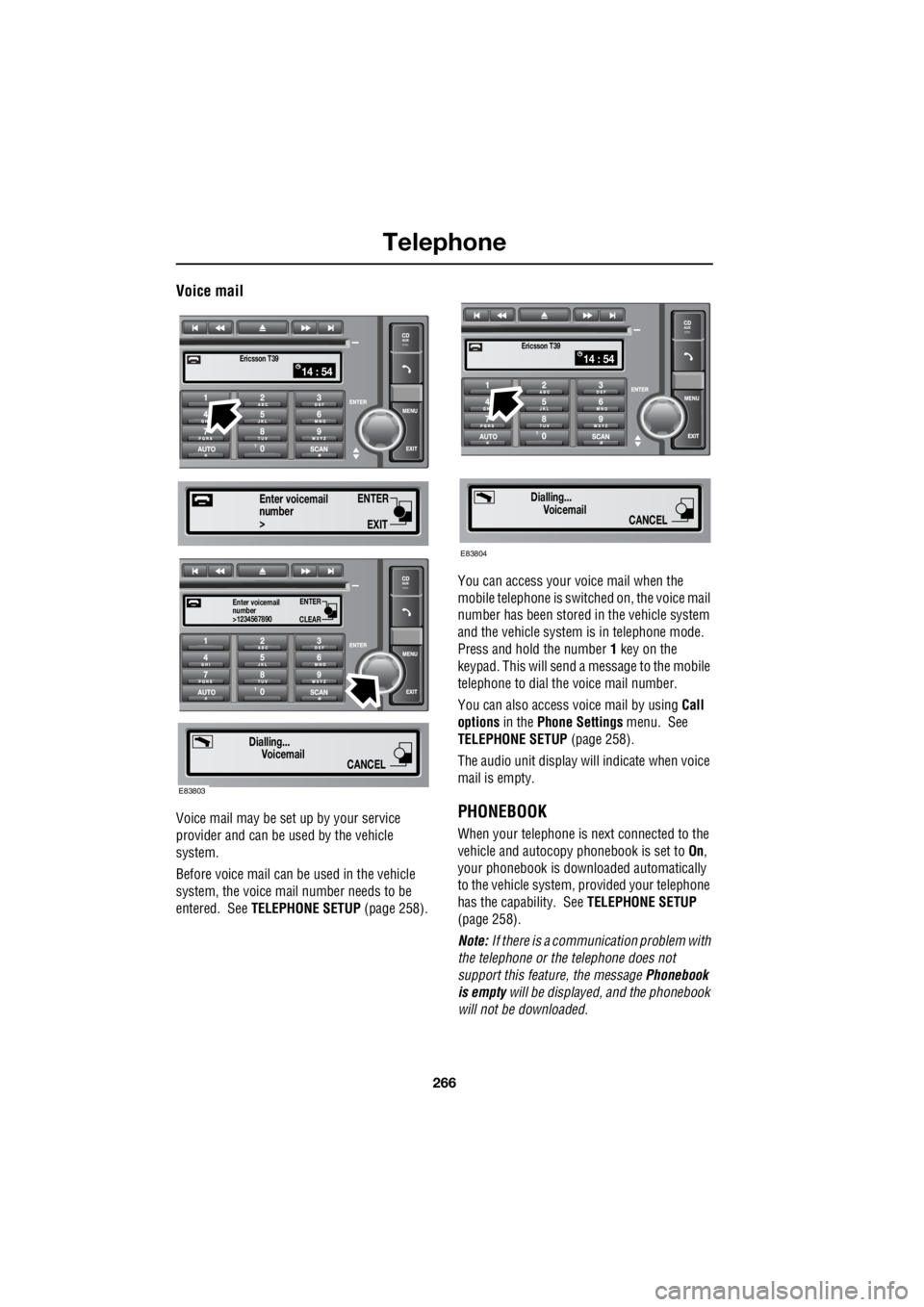
Voice mail may be set up by your service
provider and can be used by the vehicle
system.
Before voice mail can be used in the vehicle
system, the voice mail number needs to be
entered. See TELEPHONE SETUP (page 258). You can access your voice mail when the
mobile telephone is swit ched on, the voice mail
number has been stored in the vehicle system
and the vehicle system is in telephone mode.
Press and hold the number 1 key on the
keypad. This will send a message to the mobile
telephone to dial the voice mail number.
You can also access voice mail by using Call
options in the Phone Settings menu. See
TELEPHONE SETUP (page 258).
The audio unit display wi ll indicate when voice
mail is empty.PHONEBOOK
When your telephone is next connected to the
vehicle and autocopy phonebook is set to On,
your phonebook is downloaded automatically
to the vehicle system, provided your telephone
has the capability. See TELEPHONE SETUP
(page 258).
Note: If there is a communication problem with
the telephone or the telephone does not
support this feature, the message Phonebook
is empty will be displayed, and the phonebook
will not be downloaded.
14 : 54Ericsson T39
ENTER
EXIT
number>
Enter voicemail
ENTER
CLEAR
number>1234567890
Enter voicemail
Dialling...
Voicemail
CANCEL
E83803
14 : 54Ericsson T39
Dialling...Voicemail
CANCEL
E83804
Page 2988 of 3229
Telephone
268
L
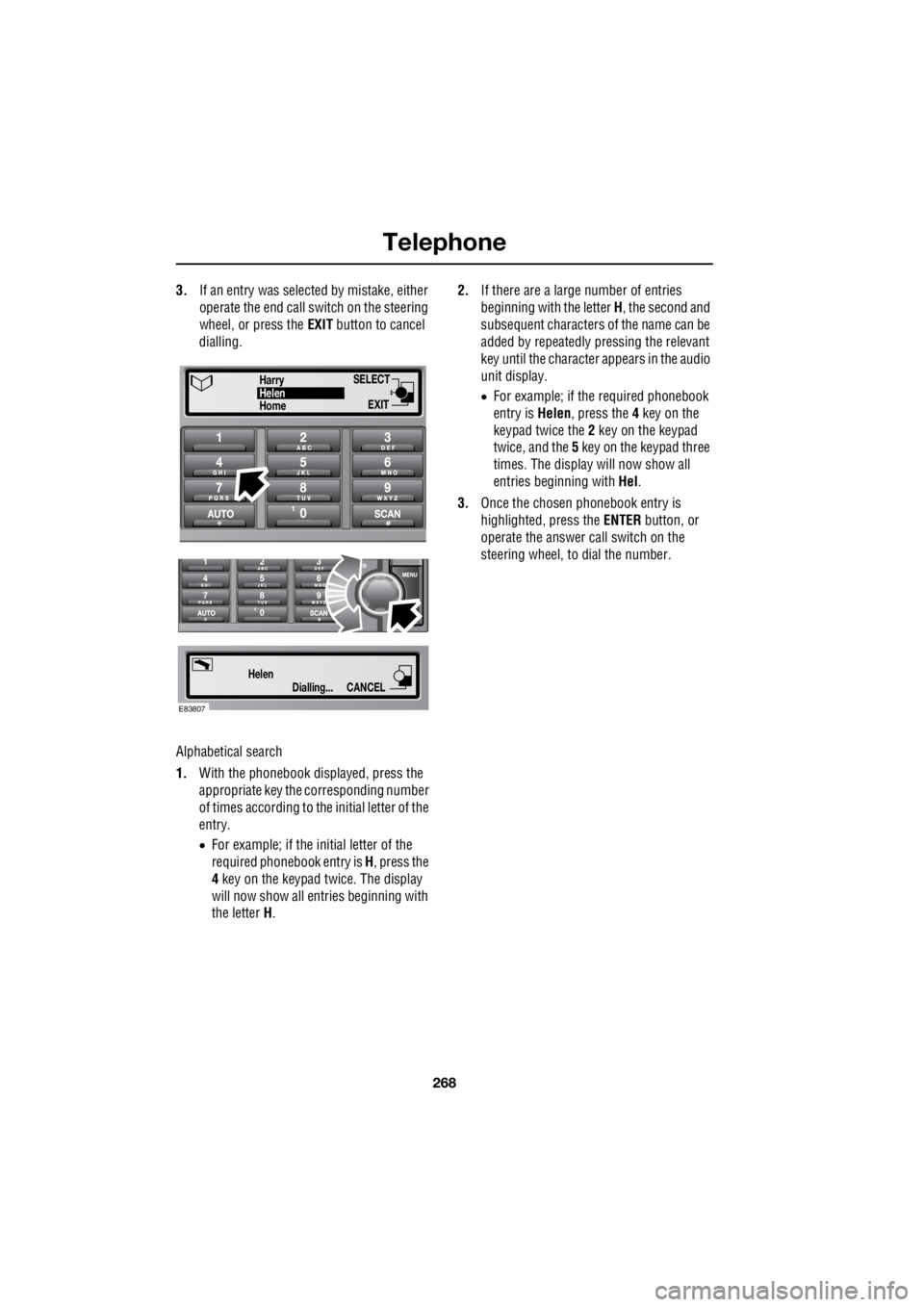
3. If an entry was selected by mistake, either
operate the end call switch on the steering
wheel, or press the EXIT button to cancel
dialling.
Alphabetical search
1. With the phonebook displayed, press the
appropriate key the corresponding number
of times according to th e initial letter of the
entry.
• For example; if the initial letter of the
required phonebook entry is H, press the
4 key on the keypad twice. The display
will now show all entries beginning with
the letter H. 2.
If there are a large number of entries
beginning with the letter H, the second and
subsequent characters of the name can be
added by repeatedly pressing the relevant
key until the character appears in the audio
unit display.
• For example; if the required phonebook
entry is Helen, press the 4 key on the
keypad twice the 2 key on the keypad
twice, and the 5 key on the keypad three
times. The display will now show all
entries beginning with Hel.
3. Once the chosen phonebook entry is
highlighted, press the ENTER button, or
operate the answer call switch on the
steering wheel, to dial the number.
Dialling...
HelenCANCEL
SELECT
EXITHomeHelen
Harry
E83807
Page 2989 of 3229
269
Telephone
R
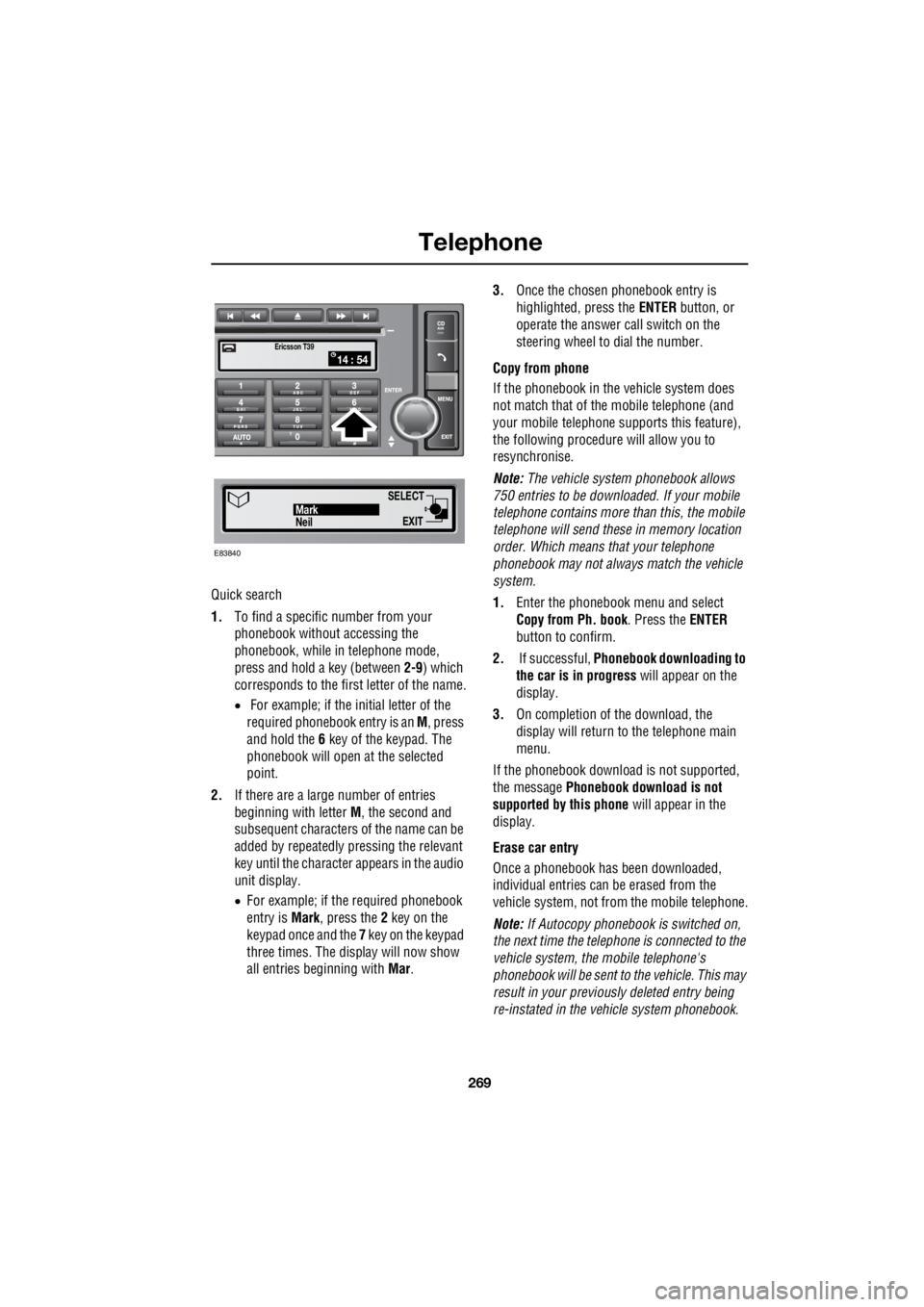
Quick search
1. To find a specific number from your
phonebook without accessing the
phonebook, while in telephone mode,
press and hold a key (between 2-9) which
corresponds to the first letter of the name.
• For example; if the initial letter of the
required phonebook entry is an M, press
and hold the 6 key of the keypad. The
phonebook will open at the selected
point.
2. If there are a large number of entries
beginning with letter M, the second and
subsequent characters of the name can be
added by repeatedly pressing the relevant
key until the character appears in the audio
unit display.
• For example; if the required phonebook
entry is Mark, press the 2 key on the
keypad once and the 7 key on the keypad
three times. The display will now show
all entries beginning with Mar. 3.
Once the chosen phonebook entry is
highlighted, press the ENTER button, or
operate the answer call switch on the
steering wheel to dial the number.
Copy from phone
If the phonebook in th e vehicle system does
not match that of th e mobile telephone (and
your mobile telephone s upports this feature),
the following procedure will allow you to
resynchronise.
Note: The vehicle system phonebook allows
750 entries to be downloa ded. If your mobile
telephone contains more than this, the mobile
telephone will send these in memory location
order. Which means that your telephone
phonebook may not always match the vehicle
system.
1. Enter the phonebook menu and select
Copy from Ph. book . Press the ENTER
button to confirm.
2. If successful, Phonebook downloading to
the car is in progress will appear on the
display.
3. On completion of the download, the
display will return to the telephone main
menu.
If the phonebook download is not supported,
the message Phonebook download is not
supported by this phone will appear in the
display.
Erase car entry
Once a phonebook has been downloaded,
individual entries can be erased from the
vehicle system, not from the mobile telephone.
Note: If Autocopy phonebook is switched on,
the next time the telephone is connected to the
vehicle system , the mobile telephone's
phonebook will be sent to the vehicle. This may
result in your previous ly deleted entry being
re-instated in the vehicle system phonebook.
14 : 54Ericsson T39
SELECT
EXITNeilMark
E83840
Page 2994 of 3229

Index
274
L
Heated seats . . . . . . . . . . . . . . . . . . . . . . . 53
Heated windows and mirrors. . . . . . . . . . 104
Hill descent control . . . . . . . . . . . . . . . . . 137
Hill descent control (HDC)
Principle of operation . . . . . . . . . . . . . 136
Hints on driving with ABS . . . . . . . . . . . . 123
ABS and off-road driving. . . . . . . . . . . 124
ABS warning indicator . . . . . . . . . . . . 123
Electronic Brake Distribution (EBD) . . 124
Emergency Brake Assist (EBA) . . . . . . 124
I
Information messages . . . . . . . . . . . . . . . . 99 Main message centre . . . . . . . . . . . . . . 99
Messages . . . . . . . . . . . . . . . . . . . . . . 100
Inspecting safety system components . . 206
Instrument panel overview . . . . . . . . . . . . 97 Instrument panel . . . . . . . . . . . . . . . . . . 97
Interior lamps . . . . . . . . . . . . . . . . . . . . . . 76
Interior mirror . . . . . . . . . . . . . . . . . . . . . . 96 Auto dimming . . . . . . . . . . . . . . . . . . . . 96
Manual dimming . . . . . . . . . . . . . . . . . . 96
ISOFIX anchor points . . . . . . . . . . . . . . . . 67 Installing an ISOFIX child seat . . . . . . . 68
Tether anchorages . . . . . . . . . . . . . . . . 68
J
Jump starting . . . . . . . . . . . . . . . . . . . . . 173
K
Keys . . . . . . . . . . . . . . . . . . . . . . . . . . . . . 40
L
Lashing points . . . . . . . . . . . . . . . . . . . . . 208
Front . . . . . . . . . . . . . . . . . . . . . . . . . . 208
Rear . . . . . . . . . . . . . . . . . . . . . . . . . . 208
Levelling . . . . . . . . . . . . . . . . . . . . . . . . . 151
Lighting control . . . . . . . . . . . . . . . . . . . . . 72 Headlamp courtesy delay . . . . . . . . . . . 72
Main beam . . . . . . . . . . . . . . . . . . . . . . 72
Main switch panel . . . . . . . . . . . . . . . . . 72
Load carrying General information . . . . . . . . . . . . . . 147
Loading compact discs . . . . . . . . . . . . . . 245 Load all . . . . . . . . . . . . . . . . . . . . . . . . 245
Loading a CD - Single disc player . . . . 245
Loading a CD - Six disc player . . . . . . 245 Locking and unlocking . . . . . . . . . . . . . . . . 44
Drive-away locking . . . . . . . . . . . . . . . . . 44
Locking and unlocking from inside the vehicle . . . . . . . . . . . . . . . . . . . . . . . . 44
Mis-lock . . . . . . . . . . . . . . . . . . . . . . . . . 44
Luggage anchor points . . . . . . . . . . . . . . . 148
Reversible floor . . . . . . . . . . . . . . . . . . 148
Luggage covers . . . . . . . . . . . . . . . . . . . . 149 Fitting the luggage cover . . . . . . . . . . . 149
Operating the luggage cover. . . . . . . . . 149
M
Maintenance General information . . . . . . . . . . . . . . . 157
Technical specifications . . . . . . . . . . . . 169
Manual climate control . . . . . . . . . . . . . . . 102
Controls . . . . . . . . . . . . . . . . . . . . . . . . 102
Manual seats. . . . . . . . . . . . . . . . . . . . . . . . 48
Manual transmission . . . . . . . . . . . . . . . . 118
Mirrors . . . . . . . . . . . . . . . . . . . . . . . . . . . 104
MP3 file playback . . . . . . . . . . . . . . . . . . . 249
N
News broadcasts . . . . . . . . . . . . . . . . . . . 230 News station preference . . . . . . . . . . . . 230
O
Oil check . . . . . . . . . . . . . . . . . . . . . . . . . . 162
On or off control . . . . . . . . . . . . . . . . . . . . 223
Opening and closing the bonnet . . . . . . . . 160
Closing the bonnet . . . . . . . . . . . . . . . . 160
Opening the bonnet . . . . . . . . . . . . . . . 160
P
Parking aid . . . . . . . . . . . . . . . . . . . . . . . . 127 Principle of operation . . . . . . . . . . . . . . 126
Parking brake . . . . . . . . . . . . . . . . . . . . . . 124
Applying the parking brake . . . . . . . . . . 125
Parking on a slope . . . . . . . . . . . . . . . . 124
Releasing the parking brake . . . . . . . . . 125
Phonebook . . . . . . . . . . . . . . . . . . . . . . . . 266 Phonebook menu . . . . . . . . . . . . . . . . . 267
Power steering fluid check . . . . . . . . . . . . 166
Checking the fluid level. . . . . . . . . . . . . 166
Topping up the fluid . . . . . . . . . . . . . . . 167
Page 2997 of 3229

Index
277
R
Track selection . . . . . . . . . . . . . . . . . . . . 246
Traction control . . . . . . . . . . . . . . . . . . . . 139
Traffic information control . . . . . . . . . . . 226 Traffic Programme (TP) preference . . 227
Transmission Technical specifications . . . . . . . . . . . 122
Transporting the vehicle . . . . . . . . . . . . . 208
Trip computer . . . . . . . . . . . . . . . . . . . . . . 99
Type approvals . . . . . . . . . . . . . . . . . . . . 215
Declarations of conformity . . . . . . . . . 215
Tyre care . . . . . . . . . . . . . . . . . . . . . . . . . 177 Age degradation . . . . . . . . . . . . . . . . . 178
Directional tyres . . . . . . . . . . . . . . . . . 180
Flat spots . . . . . . . . . . . . . . . . . . . . . . 182
Pressure compensation for ambient
temperature changes . . . . . . . . . . . 182
Punctured tyres . . . . . . . . . . . . . . . . . 178
Replacement tyres . . . . . . . . . . . . . . . 179
Tyre checks. . . . . . . . . . . . . . . . . . . . . 179
Tyre pressures . . . . . . . . . . . . . . . . . . 180
Tyre wear . . . . . . . . . . . . . . . . . . . . . . 178
Tyre glossary. . . . . . . . . . . . . . . . . . . . . . 193 Terms used . . . . . . . . . . . . . . . . . . . . . 193
Tyre repair kit . . . . . . . . . . . . . . . . . . . . . 187
Checking the tyre pressure after a repair . . 191
Land Rover tyre repair kit . . . . . . . . . . 189
Land Rover tyre repair kit safety information 188
Using the Land Rover tyre repair kit . . 190
U
Using booster cables. . . . . . . . . . . . . . . . 173 Disconnecting the cables . . . . . . . . . . 173
Using cruise control . . . . . . . . . . . . . . . . 130 Engaging cruise control . . . . . . . . . . . 130
Increasing the cruise speed . . . . . . . . 131
Reducing the cruise speed . . . . . . . . . 130
Suspending cruise control . . . . . . . . . 130
Using HDC. . . . . . . . . . . . . . . . . . . . . . . . 137
HDC operation . . . . . . . . . . . . . . . . . . 137
Selecting HDC . . . . . . . . . . . . . . . . . . . 137
Warning messages . . . . . . . . . . . . . . . 138
Using seat belts during pregnancy . . . . . . 57
Using snow chains . . . . . . . . . . . . . . . . . 192 Using stability control. . . . . . . . . . . . . . . . 141
Deactivating DSC . . . . . . . . . . . . . . . . . 141
DSC . . . . . . . . . . . . . . . . . . . . . . . . . . . 141
DSC system fault . . . . . . . . . . . . . . . . . 141
Reactivating DSC . . . . . . . . . . . . . . . . . 141
Using terrain response . . . . . . . . . . . . . . . 132
Before driving off-road . . . . . . . . . . . . . 132
Driver override options . . . . . . . . . . . . 132
Terrain response messages . . . . . . . . . 134
Terrain Response operation . . . . . . . . . 133
Using the key . . . . . . . . . . . . . . . . . . . . . . . 40
Using the parking aid . . . . . . . . . . . . . . . . 127
Front PDC deactivation. . . . . . . . . . . . . 127
PDC activation . . . . . . . . . . . . . . . . . . . 127
Sensor care . . . . . . . . . . . . . . . . . . . . . 127
System fault . . . . . . . . . . . . . . . . . . . . . 127
Using the remote control . . . . . . . . . . . . . . 41 Approach lighting. . . . . . . . . . . . . . . . . . 42
Emergency alarm . . . . . . . . . . . . . . . . . . 43
Locking . . . . . . . . . . . . . . . . . . . . . . . . . 42
Remote battery . . . . . . . . . . . . . . . . . . . 43
Remote control . . . . . . . . . . . . . . . . . . . 41
Single and double locking . . . . . . . . . . . 42
Tailgate . . . . . . . . . . . . . . . . . . . . . . . . . 43
Unlocking . . . . . . . . . . . . . . . . . . . . . . . . 41
Using the telephone . . . . . . . . . . . . . . . . . 261 Ending telephone calls . . . . . . . . . . . . . 263
Making telephone calls. . . . . . . . . . . . . 262
Receiving telephone calls . . . . . . . . . . . 264
Selecting telephone mode . . . . . . . . . . 261
Telephone in-call menu . . . . . . . . . . . . 265
Voice mail . . . . . . . . . . . . . . . . . . . . . . 266
Using traction control . . . . . . . . . . . . . . . . 139
Before driving off-road . . . . . . . . . . . . . 139
Electronic Traction Control (ETC). . . . . 139
Using winter tyres . . . . . . . . . . . . . . . . . . 183
V
Vehicle build date plate . . . . . . . . . . . . . . . 210
Vehicle identification number (VIN) . . . . . 210
Vehicle identification plate . . . . . . . . . . . . 210
Vents . . . . . . . . . . . . . . . . . . . . . . . . . . . . 101
VIN . . . . . . . . . . . . . . . . . . . . . . . . . . . . . . 210
Volume control . . . . . . . . . . . . . . . . . . . . . 223 Automatic Volume Control (AVC). . . . . 223
Reset volume settings . . . . . . . . . . . . . 223