service LAND ROVER FRELANDER 2 2006 Repair Manual
[x] Cancel search | Manufacturer: LAND ROVER, Model Year: 2006, Model line: FRELANDER 2, Model: LAND ROVER FRELANDER 2 2006Pages: 3229, PDF Size: 78.5 MB
Page 2958 of 3229
Digital audio broadcasting
238
L
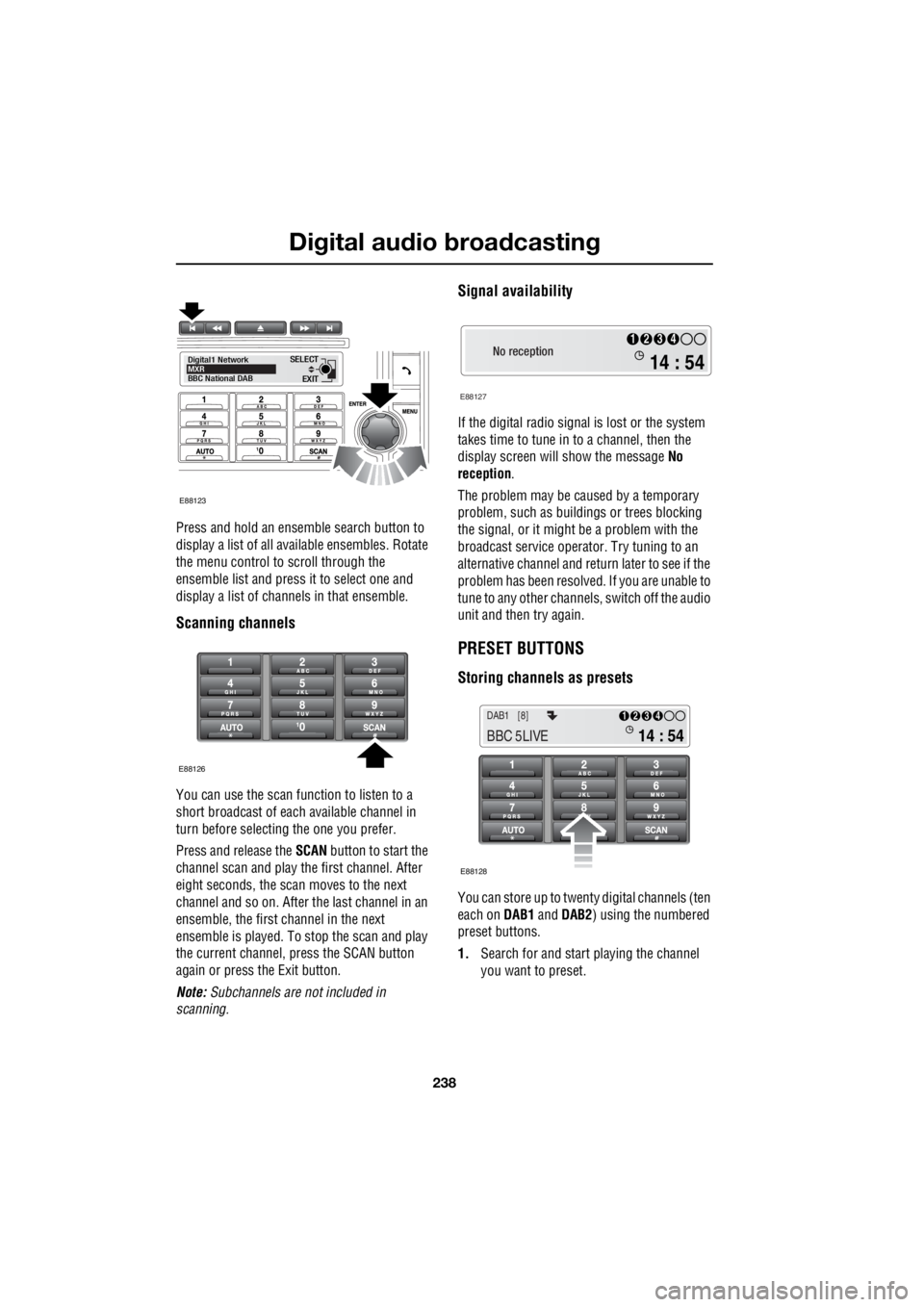
Press and hold an ensemble search button to
display a list of all available ensembles. Rotate
the menu control to scroll through the
ensemble list and press it to select one and
display a list of channels in that ensemble.
Scanning channels
You can use the scan function to listen to a
short broadcast of each available channel in
turn before selecting the one you prefer.
Press and release the SCAN button to start the
channel scan and play the first channel. After
eight seconds, the scan moves to the next
channel and so on. After the last channel in an
ensemble, the first channel in the next
ensemble is played. To stop the scan and play
the current channel, press the SCAN button
again or press the Exit button.
Note: Subchannels are not included in
scanning.
Signal availability
If the digital radio signal is lost or the system
takes time to tune in to a channel, then the
display screen will show the message No
reception .
The problem may be caused by a temporary
problem, such as buildings or trees blocking
the signal, or it might be a problem with the
broadcast service operator. Try tuning to an
alternative channel and return later to see if the
problem has been resolved. If you are unable to
tune to any other channe ls, switch off the audio
unit and then try again.
PRESET BUTTONS
Storing channels as presets
You can store up to twenty digital channels (ten
each on DAB1 and DAB2 ) using the numbered
preset buttons.
1. Search for and start playing the channel
you want to preset.
EXIT
SELECT
Digital1 Network
MXR
BBC National DAB
E88123
E88126
No reception
E88127
14 : 54
1234
14 : 54
1234DAB1 [8]
BBC 5LIVE
E88128
Page 2964 of 3229
Digital audio broadcasting
244
L
Band selection
Different regions or count ries may use different
digital bands to broadcas t DAB channels. If you
know the band(s) required then you can
choose from the Band selection menu. The
available bands are:
• LBand
• BandIII
• LBand & BandIII
• LBandCanada
• LBandCan & BandIII
Reset DAB settings
If you want to reset the DAB settings to the
manufacturer's defaults, use the menu control
to choose the Reset DAB settings menu
option. Press the menu control again to
confirm the reset.
FM traffic and news
The FM traffic function detects the presence of
local travel announcemen ts, while the FM news
function detects local news announcements.
As soon as an announcem ent is received, radio
reception or CD play is interrupted. At the end
of the announcement, ra dio or CD play will
resume. You can use this menu option to turn
announcements on or off.
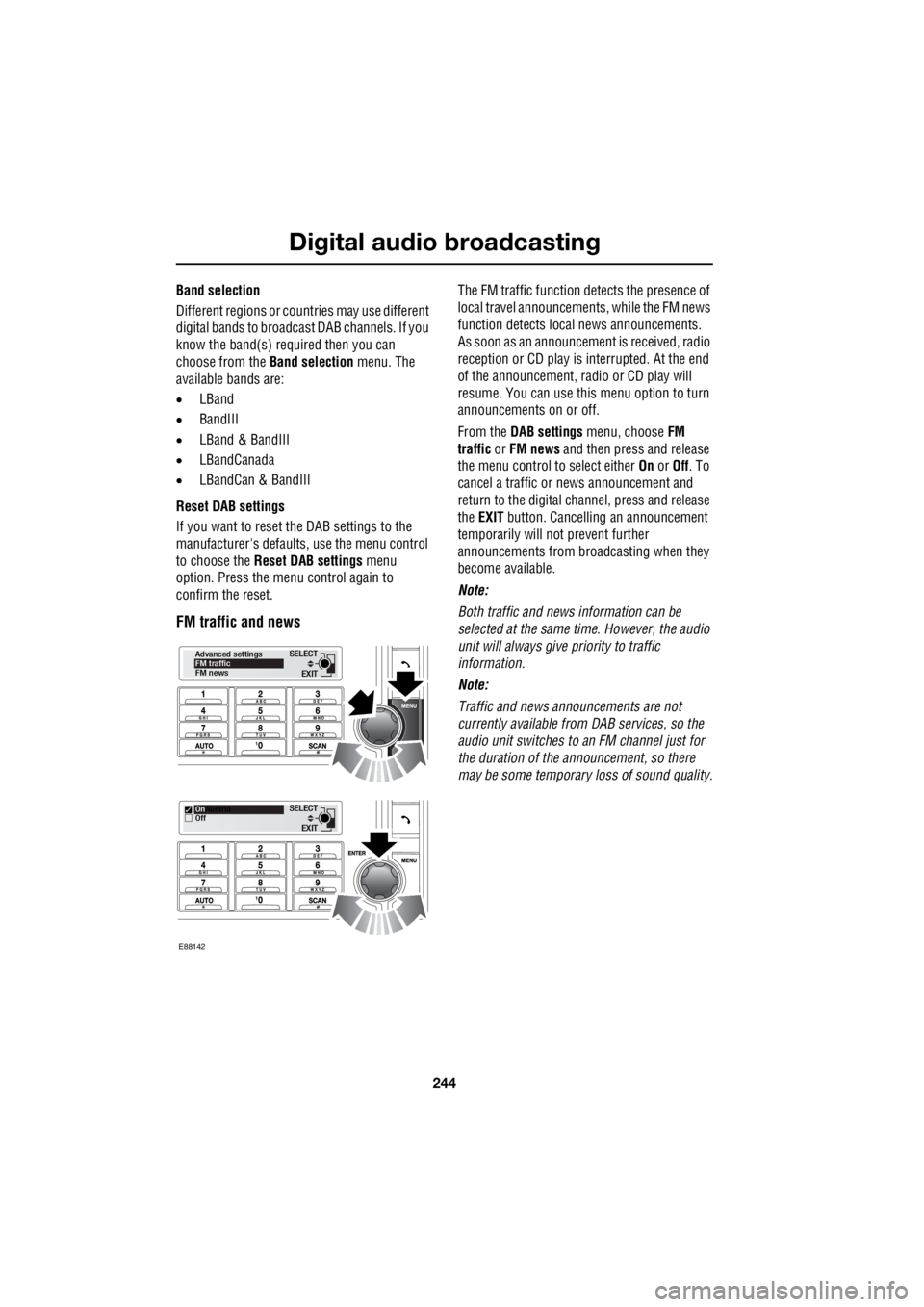
From the DAB settings menu, choose FM
traffic or FM news and then press and release
the menu control to select either On or Off. To
cancel a traffic or news announcement and
return to the digital channel, press and release
the EXIT button. Cancelling an announcement
temporarily will not prevent further
announcements from broadcasting when they
become available.
Note:
Both traffic and news information can be
selected at the same time. However, the audio
unit will always give priority to traffic
information.
Note:
Traffic and news announcements are not
currently available from DAB services, so the
audio unit switches to an FM channel just for
the duration of the announcement, so there
may be some temporary loss of sound quality.
EXIT
SELECT
Advanced settings
FM traffic
FM news
EXIT
SELECT
On
Austria
Off
E88142
Page 2986 of 3229
Telephone
266
L
Voice mail
Voice mail may be set up by your service
provider and can be used by the vehicle
system.
Before voice mail can be used in the vehicle
system, the voice mail number needs to be
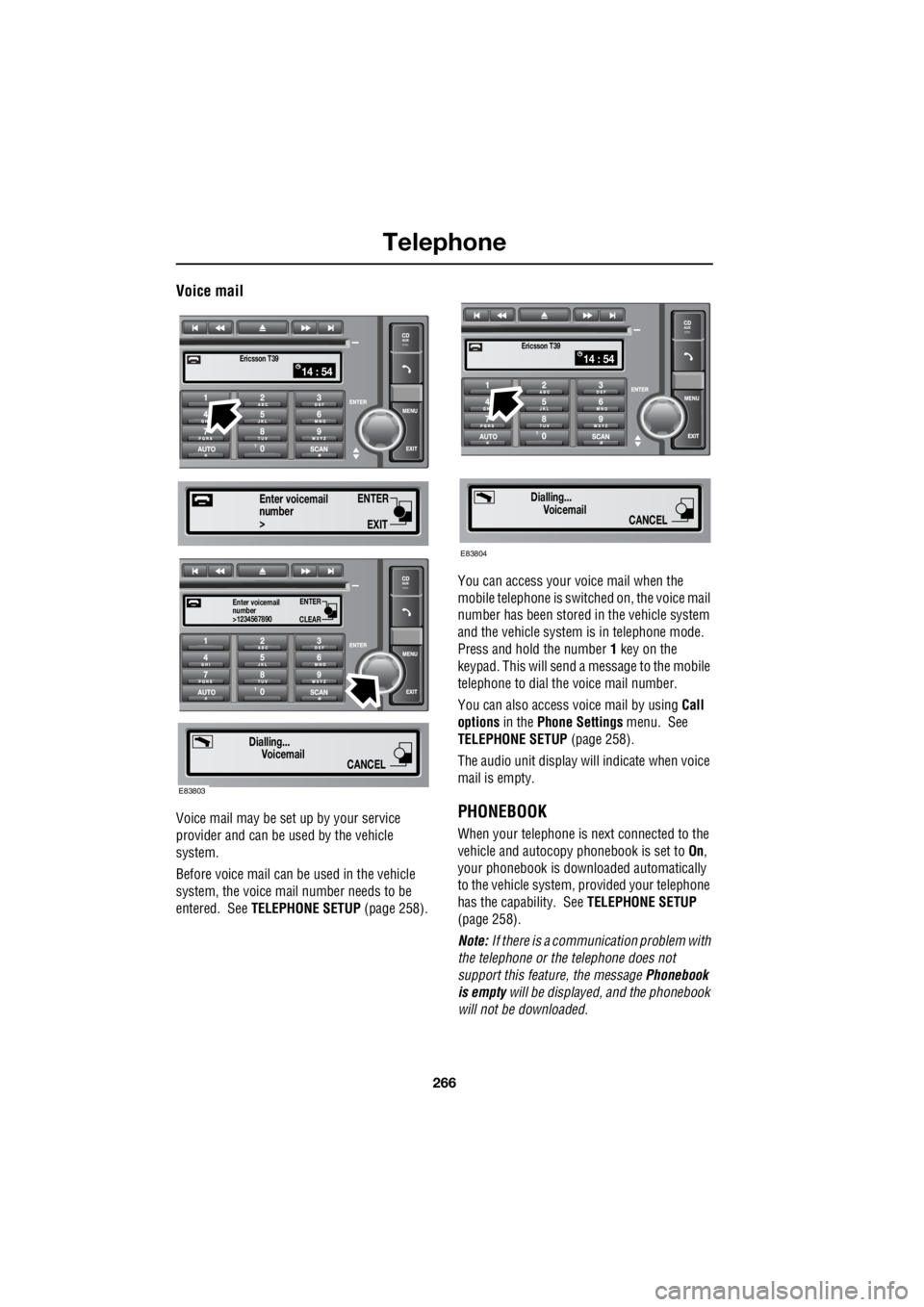
entered. See TELEPHONE SETUP (page 258). You can access your voice mail when the
mobile telephone is swit ched on, the voice mail
number has been stored in the vehicle system
and the vehicle system is in telephone mode.
Press and hold the number 1 key on the
keypad. This will send a message to the mobile
telephone to dial the voice mail number.
You can also access voice mail by using Call
options in the Phone Settings menu. See
TELEPHONE SETUP (page 258).
The audio unit display wi ll indicate when voice
mail is empty.PHONEBOOK
When your telephone is next connected to the
vehicle and autocopy phonebook is set to On,
your phonebook is downloaded automatically
to the vehicle system, provided your telephone
has the capability. See TELEPHONE SETUP
(page 258).
Note: If there is a communication problem with
the telephone or the telephone does not
support this feature, the message Phonebook
is empty will be displayed, and the phonebook
will not be downloaded.
14 : 54Ericsson T39
ENTER
EXIT
number>
Enter voicemail
ENTER
CLEAR
number>1234567890
Enter voicemail
Dialling...
Voicemail
CANCEL
E83803
14 : 54Ericsson T39
Dialling...Voicemail
CANCEL
E83804
Page 2991 of 3229

Index
271
R
A
ABS driving hints . . . . . . . . . . . . . . . . . . 123
Accessories . . . . . . . . . . . . . . . . . . . . . . . . 37
Adaptive front lighting system (AFS). . . . . 74
Adjusting the headlamps . . . . . . . . . . . . . . 73
Adjusting the steering wheel . . . . . . . . . . . 70
Adjusting the windscreen washer jets . . . . 89 Blocked jets . . . . . . . . . . . . . . . . . . . . . 90
Front . . . . . . . . . . . . . . . . . . . . . . . . . . . 89
Rear . . . . . . . . . . . . . . . . . . . . . . . . . . . 89
AFS . . . . . . . . . . . . . . . . . . . . . . . . . . . . . . 74
Air vents . . . . . . . . . . . . . . . . . . . . . . . . . 101
Airbag service information . . . . . . . . . . . . 63
Airbag warning lamp . . . . . . . . . . . . . . . . . 61
Alternative frequencies . . . . . . . . . . . . . . 229
Alternative Frequency (AF) - Premium audio 230
Alternative Frequency (A F) - Standard audio
230
Approach lamps . . . . . . . . . . . . . . . . . . . . 76
Arming the alarm . . . . . . . . . . . . . . . . . . . 45
Alarm indicator . . . . . . . . . . . . . . . . . . . 45
Full alarm . . . . . . . . . . . . . . . . . . . . . . . 45
Partial alarm . . . . . . . . . . . . . . . . . . . . . 45
Ashtray . . . . . . . . . . . . . . . . . . . . . . . . . . 109
Audio control. . . . . . . . . . . . . . . . . . . 70, 223 Audio control using the telephone buttons .
71
Balance adjustment. . . . . . . . . . . . . . . 224
Bass response adjustment . . . . . . . . . 223
Centre speaker settings . . . . . . . . . . . 224
Fader adjustment . . . . . . . . . . . . . . . . 224
Resetting tone values . . . . . . . . . . . . . 224
Subwoofer settings . . . . . . . . . . . . . . . 224
Surround sound settings . . . . . . . . . . 223
Treble response adjustment . . . . . . . . 223
Audio controls . . . . . . . . . . . . . . . . . . . . . 235
Audio unit overview. . . . . . . . . . . . . . . . . 219 Basic audio functions . . . . . . . . . . . . . 222
Premium audio overview . . . . . . . . . . 219
Standard audio overview . . . . . . . . . . 221
Automatic climate control . . . . . . . . . . . . 103
Controls . . . . . . . . . . . . . . . . . . . . . . . 103 Automatic transmission . . . . . . . . . . . . . . 118
Automatic mode. . . . . . . . . . . . . . . . . . 119
Electronic gear change strategies . . . . 120
Sport mode and CommandShift™ . . . . 120
Autostore control . . . . . . . . . . . . . . . . . . . 225 Autostoring radio stat ions - Premium audio
225
Autostoring radio stati ons - Standard audio
225
Auxiliary heater. . . . . . . . . . . . . . . . . . . . . 104
Auxiliary input (AUX IN) socket . . . . . . . . 250 Auxiliary mode . . . . . . . . . . . . . . . . . . . 251
Auxiliary power sockets . . . . . . . . . . . . . . 110
B
Battery care . . . . . . . . . . . . . . . . . . . . . . . 171
Battery charging . . . . . . . . . . . . . . . . . . . . 174
Battery warning symbols . . . . . . . . . . . . . 171
Bluetooth setup . . . . . . . . . . . . . . . . . . . . 256
Adding or changing a telephone. . . . . . 257
Loss of Bluetooth link . . . . . . . . . . . . . 257
Pairing a telephone to the system . . . . 256
Removing a telephone fr om the system. . .
257
Bonnet lock . . . . . . . . . . . . . . . . . . . . . . . 160
Booster cables . . . . . . . . . . . . . . . . . . . . . 173
Booster cushions . . . . . . . . . . . . . . . . . . . . 66
Brake and clutch fluid check . . . . . . . . . . . 165
Checking the fluid level . . . . . . . . . . . . 165
Topping up the fluid . . . . . . . . . . . . . . . 166
Brakes
Principle of operation . . . . . . . . . . . . . . 123
Bulb changing . . . . . . . . . . . . . . . . . . . . . . 77
Bulb specification chart . . . . . . . . . . . . . . . 86
C
Car wash . . . . . . . . . . . . . . . . . . . . . . . . . 154
Page 2992 of 3229

Index
272
L
Changing a bulb . . . . . . . . . . . . . . . . . . . . 77 Front fog lamp . . . . . . . . . . . . . . . . . . . 81
General information . . . . . . . . . . . . . . . 77
Headlamp unit bulbs . . . . . . . . . . . . . . . 79
High level brake lamp . . . . . . . . . . . . . . 83
Interior lamp bulbs . . . . . . . . . . . . . . . . 85
Number plate lamp bulb . . . . . . . . . . . . 84
Rear lamp bulbs . . . . . . . . . . . . . . . . . . 82
Removing the headlamp unit . . . . . . . . 78
Removing the rear lamp unit . . . . . . . . . 82
Side repeater lamp . . . . . . . . . . . . . . . . 84
Changing a fuse. . . . . . . . . . . . . . . . . . . . 195
Changing a road wheel . . . . . . . . . . . . . . 183 Locking wheel nuts . . . . . . . . . . . . . . . 187
Positioning the jack. . . . . . . . . . . . . . . 185
Temporary spare wheel . . . . . . . . . . . . 186
Tool kit . . . . . . . . . . . . . . . . . . . . . . . . 186
Wheel changing safety . . . . . . . . . . . . 184
Wheel nut tightening sequence . . . . . . 186
Changing the vehicle battery . . . . . . . . . . 174
Battery disposal . . . . . . . . . . . . . . . . . 175
Disconnecting . . . . . . . . . . . . . . . . . . . 174
Effects of disconnecting . . . . . . . . . . . 175
Refitting . . . . . . . . . . . . . . . . . . . . . . . 175
Replacement batteries. . . . . . . . . . . . . 175
Changing the wiper blades . . . . . . . . . . . . 90 Changing the front wiper blades . . . . . . 91
Changing the rear wiper blades. . . . . . . 92
Service position . . . . . . . . . . . . . . . . . . 90
Channel automatic tuning . . . . . . . . . . . . 236
Channel options. . . . . . . . . . . . . . . . . . . . 236 Scanning channels . . . . . . . . . . . . . . . 238
Selecting a channel . . . . . . . . . . . . . . . 237
Selecting a subchannel . . . . . . . . . . . . 237
Selecting an ensemble . . . . . . . . . . . . 237
Signal availability . . . . . . . . . . . . . . . . 238
Charging the vehicle battery . . . . . . . . . . 174
Checking the wiper blades . . . . . . . . . . . . . 90
Child safety locks . . . . . . . . . . . . . . . . . . . 69
Child seats . . . . . . . . . . . . . . . . . . . . . . . . . 64 Child restraint check list . . . . . . . . . . . . 65
Cigar lighter . . . . . . . . . . . . . . . . . . . . . . . 109
Cleaning the alloy wheels . . . . . . . . . . . . 154 Cleaning the exterior . . . . . . . . . . . . . . . . . 154
Cleaning after off-road driving . . . . . . . 155
Washing the vehicle . . . . . . . . . . . . . . . 154
Cleaning the interior . . . . . . . . . . . . . . . . . 155
Airbag module covers . . . . . . . . . . . . . 156
Carpets and fabrics . . . . . . . . . . . . . . . 156
Instrument pack, clock, and audio equipment . . . . . . . . . . . . . . . . . . . . 156
Leather . . . . . . . . . . . . . . . . . . . . . . . . . 155
Plastic and cloth . . . . . . . . . . . . . . . . . . 155
Seat belts . . . . . . . . . . . . . . . . . . . . . . . 156
Clock. . . . . . . . . . . . . . . . . . . . . . . . . . . . . 107
Setting the clock - Premium audio . . . . 107
Setting the clock - Standard audio . . . . 108
Compact disc display options . . . . . . . . . . 247
Compact disc function menu . . . . . . . . . . 247
Compact disc pause . . . . . . . . . . . . . . . . . 246
Compact disc playback . . . . . . . . . . . . . . . 246
Compact disc selection . . . . . . . . . . . . . . . 246
Compact disc track scanning . . . . . . . . . . 248 CD scan - Premium audio . . . . . . . . . . 248
CD Scan - Standard audio . . . . . . . . . . 249
Coolant check . . . . . . . . . . . . . . . . . . . . . . 163
Cruise control . . . . . . . . . . . . . . . . . . . . . . 130
Principle of operation . . . . . . . . . . . . . . 130
Cup holders . . . . . . . . . . . . . . . . . . . . . . . 111
D
Diesel particulate filter (DPF) . . . . . . . . . . 116 Regeneration . . . . . . . . . . . . . . . . . . . . 116
Warning indicators and messages . . . . 117
Digital audio broadcasting General information . . . . . . . . . . . . . . . 234
Dimensions. . . . . . . . . . . . . . . . . . . . . . . . 213
Clutch and brake pedal travel (China only) .
214
Wheel alignment data (China only). . . . 214
Direction indicators. . . . . . . . . . . . . . . . . . . 75
Disabling the passenger airbag . . . . . . . . . . 62 Operational status indicator . . . . . . . . . . 63
Disarming the alarm . . . . . . . . . . . . . . . . . . 46 Deactivating the alarm when triggered . . 46
Disarming when the unlock button fails to
work. . . . . . . . . . . . . . . . . . . . . . . . . . 46
Display options . . . . . . . . . . . . . . . . . . . . . 236
DPF . . . . . . . . . . . . . . . . . . . . . . . . . . . . . . 116
Page 3103 of 3229

USING THIS PUBLICATION
808/2008
USING THIS PUBLICATIONHealth and safety
Always follow health and safety guidelines, specifically those detailed in the Workshop Manual.
Using this publication
The information provided in this publication is for use only by competent, qualified auto-electricians. Good product knowledge is
assumed, as well as the ability to access and use recommended test equipment and other reference material provided.
Test equipment and other reference material
The information in this publication should be used in conjunction with the recommended test equipment; refer to Workshop Manual.
Other reference material includes: Technical Service Bulletins (TSB) and the Workshop Manual.
The Electrical Reference Library (ERL) may also prove useful since it provides detailed connector information.
Battery disconnection and reconnection
It is imperative that any information relating to battery disconnection and reconnection is followed; refer to the appropriate sections
in the Workshop Manual.
Fault Diagnosis
Always use the recommended test equipment for correct and reliable fault diagnosis, refer to the Workshop Manual.
Harness Repair
Repairs should only be undertaken for connectors where a Service Repair Kit is available; refer to the appropriate Electrical
Reference Library (ERL).
Note: Fibre Optic circuits cannot be repaired; refer to the Workshop Manual.
Page 3208 of 3229

USING THIS PUBLICATION
8 08/2008
USING THIS PUBLICATIONHealth and safety
Always follow health and safety guidelines, specifically those detailed in the Workshop Manual.
Using this publication
The information provided in this publication is for use only by competent, qualified auto-electricians. Good product knowledge is
assumed, as well as the ability to access and use recommended test equipment and other reference material provided.
Test equipment and other reference material
The information in this publication should be used in conjunction with the recommended test equipment; refer to Workshop Manual .
Other reference material includes: Technical Service Bulletins (TSB) and the Workshop Manual.
The Electrical Reference Library (ERL) may also prove useful since it provides detailed connector information.
Battery disconnection and reconnection
It is imperative that any information relating to battery disc onnection and reconnection is followed; refer to the appropriate sections
in the Workshop Manual.
Fault Diagnosis
Always use the recommended test equipment for correct a nd reliable fault diagnosis, refer to the Workshop Manual.
Harness Repair
Repairs should only be undertaken for connectors where a Service Repair Kit is available; refer to the appropriate Electrical
Reference Library (ERL).
Note : Fibre Optic circuits cannot be repaired; refer to the Workshop Manual.