clock LAND ROVER FRELANDER 2 2006 Manual PDF
[x] Cancel search | Manufacturer: LAND ROVER, Model Year: 2006, Model line: FRELANDER 2, Model: LAND ROVER FRELANDER 2 2006Pages: 3229, PDF Size: 78.5 MB
Page 2939 of 3229
219
Audio unit overview
R
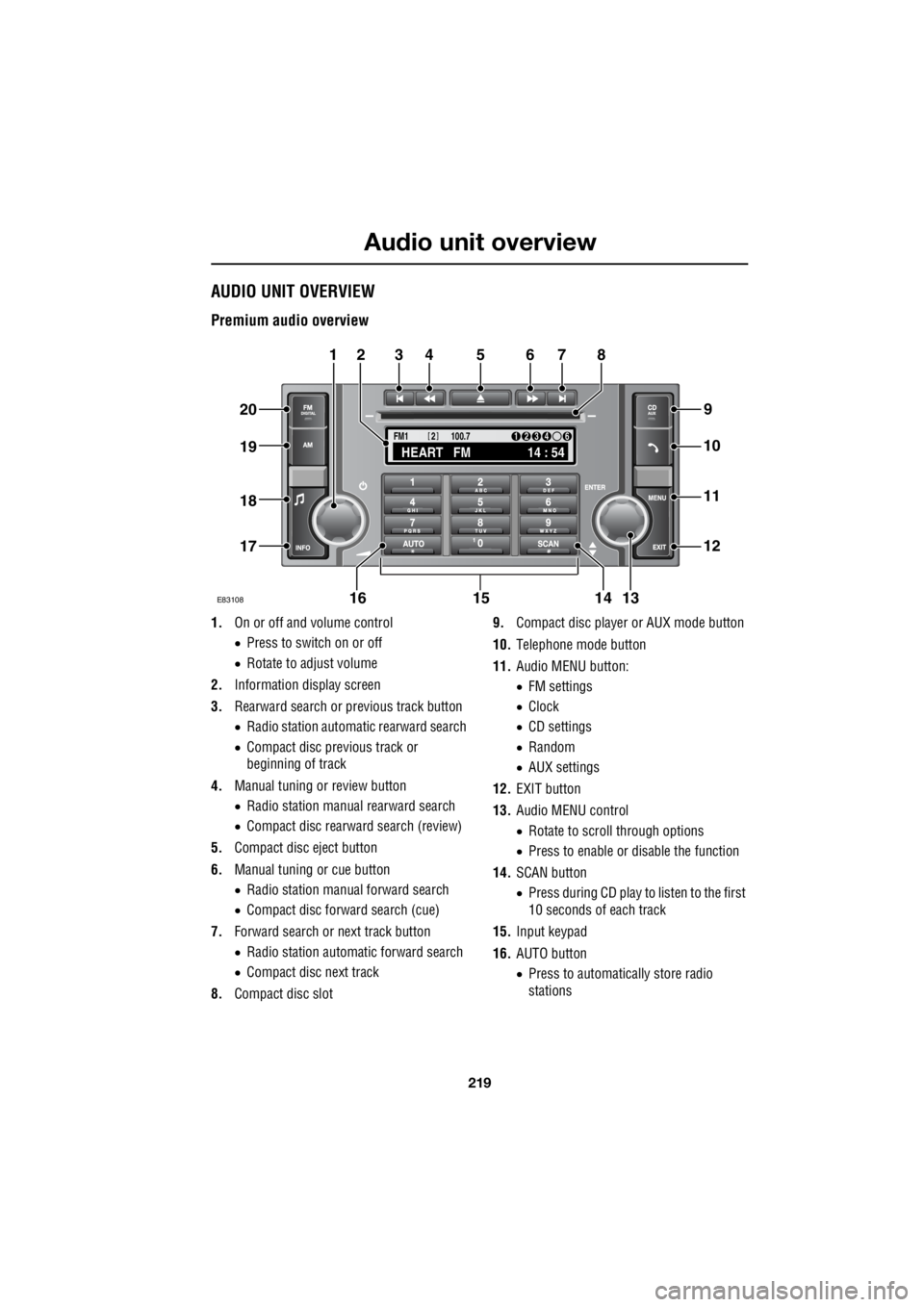
Audio unit overviewAUDIO UNIT OVERVIEW
Premium audio overview
1. On or off and volume control
• Press to switch on or off
• Rotate to adjust volume
2. Information display screen
3. Rearward search or previous track button
• Radio station automatic rearward search
• Compact disc previous track or
beginning of track
4. Manual tuning or review button
• Radio station manual rearward search
• Compact disc rearward search (review)
5. Compact disc eject button
6. Manual tuning or cue button
• Radio station manual forward search
• Compact disc forward search (cue)
7. Forward search or next track button
• Radio station automatic forward search
• Compact disc next track
8. Compact disc slot 9.
Compact disc player or AUX mode button
10. Telephone mode button
11. Audio MENU button:
• FM settings
• Clock
• CD settings
• Random
• AUX settings
12. EXIT button
13. Audio MENU control
• Rotate to scroll through options
• Press to enable or disable the function
14. SCAN button
• Press during CD play to listen to the first
10 seconds of each track
15. Input keypad
16. AUTO button
• Press to automatically store radio
stations
TA
NEWSPTY100.7
FM1
14 : 54
HEART FM
1234 6
2
E83108
34567
9
21
11
12
10
13141516
17
18
19
20
8
Page 2947 of 3229
227
Audio unit operation
R
Traffic Programme (TP) preference
With the Traffic Announc ement (TA) feature
enabled, any announcem ent received by the
system will interrupt nor mal radio reception or
CD play. The TP preference feature on premium
audio units allows the system to receive only
traffic announcements from a particular
station.
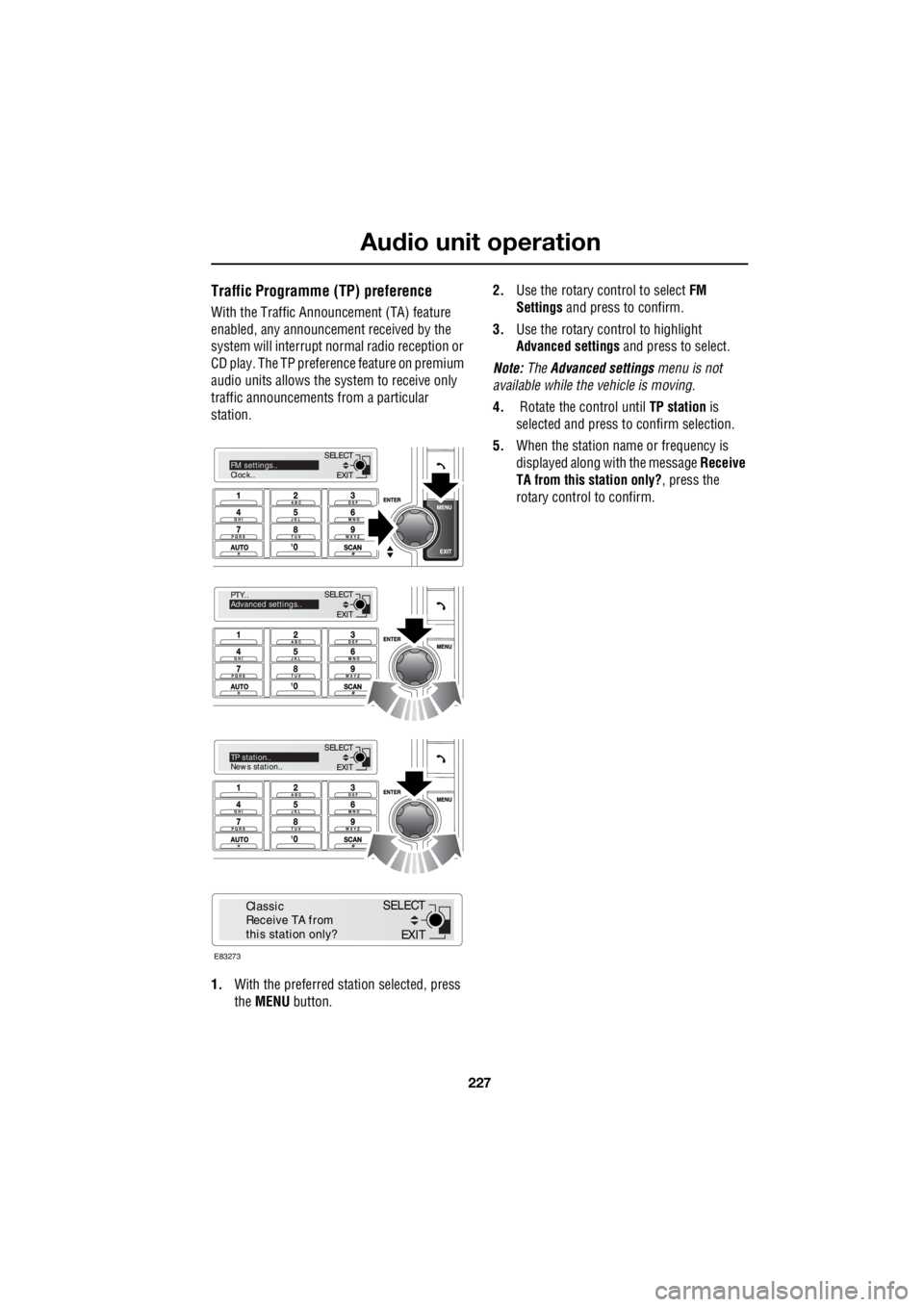
1. With the preferred station selected, press
the MENU button. 2.
Use the rotary control to select FM
Settings and press to confirm.
3. Use the rotary control to highlight
Advanced settings and press to select.
Note: The Advanced settings menu is not
available while the vehicle is moving.
4. Rotate the control until TP station is
selected and press to confirm selection.
5. When the station name or frequency is
displayed along with the message Receive
TA from this station only? , press the
rotary control to confirm.
EXIT
SELECT
PTY..
Advanced settings..
EXIT
SELECTTP station..
News station..
EXIT
SELECTFM settings..
Clock..
E83273
EXIT
SELECT
Classic
Receive TA from
this station only?
Page 2948 of 3229
Audio unit menus
228
L
Audio unit menusRADIO DATA SYSTEM (RDS)
Your audio system is equipped with RDS
(Radio Data System), which enables the audio
unit to receive extra information with the
normal radio signals.
On the FM waveband, RD S enables the audio to
receive traffic and news information
broadcasts. RDS also al lows the audio unit to
automatically retune to stations that are linked
to the same network.
Note: Not all FM radio stat ions broadcast RDS.
If a non-RDS station is selected, RDS features
will not be available.
Selecting RDS
On standard audio unit s, RDS can be enabled
or disabled, according to preference. The
following procedure explains how to switch
RDS on or off.
1. With FM1, FM2 or FMa selected, press the
MENU button to display the menu.
2. Using the rotary control, select RDS from
the menu. ON or OFF will be displayed,
dependent on status.
3. Press the rotary control to change status.
The RDS status will be displayed briefly on the
information screen.
REGIONAL MODE (REG)
As you drive into diffe rent radio reception
areas, the Radio Data System (RDS)
automatically retunes the radio to the strongest
signal. Regional mode is an RDS feature which
stops the system from tuning to another local
radio station with a stronger signal. With this
feature enabled, your selected local radio
station will re main tuned.
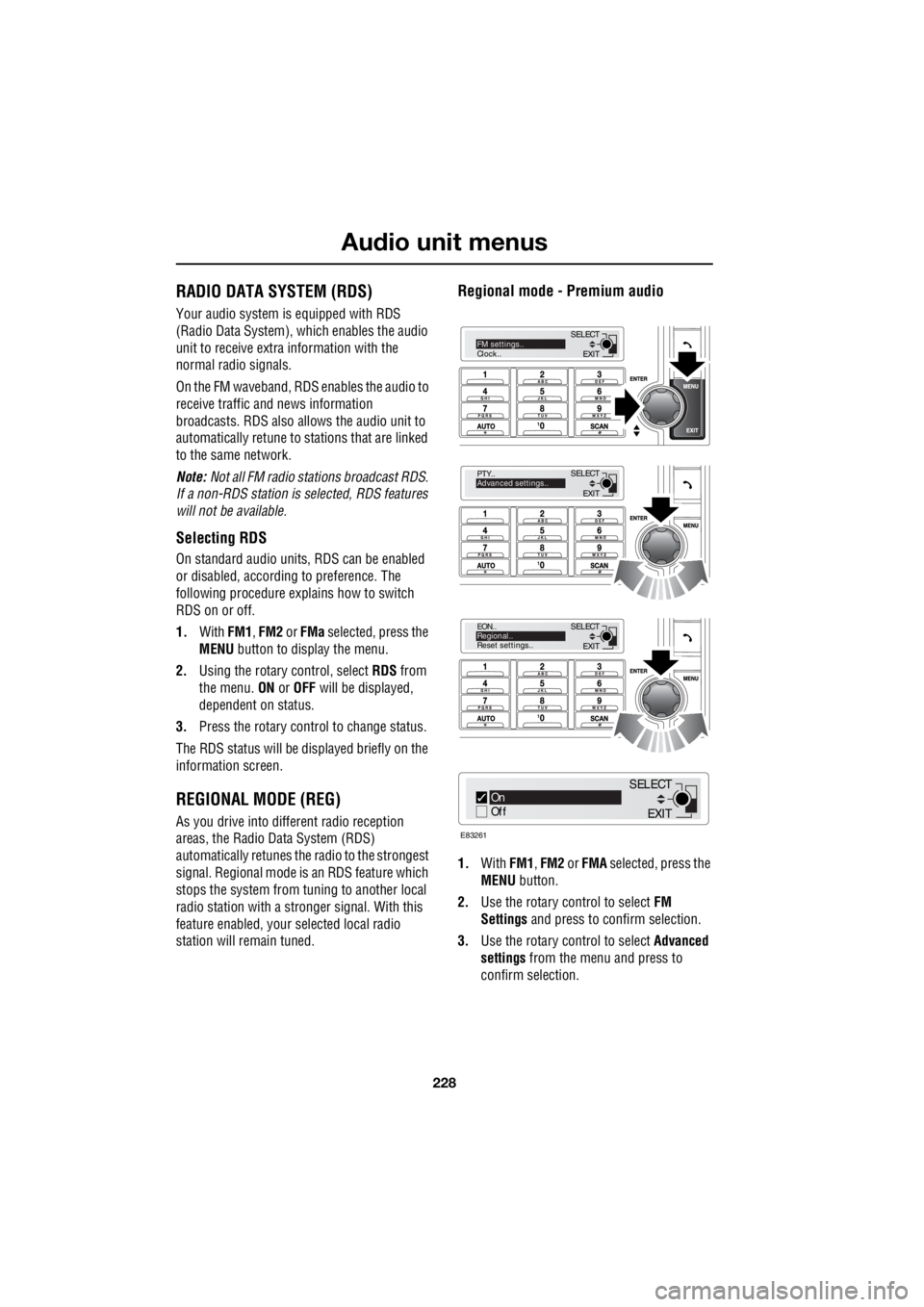
Regional mode - Premium audio
1.With FM1, FM2 or FMA selected, press the
MENU button.
2. Use the rotary control to select FM
Settings and press to c onfirm selection.
3. Use the rotary control to select Advanced
settings from the menu and press to
confirm selection.
EXIT
SELECT
PTY..
Advanced settings..
EXIT
SELECT
EON..
Regional..
Reset settings..
EXIT
SELECTFM settings..
Clock..
On
Off
E83261
EXIT
SELECT
Page 2951 of 3229
231
Audio unit menus
R
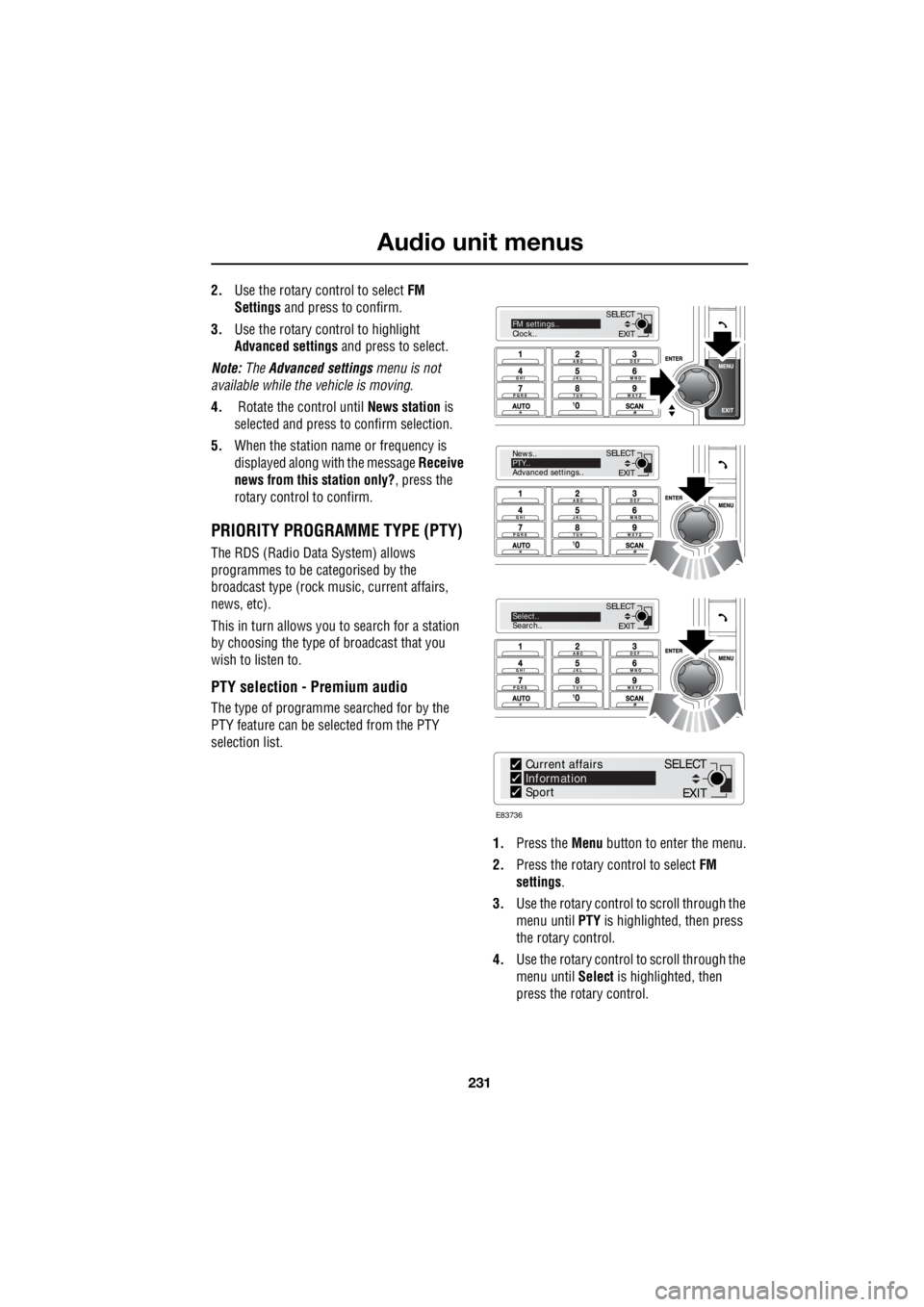
2. Use the rotary control to select FM
Settings and press to confirm.
3. Use the rotary control to highlight
Advanced settings and press to select.
Note: The Advanced settings menu is not
available while the vehicle is moving.
4. Rotate the control until News station is
selected and press to confirm selection.
5. When the station name or frequency is
displayed along with the message Receive
news from this station only? , press the
rotary control to confirm.
PRIORITY PROGRAMME TYPE (PTY)
The RDS (Radio Data System) allows
programmes to be categorised by the
broadcast type (rock mu sic, current affairs,
news, etc).
This in turn allows you to search for a station
by choosing the type of broadcast that you
wish to listen to.
PTY selection - Premium audio
The type of programme searched for by the
PTY feature can be selected from the PTY
selection list.
1. Press the Menu button to enter the menu.
2. Press the rotary control to select FM
settings .
3. Use the rotary control to scroll through the
menu until PTY is highlighted, then press
the rotary control.
4. Use the rotary control to scroll through the
menu until Select is highlighted, then
press the rotary control.
EXIT
SELECT
News..
PTY..
Advanced settings..
EXIT
SELECTSelect..
Search..
EXIT
SELECTFM settings..
Clock..
E83736
Current affairs
Information
Sport
EXIT
SELECT
Page 2960 of 3229
Digital audio broadcasting
240
L
SETTINGS
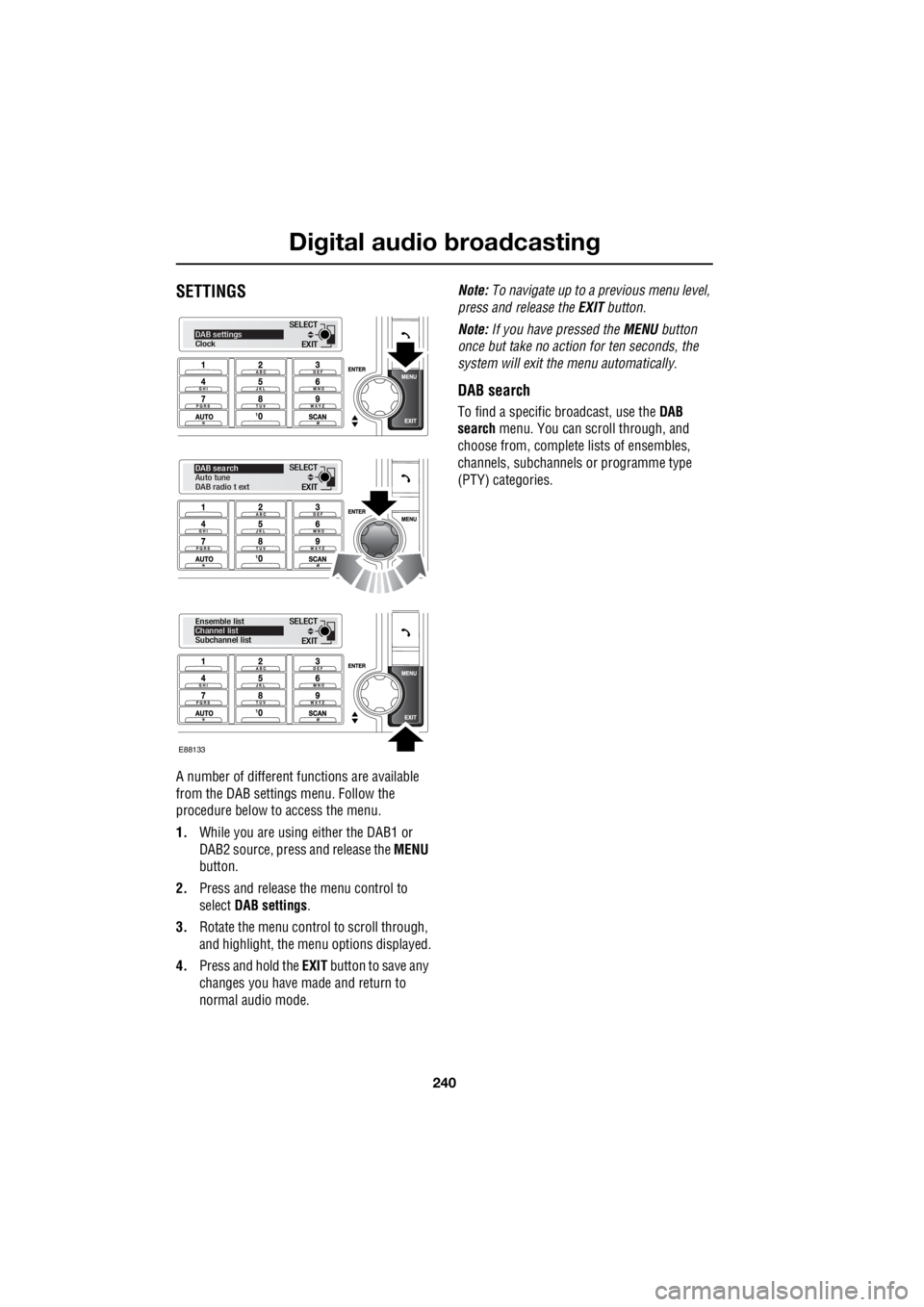
A number of different f unctions are available
from the DAB settings menu. Follow the
procedure below to access the menu.
1. While you are using either the DAB1 or
DAB2 source, press and release the MENU
button.
2. Press and release the menu control to
select DAB settings .
3. Rotate the menu control to scroll through,
and highlight, the menu options displayed.
4. Press and hold the EXIT button to save any
changes you have made and return to
normal audio mode. Note:
To navigate up to a pr evious menu level,
press and release the EXIT button.
Note: If you have pressed the MENU button
once but take no action for ten seconds, the
system will exit the menu automatically.
DAB search
To find a specific br oadcast, use the DAB
search menu. You can scroll through, and
choose from, complete lists of ensembles,
channels, subchannels or programme type
(PTY) categories.
EXIT
SELECTDAB settings
Clock
EXIT
SELECT
DAB sea rch
Auto tune
DAB radio t ext
EXIT
SELECT
Ensemble list
Channel list
Subchannel list
E88133
Page 2975 of 3229
255
Telephone
R
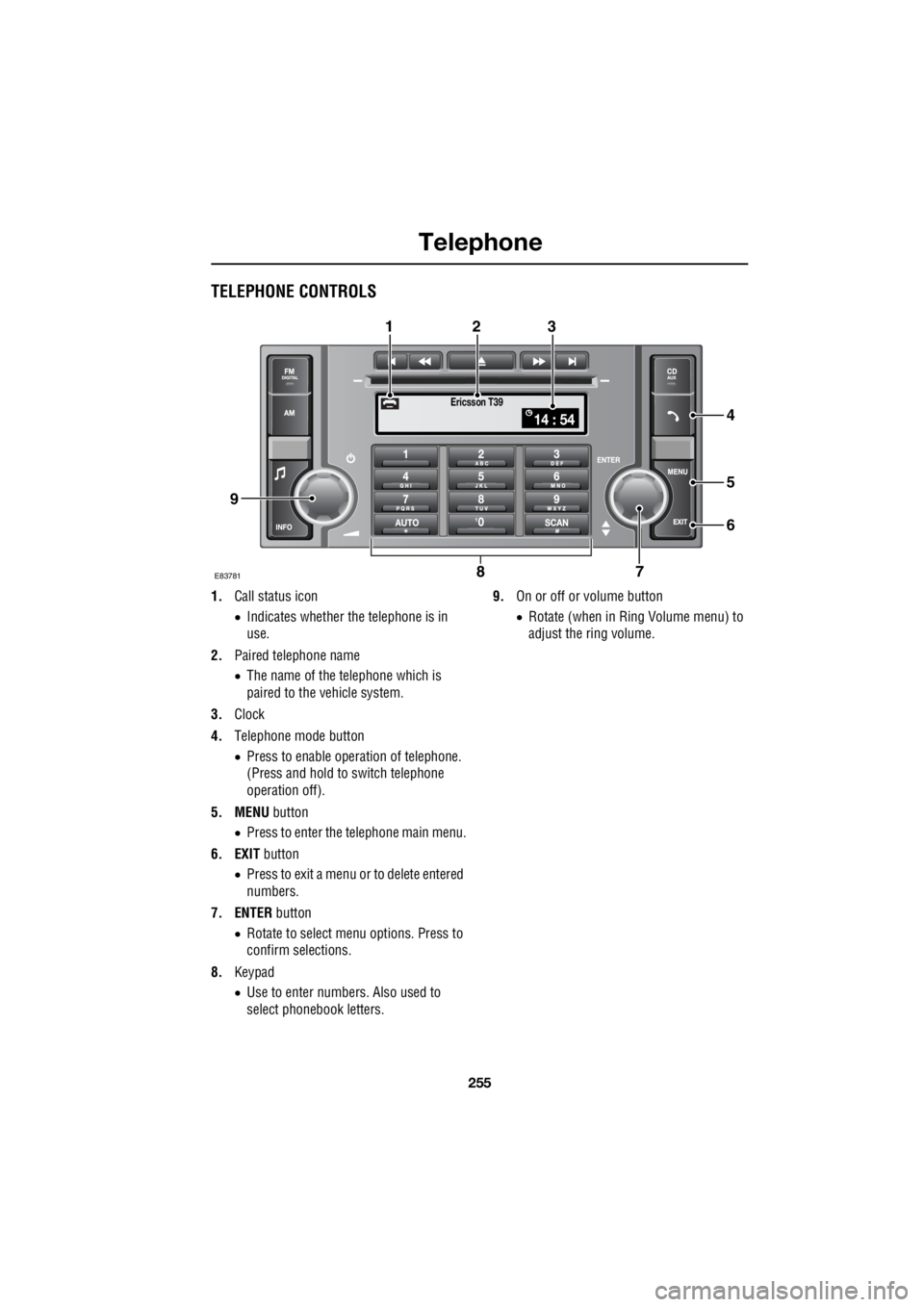
TELEPHONE CONTROLS
1. Call status icon
• Indicates whether the telephone is in
use.
2. Paired telephone name
• The name of the telephone which is
paired to the vehicle system.
3. Clock
4. Telephone mode button
• Press to enable opera tion of telephone.
(Press and hold to switch telephone
operation off).
5. MENU button
• Press to enter the telephone main menu.
6. EXIT button
• Press to exit a menu or to delete entered
numbers.
7. ENTER button
• Rotate to select me nu options. Press to
confirm selections.
8. Keypad
• Use to enter numbers. Also used to
select phonebook letters. 9.
On or off or volume button
• Rotate (when in Ring Volume menu) to
adjust the ring volume.
Ericsson T39
14 : 54
E837817
5
6
4
8
123
9
Page 2978 of 3229
Telephone
258
L
TELEPHONE SETUP
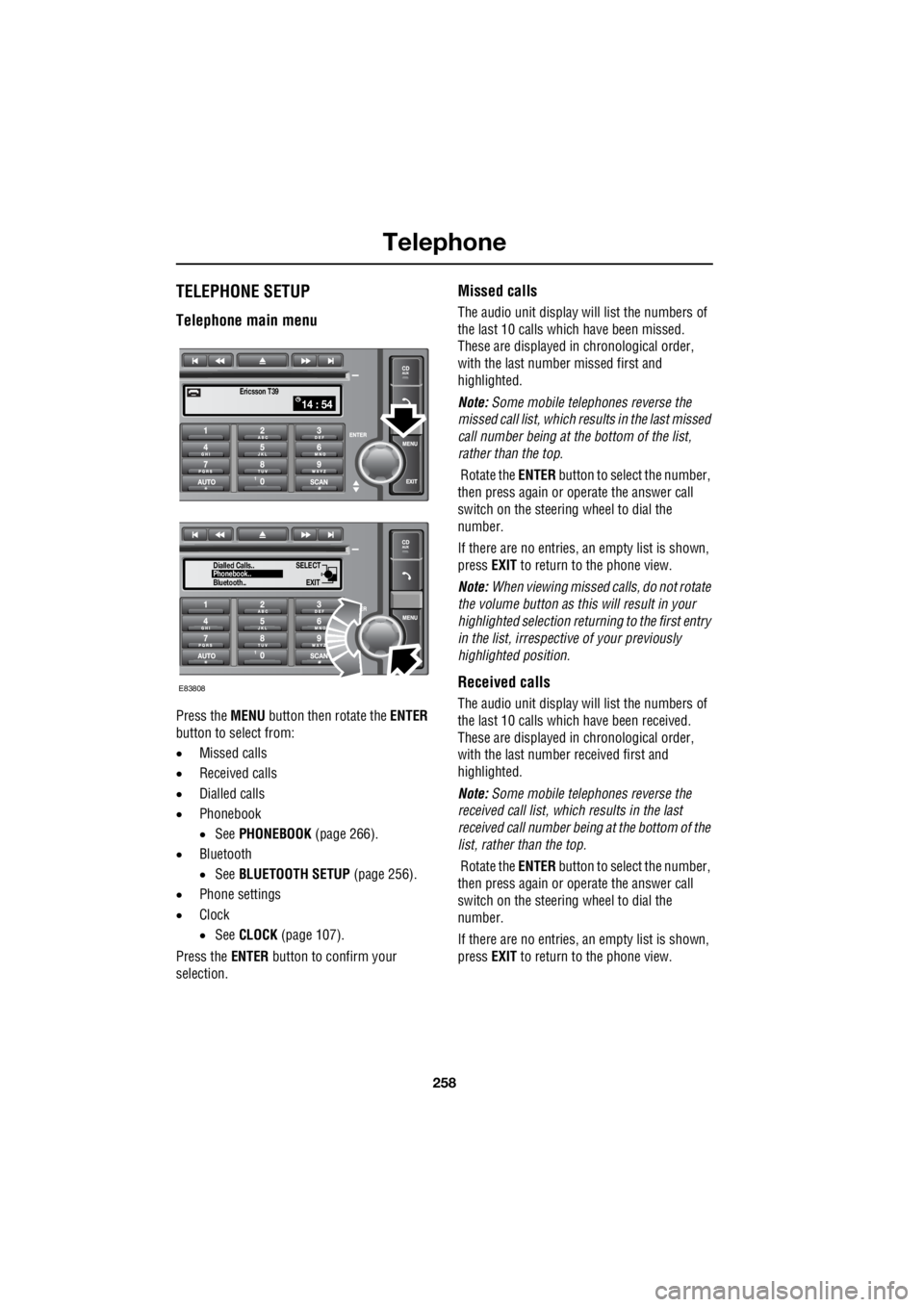
Telephone main menu
Press the MENU button then rotate the ENTER
button to select from:
• Missed calls
• Received calls
• Dialled calls
• Phonebook
• See PHONEBOOK (page 266).
• Bluetooth
• See BLUETOOTH SETUP (page 256).
• Phone settings
• Clock
• See CLOCK (page 107).
Press the ENTER button to confirm your
selection.
Missed calls
The audio unit display wi ll list the numbers of
the last 10 calls which have been missed.
These are displayed in chronological order,
with the last number missed first and
highlighted.
Note: Some mobile telephones reverse the
missed call list, which results in the last missed
call number being at the bottom of the list,
rather than the top.
Rotate the ENTER button to select the number,
then press again or operate the answer call
switch on the steering wheel to dial the
number.
If there are no entries, an empty list is shown,
press EXIT to return to the phone view.
Note: When viewing missed calls, do not rotate
the volume button as this will result in your
highlighted select ion returning to the first entry
in the list, irrespective of your previously
highlighted position.
Received calls
The audio unit display wi ll list the numbers of
the last 10 calls which have been received.
These are displayed in chronological order,
with the last number received first and
highlighted.
Note: Some mobile telephones reverse the
received call list, which results in the last
received call number be ing at the bottom of the
list, rather than the top.
Rotate the ENTER button to select the number,
then press again or operate the answer call
switch on the steering wheel to dial the
number.
If there are no entries, an empty list is shown,
press EXIT to return to the phone view.
14 : 54Ericsson T39
SELECT
EXITPhonebook..
Dialled Calls..
Bluetooth..
E83808
Page 2987 of 3229
267
Telephone
R
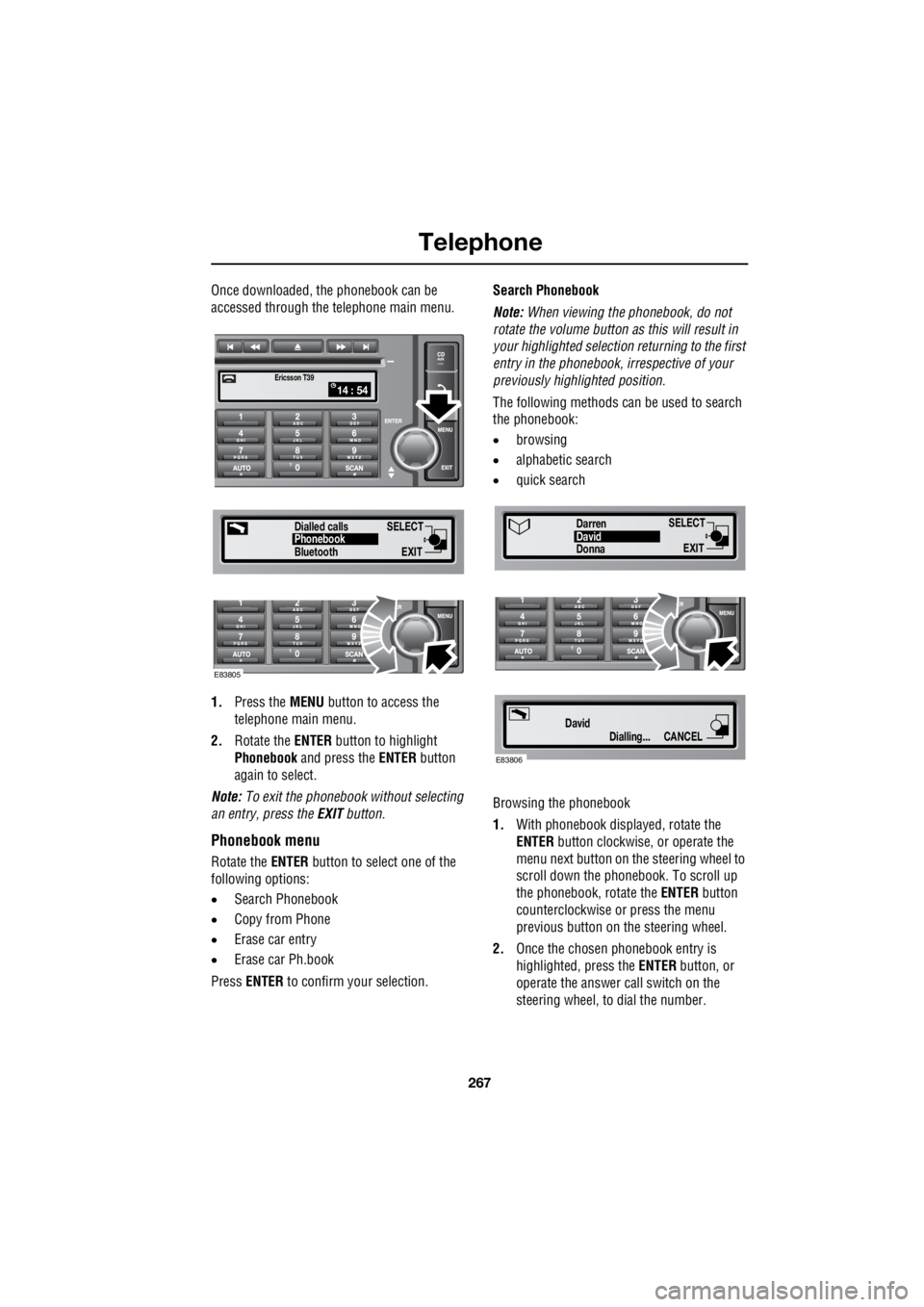
Once downloaded, the phonebook can be
accessed through the telephone main menu.
1. Press the MENU button to access the
telephone main menu.
2. Rotate the ENTER button to highlight
Phonebook and press the ENTER button
again to select.
Note: To exit the phonebook without selecting
an entry, press the EXIT button.
Phonebook menu
Rotate the ENTER button to select one of the
following options:
• Search Phonebook
• Copy from Phone
• Erase car entry
• Erase car Ph.book
Press ENTER to confirm your selection. Search Phonebook
Note: When viewing the phonebook, do not
rotate the volume button as this will result in
your highlighted selection returning to the first
entry in the phonebook, i rrespective of your
previously highlighted position.
The following methods can be used to search
the phonebook:
• browsing
• alphabetic search
• quick search
Browsing the phonebook
1. With phonebook displa yed, rotate the
ENTER button clockwise, or operate the
menu next button on th e steering wheel to
scroll down the phonebook. To scroll up
the phonebook, rotate the ENTER button
counterclockwise or press the menu
previous button on the steering wheel.
2. Once the chosen phonebook entry is
highlighted, press the ENTER button, or
operate the answer call switch on the
steering wheel, to dial the number.
SELECT
EXITPhonebook
Dialled calls
14 : 54Ericsson T39
Bluetooth
E83805
SELECT
EXITDonnaDavid
Darren
Dialling...
DavidCANCEL
E83806
Page 2992 of 3229

Index
272
L
Changing a bulb . . . . . . . . . . . . . . . . . . . . 77 Front fog lamp . . . . . . . . . . . . . . . . . . . 81
General information . . . . . . . . . . . . . . . 77
Headlamp unit bulbs . . . . . . . . . . . . . . . 79
High level brake lamp . . . . . . . . . . . . . . 83
Interior lamp bulbs . . . . . . . . . . . . . . . . 85
Number plate lamp bulb . . . . . . . . . . . . 84
Rear lamp bulbs . . . . . . . . . . . . . . . . . . 82
Removing the headlamp unit . . . . . . . . 78
Removing the rear lamp unit . . . . . . . . . 82
Side repeater lamp . . . . . . . . . . . . . . . . 84
Changing a fuse. . . . . . . . . . . . . . . . . . . . 195
Changing a road wheel . . . . . . . . . . . . . . 183 Locking wheel nuts . . . . . . . . . . . . . . . 187
Positioning the jack. . . . . . . . . . . . . . . 185
Temporary spare wheel . . . . . . . . . . . . 186
Tool kit . . . . . . . . . . . . . . . . . . . . . . . . 186
Wheel changing safety . . . . . . . . . . . . 184
Wheel nut tightening sequence . . . . . . 186
Changing the vehicle battery . . . . . . . . . . 174
Battery disposal . . . . . . . . . . . . . . . . . 175
Disconnecting . . . . . . . . . . . . . . . . . . . 174
Effects of disconnecting . . . . . . . . . . . 175
Refitting . . . . . . . . . . . . . . . . . . . . . . . 175
Replacement batteries. . . . . . . . . . . . . 175
Changing the wiper blades . . . . . . . . . . . . 90 Changing the front wiper blades . . . . . . 91
Changing the rear wiper blades. . . . . . . 92
Service position . . . . . . . . . . . . . . . . . . 90
Channel automatic tuning . . . . . . . . . . . . 236
Channel options. . . . . . . . . . . . . . . . . . . . 236 Scanning channels . . . . . . . . . . . . . . . 238
Selecting a channel . . . . . . . . . . . . . . . 237
Selecting a subchannel . . . . . . . . . . . . 237
Selecting an ensemble . . . . . . . . . . . . 237
Signal availability . . . . . . . . . . . . . . . . 238
Charging the vehicle battery . . . . . . . . . . 174
Checking the wiper blades . . . . . . . . . . . . . 90
Child safety locks . . . . . . . . . . . . . . . . . . . 69
Child seats . . . . . . . . . . . . . . . . . . . . . . . . . 64 Child restraint check list . . . . . . . . . . . . 65
Cigar lighter . . . . . . . . . . . . . . . . . . . . . . . 109
Cleaning the alloy wheels . . . . . . . . . . . . 154 Cleaning the exterior . . . . . . . . . . . . . . . . . 154
Cleaning after off-road driving . . . . . . . 155
Washing the vehicle . . . . . . . . . . . . . . . 154
Cleaning the interior . . . . . . . . . . . . . . . . . 155
Airbag module covers . . . . . . . . . . . . . 156
Carpets and fabrics . . . . . . . . . . . . . . . 156
Instrument pack, clock, and audio equipment . . . . . . . . . . . . . . . . . . . . 156
Leather . . . . . . . . . . . . . . . . . . . . . . . . . 155
Plastic and cloth . . . . . . . . . . . . . . . . . . 155
Seat belts . . . . . . . . . . . . . . . . . . . . . . . 156
Clock. . . . . . . . . . . . . . . . . . . . . . . . . . . . . 107
Setting the clock - Premium audio . . . . 107
Setting the clock - Standard audio . . . . 108
Compact disc display options . . . . . . . . . . 247
Compact disc function menu . . . . . . . . . . 247
Compact disc pause . . . . . . . . . . . . . . . . . 246
Compact disc playback . . . . . . . . . . . . . . . 246
Compact disc selection . . . . . . . . . . . . . . . 246
Compact disc track scanning . . . . . . . . . . 248 CD scan - Premium audio . . . . . . . . . . 248
CD Scan - Standard audio . . . . . . . . . . 249
Coolant check . . . . . . . . . . . . . . . . . . . . . . 163
Cruise control . . . . . . . . . . . . . . . . . . . . . . 130
Principle of operation . . . . . . . . . . . . . . 130
Cup holders . . . . . . . . . . . . . . . . . . . . . . . 111
D
Diesel particulate filter (DPF) . . . . . . . . . . 116 Regeneration . . . . . . . . . . . . . . . . . . . . 116
Warning indicators and messages . . . . 117
Digital audio broadcasting General information . . . . . . . . . . . . . . . 234
Dimensions. . . . . . . . . . . . . . . . . . . . . . . . 213
Clutch and brake pedal travel (China only) .
214
Wheel alignment data (China only). . . . 214
Direction indicators. . . . . . . . . . . . . . . . . . . 75
Disabling the passenger airbag . . . . . . . . . . 62 Operational status indicator . . . . . . . . . . 63
Disarming the alarm . . . . . . . . . . . . . . . . . . 46 Deactivating the alarm when triggered . . 46
Disarming when the unlock button fails to
work. . . . . . . . . . . . . . . . . . . . . . . . . . 46
Display options . . . . . . . . . . . . . . . . . . . . . 236
DPF . . . . . . . . . . . . . . . . . . . . . . . . . . . . . . 116
Page 2995 of 3229

Index
275
R
Preset buttons . . . . . . . . . . . . . . . . . . . . . 238 Recalling a preset channel . . . . . . . . . 239
Scrolling through presets . . . . . . . . . . 239
Storing channels as presets . . . . . . . . 238
Principle of operation Airbag deployment effects . . . . . . . . . . 61
Airbag operation . . . . . . . . . . . . . . . . . . 60
Airbags . . . . . . . . . . . . . . . . . . . . . . . . . 59
Before driving off-road . . . . . . . . . . . . 136
Brake pads . . . . . . . . . . . . . . . . . . . . . 123
Deployment and deflation . . . . . . . . . . . 60
Dynamic Stability Control (DSC) . . . . . 140
Gradient release control (GRC) . . . . . . 136
Introduction . . . . . . . . . . . . . . . . . . . . . 58
Roll stability control (RSC) . . . . . . . . . 140
Seat belt checks . . . . . . . . . . . . . . . . . . 55
Seat belt safety . . . . . . . . . . . . . . . . . . . 54
Seat belts . . . . . . . . . . . . . . . . . . . . . . . 54
Wet conditions . . . . . . . . . . . . . . . . . . 123
Priority programme type (PTY) . . . . . . . . 231 PTY search - Premium audio . . . . . . . 232
PTY seek - Standard audio . . . . . . . . . 233
PTY selection - Premium audio . . . . . 231Q
Quick start . . . . . . . . . . . . . . . . . . . . . . . . . . 7 Audio system . . . . . . . . . . . . . . . . . . . . . 27
Automatic transmission . . . . . . . . . . . . . 23
Bonnet . . . . . . . . . . . . . . . . . . . . . . . . . . . 9
CD autochanger . . . . . . . . . . . . . . . . . . . 30
CD OPERATION . . . . . . . . . . . . . . . . . . . 30
Clock setting . . . . . . . . . . . . . . . . . . . . . 31
Cruise control . . . . . . . . . . . . . . . . . . . . 24
DAB radio. . . . . . . . . . . . . . . . . . . . . . . . 29
Driving position memory . . . . . . . . . . . . 10
Engine starting . . . . . . . . . . . . . . . . . . . . . 8
Exterior lighting . . . . . . . . . . . . . . . . . . . 22
Facia. . . . . . . . . . . . . . . . . . . . . . . . . . . . 17
Gearshift interlocks . . . . . . . . . . . . . . . . 23
Heating and ventilation. . . . . . . . . . . . . . 14
Hill Descent Control (HDC) . . . . . . . . . . 25
Instrument pack . . . . . . . . . . . . . . . . . . . 19
Manual seat adjustment . . . . . . . . . . . . . 11
Master lock and unlock switches . . . . . . . 9
Overhead console . . . . . . . . . . . . . . . . . 12
Parking aid . . . . . . . . . . . . . . . . . . . . . . . 26
Passenger airbag deactivation . . . . . . . . 13
Power operated seat adjustment . . . . . . 10
Radio operation . . . . . . . . . . . . . . . . . . . 29
Remote control . . . . . . . . . . . . . . . . . . . . 7
Seat belts and Child restraints . . . . . . . . 13
Single CD player. . . . . . . . . . . . . . . . . . . 30
Steering column adjustment . . . . . . . . . 12
Steering column lock . . . . . . . . . . . . . . . 12
Tailgate . . . . . . . . . . . . . . . . . . . . . . . . . . 9
Telephone - Bluetooth system . . . . . . . . 31
Terrain Response system. . . . . . . . . . . . 25
Warning indicators (attention) . . . . . . . . 21
Warning indicators (information) . . . . . . 21
Windows and Door mirrors . . . . . . . . . . 11
Wipers and washers. . . . . . . . . . . . . . . . 22
R
Radio data system (RDS) . . . . . . . . . . . . . 228 Selecting RDS . . . . . . . . . . . . . . . . . . . 228
Radio reception . . . . . . . . . . . . . . . . . . . . 218
Rain sensor . . . . . . . . . . . . . . . . . . . . . . . . 87
Operation . . . . . . . . . . . . . . . . . . . . . . . . 88
Rear fog lamps . . . . . . . . . . . . . . . . . . . . . . 73