Lexus CT200h 2015 Navigation Manual (in English)
Manufacturer: LEXUS, Model Year: 2015, Model line: CT200h, Model: Lexus CT200h 2015Pages: 405, PDF Size: 7.61 MB
Page 41 of 405
40
1. BASIC INFORMATION BEFORE OPERATION
CT200h_Navi_OM76146U_(U)14.06.17 09:48
4. ENTERING LETTERS AND NUMBERS/LIST SCREEN OPERATION
zOn certain letter entry screens, letters can
be entered in upper or lower case.
: Select to enter in lower case.
: Select to enter in upper case.
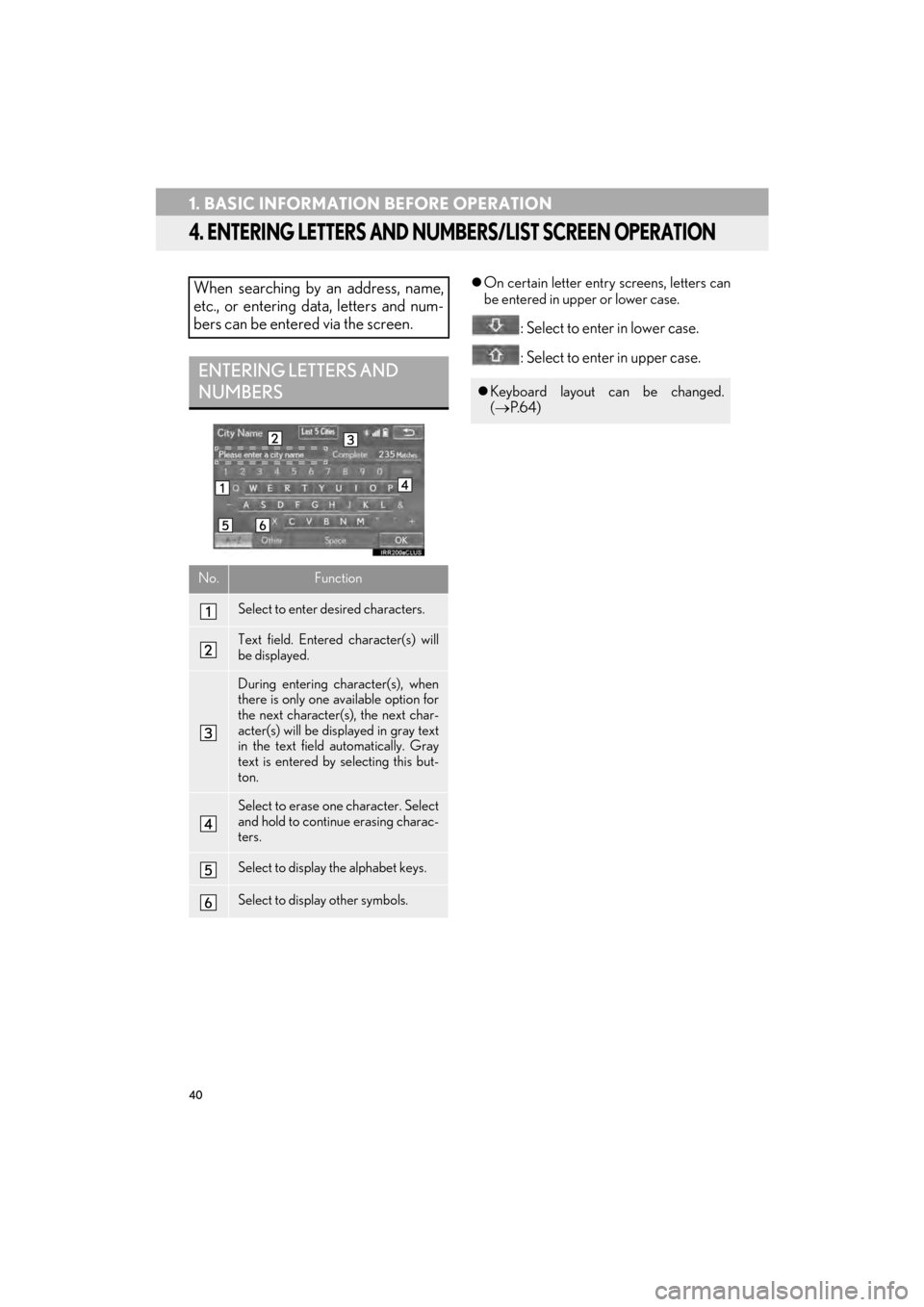
When searching by an address, name,
etc., or entering data, letters and num-
bers can be entered via the screen.
ENTERING LETTERS AND
NUMBERS
No.Function
Select to enter desired characters.
Text field. Entered character(s) will
be displayed.
During entering character(s), when
there is only one available option for
the next character(s), the next char-
acter(s) will be displayed in gray text
in the text field automatically. Gray
text is entered by selecting this but-
ton.
Select to erase one character. Select
and hold to continue erasing charac-
ters.
Select to display the alphabet keys.
Select to display other symbols.
zKeyboard layout can be changed.
(→ P. 6 4 )
Page 42 of 405
41
1. BASIC INFORMATION BEFORE OPERATION
2
BASIC FUNCTION
CT200h_Navi_OM76146U_(U)14.06.17 09:48
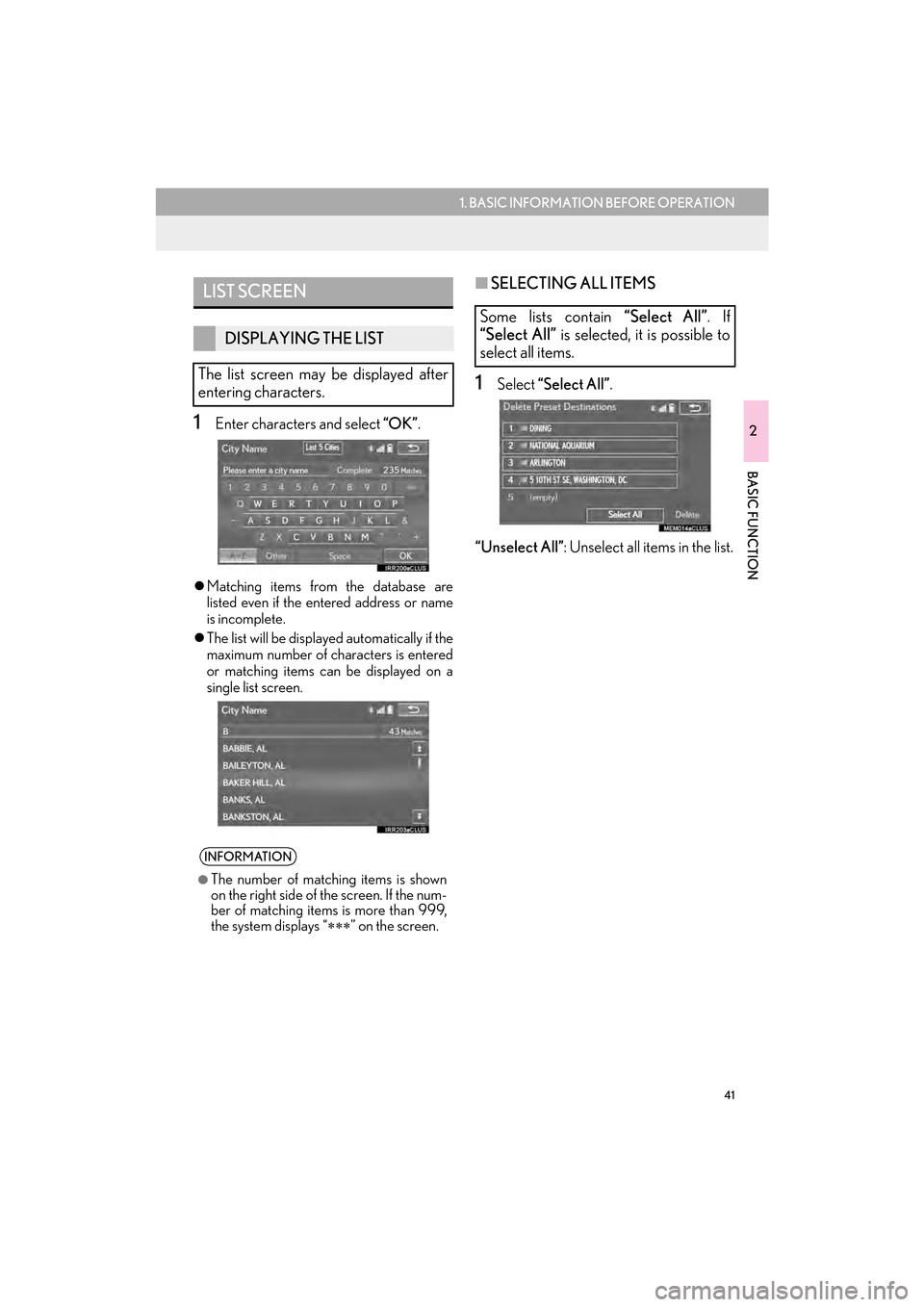
1Enter characters and select “OK”.
zMatching items from the database are
listed even if the entered address or name
is incomplete.
z The list will be displayed automatically if the
maximum number of characters is entered
or matching items can be displayed on a
single list screen.
■ SELECTING ALL ITEMS
1Select “Select All” .
“Unselect All” : Unselect all items in the list.
LIST SCREEN
DISPLAYING THE LIST
The list screen may be displayed after
entering characters.
INFORMATION
●
The number of matching items is shown
on the right side of the screen. If the num-
ber of matching items is more than 999,
the system displays “ ∗∗∗” on the screen.
Some lists contain “Select All”. If
“Select All” is selected, it is possible to
select all items.
Page 43 of 405

42
1. BASIC INFORMATION BEFORE OPERATION
CT200h_Navi_OM76146U_(U)14.06.17 09:48
1Select “Sort”.
2Select the desired sorting criteria.
LIST SCREEN OPERATION
When a list is displayed, use the appro-
priate screen button to scroll through
the list.
IconFunction
Select to skip to the next or previ-
ous page.
Select and hold or to
scroll through the displayed list.
This indicates the displayed
screen’s position.
If appears to the right of an
item name, the complete name is
too long to display.
Select to scroll to the end of
the name.
Select to move to the begin-
ning of the name.
INFORMATION
●
The “” and “” buttons on the Remote
Touch can be used to scroll up and down
on list screens.
SORTING
The order of a list displayed on the
screen can be sorted in the order of dis-
tance from the current location, date,
category, etc.
Page 44 of 405

43
1. BASIC INFORMATION BEFORE OPERATION
2
BASIC FUNCTION
CT200h_Navi_OM76146U_(U)14.06.17 09:48
1Select the desired character jump but-
tons.
CHARACTER JUMP BUTTONS
IN LISTS
Some lists contain character screen but-
tons, “ABC”, “DEF” etc., which allow a
direct jump to list entries that begin with
the same letter as the character screen
button.
INFORMATION
●
Every time the same character screen
button is selected, the list starting with the
subsequent character is displayed.
Page 45 of 405

44
1. BASIC INFORMATION BEFORE OPERATION
CT200h_Navi_OM76146U_(U)14.06.17 09:48
5. SCREEN ADJUSTMENT
1Press the “MENU” button on the
Remote Touch.
2Select “Display” .
3Select the items to be set.The contrast and brightness of the
screen display and the image of the
camera display can be adjusted. The
screen can also be turned off, and/or
changed to either day or night mode.
(For information regarding audio/visual
screen adjustment:
→P.176)
No.FunctionPage
Select to turn the screen off.
To turn it on, press any but-
ton on the audio panel or on
the Remote Touch.
Select to turn day mode
on/off.45
Select to adjust the screen
display.
45Select to adjust the camera
display.
INFORMATION
●
When the screen is viewed through
polarized sunglasses, a rainbow pattern
may appear on the screen due to optical
characteristics of the screen. If this is dis-
turbing, please operate the screen with-
out polarized sunglasses.
Page 46 of 405

45
1. BASIC INFORMATION BEFORE OPERATION
2
BASIC FUNCTION
CT200h_Navi_OM76146U_(U)14.06.17 09:48
1Select “Day Mode” .
zIn the following conditions, the display’s
condition is not changed to night mode
even if headlight switch is turned on:
• The instrument panel light control dial is
turned fully to the upper.
• The vehicle is in a bright area, such as out- side in direct sunlight.
1Select “General” or “Camera” .
2Select the desired item.
z“Display (General)” screen only: Select “”
or “” to select the desired display.
CHANGING BETWEEN DAY
AND NIGHT MODE
Depending on the position of the head-
light switch, the screen changes to day
or night mode. This feature is available
when the headlight is switched on.
INFORMATION
●
If the screen is set to day mode with the
headlight switch turned on, this condition
is memorized even with the hybrid system
turned off.
ADJUSTING THE CONTRAST/
BRIGHTNESS
The contrast and brightness of the
screen can be adjusted according to the
brightness of your surroundings.
Screen buttonFunction
“Contrast” “+”Select to strengthen the
contrast of the screen.
“Contrast” “-”Select to weaken the
contrast of the screen.
“Brightness” “+”Select to brighten the
screen.
“Brightness” “-”Select to darken the
screen.
Page 47 of 405
46
CT200h_Navi_OM76146U_(U)14.06.17 09:48
2. Bluetooth® SETTINGS
1. REGISTERING/CONNECTING Bluetooth® DEVICE
1Turn the Bluetooth® connection setting
of your cellular phone on.
z This function is not available when
Bluetooth® connection setting of your cel-
lular phone is set to off.
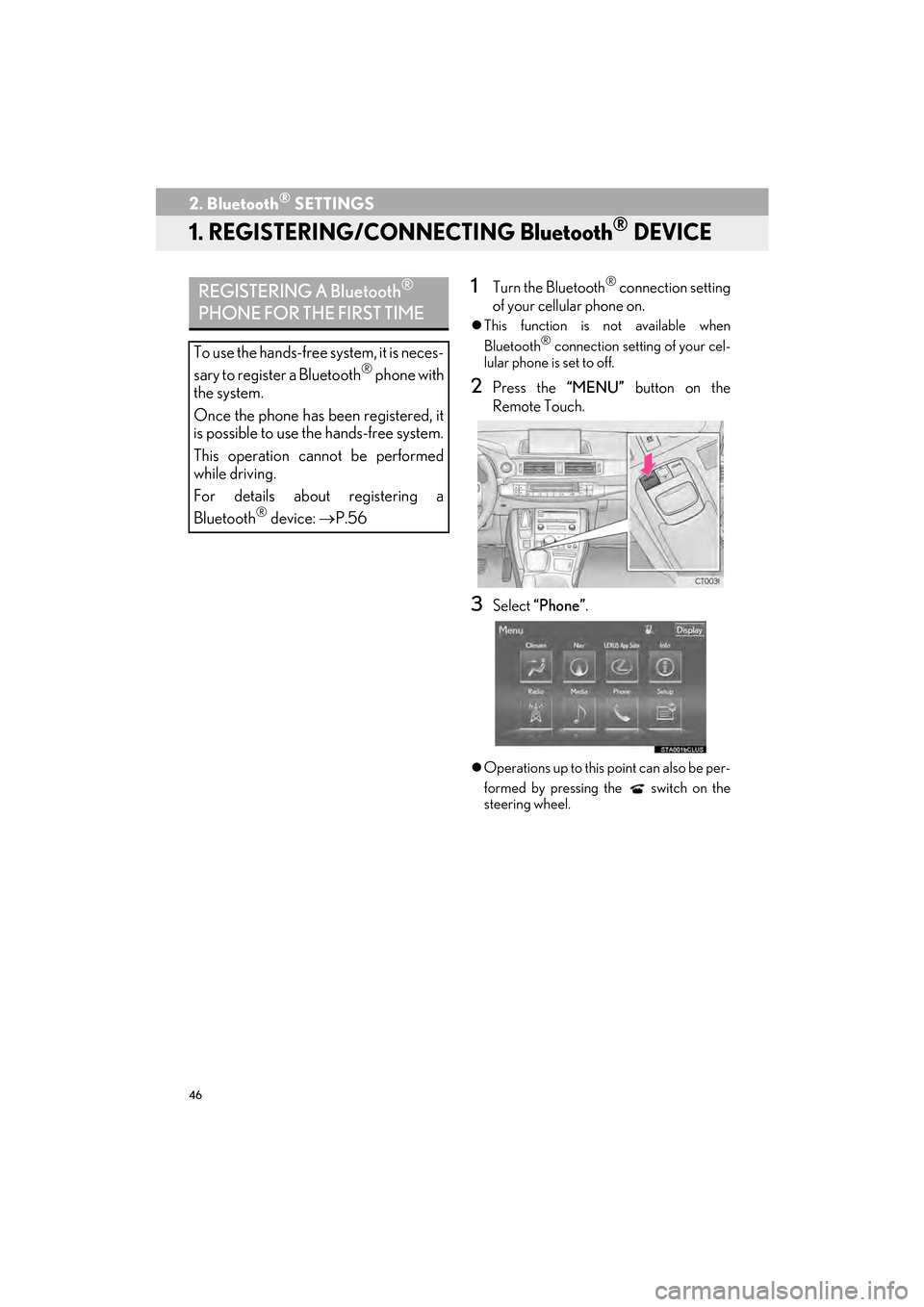
2Press the “MENU” button on the
Remote Touch.
3Select “Phone”.
zOperations up to this point can also be per-
formed by pressing the switch on the
steering wheel.
REGISTERING A Bluetooth®
PHONE FOR THE FIRST TIME
To use the hands-free system, it is neces-
sary to register a Bluetooth® phone with
the system.
Once the phone has been registered, it
is possible to use the hands-free system.
This operation cannot be performed
while driving.
For details about registering a
Bluetooth
® device: →P.56
Page 48 of 405

47
2. Bluetooth® SETTINGS
2
BASIC FUNCTION
CT200h_Navi_OM76146U_(U)14.06.17 09:48
4Select “Yes” to register a phone.
5When this screen is displayed, search
for the device name displayed on this
screen on the screen of your
Bluetooth
® device.
zFor details about operating the Bluetooth®
device, see the manual that comes with it.
z To cancel the registration, select “Cancel”.
6Register the Bluetooth® device using
your Bluetooth
® device.
z A PIN-code is not required for SSP
(Secure Simple Pairing) compatible
Bluetooth
® devices. Depending on the
type of Bluetooth® device being con-
nected, a message confirming registration
may be displayed on the Bluetooth
®
device’s screen. Respond and operate the
Bluetooth® device according to the confir-
mation message.
7Check that the following screen is dis-
played when registration is complete.
z The system waits for connection requests
coming from the registered device.
z At this stage, the Bluetooth
® functions are
not yet available.
Page 49 of 405

48
2. Bluetooth® SETTINGS
CT200h_Navi_OM76146U_(U)14.06.17 09:48
8Select “OK” when the connection sta-
tus changes from “Connecting...” to
“Connected”.
z If an error message is displayed, follow the
guidance on the screen to try again.
REGISTERING A Bluetooth®
AUDIO PLAYER FOR THE
FIRST TIME
To use the Bluetooth® Audio, it is nec-
essary to register an audio player with
the system.
Once the player has been registered, it
is possible to use the Bluetooth
® Audio.
This operation cannot be performed
while driving.
For details about registering a
Bluetooth
® device: →P.56
Page 50 of 405

49
2. Bluetooth® SETTINGS
2
BASIC FUNCTION
CT200h_Navi_OM76146U_(U)14.06.17 09:48
1Turn the Bluetooth® connection setting
of your audio player on.
z This function is not available when the
Bluetooth® connection setting of your
audio player is set to off.
2Press the “MENU” button on the
Remote Touch.
3Select “Radio” or “Media” .
4Select “Source” .
5Select “Bluetooth*” .
6Select “Connect” .
7Select “Yes” to register a audio player.
8Follow the steps in “REGISTERING A
Bluetooth
® PHONE FOR THE FIRST
TIME” from “STEP 5”. ( →P.46)
*: Bluetooth is a registered trademark of Bluetooth SIG, Inc.