steering Lexus CT200h 2017 (in English) User Guide
[x] Cancel search | Manufacturer: LEXUS, Model Year: 2017, Model line: CT200h, Model: Lexus CT200h 2017Pages: 640, PDF Size: 17.94 MB
Page 48 of 640

481-1. For safe use
CT200h_OM_OM76215U_(U)
●The pad section of the steering wheel, dash-
board near the front passenger airbag or
lower portion of the instrument panel is
scratched, cracked, or otherwise damaged.
●The surface of the seats with the side airbag is
scratched, cracked, or otherwise damaged.
●The portion of the front pillars, rear pillars or
roof side rail garnishes (padding) containing
the curtain shield airbag s inside is scratched,
cracked, or otherwise damaged.
Page 83 of 640
CT200h_OM_OM76215U_(U)
832. Instrument cluster
2
Instrument cluster
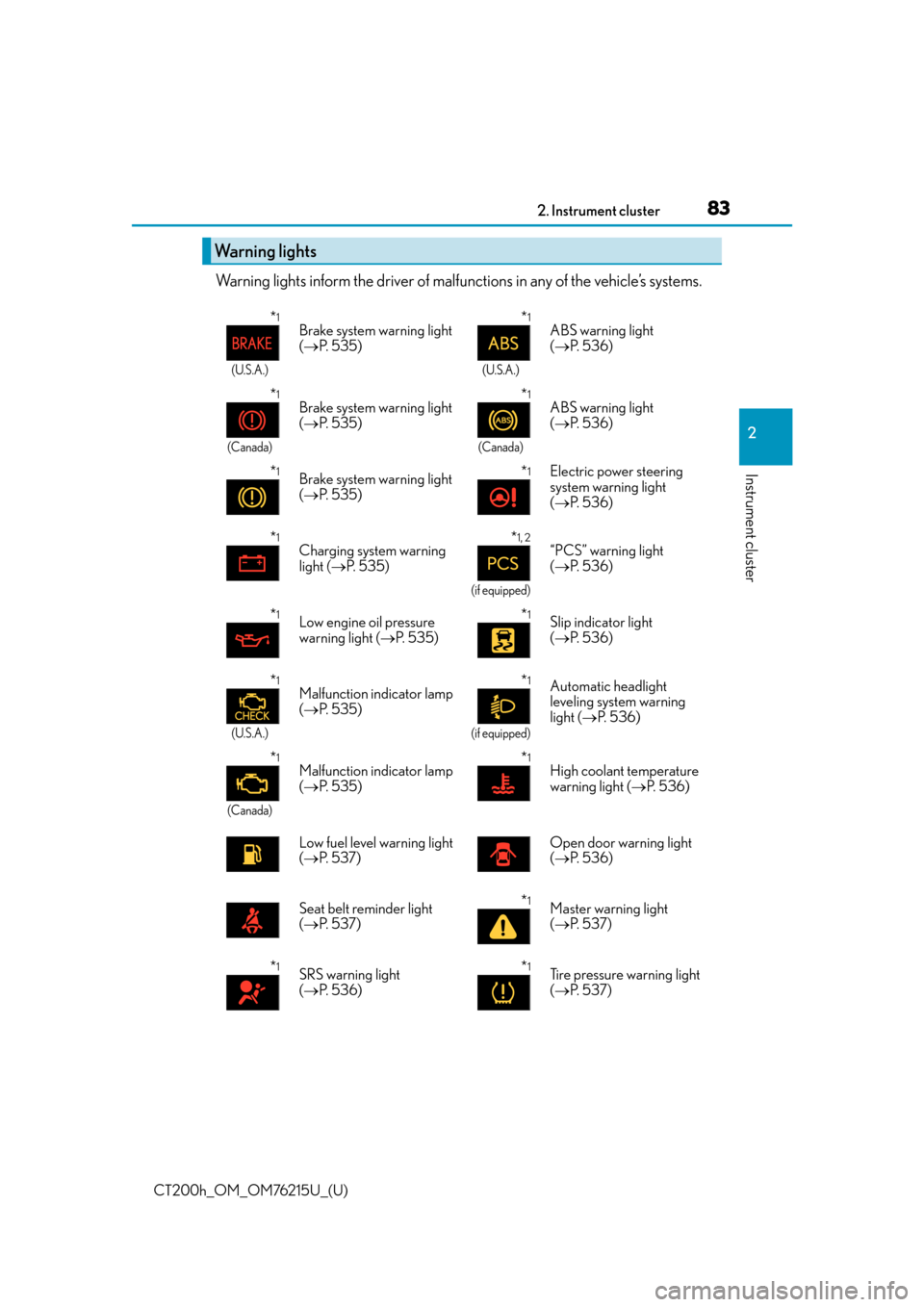
Warning lights inform the driver of malfunctions in any of the vehicle’s systems.
Warning lights
*1
(U.S.A.)
Brake system warning light
( P. 5 3 5 )*1
(U.S.A.)
ABS warning light
( P. 5 3 6 )
*1
(Canada)
Brake system warning light
( P. 5 3 5 )*1
(Canada)
ABS warning light
( P. 5 3 6 )
*1Brake system warning light
( P. 5 3 5 )*1Electric power steering
system warning light
( P. 5 3 6 )
*1Charging system warning
light ( P. 5 3 5 )*1, 2
(if equipped)
“PCS” warning light
( P. 5 3 6 )
*1Low engine oil pressure
warning light ( P. 5 3 5 )*1Slip indicator light
( P. 5 3 6 )
*1
(U.S.A.)
Malfunction indicator lamp
( P. 5 3 5 )*1
(if equipped)
Automatic headlight
leveling system warning
light ( P. 5 3 6 )
*1
(Canada)
Malfunction indicator lamp
( P. 5 3 5 )*1High coolant temperature
warning light ( P. 5 3 6 )
Low fuel level warning light
( P. 5 3 7 ) Open door warning light
(
P. 5 3 6 )
Seat belt reminder light
( P. 5 3 7 )
*1Master warning light
( P. 5 3 7 )
*1SRS warning light
( P. 5 3 6 )*1Tire pressure warning light
( P. 5 3 7 )
Page 94 of 640

94
CT200h_OM_OM76215U_(U)2. Instrument cluster
Navigation system screen
Press the “MENU” button on the
Remote Touch, then select “Info” on the
“Menu” screen, and then select “Fuel
Consumption”.
If the “Trip Information” or “Past Record”
screen is displayed, select “Energy”.
Lexus Display Audio screen
Press the “MENU” button on the Lexus
Display Audio controller, then select
“Info” on the “Menu” screen, and then
select “Fuel Consumption”.
If the “Energy Monitor” screen does not
appear, move the controller to the right
and select “Energy”.
Multi-information display
Press the “DISP” switch on the steering wheel several times to select the energy
monitor display.
Energy monitor
Page 101 of 640

101
CT200h_OM_OM76215U_(U)
3
Operation of
each component
3-1. Key information
Keys .................................................. 102
3-2. Opening, closing and locking the doors
Side doors .......................................107
Back door......................................... 112
Smart access system with push-button start........................ 116
3-3. Adjusting the seats Front seats .......................................122
Rear seats ........................................ 124
Driving position memory ..........126
Head restraints .............................129
3-4. Adjusting the steering wheel and mirrors
Steering wheel ............................. 132
Inside rear view mirror.............. 134
Outside rear view mirrors ........ 137
3-5. Opening, closing the windows and moon roof
Power windows ............................ 139
Moon roof .......................................142
Page 128 of 640
128
CT200h_OM_OM76215U_(U)3-3. Adjusting the seats
■Recall procedure
Carry the electronic key that has been
registered to the driving position, and
then unlock and open the driver’s door using the smart access system with
push-button start or wireless remote control.
The driving position will move to the recorded position.
If the driving position is in a position that has already been recorded, the seat and out-
side rear view mirrors will not move.
■Cancelation procedure
Carry only the key you want to cancel and then close the driver’s door.
If 2 or more keys are in the vehicle, the driving position cannot be canceled
properly.
Turn the power switch to ON mode.
While pressing the “SET” button, press and hold the door lock switch
(either lock or unlock) unt il the buzzer sounds twice.
If the button could not be canceled, the buzzer sounds continuously for approxi-
mately 3 seconds.
■Recalling the driving position using the memory recall function
●Different driving positions can be registered for each electronic key. Therefore, the
driving position that is recalled may be different depending on the key being carried.
●If a door other than the driver’s door is unlocked with the smart access system with
push-button start, the driving position cannot be recalled. In this case, press the driving
position button which has been set.
WA R N I N G
■Seat adjustment caution
Take care during seat adjustment so that th e seat does not strike the rear passenger or
squeeze your body against the steering wheel.
1
2
Page 132 of 640

1323-4. Adjusting the steering wheel and mirrors
CT200h_OM_OM76215U_(U)
Steering wheel
Hold the steering wheel and push
the lever down.
Adjust to the ideal position by mov-
ing the steering wheel horizontally
and vertically.
After adjustment, pull the lever up to
secure the steering wheel.
To sound the horn, press on or close to
the mark.
■After adjusting the steering wheel
Make sure that the steering wheel is securely locked.
The horn may not sound if the steering wheel is not securely locked.
Adjustment procedure
1
2
Horn
Page 133 of 640

1333-4. Adjusting the steering wheel and mirrors
3
Operation of each component
CT200h_OM_OM76215U_(U)
WA R N I N G
■While driving
Do not adjust the steering wheel while driving.
Doing so may cause the driver to mishandle the vehicle and cause an accident, result-
ing in death or serious injury.
■After adjusting the steering wheel
Make sure that the steering wheel is securely locked.
Otherwise, the steering wheel may move suddenly, possibly causing an accident, and
resulting in death or serious injury.
Page 134 of 640

1343-4. Adjusting the steering wheel and mirrors
CT200h_OM_OM76215U_(U)
Inside rear view mirror
The height of the rear view mirror can be adjusted to suit your driving posture.
Adjust the height of the rear view mir-
ror by moving it up and down.
Manual anti-glare inside rear view mirror
Reflected light from the headlights of vehicles behind can be reduced by operat-
ing the lever.
Normal position
Anti-glare position
The rear view mirror’s position can be adjusted to enable sufficient confirma-
tion of the rear view.
Adjusting the height of rear view mirror
Anti-glare function
1
2
Page 135 of 640

1353-4. Adjusting the steering wheel and mirrors
3
Operation of each component
CT200h_OM_OM76215U_(U)
Auto anti-glare inside rear view mirror (type A)
Responding to the level of brightness of the headlights of vehicles behind, the
reflected light is automatically reduced.
Changing automatic anti-glare func-
tion mode
On/off
When the automatic anti-glare function
is in ON mode, the indicator illuminates.
The function will set to ON mode each
time the power switch is turned to ON
mode.
Pressing the button turns the function to
OFF mode. (The indicator also turns
off.)
Auto anti-glare inside rear view mirror (type B)
Responding to the level of brightness of the headlights of vehicles behind, the
reflected light is automatically reduced.
Changing automatic anti-glare func-
tion mode
On/off
When the automatic anti-glare function
is in ON mode, the indicator illuminates.
The function will set to ON mode each
time the power switch is turned to ON
mode.
Pressing the button turns the function to
OFF mode. (The indicator also turns
off.)
Indicator
Indicator
Page 136 of 640

1363-4. Adjusting the steering wheel and mirrors
CT200h_OM_OM76215U_(U)
■To prevent sensor error (vehicles with auto anti-glare inside rear view mirror)
To ensure that the sens ors operate properly, do
not touch or cover them.
Ty p e A
Ty p e B
WA R N I N G
Do not adjust the position of the mirror while driving.
Doing so may lead to mishandling of the vehicle and cause an accident, resulting in
death or serious injury.