Parking Lexus CT200h 2017 (in English) Owner's Guide
[x] Cancel search | Manufacturer: LEXUS, Model Year: 2017, Model line: CT200h, Model: Lexus CT200h 2017Pages: 640, PDF Size: 17.94 MB
Page 211 of 640
CT200h_OM_OM76215U_(U)
2114-5. Using the driving support systems
4
Driving
■If a message is displayed on the multi-information display
P. 5 4 2
■Certification
For vehicles sold in the U.S.A.
This device complies with Part 15 of the FC C Rules. Operation is subject to the following
two conditions; (1) This device may not caus e harmful interference, and (2) this device
must accept any interference received, incl uding interference that may cause undesired
operation.
For vehicles sold in Canada
This ISM device complies with Canadian ICES-001.
Cet appareil ISM est conforme à la norme NMB-001 du Canada.
■Customization
Settings (e.g. buzzer sounds volume) can be changed.
(Customizable features: P. 5 9 8 )
WA R N I N G
■When using the intuitive parking assist
Observe the following precautions.
Failing to do so may result in the vehicle being unable to be driven safely and possibly
cause an accident.
●Do not use the sensor at speeds in excess of 6 mph (10 km/h).
●The sensors’ detection areas and reaction times are limited. When moving forward or
reversing, check the areas surrounding the vehicle (especially the sides of the vehi-
cle) for safety, and drive slowly, using the brake to control the vehicle’s speed.
●Do not install accessories within the sensors’ detection areas.
NOTICE
■When using intuitive parking assist
In the following situations, the system may not function correctly due to a sensor mal-
function etc. Have the vehicle checked by your Lexus dealer.
●The intuitive parking assist operation display flashes, and a buzzer sounds when no
obstacles are detected.
●If the area around a sensor collides with so mething, or is subjected to strong impact.
●If the bumper collides with something.
●If the display shows continuously without beeping, except when the buzzer mute
switch has been turned on.
●If a display error occurs, first check the sensor.
If the error occurs even if there is no ice, snow or mud on the sensor, it is likely that the
sensor is malfunctioning.
■Notes when washing the vehicle
Do not apply intensive bursts of water or steam to the sensor area.
Doing so may result in th e sensor malfunctioning.
Page 216 of 640
216
CT200h_OM_OM76215U_(U)4-5. Using the driving support systems
■Differences between the screen and the actual road
The distance guide lines and the vehicl
e width guide lines may not actually be
parallel with the dividing lines of the parking space, even when they appear to
be so. Be sure to check visually.
The distances between the vehicle width guide lines and the left and right
dividing lines of the parking space may not be equal, even when they appear
to be so. Be sure to check visually.
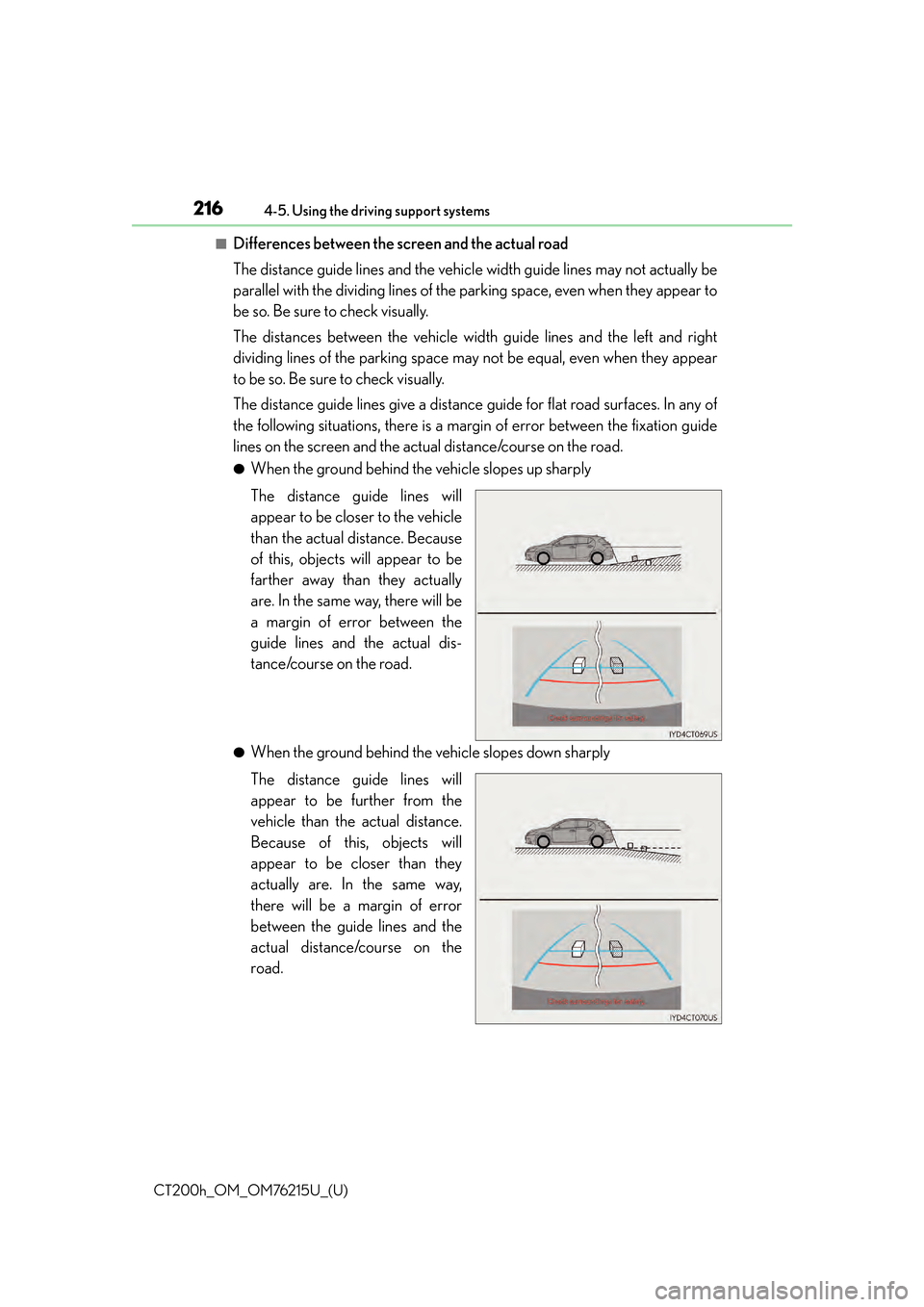
The distance guide lines give a distance guide for flat road surfaces. In any of
the following situations, there is a margin of error between the fixation guide
lines on the screen and the actual distance/course on the road.
●When the ground behind the vehicle slopes up sharply
The distance guide lines will
appear to be closer to the vehicle
than the actual distance. Because
of this, objects will appear to be
farther away than they actually
are. In the same way, there will be
a margin of error between the
guide lines and the actual dis-
tance/course on the road.
●When the ground behind the vehicle slopes down sharply
The distance guide lines will
appear to be further from the
vehicle than the actual distance.
Because of this, objects will
appear to be closer than they
actually are. In the same way,
there will be a margin of error
between the guide lines and the
actual distance/course on the
road.
Page 218 of 640
218
CT200h_OM_OM76215U_(U)4-5. Using the driving support systems
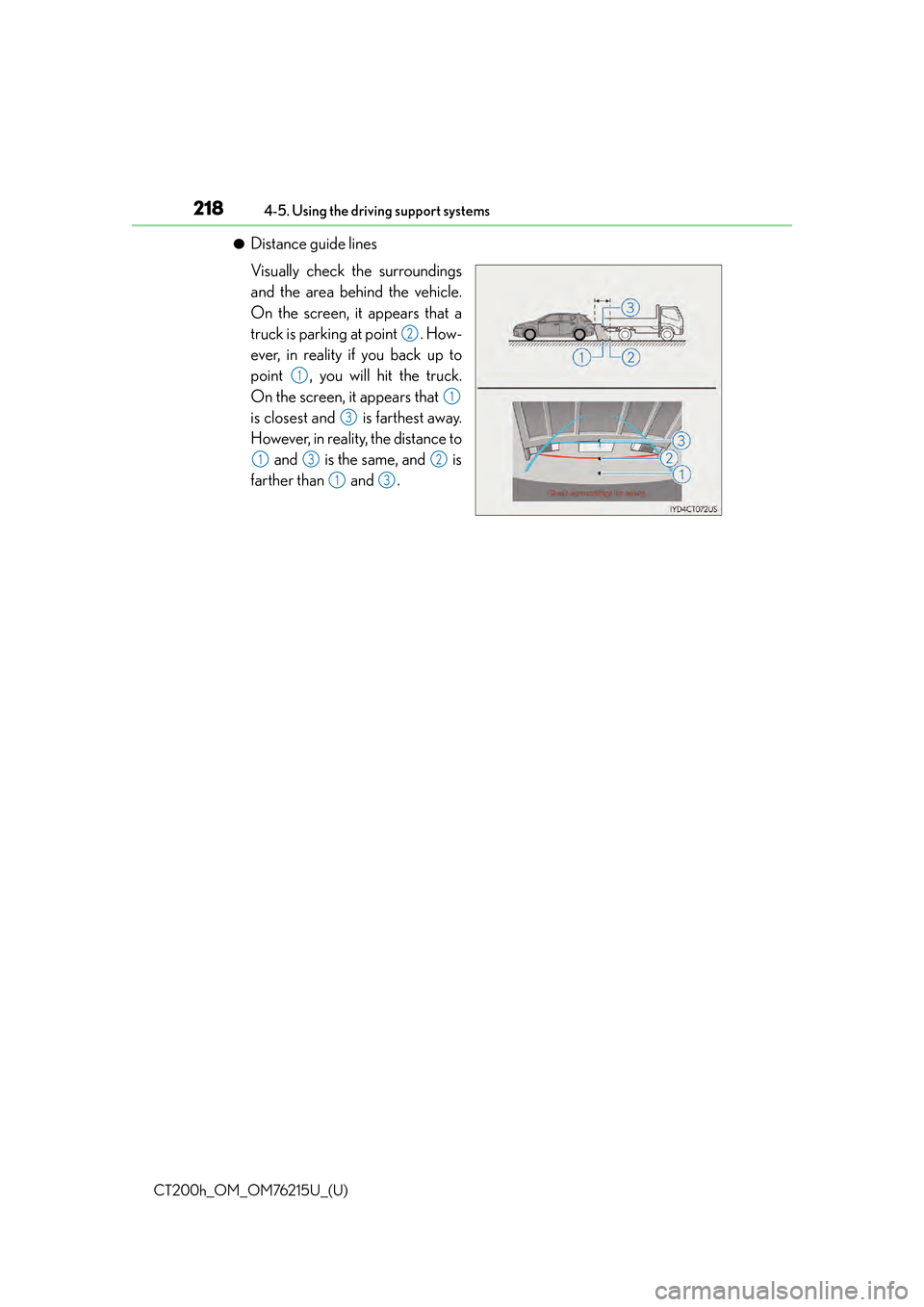
●Distance guide lines
Visually check the surroundings
and the area behind the vehicle.
On the screen, it appears that a
truck is parking at point . How-
ever, in reality if you back up to
point , you will hit the truck.
On the screen, it appears that
is closest and is farthest away.
However, in reality, the distance to
and is the same, and is
farther than and .
2
1
1
3
132
13
Page 220 of 640
220
CT200h_OM_OM76215U_(U)4-5. Using the driving support systems
WA R N I N G
■When using the rear view monitor system
The rear view monitor system is a suppleme
ntal device intended to assist the driver
when backing up. When backing up, be sure to check visually behind and all around
the vehicle before proceeding.
Observe the following precautions to avoid an accident that could result in death or
serious injuries.
●Never depend on the rear view monitor syst em entirely when backing up. The image
and the position of the guide lines displaye d on the screen may differ from the actual
state.
Use caution, just as you would when backing up any vehicle.
●Be sure to back up slowly, depressing the brake pedal to control vehicle speed.
●The instructions given are only guide lines.
When and how much to turn the steering wheel will vary according to traffic condi-
tions, road surface conditions, vehicle condit ion, etc. when parking. It is necessary to
be fully aware of this before using the rear view monitor system.
●When parking, be sure to check that the par king space will accommodate your vehi-
cle before maneuvering into it.
●Do not use the rear view monitor system in the following cases:
• On icy or slick road surfaces, or in snow
• When using tire chains or emergency tires
• When the back door is not closed completely
• On roads that are not flat or straight, such as curves or slopes.
●In low temperatures, the screen may darken or the image may become faint. The
image could distort when the vehicle is moving, or you may become unable to see the
image on the screen. Be sure to check dire ct visually and with the mirrors all around
the vehicle before proceeding.
●If the tire sizes are changed, the position of the fixed guide lines displayed on the
screen may change.
●The camera uses a special lens. The dist ances between objects and pedestrians that
appear in the image displayed on the screen will differ from the actual distances.
( P. 2 1 6 )
Page 222 of 640

222
CT200h_OM_OM76215U_(U)4-5. Using the driving support systems
Lexus parking assist monitor
The rear view image is displayed when
the shift position is in R and the power
switch is in ON mode.
The parking assist monitor system will
be deactivated when the shift position is
in any position other than R.
: If equipped
The parking assist monitor assists the driv
er by displaying an image of the view
behind the vehicle while backing up, for example while parking.
Owners of models equipped with a navi gation system should refer to the
“NAVIGATION SYSTEM OWNER’S MANUAL”.
The screen illustrations used in this text are intended as examples, and may
differ from the image that is ac tually displayed on the screen.
Page 223 of 640

CT200h_OM_OM76215U_(U)
2234-5. Using the driving support systems
4
Driving
■Screen display
The parking assist monitor screen
will be displayed if the shift position is
shifted to R while the power switch is
in ON mode.Intuitive parking assist display (if
equipped)
If an obstacle is detected while the
intuitive parking assist is on, a display
is shown in the top right corner of the
screen.
■Using the system
Use any of the following modes.
●Estimated course line display mode ( P. 225)
Estimated course lines are dis-
played which move in accor-
dance with the operation of the
steering wheel.
Using the Lexus parking assist monitor
A
Page 224 of 640

224
CT200h_OM_OM76215U_(U)4-5. Using the driving support systems
●Parking assist guide line display mode (
P. 2 2 7 )
The steering wheel return points
(parking assist guide lines) are
displayed.
●Distance guide line display mode
Distance guide lines only are dis-
played.
When the shift position is in any position other than R, the display mode can be
changed in the following procedure. Press the “MENU” button on the Lexus Display Audio controller, and then
select “Setup” on the screen.
Select “Vehicle”, and then select “B ack Camera Guide Line Setting” on the
screen.
Select the desired display mode.
Estimated course line display
mode ( P. 2 2 5 )
Parking assist guide line display
mode ( P. 2 2 7 )
Distance guide line display mode
Distance guide lines only are dis-
played.
Switching the display mode
1
2
3
1
2
3
Page 226 of 640
226
CT200h_OM_OM76215U_(U)4-5. Using the driving support systems
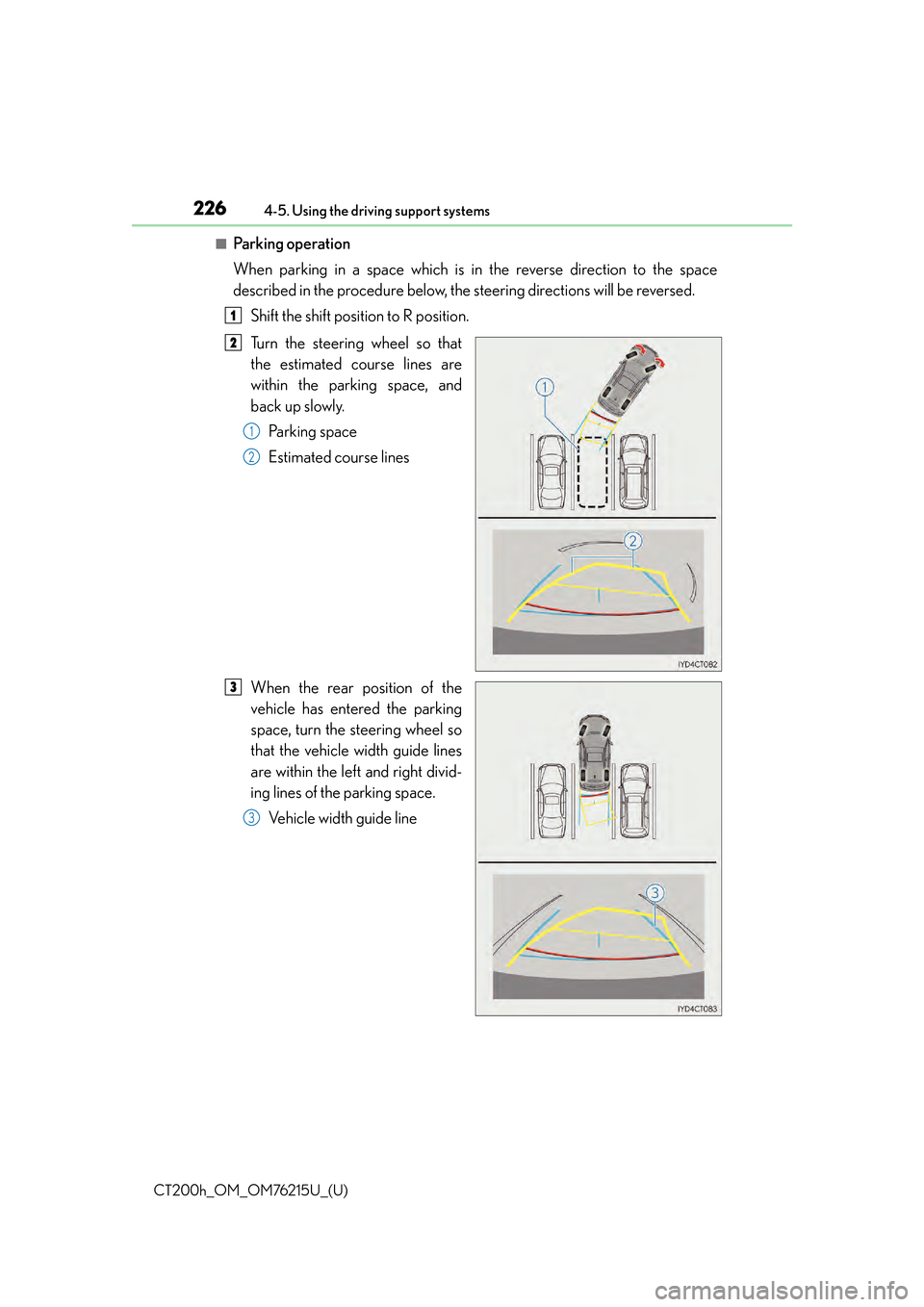
■Pa r k i n g o p e ra t i o n
When parking in a space which is in the reverse direction to the space
described in the procedure below, the steering directions will be reversed.
Shift the shift position to R position.
Turn the steering wheel so that
the estimated course lines are
within the parking space, and
back up slowly.Parking space
Estimated course lines
When the rear position of the
vehicle has entered the parking
space, turn the steering wheel so
that the vehicle width guide lines
are within the left and right divid-
ing lines of the parking space. Vehicle width guide line
1
2
1
2
3
3
Page 227 of 640

CT200h_OM_OM76215U_(U)
2274-5. Using the driving support systems
4
Driving
Once the vehicle width guide lines and the parking space lines are parallel,
straighten the steering wheel and back up slowly until the vehicle has com-
pletely entered the parking space.
Stop the vehicle in an appropriate place, and finish parking.
■Screen description
Vehicle width guide lines
These lines indicate a guide path when the vehicle is being backed straight
up. The displayed width is wider than the actual vehicle width.
Parking assist guide lines
These lines indicate the path of the smallest turn possible behind the vehi-
cle.
These lines also indicate the approximate position of the steering wheel
when parking.
Distance guide line
This line (red) indicates points approxim ately 1.5 ft. (0.5 m) behind the rear
bumper of your vehicle.
Vehicle center guide line
This line indicates the estimated vehicle center on the ground.
Parking assist guide line display mode
4
5
1
2
3
4
Page 228 of 640

228
CT200h_OM_OM76215U_(U)4-5. Using the driving support systems
■Pa r k i n g o p e ra t i o n
When parking in a space which is in the reverse direction to the space
described in the procedure below, the steering directions will be reversed.
Shift the shift position to R position.
Back up until the parking assist
guide line meets the edge of the
left-hand dividing line of the park-
ing space.Parking assist guide line
Parking space dividing line
Turn the steering wheel all the way to the right, and back up slowly.
Once the vehicle is parallel with the parking space, straighten the steering
wheel and back up slowly until the vehicle has completely entered the
parking space.
Stop the vehicle in an appropri ate place, and finish parking.
1
2
1
2
3
4
5