Accessory mode Lexus CT200h 2017 Owner's Manual (in English)
[x] Cancel search | Manufacturer: LEXUS, Model Year: 2017, Model line: CT200h, Model: Lexus CT200h 2017Pages: 640, PDF Size: 17.94 MB
Page 76 of 640
761-3. Theft deterrent system
CT200h_OM_OM76215U_(U)
Immobilizer system
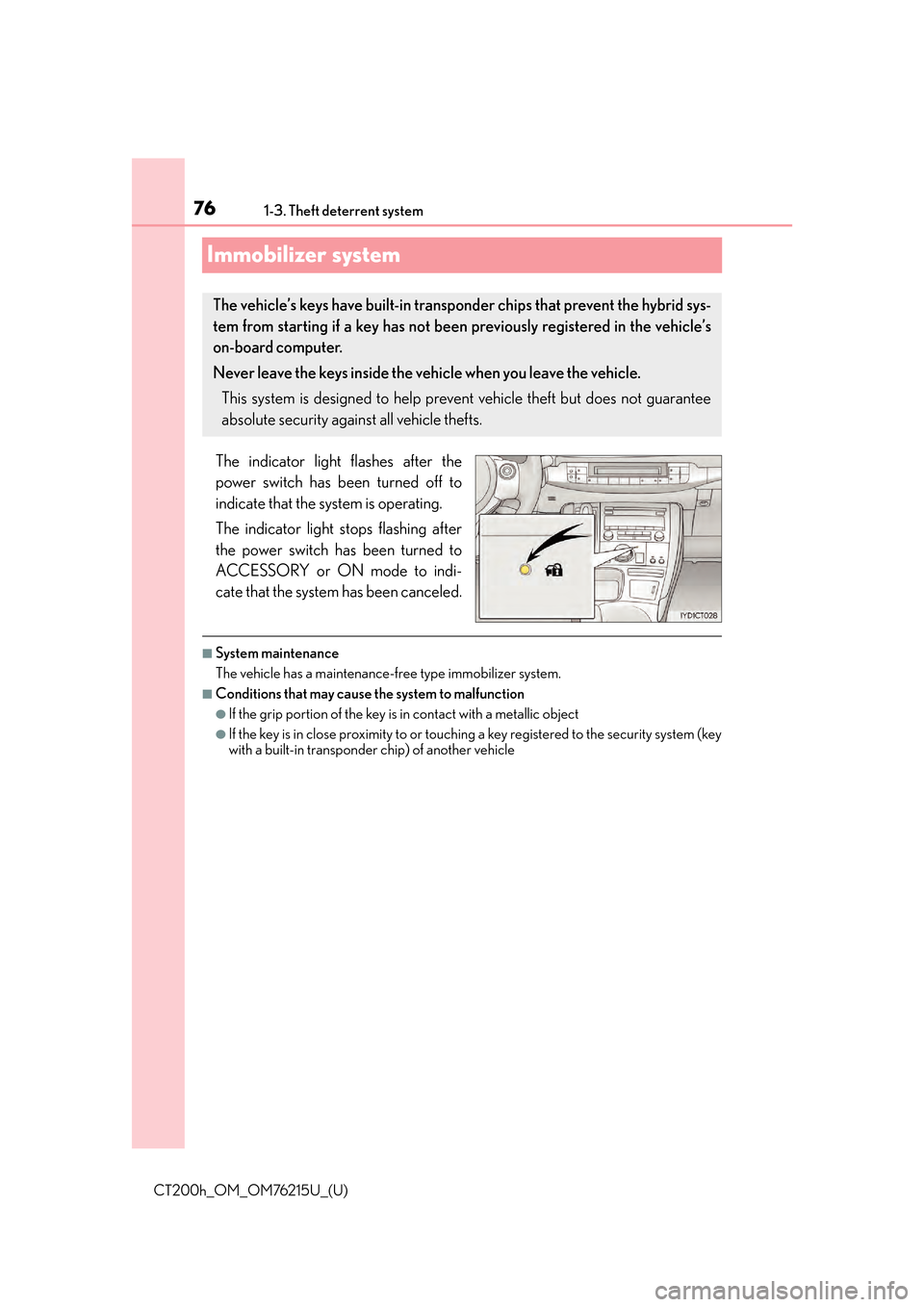
The indicator light flashes after the
power switch has been turned off to
indicate that the system is operating.
The indicator light stops flashing after
the power switch has been turned to
ACCESSORY or ON mode to indi-
cate that the system has been canceled.
■System maintenance
The vehicle has a maintenance-free type immobilizer system.
■Conditions that may cause the system to malfunction
●If the grip portion of the key is in contact with a metallic object
●If the key is in close proximity to or touching a key registered to the security system (key
with a built-in transponder chip) of another vehicle
The vehicle’s keys have built-in transponder chips that prevent the hybrid sys-
tem from starting if a key has not been previously registered in the vehicle’s
on-board computer.
Never leave the keys inside the vehicle when you leave the vehicle.
This system is designed to help prevent vehicle theft but does not guarantee
absolute security against all vehicle thefts.
Page 78 of 640

781-3. Theft deterrent system
CT200h_OM_OM76215U_(U)
Alarm
The alarm uses light and sound to give an alert when an intrusion is detected.
The alarm is triggered in the following situations when the alarm is set:
●A locked door is unlocked or opened in any way other than using the entry
function, wireless remote control or mech anical key. (The doors will lock again
automatically.)
●The hood is opened.
Close the doors and hood, and lock all
the doors. The system will be set auto-
matically after 30 seconds.
The indicator light changes from being
on to flashing when the system is set.
Do one of the following to de activate or stop the alarms:
●Unlock the doors.
●Turn the power switch to ACCESSORY or ON mode, or start the hybrid sys-
tem. (The alarm will be deactivated or stopped after a few seconds.)
■System maintenance
The vehicle has a maintenance-free type alarm system.
■Items to check before locking the vehicle
To prevent unexpected triggering of the alarm and vehicle theft, make sure of the follow-
ing:
●Nobody is in the vehicle.
●The windows and moon roof (if equipped) are closed before the alarm is set.
●No valuables or other personal items are left in the vehicle.
The alarm
Setting the alarm system
Deactivating or stopping the alarm
Page 110 of 640

110
CT200h_OM_OM76215U_(U)3-2. Opening, closing and locking the doors
Move the inside lock button to the lock position.
Close the door.
The door cannot be locked if the power switch is in ACCESSORY or ON mode,
or the electronic key is left inside the vehicle.
The key may not be detected correc tly and the door may be locked.
The door cannot be opened from inside
the vehicle when the lock is set.
Unlock
Lock
These locks can be set to prevent chil-
dren from opening the rear doors. Push
down on each rear door switch to lock
both rear doors.
The following functions can be set or canceled:
For instructions on customizing, refer to P. 598.
Locking the front doors from the outside without a key
Rear door child-protector lock
1
2
1
2
Automatic door locking and unlocking systems
FunctionOperation
Shift position linked door locking
functionShifting the shift position to any positions other
than P locks all the doors.
Shift position linked door unlocking
functionShifting the shift position to P unlocks all the
doors.
Speed linked door locking functionAll the doors are locked when the vehicle speed
is approximately 12 mph (20 km/h) or higher.
Driver’s door linked door unlocking
functionAll the doors are unlocked when the driver’s
door is opened within approximately 45 sec-
onds after turning the power switch off.
Page 117 of 640
CT200h_OM_OM76215U_(U)
1173-2. Opening, closing and locking the doors
3
Operation of each component
■Alarms and warning messages
An alarm sounds and warning message displa ys shown on the multi-information display
are used to protect against unexpected acci dents or theft of the vehicle resulting from
erroneous operation. When a warning messag e is displayed, take appropriate measures
based on the displayed message. ( P. 5 4 2 )
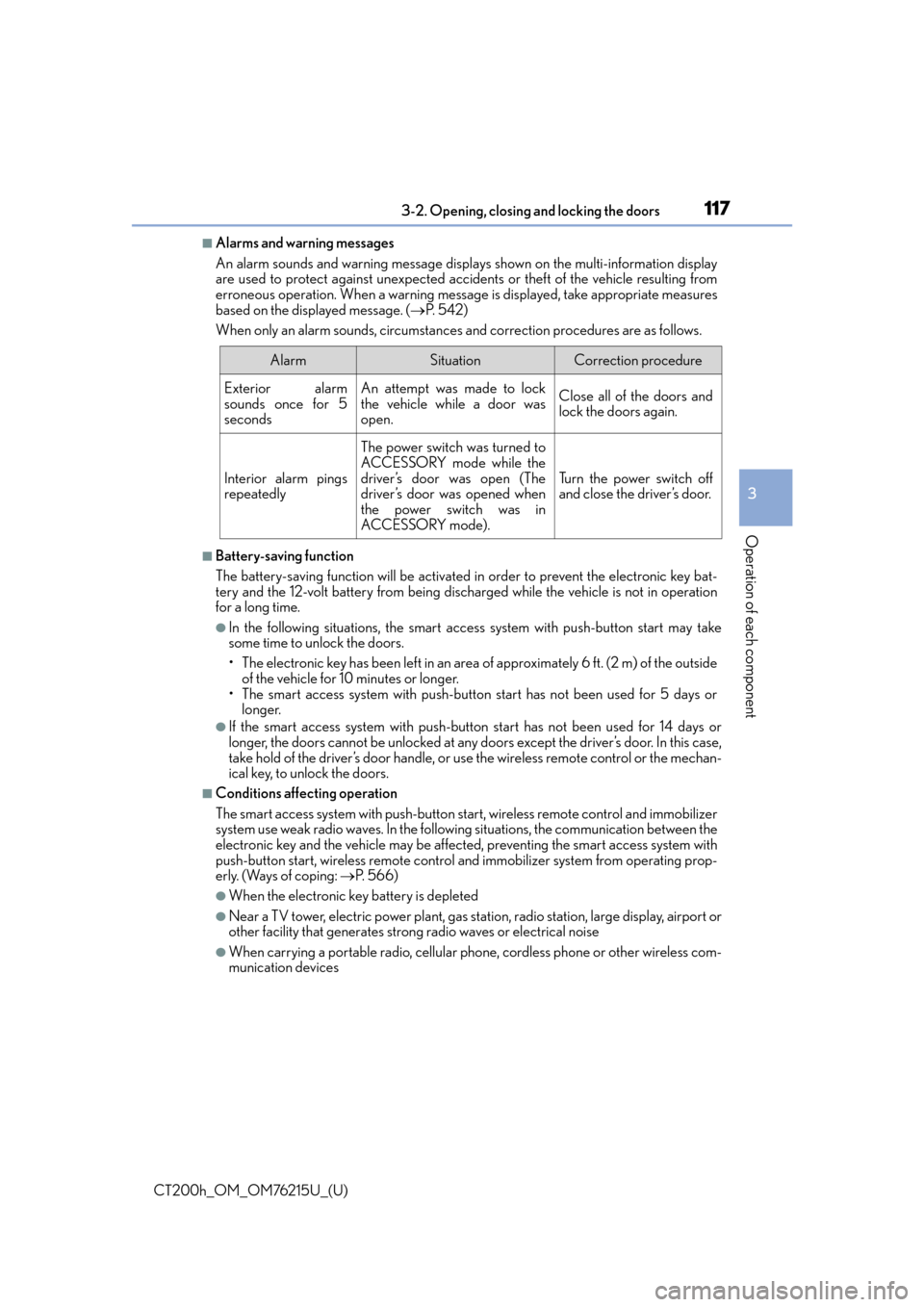
When only an alarm sounds, circumstances and correction procedures are as follows.
■Battery-saving function
The battery-saving function will be activated in order to prevent the electronic key bat-
tery and the 12-volt battery from being discha rged while the vehicle is not in operation
for a long time.
●In the following situations, the smart access system with push-button start may take
some time to unlock the doors.
• The electronic key has been left in an area of approximately 6 ft. (2 m) of the outside
of the vehicle for 10 minutes or longer.
• The smart access system with push-butto n start has not been used for 5 days or
longer.
●If the smart access system with push-butto n start has not been used for 14 days or
longer, the doors cannot be unlocked at any doors except the driver’s door. In this case,
take hold of the driver’s door handle, or us e the wireless remote control or the mechan-
ical key, to unlock the doors.
■Conditions affe cting operation
The smart access system with push-button star t, wireless remote control and immobilizer
system use weak radio waves. In the followi ng situations, the communication between the
electronic key and the vehicle may be affected, preventing the smart access system with
push-button start, wireless remote control and immobilizer system from operating prop-
erly. (Ways of coping: P. 566)
●When the electronic key battery is depleted
●Near a TV tower, electric powe r plant, gas station, radio station, large display, airport or
other facility that generates strong radio waves or electrical noise
●When carrying a portable radio, cellular ph one, cordless phone or other wireless com-
munication devices
AlarmSituationCorrection procedure
Exterior alarm
sounds once for 5
secondsAn attempt was made to lock
the vehicle while a door was
open.Close all of the doors and
lock the doors again.
Interior alarm pings
repeatedly
The power switch was turned to
ACCESSORY mode while the
driver’s door was open (The
driver’s door was opened when
the power switch was in
ACCESSORY mode).
Tu r n t h e p o w e r s w i t c h o f f
and close the driver’s door.
Page 138 of 640

1383-4. Adjusting the steering wheel and mirrors
CT200h_OM_OM76215U_(U)
■Mirror angle can be adjusted when
The power switch is in ACCESSORY or ON mode.
■When the mirrors are fogged up
The outside rear view mirrors can be cleare d using the mirror defoggers. Turn on the
rear window defogger to turn on the outside rear view mirror defoggers.
( P. 4 1 8 , 4 2 4 )
■Automatic adjustment of the mirror angle (vehicles with driving position memory)
A desired mirror face angle can be entered to memory and recalled automatically by the
driving position memory. ( P. 1 2 6 )
■Auto anti-glare function (if equipped)
When the anti-glare inside rear view mirror is set to automatic mode, the outside rear
view mirrors will activate in conjunction with the anti-glare inside rear view mirror to
reduce reflected light. ( P. 1 3 4 )
WA R N I N G
■Important points while driving
Observe the following precautions while driving.
Failing to do so may result in loss of contro l of the vehicle and cause an accident, result-
ing in death or serious injury.
●Do not adjust the mirrors while driving.
●Do not drive with the mirrors folded.
●Both the driver and passenger side mirror s must be extended and properly adjusted
before driving.
■When a mirror is moving
To avoid personal injury and mirror malfunct ion, be careful not to get your hand caught
by the moving mirror.
■When the mirror defoggers are operating
Do not touch the rear view mirror surfaces, as they can become very hot and burn you.
Page 140 of 640

140
CT200h_OM_OM76215U_(U)3-5. Opening, closing the windows and moon roof
■The power windows can be operated when
The power switch is in ON mode.
■Operating the power windows after turning the hybrid system off
The power windows can be operated for approximately 45 seconds even after the
power switch is turned to ACCESSORY mode or turned off. They cannot, however, be
operated once either front door is opened.
■Jam protection function
If an object becomes jammed between the wi
ndow and the window frame while the win-
dow is closing, window movement is stop ped and the window is opened slightly.
■Catch protection function
If an object becomes caught between the door and window while the window is opening,
window movement is stopped.
■When the window cannot be opened or closed
When the jam protection function or catch protection function operates unusually and
the door window cannot be open ed or closed, perform the following operations with the
power window switch of that door.
●Stop the vehicle. With the power switch in ON mode, within 4 seconds of the jam pro-
tection function or catch protection func tion activating, continuously operate the
power window switch in the one-touch closing direction or one-touch opening direc-
tion so that the door window can be opened and closed.
●If the door window cannot be opened and closed even when performing the above
operations, perform the following proc edure for function initialization.
Turn the power switch to ON mode.
Pull and hold the power window switch in the one-touch closing direction and com-
pletely close the door window.
Release the power window switch for a moment, resume pulling the switch in the one-
touch closing direction, and hold it th ere for approximately 6 seconds or more.
Press and hold the power window switch in the one-touch opening direction. After the
door window is completely op ened, continue holding the swit ch for an additional 1 sec-
ond or more.
Release the power window switch for a mo ment, resume pushing the switch in the
one-touch opening direction, and hold it there for approximately 4 seconds or more.
Pull and hold the power window switch in the one-touch closing direction again. After
the door window is completely closed, continue holding the switch for a further 1 sec-
ond or more.
If you release the switch while the window is moving, start again from the beginning.
If the window reverses and cannot be fully cl osed or opened, have the vehicle inspected
by your Lexus dealer.
■Door lock linked window operation
●The power windows can be opened an d closed using the mechanical key.* ( P. 5 6 6 )
●The power windows can be opened us ing the wireless remote control.* (P. 1 0 7 )
*: These settings must be customized at your Lexus dealer.
■Customization
Setting (e.g. linked door lock operation) can be changed.
(Customizable features:
P. 5 9 8 )
1
2
3
4
5
6
Page 142 of 640

142
CT200h_OM_OM76215U_(U)3-5. Opening, closing the windows and moon roof
Moon roof
Opens the moon roof*
Push and hold “OPEN” for more than 1
second. The moon roof tilts up and then
opens automatically.
Closes the moon roof*
Push and hold “CLOSE” for more than 1
second. The moon roof closes automati-
cally and stops slightly before the tilt up
position.
Push and hold “CLOSE” again to fully
close the moon roof.
*: Lightly press either end of the moon roof
switch to stop the moon roof partway.
Tilts the moon roof up*
Tilts the moon roof down*
*
: Lightly press either end of the moon roof switch to stop the moon roof partway.
■The moon roof can be operated when
The power switch is in ON mode.
■Operating the moon roof after turning the hybrid system off
The moon roof can be operated for approximately 45 seconds even after the power
switch is turned to ACCESSORY mode or turned off. It cannot, however, be operated
once either front door is opened.
: If equipped
Use the overhead switches to open and close the moon roof and tilt it up and
down.
Opening and closing
1
2
Tilting up and down
1
2
Page 160 of 640
160
CT200h_OM_OM76215U_(U)4-2. Driving procedures
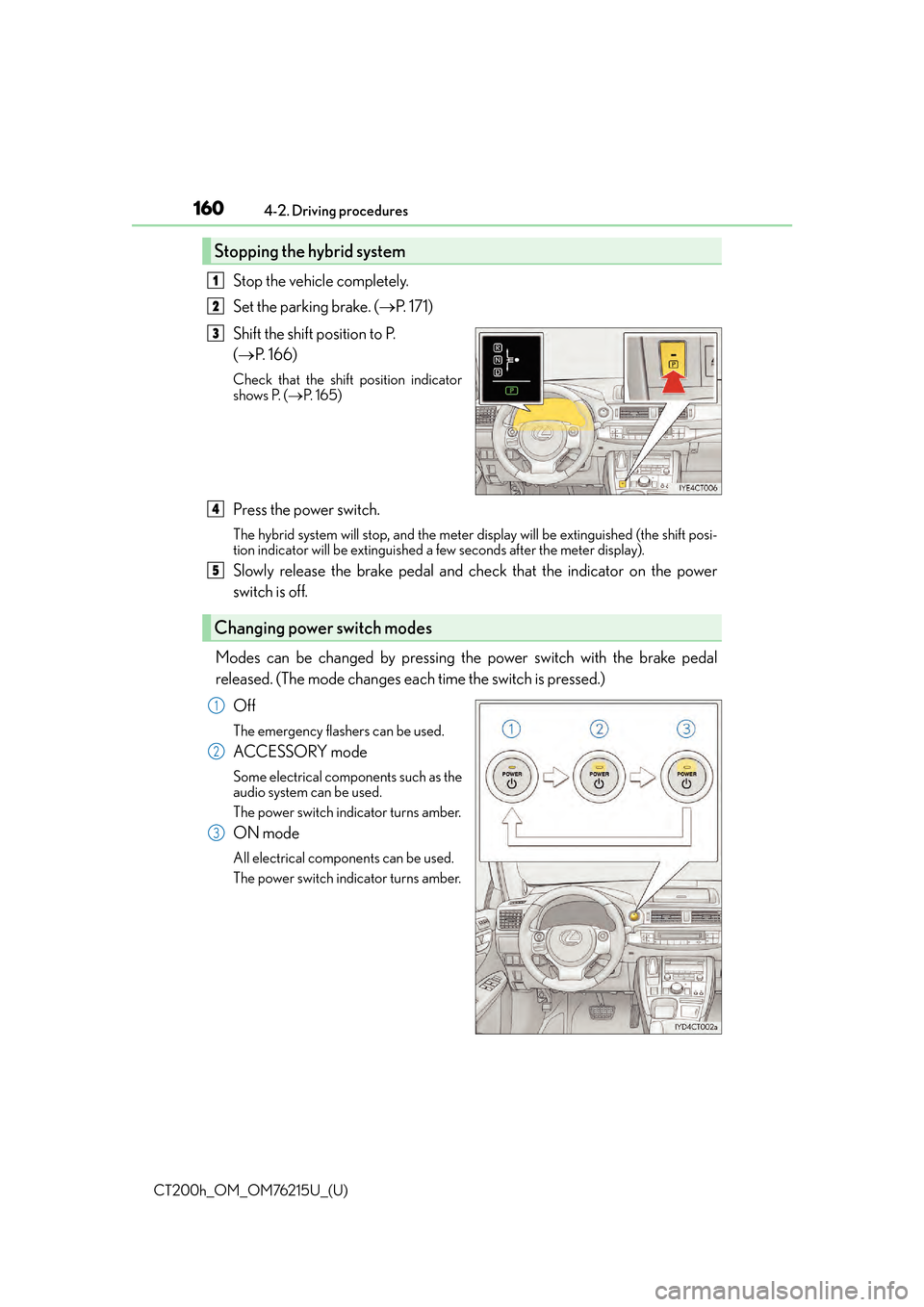
Stop the vehicle completely.
Set the parking brake. (
P. 171)
Shift the shift position to P.
( P. 166)
Check that the shift position indicator
shows P. ( P. 1 6 5 )
Press the power switch.
The hybrid system will stop, and the meter display will be extinguished (the shift posi-
tion indicator will be extinguished a few seconds after th e meter display).
Slowly release the brake pedal and check that the indicator on the power
switch is off.
Modes can be changed by pressing the power switch with the brake pedal
released. (The mode changes each time the switch is pressed.) Off
The emergency flashers can be used.
ACCESSORY mode
Some electrical components such as the
audio system can be used.
The power switch indicator turns amber.
ON mode
All electrical components can be used.
The power switch indicator turns amber.
Stopping the hybrid system
1
2
3
Changing power switch modes
4
5
1
2
3
Page 161 of 640

CT200h_OM_OM76215U_(U)
1614-2. Driving procedures
4
Driving
■Auto power off function
If the vehicle is left in ACCESSORY mode for more than 20 minutes or ON mode (the
hybrid system is not operating) for more than an hour with the shift position in P, the
power switch will automatically turn off. However, this function cannot entirely prevent
the 12-volt battery discharge. Do not leave the vehicle with the power switch in ACCES-
SORY or ON mode for long periods of time when the hybrid system is not operating.
■Sounds and vibrations specific to a hybrid vehicle
P. 7 0
■Electronic key battery depletion
P. 1 0 5
■When the ambient temperature is low, such as during winter driving conditions
When starting the hybrid system, the flas hing time of the “READY” indicator may be
long. Leave the vehicle as it is until the “REA DY” indicator is steady on, as steady means
the vehicle is able to move.
■Conditions affe cting operation
P. 117
■Note for the entry function
P. 118
■If the hybrid system does not start
The immobilizer system may not have been deactivated. ( P. 76 )
Contact your Lexus dealer.
■When the power switch indicator flashes in amber
The system may be malfunctioning. Have the vehicle inspected by your Lexus dealer
immediately.
■If the “READY” indicator does not come on
In the event that the “READY” indicator does not come on even after performing the
proper procedures for starting the vehicle, contact your Lexus dealer immediately.
■If the hybrid system is malfunctioning
P. 5 4 5
■If the electronic key battery is depleted
P. 5 0 9
■Operation of the power switch
●If the switch is not pressed shortly and firm ly, the power switch mode may not change or
the hybrid system may not start.
●If attempting to restart the hybrid system immediately after turning the power switch off,
the hybrid system may not start in some cases. After turning the power switch off,
please wait a few seconds before restarting the hybrid system.
■Automatically P position selection function
P. 1 6 8
■When the shift control system malfunctions
The power switch will not be able to be turn ed off. In such a case, the switch can be
turned off after applying the parking brake.
Have the vehicle inspected by your Lexus dealer immediately.
Page 162 of 640

162
CT200h_OM_OM76215U_(U)4-2. Driving procedures
WA R N I N G
■When starting the hybrid system
Always start the hybrid system while sittin
g in the driver’s seat. Do not depress the
accelerator pedal while starting the hy brid system under any circumstances.
Doing so may cause an accident resu lting in death or serious injury.
■Stopping the hybrid system in an emergency
If you want to stop the hybrid system in an emergency while driving the vehicle, press
and hold the power switch for more than 2 se conds, or press it briefly 3 times or more
in succession. ( P. 5 2 9 )
However, do not touch the power switch whil e driving except in an emergency. Turning
the hybrid system off while driving will not cause loss of steering or braking control,
however, power assist to the steering will be lost. This will make it more difficult to steer
smoothly, so you should pull over and stop the vehicle as soon as it is safe to do so.
NOTICE
■To prevent 12-volt battery discharge
●Do not leave the power switch in ACCESSORY or ON mode for long periods of
time without the hybrid system on.
●If the hybrid system is off, but the indicator on the power switch is illuminated, this indi-
cates that the power switch is still turned on. When exiting the vehicle, always check
that the power switch is off.
■When starting the hybrid system
If the hybrid system becomes difficult to start, have your vehicle checked by your Lexus
dealer immediately.
■Symptoms indicating a malfunction with the power switch
If the power switch seems to be operating so mewhat differently than usual, such as the
switch sticking slightly, there may be a malf unction. Contact your Lexus dealer immedi-
ately.