Depleted key battery Lexus CT200h 2017 Owner's Manual (in English)
[x] Cancel search | Manufacturer: LEXUS, Model Year: 2017, Model line: CT200h, Model: Lexus CT200h 2017Pages: 640, PDF Size: 17.94 MB
Page 103 of 640

CT200h_OM_OM76215U_(U)
1033-1. Key information
3
Operation of each component
To take out the mechanical key:
Electronic keys: Slide the release lever
and take the key out.
Card key: Press the lock release button
and take the key out.
The mechanical key can only be
inserted in one direction, as the key only
has grooves on one side. If the key can-
not be inserted in a lock cylinder, turn it
over and re-attempt to insert it.
After using the mechanical key, store it
in the electronic key. Carry the mechan-
ical key together with the electronic key.
If the electronic key battery is depleted
or the entry function does not operate
properly, you will need the mechanical
key. (P. 566)
■Panic mode
Using the mechanical key
When is pressed for longer than about one
second, an alarm will sound intermittently and
the vehicle lights will flash to deter any person
from trying to break into or damage your vehi-
cle.
To stop the alarm, press any button on the elec-
tronic key.
Page 105 of 640

CT200h_OM_OM76215U_(U)
1053-1. Key information
3
Operation of each component
■Electronic key battery depletion
●The standard battery life is 1 to 2 years. (The card key battery life is about a year and a
half.)
●If the battery becomes low, an alarm will sound in the cabin when the hybrid system
stops. ( P. 5 5 4 )
●As the electronic key always receives ra dio waves, the battery will become depleted
even if the electronic key is not used. The following symptoms indicate that the elec-
tronic key battery may be depleted. Replace the battery when necessary. ( P. 5 0 9 )
• The smart access system with push-button start or the wireless remote control does
not operate.
• The detection area becomes smaller.
• The LED indicator on the key surface does not turn on.
●To avoid serious deterioration, do not leave the electronic key within 3 ft. (1 m) of the
following electrical appliances that produce a magnetic field:
•TVs
• Personal computers
• Cellular phones, cordless phones and battery chargers
• Recharging cellular phones or cordless phones
• Induction cookers
• Table lamps
■Replacing the battery
P. 5 0 9
■Confirmation of the registered key number
The number of keys already registered to the vehicle can be confirmed. Ask your Lexus
dealer for details.
■If a wrong key is used
The key cylinder rotates freely to isolate inside mechanism.
Page 108 of 640

108
CT200h_OM_OM76215U_(U)3-2. Opening, closing and locking the doors
■Operation signals
Doors:
A buzzer sounds and the emergency flashers
flash to indicate that the doors have been
locked/unlocked. (Locked: Once; Unlocked: Twice)
Windows:
A buzzer sounds to indicate that the windows are opening.
■Security feature
If a door is not opened within approximately 60 seconds after the vehicle is unlocked, the
security feature automatically locks the vehicle again.
■Welcome light illumination control
The side marker, parking, tail and license plat e lights automatically turn on at night when
the doors are unlocked using the entry functi on or wireless remote control if the light
switch is in the “AUTO” position.
■When the door cannot be locked by the lock sensor on the upper part of the door han-
dle
■Door lock buzzer
If an attempt to lock the doors is made when a door is not fully closed, a buzzer sounds
continuously for 5 seconds. Fully close the door to stop the buzzer, and lock the vehicle
once more.
■Setting the alarm
Locking the doors will set the alarm system. ( P. 7 8 )
■If the smart access system with push-butto n start or the wireless remote control does
not operate properly
●Use the mechanical key to lock and unlock the doors. ( P. 5 6 6 )
●Replace the key battery with a new one if it is depleted. ( P. 5 0 9 )
If the door will not lock even when the topside
sensor area is touched, try touching both the
topside and underside sensor areas at the same
time.
Page 117 of 640
CT200h_OM_OM76215U_(U)
1173-2. Opening, closing and locking the doors
3
Operation of each component
■Alarms and warning messages
An alarm sounds and warning message displa ys shown on the multi-information display
are used to protect against unexpected acci dents or theft of the vehicle resulting from
erroneous operation. When a warning messag e is displayed, take appropriate measures
based on the displayed message. ( P. 5 4 2 )
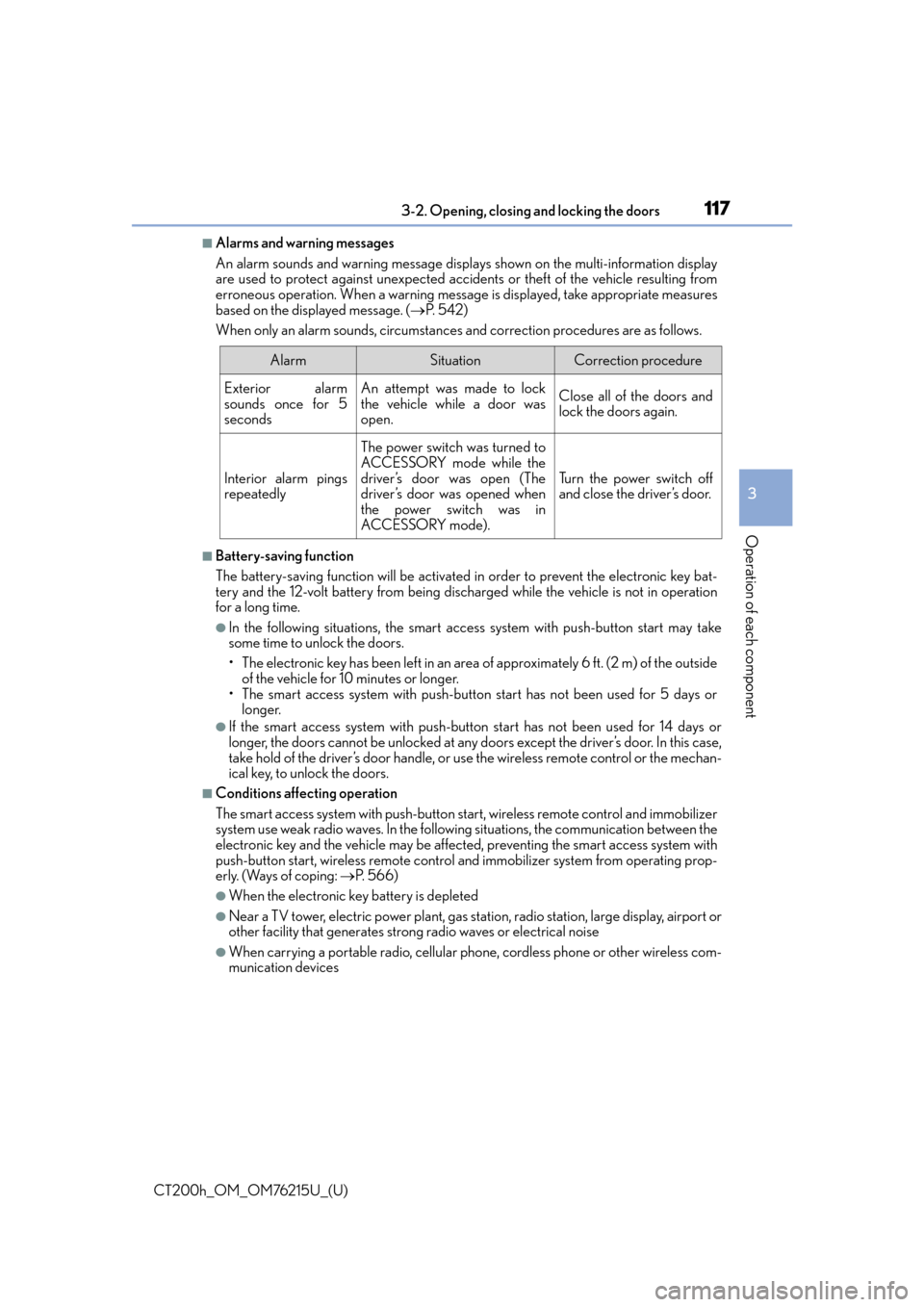
When only an alarm sounds, circumstances and correction procedures are as follows.
■Battery-saving function
The battery-saving function will be activated in order to prevent the electronic key bat-
tery and the 12-volt battery from being discha rged while the vehicle is not in operation
for a long time.
●In the following situations, the smart access system with push-button start may take
some time to unlock the doors.
• The electronic key has been left in an area of approximately 6 ft. (2 m) of the outside
of the vehicle for 10 minutes or longer.
• The smart access system with push-butto n start has not been used for 5 days or
longer.
●If the smart access system with push-butto n start has not been used for 14 days or
longer, the doors cannot be unlocked at any doors except the driver’s door. In this case,
take hold of the driver’s door handle, or us e the wireless remote control or the mechan-
ical key, to unlock the doors.
■Conditions affe cting operation
The smart access system with push-button star t, wireless remote control and immobilizer
system use weak radio waves. In the followi ng situations, the communication between the
electronic key and the vehicle may be affected, preventing the smart access system with
push-button start, wireless remote control and immobilizer system from operating prop-
erly. (Ways of coping: P. 566)
●When the electronic key battery is depleted
●Near a TV tower, electric powe r plant, gas station, radio station, large display, airport or
other facility that generates strong radio waves or electrical noise
●When carrying a portable radio, cellular ph one, cordless phone or other wireless com-
munication devices
AlarmSituationCorrection procedure
Exterior alarm
sounds once for 5
secondsAn attempt was made to lock
the vehicle while a door was
open.Close all of the doors and
lock the doors again.
Interior alarm pings
repeatedly
The power switch was turned to
ACCESSORY mode while the
driver’s door was open (The
driver’s door was opened when
the power switch was in
ACCESSORY mode).
Tu r n t h e p o w e r s w i t c h o f f
and close the driver’s door.
Page 161 of 640

CT200h_OM_OM76215U_(U)
1614-2. Driving procedures
4
Driving
■Auto power off function
If the vehicle is left in ACCESSORY mode for more than 20 minutes or ON mode (the
hybrid system is not operating) for more than an hour with the shift position in P, the
power switch will automatically turn off. However, this function cannot entirely prevent
the 12-volt battery discharge. Do not leave the vehicle with the power switch in ACCES-
SORY or ON mode for long periods of time when the hybrid system is not operating.
■Sounds and vibrations specific to a hybrid vehicle
P. 7 0
■Electronic key battery depletion
P. 1 0 5
■When the ambient temperature is low, such as during winter driving conditions
When starting the hybrid system, the flas hing time of the “READY” indicator may be
long. Leave the vehicle as it is until the “REA DY” indicator is steady on, as steady means
the vehicle is able to move.
■Conditions affe cting operation
P. 117
■Note for the entry function
P. 118
■If the hybrid system does not start
The immobilizer system may not have been deactivated. ( P. 76 )
Contact your Lexus dealer.
■When the power switch indicator flashes in amber
The system may be malfunctioning. Have the vehicle inspected by your Lexus dealer
immediately.
■If the “READY” indicator does not come on
In the event that the “READY” indicator does not come on even after performing the
proper procedures for starting the vehicle, contact your Lexus dealer immediately.
■If the hybrid system is malfunctioning
P. 5 4 5
■If the electronic key battery is depleted
P. 5 0 9
■Operation of the power switch
●If the switch is not pressed shortly and firm ly, the power switch mode may not change or
the hybrid system may not start.
●If attempting to restart the hybrid system immediately after turning the power switch off,
the hybrid system may not start in some cases. After turning the power switch off,
please wait a few seconds before restarting the hybrid system.
■Automatically P position selection function
P. 1 6 8
■When the shift control system malfunctions
The power switch will not be able to be turn ed off. In such a case, the switch can be
turned off after applying the parking brake.
Have the vehicle inspected by your Lexus dealer immediately.
Page 509 of 640

509
CT200h_OM_OM76215U_(U)7-3. Do-it-yourself maintenance
7
Maintenance and care
Electronic key battery
●Flathead screwdriver
●Lithium battery CR1632
Take out the mechanical key.
Remove the cover.
To prevent damage to the key, cover the
tip of the screwdriver with a rag.
Remove the depleted battery.
Insert a new battery with the “+” termi-
nal facing up.
Replace the battery with a new one if it is depleted.
You will need the following items:
Replacing the battery
1
2
3
Page 510 of 640

510
CT200h_OM_OM76215U_(U)7-3. Do-it-yourself maintenance
■Use a CR1632 lithium battery
●Batteries can be purchased at your Lexus
dealer, local electrical appliance shops or
camera stores.
●Replace only with the same or equivalent type recommended by the manufacturer.
●Dispose of used batteries according to the local laws.
■When the card key battery needs to be replaced (if equipped)
The battery for the card key is available only at Lexus dealers. Your Lexus dealer can
replace the battery for you.
■If the electronic key battery is depleted
The following symptoms may occur:
●The smart access system with push-button start and wireless remote control will not
function properly.
●The operational range will be reduced.
WA R N I N G
■Removed battery and other parts
These parts are small and if swallowed by a child, they can cause choking. Keep away
from children. Failure to do so could result in death or serious injury.
NOTICE
■For normal operation afte r replacing the battery
Observe the following precautions to prevent accidents:
●Always work with dry hands.
Moisture may cause the battery to rust.
●Do not touch or move any other component inside the remote control.
●Do not bend either of the battery terminals.
Page 566 of 640

566
CT200h_OM_OM76215U_(U)8-2. Steps to take in an emergency
If the electronic key do
es not operate properly
Use the mechanical key ( P. 1 0 3 ) i n
order to perform the following opera-
tions:
Locks all the doors
Closes the windows
* (turn and hold)
Unlocks the door
Turning the key rearward unlocks the
driver’s door. Turning the key once again
within 3 seconds unlocks the other
doors.
Opens the windows* (turn and hold)
*: These settings must be cust omized at your Lexus dealer.
If communication between the electron ic key and vehicle is interrupted
( P. 117) or the electronic key cannot be used because the battery is
depleted, the smart access system with push-button start and wireless
remote control cannot be used. In such cases, the doors can be opened and
the hybrid system can be started by following the procedure below.
Locking and unlocking the doors and key linked functions
1
2
3
4
Page 567 of 640

5678-2. Steps to take in an emergency
CT200h_OM_OM76215U_(U)
8
When trouble arises
Depress the brake pedal.
Touch the Lexus emblem side of the
electronic key to the power switch.
If any of the doors is opened or closed
while the key is being touched to the
switch, an alarm will sound to indicate
that the start function cannot detect the
electronic key.
Press the power switch within 10 second s of the buzzer sounding, keeping the
brake pedal depressed.
In the event that the hybrid system st ill cannot be operated, contact your Lexus
dealer.
■Stopping the hybrid system
Set the parking brake, shift the shift position to P and press the power switch as you nor-
mally do when stopping the hybrid system.
■Replacing the key battery
As the above procedure is a temporary measure, it is recommended that the electronic
key battery be replaced immediately when the battery is depleted. ( P. 5 0 9 )
■Changing power switch modes
Within 10 seconds of the buzzer sounding, release the brake pedal and press the power
switch.
The hybrid system does not start and mode s will be changed each time the switch is
pressed. ( P. 1 6 0 )
Starting the hybrid system
1
2
WA R N I N G
■When using the mechanical key and operating the power windows
Operate the power window after checking to make sure that there is no possibility of
any passenger having any of their body parts caught in the window.
Also, do not allow children to operate the mech anical key. It is possible for children and
other passengers to get caught in the power window.
3
Page 618 of 640

618What to do if... (Troubleshooting)
CT200h_OM_OM76215U_(U)
What to do if... (Troubleshooting)
●If you lose your mechanical keys, ne w genuine mechanical keys can be made
by your Lexus dealer. ( P. 1 0 4 )
●If you lose your electronic keys, the risk of vehicle theft increases significantly.
Contact your Lexus dealer immediately. ( P. 1 0 6 )
●Is the electronic key battery weak or depleted? ( P. 5 0 9 )
●Is the power switch in ON mode?
When locking the doors, turn the power switch off. ( P. 1 6 0 )
●Is the electronic key left inside the vehicle?
When locking the doors, make sure that you have the electronic key on your
person.
●The function may not operate properly du e to the condition of the radio wave.
( P. 1 1 7 )
●Is the child-protector lock set?
The rear door cannot be opened from inside the vehicle when the lock is set.
Open the rear door from outside and then unlock the child-protector lock.
( P. 1 1 0 )
If you have a problem, check the following before contacting your Lexus
dealer.
The doors cannot be locked, unlocked, opened or closed
You lose your keys
The doors cannot be locked or unlocked
The rear door cannot be opened