ad blue Lexus CT200h 2017 Owner's Manual (in English)
[x] Cancel search | Manufacturer: LEXUS, Model Year: 2017, Model line: CT200h, Model: Lexus CT200h 2017Pages: 640, PDF Size: 17.94 MB
Page 4 of 640
TABLE OF CONTENTS4
CT200h_OM_OM76215U_(U)
5-1. Basic OperationsAudio system types .................. 256
Using the steering wheel audio switches ......................... 258
AUX port/USB port................ 259
5-2. Using the audio system Optimal use of the audio system ........................................... 261
5-3. Using the radio Radio operation ......................... 263
5-4. Playing audio CDs and MP3/WMA discs
CD player operation ............... 269
5-5. Using an external device Listening to an iPod ................... 276
Listening to a USB memory device.......................................... 282
Using the AUX port ................ 287 5-6. Using Bluetooth
® devices
Bluetooth
® audio/phone....... 288
Using the steering wheel switches...................................... 295
Registering a Bluetooth
®
audio system for the
first time...................................... 296
Registering a Bluetooth
®
phone for the first time.......... 297
5-7. Setup menu Setting up a Bluetooth
®
enabled portable player...... 298
Bluetooth
® audio system
setup ............................................ 302
Setting a cellular phone.......... 303
Security and system setup..... 306
Using the phone book ............ 309
5-8. Bluetooth
® Audio
Operating a Bluetooth
®
enabled portable player........314
5-9. Bluetooth
® Phone
Making a phone call...................316
Receiving a phone call ............. 318
Speaking on th e phone.............319
5-10. Bluetooth
®
Bluetooth®.................................. 320
5Audio system
Page 5 of 640
5
1
9 8
7
6 4 3
2
CT200h_OM_OM76215U_(U)
10
5
5-11. Basic Operations (Lexus Display Audio System)
Lexus Display Audio System ........................................ 324
Steering wheel audio switches...................................... 329
USB/AUX ports ........................ 330
5-12. Setup (Lexus Display Audio System)
Setup menu ................................. 332
General settings ........................ 333
Voice settings.............................. 336
Display settings ...........................337
5-13. Using the audio system (Lexus Display Audio System)
Selecting the audio source ......................................... 338
Optimal use of the audio system ......................................... 339
Audio settings.............................340
Audio menu screen operation ................................... 342
5-14. Using the radio (Lexus Display Audio System)
Radio operation ......................... 345
5-15. Playing an audio CD and MP3/WMA/AAC discs
(Lexus Display Audio System)
CD player operation .................351 5-16. Using an external device
(Lexus Display Audio System)
Listening to an iPod ...................357
Using USB memory device.......................................... 360
Using the AUX port ................ 364
5-17. Connecting Bluetooth
®
(Lexus Display Audio System)
Steps for using Bluetooth
®
devices........................................ 365
Registering a Bluetooth
®
device...........................................367
Selecting a Bluetooth
®
device.......................................... 368
Connecting a Bluetooth
®
audio player.............................. 369
Connecting a Bluetooth
®
phone ...........................................370
Displaying a Bluetooth
®
device details ............................. 371
Detailed Bluetooth
®
settings ........................................372
5-18. Bluetooth
® Audio
(Lexus Display Audio System)
Listening to Bluetooth
®
Audio ...........................................373
Page 6 of 640
TABLE OF CONTENTS6
CT200h_OM_OM76215U_(U)
5-19. Bluetooth® Phone (Lexus
Display Audio System)
Using a Bluetooth
®
Phone ...........................................375
Making a call ................................ 377
Receiving a call ...........................379
Speaking on the phone...........380
Using a Bluetooth
®
phone message....................... 382
Using the steering wheel switches...................................... 384
Bluetooth
® phone settings ...385
5-20.Phonebook (Lexus Display Audio System)
Contact settings ........................ 387
Messaging setting..................... 390
5-21. Bluetooth
® (Lexus
Display Audio System)
What to do if... (Troubleshooting).................... 391
Bluetooth
®.................................. 394
5-22.Other function (Lexus Display Audio System)
“Information” screen ................ 399
USB photo .................................... 401
Weather information ............... 403
Voice command system ......... 404
Mobile Assistant........................408
LEXUS Enform Remote ......... 410 6-1. Using the air conditioning
system and defogger
Automatic air conditioning system (Vehicles with a
navigation system or Lexus
Display Audio System) ........... 414
Automatic air conditioning system (Vehicles without a
navigation system or Lexus
Display Audio System) ..........422
Heated steering wheel/ seat heaters ............................... 429
• Heated steering wheel ...... 430
• Seat heaters ........................... 430
6-2. Using the interior lights Interior lights list ...........................431• Personal/interior light main switch ...............................431
•Front personal/ interior lights .......................... 432
• Rear interior light ................. 432
6Interior features
Page 88 of 640
88
CT200h_OM_OM76215U_(U)2. Instrument cluster
■The meters and display illuminate when
The power switch is in ON mode.
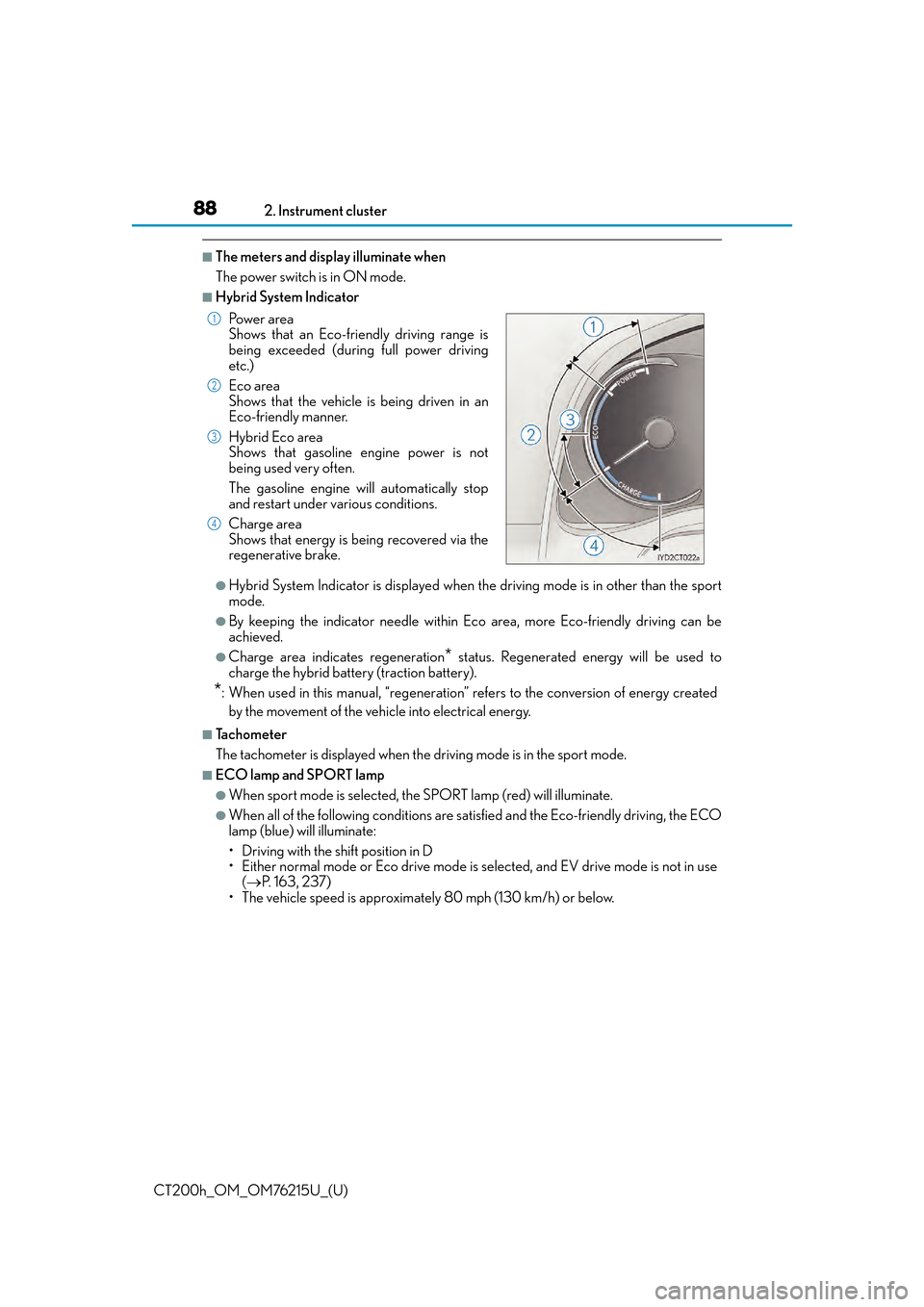
■Hybrid System Indicator
●Hybrid System Indicator is displayed when th
e driving mode is in other than the sport
mode.
●By keeping the indicator needle within Ec o area, more Eco-friendly driving can be
achieved.
●Charge area indicates regeneration* status. Regenerated energy will be used to
charge the hybrid battery (traction battery).
*: When used in this manual, “regeneration” re fers to the conversion of energy created
by the movement of the vehicle into electrical energy.
■Tachometer
The tachometer is displayed when the driving mode is in the sport mode.
■ECO lamp and SPORT lamp
●When sport mode is selected, th e SPORT lamp (red) will illuminate.
●When all of the following conditions are satisfied and the Eco-friendly driving, the ECO
lamp (blue) will illuminate:
• Driving with the shift position in D
• Either normal mode or Eco drive mode is selected, and EV drive mode is not in use ( P. 1 6 3 , 2 3 7 )
• The vehicle speed is approximately 80 mph (130 km/h) or below. Po w e r a r e a
Shows that an Eco-friendly driving range is
being exceeded (during full power driving
etc.)
Eco area
Shows that the vehicle is being driven in an
Eco-friendly manner.
Hybrid Eco area
Shows that gasoline engine power is not
being used very often.
The gasoline engine will automatically stop
and restart under various conditions.
Charge area
Shows that energy is being recovered via the
regenerative brake.
1
2
3
4
Page 214 of 640
214
CT200h_OM_OM76215U_(U)4-5. Using the driving support systems
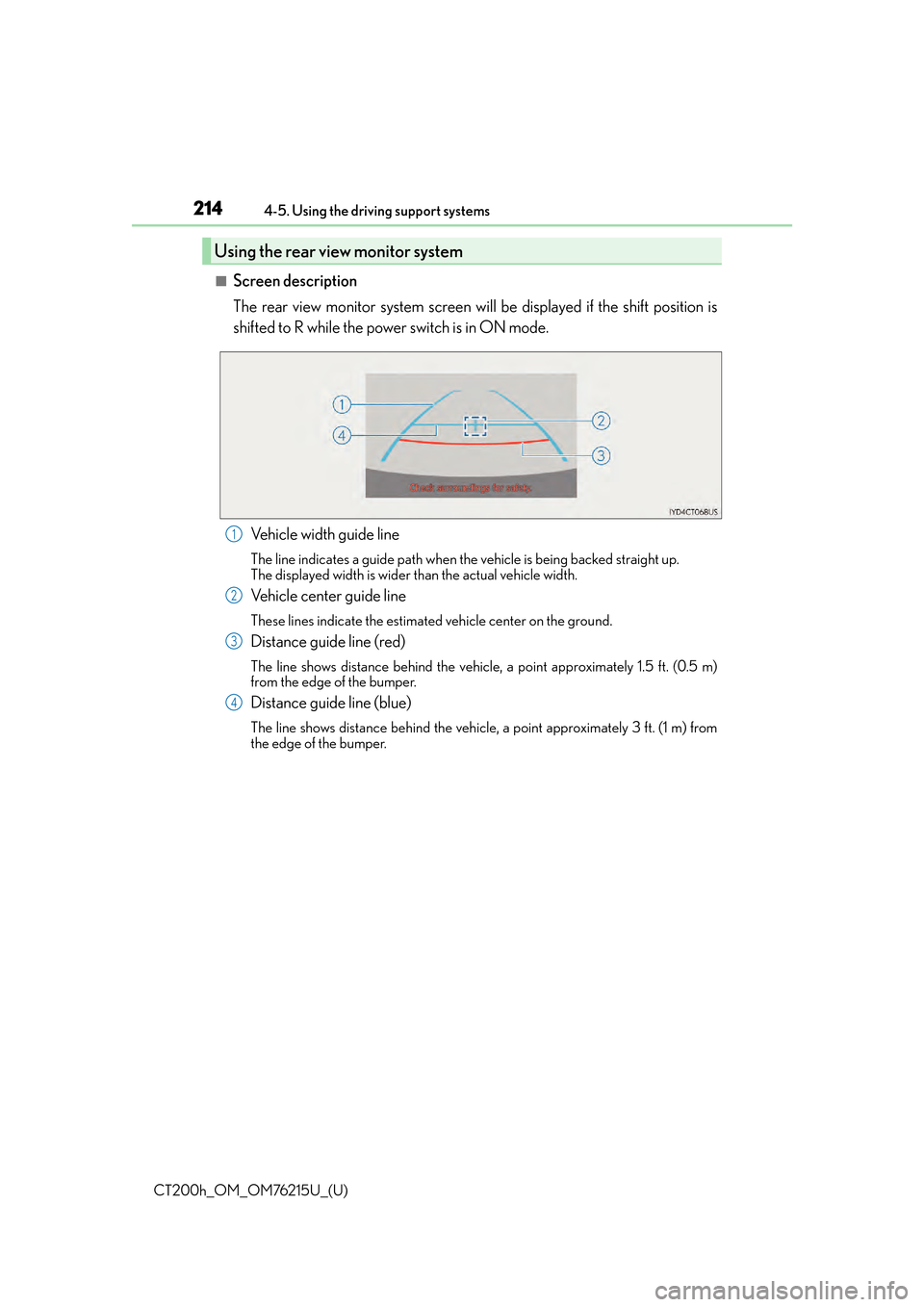
■Screen description
The rear view monitor system screen w
ill be displayed if the shift position is
shifted to R while the power switch is in ON mode.
Vehicle width guide line
The line indicates a guide path when the vehicle is being backed straight up.
The displayed width is wider than the actual vehicle width.
Vehicle center guide line
These lines indicate the estimated vehicle center on the ground.
Distance guide line (red)
The line shows distance behind the vehicle, a point approximately 1.5 ft. (0.5 m)
from the edge of the bumper.
Distance guide line (blue)
The line shows distance behind the vehicle, a point approximately 3 ft. (1 m) from
the edge of the bumper.
Using the rear view monitor system
1
2
3
4
Page 225 of 640

CT200h_OM_OM76215U_(U)
2254-5. Using the driving support systems
4
Driving
■Screen descriptionVehicle width guide line
The line indicates a guide path when the vehicle is being backed straight up.
The displayed width is wider than the actual vehicle width.
The line aligns with the estimated course lines when the steering wheel is straight.
Estimated course lines
The lines show an estimated course when the steering wheel is turned.
Distance guide line
The line moves, together with the estimated course lines, in sync with the steering
wheel. The line shows points approximately 1.5 ft. (0.5 m) (red) and approximately
3 ft. (1 m) (yellow) from the center of the edge of the bumper.
Distance guide line
The line shows distance behind the vehicle, a point approximately 1.5 ft. (0.5 m)
(blue) from the edge of the bumper.
Vehicle center guide line
This line indicates the estimated vehicle center on the ground.
Estimated course line display mode
1
2
3
4
5
Page 254 of 640

254
CT200h_OM_OM76215U_(U)
5-6. Using Bluetooth® devices
Bluetooth
® audio/phone ...... 288
Using the steering wheel switches ......................................295
Registering a Bluetooth
®
audio system for the
first time ...................................... 296
Registering a Bluetooth
®
phone for the first time ......... 297
5-7. Setup menu Setting up a Bluetooth
®
enabled portable player ..... 298
Bluetooth
® audio system
setup ........................................... 302
Setting a cellular phone ......... 303
Security and system setup .... 306
Using the phone book ............ 309
5-8. Bluetooth
® Audio
Operating a Bluetooth
®
enabled portable player ....... 314
5-9. Bluetooth
® Phone
Making a phone call .................. 316
Receiving a phone call ............. 318
Speaking on the phone ............ 319
5-10. Bluetooth
®
Bluetooth®.................................. 320 5-11. Basic Operations
(Lexus Display Audio System)
Lexus Display Audio System......................................... 324
Steering wheel audio switches ...................................... 329
USB/AUX ports ........................330
5-12. Setup (Lexus Display Audio System)
Setup menu.................................. 332
General settings ........................ 333
Voice settings.............................. 336
Display settings .......................... 337
5-13. Using the audio system (Lexus Display Audio System)
Selecting the audio source .........................................338
Optimal use of the audio system ......................................... 339
Audio settings .............................340
Audio menu screen operation ................................... 342
5-14. Using the radio (Lexus Display Audio System)
Radio operation ......................... 345
5-15. Playing an audio CD and MP3/WMA/AAC discs
(Lexus Display Audio System)
CD player operation................. 351
Page 255 of 640

255
CT200h_OM_OM76215U_(U)
Audio system5
5-16. Using an external device (Lexus Display Audio System)
Listening to an iPod................... 357
Using USB memory device ......................................... 360
Using the AUX port .................364
5-17. Connecting Bluetooth
®
(Lexus Display Audio System)
Steps for using Bluetooth
®
devices ........................................365
Registering a Bluetooth
®
device .......................................... 367
Selecting a Bluetooth
®
device ......................................... 368
Connecting a Bluetooth
®
audio player ..............................369
Connecting a Bluetooth
®
phone........................................... 370
Displaying a Bluetooth
®
device details..............................371
Detailed Bluetooth
®
settings ........................................ 372
5-18. Bluetooth
® Audio
(Lexus Display Audio System)
Listening to Bluetooth
®
Audio ........................................... 373 5-19. Bluetooth
® Phone (Lexus
Display Audio System)
Using a Bluetooth
®
Phone .......................................... 375
Making a call ................................377
Receiving a call .......................... 379
Speaking on the phone .......... 380
Using a Bluetooth
®
phone message ....................... 382
Using the steering wheel switches ......................................384
Bluetooth
® phone settings ...385
5-20.Phonebook (Lexus Display Audio System)
Contact settings ........................ 387
Messaging setting .....................390
5-21. Bluetooth
® (Lexus
Display Audio System)
What to do if... (Troubleshooting) .................... 391
Bluetooth
®.................................. 394
5-22.Other function (Lexus Display Audio System)
“Information” sc reen ................ 399
USB photo .................................... 401
Weather information................ 403
Voice command system ......... 404
Mobile Assistant ....................... 408
LEXUS Enform Remote.......... 410
Page 258 of 640

258
CT200h_OM_OM76215U_(U)5-1. Basic Operations
Using the steering wheel audio switches
Volume switch:
• Press: Increases/decreases vol- ume
• Press and hold: Continuously increases/decreases volume
Radio mode: • Press: Selects a radio station
• Press and hold: Seeks up/down
CD, MP3/WMA disc, Bluetooth
®, iPod or USB mode:
• Press: Selects a track/file/song
• Press and hold: Selects a folder or album (MP3/WMA disc, Bluetooth
®,
iPod or USB)
“MODE” switch: • Press: Turns the power on, selects an audio source
• Press and hold: Turns the power off
■Canceling automatic select ion of a radio station
Press the “ ” or “” button again.
Some audio features can be controlled using the switches on the steering
wheel.
Operation may differ depending on th e type of audio system or navigation
system. For details, refer to the manual provided with the audio system or nav-
igation system.
1
2
WA R N I N G
■To reduce the risk of an accident
Exercise care when operating the audio switches on the steering wheel.
3
Page 264 of 640

2645-3. Using the radio
CT200h_OM_OM76215U_(U)
■Scanning the preset radio stations Press and hold the “SCAN” button until you hear a beep.
When the desired station is reached, press the button again.
■Scanning all the radio stations within rangePress the “SCAN” button.
All the stations with reception w ill be played for 5 seconds each.
When the desired station is reached, press the button again.
This feature allows your radio to receive station identification information and
program information (classical, jazz, etc. ) from radio stations which broadcast
this information.
■Receiving RDS broadcasts
Press “ ”or “ ” on the “TYPE•FOLDER” button during FM reception.
The type of program changes each time the button is pressed.
●“ROCK”
●“EASYLIS” (Easy listening)
●“CLS/JAZZ” (Classical music and Jazz)
●“R & B” (Rhythm and Blues)
●“INFORM” (Information)
●“RELIGION”
●“MISC” (Miscellaneous)
●“ALERT” (Emergency messages)
If the system receives no RDS statio ns, “NO PTY” appears on the display.
Press the “SCAN” button, or “”or “ ” on the “SEEK•TRACK” button.
The radio seeks or scans for statio ns of the relevant program type.
■Displaying radio station names
Press the “TEXT” button.
■Displaying radio text messages
Press the “TEXT” button twice.
A text message is displayed when “MSG” is shown on the screen.
If the text continues past the end of the di splay, is displayed. Press and hold the
button until you hear a beep.
Scanning radio stations (excluding XM® Satellite Radio)
RDS (Radio Data System)
1
2
1
2
1
2