interior Lexus ES300h 2014 User Guide
[x] Cancel search | Manufacturer: LEXUS, Model Year: 2014, Model line: ES300h, Model: Lexus ES300h 2014Pages: 918, PDF Size: 25.26 MB
Page 110 of 918
ES350_300h_OM_OM33A60U_(U)
1092. Instrument cluster
2
Instrument cluster
CAUTION
■The multi-information display at low temperatures
Allow the interior of the vehicle to warm up before using the liquid crystal multi-
information display. At extremely low temperatures, the multi-information display
monitor may respond slowly, and display changes may be delayed.
For example, there is a lag between the driver’s shifting and the new gear number
appearing on the display. This lag could cause the driver to downshift again, caus-
ing rapid and excessive engine braking and possibly an accident resulting in death
or injury.
■Cautions during setting up the display
As the engine needs to be running
setting up the display, ensure that the vehicle is parked in a place with adequate
ventilation. In a closed area such as a garage, exhaust gases including harmful car-
bon monoxide (CO) may collect and enter the vehicle. This may lead to death or a
serious health hazard.
NOTICE
■During setting up the display
To prevent 12-volt battery discharge, ensure that the engine is running
Page 130 of 918
ES350_300h_OM_OM33A60U_(U)
1293-2. Opening, closing and locking the doors and trunk
3
Operation of each component
■Alarms and warning indicators
An alarm sounds and warning message displays shown on the multi-information dis-
play are used to protect against unexpected accidents or theft of the vehicle result-
ing from erroneous operation. When a warning message is displayed, take
appropriate measures based on the displayed message. (→P. 76 9 )
When only an alarm sounds, circumstances and correction procedures are as fol-
lows.
AlarmSituationCorrection procedure
Exterior alarm sounds
once for 5 seconds
The trunk was closed
while the electronic key
was still inside the trunk
and all the doors were
locked.
Retrieve the electronic
key from the trunk and
close the trunk lid.
An attempt was made to
lock the vehicle while a
door was open.Close all of the doors and
lock the doors again.
Interior alarm sounds
continuously
The “START STOP
ENGINE” <“POWER”>
switch was turned to
ACCESSORY mode
while the driver’s door
was open (or the driver’s
door was opened while
the “START STOP
ENGINE” <“POWER”>
switch was in ACCES-
SORY mode).
Turn the “START STOP
ENGINE” <“POWER”>
switch off and close the
driver’s door.
Page 131 of 918
130
ES350_300h_OM_OM33A60U_(U)
3-2. Opening, closing and locking the doors and trunk
■Changing the door unlock function setting
It is possible to set which doors the entry function unlocks using the wireless remote
control. Turn the “START STOP ENGINE” <“POWER”> switch off.
When the indicator light on the key surface is not on, press and hold ,
or for approximately 5 seconds while pressing and holding .
The setting changes each time an operation is performed, as shown below. (When
changing the setting continuously, release the buttons, wait for at least 5 seconds,
and repeat step .)
To prevent unintended triggering of the alarm, unlock the doors using the wireless
remote control and open and close a door once after the settings have been
changed. (If a door is not opened within 60 seconds after is pressed, the
doors will be locked again and the alarm will automatically be set.)
In case that the alarm is triggered, immediately stop the alarm. ( →P. 8 6 )
1
2
2
Multi-information
displayUnlocking functionBeep
Holding the driver’s door han-
dle unlocks only the driver’s
door.
Exterior: Beeps 3 times
Interior: Pings once
Holding a passenger’s door
handle unlocks all the doors.
Holding a door handle unlocks
all the doors.Exterior: Beeps twice
Interior: Pings once
Page 192 of 918
ES350_300h_OM_OM33A60U_(U)
1914-1. Before driving
4
Driving
CAUTION
■When the vehicle is parked
●Do not leave glasses, cigarette lighters, spray cans, or soft drink cans in the vehi-
cle when it is in the sun.
Doing so may result in the following:
• Gas may leak from a cigarette lighter or spray can, and may lead to a fire.
• The temperature inside the vehicle may cause the plastic lenses and plasticmaterial of glasses to deform or crack.
• Soft drink cans may fracture, causing the contents to spray over the interior of the vehicle, and may also cause a short circuit in the vehicle’s electrical com-
ponents.
●Do not leave cigarette lighters in the vehicle. If a cigarette lighter is in a place such
as the glove box or on the floor, it may be lit accidentally when luggage is loaded
or the seat is adjusted, causing a fire.
●Do not attach adhesive discs to the windshield or windows. Do not place contain-
ers such as air fresheners on the instrument panel or dashboard. Adhesive discs
or containers may act as lenses, causing a fire in the vehicle.
●Do not leave a door or window open if the curved glass is coated with a metal-
lized film such as a silver-colored one. Reflected sunlight may cause the glass to
act as a lens, causing a fire.
●Always apply the parking brake, shift the shift lever to P, stop the engine
Do not leave the vehicle unattended while the engine is running
●Do not touch the exhaust pipes while the engine is running
Doing so may cause burns.
Page 329 of 918
328
ES350_300h_OM_OM33A60U_(U)
4-6. Driving tips
Control your speed and keep at a constant speed. Also, before stopping
at a toll booth or similar, allow plenty of time to release the accelerator and
gently apply the brakes. A greater amount of electrical energy can be
retained when slowing down.
Use the air conditioning only when necessary. Doing so can help control
excessive gasoline consumption.
In summer: In high temperatures, use the recirculated air mode. Doing so
will help to reduce the burden on the air conditioner and reduce fuel con-
sumption as well.
In winter: Because the gasoline engine will not automatically cut out until
the gasoline engine and the interior of the vehicle are warm, it will con-
sume fuel. Also, fuel consumption can be improved by avoiding overuse of
the heater.
Make sure to check the tire inflation pressure frequently. Improper tire
inflation pressure can cause poor fuel consumption.
Also, as snow tires can cause large amounts of friction, their use on dry
roads can lead to poor fuel consumption. Use a tire that is appropriate for
the season.
Carrying heavy luggage can lead to poor fuel consumption. Avoid carry-
ing unnecessary luggage. Installing a large roof rack can also cause poor
fuel consumption.
Highway driving
Air conditioning
Checking tire inflation pressure
Luggage
Page 338 of 918
337
ES350_300h_OM_OM33A60U_(U)
5Interior features
5-4. Using the audio systemAudio system (without a navigation system or
the Lexus Display
Audio system) .......................... 500
Using the radio ........................... 503
Using the CD player .................. 512
Playing MP3 and WMA discs................................. 521
Operating an iPod ..................... 529
Operating a USB memory.....539
Bluetooth
® audio system ...... 548
Using the Bluetooth
®
audio system.............................. 552
Operating a Bluetooth
®
enabled portable player ....... 557
Setting up a Bluetooth
®
enabled portable player ........ 561
Bluetooth
® audio
system setup ............................. 568
Optimal use of the audio system..............................569
Using the AUX port................... 571
Using the steering wheel audio switches .......................... 573
Hands-free system (for cellular phone) ..................576
Using the hands-free system (for cellular phones) ................581
Making a phone call ................. 589
Setting a cellular phone ...........593
Security and system setup ..... 598
Using the phone book............. 603 5-5. Using the interior lights
Interior lights list ............................ 611• Interior light ..............................612
• Personal lights .........................612
5-6. Using the storage features List of storage features ..............614• Glove box .................................616
• Console box............................. 617
• Cup holders ............................ 618
• Auxiliary box ............................619
Trunk features .............................. 620
5-7. Other interior features Sun visors and vanity mirrors ................... 622
Clock............................................... 623
Power outlets ............................... 624
Heated steering wheel ............ 626
Seat heaters and ventilators ................................... 628
Armrest ..........................................630
Rear sunshade/ rear door sunshades ............... 631
Trunk storage extension .......... 634
Coat hooks ................................... 635
Assist grips.................................... 636
Garage door opener................ 637
Compass ....................................... 644
Safety Connect ........................... 649
Page 340 of 918
ES350_300h_OM_OM33A60U_(U)
3395-1. Lexus Display Audio system
5
Interior features
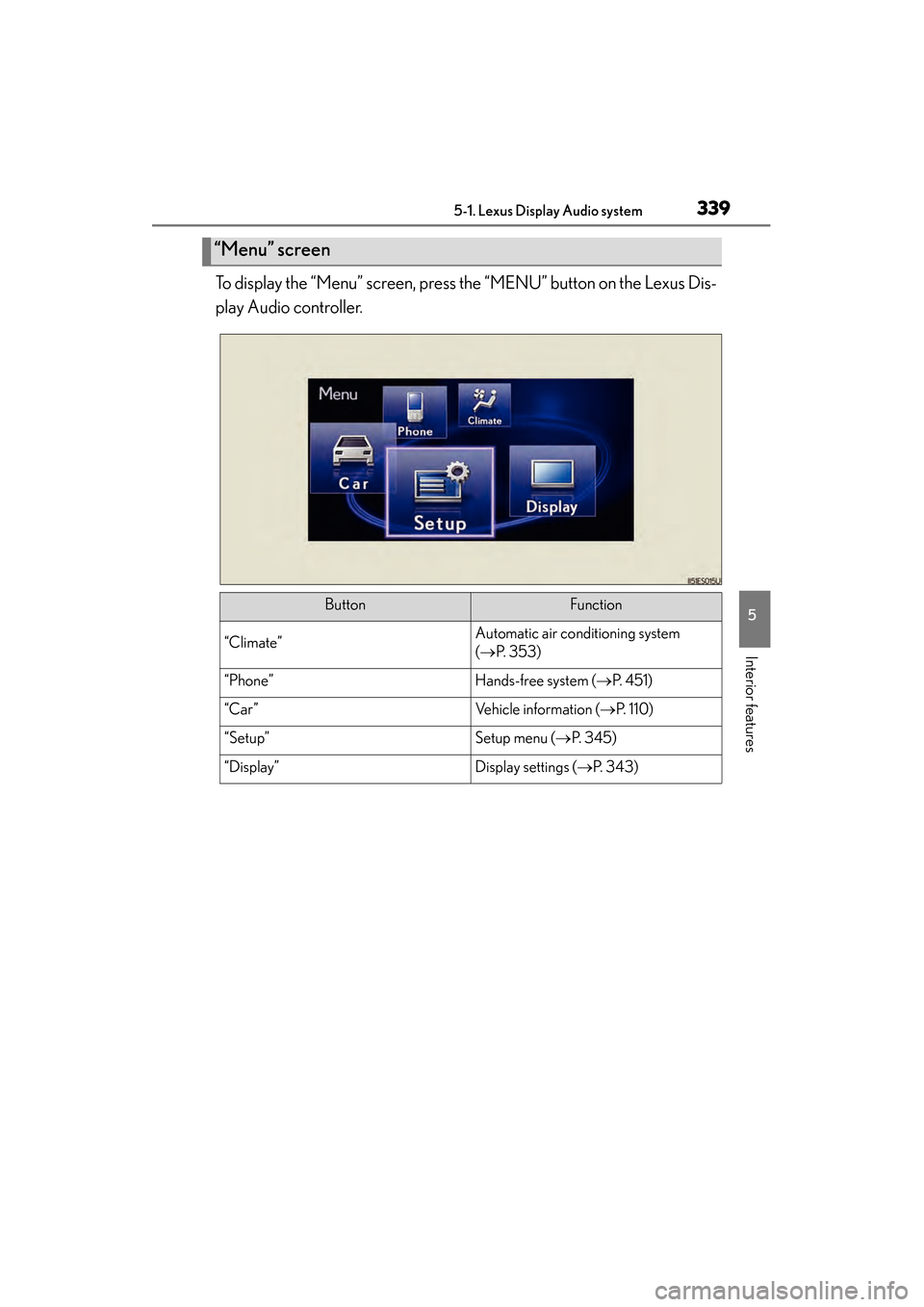
To display the “Menu” screen, press the “MENU” button on the Lexus Dis-
play Audio controller.
“Menu” screen
ButtonFunction
“Climate”Automatic air conditioning system
(→ P. 3 5 3 )
“Phone”Hands-free system ( →P. 4 5 1 )
“Car ”Vehicle information ( →P. 1 1 0 )
“Setup”Setup menu ( →P. 3 4 5 )
“Display”Display settings ( →P. 3 4 3 )
Page 342 of 918
ES350_300h_OM_OM33A60U_(U)
3415-1. Lexus Display Audio system
5
Interior features
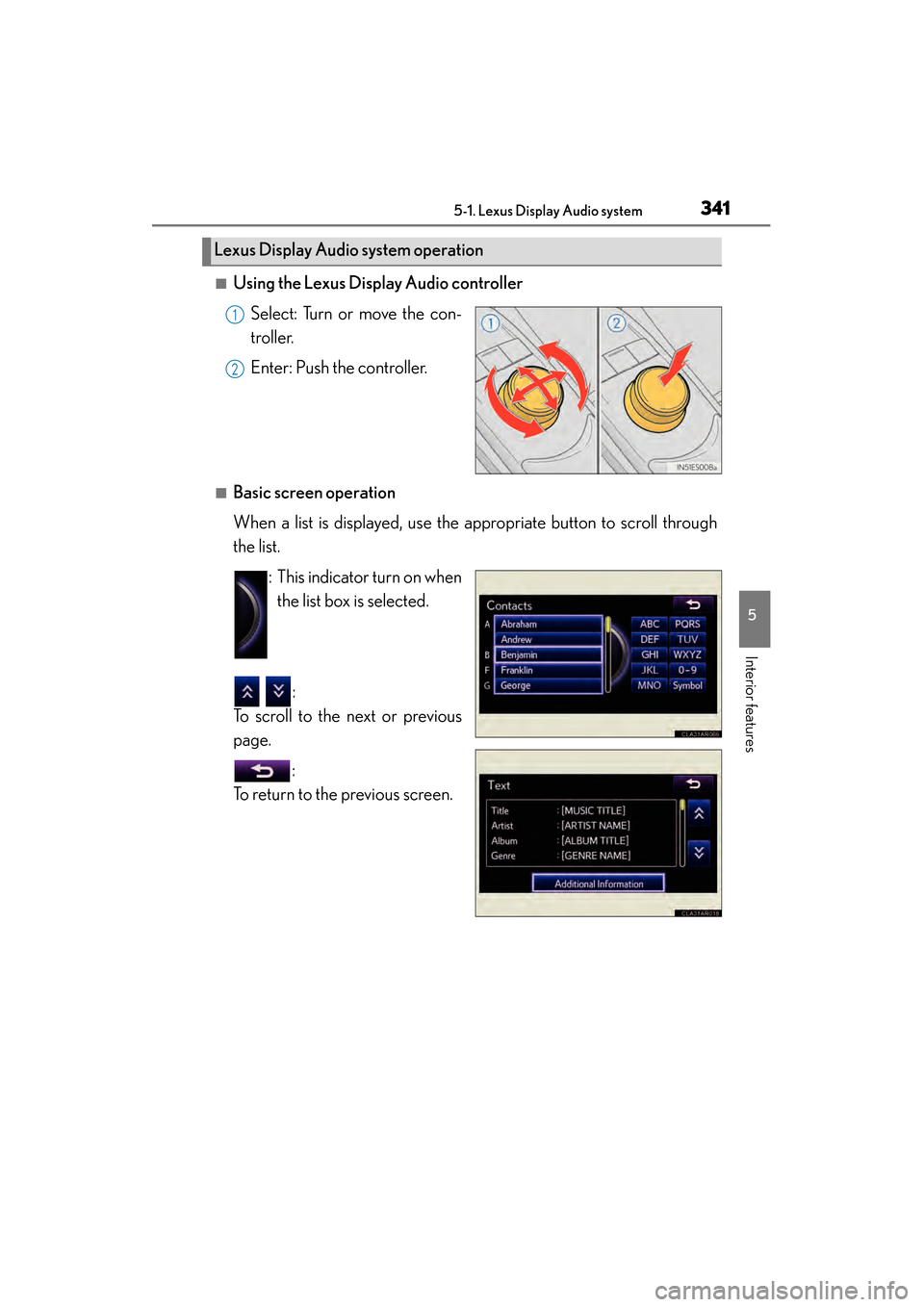
■Using the Lexus Display Audio controllerSelect: Turn or move the con-
troller.
Enter: Push the controller.
■Basic screen operation
When a list is displayed, use the appropriate button to scroll through
the list. : This indicator turn on whenthe list box is selected.
:
To scroll to the next or previous
page.
:
To return to the previous screen.
Lexus Display Audio system operation
1
2
Page 344 of 918
343
ES350_300h_OM_OM33A60U_(U)
5-1. Lexus Display Audio system
5
Interior features
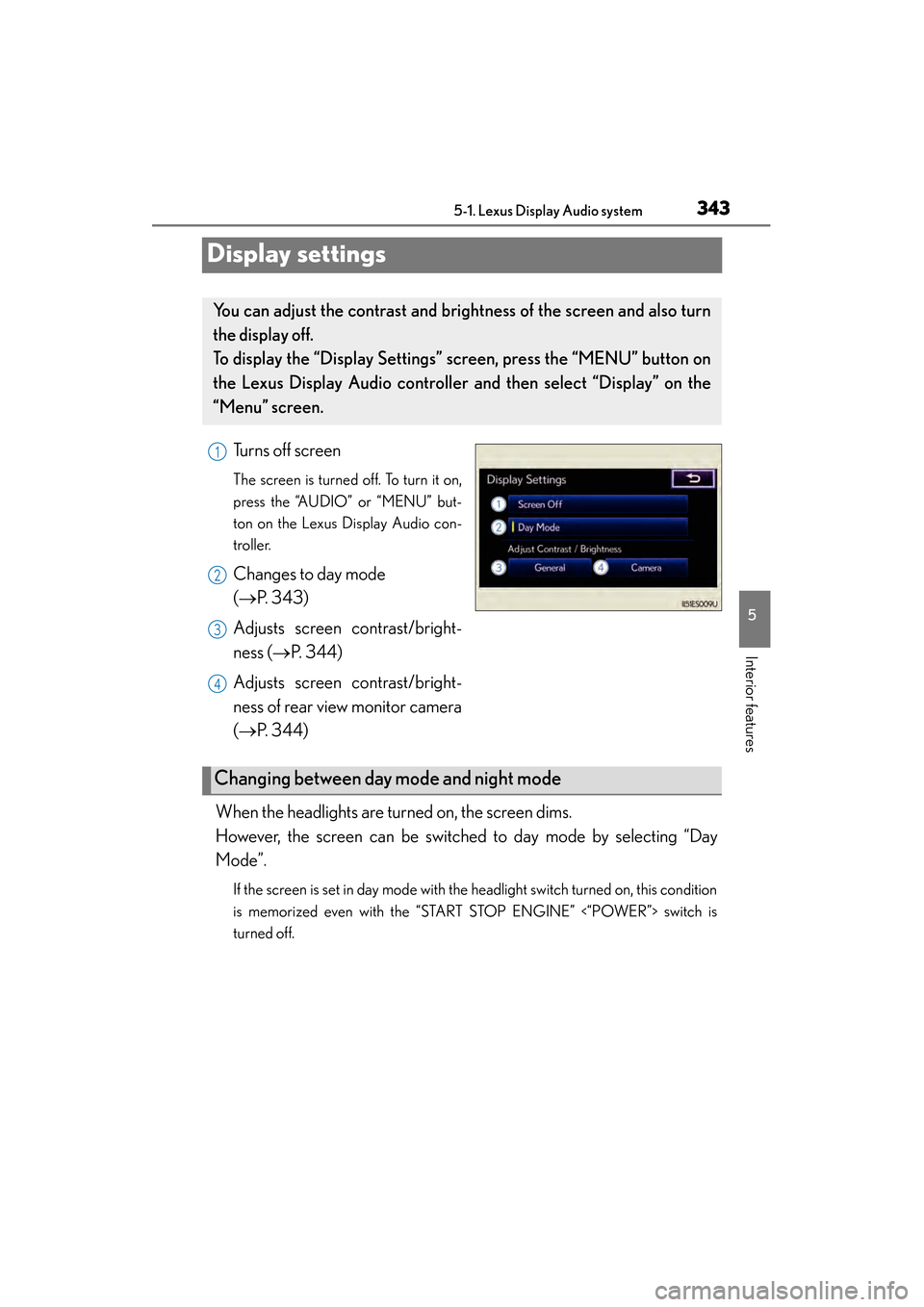
Display settings
Turns off screen
The screen is turned off. To turn it on,
press the “AUDIO” or “MENU” but-
ton on the Lexus Display Audio con-
troller.
Changes to day mode
(→P. 343)
Adjusts screen contrast/bright-
ness ( →P. 3 4 4 )
Adjusts screen contrast/bright-
ness of rear view monitor camera
(→ P. 3 4 4 )
When the headlights are turned on, the screen dims.
However, the screen can be switched to day mode by selecting “Day
Mode”.
If the screen is set in day mode with the headlight switch turned on, this condition
is memorized even with the “START STOP ENGINE” <“POWER”> switch is
turned off.
You can adjust the contrast and brightness of the screen and also turn
the display off.
To display the “Display Settings” screen, press the “MENU” button on
the Lexus Display Audio controller and then select “Display” on the
“Menu” screen.
1
2
3
4
Changing between day mode and night mode
Page 346 of 918
345
ES350_300h_OM_OM33A60U_(U)
5-1. Lexus Display Audio system
5
Interior features
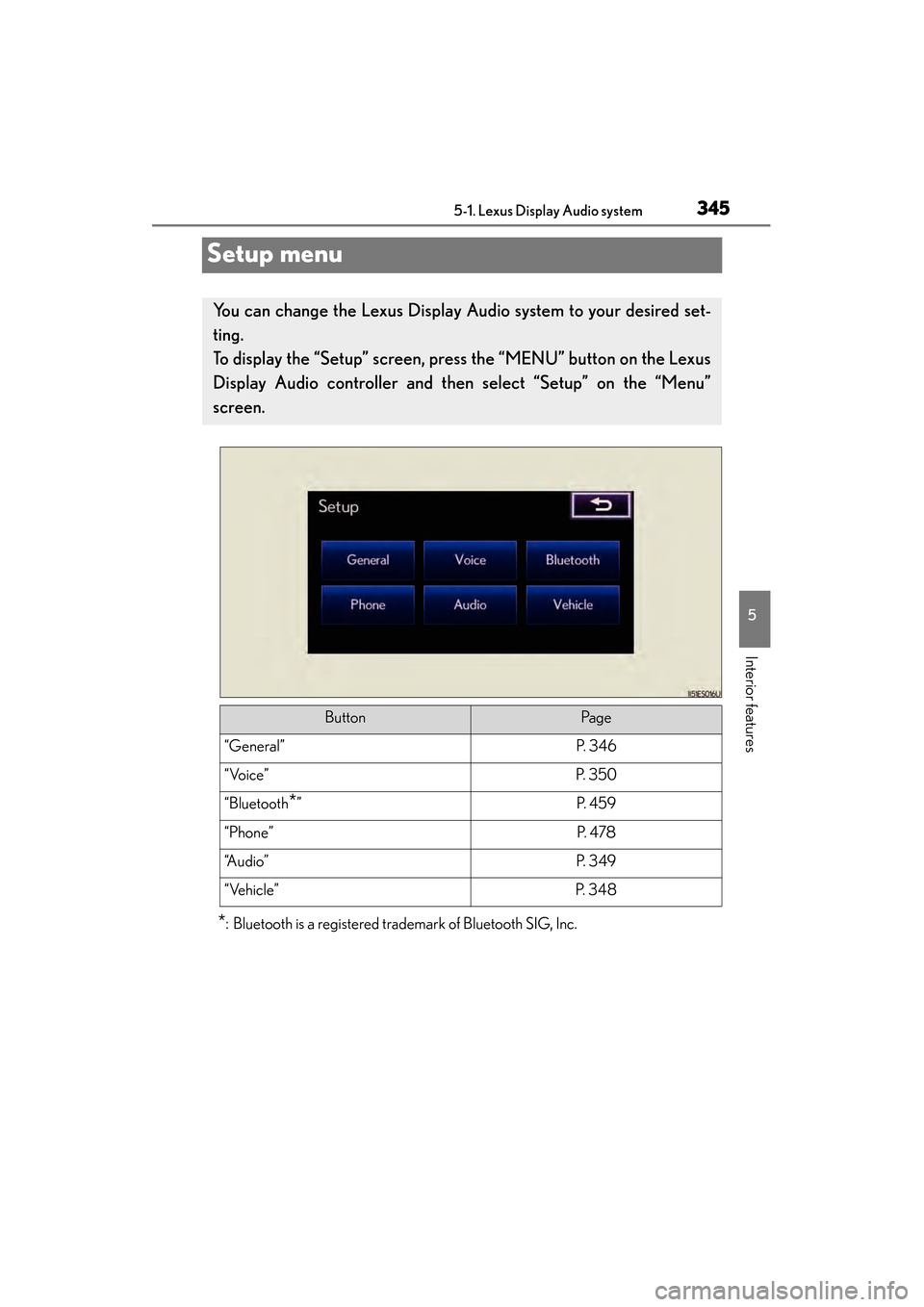
Setup menu
*: Bluetooth is a registered trademark of Bluetooth SIG, Inc.
You can change the Lexus Display Audio system to your desired set-
ting.
To display the “Setup” screen, press the “MENU” button on the Lexus
Display Audio controller and then select “Setup” on the “Menu”
screen.
ButtonPa g e
“General”P. 3 4 6
“Voice”P. 3 5 0
“Bluetooth*”P. 4 5 9
“Phone”P. 4 7 8
“A u d i o ”P. 3 4 9
“Vehicle”P. 3 4 8