audio Lexus ES350 2016 Owner's Manuals /
[x] Cancel search | Manufacturer: LEXUS, Model Year: 2016, Model line: ES350, Model: Lexus ES350 2016Pages: 576, PDF Size: 8.3 MB
Page 353 of 576
353
ES350_OM_OM33B64U_(U)5-12. Other function
5
Lexus Display Audio system
USB photo
Go to “USB Photo”: “MENU” button
“Info” “USB1 Photo” or “USB2
Photo”
P. 2 74
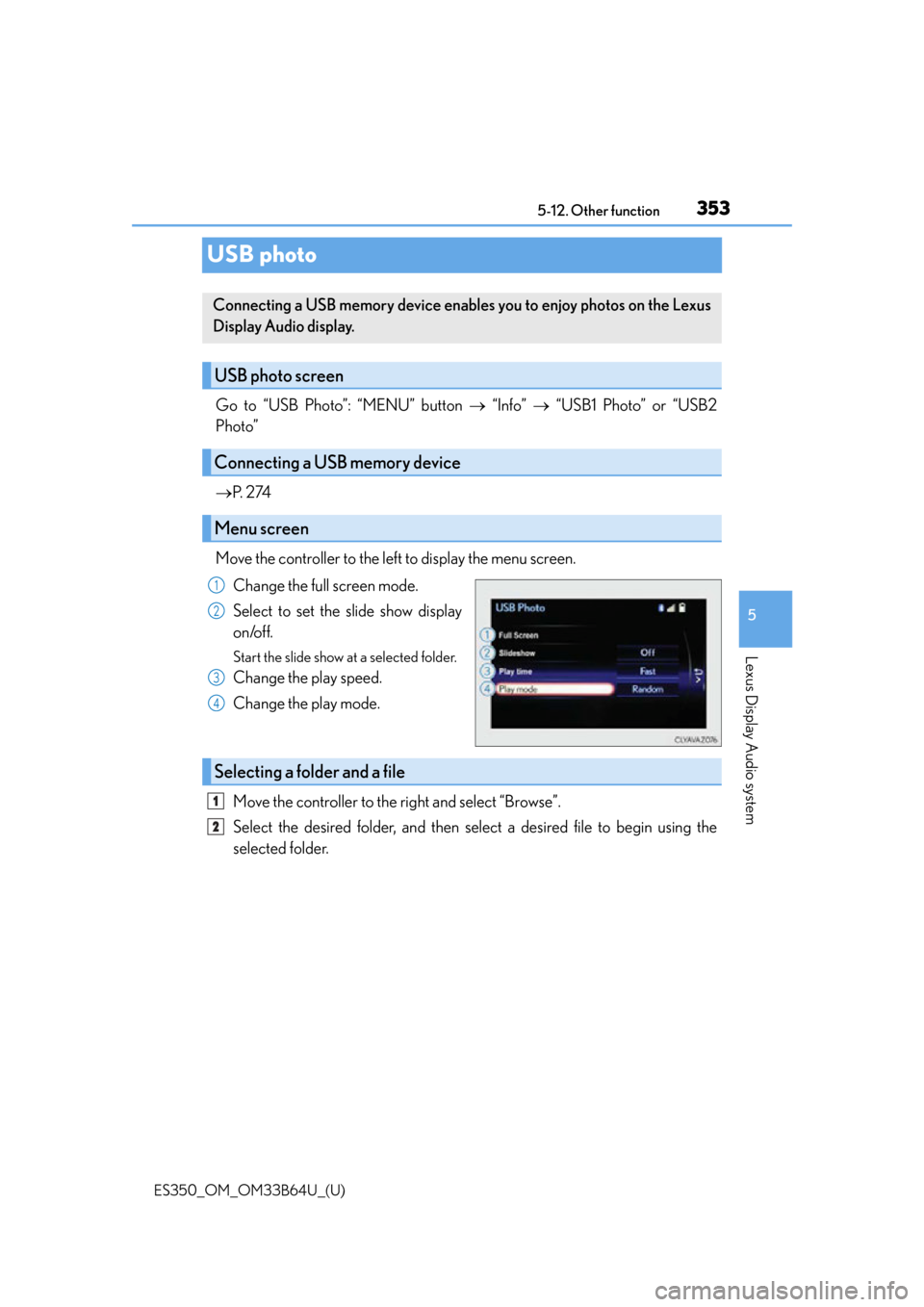
Move the controller to the left to display the menu screen. Change the full screen mode.
Select to set the slide show display
on/off.
Start the slide show at a selected folder.
Change the play speed.
Change the play mode.
Move the controller to the right and select “Browse”.
Select the desired folder, and then select a desired file to begin using the
selected folder.
Connecting a USB memory device enables you to enjoy photos on the Lexus
Display Audio display.
USB photo screen
Connecting a USB memory device
Menu screen
1
2
3
4
Selecting a folder and a file
1
2
Page 355 of 576
355
ES350_OM_OM33B64U_(U)5-12. Other function
5
Lexus Display Audio system
Weather information
Go to “Weather”: “MENU” button
“Info” “Weather”
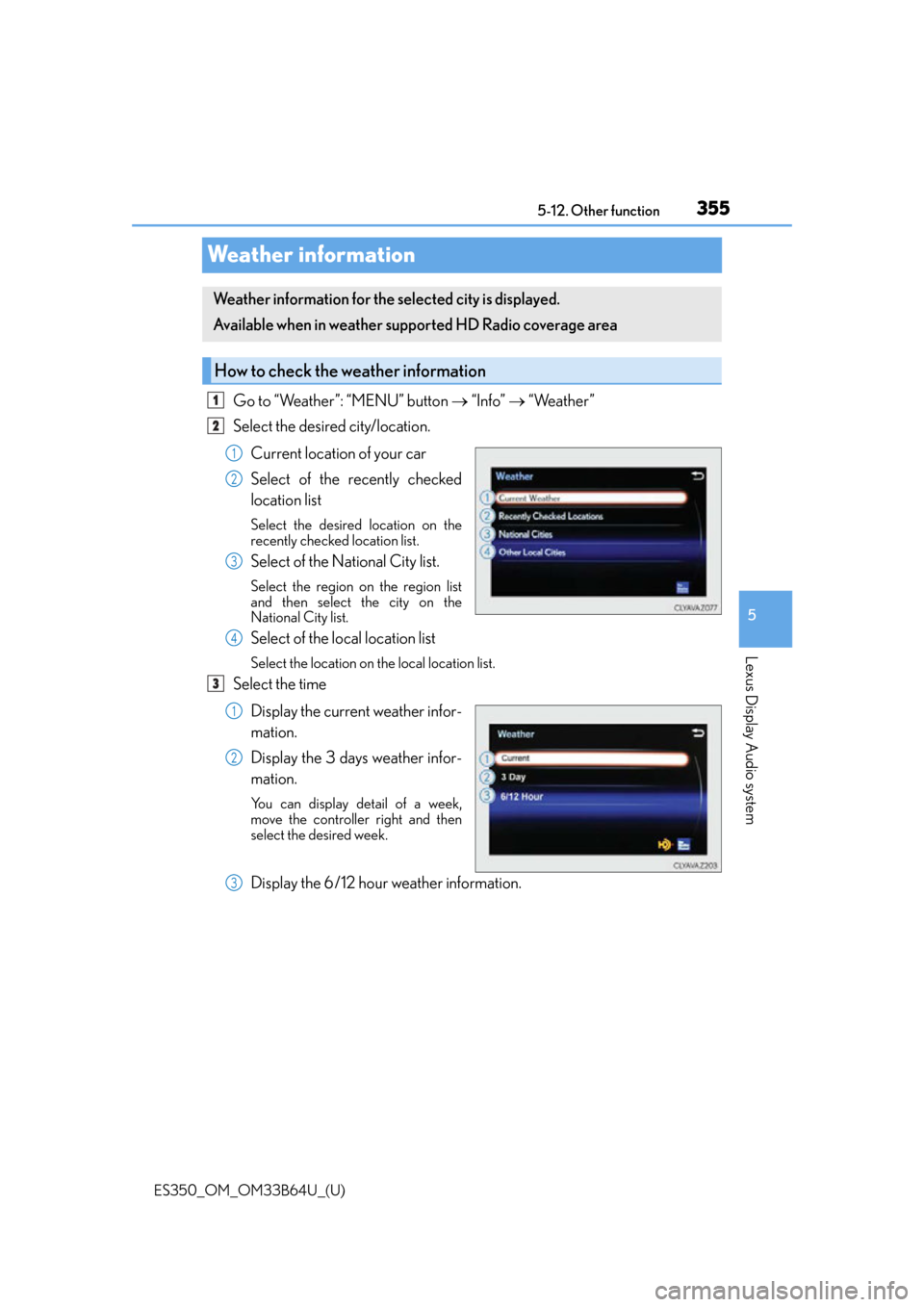
Select the desired city/location.
Current location of your car
Select of the recently checked
location list
Select the desired location on the
recently checked location list.
Select of the National City list.
Select the region on the region list
and then select the city on the
National City list.
Select of the local location list
Select the location on the local location list.
Select the timeDisplay the current weather infor-
mation.
Display the 3 days weather infor-
mation.
You can display detail of a week,
move the controller right and then
select the desired week.
Display the 6/12 hour weather information.
Weather information for the selected city is displayed.
Available when in weather supported HD Radio coverage area
How to check the weather information
1
2
1
2
3
4
3
1
2
3
Page 356 of 576
356
ES350_OM_OM33B64U_(U)5-12. Other function
Voice command system
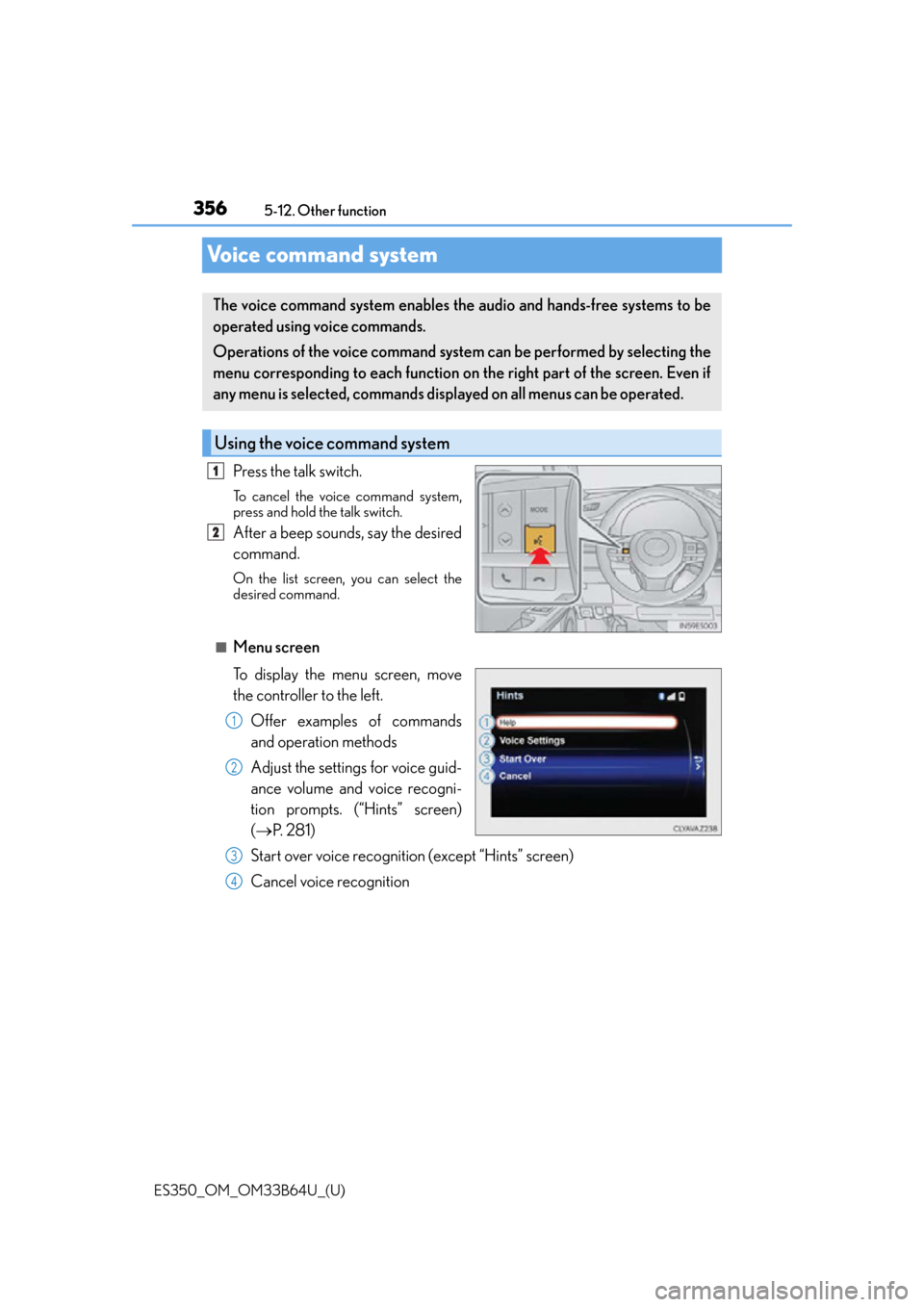
Press the talk switch.
To cancel the voice command system,
press and hold the talk switch.
After a beep sounds, say the desired
command.
On the list screen,
you can select the
desired command.
■Menu screen
To display the menu screen, move
the controller to the left.
Offer examples of commands
and operation methods
Adjust the settings for voice guid-
ance volume and voice recogni-
tion prompts. (“Hints” screen)
( P. 2 8 1 )
Start over voice recognition (except “Hints” screen)
Cancel voice recognition
The voice command system enables the audio and hands-free systems to be
operated using voice commands.
Operations of the voice command system can be performed by selecting the
menu corresponding to each function on the right part of the screen. Even if
any menu is selected, commands displayed on all menus can be operated.
Using the voice command system
1
2
1
2
3
4
Page 357 of 576

ES350_OM_OM33B64U_(U)
3575-12. Other function
5
Lexus Display Audio system
■Microphone
P. 3 2 6
■When using the microphone
●It is unnecessary to speak directly into the microphone when giving a command.
●Wait for the confirmation beep before speaking a command.
●Voice commands may not be recognized if:
• Spoken too quickly.
• Spoken at a low or high volume.
• The roof or windows are open.
• Passengers are talking while voice commands are spoken.
• The air conditioning speed is set high.
• The air conditioning vents are turned towards the microphone.
●In the following conditions, the system ma y not recognize the command properly and
using voice commands may not be possible:
• The command is incorrect or unclear. No te that certain words, accents or speech
patterns may be difficult for the system to recognize.
• There is excessive background noise, such as wind noise.
■When searching for a track
●A USB memory or iPod must be connected to enable track searching and playback.
( P. 2 74 )
●When a USB memory or iPod is connected, recognition data is created so tracks can
be searched using voice commands.
●Recognition data is updated un der the following conditions:
• When the USB memory or iPod data has changed.
• When the voice recognition language is changed. (P. 277)
●While the recognition data is being created or being updated, a track search cannot be
performed using a voice command.
■The Gracenote® media database
P. 3 0 3
Page 359 of 576
ES350_OM_OM33B64U_(U)
3595-12. Other function
5
Lexus Display Audio system
Phone
Audio
Info
CommandAction
“Redial”Places a call to the phone number of the latest outgo-
ing call
“Call Back”Places a call to the phone number of latest incoming
call
“Show Recent Calls”Displays the call history screen
“Dial
“Call
the phone book
CommandAction
“Play Playlist
“Play Artist
“Play Song
“Play Album
“Turn Music On/Off”Turns the audio system on/off
“Play the
Page 361 of 576
ES350_OM_OM33B64U_(U)
3615-12. Other function
5
Lexus Display Audio system
■Microphone
●Wait for the listening beeps before using the Mobile Assistant.
●The Mobile Assistant may not recognize commands in the following situations:
• When spoken too quickly.
• When spoken at a low or high volume.
• When the roof or windows are open.
• When passengers are talking while th e Mobile Assistant is being used.
• When the air conditioning syst em’s fan speed is set high.
• When the air conditioning vents ar e turned toward the microphone.
■Mobile Assistant precautions
●The available features and functions may vary based on the iOS version installed on the
connected device.
●Some Siri features are limited in Eyes Free mode. If you attempt to use an unavailable
function, Siri will inform you that the function is not available.
●If Siri is not enabled on the cellular phone connected via Bluetooth®, an error message
will be displayed on the screen.
●While a phone call is active, the Mobile Assistant cannot be used.
●If using the navigation feature of the cellular phone, ensure the active audio source is
Bluetooth® audio or iPod in order to hear turn by turn direction prompts.
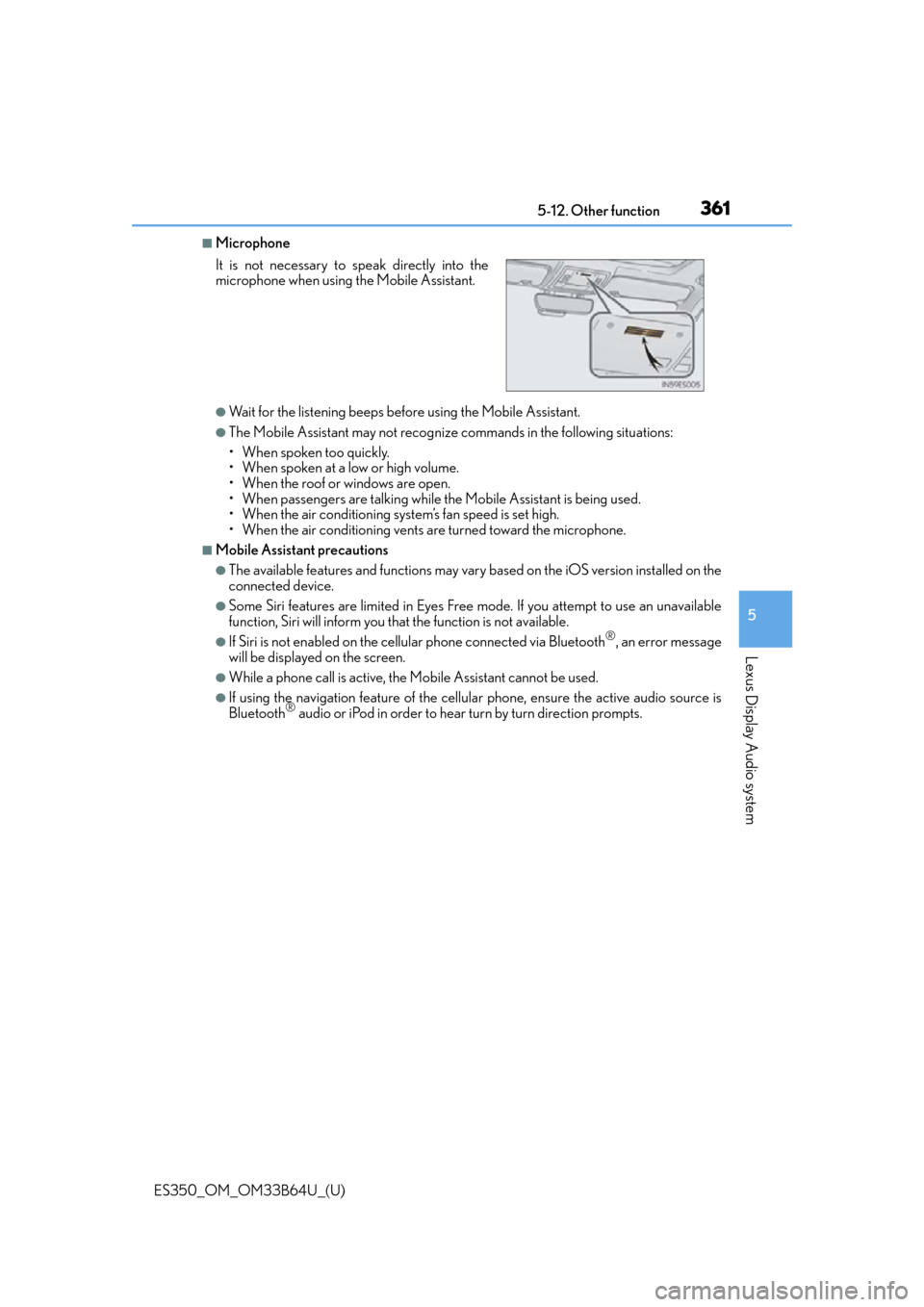
It is not necessary to speak directly into the
microphone when using
the Mobile Assistant.
Page 364 of 576
364
ES350_OM_OM33B64U_(U)6-1. Using the air conditioning system and defogger
Automatic air conditioning system
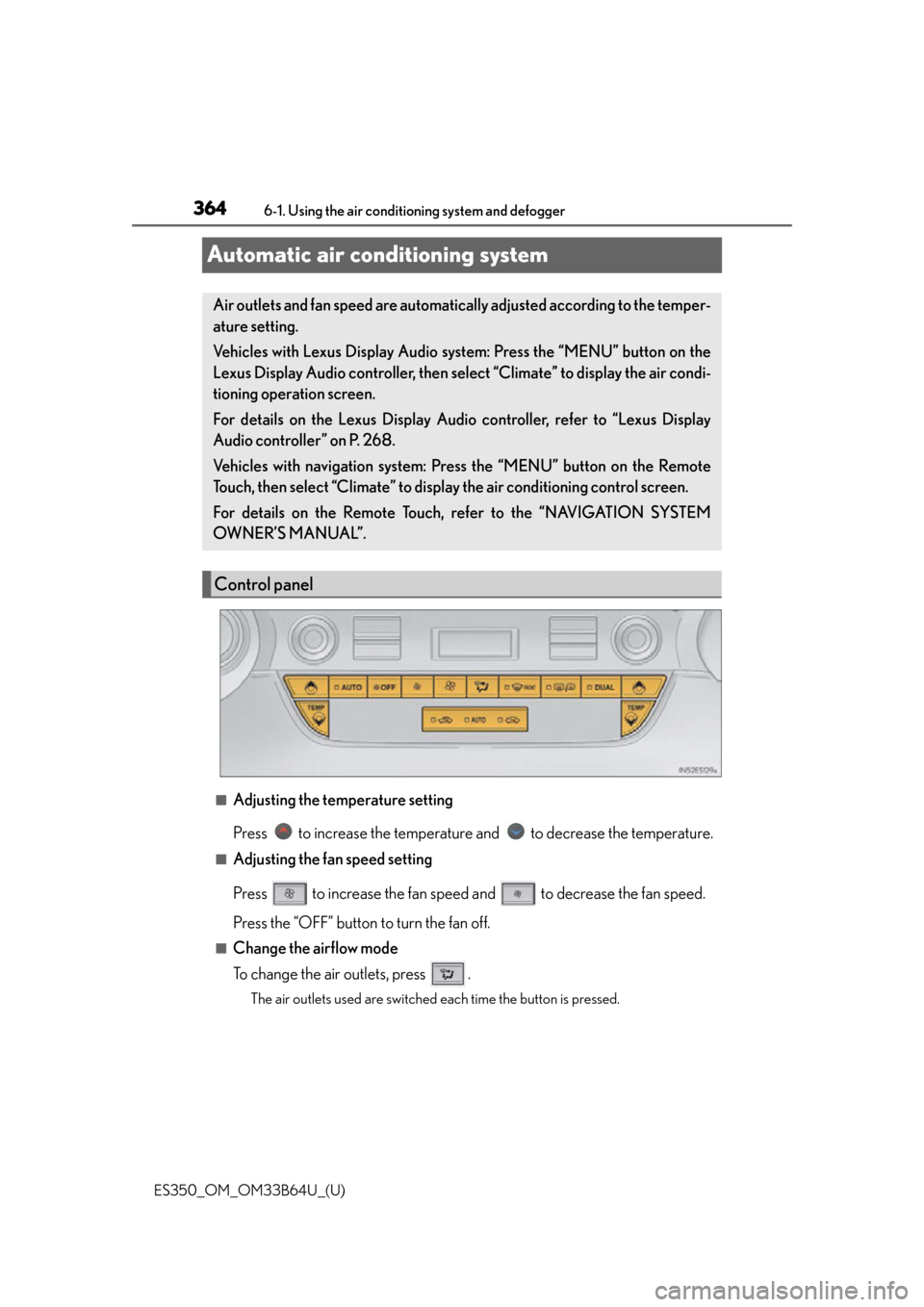
■Adjusting the temperature setting
Press to increase the temperature and to decrease the temperature.
■Adjusting the fan speed setting
Press to increase the fan speed and to decrease the fan speed.
Press the “OFF” button to turn the fan off.
■Change the airflow mode
To change the air outlets, press .
The air outlets used are switched each time the button is pressed.
Air outlets and fan speed are automatica
lly adjusted according to the temper-
ature setting.
Vehicles with Lexus Display Audio sy stem: Press the “MENU” button on the
Lexus Display Audio controller, then select “Climate” to display the air condi-
tioning operation screen.
For details on the Lexus Display Audio controller, refer to “Lexus Display
Audio controller” on P. 268.
Vehicles with navigation system: Press the “MENU” button on the Remote
Touch, then select “Climate” to display the air conditioning control screen.
For details on the Remote Touch, refer to the “NAVIGATION SYSTEM
OWNER’S MANUAL”.
Control panel
Page 365 of 576
ES350_OM_OM33B64U_(U)
3656-1. Using the air conditioning system and defogger
6
Interior features
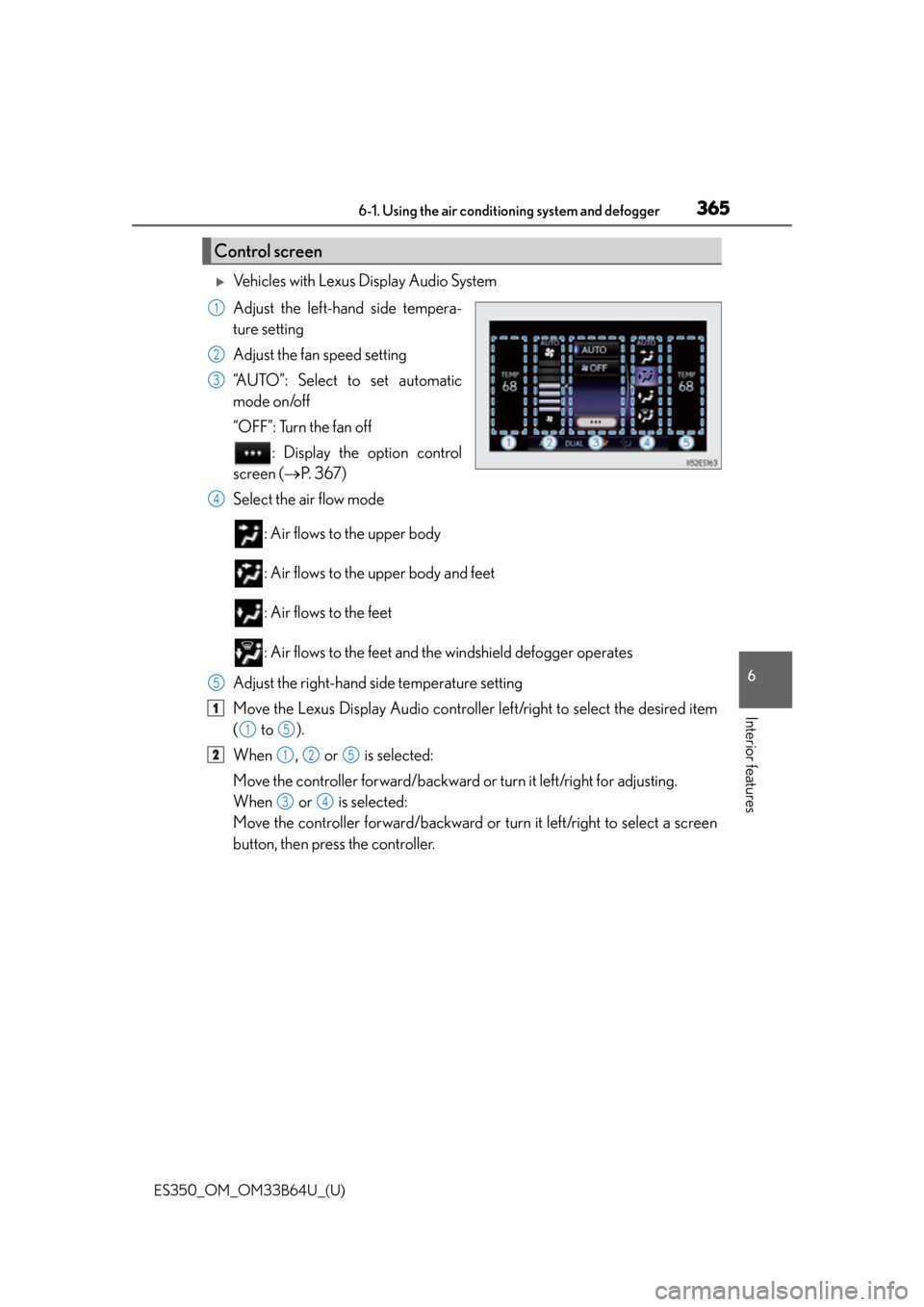
Vehicles with Lexus Display Audio System
Adjust the left-hand side tempera-
ture setting
Adjust the fan speed setting
“AUTO”: Select to set automatic
mode on/off
“OFF”: Turn the fan off
: Display the option control
screen ( P. 3 6 7 )
Select the air flow mode
: Air flows to the upper body
: Air flows to the upper body and feet
: Air flows to the feet
: Air flows to the feet and th e windshield defogger operates
Adjust the right-hand side temperature setting
Move the Lexus Display Audio controller left/right to select the desired item
( to ).
When , or is selected:
Move the controller forward/backward or turn it left/right for adjusting.
When or is selected:
Move the controller forward/backward or turn it left/right to select a screen
button, then press the controller.
Control screen
1
2
3
4
5
1
15
2125
34
Page 367 of 576
ES350_OM_OM33B64U_(U)
3676-1. Using the air conditioning system and defogger
6
Interior features
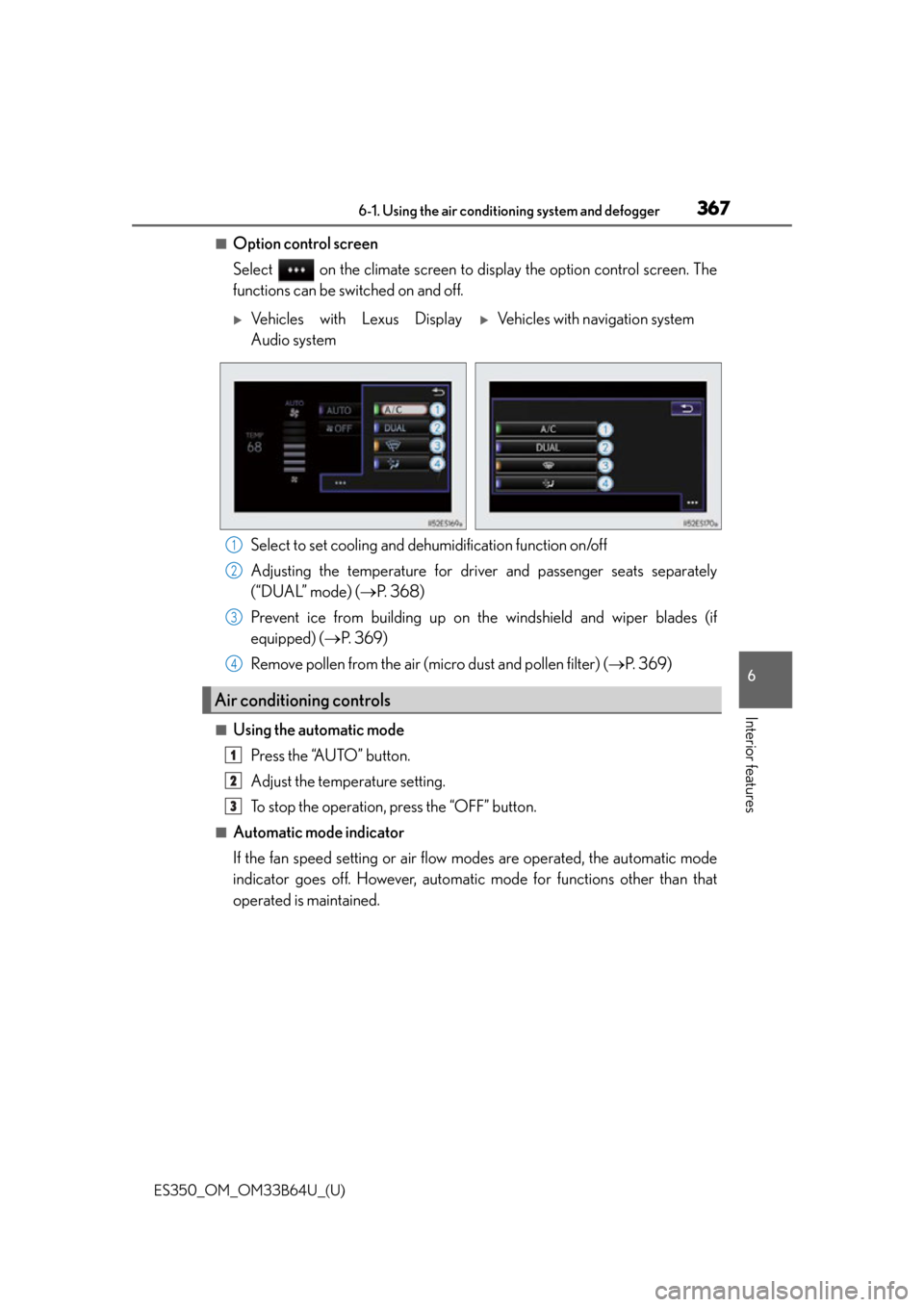
■Option control screen
Select on the climate screen to display the option control screen. The
functions can be switched on and off.
Select to set cooling and dehumidification function on/off
Adjusting the temperature for driver and passenger seats separately
(“DUAL” mode) ( P. 3 6 8 )
Prevent ice from building up on th e windshield and wiper blades (if
equipped) ( P. 3 6 9 )
Remove pollen from the air (micro dust and pollen filter) ( P. 3 6 9 )
■Using the automatic mode
Press the “AUTO” button.
Adjust the temperature setting.
To stop the operation, press the “OFF” button.
■Automatic mode indicator
If the fan speed setting or air flow modes are operated, the automatic mode
indicator goes off. However, automati c mode for functions other than that
operated is maintained.
Vehicles with Lexus Display
Audio systemVehicles with navigation system
Air conditioning controls
1
2
3
4
1
2
3
Page 413 of 576

ES350_OM_OM33B64U_(U)
4137-1. Maintenance and care
7
Maintenance and care
NOTICE
■Cleaning detergents
●Do not use the following types of detergent, as they may discolor the vehicle interior
or cause streaks or damage to painted surfaces:
• Non-seat portions: Organic substances such as benzene or gasoline, alkaline or
acidic solutions, dye, and bleach
• Seats: Alkaline or acidic solutions, such as thinner, benzene, and alcohol
●Do not use polish wax or polish cleaner. The instrument panel’s or other interior part’s
painted surface may be damaged.
■Preventing damage to leather surfaces
Observe the following precautions to avoid damage to and deterioration of leather
surfaces:
●Remove any dust or dirt from leather surfaces immediately.
●Do not expose the vehicle to direct sunlight for extended periods of time. Park the
vehicle in the shade, especially during summer.
●Do not place items made of vinyl, plastic, or containing wax on the upholstery, as they
may stick to the leather su rface if the vehicle interior heats up significantly.
■Water on the floor
Do not wash the vehicle floor with water.
Vehicle systems such as the audio system may be damaged if water comes into contact
with electrical components such as the au dio system above or under the floor of the
vehicle. Water may also cause the body to rust.
■When cleaning the inside of the windshie ld (vehicles with Lexus Safety System+)
Do not allow glass cleaner to contact the lens. Also, do not touch the lens. ( P. 1 7 8 )
■Cleaning the inside of the rear window
●Do not use glass cleaner to clean the rear window, as this may cause damage to the
rear window defogger heater wires or antenna. Use a cloth dampened with luke-
warm water to gently wipe the window clean. Wipe the window in strokes running
parallel to the heater wires or antenna.
●Be careful not to scratch or damage the heater wires or antenna.