audio Lexus ES350 2016 Quick Guide /
[x] Cancel search | Manufacturer: LEXUS, Model Year: 2016, Model line: ES350, Model: Lexus ES350 2016Pages: 112, PDF Size: 2.11 MB
Page 45 of 112

45
ES350_QG_OM33B82U_(U)
Intuitive Parking Assist (if equipped)
nTurning the system on and off
Turns the intuitive parking assist on/off
When on, the indi cator light comes
on to inform the driver that the sys-
tem is operational.
The distance from your vehicle to near by obstacles when parallel parking or
maneuvering into a garage is measured by the sensors and communicated via the
multi-information display, navigation system screen or Lexus Display Audio sys-
tem screen and a buzzer. Always check the surrounding area when using this sys-
Page 50 of 112

49
ES350_QG_OM33B82U_(U)
nMenu
Press the “MENU” button on the
Remote Touch to display the “Menu”
screen.
“Climate” ( →P.78)
“Nav” ( →P.52)
“LEXUS App Suite”
“Info”
“Radio” ( →P.65)
“Media” ( →P.63)
“Phone” ( →P.58)
“Setup”
“Display”
n Home
Three-way split screen
Press the “HOME” button on the
Remote Touch to display the home
screen.
The home screen can display multiple
information screens, such as the naviga-
tion system screen, audio system screen
and fuel consumption screen, simulta-
neously. When a screen is selected, the
selected screen is switched to a full-
screen display.
Displays the condition of the
Bluetooth
® connection
Select to change the display items/
area and the home screen layout.
Two-way split screen
1
2
3
4
5
6
7
8
9
1
2
Page 65 of 112

64
ES350_QG_OM33B82U_(U)
Audio System (with navigation system)
nAudio control screen
Follow the procedure below to di splay the audio control screen.
Press the “MENU” button on the
Remote Touch.
Please refer to P.48 for the
Remote Touch operation.
The “Menu” screen will be dis-
played.
Using the Remote Touch, select
“Radio” or “Media” and select each
tab.
nRemote control (steer ing wheel switches)
Some audio features can be controlled using the switches on the steering wheel.
Increases/decreases volume
Radio mode: Selects a radio station/
channel
Audio CD mode: Selects a track
MP3/WMA/AAC disc mode:
Selects a file
DVD mode: Selects a chapter
iPod mode: Selects a track/file
Press: Change audio modes
Press and hold: Mute/unmute or
pause/resume the current operation
1
2
1
2
3
Page 66 of 112
65
ES350_QG_OM33B82U_(U)
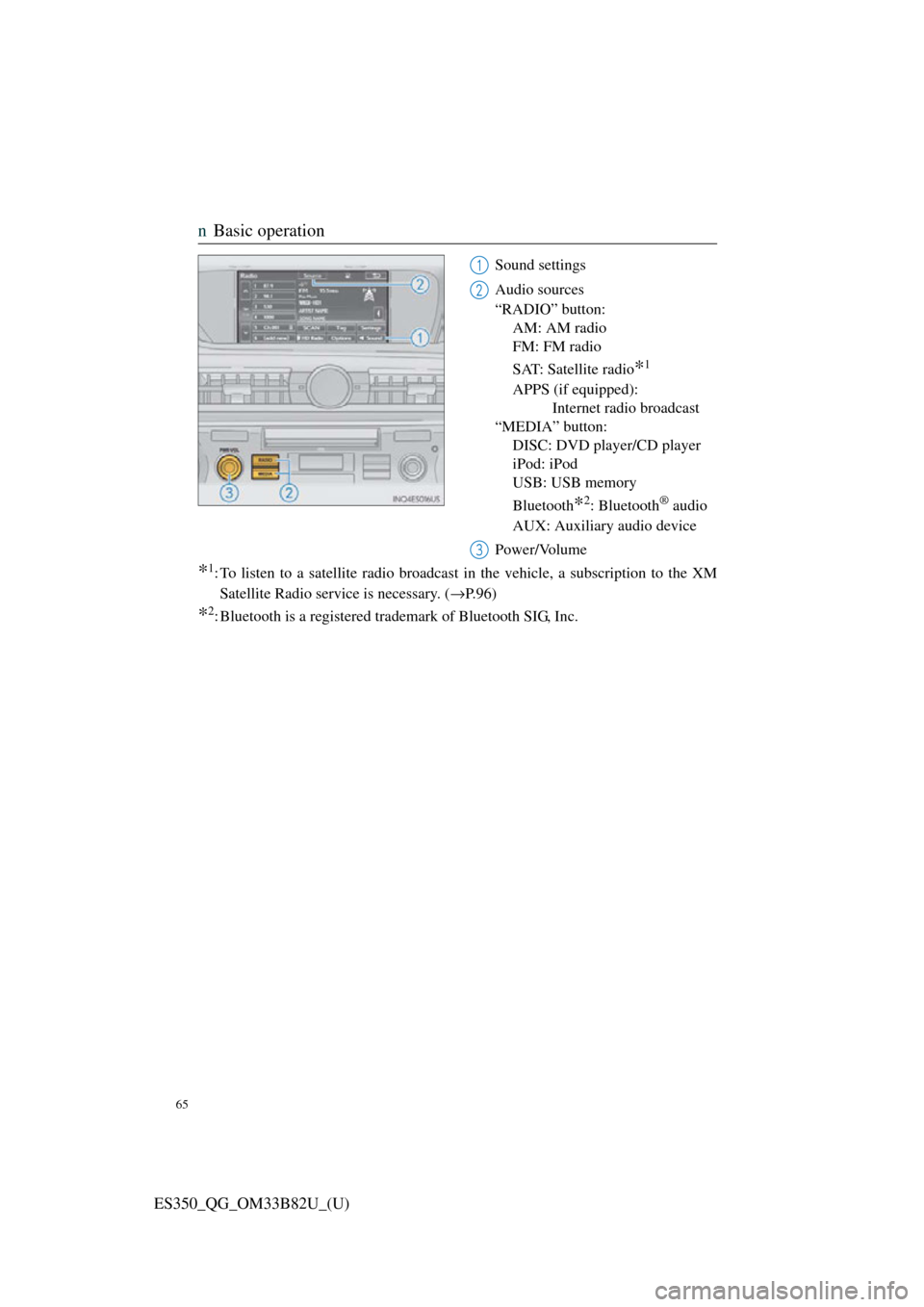
nBasic operation
Sound settings
Audio sources
“RADIO” button:
AM: AM radio
FM: FM radio
SAT: Satellite radio
*1
APPS (if equipped): Internet radio broadcast
“MEDIA” button: DISC: DVD player/CD player
iPod: iPod
USB: USB memory
Bluetooth
*2: Bluetooth® audio
AUX: Auxiliary audio device
Power/Volume
*1: To listen to a satellite radio broadcast in the vehicle, a subscription to the XM Satellite Radio service is necessary. ( →P.96)
*2: Bluetooth is a registered tr ademark of Bluetooth SIG, Inc.
1
2
3
Page 68 of 112

67
ES350_QG_OM33B82U_(U)
nDVD player/CD player
n
Playing an audio CD
Playback/pause
Repeat playback
Random playback
Selecting a track
Disc slot
CD eject
nPlaying a CD with MP3/WMA/AAC files
Playback/pause
Repeat playback
Random playback
Selecting a file
Selecting a folder
Selecting a file/fast forward/rewind
CD eject
Disc slot
1
2
3
4
5
6
1
2
3
4
5
6
7
8
Page 70 of 112
69
ES350_QG_OM33B82U_(U)
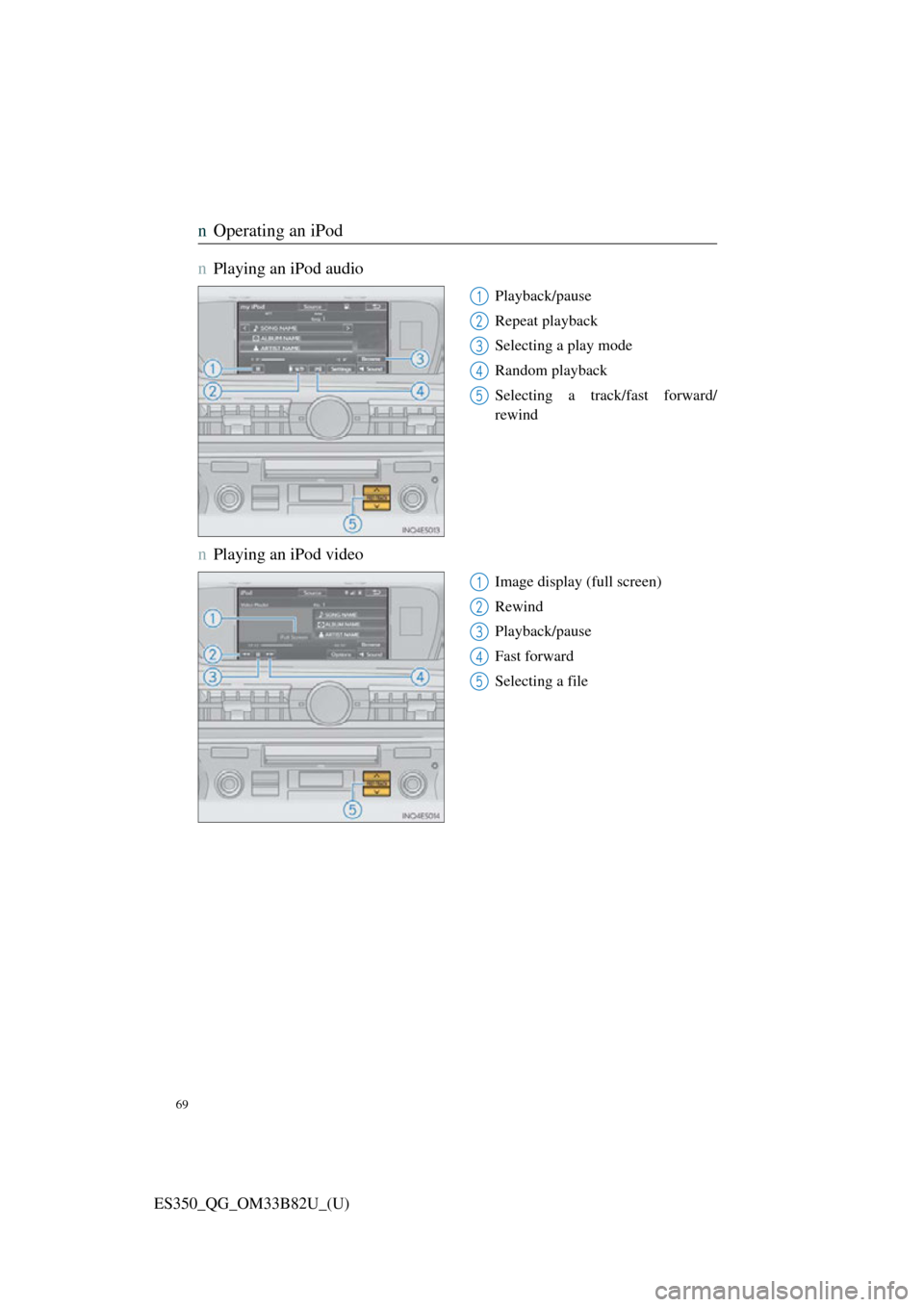
nOperating an iPod
n
Playing an iPod audio
Playback/pause
Repeat playback
Selecting a play mode
Random playback
Selecting a track/fast forward/
rewind
nPlaying an iPod video
Image display (full screen)
Rewind
Playback/pause
Fast forward
Selecting a file
1
2
3
4
5
1
2
3
4
5
Page 71 of 112
70
ES350_QG_OM33B82U_(U)
Lexus Display Audio Controller
(with Lexus Display Audio System)
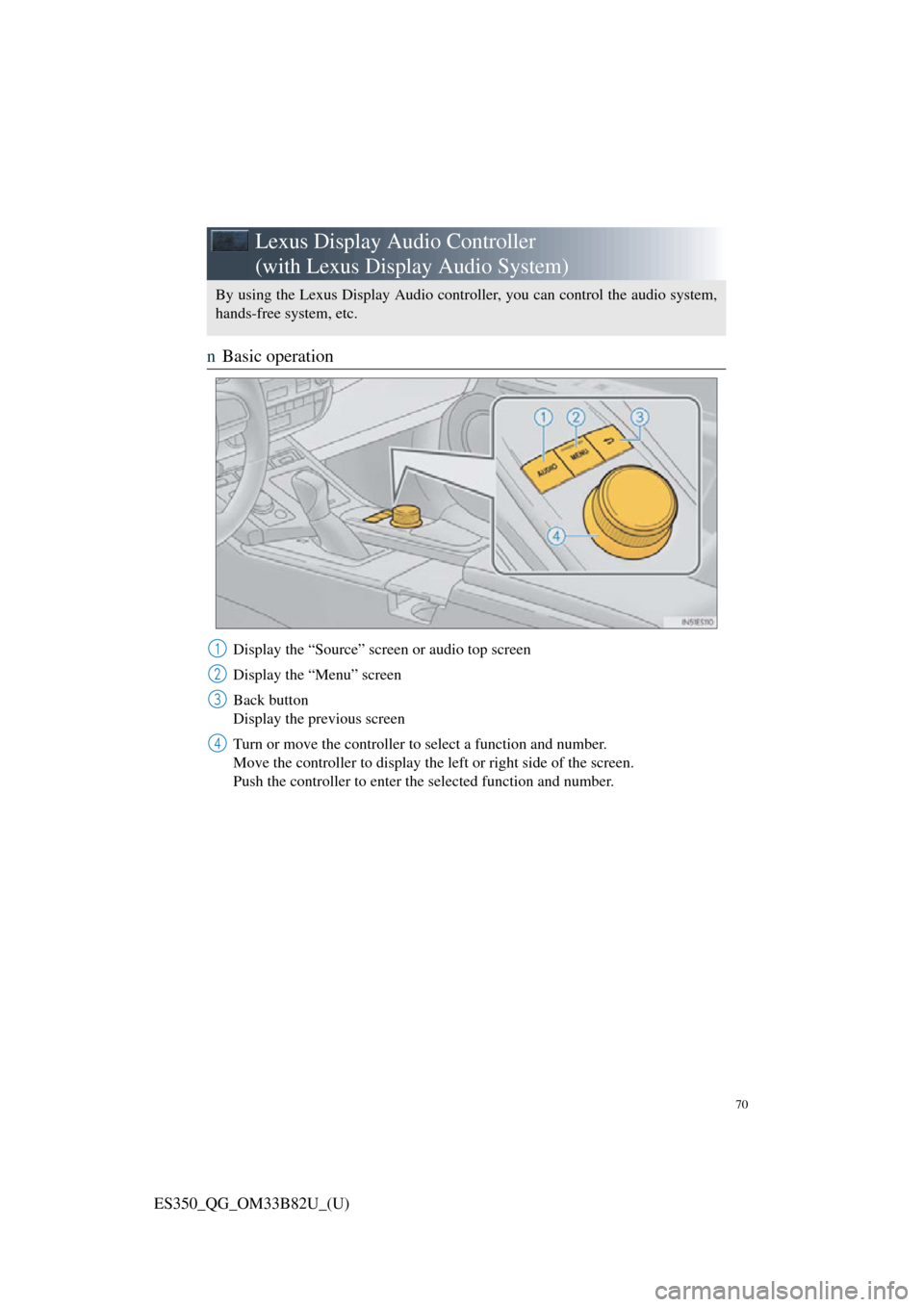
nBasic operation
Display the “Source” screen or audio top screen
Display the “Menu” screen
Back button
Display the previous screen
Turn or move the controller to select a function and number.
Move the controller to display the left or right side of the screen.
Push the controller to enter the selected function and number.
By using the Lexus Display Audio controller, you can control the audio system,
hands-free system, etc.
1
2
3
4
Page 73 of 112

72
ES350_QG_OM33B82U_(U)
Hands-free System For Cellular Phone
(with Lexus Display Audio System)
n How to register a Bluetooth® phone
Compatible Bluetooth®-equipped phones can be connected to the vehicle, enabling
hands-free operation. Please refer to the cellular phone manufacture’s user guide for
pairing procedures, or go to “www.lexus.com/MobileLink
” (for U.S.A) for phone
information.
Turn the Bluetooth® connection setting of your device set to on.
Go to “Bluetooth* Setup”: “MENU” button → “Setup” → “Bluetooth*”
Move the controller to the left and then select “Add Device”
When this screen is displayed, input
the passcode displayed on the
screen into your Bluetooth
® phone.
Register the Bluetooth
® phone
using your Bluetooth
® phone.
*: Bluetooth is a registered trad emark of Bluetooth SIG, Inc.
nRegistering favorites
You can register the desired contact from the phonebook. Up to 15 contacts per
phone can be registered.
Go to “Add Favorite”: “MENU” button → “Setup” → “Phone” → “Contact/
Call History Settings” → “Add Favorite”
Choose the contact to register.
n Dialing
Go to “Dial Pad”: “MENU” button → “Phone” → “Dial Pad”
Input a phone number.
Press the off-hook switch on th e steering wheel or select .
nDialing from the phonebook
Go to “Contacts”: “MENU” button → “Phone” → “Contacts”
Choose the desired contact to call from the list.
Choose the number and then press the of f-hook switch on the steering wheel or
press the controller.
1
2
3
4
5
1
2
1
2
3
1
2
3
Page 76 of 112

75
ES350_QG_OM33B82U_(U)
Audio System (with Lexus Display Audio
System)
nLexus Display Audio operation buttons
Eject a disc.
Disc slot
Except radio and A/V mode: Pause or resume playing a track.
Radio and A/V mode: Turn mute on/off
“TUNE•SCROLL” knob
Select a radio station band, track or file.
Selects a preset radio station, or to access a desired track or file.
Display the radio top screen.
Display the media top screen.
“PWR•VOL” knob
Press to turn the audio system on/off, and turn to adjust the volume.
nUsing the steering switches to change audio sources
Press the “MODE” switch when the audio system is turned on. The audio source
changes each time the “MODE” switch is pressed.
1
2
3
4
5
6
7
8
Page 77 of 112
76
ES350_QG_OM33B82U_(U)
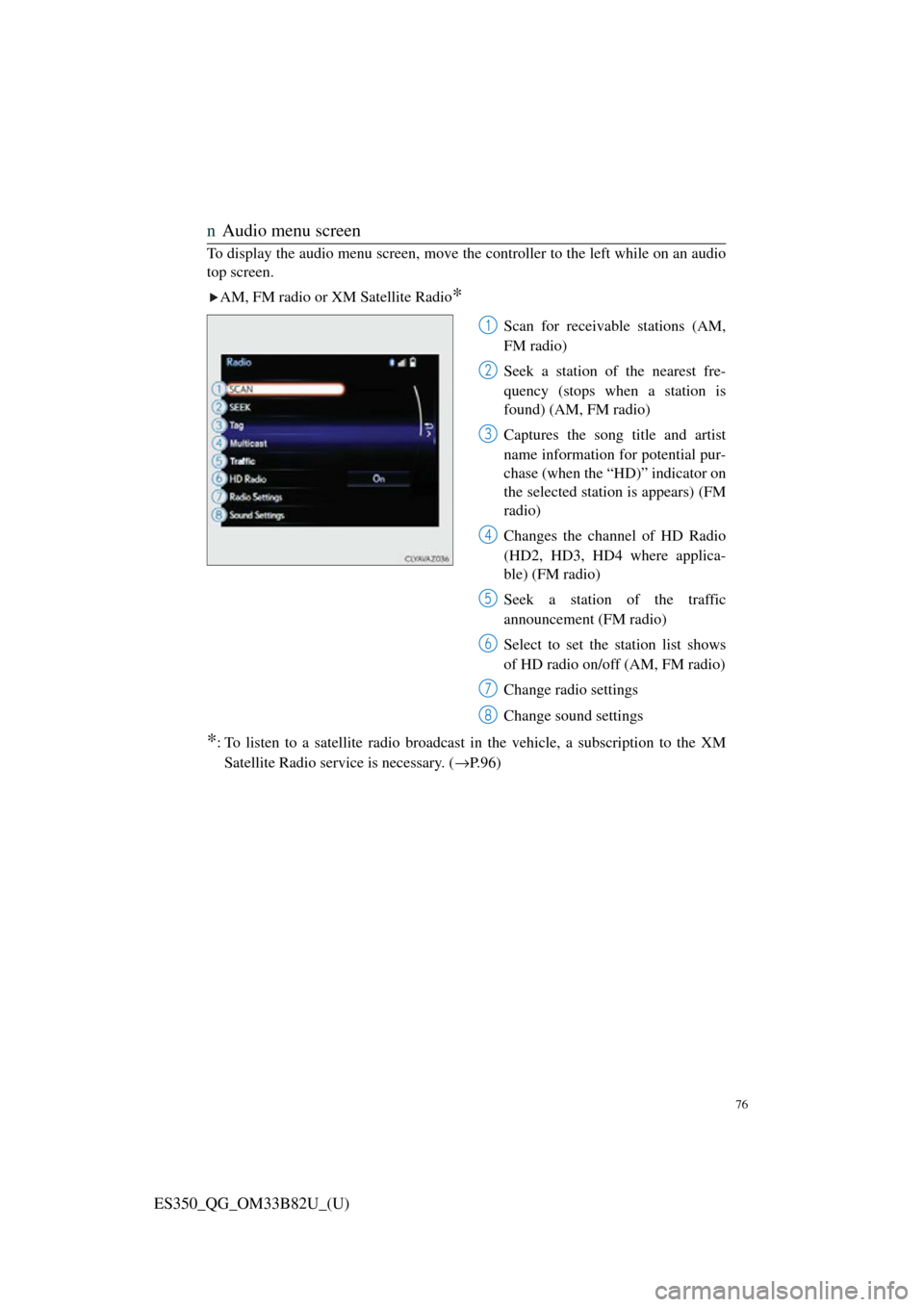
nAudio menu screen
To display the audio menu screen, move the controller to the left while on an audio
top screen.
AM, FM radio or XM Satellite Radio
*
Scan for receivable stations (AM,
FM radio)
Seek a station of the nearest fre-
quency (stops when a station is
found) (AM, FM radio)
Captures the song title and artist
name information for potential pur-
chase (when the “HD)” indicator on
the selected station is appears) (FM
radio)
Changes the channel of HD Radio
(HD2, HD3, HD4 where applica-
ble) (FM radio)
Seek a station of the traffic
announcement (FM radio)
Select to set the station list shows
of HD radio on/off (AM, FM radio)
Change radio settings
Change sound settings
*: To listen to a satellite radio broadcast in the vehicle, a subscription to the XMSatellite Radio service is necessary. ( →P.96)
1
2
3
4
5
6
7
8