set Lexus ES350 2016 Quick Guide /
[x] Cancel search | Manufacturer: LEXUS, Model Year: 2016, Model line: ES350, Model: Lexus ES350 2016Pages: 112, PDF Size: 2.11 MB
Page 67 of 112

66
ES350_QG_OM33B82U_(U)
nRadio
Tuning to preset stations/channels
Scanning for receivable stations
Using HD Radio
TM Technology
(for U.S.A., if equipped)
Cache radio operation buttons
Press: Selects a preset station
Press and hold: Seeks for a station
Adjusting the frequency
nEntering station presets
Tune in the desired station.
Select “add new”.
Select “Yes” on the confirmation screen.
Select “OK” after setting the new preset station.
Radio mode has a mix preset function, which can store up to 36 stations (6 stations
per page x 6 pages) from any of the AM, FM or SAT bands.
1
2
3
4
5
6
1
2
3
4
Page 72 of 112
71
ES350_QG_OM33B82U_(U)
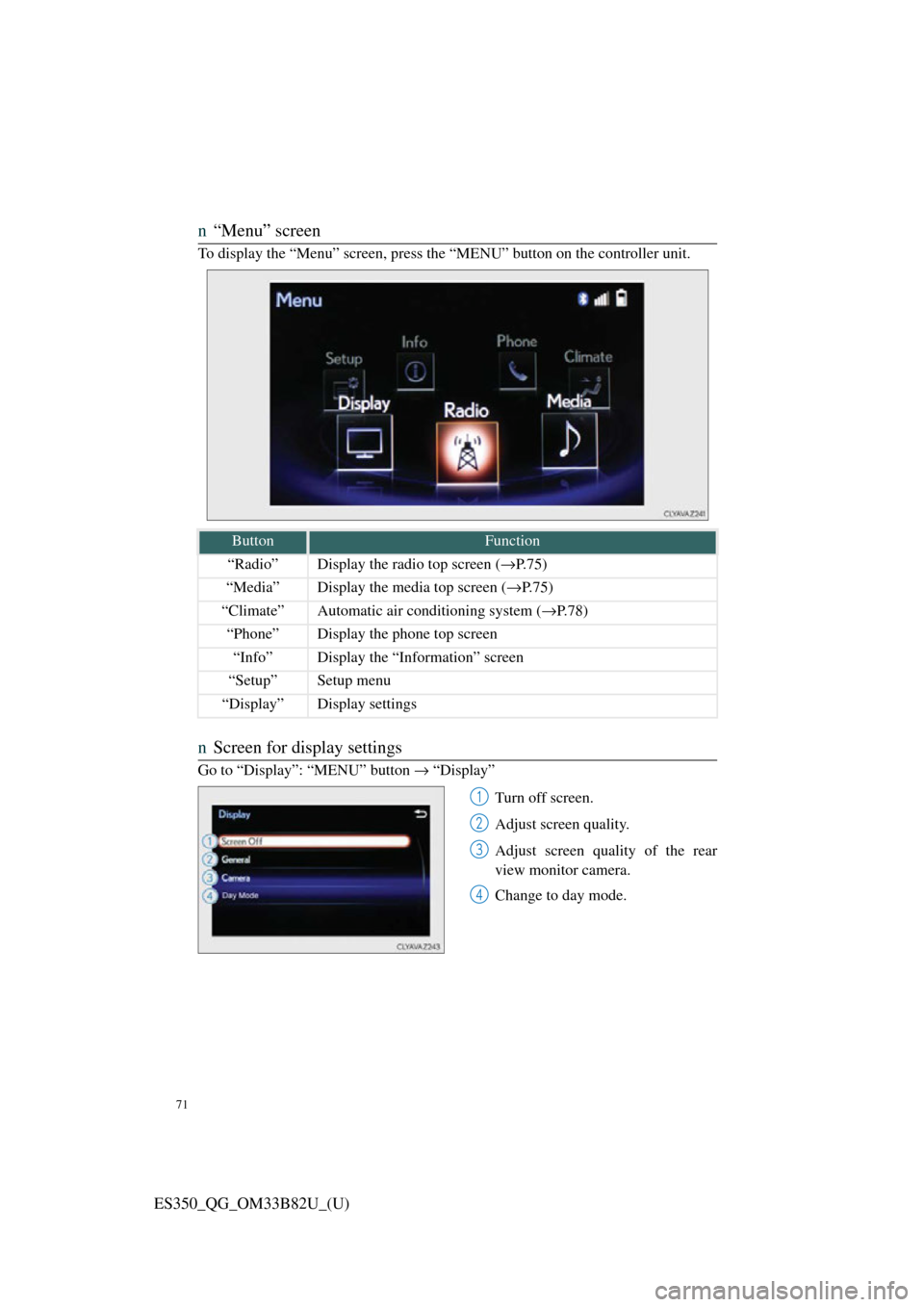
n“Menu” screen
To display the “Menu” screen, press th e “MENU” button on the controller unit.
nScreen for display settings
Go to “Display”: “MENU” button → “Display”
Turn off screen.
Adjust screen quality.
Adjust screen quality of the rear
view monitor camera.
Change to day mode.
ButtonFunction
“Radio”Display the radio top screen ( →P.75)
“Media”Display the media top screen ( →P.75)
“Climate”Automatic air conditioning system ( →P.78)
“Phone”Display the phone top screen
“Info”Display the “Information” screen
“Setup”Setup menu
“Display”Display settings
1
2
3
4
Page 73 of 112

72
ES350_QG_OM33B82U_(U)
Hands-free System For Cellular Phone
(with Lexus Display Audio System)
n How to register a Bluetooth® phone
Compatible Bluetooth®-equipped phones can be connected to the vehicle, enabling
hands-free operation. Please refer to the cellular phone manufacture’s user guide for
pairing procedures, or go to “www.lexus.com/MobileLink
” (for U.S.A) for phone
information.
Turn the Bluetooth® connection setting of your device set to on.
Go to “Bluetooth* Setup”: “MENU” button → “Setup” → “Bluetooth*”
Move the controller to the left and then select “Add Device”
When this screen is displayed, input
the passcode displayed on the
screen into your Bluetooth
® phone.
Register the Bluetooth
® phone
using your Bluetooth
® phone.
*: Bluetooth is a registered trad emark of Bluetooth SIG, Inc.
nRegistering favorites
You can register the desired contact from the phonebook. Up to 15 contacts per
phone can be registered.
Go to “Add Favorite”: “MENU” button → “Setup” → “Phone” → “Contact/
Call History Settings” → “Add Favorite”
Choose the contact to register.
n Dialing
Go to “Dial Pad”: “MENU” button → “Phone” → “Dial Pad”
Input a phone number.
Press the off-hook switch on th e steering wheel or select .
nDialing from the phonebook
Go to “Contacts”: “MENU” button → “Phone” → “Contacts”
Choose the desired contact to call from the list.
Choose the number and then press the of f-hook switch on the steering wheel or
press the controller.
1
2
3
4
5
1
2
1
2
3
1
2
3
Page 76 of 112

75
ES350_QG_OM33B82U_(U)
Audio System (with Lexus Display Audio
System)
nLexus Display Audio operation buttons
Eject a disc.
Disc slot
Except radio and A/V mode: Pause or resume playing a track.
Radio and A/V mode: Turn mute on/off
“TUNE•SCROLL” knob
Select a radio station band, track or file.
Selects a preset radio station, or to access a desired track or file.
Display the radio top screen.
Display the media top screen.
“PWR•VOL” knob
Press to turn the audio system on/off, and turn to adjust the volume.
nUsing the steering switches to change audio sources
Press the “MODE” switch when the audio system is turned on. The audio source
changes each time the “MODE” switch is pressed.
1
2
3
4
5
6
7
8
Page 77 of 112
76
ES350_QG_OM33B82U_(U)
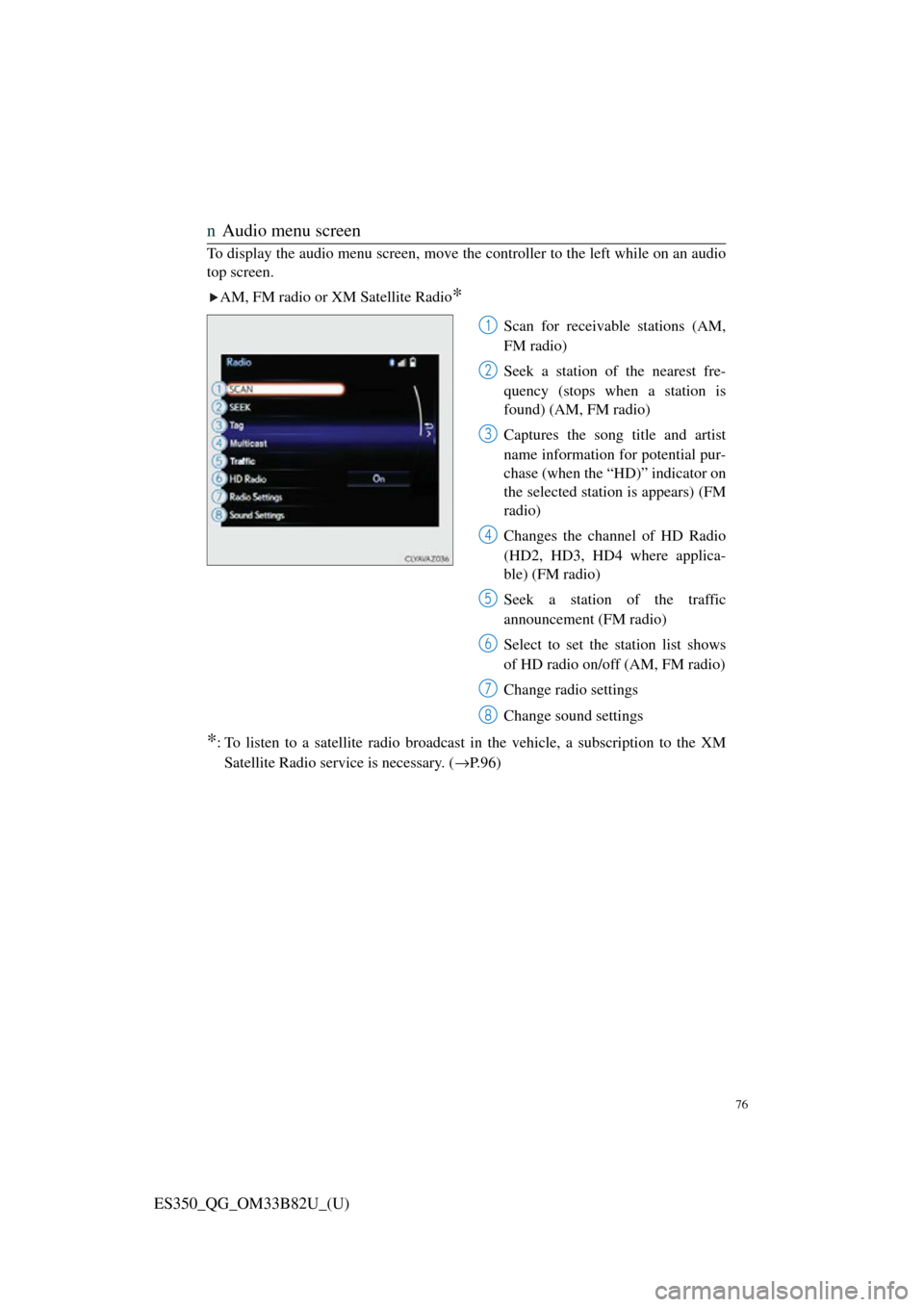
nAudio menu screen
To display the audio menu screen, move the controller to the left while on an audio
top screen.
AM, FM radio or XM Satellite Radio
*
Scan for receivable stations (AM,
FM radio)
Seek a station of the nearest fre-
quency (stops when a station is
found) (AM, FM radio)
Captures the song title and artist
name information for potential pur-
chase (when the “HD)” indicator on
the selected station is appears) (FM
radio)
Changes the channel of HD Radio
(HD2, HD3, HD4 where applica-
ble) (FM radio)
Seek a station of the traffic
announcement (FM radio)
Select to set the station list shows
of HD radio on/off (AM, FM radio)
Change radio settings
Change sound settings
*: To listen to a satellite radio broadcast in the vehicle, a subscription to the XMSatellite Radio service is necessary. ( →P.96)
1
2
3
4
5
6
7
8
Page 78 of 112
77
ES350_QG_OM33B82U_(U)
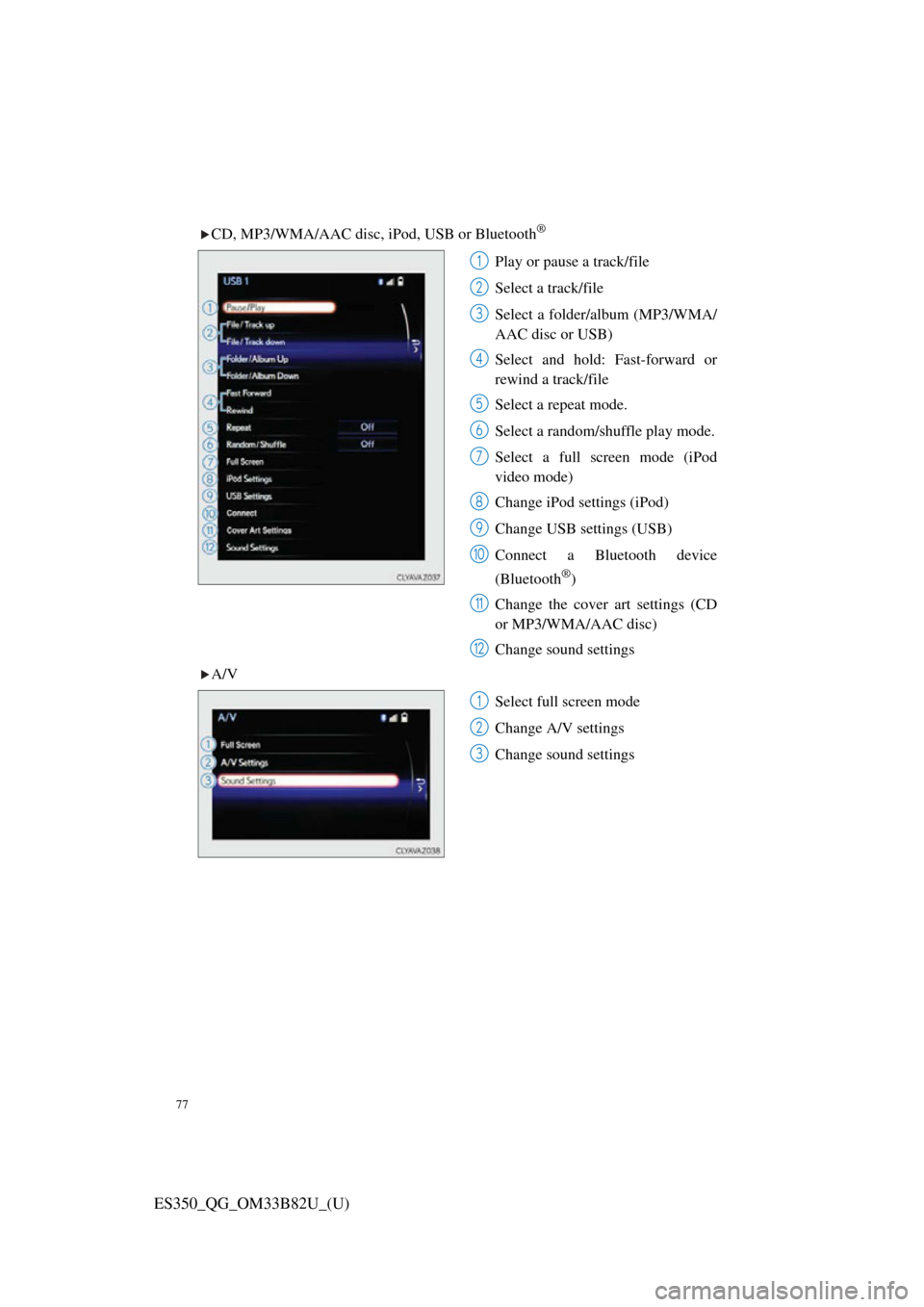
CD, MP3/WMA/AAC disc, iPod, USB or Bluetooth®
Play or pause a track/file
Select a track/file
Select a folder/album (MP3/WMA/
AAC disc or USB)
Select and hold: Fast-forward or
rewind a track/file
Select a repeat mode.
Select a random/shuffle play mode.
Select a full screen mode (iPod
video mode)
Change iPod settings (iPod)
Change USB settings (USB)
Connect a Bluetooth device
(Bluetooth
®)
Change the cover art settings (CD
or MP3/WMA/AAC disc)
Change sound settings
A/V
Select full screen mode
Change A/V settings
Change sound settings
1
2
3
4
5
6
7
8
9
10
11
12
1
2
3
Page 80 of 112
79
ES350_QG_OM33B82U_(U)
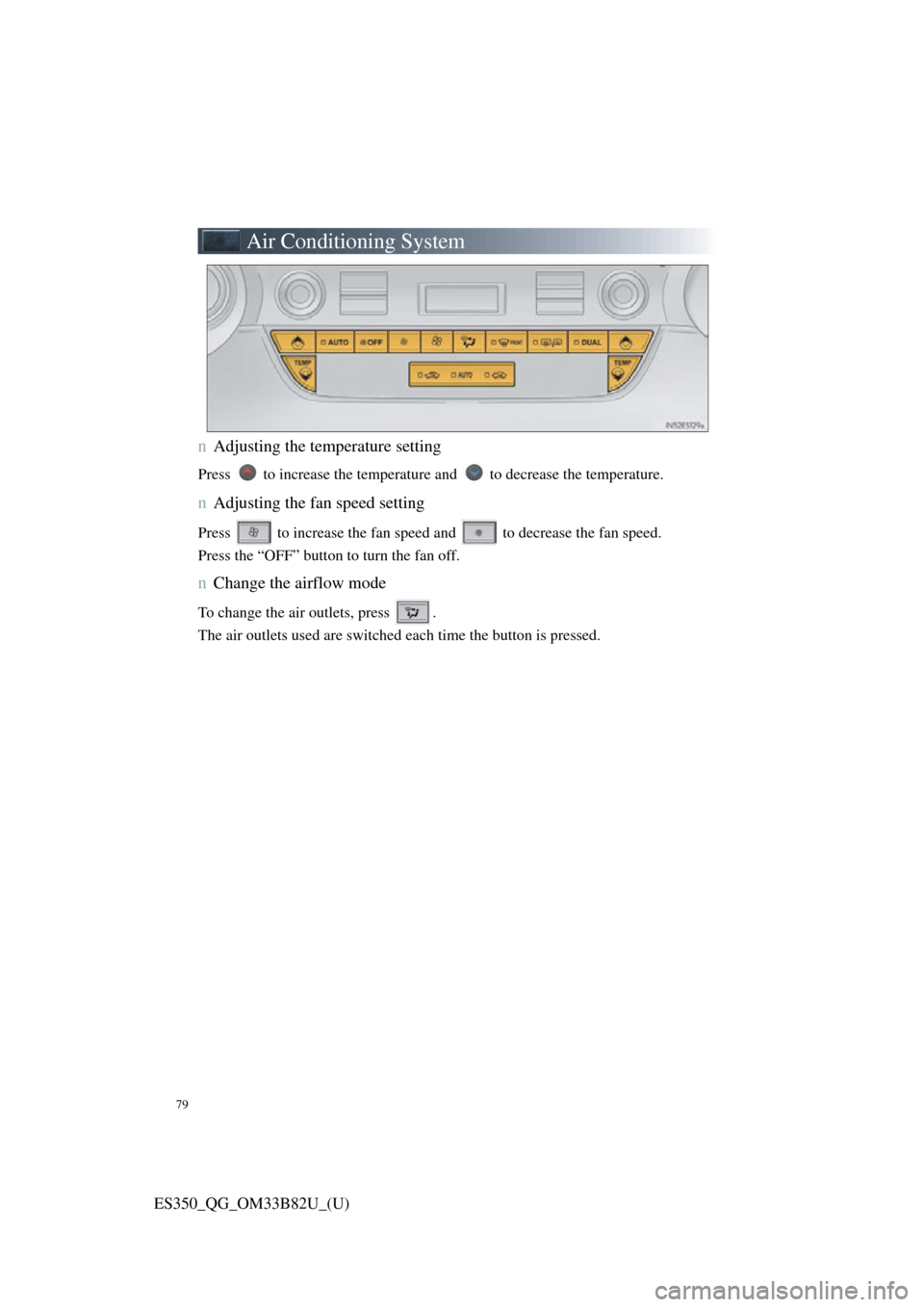
Air Conditioning System
nAdjusting the temperature setting
Press to increase the temperature and to decrease the temperature.
nAdjusting the fan speed setting
Press to increase the fan speed and to decrease the fan speed.
Press the “OFF” button to turn the fan off.
nChange the airflow mode
To change the air outlets, press .
The air outlets used are switched each time the button is pressed.
Page 81 of 112
80
ES350_QG_OM33B82U_(U)
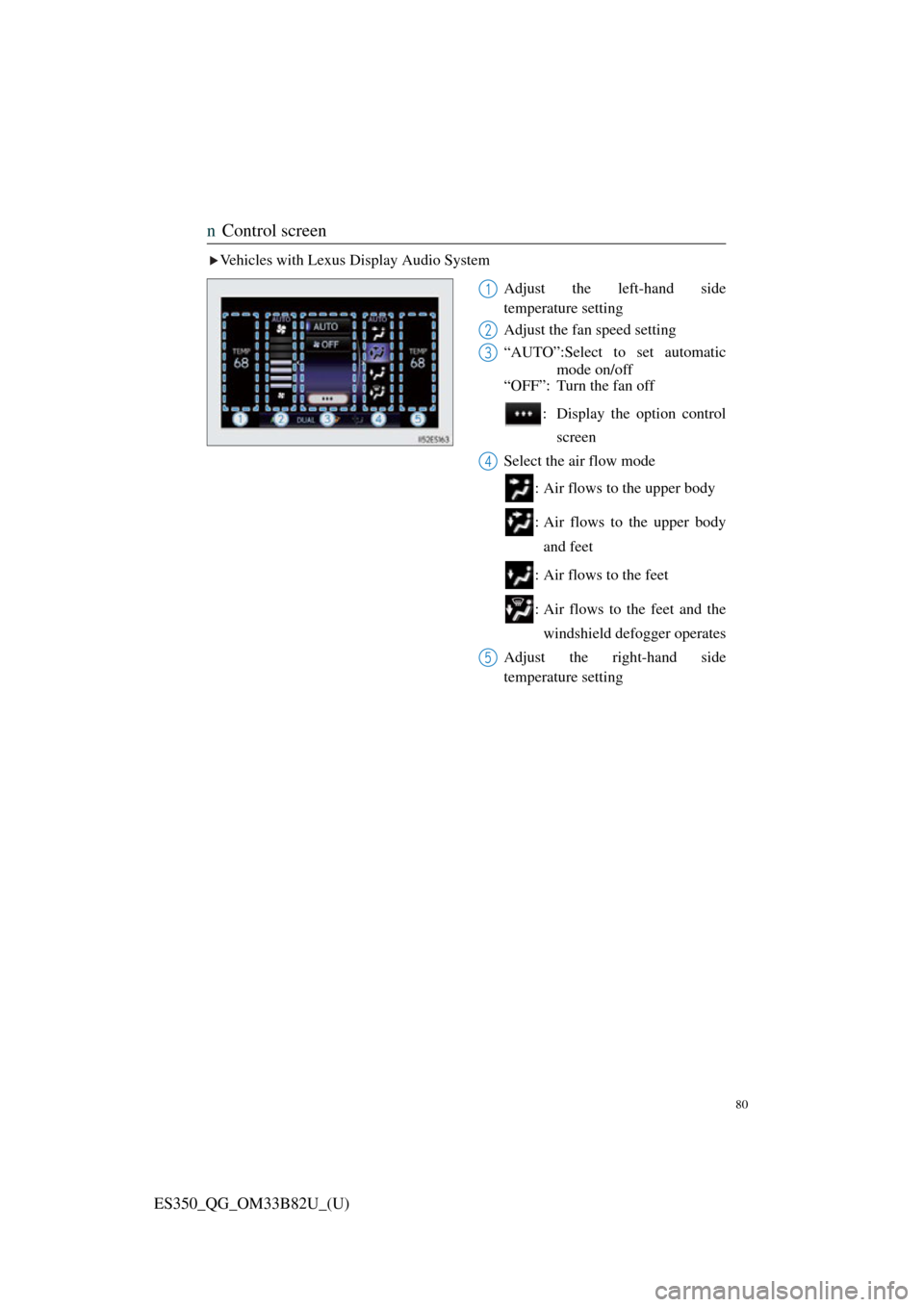
nControl screen
Vehicles with Lexus Display Audio System
Adjust the left-hand side
temperature setting
Adjust the fan speed setting
“AUTO”:Select to set automaticmode on/off
“OFF”: Turn the fan off
: Display the option controlscreen
Select the air flow mode
: Air flows to the upper body
: Air flows to the upper bodyand feet
: Air flows to the feet
: Air flows to the feet and the windshield defogger operates
Adjust the right-hand side
temperature setting
1
2
3
4
5
Page 82 of 112

81
ES350_QG_OM33B82U_(U)
Vehicles with navigation systemAdjust the left-hand side
temperature setting
Adjust the fan speed setting
Select the air flow mode
: Air flows to the upper body
: Air flows to the upper bodyand feet
: Air flows to the feet
: Air flows to the feet and the windshield defogger oper-
ates
Adjust the right-hand side
temperature setting
Display the option control screen
Turn the fan off
Select to set automatic mode on/off
1
2
3
4
5
6
7
Page 83 of 112
82
ES350_QG_OM33B82U_(U)
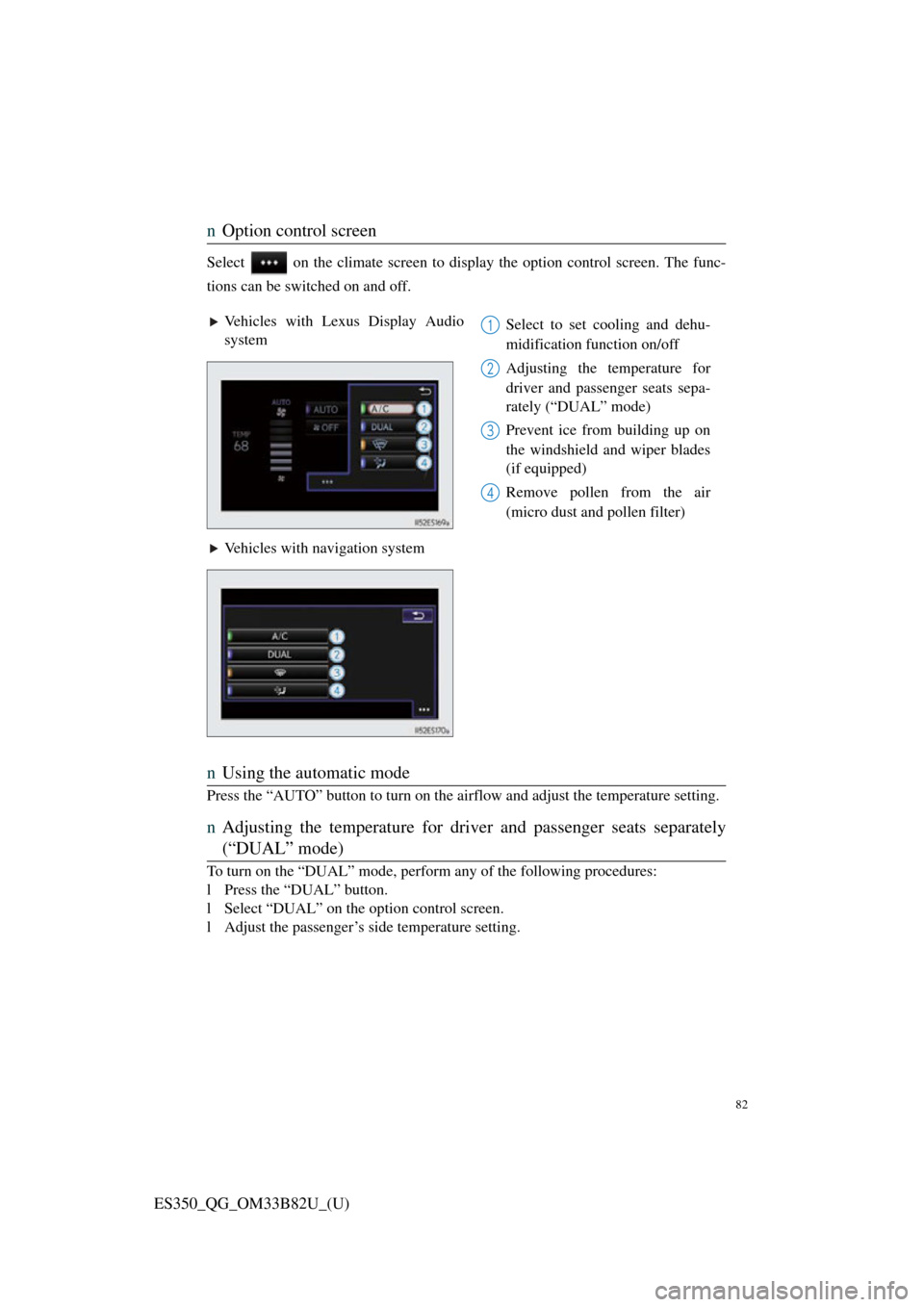
nOption control screen
Select on the climate screen to disp lay the option control screen. The func-
tions can be switched on and off.
n Using the automatic mode
Press the “AUTO” button to turn on the ai rflow and adjust the temperature setting.
nAdjusting the temperature for driv er and passenger seats separately
(“DUAL” mode)
To turn on the “DUAL” mode, perform any of the following procedures:
l Press the “DUAL” button.
l Select “DUAL” on the option control screen.
l Adjust the passenger’s side temperature setting.
Vehicles with Lexus Display Audio
system Select to set cooling and dehu-
midification function on/off
Adjusting the temperature for
driver and passenger seats sepa-
rately (“DUAL” mode)
Prevent ice from building up on
the windshield and wiper blades
(if equipped)
Remove pollen from the air
(micro dust and pollen filter)
Vehicles with navigation system1
2
3
4