set Lexus ES350 2016 Quick Guide /
[x] Cancel search | Manufacturer: LEXUS, Model Year: 2016, Model line: ES350, Model: Lexus ES350 2016Pages: 112, PDF Size: 2.11 MB
Page 85 of 112

84
ES350_QG_OM33B82U_(U)
nCommand list
Basic (vehicles with Lexus Display Audio System)
Basic (Vehicles with navigation system)
Apps (vehicles with navigation system) (for U.S.A., if equipped)
Navi (vehicles with navigation system)
*1: For example; “Gas stati ons”, “Restaurants”, etc.
*2: Depending on the search results, a POI list may be provided by a relevant POI
application of the LEXUS App suite.
CommandAction
“Help”Prompts voice guidance to offer examples of
commands or operation methods
“Go Back”Returns to the previous screen
“Go to
CommandAction
“Help”Prompts voice guidance to offer examples of
commands or operation methods
“Go Back”Returns to the previous screen
“Go to
“More Hints”Displays more commonly used commands
“Cancel”Cancels the voice command system
CommandAction
“Launch
CommandAction
“Find
current position
*2
“Enter an Address”Enables setting a destination by saying the
address
“Go Home”Displays the route to home
“Pause Guidance”Stops the route guidance
“Resume Guidance”Resumes the route guidance
“Show
“Delete Destination”Deletes the destination
“Previous Destination”Displays previous destinations
Page 86 of 112

85
ES350_QG_OM33B82U_(U)
PhoneRadio (vehicles with navigation system)
Audio (vehicles with Lexus Display Audio System)
CommandAction
“Redial”Places a call to the phone number of the latest
outgoing call
“Call Back”Places a call to the phone number of latest
incoming call
“Show Recent Calls”Displays the call history screen
“Dial
“Call
from the phone book
CommandAction
“Tune to
quency
“Tune to
“Play
fied genre
“Tune to FM
HD
tion
“Tune to preset
station
“Tune to
with the specified name
“Tune to channel
channel number
“Play
tion”Changes the radio to a satellite radio channel of
the specified genre
CommandAction
“Play Playlist
“Play Artist
“Play Song
“Play Album
“Turn Music On/Off”Turns the audio system on/off
Audio source nameSelects audio source
Page 88 of 112

87
ES350_QG_OM33B82U_(U)
Other (vehicles with navigation system)
*1: Only within the possible temperature range of the air conditioning system
*2: Bluetooth is a registered tr ademark of Bluetooth SIG, Inc.
CommandAction
“Turn Climate Control On”Turns air conditioning system on
“Turn Climate Control Off”Turns air conditioning system off
“Warmer”Increases the temperature of the air conditioning
system
“Cooler”Decreases the temperatur e of the air condition-
ing system
“<#> degrees”Changes the set temperature of the air condition-
ing system to <#> degrees
*1
“Turn Music On”Turns the audio system on
“Turn Music Off”Turns the audio system off
“AM Radio”Selects AM radio mode
“FM Radio”Selects FM radio mode
“Sirius XM”Selects satellite radio mode
“Disc”Selects the selected disc mode
“USB”Selects USB audio mode
“iPod”Selects iPod audio mode
“Bluetooth*2 Audio”Selects Bluetooth® audio mode
“A.V.”Selects VTR mode
“Auxiliary”Selects AUX audio mode
Commands relating to operation of the audio/visual and air conditioning systems
can only be performed when the audio and air conditioning systems are turned
on. Refer to the “OWNER’S MANUAL” and “NAVIGATION SYSTEM
OWNER’S MANUAL”.
Page 96 of 112
95
ES350_QG_OM33B82U_(U)
LEXUS Enform (for U.S.A., if equipped)
nFunction achieved by using a cellular phone (with navigation system)
n
Services
Of the functions included with Lexus Enform, only LEXUS App Suite can be
achieved by using a cellular phone.
LEXUS App Suite is a service that enables the usable contents of a cellular phone to
be displayed on and operated from the navigation screen. Before LEXUS App Suite
can be used, a few settings need to be performed.
l LEXUS App Suite
When LEXUS App Suite is activated, an application may need to update. By
updating, an application can be kept the latest version. To updating the applica-
tion, it is necessary to download the updated data and install it.
nSubscription
LEXUS App Suite will be available on a trial period included upon purchase of a
new vehicle. User registration is required to start using the service.
When a trial period has elapsed after purchasing a new vehicle, a fee will be
charged to renew the contract. Services re quiring a separate contract can also be
used. For details, refer to http://www.lexus.com/enform/
or call 1-800-255-3987.
n Function achieved by using DCM and the navigation system
(with navigation system)
n
Services
Of the functions included with Lexu s Enform, LEXUS Enform Destinations
(Destination Assist, eDestination), and Le xus Insider can be achieved by making
DCM cooperate with the navigation system.
These are subscription-based telematics se rvices that use Global Positioning System
(GPS) data, embedded cellular technology to provide safety and security as well as
convenience features to subs cribers. The services are supported by Lexus’ desig-
nated response center, which operates 24 hours a day, 7 days a week.
The services are available by subscription on select, telematics hardware-equipped
vehicles.
Lexus Enform is a service that includes Safety Connect, Remote, Destinations,
Insider and App Suite.
For details, refer to the “OWNER’S MANUAL” and “NAVIGATION SYSTEM
OWNER’S MANUAL”.
Page 100 of 112
98
ES350_QG_OM33B82U_(U)
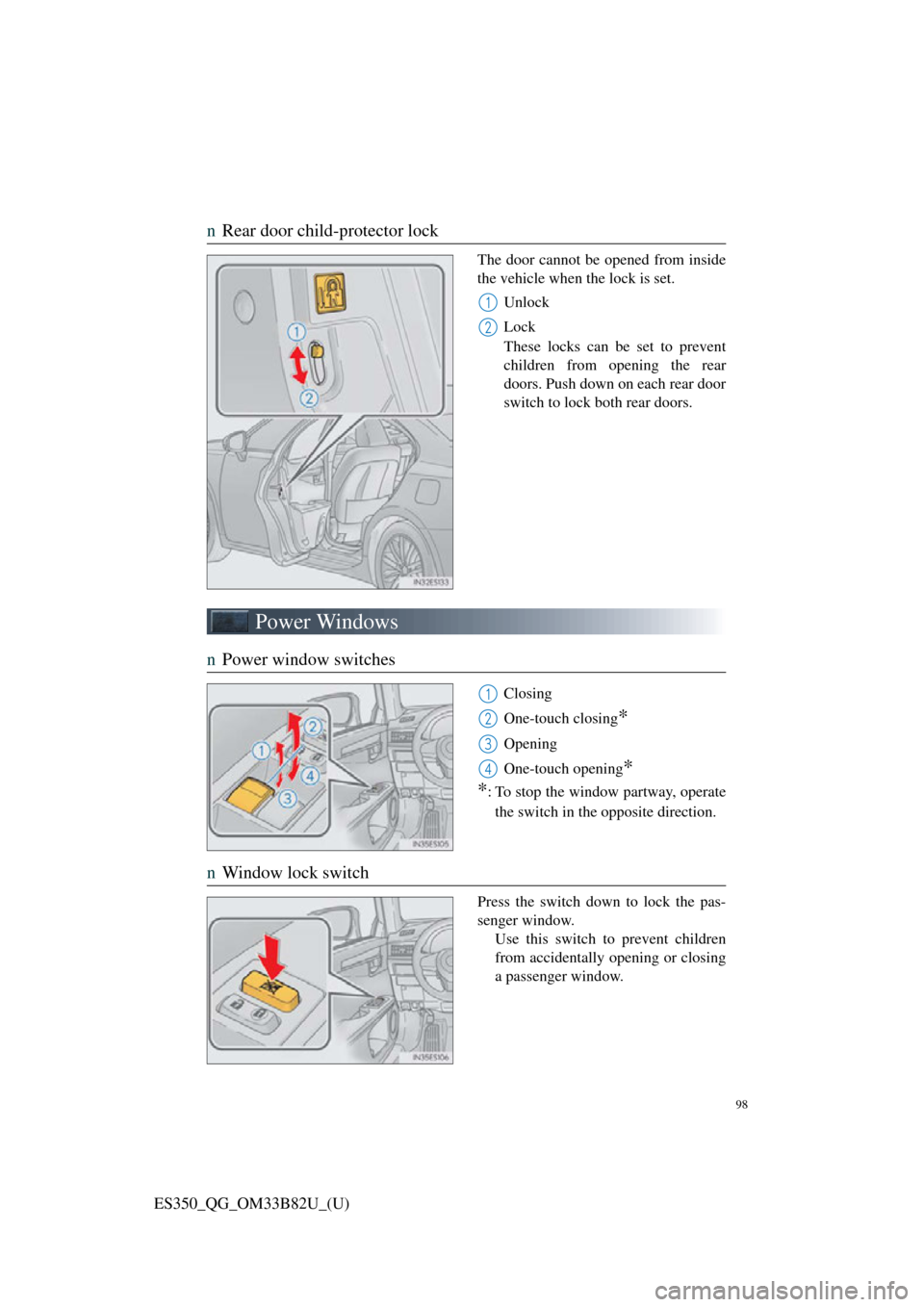
nRear door child-protector lock
The door cannot be opened from inside
the vehicle when the lock is set.
Unlock
Lock
These locks can be set to prevent
children from opening the rear
doors. Push down on each rear door
switch to lock both rear doors.
Power Windows
n Power window switches
Closing
One-touch closing
*
Opening
One-touch opening
*
*
: To stop the window partway, operate
the switch in the opposite direction.
n Window lock switch
Press the switch down to lock the pas-
senger window.
Use this switch to prevent children
from accidentally opening or closing
a passenger window.
1
2
1
2
3
4
Page 109 of 112
What to do if...
107
ES350_QG_OM33B82U_(U)
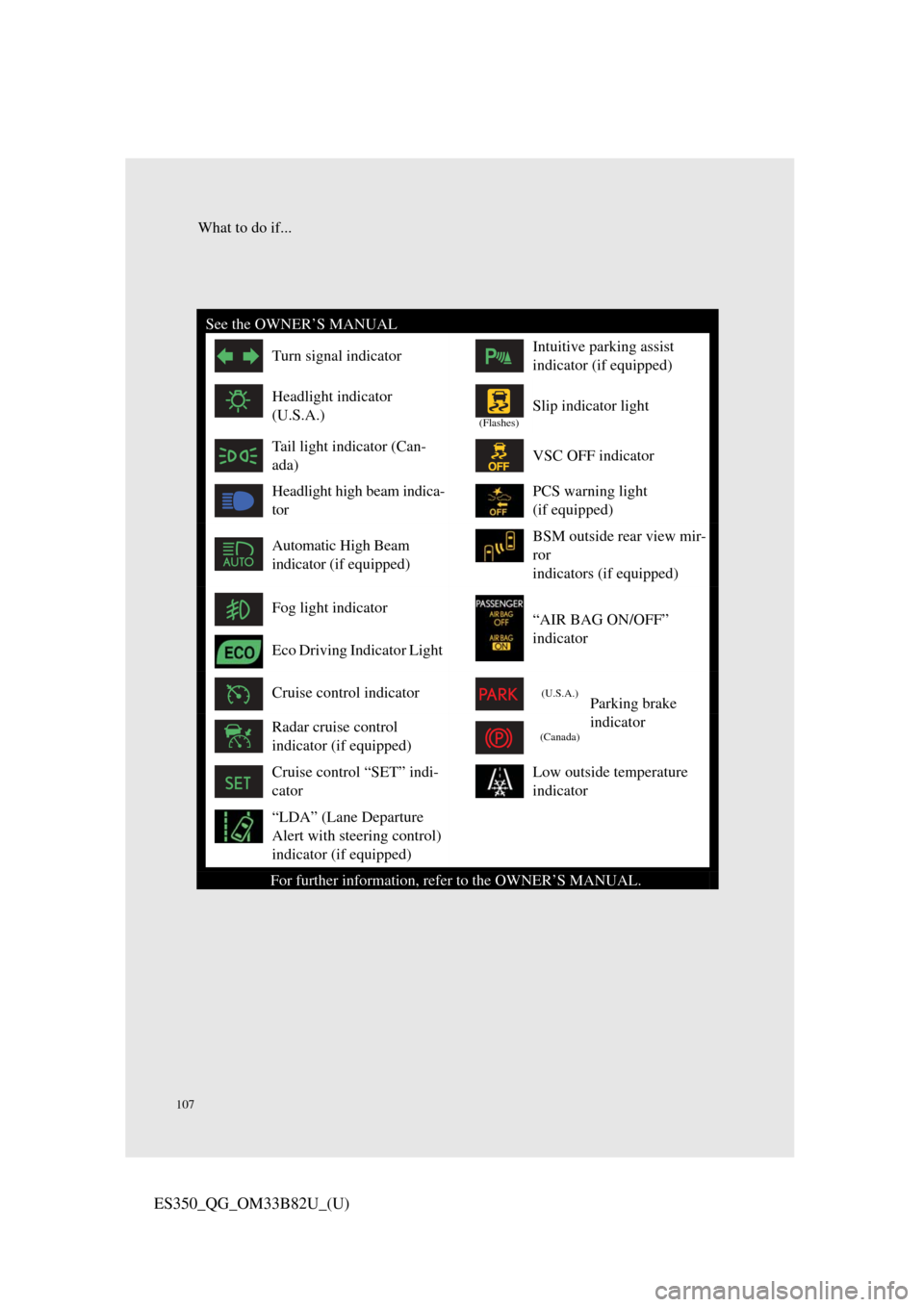
See the OWNER’S MANUAL
Turn signal indicatorIntuitive parking assist
indicator (if equipped)
Headlight indicator
(U.S.A.)
(Flashes)
Slip indicator light
Tail light indicator (Can-
ada)VSC OFF indicator
Headlight high beam indica-
torPCS warning light
(if equipped)
Automatic High Beam
indicator (if equipped)BSM outside rear view mir-
ror
indicators (if equipped)
Fog light indicator“AIR BAG ON/OFF”
indicator
Eco Driving Indicator Light
Cruise control indicator(U.S.A.)Parking brake
indicator
Radar cruise control
indicator (if equipped)(Canada)
Cruise control “SET” indi-
catorLow outside temperature
indicator
“LDA” (Lane Departure
Alert with steering control)
indicator (if equipped)
For further information, refer to the OWNER’S MANUAL.
Page 110 of 112

108
What to do if...
ES350_QG_OM33B82U_(U)
If the electronic key does not operate properly
nUnlocking and locking the doors
Use the mechanical key ( →P. 1 4 ) i n
order to perform the following opera-
tions:
Locks all the doors
Closes the windows and moon
roof
* (turn and hold)
Unlocks the door
Turning the key rearward unlocks
the driver’s door. Turning the key
once again within 5 seconds
unlocks the other doors.
Opens the windows and moon
roof
* (turn and hold)
*: This setting must be customized at your Lexus dealer.
n Unlocking the trunk
Turn the mechanical key clockwise to
open.
1
2
3
4
Page 111 of 112

What to do if...
109
ES350_QG_OM33B82U_(U)
nStarting the engine
Ensure that the shift lever is in P
and depress the brake pedal.
Touch the Lexus emblem side of
the electronic key to the engine
switch.
The engine switch will turn to
IGNITION ON mode.
When the smart access system with
push-button start is deactivated in
customization setting, the engine
switch will turn to ACCESSORY
mode.
Firmly depress the brake pedal and
check that is shown on the
multi-information display.
Press the engine switch.
In the event that the engine still cannot be started, contact your Lexus dealer.
If the engine doesn’t start
Make sure that the correct operati ng procedures have been followed.
Make sure that the brake pedal is firmly
depressed when attempting to start the
engine. (→P.22)
1
2
3
4
If the electronic key battery becomes de pleted, replace it with a new battery. For
instructions on replacing the battery, refer to the OWNER’S MANUAL. If you
need further assistance, contact your Lexus dealer.
Brake pedal
If the engine still does not start, see the OWNER’S MANUAL for more informa-
tion or contact your Lexus dealer.