turn Lexus ES350 2017 Quick Guide
[x] Cancel search | Manufacturer: LEXUS, Model Year: 2017, Model line: ES350, Model: Lexus ES350 2017Pages: 104, PDF Size: 3.83 MB
Page 6 of 104
5
ES350_QG_OM33C84U_(U)
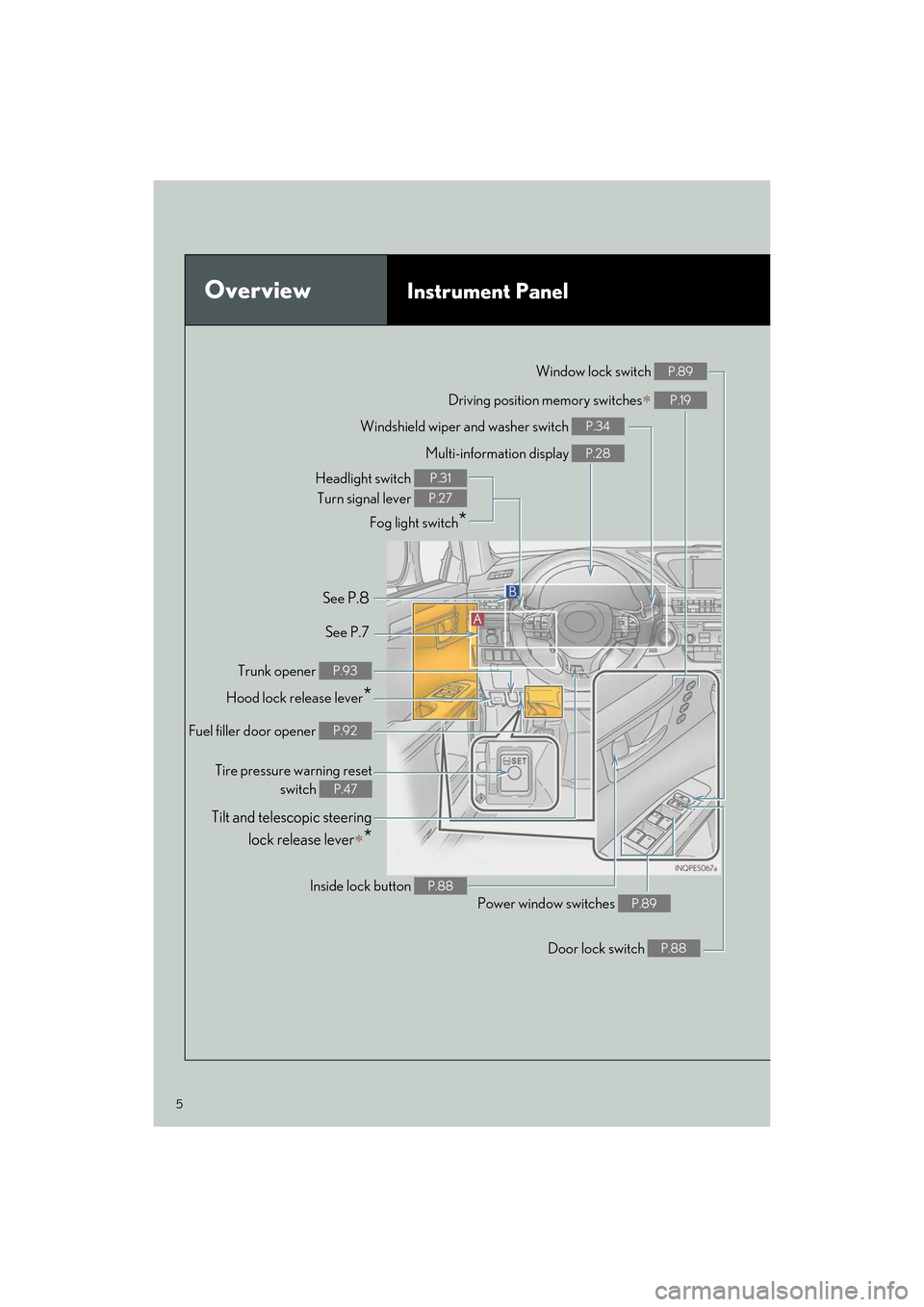
OverviewInstrument Panel
Windshield wiper and washer switch P.34
Multi-information display P.28
Headlight switch Turn signal lever
Fog light switch
*
P.31
P.27
Inside lock button P.88
Trunk opener P.93
Hood lock release lever*
Driving position memory switches∗ P.19
See P.8
See P.7 Window lock switch
P.89
Power window switches P.89
Door lock switch P.88
Tire pressure warning reset
switch
P.47
Fuel filler door opener P.92
Tilt and telescopic steering
lock release lever
∗*
Page 12 of 104

11
ES350_QG_OM33C84U_(U)
Floor mat installation
Insert the retaining hooks (clips) into
the floor mat eyelets.
Turn the upper knob of each retaining
hook (clip) to secure the floor mats in
place.
*:Always align the marks.
The shape of the retaining hooks (clips) may differ from that shown in the illustration.
Use only floor mats designed specifically for vehicles of the same model and model year
as your vehicle. Fix them securely in place onto the carpet.
1
*
2
Page 13 of 104
12
ES350_QG_OM33C84U_(U)
Fuel Consumption Screen
■Displaying the fuel consumption screen
● Trip information
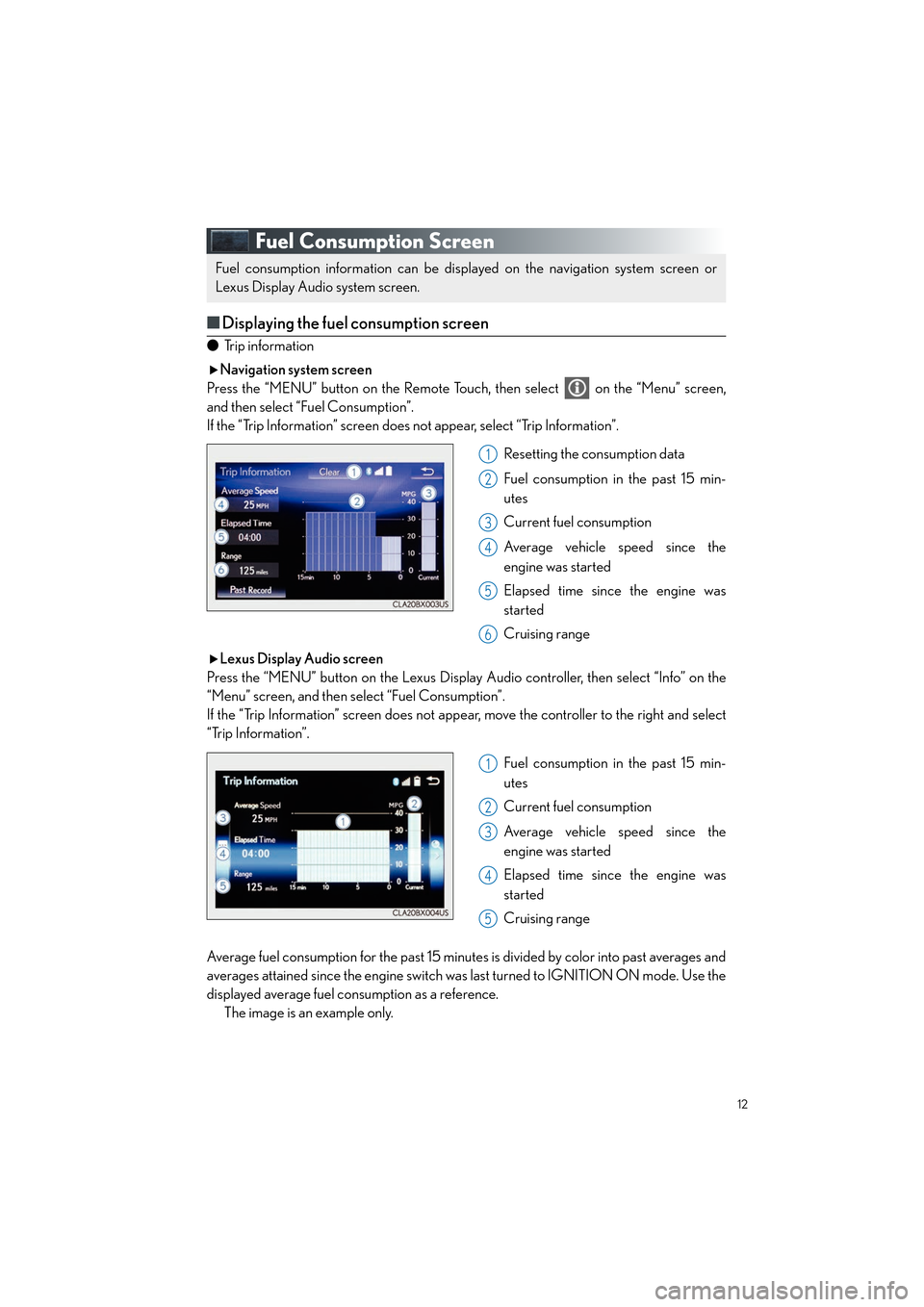
Navigation system screen
Press the “MENU” button on the Remote Touch, then select on the “Menu” screen,
and then select “Fuel Consumption”.
If the “Trip Information” screen does not appear, select “Trip Information”.
Resetting the consumption data
Fuel consumption in the past 15 min-
utes
Current fuel consumption
Average vehicle speed since the
engine was started
Elapsed time since the engine was
started
Cruising range
Lexus Display Audio screen
Press the “MENU” button on the Lexus Display Audio controller, then select “Info” on the
“Menu” screen, and then select “Fuel Consumption”.
If the “Trip Information” screen does not appear, move the controller to the right and select
“Trip Information”.
Fuel consumption in the past 15 min-
utes
Current fuel consumption
Average vehicle speed since the
engine was started
Elapsed time since the engine was
started
Cruising range
Average fuel consumption for the past 15 minutes is divided by color into past averages and
averages attained since the engine switch was last turned to IGNITION ON mode. Use the
displayed average fuel consumption as a reference. The image is an example only.
Fuel consumption information can be displayed on the navigation system screen or
Lexus Display Audio system screen.
1
2
3
4
5
6
1
2
3
4
5
Page 17 of 104
16
ES350_QG_OM33C84U_(U)
Theft Deterrent System
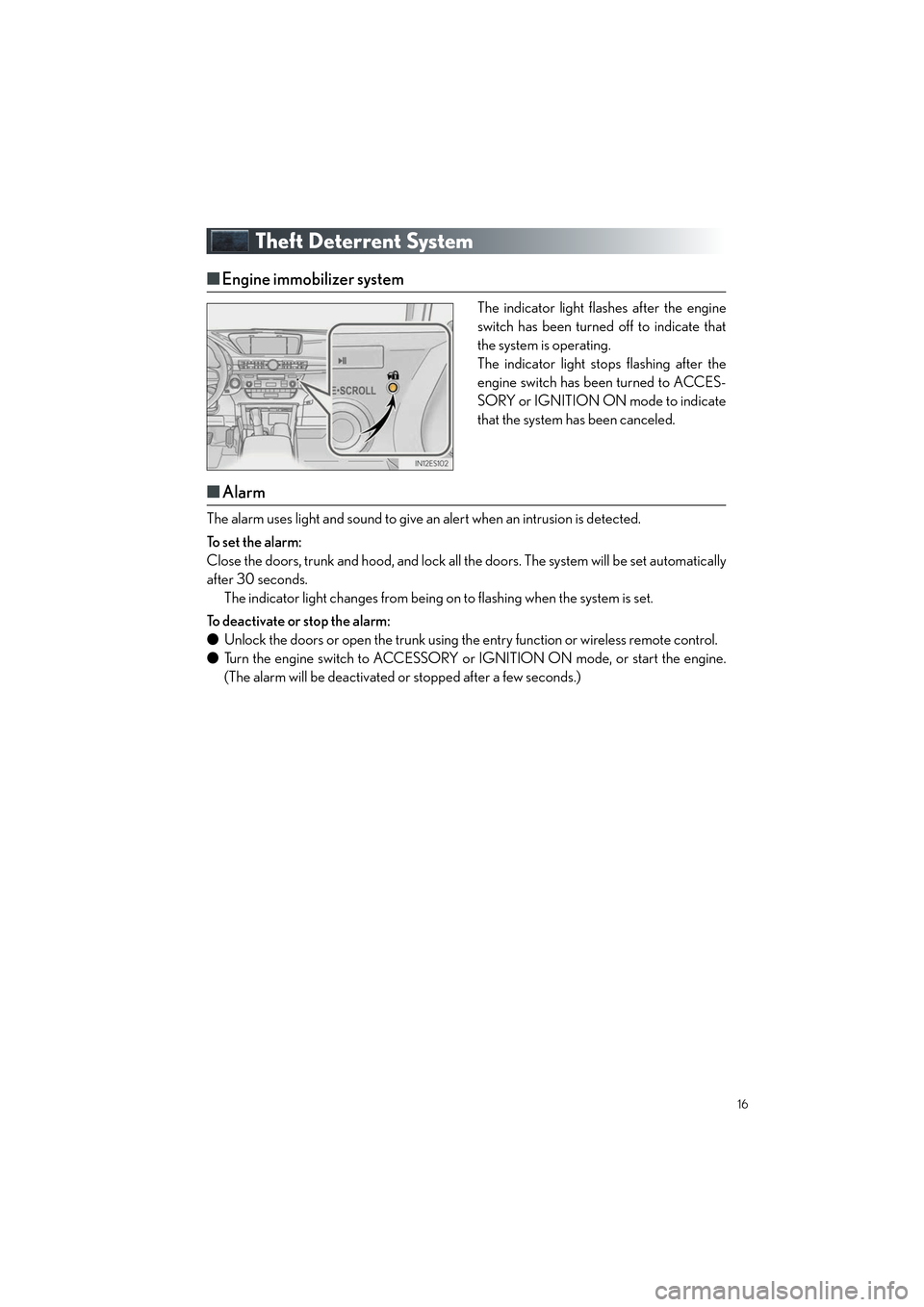
■Engine immobilizer system
The indicator light flashes after the engine
switch has been turned off to indicate that
the system is operating.
The indicator light stops flashing after the
engine switch has been turned to ACCES-
SORY or IGNITION ON mode to indicate
that the system has been canceled.
■Alarm
The alarm uses light and sound to give an alert when an intrusion is detected.
To set the alarm:
Close the doors, trunk and hood , and lock all the doors. The system will be set automatically
after 30 seconds. The indicator light changes from being on to flashing when the system is set.
To deactivate or stop the alarm:
● Unlock the doors or open the trunk using the entry function or wireless remote control.
● Turn the engine switch to ACCESSORY or IGNITION ON mode, or start the engine.
(The alarm will be deactivated or stopped after a few seconds.)
Page 19 of 104
18
ES350_QG_OM33C84U_(U)
Head Restraints
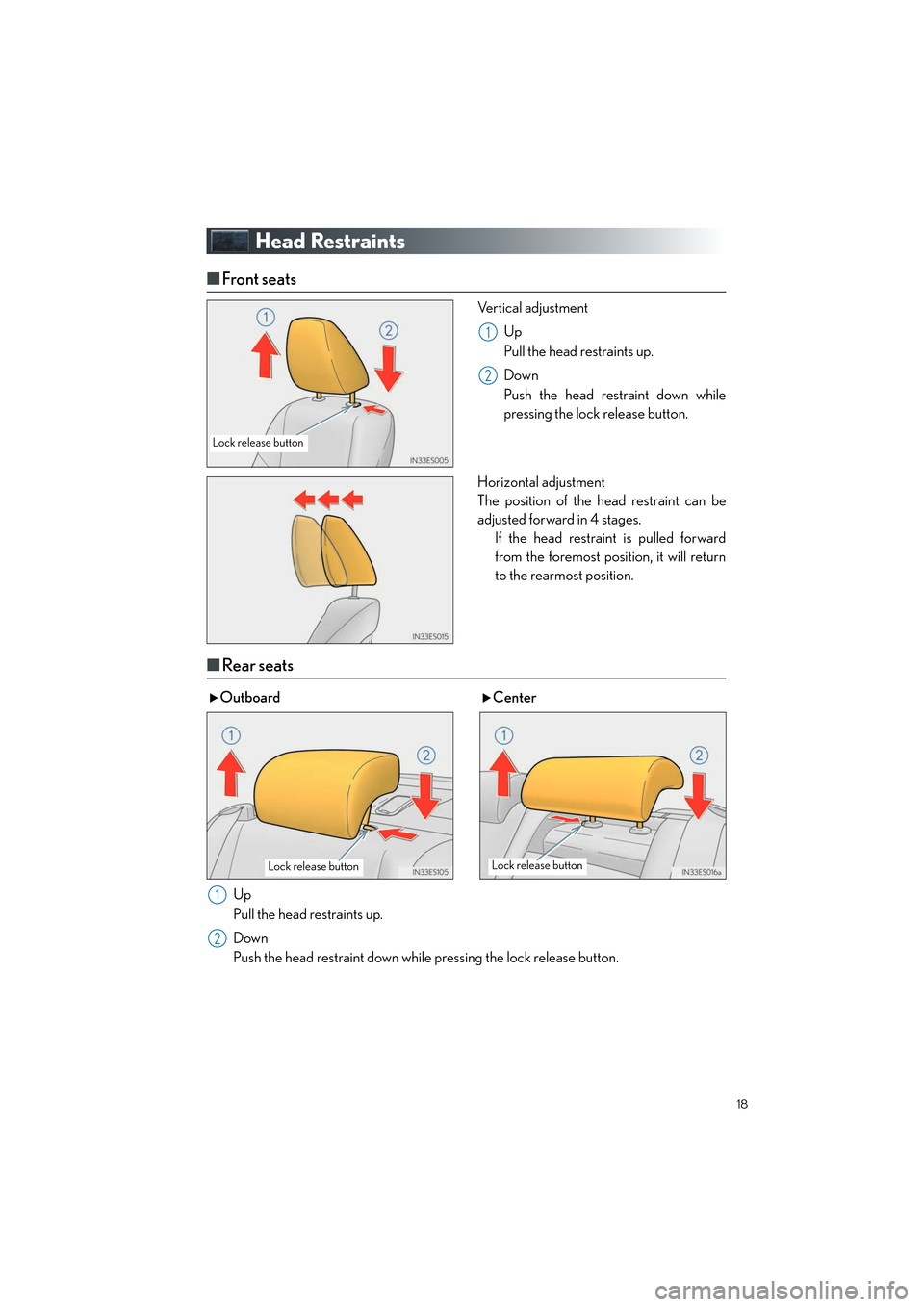
■Front seats
Vertical adjustment
Up
Pull the head restraints up.
Down
Push the head restraint down while
pressing the lock release button.
Horizontal adjustment
The position of the head restraint can be
adjusted forward in 4 stages. If the head restraint is pulled forward
from the foremost position, it will return
to the rearmost position.
■Rear seats
Lock release button
1
2
Outboard Center
Up
Pull the head restraints up.
Down
Push the head restraint down while pressing the lock release button.
Lock release buttonLock release button
1
2
Page 20 of 104
19
ES350_QG_OM33C84U_(U)
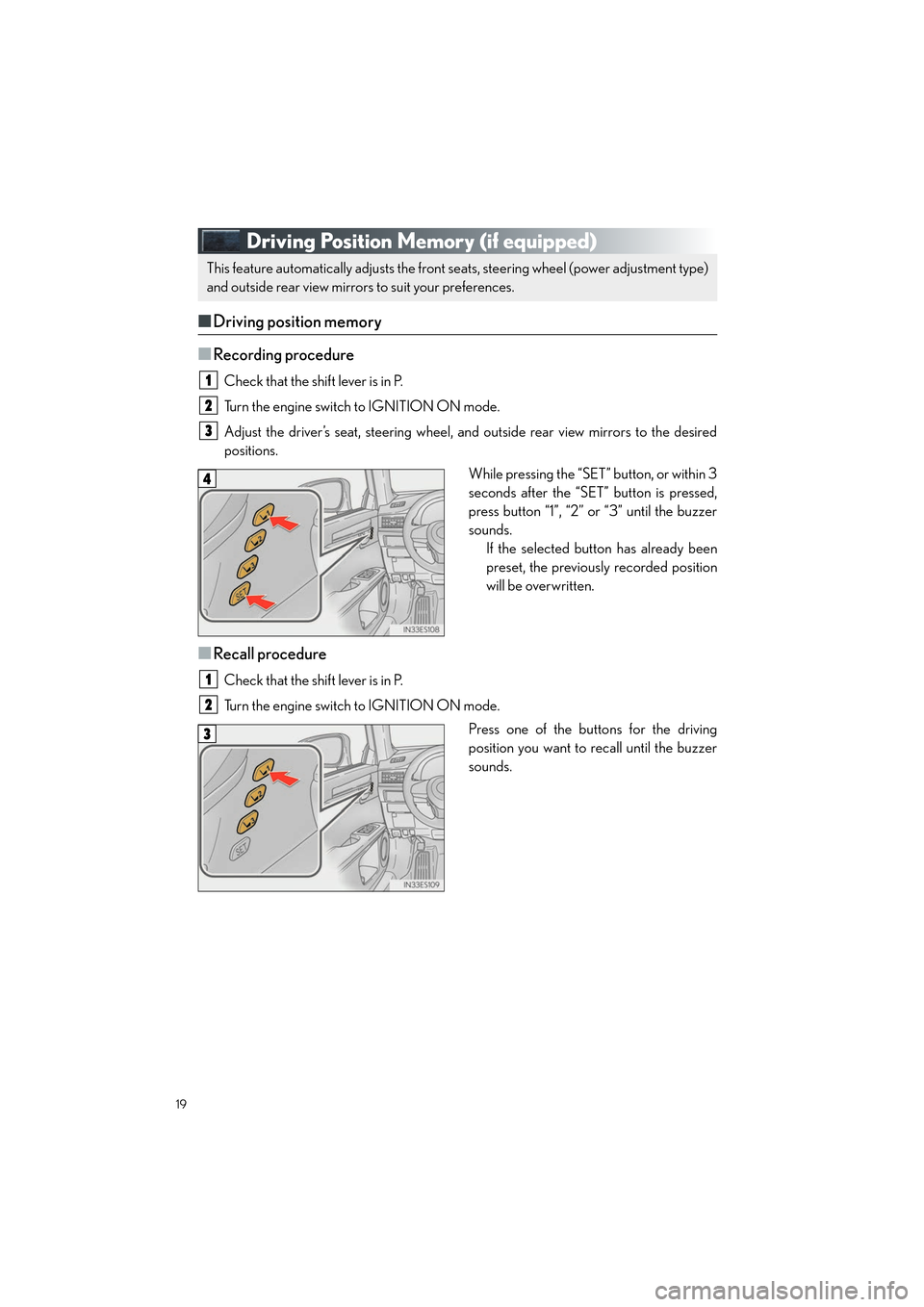
Driving Position Memory (if equipped)
■Driving position memory
■
Recording procedure
Check that the shift lever is in P.
Turn the engine switch to IGNITION ON mode.
Adjust the driver’s seat, steering wheel, and outside rear view mirrors to the desired
positions. While pressing the “SET” button, or within 3
seconds after the “SET” button is pressed,
press button “1”, “2” or “3” until the buzzer
sounds.If the selected button has already been
preset, the previously recorded position
will be overwritten.
■Recall procedure
Check that the shift lever is in P.
Turn the engine switch to IGNITION ON mode.
Press one of the buttons for the driving
position you want to recall until the buzzer
sounds.
This feature automatically adjusts the front se ats, steering wheel (power adjustment type)
and outside rear view mirrors to suit your preferences.
1
2
3
4
1
2
3
Page 21 of 104

20
ES350_QG_OM33C84U_(U)
■Memory recall function (driver’s side only)
Each electronic key can be registered to recall your preferred driving position.
■Registering procedure
Check that the shift lever is in P.
Turn the engine switch to IGNITION ON mode.
Recall the driving position that you want to record.
While pressing the recalled button, press
and hold the door lock switch (either lock
or unlock) until the buzzer sounds.If the button could not be registered, the
buzzer sounds continuously for approxi-
mately 3 seconds.1
2
3
4
Page 24 of 104

23
ES350_QG_OM33C84U_(U)
■Stopping the engine
Stop the vehicle.
Set the parking brake, and shift the shift lever to P.
Press the engine switch.
Release the brake pedal and check that “POWER ON” on the multi-information dis-
play is off.
■Changing engine switch modes
Modes can be changed by pressing the engine switch with the brake pedal released. (The
mode changes each time the switch is pressed.)
Off
*
The emergency flashers can be used.
ACCESSORY mode Some electrical components such as the
audio system can be used.
“POWER ON” will be displayed on the
multi-information display.
IGNITION ON mode All electrical components can be used.
“POWER ON” will be displayed on the
multi-information display.
*: If the shift lever is in a position other than
P when turning off the engine, the
engine switch will be turned to ACCES-
SORY mode, not to off.
1
2
3
4
Page 28 of 104

27
ES350_QG_OM33C84U_(U)
Tu r n S i g n a l L e v e r
Right turn
Lane change to the right (move the
lever partway and then release it)
The right hand signals will flash 3 times.
Lane change to the left (move the lever
partway and then release it)
The left hand signals will flash 3 times.
Left turn1
2
3
4
■Customization
The number of times the turn signals flash during a lane change can be changed.
Page 30 of 104

29
ES350_QG_OM33C84U_(U)
■Operating the meter control switches
The multi-information display is operated
using the meter control switches.
Select an item/change pages
Enter/Set
Return to the previous screen
Press:
Displays the screen registered to
When no screen has been registered,
the drive information screen will be dis-
played.
Press and hold:
Registers the currently displayed
screen to
The registration confirmation screen is
displayed. If the selected screen can-
not be registered, a registration failure
message will be shown.
1
2
3
4
If a problem is detected in any of the vehicle’s systems, a warning message is shown on the
multi-information display.