lights Lexus GS250 2014 Workshop Manual
[x] Cancel search | Manufacturer: LEXUS, Model Year: 2014, Model line: GS250, Model: Lexus GS250 2014Pages: 688, PDF Size: 152.64 MB
Page 312 of 688
3124-5. Using the driving support systems
GS350_250_OM_OM30E16E_(EE)
●When driving on a road surface that is wet due to rain, previous rainfall, standing
water, etc.
●When the vehicle experiences strong up-and-down motion such as when driving
on an extremely rough road or on a seam in the pavement
●When headlight brightness at nighttime is reduced due to dirt on the lenses, or
when the headlights are misaligned
●When driving with a strong crosswind
●When driving on winding roads or roads that are uneven
●When driving on rough or unpaved roads
■When changing the tires
Depending on the tires used, sufficient performance may not be maintainable.
■Warning messages for LKA
Warning messages are used to indicate a system malfunction or to inform the driver
of the need for caution while driving. (→P. 555, 563)
CAUTION
■Before using the LKA system
Do not rely solely on the LKA system. The LKA system does not drive the vehicle
automatically, nor does it reduce the amount of care you need to take. As such, the
driver must always assume full responsibility for understanding his/her surround-
ings, for operating the steering wheel to correct the driving line, and for driving
safely.
Inappropriate or negligent driving could lead to an accident.
■To avoid operating the LKA by mistake
Switch the LKA off using the “LKA” switch when not in use.
GS350_250_OM_OM30E16E_(EE).book Page 312 Tuesday, July 8, 201 4 7:11 PM
Page 313 of 688
3134-5. Using the driving support systems
4
Driving
GS350_250_OM_OM30E16E_(EE)
CAUTION
■Situations unsuitable for LKA
Do not use LKA in any of the following situations.
Otherwise, the system may not function correctly and could result in an accident.
●When driving with snow tires, tire chains, a spare tire, or similar equipment
●When the tires have been excessively worn, or when the tire inflation pressure is
low
●When there are objects or structures along the roadside that might be misinter-
preted as lane markers (such as guardrails, curb, reflector posts, etc.)
●When driving on snowy roads
●When pavement lane markers are difficult to see due to rain, snow, fog, sand, dirt,
etc.
●When there are visible lines on the pavement from road repairs, or if the remains
of old lane markers are still visible on the road
●When driving on slippery roads, such as those covered with rain, ice or snow
●When driving in a lane other than the driving or passing lanes on a freeway or
highway
●When driving on a road with lane closures due to maintenance, or when driving
in a temporary lane
●When towing a trailer
NOTICE
■To prevent damage to or incorrect operation of the LKA system
●Do not modify the headlights or attach stickers to the surface of the lights.
●Do not modify the suspension. If any suspension part needs to be replaced, con-
tact any authorized Lexus dealer or repairer, or another duly qualified and
equipped professional.
●Do not install or place anything on the hood or the grille. Also, do not install a
grille guard (bull bars, kangaroo bar etc.).
●Do not modify the sun visor. If any sun visor part needs to be replaced, contact
any authorized Lexus dealer or repairer, or another duly qualified and equipped
professional.
●If your windshield needs repairs, contact any authorized Lexus dealer or repairer,
or another duly qualified and equipped professional.
GS350_250_OM_OM30E16E_(EE).book Page 313 Tuesday, July 8, 201 4 7:11 PM
Page 321 of 688
3214-5. Using the driving support systems
4
Driving
GS350_250_OM_OM30E16E_(EE)
◆EPS (Electric Power Steering)
Employs an electric motor to reduce the amount of effort needed to
turn the steering wheel
◆AVS (Adaptive Variable Suspension system) (if equipped)
By independently controlling the damping force of the shock absorbers
for each of the 4 wheels according to the road and driving conditions,
this system helps riding comfort with superior steering stability, and
helps good vehicle posture
When SPORT S+ mode is selected by the driving mode select switch,
the damping force is suitable for sporty driving ( →P. 317)
◆VDIM (Vehicle Dynamics Integrated Management)
Provides integrated control of the ABS, brake assist, TRC, VSC, hill-
start assist control and EPS systems
Helps to maintain vehicle stability when swerving on slippery road sur-
faces by controlling the brakes, engine output, steering assist, and
steering ratio
◆PCS (Pre-Crash Safety system) (if equipped)
→ P. 3 3 0
◆Emergency brake signal
When the brakes are applied suddenly, the stop lights automatically
flash to alert the vehicle behind.
GS350_250_OM_OM30E16E_(EE).book Page 321 Tuesday, July 8, 201 4 7:11 PM
Page 328 of 688

3284-5. Using the driving support systems
GS350_250_OM_OM30E16E_(EE)
Hill-start assist control
To engage hill-start assist control,
further depress the brake pedal
when the vehicle is stopped com-
pletely.
A buzzer will sound once to indicate
the system is activated. The slip indica-
tor will also start flashing.
■Hill-start assist control operating conditions
●The system operates in the following situations:
• The shift lever is in a position other than P.
• The parking brake is not applied.
• The accelerator pedal is not depressed.
●Hill-start assist control cannot be operated while the slip indicator light is illumi-
nated.
■Hill-start assist control
●While hill-start assist control is operating, the brakes remain automatically applied
after the driver releases the brake pedal. The stop lights and the high mounted
stoplight turn on.
●Hill-start assist control operates for about 2 seconds after the brake pedal is
released.
●If the slip indicator does not flash and the buzzer does not sound when the brake
pedal is further depressed, slightly reduce the pressure on the brake pedal (do not
allow the vehicle to roll backward) and then firmly depress it again. If the system still
does not operate, check that the operating conditions explained above have been
met.
Assists with starting off and tempo rarily maintains braking power even
if the foot is removed from the brake pedal when starting off on an
incline or a slippery slope.
GS350_250_OM_OM30E16E_(EE).book Page 328 Tuesday, July 8, 201 4 7:11 PM
Page 355 of 688

3554-6. Driving tips
4
Driving
GS350_250_OM_OM30E16E_(EE)
Perform the following according to the driving conditions:
●Do not try to forcibly open a window or move a wiper that is frozen.
Pour warm water over the frozen area to melt the ice. Wipe away the
water immediately to prevent it from freezing.
●To ensure proper operation of the climate control system fan, remove
any snow that has accumulated on the air inlet vents in front of the wind-
shield.
●Check for and remove any excess ice or snow that may have accumu-
lated on the exterior lights, vehicle’s roof, chassis, around the tires or on
the brakes.
●Remove any snow or mud from the bottom of your shoes before getting
in the vehicle.
Accelerate the vehicle slowly, keep a safe distance between you and the
vehicle ahead, and drive at a reduced speed suitable to road conditions.
Park the vehicle and move the shift lever to P without setting the parking
brake. The parking brake may freeze up, preventing it from being
released. If necessary, block the wheels to prevent inadvertent sliding or
creeping.
Before driving the vehicle
When driving the vehicle
When parking the vehicle
GS350_250_OM_OM30E16E_(EE).book Page 355 Tuesday, July 8, 201 4 7:11 PM
Page 361 of 688
361
5Interior features
GS350_250_OM_OM30E16E_(EE)
5-1. Remote Touch screenRemote Touch/12.3-inch display...................... 362
5-2. Using the air conditioning system and defogger
Front automatic air conditioning system ...........371
Rear air conditioning system .......... 391
Rear window and outside rear view mirror defoggers ..........396
Windshield wiper de-icer ....... 397
5-3. Using the interior lights Interior lights list..........................399
• Interior light ........................... 400
• Personal lights....................... 400 5-4. Using the storage features
List of storage features ............ 402• Glove box ............................... 404
• Console box...........................405
• Cup holders ...........................406
• Auxiliary boxes .....................408
Trunk features ..............................409
5-5. Other interior features Sun visors and vanity mirrors ..............................412
Clock ................................................413
Ashtrays ...........................................414
Power outlets ................................ 415
Heated steering wheel .............. 417
Seat heaters/ seat ventilators .......................... 419
Armrest .......................................... 426
Rear sunshade/ rear door sunshades ...............427
Trunk storage extension ..........430
Coat hooks .................................... 431
Assist grips.................................... 432
Utility hook ................................... 433
Sec_05TOC.fm Page 361 Friday, July 11, 2014 7:00 PM
Page 399 of 688
399
5
5-3. Using the interior lights
Interior features
GS350_250_OM_OM30E16E_(EE)
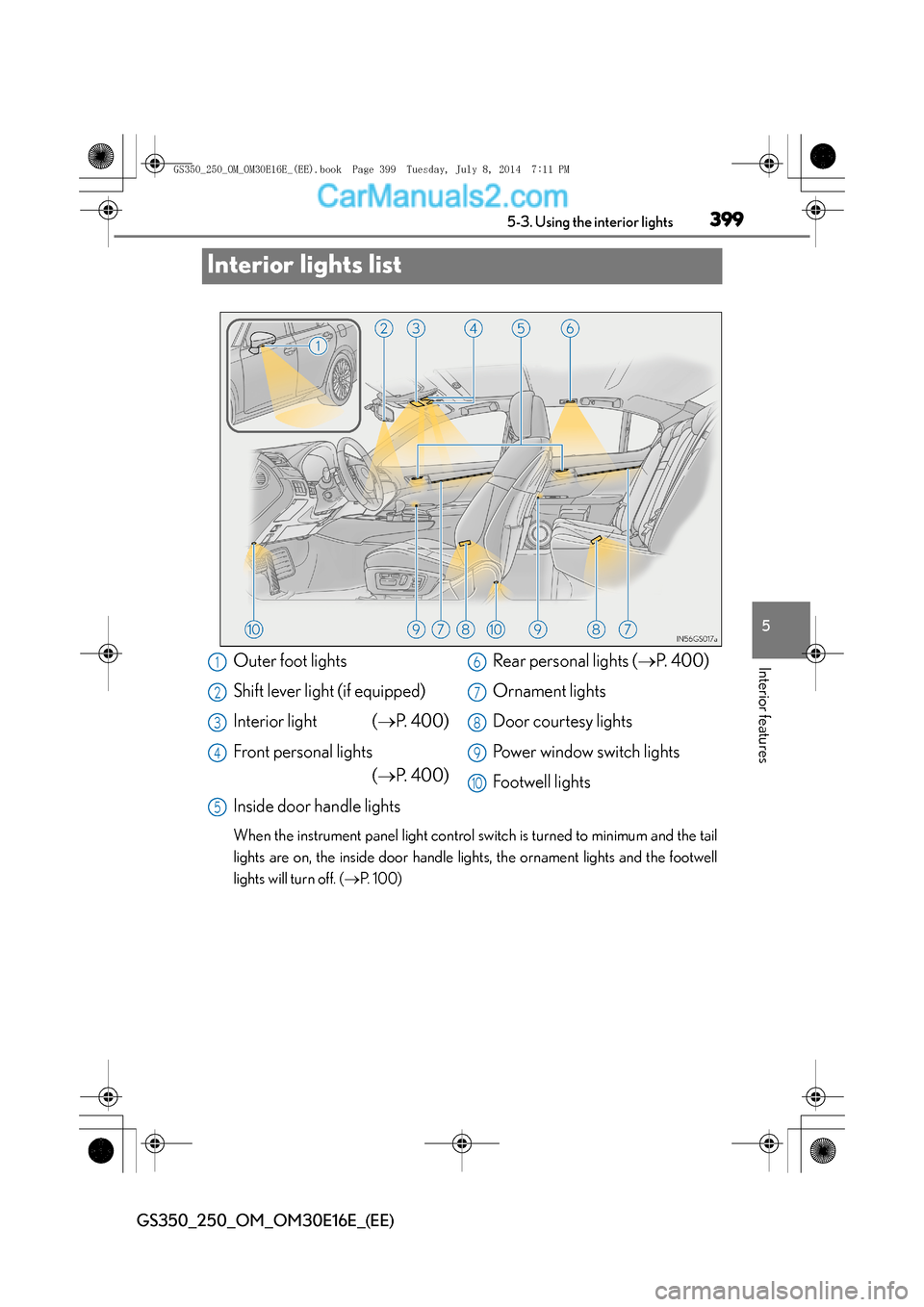
Interior lights list
When the instrument panel light control sw
itch is turned to minimum and the tail
lights are on, the inside door handle ligh ts, the ornament lights and the footwell
lights will turn off. ( →P. 100)
Outer foot lights
Shift lever light (if equipped)
Interior light ( →P. 4 0 0 )
Front personal lights (→ P. 4 0 0 )
Inside door handle lights Rear personal lights (
→P. 4 0 0 )
Ornament lights
Door courtesy lights
Power window switch lights
Footwell lights1
2
3
4
5
6
7
8
9
10
GS350_250_OM_OM30E16E_(EE).book Page 399 Tuesday, July 8, 201 4 7:11 PM
Page 400 of 688
4005-3. Using the interior lights
GS350_250_OM_OM30E16E_(EE)
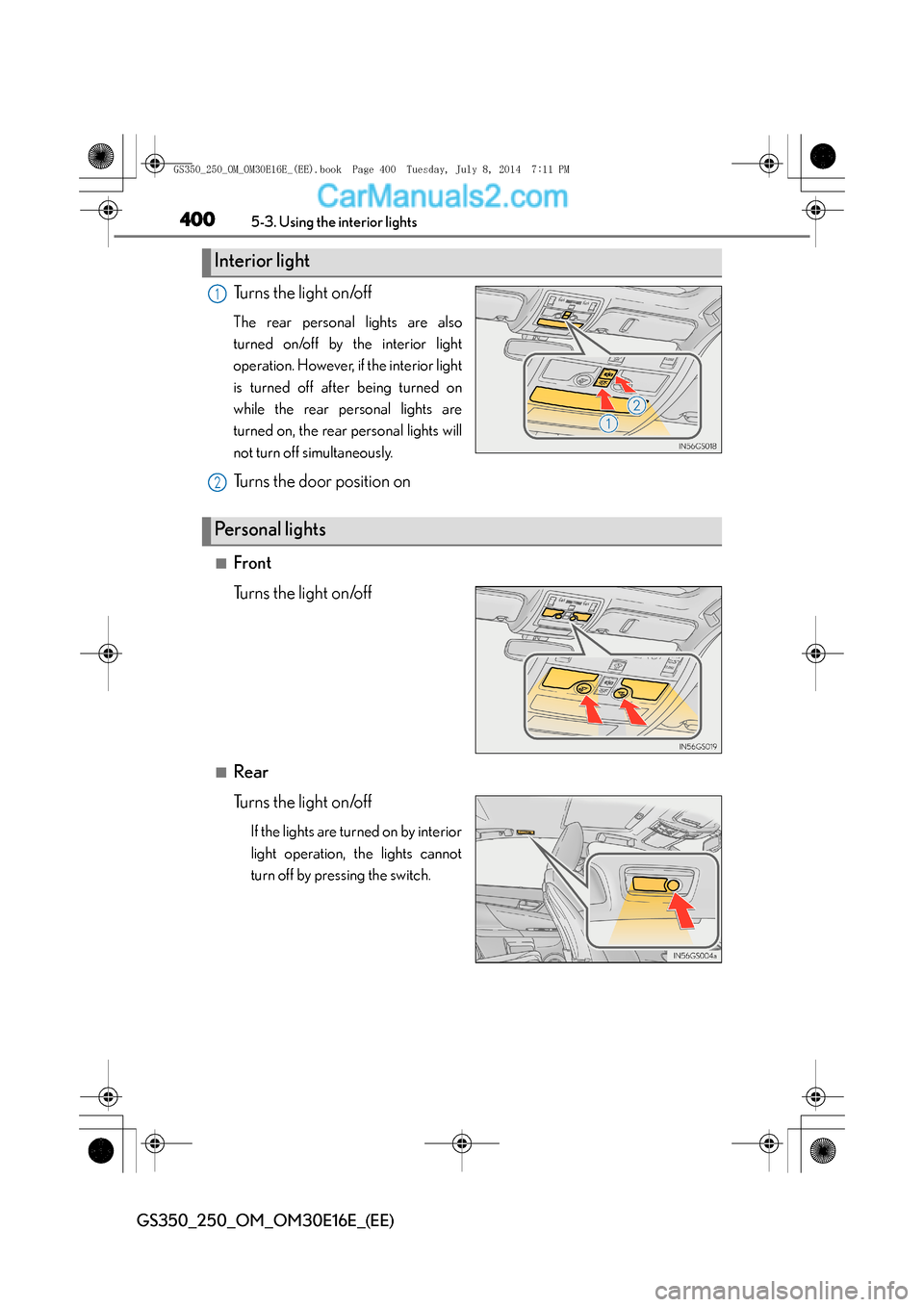
Turns the light on/off
The rear personal lights are also
turned on/off by the interior light
operation. However, if the interior light
is turned off after being turned on
while the rear personal lights are
turned on, the rear personal lights will
not turn off simultaneously.
Turns the door position on
■Front
Turns the light on/off
■Rear
Turns the light on/off
If the lights are turned on by interior
light operation, the lights cannot
turn off by pressing the switch.
Interior light
1
2
Pe rs o n a l l i g h t s
GS350_250_OM_OM30E16E_(EE).book Page 400 Tuesday, July 8, 2014 7:11 PM
Page 401 of 688
4015-3. Using the interior lights
5
Interior features
GS350_250_OM_OM30E16E_(EE)
■Illuminated entry system
The lights automatically turn on/off according to engine switch mode, the presence
of the electronic key, whether the doors are locked/unlocked, and whether the doors
are opened/closed.
■To prevent battery discharge
If the interior lights remain on when the engine switch is turned off, the lights will go
off automatically after 20 minutes.
■Customization
Setting (e.g. the time elapsed before lights turn off) can be changed.
(Customizable features: →P. 650)
NOTICE
■To prevent battery discharge
Do not leave the lights on longer than necessary when the engine is not running.
GS350_250_OM_OM30E16E_(EE).book Page 401 Tuesday, July 8, 201 4 7:11 PM
Page 404 of 688
4045-4. Using the storage features
GS350_250_OM_OM30E16E_(EE)
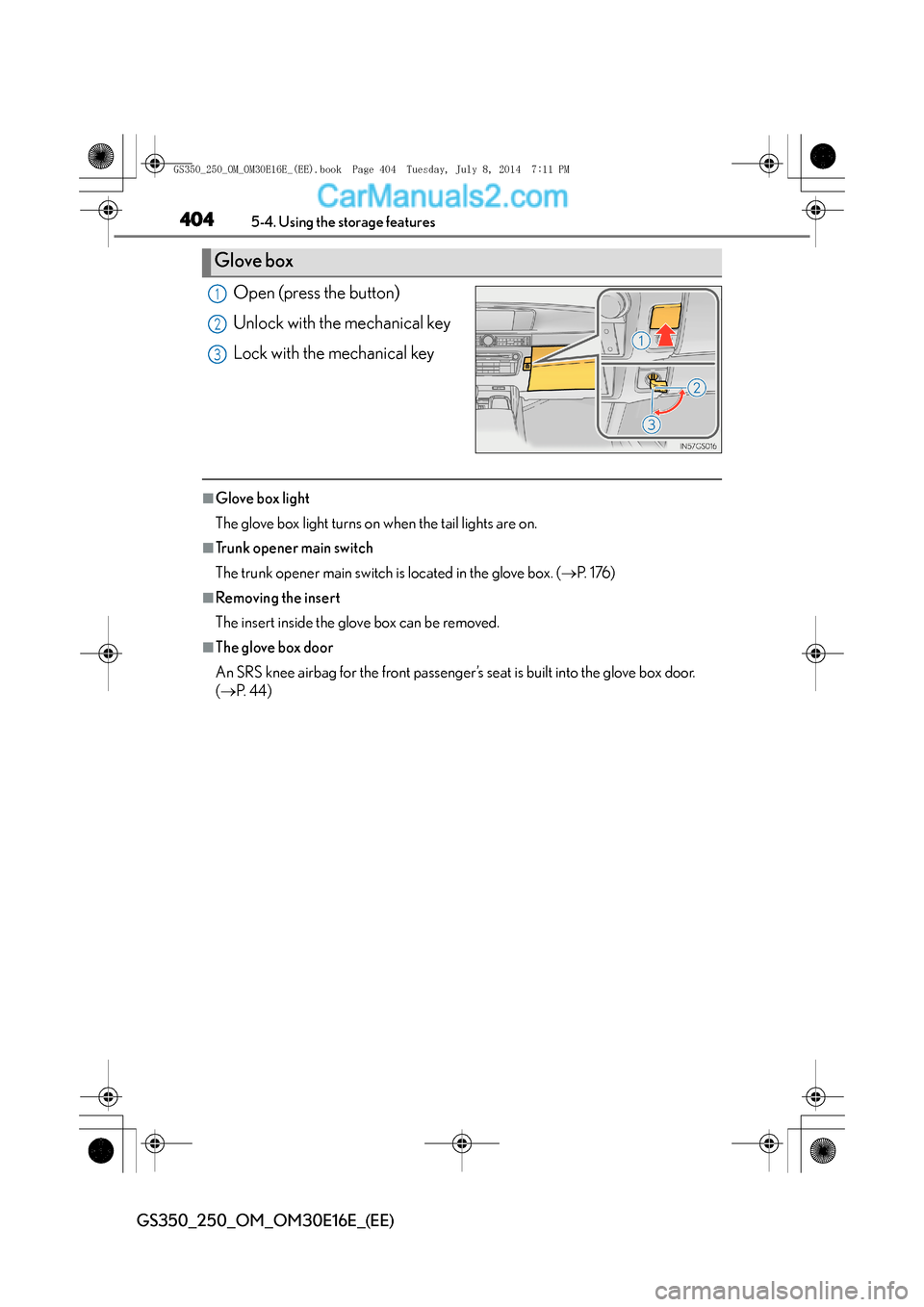
Open (press the button)
Unlock with the mechanical key
Lock with the mechanical key
■Glove box light
The glove box light turns on when the tail lights are on.
■Trunk opener main switch
The trunk opener main switch is located in the glove box. (→P. 1 76 )
■Removing the insert
The insert inside the glove box can be removed.
■The glove box door
An SRS knee airbag for the front passenger’s seat is built into the glove box door.
(→ P. 4 4 )
Glove box
1
2
3
GS350_250_OM_OM30E16E_(EE).book Page 404 Tuesday, July 8, 201 4 7:11 PM