settings Lexus GS300h 2016 Navigation manual
[x] Cancel search | Manufacturer: LEXUS, Model Year: 2016, Model line: GS300h, Model: Lexus GS300h 2016Pages: 383, PDF Size: 46.51 MB
Page 169 of 383
169
1. BASIC OPERATION
GS_Navi+MM_OM30F13E_(EE)
15.09.01 14:54
AUDIO/VISUAL SYSTEM
4
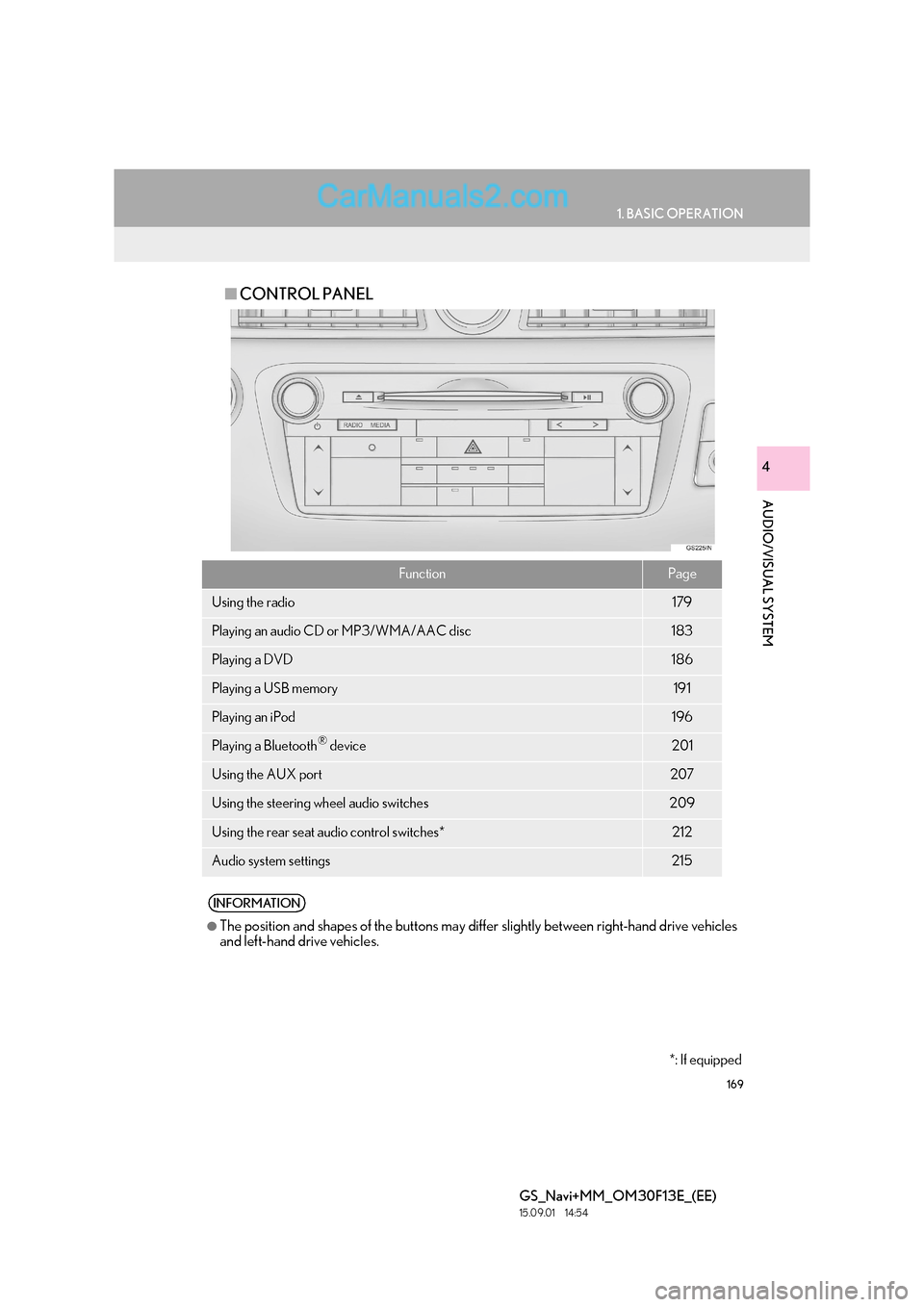
■CONTROL PANEL
FunctionPage
Using the radio179
Playing an audio CD or MP3/WMA/AAC disc183
Playing a DVD186
Playing a USB memory191
Playing an iPod196
Playing a Bluetooth® device201
Using the AUX port207
Using the steering wheel audio switches209
Using the rear seat audio control switches*212
Audio system settings215
INFORMATION
●
The position and shapes of the buttons may differ slightly between right-hand drive vehicles
and left-hand drive vehicles.
*: If equipped
Page 174 of 383
174
1. BASIC OPERATION
GS_Navi+MM_OM30F13E_(EE)
15.09.01 14:54
zWhen using an iPod video, a cable that has
a 4-pole AUX plug and a USB connector is
necessary. Connect the plug and connec-
tor to the AUX and USB ports.
1Display the audio control screen.
(→ P.168)
2Select “Sound” .
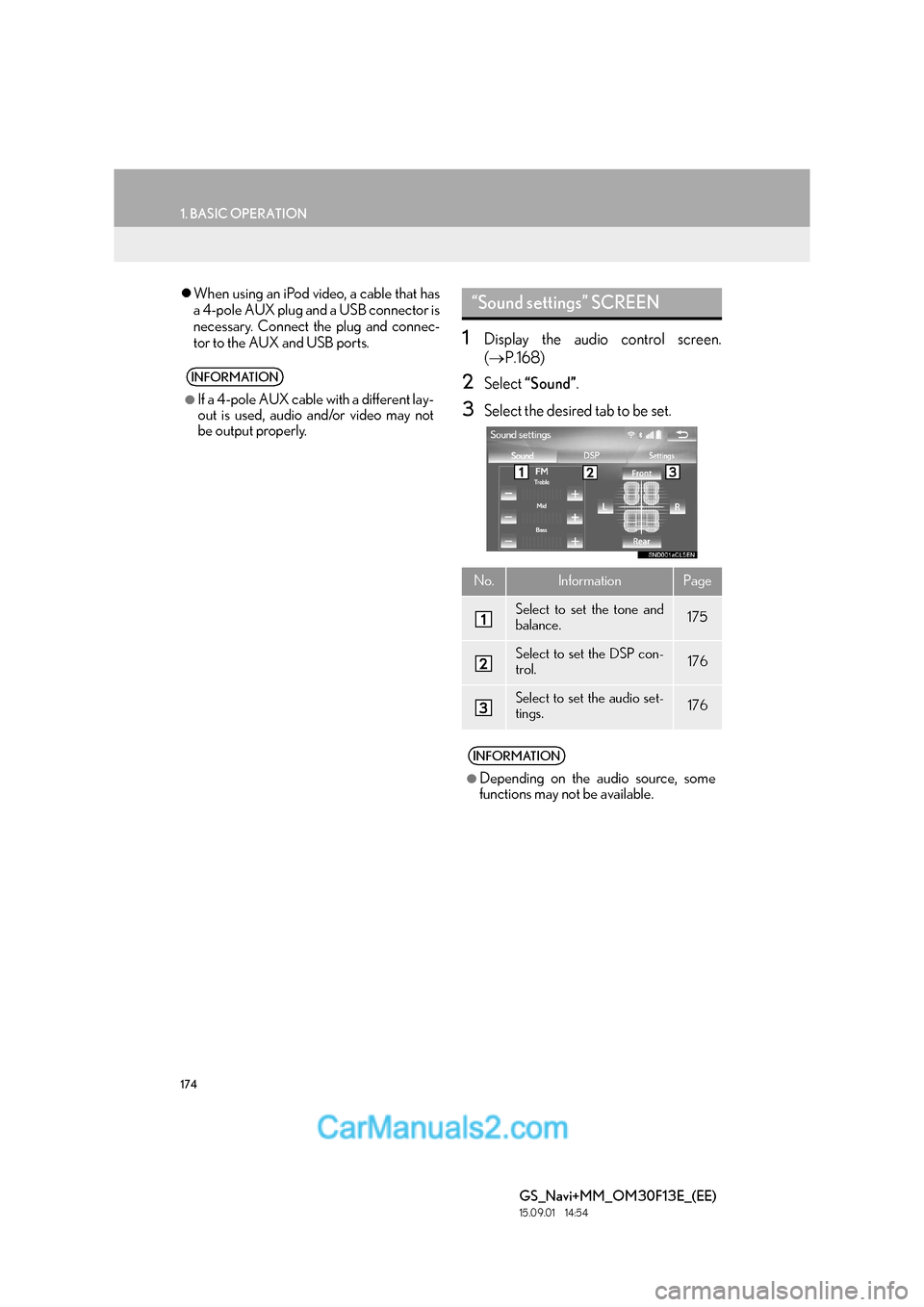
3Select the desired tab to be set.
INFORMATION
●
If a 4-pole AUX cable with a different lay-
out is used, audio and/or video may not
be output properly.
“Sound settings” SCREEN
No.InformationPage
Select to set the tone and
balance.175
Select to set the DSP con-
trol.176
Select to set the audio set-
tings.176
INFORMATION
●
Depending on the audio source, some
functions may not be available.
Page 176 of 383

176
1. BASIC OPERATION
GS_Navi+MM_OM30F13E_(EE)
15.09.01 14:54
1Select the “DSP” tab and select the de-
sired item to be set.1Select the “Settings” tab and select the
desired item to be set.
DSP CONTROL
No.Function
The system adjusts to the optimum
volume and tone quality according
to vehicle speed to compensate for
increased vehicle noise.
This function can create a feeling of
presence.
AUDIO SETTINGS
FunctionPage
FM radio settings216
DAB settings216
Cover art settings217
Gracenote settings217
DVD settings218
Screen size settings177
Display settings177
Video sound input settings217
Video signal settings217
Page 177 of 383
177
1. BASIC OPERATION
GS_Navi+MM_OM30F13E_(EE)
15.09.01 14:54
AUDIO/VISUAL SYSTEM
4
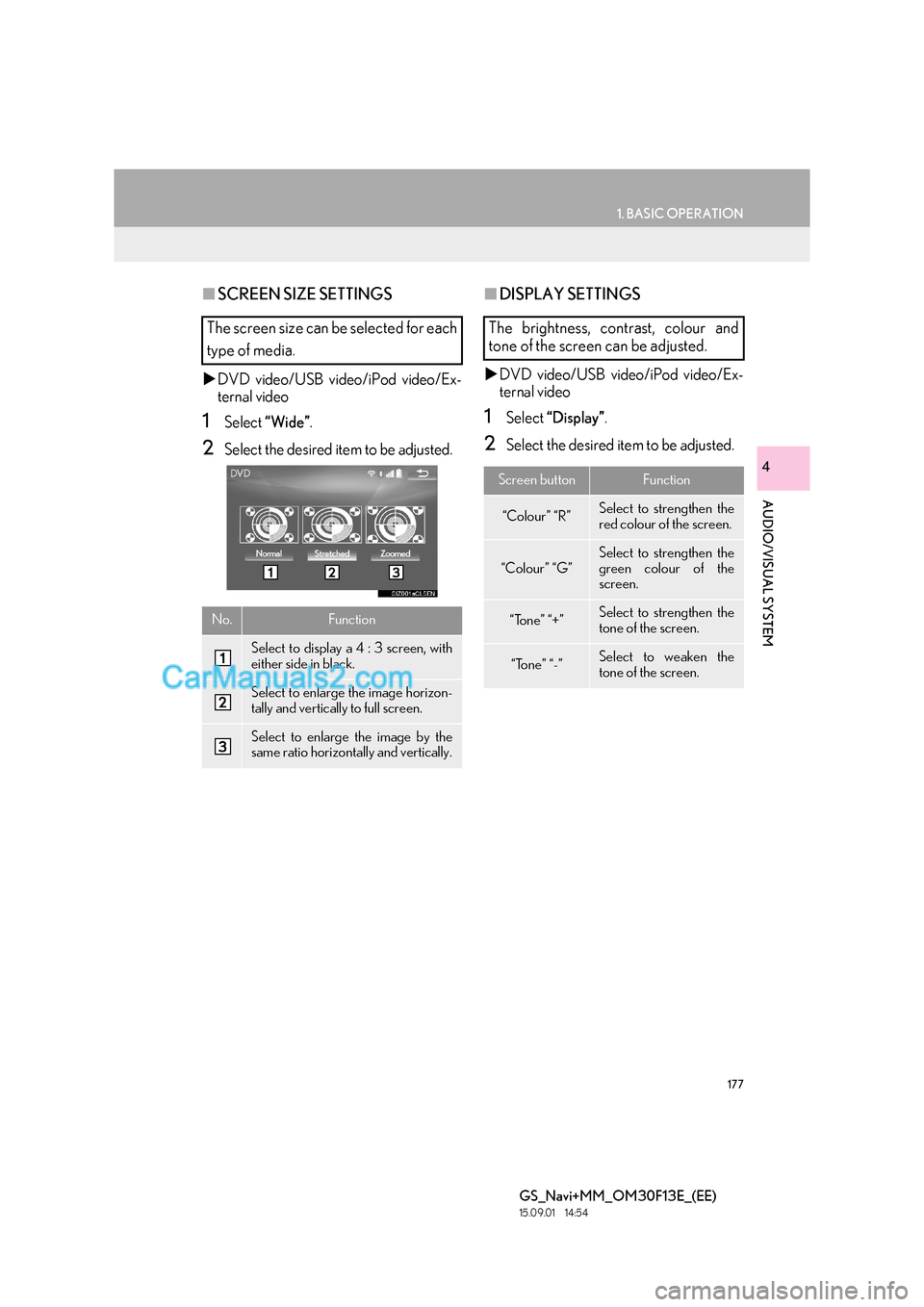
■SCREEN SIZE SETTINGS
X DVD video/USB video/iPod video/Ex-
ternal video
1Select “Wide” .
2Select the desired item to be adjusted.
■DISPLAY SETTINGS
X DVD video/USB video/iPod video/Ex-
ternal video
1Select “Display” .
2Select the desired item to be adjusted.
The screen size can be selected for each
type of media.
No.Function
Select to display a 4 : 3 screen, with
either side in black.
Select to enlarge the image horizon-
tally and vertically to full screen.
Select to enlarge the image by the
same ratio horizontally and vertically.
The brightness, contrast, colour and
tone of the screen can be adjusted.
Screen buttonFunction
“Colour” “R”Select to strengthen the
red colour of the screen.
“Colour” “G”
Select to strengthen the
green colour of the
screen.
“Tone” “+”Select to strengthen the
tone of the screen.
“Tone” “-”Select to weaken the
tone of the screen.
Page 215 of 383

215
GS_Navi+MM_OM30F13E_(EE)
15.09.01 14:54
AUDIO/VISUAL SYSTEM
4
5. SETUP
1. AUDIO SETTINGS
1Press the “MENU” button on the
Remote Touch.
2Select “Setup” .
3Select “A u d i o ” .
4Select the desired item to be set.
Detailed audio settings can be pro-
grammed.
AUDIO SETTINGS SCREEN
No.FunctionPage
Select to set detailed sound
settings.174
Select to set detailed FM
radio settings.216
Select to set detailed DAB
settings. 216
Select to set the iPod audio
signal input settings.217
Select to set the video sig-
nal format settings.217
Select to set detailed cover
art settings.217
*Select to set detailed DVD
settings.218
*: Only in DVD video mode
Page 216 of 383

216
5. SETUP
GS_Navi+MM_OM30F13E_(EE)
15.09.01 14:54
1Display the audio setting screen.
(→ P.215)
2Select “FM radio settings” .
3Select the desired button to be set.
1Display the audio setting screen.
(→ P.215)
2Select “DAB settings” .
3Select the desired button to be set.
FM RADIO SETTINGS
No.Function
Select “Broadcaster” or “A l p h a b e t i -
cal” to set the listing order of the sta-
tion list.
The tuner will automatically seek a
station that regularly broadcasts
traffic information and the station
broadcasts when the traffic informa-
tion program starts.
A station providing good reception
is automatically selected if current
reception worsens.
Select to switch to a broadcasting
station within the same local pro-
gram network.
Select on/off to set the FM Radio
text feature.
DAB SETTINGS
No.Function
Select on/off to set L-band in the
tune range. When “Off” is selected,
the physical channel range for tuning
operations is limited to Band III, ex-
cluding for preset operations. When
“On” is selected, the physical chan-
nel range for tuning operations in-
cludes Band III and L-band.
The tuner will automatically seek a
station that regularly broadcasts
traffic information and the station
broadcasts when the traffic informa-
tion program starts.
A station providing good reception
is automatically selected if current
reception worsens.
Select on/off to set the DAB text fea-
ture.
Page 217 of 383

217
5. SETUP
GS_Navi+MM_OM30F13E_(EE)
15.09.01 14:54
AUDIO/VISUAL SYSTEM
4
1Display the audio setting screen.
(→ P.215)
2Select “iPod settings” .
3Select “Video sound input” .
4Select a screen button for the desired
setting.
1Display the audio setting screen.
(→ P.215)
2Select “External video settings” .
3Select “Video Signal Switch” .
4Select a screen button for the desired
setting.
1Display the audio setting screen.
(→ P.215)
2Select “Cover art settings” .
3Select the desired button to be set.
iPod SETTINGS
EXTERNAL VIDEO SETTINGS
COVER ART SETTINGS
No.Function
Select on/off to set the cover art dis-
play.
Select on/off to set the priority of the
Gracenote database.
INFORMATION
●
Images from the Gracenote database
displayed on the screen may be different
from the actual cover art.
Page 218 of 383

218
5. SETUP
GS_Navi+MM_OM30F13E_(EE)
15.09.01 14:54
1Display the audio setting screen.
(→ P.215)
2Select “DVD settings” .
3Select the items to be set.
DVD SETTINGSNo.FunctionPage
Select to change the audio
language.219
Select to change the subti-
tle language.219
Select to change the lan-
guage of the DVD video
menu.
219
Select to set the angle mark
on/off.
Select to set the parental
lock.219
Select to set the auto start
playback on/off.
Discs that are inserted
while the vehicle is in mo-
tion will automatically start
playing. Certain discs may
not play.
Select to set a dynamic
range.219
Select to initialize all menus.
Page 226 of 383

226
6. TIPS FOR OPERATING THE AUDIO/VISUAL SYSTEM
GS_Navi+MM_OM30F13E_(EE)
15.09.01 14:54
zCD-R/CD-RW discs that have not been
subject to the “finaliz ing process” (a pro-
cess that allows discs to be played on a
conventional CD player) cannot be played.
z It may not be possible to play CD-R/CD-
RW discs recorded on a music CD
recorder or a personal computer because
of disc characteristics, scratches or dirt on
the disc, or dirt, condensation, etc. on the
lens of the unit.
z It may not be possible to play discs
recorded on a personal computer depend-
ing on the application settings and the envi-
ronment. Record with the correct format.
(For details, contact the appropriate appli-
cation manufacturers of the applications.)
z CD-R/CD-RW discs may be damaged by
direct exposure to sunlight, high tempera-
tures or other storage conditions. The unit
may be unable to play some damaged
discs.
z If you insert a CD-RW disc into the player,
playback will begin more slowly than with a
conventional CD or CD-R disc.
z Recordings on CD-R/CD-RW cannot be
played using the DDCD (Double Density
CD) system.
Region codes : Some DVD video discs have
the following region code indicating which
countries the DVD video disc can be played
in on this DVD player. If you attempt to play
an inappropriate DVD video disc on this
player, error message appears on the
screen. Even if the DVD video disc does not
have a region code, there are cases when it
cannot be used.
CD-R/RW AND DVD-R/RW
DISCSDVD VIDEO DISCS
This DVD player conforms to NTSC/
PAL colour TV formats. DVD video
discs conforming to another format such
as SECAM cannot be used.
CodeCountry
ALLAll countries
5Eastern Europe, Russia
Page 241 of 383
241
1. SPEECH COMMAND SYSTEM OPERATION
SPEECH COMMAND SYSTEM
GS_Navi+MM_OM30F13E_(EE)
15.09.01 14:54
5
1Press the talk switch.
2Say “Go home” or select “Go home” .
zA confirmation screen will be displayed
showing the recognition results.
3Say “Yes” or select “Yes”.
zThe system starts se arching for a route to
your home.
z When the speech command is recognized,
the map of the area around the home
address will be displayed and route guid-
ance to the home address will begin.
INFORMATION
●
If the system does not respond or the
confirmation screen does not disappear,
press the talk switch and try again.
●If a speech command cannot be recog-
nized, voice guidance will say “Pardon?”
and speech command reception will
restart.
●If a speech command cannot be recog-
nized 2 consecutive times, the speech
command guidance system will say “To
restart voice recognition, push the talk
switch.”. Then voice recognition will be
suspended.
●The voice recognition prompt can be set
to on or off when “Voice recognition
prompts” is selected. This setting can also
be changed on the “Voice settings”
screen. ( →P.77)
●Voice guidance can be canceled by set-
ting voice prompts to off. Use this setting
when it is desirable to say a command
immediately after pressing the talk switch
and hearing a beep.
●With 12.3-inch display: The side display
cannot be operated during voice recog-
nition.
SPEECH COMMAND
EXAMPLE: SEARCHING FOR
A ROUTE TO YOUR HOME
zIf a home address is not registered, voice
guidance will say “Your home is not set.”.
Please try again after setting a home
location. ( →P.1 3 2 )