settings Lexus GS300h 2016 Navigation manual
[x] Cancel search | Manufacturer: LEXUS, Model Year: 2016, Model line: GS300h, Model: Lexus GS300h 2016Pages: 383, PDF Size: 46.51 MB
Page 59 of 383
59
2. NETWORK SETTINGS
BASIC FUNCTION
GS_Navi+MM_OM30F13E_(EE)
15.09.01 14:54
21Select “Bluetooth* power” .
When “Bluetooth* power” is on :
The Bluetooth
® device is automatically
connected when the engine
is in ACCESSORY or IGNITION ON
When “Bluetooth* power” is off :
The Bluetooth
® device is disconnected,
and the system will not connect to it next
time.
*: The Bluetooth
® word mark and logos are
registered trademarks owned by
Bluetooth SIG, Inc.
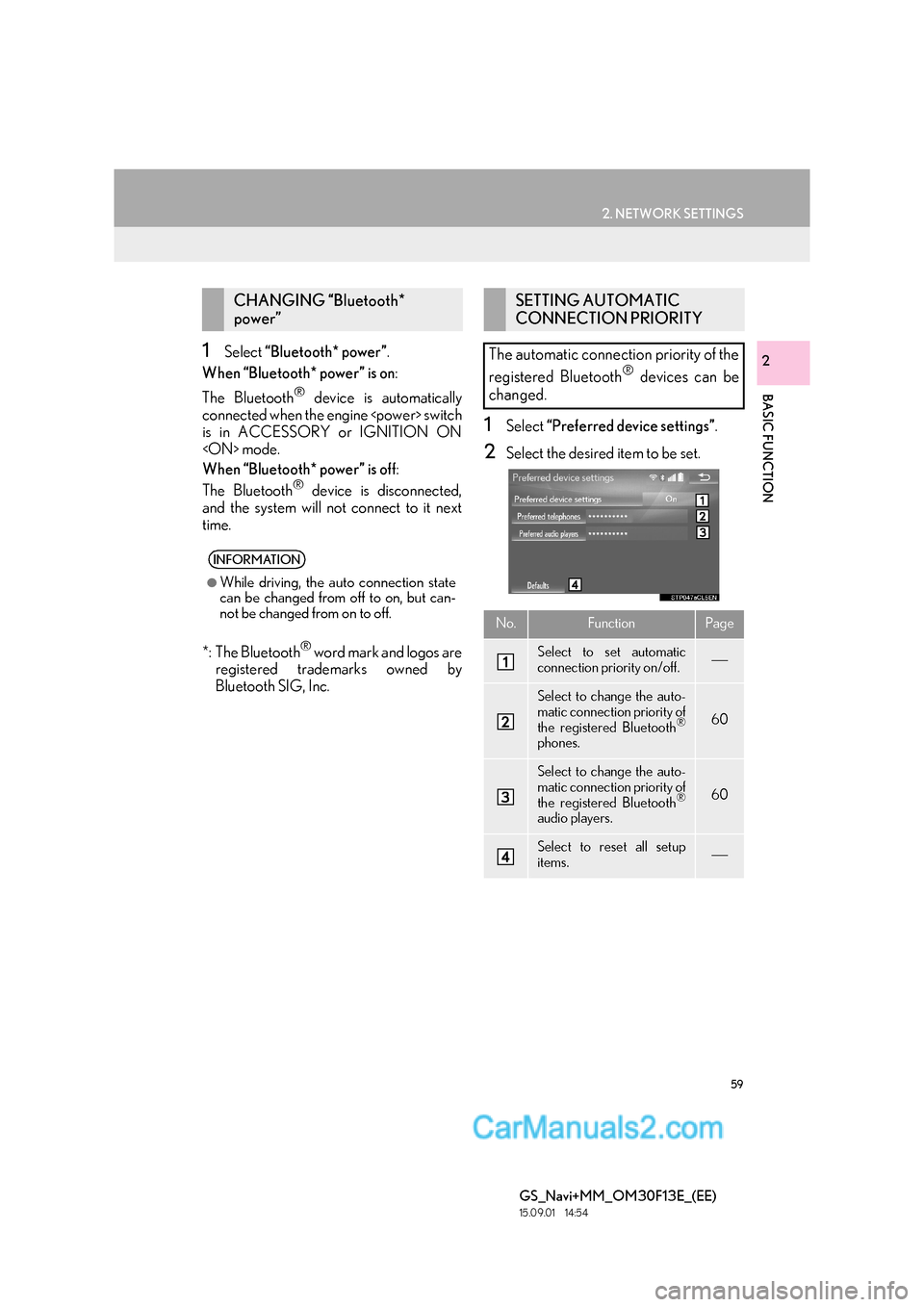
1Select “Preferred device settings” .
2Select the desired item to be set.
CHANGING “Bluetooth*
power”
INFORMATION
●
While driving, the auto connection state
can be changed from off to on, but can-
not be changed from on to off.
SETTING AUTOMATIC
CONNECTION PRIORITY
The automatic connection priority of the
registered Bluetooth
® devices can be
changed.
No.FunctionPage
Select to set automatic
connection priority on/off.
Select to change the auto-
matic connection priority of
the registered Bluetooth
®
phones.
60
Select to change the auto-
matic connection priority of
the registered Bluetooth
®
audio players.
60
Select to reset all setup
items.
Page 60 of 383

60
2. NETWORK SETTINGS
GS_Navi+MM_OM30F13E_(EE)
15.09.01 14:54
■CHANGING TELEPHONE AUTO-
MATIC CONNECTION PRIORITY
1Select “Preferred telephones” .
2Select the desired Bluetooth® device
and select “UP” or “DOWN” to change
the preferred order.
■ CHANGING AUDIO PLAYER AU-
TOMATIC CONNECTION PRIOR-
ITY
1Select “Preferred audio players” .
2Select the desired Bluetooth® device
and select “UP” or “DOWN” to change
the preferred order.
INFORMATION
●
A newly registered Bluetooth® device
will automatically be given the highest
automatic connection priority.
Page 61 of 383
61
2. NETWORK SETTINGS
BASIC FUNCTION
GS_Navi+MM_OM30F13E_(EE)
15.09.01 14:54
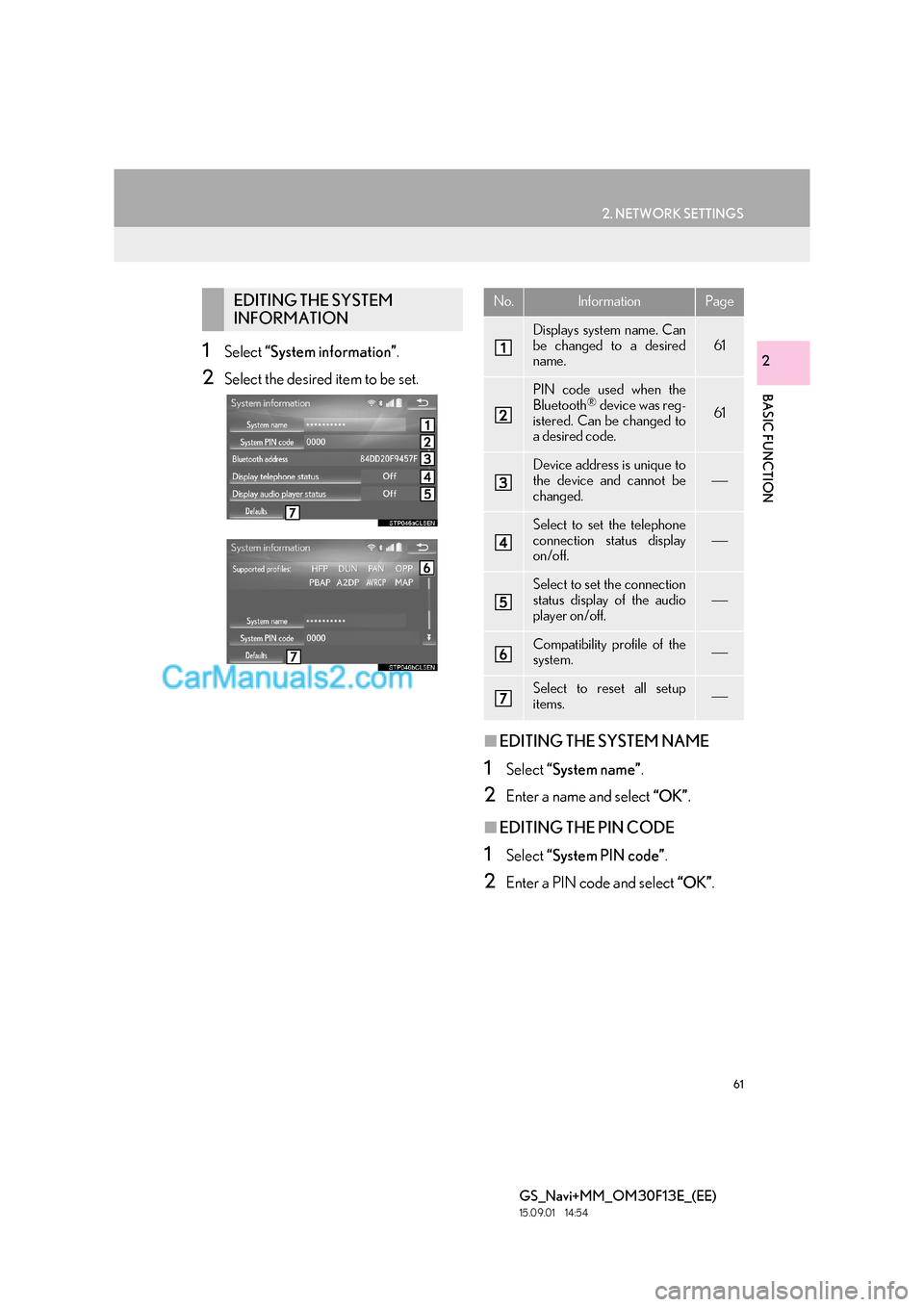
21Select “System information” .
2Select the desired item to be set.
■EDITING THE SYSTEM NAME
1Select “System name” .
2Enter a name and select “OK”.
■EDITING THE PIN CODE
1Select “System PIN code” .
2Enter a PIN code and select “OK”.
EDITING THE SYSTEM
INFORMATIONNo.InformationPage
Displays system name. Can
be changed to a desired
name.
61
PIN code used when the
Bluetooth® device was reg-
istered. Can be changed to
a desired code.61
Device address is unique to
the device and cannot be
changed.
Select to set the telephone
connection status display
on/off.
Select to set the connection
status display of the audio
player on/off.
Compatibility profile of the
system.
Select to reset all setup
items.
Page 62 of 383

62
2. NETWORK SETTINGS
GS_Navi+MM_OM30F13E_(EE)
15.09.01 14:54
3. CONNECTING TO INTERNET VIA Bluetooth® DEVICE
1Press the “MENU” button on the
Remote Touch.
2Select “Setup” .
3Select “Telephone” .
4Select “Communication settings” .
5Select “Yes”.
zA portal account is an account that is
obtained from the website Lexus prepares
for its customers.
SETTING INTERNET
CONNECTION
To use the internet via Bluetooth® de-
vice, it is necessary to register a
Bluetooth
® device with the system.
Once the device has been registered, it
is possible to use the internet via
Bluetooth
® device.
The connection method varies depend-
ing on the type of Bluetooth
® device be-
ing connected. (See step 6.)
For details about registering a
Bluetooth
® device: →P.52
Page 63 of 383

63
2. NETWORK SETTINGS
BASIC FUNCTION
GS_Navi+MM_OM30F13E_(EE)
15.09.01 14:54
2
XIf the “Username” screen is displayed
6Enter the user name and select “OK”.
7Enter the password and select “OK”.
8When the cellular phone has been con-
nected successfully, “Data connection
successful.” will be displayed on the
screen. The connected services will be
available.
X If the “Communication settings” screen is
displayed
6Select “Country” .
7Enter the country name and select
“OK”.
8Select the country.
zThe previous screen will be displayed.
9Select “Provider” .
10Select your mobile network provider.
11Select “OK” on the “Communication
settings” screen.
z If “Other ” is selected for country and/or
mobile network provider, the “Detail set-
tings” screen will be displayed. ( →P. 6 4 )
z The system will automatically set the details
of the mobile network provider’s informa-
tion and perform a communication con-
nection test.
z If the setting cannot be performed auto-
matically, the “Detail settings” screen will be
displayed. ( →P. 6 4 )
12Enter the user name and select “OK”.
13Enter the password and select “OK”.
14When the cellular phone has been con-
nected successfully, “Data connection
successful.” will be displayed on the
screen. The connected services will be
available.
zBefore performing a communication
connection test, a confirmation screen
will be displayed in accordance with the
connected service settings. ( →P. 3 5 7 )
Page 64 of 383

64
2. NETWORK SETTINGS
GS_Navi+MM_OM30F13E_(EE)
15.09.01 14:54
■“Detail settings” SCREEN
zEnter or select User name (for APN set-
ting), Password (for APN setting), APN,
DNS1, DNS2, Dial Number and Script.
z If there is only one DNS, set it in DNS 1.
z If more than one item needs to be entered
into “Script”, separate the first and second
items with a semi-colon (;).
If the system does not have mobile net-
work provider setting information for
the country or mobile network provider
that has been selected, or if you select
“Other ” for either country or mobile
network provider, the “Detail settings”
screen will be displayed. Contact your
mobile network provider to obtain the
contract information to be input in the
“Detail settings” screen.
Page 65 of 383

65
2. NETWORK SETTINGS
GS_Navi+MM_OM30F13E_(EE)
15.09.01 14:54
BASIC FUNCTION
2
4. CONNECTING TO INTERNET VIA Wi-Fi®*1
1Press the “MENU” button on the
Remote Touch.
2Select “Setup” .
3Select “Wi-Fi*2”.
4Select the items to be set.
*
2: Wi-Fi is a registered mark of the Wi-Fi Alliance®.
Using the Wi-Fi® function, this system
can connect to the internet, which allows
the use of the connected services, traffic
information, etc.Wi-Fi® SETTINGS SCREEN
No.FunctionPage
Select to turn the Wi-Fi®
function on/off.66
Displays connected net-
work name
Select to search for avail-
able networks that can be
connected. 66
Select to connect quickly to
a WPS compatible Wi-Fi®
device.67
Select to set the detailed
Wi-Fi® settings.67
*1: This function is not available in some countries/areas.
Page 66 of 383

66
2. NETWORK SETTINGS
GS_Navi+MM_OM30F13E_(EE)
15.09.01 14:54
1Display the “Wi-Fi* settings” screen.
(→ P.65)
2Select “Wi-Fi* power” .
zWhen set to on, the indicator will illuminate.
1Display the “Wi-Fi* settings” screen.
(→ P.65)
2Select “Available networks” .
3Select the desired network.
zWhen a network with is selected and
the password enter screen is displayed,
enter the password then select “OK”.
z The network connected to in the past is
marked with .
“Details” : Select to display details about the
network.
“Add Wi-Fi* network” : Select to add a Wi-Fi
®
network that is not currently displayed.
■ADDING A Wi-Fi® NETWORK
1Select “Add Wi-Fi* network” .
2Enter the network name and select
“OK”.
3Select the security type.
4Enter the password and select “OK”.
*: Wi-Fi is a registered mark of the Wi-Fi Alliance
®.
TURNING Wi-Fi® FUNCTION
ON/OFF
When turned on, “Available networks”
and “Easy setup” can be selected.
CONNECTING TO A
NETWORK
Available networks can be searched for
and connected to.
Available networks which are not dis-
played by searching can be added.
Page 67 of 383

67
2. NETWORK SETTINGS
BASIC FUNCTION
GS_Navi+MM_OM30F13E_(EE)
15.09.01 14:54
2
1Display the “Wi-Fi* settings” screen.
(→ P.65)
2Select “Easy setup” .
3Select “PIN code” or “Push button” as
determined by the device.
4Operate the Wi-Fi® device to connect.
1Display the “Wi-Fi* settings” screen.
( → P.65)
2Select “Detailed Wi-Fi* settings” .
3Select the items to be set.
*: Wi-Fi is a registered mark of the Wi-Fi Alliance
®.
CONNECTING QUICKLY
If a Wi-Fi
® device is Wi-Fi Protected
Setup compatible, it can be connect-
ed to more quickly.
DETAILED Wi-Fi® SETTINGS
No.Function
Select to change the listing order of
your preferred networks and to de-
lete networks from the list. ( →P.68)
Select to set automatic connection
to network on/off. When set to on,
the system will automatically con-
nect to the preferred networks that
have been registered.
Select to set the automatic connec-
tion message notification display on/
off.
Select to reset all setup items.
Page 68 of 383

68
2. NETWORK SETTINGS
GS_Navi+MM_OM30F13E_(EE)
15.09.01 14:54
■PREFERRED NETWORK SET-
TINGS
1Select “Reorder/Remove preferred
networks” .
2Select the desired network and select
“Move up” or “Move down” to change
the connection priority of the network.
“Remove” : Select to delete a network.
Any network connected to in the past is
set as a preferred network. The priority
of the networks to connect to can be
changed.
INFORMATION
●
If a network is being connected to, pre-
ferred network settings cannot be
changed.
Wi-Fi® FUNCTION
OPERATING HINTS
WA R N I N G
●Use Wi-Fi® devices only when safe and
legal to do so.
●Your audio unit is fitted with Wi-Fi®
antennas. People with implantable car-
diac pacemakers, cardiac resynchroniza-
tion therapy-pacemakers or implantable
cardioverter defibrillators should main-
tain a reasonable distance between
themselves and the Wi-Fi
® antennas.
The radio waves may affect the operation
of such devices.
●Before using Wi-Fi® devices, users of any
electrical medical device other than
implantable cardiac pacemakers, car-
diac resynchronization therapy-pace-
makers or implantable cardioverter
defibrillators should consult the manufac-
turer of the device for information about
its operation under the influence of radio
waves.
Radio waves could have unexpected
effects on the operation of such medical
devices.