display Lexus GS350 2013 Owner's Manual
[x] Cancel search | Manufacturer: LEXUS, Model Year: 2013, Model line: GS350, Model: Lexus GS350 2013Pages: 830, PDF Size: 9.71 MB
Page 417 of 830
416
GS350_U (OM30C34U)
5-3. Using the audio system
■Selecting a folder
Select “
<” or “>” on the screen to select the next/previous folder.
■Selecting a folder from the folder listSelect the folder name on the screen to display the following folder
list screen.
Select the desired folder num-
ber to display the folder’s file
list. From the file list, select the
desired file number.
, : Select to move the list up or
down by 5 folder groups.
“TUNE/SCROLL” knob: Turn the
knob clockwise or counterclock-
wise to quickly scroll up or down
the folder list.
, : If appears to the right of
an item name, the complete name
is too long for the screen. Select
to scroll to the end of the name.
Select to move to the beginning
of the name.
Selecting a folder (MP3/WMA discs)
1
2
Page 418 of 830
GS350_U (OM30C34U)
4175-3. Using the audio system
5
Interior features
■Selecting a file
Select “<” or “>” on the screen to select the next/previous file.
Press “<” or “>” on the “PRST•TRACK” button or turn the “TUNE/
SCROLL” knob to select the desired file number.
■Selecting a file from the file listSelect the file name on the screen to display the following file list
screen.
Select the desired file number.
, : Select to move the list up or
down by 5 file groups.
“PRST•TRACK” button: Press “<” or
“>” on the “PRST•TRACK” button to
scroll through the file list one by
one.
“TUNE/SCROLL” knob: Turn the
knob clockwise or counterclock-
wise to quickly scroll up or down
the file list.
, : If appears to the right of
an item name, the complete name
is too long for the screen. Select
to scroll to the end of the name.
Select to move to the beginning
of the name.
■Fast forwarding or rewinding a file
To fast forward or rewind, press and hold “<” or “>” on the
“PRST•TRACK” button.
Selecting, fast forwarding or rewinding a file (MP3/WMA discs)
1
2
Page 420 of 830
GS350_U (OM30C34U)
4195-3. Using the audio system
5
Interior features
■Audio CD
Select “RPT” on the screen.
“RPT” appears on the screen.
To cancel, select “RPT” again.
■MP3/WMA disc
●Repeating a file
Select “RPT” on the screen.
Each time is “RPT” selected, the mode changes as follows: • When “RAND” is off file repeat → folder repeat → off
• When “RAND” is on file → repeat off
●Repeating all of the files in a folder
Select “RPT” repeatedly until “FLD.RPT” appears on the screen.
To cancel, select “RPT” again.
■If you select
The display returns to the previous screen.
■Displaying the title and artist name (Audio CD)
If a CD-TEXT disc is inserted, the title of the disc and track will be displayed. Up to
32 characters can be displayed.
■Error messages
→P. 4 3 2
Repeating a track
Page 422 of 830
GS350_U (OM30C34U)
4215-3. Using the audio system
5
Interior features
Menu screen appears
Option screen appears ( →P. 4 2 2 )
Display menu control key ( →P. 4 2 3 )
Vehicle is completely stopped and the parking brake is applied, the
video screen returns
Rewind
Stop
Pa u s e
Select to play
Fast f or ward
Setting the sound ( →P. 4 74 )
If is selected, while watching a DVD, the DVD controls will appear.
If appears on the screen when a control is selected the operation rele-
vant to the control is not permitted.
Control icon screen
XVehicles without a navigation
systemXVehicles with a navigation sys-
tem
12
3
4
5
6
7
8
9
10
Page 423 of 830
422
GS350_U (OM30C34U)
5-3. Using the audio system
Select “Options” on “DVD” screen, the following screen appears.Returns to the full screen (only when the vehicle is completely stopped
and the parking brake is applied)
Search by title/group number
Change audio language
Change angle
Display the predetermined scene and start playing from there
Change subtitle language
Change screen size
Display the image quality adjustment screen
Change initial setting
If appears on the screen when a control is selected the operation rele-
vant to the control is not permitted.
Select and hold or on the control icon screen.
DVD options screen
XVehicles without a navigation
systemXVehicles with a navigation sys-
tem
Fast forwarding/rewinding a disc
1
2
3
4
5
6
7
8
9
Page 426 of 830
GS350_U (OM30C34U)
4255-3. Using the audio system
5
Interior features
Select “Wide” on the “DVD Options” screen.
Select the desired display. After
setting, select “Save”.Displays a 3 : 4 screen, with
either side in black
Widens the 3 : 4 screen hori-
zontally to fill the screen
Widens the 3 : 4 screen verti-
cally and horizontally, in the
same ratio, to fill the screen
: Returns to the previousscreen
Changing screen size
1
2
1
2
3
Page 427 of 830
426
GS350_U (OM30C34U)
5-3. Using the audio system
Select “Display” on the “DVD Options” screen.
Select “<” or “>” to display the
desired item to be adjusted, and
then select “OK”.
The screen goes off when “Screen
Off” is selected. To turn the display
screen back on, select any button. The
selected screen appears.
Adjusting the screen
1
2
RG
ColorRedGreen
+-
To n eLighterDarker
ContrastWeakerStronger
BrightnessDarkerBrighter
Page 428 of 830
GS350_U (OM30C34U)
4275-3. Using the audio system
5
Interior features
■Displaying “DVD Settings” screenSelect “DVD Settings” on the “DVD Options” screen.
Select the setting to be changed.
After you change the settings,
select “Save”.
“Default”: Restores default settings
: Returns to the previousscreen
■Setting audio language
Select “Audio Language” on the “DVD Settings” screen.
Select the desired language to be heard on the “Audio Language”
screen.
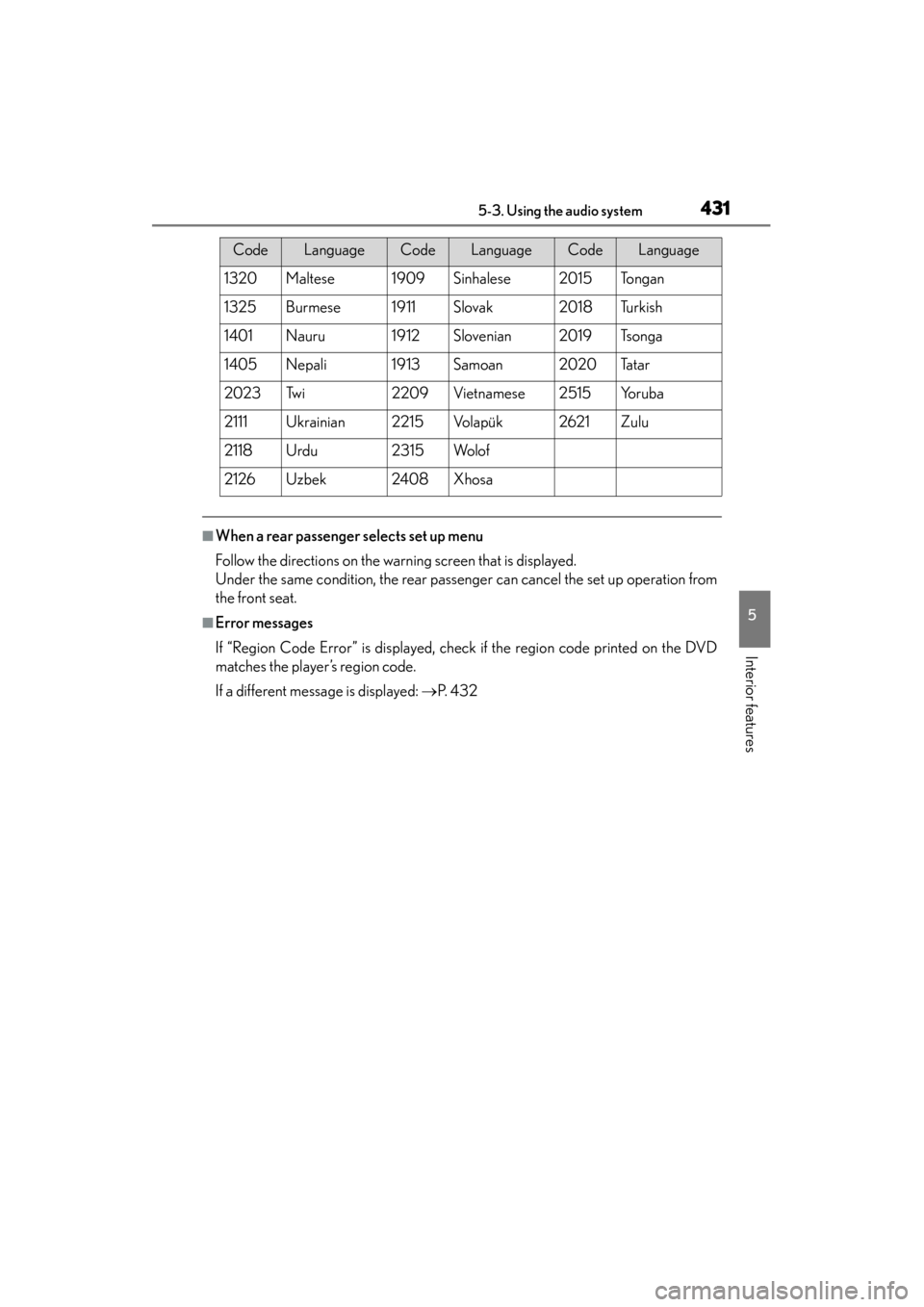
If you cannot find the desired language, select “Other” and input the desired
language code. ( →P. 4 2 9 )
■Setting subtitle language
Select “Subtitle Language” on the “DVD Settings” screen.
Select the desired language to be read on the “Subtitle Language”
screen.
If you cannot find the desired language, select “Other” and input the desired
language code. ( →P. 4 2 9 )
Initial DVD settings
1
2
1
2
1
2
Page 432 of 830
GS350_U (OM30C34U)
4315-3. Using the audio system
5
Interior features
■When a rear passenger selects set up menu
Follow the directions on the warning screen that is displayed.
Under the same condition, the rear passenger can cancel the set up operation from
the front seat.
■Error messages
If “Region Code Error” is displayed, check if the region code printed on the DVD
matches the player’s region code.
If a different message is displayed: →P. 4 3 2
1320Maltese1909Sinhalese2015To n g a n
1325Burmese1911Slovak2018Tu r k i s h
1401Nauru1912Slovenian2019Ts o n g a
1405Nepali1913Samoan2020Ta t a r
2023Tw i2209Vietnamese2515Yo r u b a
2111Ukrainian2215Vo l a p ü k2621Zulu
2118Urdu2315Wo l o f
2126Uzbek2408Xhosa
CodeLanguageCodeLanguageCodeLanguage
Page 434 of 830
GS350_U (OM30C34U)
4335-3. Using the audio system
5
Interior features
●The DVD player conforms to NTSC/PAL color TV formats. DVD
video discs conforming to another format such as SECAM cannot
be used.
●Region code: Some DVD video discs have a region code indicating
the region in which you can use the DVD video disc. If the DVD
video disc is not labeled as “ALL” or “1”, you cannot use it on this DVD
player. If you attempt to play an inappropriate DVD video disc on this
player, “Region Code Error” appears on the screen. Even if the DVD
video disc does not have a region code, you may not be able to use it.
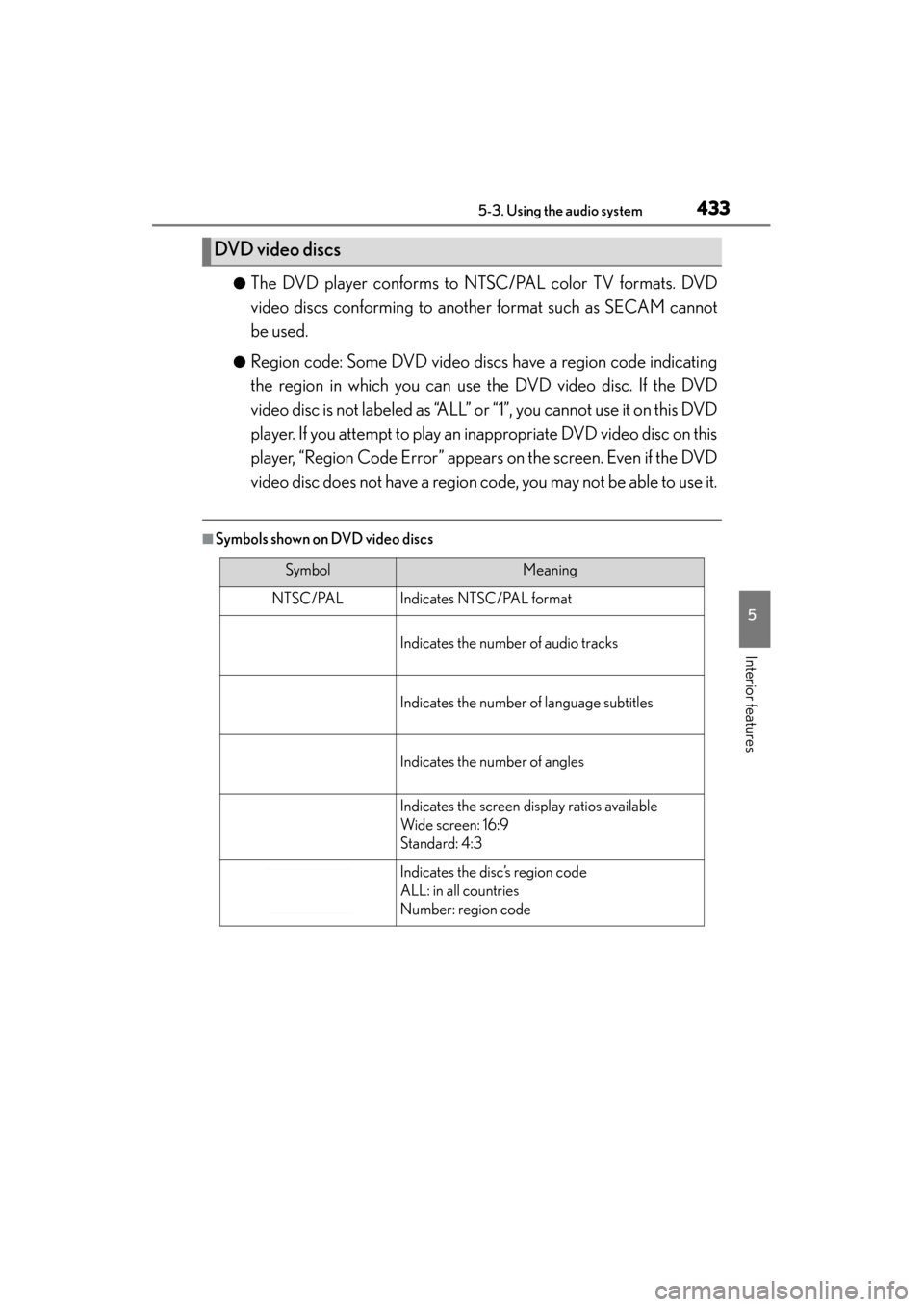
■Symbols shown on DVD video discs
DVD video discs
SymbolMeaning
NTSC/PALIndicates NTSC/PAL format
Indicates the number of audio tracks
Indicates the number of language subtitles
Indicates the number of angles
Indicates the screen display ratios available
Wide screen: 16:9
Standard: 4:3
Indicates the disc’s region code
ALL: in all countries
Number: region code