light Lexus GS350 2017 Owner's Manual
[x] Cancel search | Manufacturer: LEXUS, Model Year: 2017, Model line: GS350, Model: Lexus GS350 2017Pages: 676, PDF Size: 67.73 MB
Page 377 of 676
377
4-5. Using the driving support systems
4
Driving
GS350_200t_GS F_OM_OM30F83E_(EE)
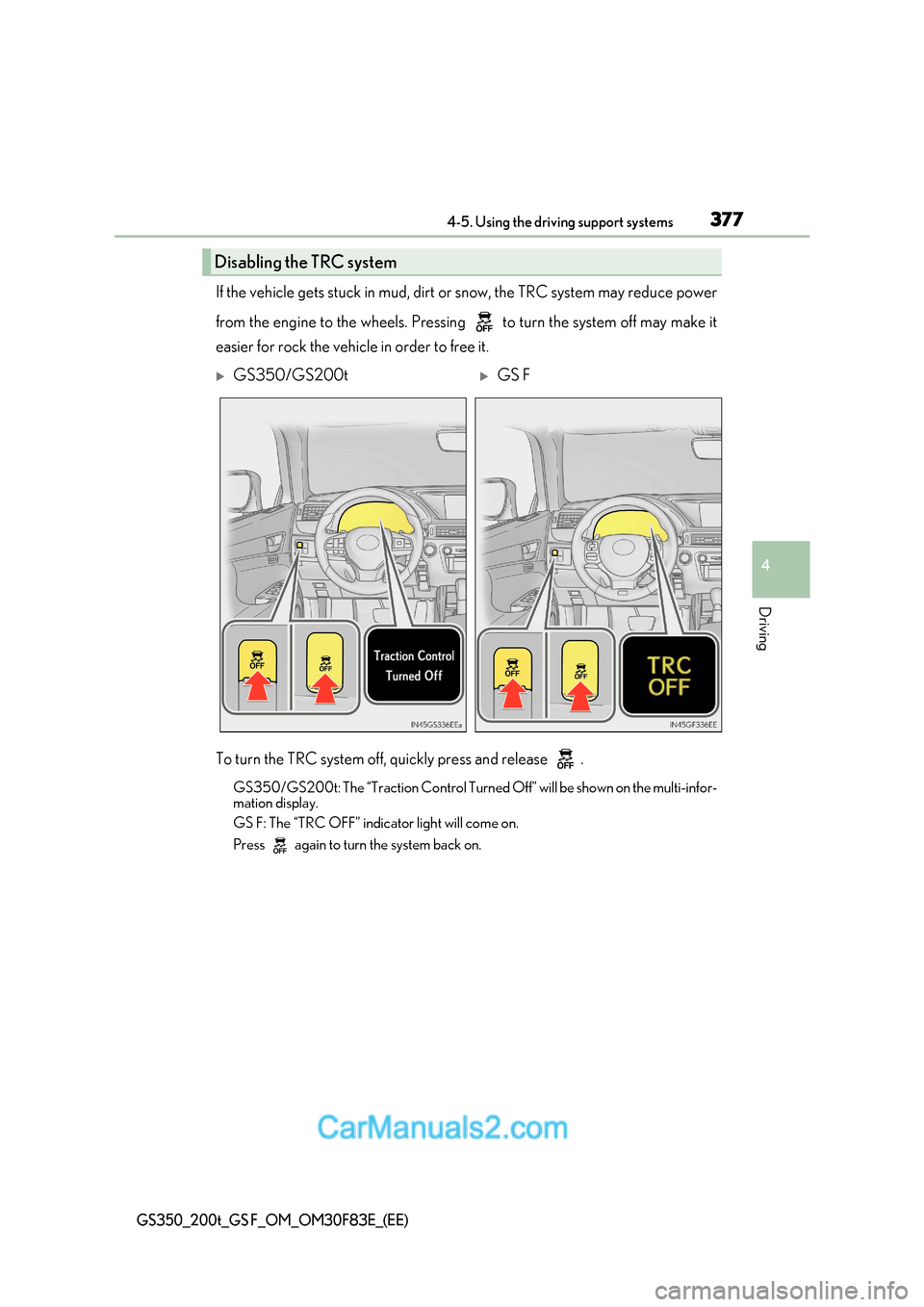
If the vehicle gets stuck in mud, dirt or snow, the TRC system may reduce power
from the engine to the wheels. Pressing to turn the system off may make it
easier for rock the vehicle in order to free it.
To turn the TRC system off, quickly press and release . GS350/GS200t: The “Traction Control Turned Off” will be shown on the multi-infor-
mation display.
GS F: The “TRC OFF” indicator light will come on.
Press again to turn the system back on.
Disabling the TRC system
GS350/GS200tGS F
Page 378 of 676
3784-5. Using the driving support systems
GS350_200t_GS F_OM_OM30F83E_(EE)
■Turning off both TRC and VSC systems
GS350/GS200t
To turn the TRC and VSC systems off, press and hold for more than 3 seconds while
the vehicle is stopped.
The VSC OFF indicator light will come on an d the “Traction Control Turned Off” will be
shown on the multi-information display. *
Press again to turn the systems back on.
GS F
To turn the TRC and VSC systems off, press and hold for more than 3 seconds.
The “TRC OFF” indicator light and the VSC OFF indi cator light will come on.*
Press again to turn the systems back on.
* : On vehicles with PCS (Pre-Crash Safety system), pre-crash brake assist and pre-
crash braking will also be disabled. The PCS (Pre-Crash Safety system) warning light
will come on and a message will be disp layed on the multi-information display.
( P. 524)
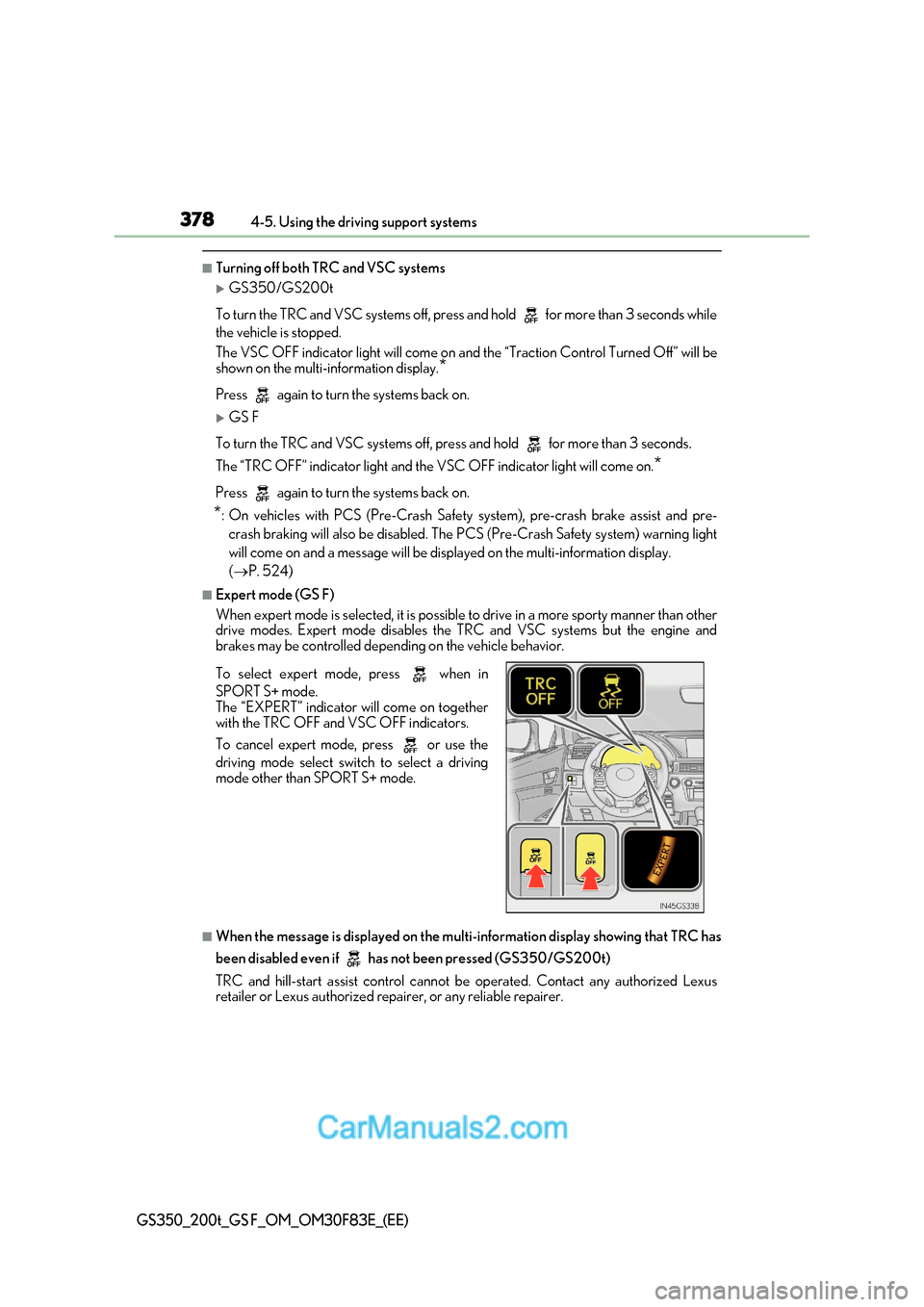
■Expert mode (GS F)
When expert mode is selected, it is possible to drive in a more sporty manner than other
drive modes. Expert mode disables the TRC and VSC systems but the engine and
brakes may be controlled depending on the vehicle behavior.
■When the message is displayed on the mult i-information display showing that TRC has
been disabled even if has not been pressed (GS350/GS200t)
TRC and hill-start assist control cannot be operated. Contact any authorized Lexus
retailer or Lexus authorized repa irer, or any reliable repairer.
To select expert mode, press when in
SPORT S+ mode.
The “EXPERT” indicator will come on together
with the TRC OFF and VSC OFF indicators.
To cancel expert mode, press or use the
driving mode select swit
ch to select a driving
mode other than SPORT S+ mode.
Page 379 of 676
379
4-5. Using the driving support systems
4
Driving
GS350_200t_GS F_OM_OM30F83E_(EE)
■When the “TRC OFF” indicator light comes on even if has not been pressed (GS F)
TRC and hill-start assist control cannot be operated. Contact any authorized Lexus
retailer or Lexus authorized repa irer, or any reliable repairer.
■Sounds and vibrations caused by the ABS, brake assist, VSC, Hill-start assist control
and TRC systems
●A sound may be heard from the engine compartment when the brake pedal is
depressed repeatedly, when the engine is started or just after the vehicle begins to
move. This sound does not indicate that a malfunction has occurred in any of these sys-
tems.
●Any of the following conditions may occur when the above systems are operating.
None of these indicates that a malfunction has occurred.
Page 381 of 676
381
4-5. Using the driving support systems
4
Driving
GS350_200t_GS F_OM_OM30F83E_(EE)
WARNING
■The ABS does not operate effectively when
●The limits of tire gripping performance have been exceeded (such as excessively
worn tires on a snow covered road).
●The vehicle hydroplanes while driving at high speed on wet or slick roads.
■Stopping distance when the ABS is operat ing may exceed that of normal conditions
The ABS is not designed to shorten the vehicle’s stopping distance. Always maintain a
safe distance from the vehicle in front of you, especially in the following situations:
●When driving on dirt, gravel or snow-covered roads
●When driving with tire chains
●When driving over bumps in the road
●When driving over roads with potholes or uneven surfaces
■TRC may not operate effectively when
Directional control and power may not be achievable while driving on slippery road
surfaces, even if the TRC system is operating.
Drive the vehicle carefully in conditions where stability and power may be lost.
■Hill-start assist control does not operate effectively when
●Do not overly rely on the hill-start assist co ntrol. The hill-start assist control may not
operate effectively on steep inclines and roads covered with ice.
●Unlike the parking brake, hill-start assist co ntrol is not intended to hold the vehicle
stationary for an extended period of time. Do not attempt to use hill-start assist con-
trol to hold the vehicle on an incline, as doing so may lead to an accident.
■When the VSC is activated
The slip indicator light flashes. Always drive carefully. Reckless driving may cause an
accident. Exercise particular care when the indicator light flashes.
■When the TRC/VSC systems are turned off
Be especially careful and drive at a speed appropriate to the road conditions. As these
are the systems to help ensure vehicle stability and driving force, do not turn the TRC/
VSC systems off unless necessary.
Page 384 of 676
3844-6. Driving tips
GS350_200t_GS F_OM_OM30F83E_(EE)
Perform the following according to the driving conditions: ●Do not try to forcibly open a window or move a wiper that is fr ozen. Pour
warm water over the frozen area to melt the ice. Wipe away the water imme-
diately to prevent it from freezing.
● To ensure proper operation of the climate control system fan, remove any
snow that has accumulated on the air inlet vents in front of the windsh ield.
● Check for and remove any excess ice or snow that may have accumulated on
the exterior lights, vehicle’s roof, chassis, around the tires or on the brakes.
● Remove any snow or mud from the bottom of your shoes before getting in the
vehicle.
Accelerate the vehicle slowly, keep a safe distance between you and the vehicle
ahead, and drive at a reduced speed suitable to road conditions. ● Park the vehicle and move the shift lever to P without setting the parking
brake. The parking brake may freeze up, preventing it from being released. If
the vehicle is parked without setting the parking brake, make sure to block the
wheels.
Failure to do so may be dangerous because it may cause the vehicle to move
unexpectedly, possibly leading to an accident.
● If the vehicle is parked without setting the parking brake, confirm that the shift
lever cannot be moved out of P *.
* : The shift lever will be locked if it is attemp ted to be shifted from P to any other position
without depressing the brake pedal. If the shift lever can be shifted from P, there may
be a problem with the shift lock system. Have the vehicle inspected by any authorized
Lexus retailer or Lexus authorized repair er, or any reliable repairer immediately.
Before driving the vehicle
When driving the vehicle
When parking the vehicle
Page 389 of 676
389
5Interior features
GS350_200t_GS F_OM_OM30F83E_(EE)
5-1. Remote Touch screenRemote Touch/12.3-inch display ......................................... 390
5-2. Using the air conditioning system and defogger
Front automatic air conditioning system .........396
Rear air conditioning system ........ 408
Heated steering wheel/ seat heaters/
seat ventilators ............................ 411
5-3. Using the interior lights Interior lights list........................... 416
Page 390 of 676
3905-1. Remote Touch screen
GS350_200t_GS F_OM_OM30F83E_(EE)
Remote Touch/12.3-inch display
: If equipped
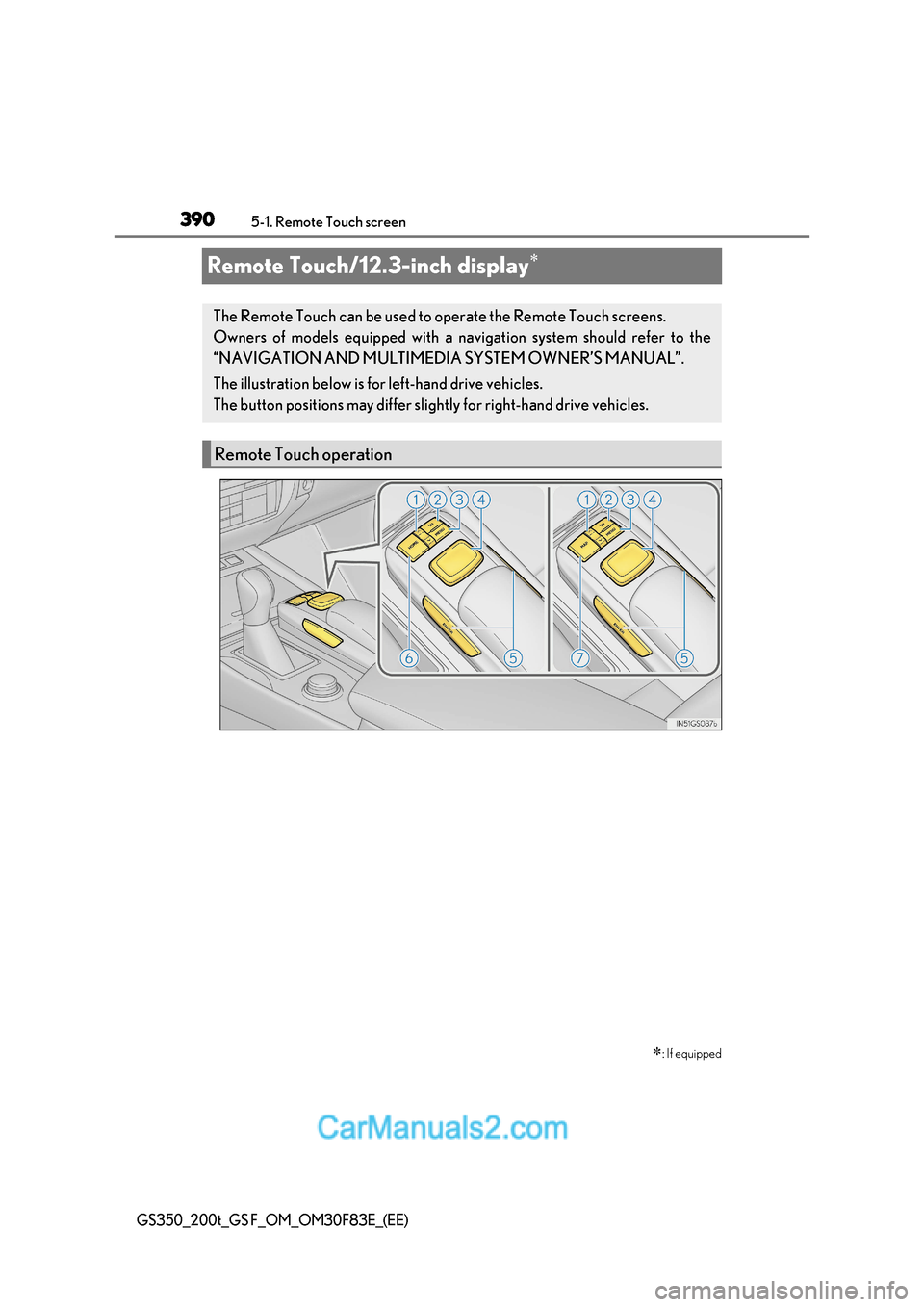
The Remote Touch can be used to operate the Remote Touch screens.
Owners of models equipped with a navi gation system should refer to the
“NAVIGATION AND MULTIMEDIA SYSTEM OWNER’S MANUAL”.
The illustration below is for left-hand drive vehicles.
The button positions may differ slight ly for right-hand drive vehicles.
Remote Touch operation
Page 404 of 676
4045-2. Using the air conditio ning system and defogger
GS350_200t_GS F_OM_OM30F83E_(EE)
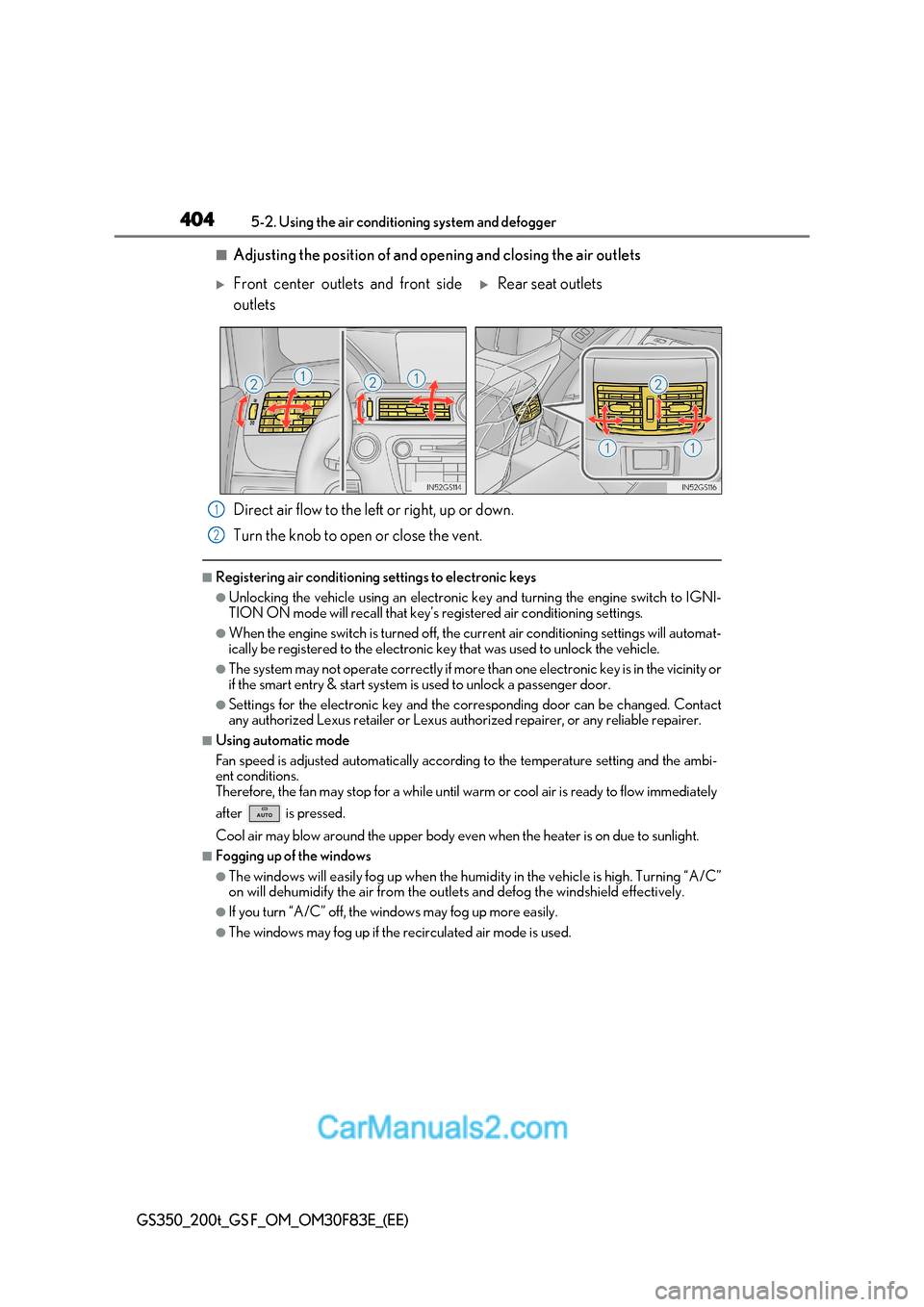
■Adjusting the position of and opening and closing the air outlets
Direct air flow to the left or right, up or down.
Turn the knob to open or close the vent.
■Registering air conditioning settings to electronic keys
●Unlocking the vehicle using an electronic ke y and turning the engine switch to IGNI-
TION ON mode will recall that key’s registered air conditioning settings.
●When the engine switch is turned off, the current air conditioning settings will automat-
ically be registered to the electronic key that was used to unlock the vehicle.
●The system may not operate correctly if more than one electronic key is in the vicinity or
if the smart entry & start system is used to unlock a passenger door.
●Settings for the electronic key and the corresponding door can be changed. Contact
any authorized Lexus retailer or Lexus author ized repairer, or any reliable repairer.
■Using automatic mode
Fan speed is adjusted automatically according to the temperature setting and the ambi-
ent conditions.
Therefore, the fan may stop for a while until wa rm or cool air is ready to flow immediately
after is pressed.
Cool air may blow around the upper body even when the heater is on due to sunlight.
■Fogging up of the windows
●The windows will easily fog up when the humidity in the vehicle is h igh. Turning “A/C”
on will dehumidify the air from the outlets and defog the windshield effectively.
●If you turn “A/C” off, the windows may fog up more easily.
●The windows may fog up if the recirculated air mode is used.
Front center outlets and front side
outletsRear seat outlets
1
2
Page 412 of 676
4125-2. Using the air conditio ning system and defogger
GS350_200t_GS F_OM_OM30F83E_(EE)
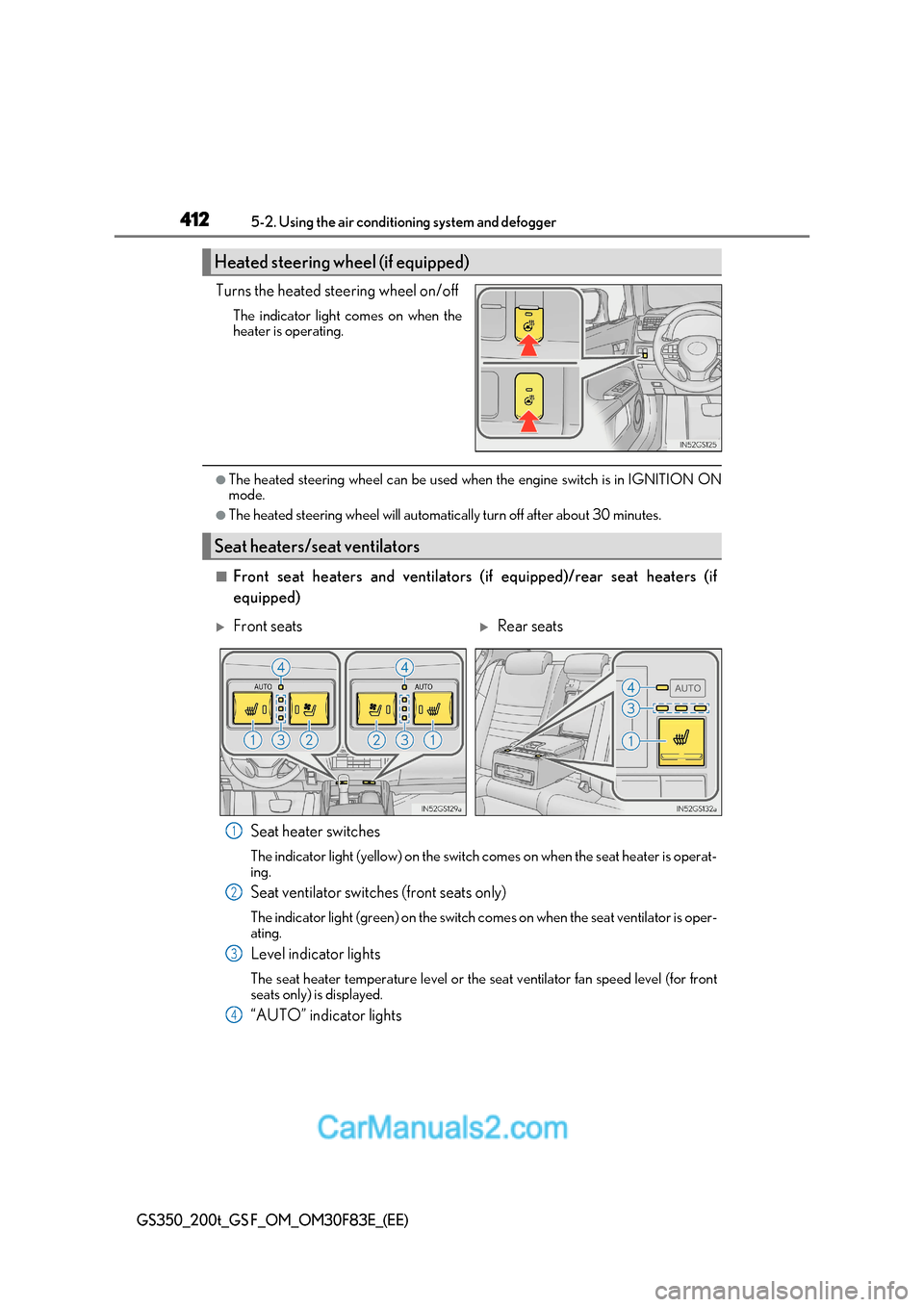
Turns the heated steering wheel on/off
The indicator light comes on when the
heater is operating.
●The heated steering wheel can be used when the engine switch is in IGNITION ON
mode.
●The heated steering wheel will automatically turn off after about 30 minutes.
■Front seat heaters and ventilators (if equipped)/rear seat heaters (if equipped)
Seat heater switches
The indicator light (yellow) on the switch comes on when the seat heater is operat- ing.
Seat ventilator switches (front seats only)
The indicator light (green) on the switch co mes on when the seat ventilator is oper-
ating.
Level indicator lights
The seat heater temperature level or the seat ventilator fan speed level (for front
seats only) is displayed.
“AUTO” indicator lights
Heated steering wheel (if equipped)
Seat heaters/seat ventilators
Front seatsRear seats
1
2
3
4
Page 413 of 676
413
5-2. Using the air conditioning system and defogger
5
Interior features
GS350_200t_GS F_OM_OM30F83E_(EE)
● Modes and indicators
The mode can be changed by pressing the switch.
* : When automatic mode is selected, the leve l automatically changes depending on the
air conditioning settings.
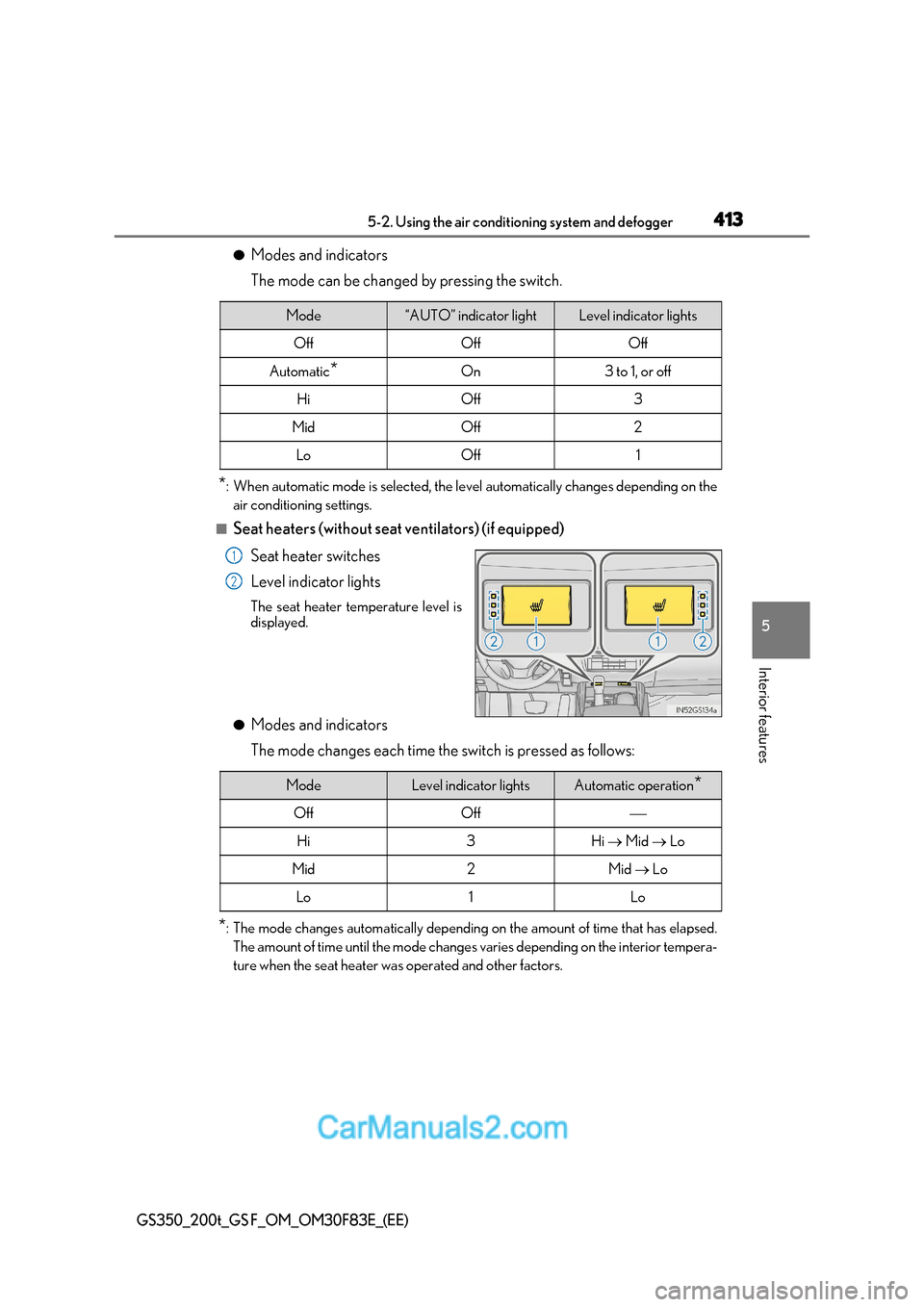
■Seat heaters (without seat ventilators) (if equipped)
Seat heater switches
Level indicator lights The seat heater temperature level is
displayed.
● Modes and indicators
The mode changes each time the switch is pressed as follows:
* : The mode changes automatically depending on the amount of time that has elapsed.
The amount of time until the mode changes varies depending on the interior tempera-
ture when the seat heater was operated and other factors.
Mode“AUTO” indicator lightLevel indicator lights
OffOffOff
Automatic *On3 to 1, or off
HiOff3
MidOff2
LoOff1
1
2
ModeLevel indicator lightsAutomatic operation *
OffOff
Hi3Hi Mid Lo
Mid2Mid Lo
Lo1Lo